navigation Lexus ES300h 2013 User Guide
[x] Cancel search | Manufacturer: LEXUS, Model Year: 2013, Model line: ES300h, Model: Lexus ES300h 2013Pages: 910, PDF Size: 9.95 MB
Page 115 of 910
114
ES350 300h_OM_OM33A01U_(U)
2. Instrument cluster
These images are examples only, and may vary slightly from actual conditions.
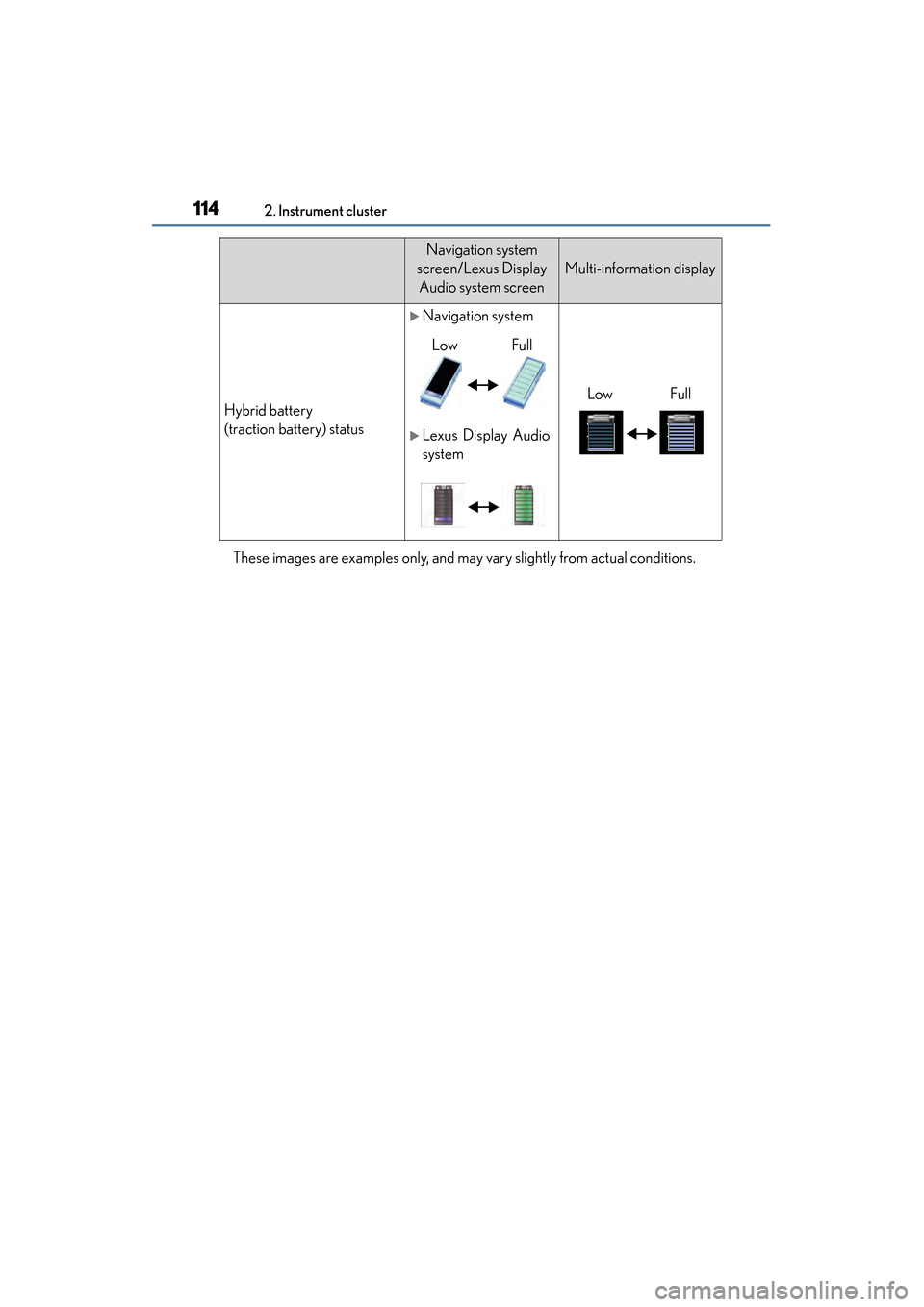
Hybrid battery
(traction battery) status
XNavigation system
XLexus Display Audio
system
Navigation system
screen/Lexus Display Audio system screen
Multi-information display
LowFull
LowFull
Page 116 of 910
ES350 300h_OM_OM33A01U_(U)
1152. Instrument cluster
2
Instrument cluster
XVehicles with a navigation system
Press the “MENU” button on the Remote Touch, then select “Info/
Apps” on the “Menu” screen.
Select “Fuel Consumption” on the “Information” screen.
Hybrid vehicles: If the “Energy Monitor” screen is displayed, select
“Fuel Consumption”.
XVehicles with Lexus Display Audio system
Press the “MENU” button on the Lexus Display Audio controller, then
select “Car” on the “Menu” screen.
Hybrid vehicles: If the “Energy Monitor” screen is displayed, select
“Fuel Consumption”.
Consumption (if equipped)
1
2
Page 117 of 910
116
ES350 300h_OM_OM33A01U_(U)
2. Instrument cluster
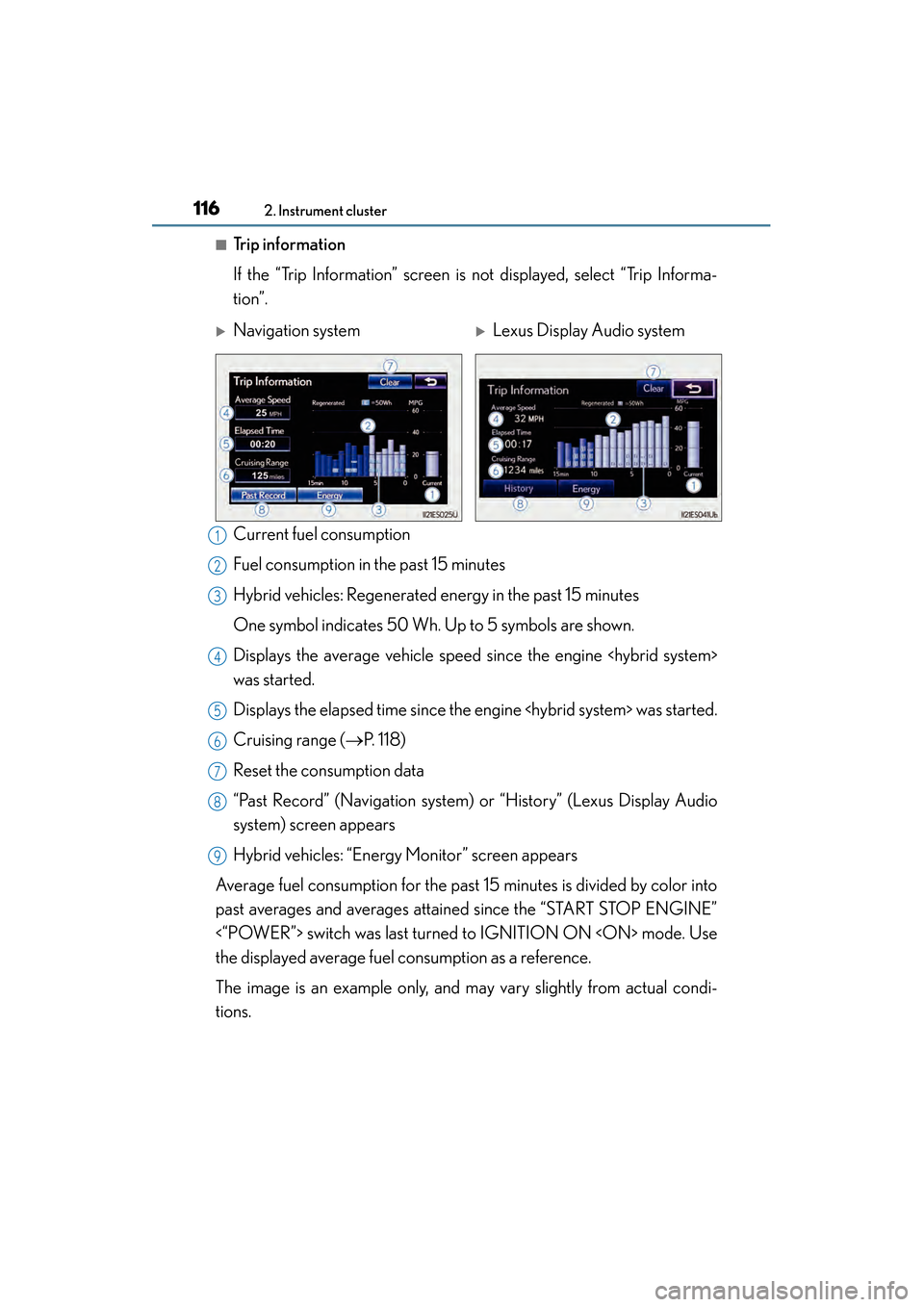
■Trip information
If the “Trip Information” screen is not displayed, select “Trip Informa-
tion”.
Current fuel consumption
Fuel consumption in the past 15 minutes
Hybrid vehicles: Regenerated energy in the past 15 minutes
One symbol indicates 50 Wh. Up to 5 symbols are shown.
Displays the average vehicle speed since the engine
was started.
Displays the elapsed time since the engine
Cruising range (→P. 118)
Reset the consumption data
“Past Record” (Navigation system) or “History” (Lexus Display Audio
system) screen appears
Hybrid vehicles: “Energy Monitor” screen appears
Average fuel consumption for the past 15 minutes is divided by color into
past averages and averages attained since the “START STOP ENGINE”
<“POWER”> switch was last turned to IGNITION ON
the displayed average fuel consumption as a reference.
The image is an example only, and may vary slightly from actual condi-
tions.
XNavigation systemXLexus Display Audio system
1
2
3
4
5
6
7
8
9
Page 118 of 910
ES350 300h_OM_OM33A01U_(U)
1172. Instrument cluster
2
Instrument cluster
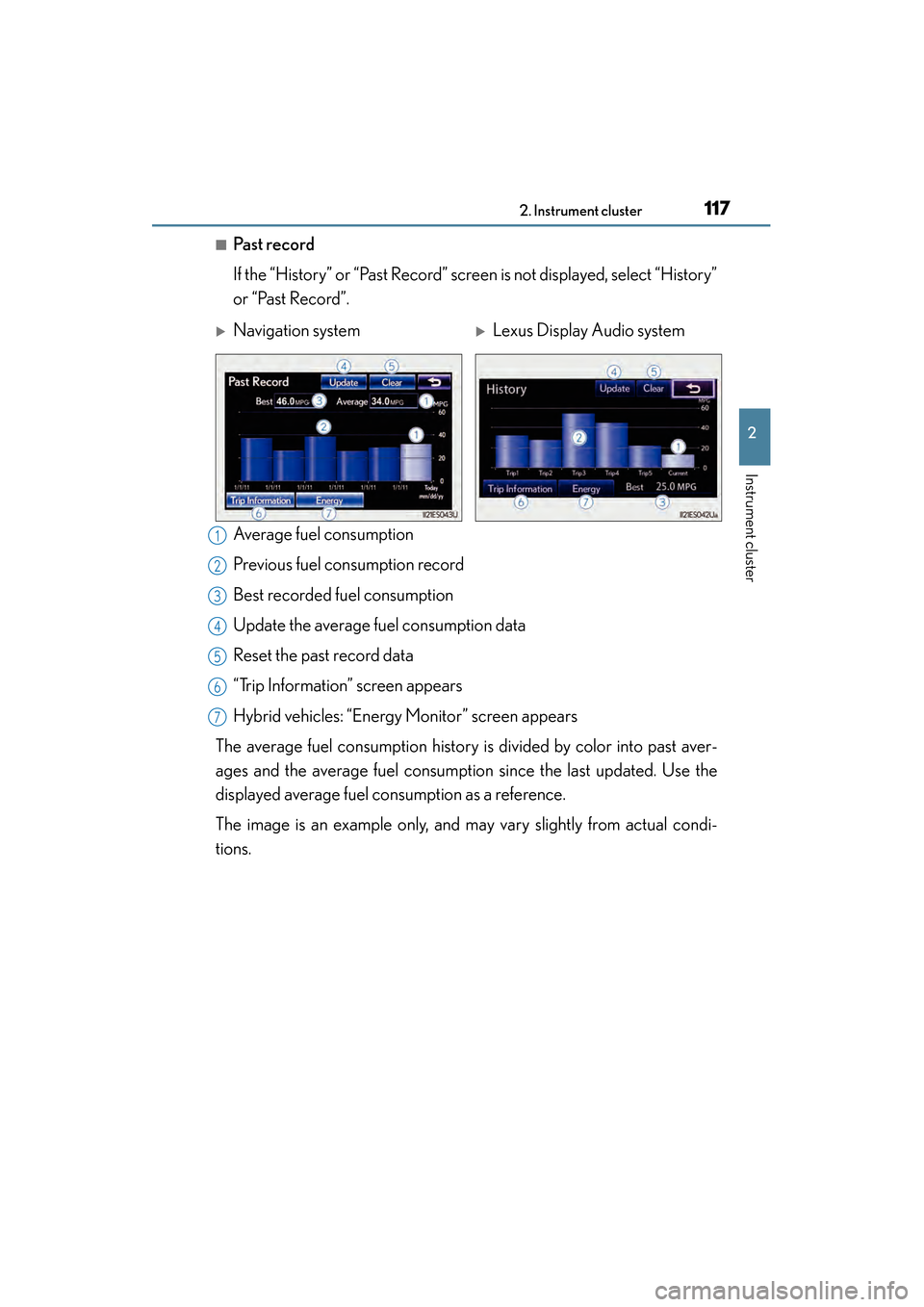
■Past record
If the “History” or “Past Record” screen is not displayed, select “History”
or “Past Record”.
Average fuel consumption
Previous fuel consumption record
Best recorded fuel consumption
Update the average fuel consumption data
Reset the past record data
“Trip Information” screen appears
Hybrid vehicles: “Energy Monitor” screen appears
The average fuel consumption history is divided by color into past aver-
ages and the average fuel consumption since the last updated. Use the
displayed average fuel consumption as a reference.
The image is an example only, and may vary slightly from actual condi-
tions.
XNavigation systemXLexus Display Audio system
1
2
3
4
5
6
7
Page 194 of 910
ES350 300h_OM_OM33A01U_(U)
1934-1. Before driving
4
Driving
CAUTION
■Things that must not be carried in the trunk
The following things may cause a fire if loaded in the trunk:
●Receptacles containing gasoline
●Aerosol cans
■Storage precautions
Observe the following precautions.
Failure to do so may prevent the pedals from being depressed properly, may block
the driver’s vision, or may result in items hitting the driver or passengers, possibly
causing an accident.
●Stow cargo and luggage in the trunk whenever possible.
●Do not place cargo or luggage in or on the following locations.
• At the feet of the driver
• On the front passenger or rear seats (when stacking items)
• On the package tray
• On the instrument panel
• On the dashboard
• In front of the navigation system screen, Lexus Display Audio system screen or the audio/air conditioning system display
●Secure all items in the occupant compartment.
■Capacity and distribution
●Do not exceed the maximum axle weight rating or the total vehicle weight rating.
●Even if the total load of occupant’s weight and the cargo load is less than the total
load capacity, do not apply the load unevenly. Improper loading may cause dete-
rioration of steering or braking control which may cause death or serious injury.
Page 272 of 910
271
ES350 300h_OM_OM33A01U_(U)
4-5. Using the driving support systems
4
Driving
Intuitive parking assist∗
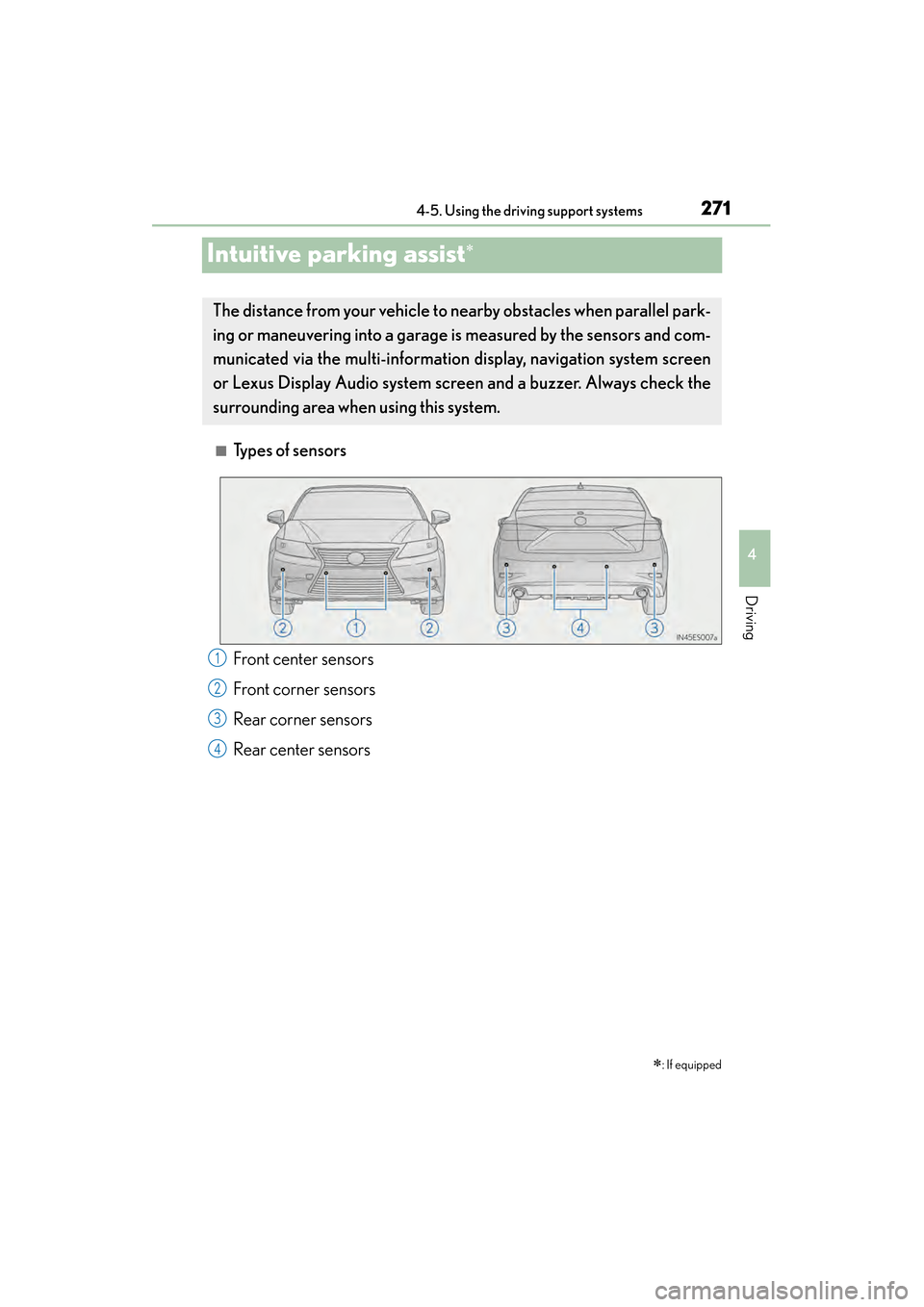
■Types of sensors∗
: If equipped
The distance from your vehicle to nearby obstacles when parallel park-
ing or maneuvering into a garage is measured by the sensors and com-
municated via the multi-information display, navigation system screen
or Lexus Display Audio system scr een and a buzzer. Always check the
surrounding area when using this system.
Front center sensors
Front corner sensors
Rear corner sensors
Rear center sensors1
2
3
4
Page 274 of 910
ES350 300h_OM_OM33A01U_(U)
2734-5. Using the driving support systems
4
Driving
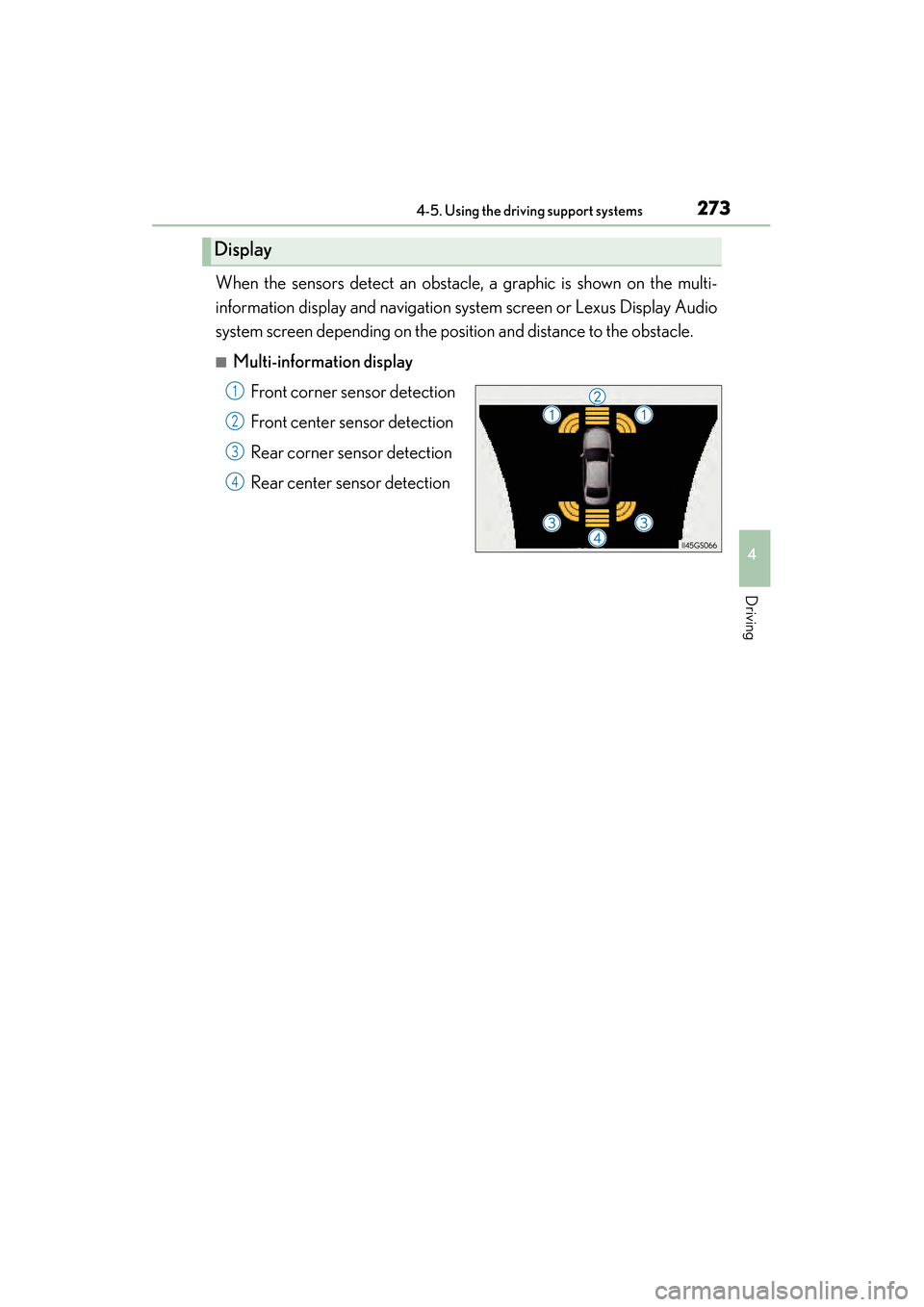
When the sensors detect an obstacle, a graphic is shown on the multi-
information display and navigation system screen or Lexus Display Audio
system screen depending on the position and distance to the obstacle.
■Multi-information displayFront corner sensor detection
Front center sensor detection
Rear corner sensor detection
Rear center sensor detection
Display
1
2
3
4
Page 275 of 910
274
ES350 300h_OM_OM33A01U_(U)
4-5. Using the driving support systems
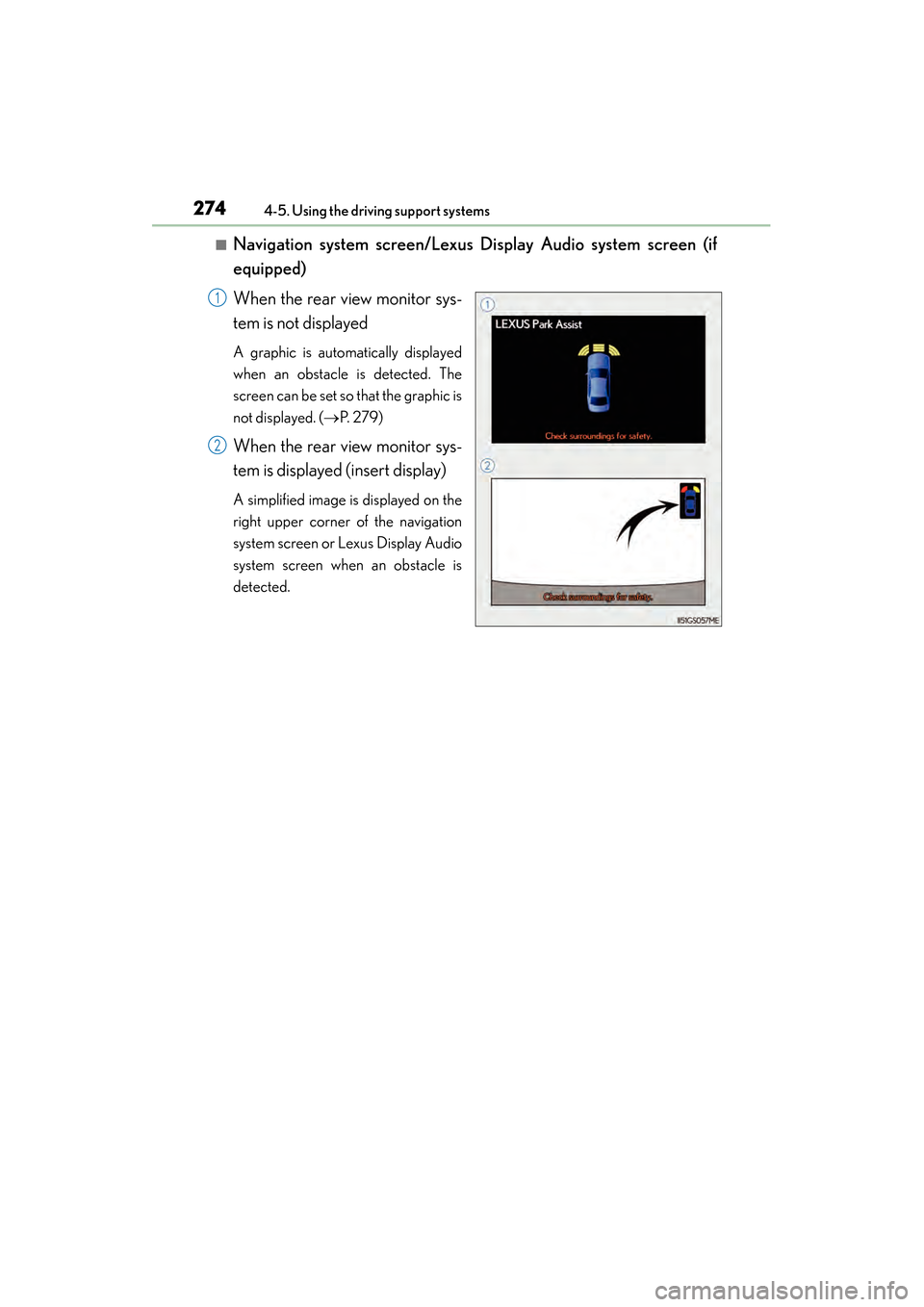
■Navigation system screen/Lexus Display Audio system screen (if
equipped)
When the rear view monitor sys-
tem is not displayed
A graphic is automatically displayed
when an obstacle is detected. The
screen can be set so that the graphic is
not displayed. ( →P. 2 7 9 )
When the rear view monitor sys-
tem is displayed (insert display)
A simplified image is displayed on the
right upper corner of the navigation
system screen or Lexus Display Audio
system screen when an obstacle is
detected.
1
2
Page 276 of 910
ES350 300h_OM_OM33A01U_(U)
2754-5. Using the driving support systems
4
Driving
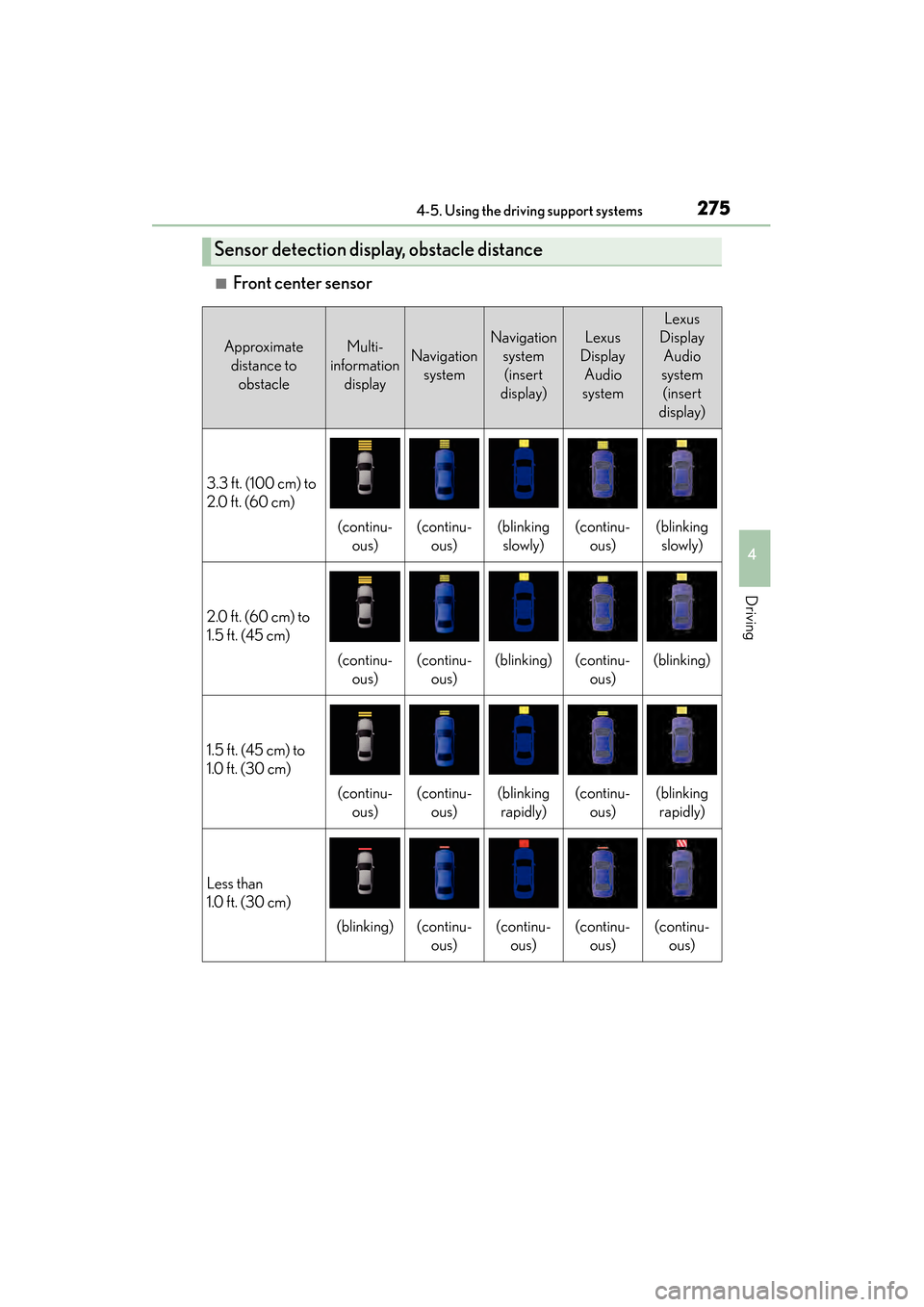
■Front center sensor
Sensor detection display, obstacle distance
Approximate distance to obstacleMulti-
information displayNavigation system
Navigation system (insert
display)Lexus
Display Audio
system
Lexus
Display Audio
system (insert
display)
3.3 ft. (100 cm) to
2.0 ft. (60 cm)
(continu- ous)(continu-ous)(blinking slowly)(continu- ous)(blinking slowly)
2.0 ft. (60 cm) to
1.5 ft. (45 cm)
(continu- ous)(continu-ous)(blinking)(continu- ous)(blinking)
1.5 ft. (45 cm) to
1.0 ft. (30 cm)
(continu-ous)(continu-ous)(blinking rapidly)(continu- ous)(blinking rapidly)
Less than
1.0 ft. (30 cm)
(blinking)(continu- ous)(continu-ous)(continu- ous)(continu-ous)
Page 277 of 910
276
ES350 300h_OM_OM33A01U_(U)
4-5. Using the driving support systems
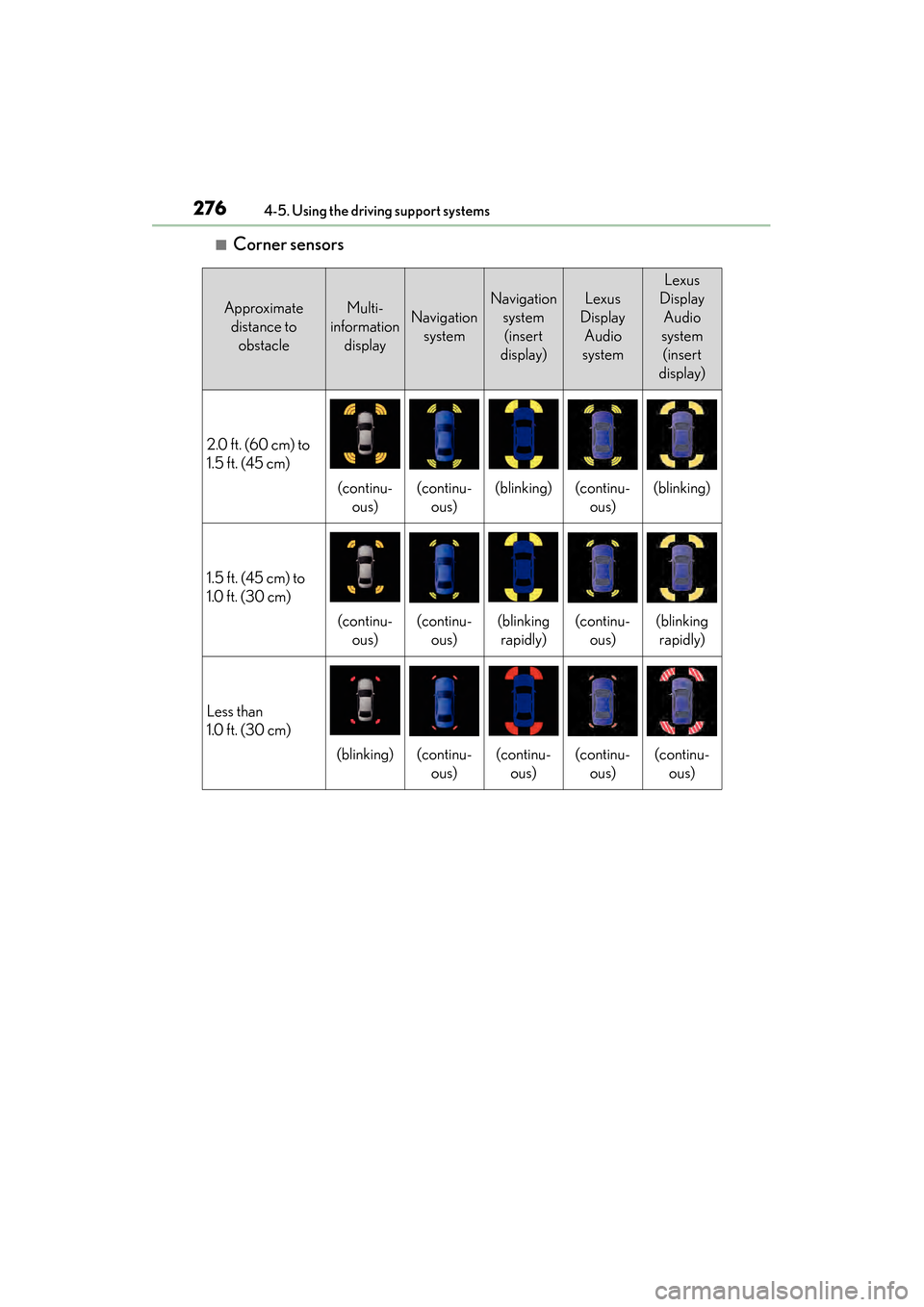
■Corner sensors
Approximate distance to obstacleMulti-
information displayNavigation system
Navigation system (insert
display)Lexus
Display Audio
system
Lexus
Display Audio
system (insert
display)
2.0 ft. (60 cm) to
1.5 ft. (45 cm)
(continu- ous)(continu-ous)(blinking)(continu- ous)(blinking)
1.5 ft. (45 cm) to
1.0 ft. (30 cm)
(continu-ous)(continu-ous)(blinking rapidly)(continu- ous)(blinking rapidly)
Less than
1.0 ft. (30 cm)
(blinking)(continu- ous)(continu-ous)(continu- ous)(continu-ous)