audio Lexus ES300h 2013 Manual Online
[x] Cancel search | Manufacturer: LEXUS, Model Year: 2013, Model line: ES300h, Model: Lexus ES300h 2013Pages: 910, PDF Size: 9.95 MB
Page 407 of 910
406
ES350 300h_OM_OM33A01U_(U)
5-3. Using the Lexus Display Audio system
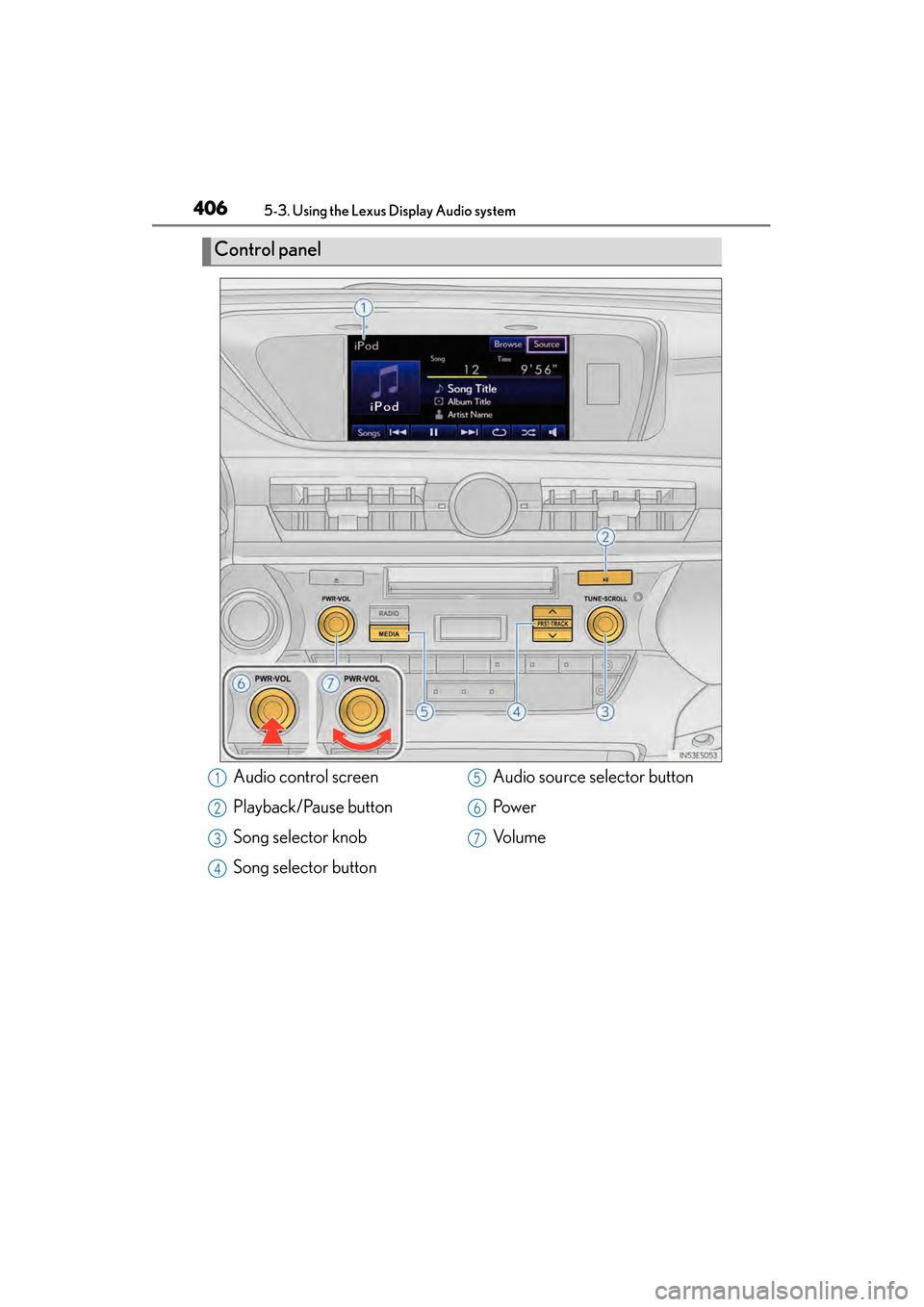
Control panel
Audio control screen
Playback/Pause button
Song selector knob
Song selector buttonAudio source selector button
Pow e r
Vo l u m e1
2
3
4
5
6
7
Page 408 of 910
ES350 300h_OM_OM33A01U_(U)
4075-3. Using the Lexus Display Audio system
5
Interior features
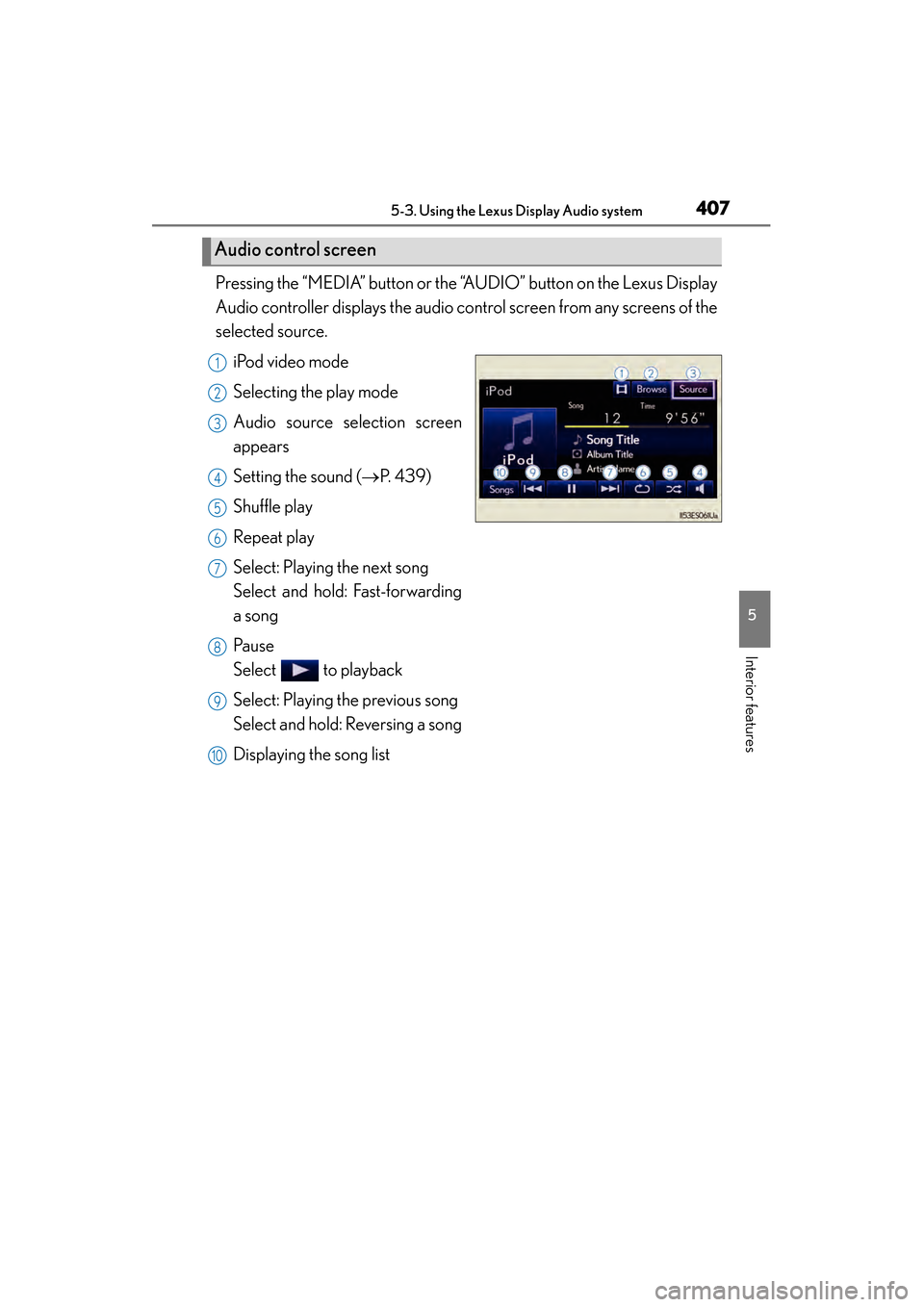
Pressing the “MEDIA” button or the “AUDIO” button on the Lexus Display
Audio controller displays the audio control screen from any screens of the
selected source.iPod video mode
Selecting the play mode
Audio source selection screen
appears
Setting the sound ( →P. 4 3 9 )
Shuffle play
Repeat play
Select: Playing the next song
Select and hold: Fast-forwarding
a song
Pa u s e
Select to playback
Select: Playing the previous song
Select and hold: Reversing a song
Displaying the song list
Audio control screen
1
2
3
4
5
6
7
8
9
10
Page 409 of 910
408
ES350 300h_OM_OM33A01U_(U)
5-3. Using the Lexus Display Audio system
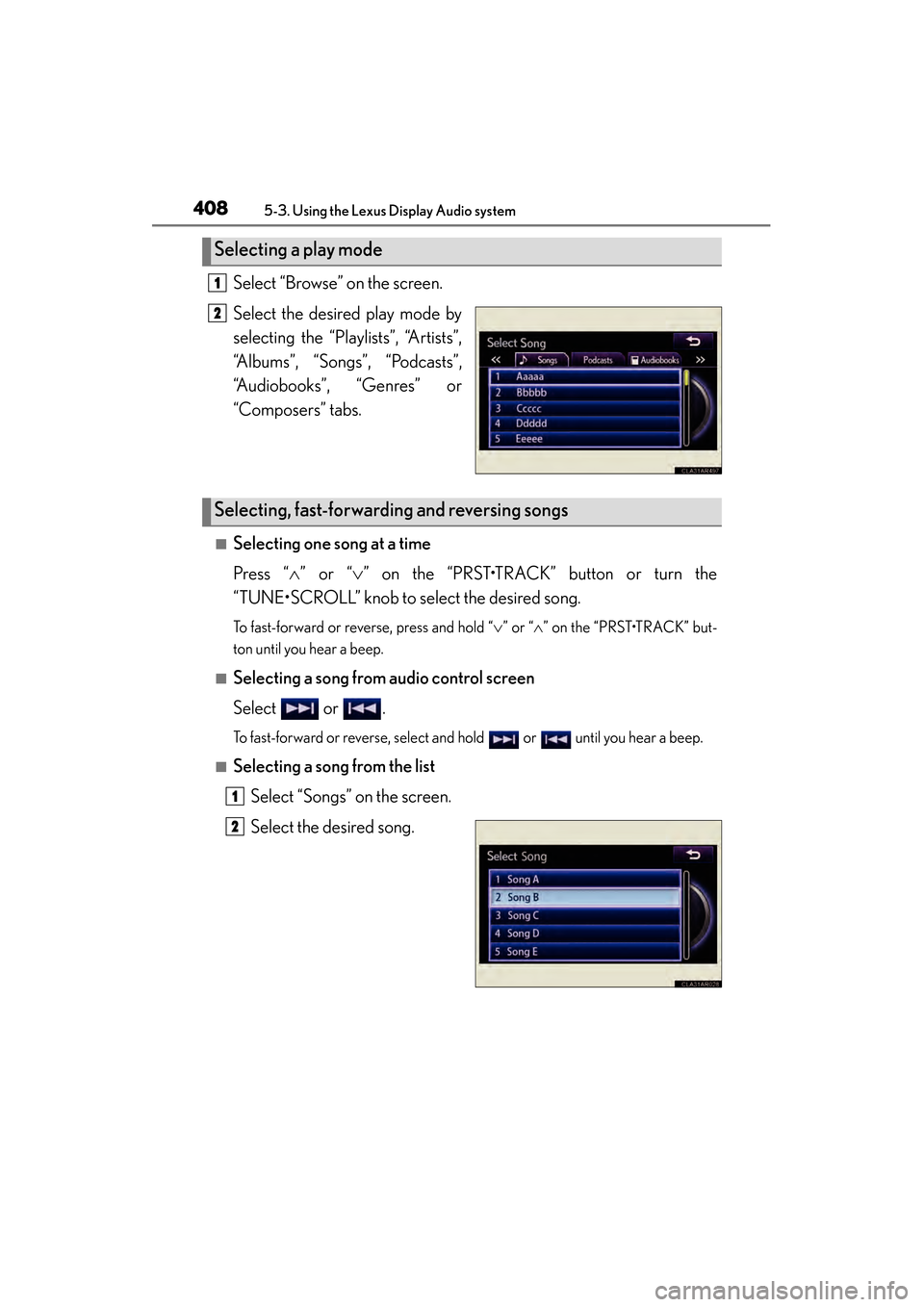
Select “Browse” on the screen.
Select the desired play mode by
selecting the “Playlists”, “Artists”,
“Albums”, “Songs”, “Podcasts”,
“Audiobooks”, “Genres” or
“Composers” tabs.
■Selecting one song at a time
Press “∧” or “ ∨” on the “PRST•TRACK” button or turn the
“TUNE•SCROLL” knob to select the desired song.
To fast-forward or reverse, press and hold “ ∨” or “ ∧” on the “PRST•TRACK” but-
ton until you hear a beep.
■Selecting a song from audio control screen
Select or .
To fast-forward or reverse, select and hold or until you hear a beep.
■Selecting a song from the list
Select “Songs” on the screen.
Select the desired song.
Selecting a play mode
1
2
Selecting, fast-forwarding and reversing songs
1
2
Page 410 of 910
ES350 300h_OM_OM33A01U_(U)
4095-3. Using the Lexus Display Audio system
5
Interior features
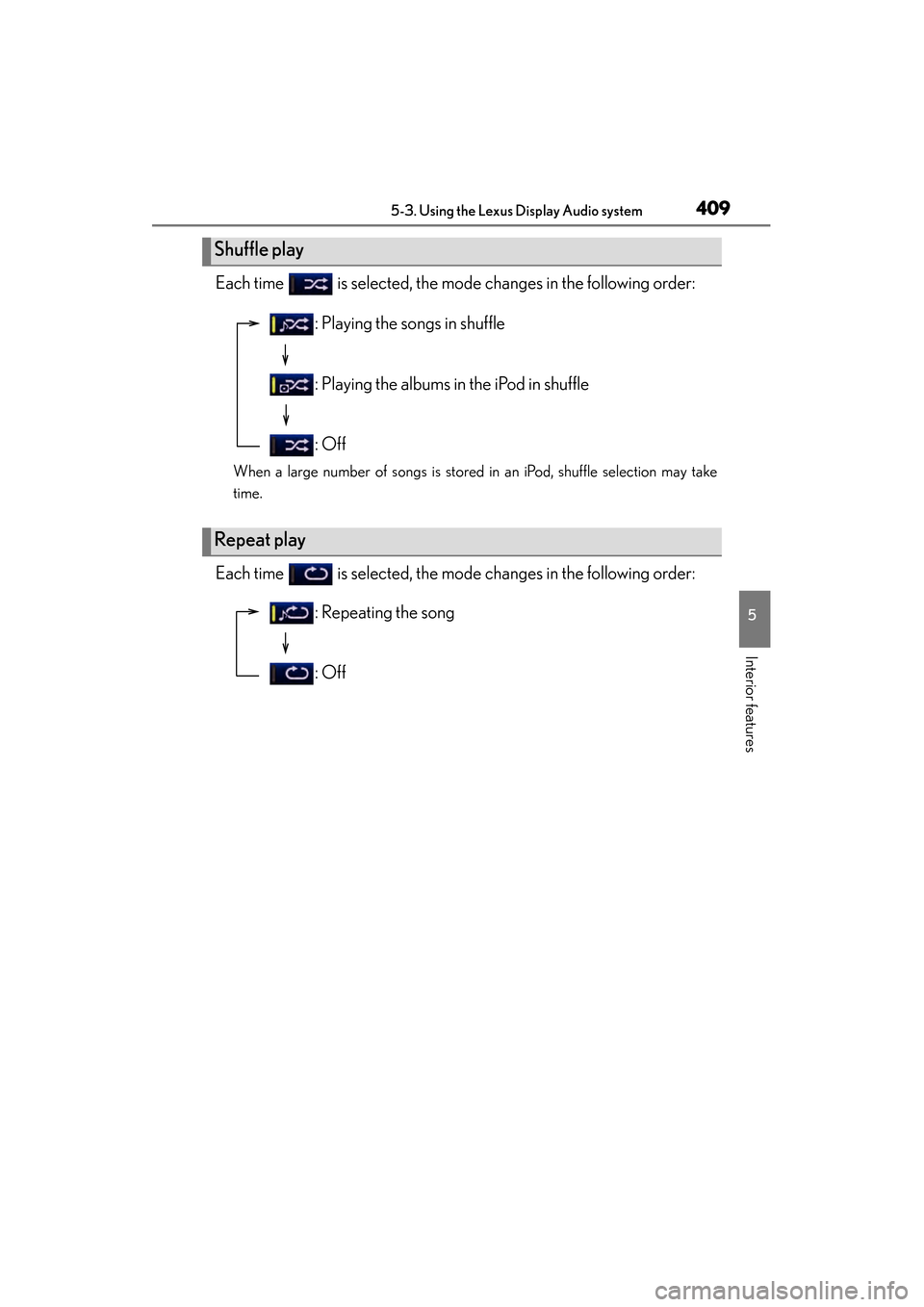
Each time is selected, the mode changes in the following order:
When a large number of songs is stored in an iPod, shuffle selection may take
time.
Each time is selected, the mode changes in the following order:
Shuffle play
Repeat play
: Playing the songs in shuffle
: Playing the albums in the iPod in shuffle
: Off
: Repeating the song
: Off
Page 411 of 910
410
ES350 300h_OM_OM33A01U_(U)
5-3. Using the Lexus Display Audio system
■About iPod
●“Made for iPod” and “Made for iPhone” mean that an electronic accessory has
been designed to connect specifically to iPod, or iPhone, respectively, and has
been certified by the developer to meet Apple performance standards.
●Apple is not responsible for the operation of this device or its compliance with
safety and regulatory standards. Please note that the use of this accessory with
iPod or iPhone may affect wireless performance.
●iPhone, iPod, iPod classic, iPod nano and iPod touch are trademarks of Apple Inc.,
registered in the U.S. and other countries.
■iPod cover art
●Depending on the iPod and songs in the iPod, iPod cover art may be displayed.
●This function can be changed to “On” or “Off”. (→P. 3 4 5 )
●It may take time to display iPod cover art, and the iPod may not be operated while
the cover art display is in process.
●Only iPod cover art that is saved in a JPEG format can be displayed.
■iPod functions
●When the iPod connected to the system includes iPod video, the system can only
output the sound by selecting on the “iPod” screen.
●Depending on the iPod, the video sound may not be able to be heard.
●When an iPod is connected and the audio source is changed to iPod mode, the
iPod will resume play from the same point in which it was last used.
●Depending on the iPod that is connected to the system, certain functions may not
be available. If a function is unavailable due to a malfunction (as opposed to a sys-
tem specification), disconnecting the device and reconnecting it once again may
resolve the problem.
●While connected to the system, the iPod cannot be operated with its own controls.
It is necessary to use the controls of the vehicle’s audio system instead.
●When the battery level of an iPod is very low, the iPod may not operate. If so, charge
the iPod before use.
●Supported models ( →P. 4 1 1 )
Page 412 of 910
ES350 300h_OM_OM33A01U_(U)
4115-3. Using the Lexus Display Audio system
5
Interior features
■iPod problems
To resolve most problems encountered when using your iPod, disconnect your iPod
from the vehicle iPod connection and reset it. For instructions on how to reset your
iPod, refer to your iPod Owner’s Manual.
■Error messages
“Connection error. Please consult your Owner’s Manual for instructions on how to
connect the iPod.”:
This indicates a problem in the iPod or its connection.
“There are no songs available for playback. Please load compatible media to your
iPod.”:
This indicates that there is no music data in the iPod.
■Compatible models
The following iPod
®, iPod nano®, iPod classic®, iPod touch® and iPhone® devices
can be used with this system.
●Made for
• iPod touch (4th generation)
• iPod touch (3rd generation)
• iPod touch (2nd generation)
• iPod touch (1st generation)
•iPod classic
• iPod with video
• iPod nano (6th generation)
• iPod nano (5th generation)
• iPod nano (4th generation)
• iPod nano (3rd generation)
• iPod nano (2nd generation)
• iPod nano (1st generation)
•iPhone 4
•iPhone 3GS
•iPhone 3G
•iPhone
Depending on differences between models or software versions etc., some models
might be incompatible with this system.
Page 413 of 910
412
ES350 300h_OM_OM33A01U_(U)
5-3. Using the Lexus Display Audio system
CAUTION
■Caution while driving
Do not connect iPod or operate the controls.
NOTICE
■To prevent damage to iPod
●Do not leave iPod in the vehicle. The temperature inside the vehicle may become
high, resulting in damage to the player.
●Do not push down on or apply unnecessary pressure to the iPod while it is con-
nected as this may damage the iPod or its terminal.
●Do not insert foreign objects into the port as this may damage the iPod or its ter-
minal.
Page 414 of 910
413
ES350 300h_OM_OM33A01U_(U)
5-3. Using the Lexus Display Audio system
5
Interior features
Listening to a USB memory
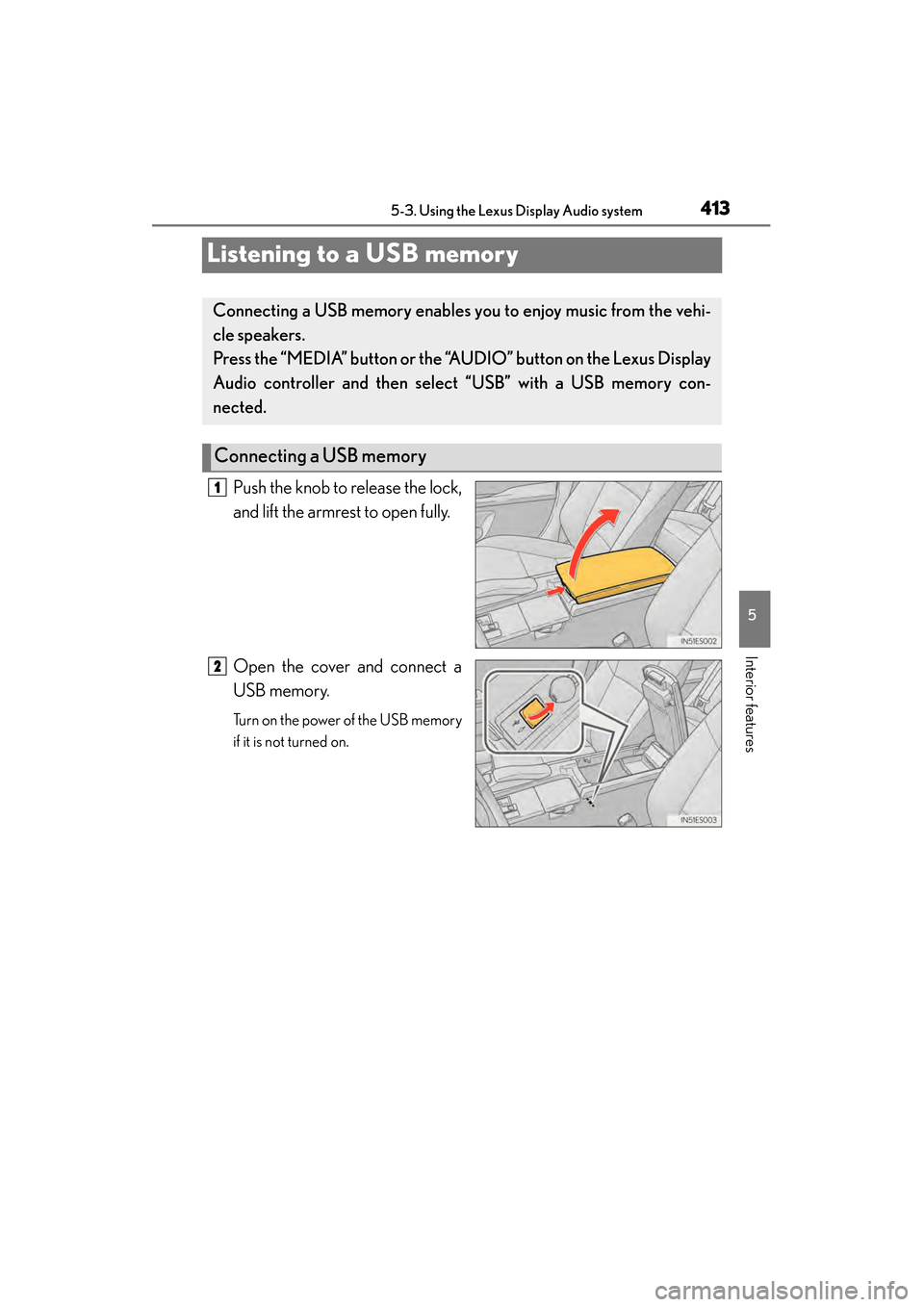
Push the knob to release the lock,
and lift the armrest to open fully.
Open the cover and connect a
USB memory.
Turn on the power of the USB memory
if it is not turned on.
Connecting a USB memory enables you to enjoy music from the vehi-
cle speakers.
Press the “MEDIA” button or the “AUDIO” button on the Lexus Display
Audio controller and then select “USB” with a USB memory con-
nected.
Connecting a USB memory
1
2
Page 415 of 910
414
ES350 300h_OM_OM33A01U_(U)
5-3. Using the Lexus Display Audio system
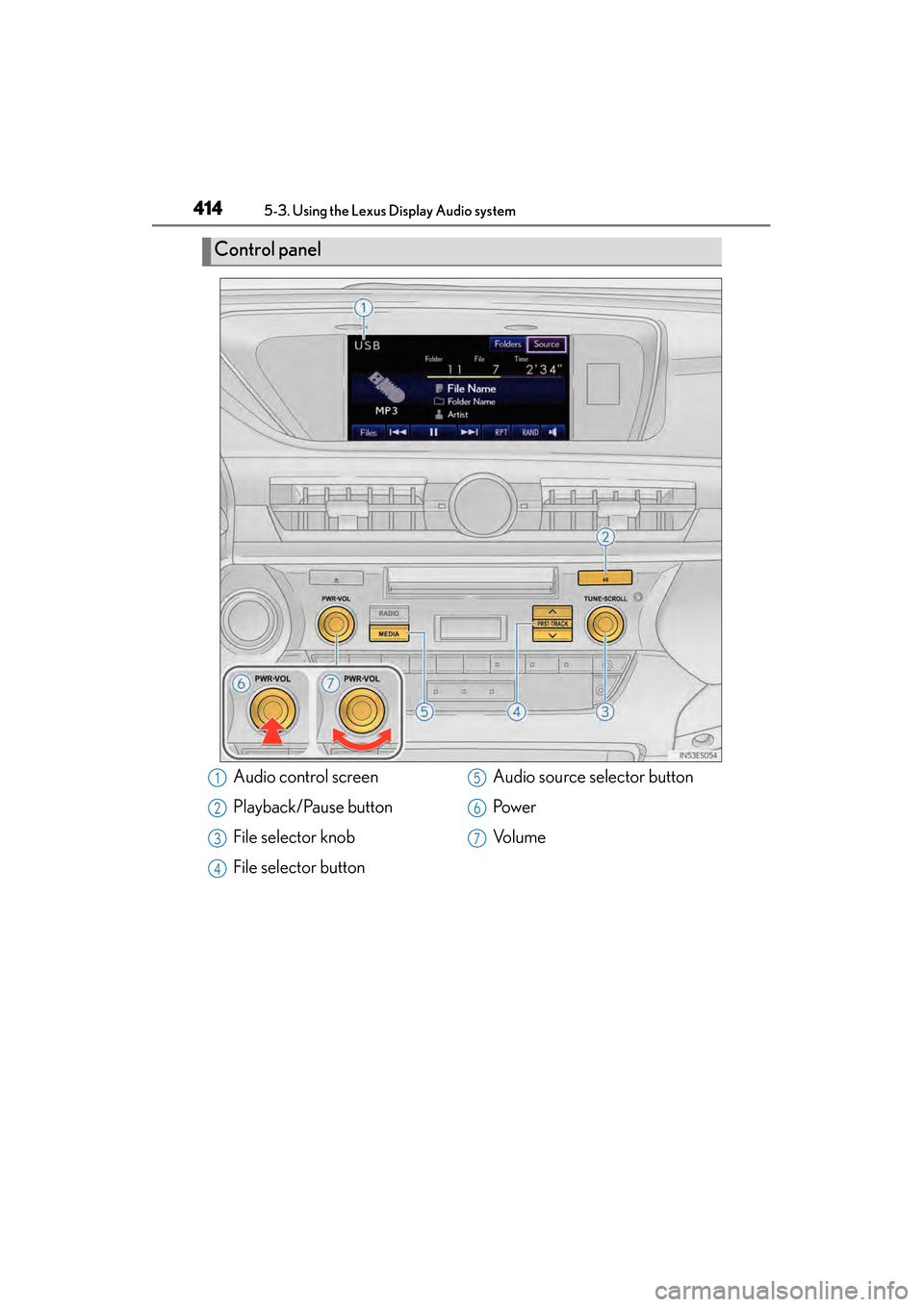
Control panel
Audio control screen
Playback/Pause button
File selector knob
File selector buttonAudio source selector button
Pow e r
Vo l u m e1
2
3
4
5
6
7
Page 416 of 910
ES350 300h_OM_OM33A01U_(U)
4155-3. Using the Lexus Display Audio system
5
Interior features
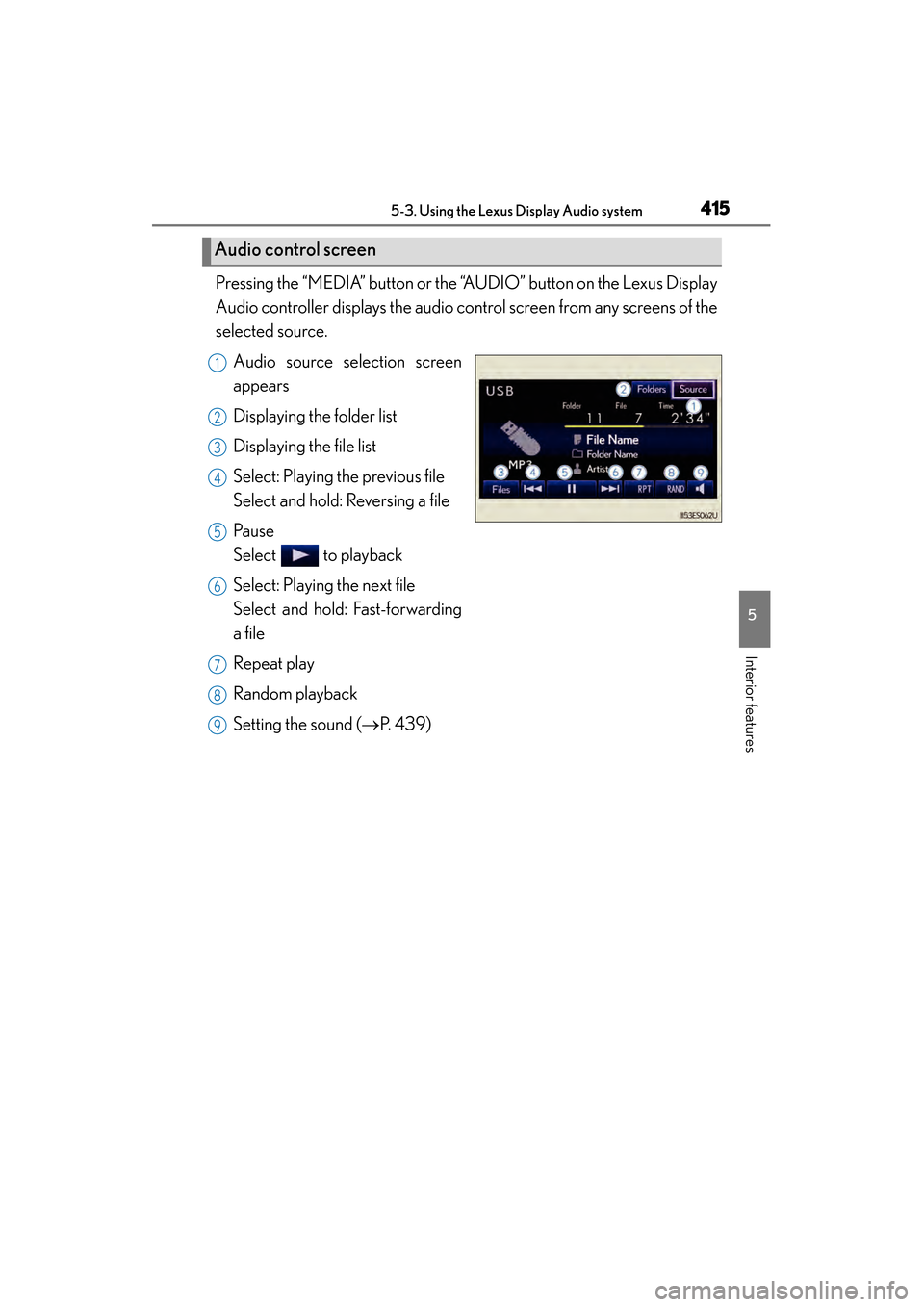
Pressing the “MEDIA” button or the “AUDIO” button on the Lexus Display
Audio controller displays the audio control screen from any screens of the
selected source.Audio source selection screen
appears
Displaying the folder list
Displaying the file list
Select: Playing the previous file
Select and hold: Reversing a file
Pa u s e
Select to playback
Select: Playing the next file
Select and hold: Fast-forwarding
a file
Repeat play
Random playback
Setting the sound ( →P. 4 3 9 )
Audio control screen
1
2
3
4
5
6
7
8
9