service Lexus ES300h 2014 User Guide
[x] Cancel search | Manufacturer: LEXUS, Model Year: 2014, Model line: ES300h, Model: Lexus ES300h 2014Pages: 918, PDF Size: 25.26 MB
Page 398 of 918
ES350_300h_OM_OM33A60U_(U)
3975-3. Using the Lexus Display Audio system
5
Interior features
■When the 12-volt battery is disconnected
All preset stations are erased.
■Reception sensitivity
●Cargo loaded on the roof luggage carrier, especially metal objects, may adversely
affect the reception of XM® Satellite Radio.
●It is difficult to maintain perfect radio reception at all times due to the continually
changing position of the antenna, differences in signal strength and surrounding
objects, such as trains and transmitters.
●The radio antenna is mounted inside the trunk and the rear window. To maintain
clear radio reception, do not attach metallic window tinting or other metallic
objects to the antenna wire mounted inside the rear window.
■XM® Satellite Radio
An XM
® Satellite Radio is a tuner designed exclusively to receive broadcasts pro-
vided under a separate subscription. Availability is limited to the 48 contiguous
states and 10 Canadian provinces.
●XM® subscriptions
For detailed information about XM® Satellite Radio or to subscribe:
U.S.A.
Visit on the web at www.siriusxm.com
or call 1-866-635-2349.
Canada
Visit on the web at www.xmradio.ca
or call 1-877-438-9677.
●Radio ID
You will need the radio ID when activating XM® service or reporting a problem.
Select “CH000” using the “TUNE•SCROLL” knob, and the receiver’s 8-charac-
ter ID number will appear.
●Satellite tuner
The tuner supports only Audio Services (Music and Talk) and the accompanying
Te x t I n f o r m a t i o n o f X M
® Satellite Radio.
Page 455 of 918
454
ES350_300h_OM_OM33A60U_(U)
5-3. Using the Lexus Display Audio system
●In the following circumstances, it may be difficult to hear the other party:
• When driving on unpaved roads
• When driving at high speeds
• If a window is open
• If the air conditioning is blowing directly on the microphone
• There is an effect from the network of the cellular phone
■Conditions under which the system will not operate
●If using a cellular phone that does not support Bluetooth®
●If the cellular phone is turned off
●If you are outside service range
●If the cellular phone is not connected
●If the cellular phone’s battery is low
●When outgoing is controlled, due to heavy traffic on telephone lines, etc.
●When the cellular phone itself cannot be used
●When transferring the phonebook data from the cellular phone
■Bluetooth® antenna
The antenna is built into the display. If the cellular phone is behind the seat or in the
console box, or touching or covered by metal objects, connection status may deteri-
orate.
■Battery charge/Signal status
●This display may not correspond exactly with the cellular phone itself.
●This system does not have a charging function.
●The Bluetooth® phone battery will burn quickly when it is connected to Bluetooth®.
●When the cellular phone is not connected, “No Connect” is displayed.
●When you are out of service area or in a place inaccessible by radio waves, “No
service” is displayed.
■When using Bluetooth® audio and hands-free system at the same time
The following problems may occur.
●The Bluetooth® connection may be cut.
●Noise may be heard on the Bluetooth® audio playback.
Page 456 of 918
ES350_300h_OM_OM33A60U_(U)
4555-3. Using the Lexus Display Audio system
5
Interior features
■About the phonebook in this system
The following data is stored for every registered phone. When another phone is con-
necting, you cannot read the registered data.
●Phonebook data
●Call history date
●Speed dial
When you delete the phone, the above-mentioned data is also deleted.
■When you release your car
Be sure to initialize your data. ( →P. 3 4 7 )
■About Bluetooth®
■Compatible models
This system supports the following service.
●Bluetooth® Specification:
Ver. 1.1 or higher (Recommended: Ver. 2.1+EDR or higher)
●Profiles:
• HFP (Hands Free Profile) Ver. 1.0 or higher (Recommended: Ver. 1.5 or higher) This is a profile to allow hands-free phone calls using the cellular phone or head
sets. It has an outgoing and incoming call function.
• OPP (Object Push Profile) Ver. 1.1 or higher This is a profile to exchange phonebook data. When the Bluetooth
® phone has
PBAP and OPP, OPP cannot be used.
• PBAP (Phone Book Access Profile) Ver. 1.0 or higher This is a profile to transfer phonebook data.
If your cellular phone does not support HFP, you cannot enter the Bluetooth
® phone.
You need to take OPP or PBAP service individually.
Please go to the website at http://www.lexus.com/MobileLink
to find approved por-
table players for this system. The Bluetooth
® word mark and logos are
registered trademarks owned by Bluetooth
SIG, Inc. and any use of such marks by
PIONEER CORPORATION is under
license. Other trademarks and trade names
are those of their respective owners.
Page 469 of 918
468
ES350_300h_OM_OM33A60U_(U)
5-3. Using the Lexus Display Audio system
●When the phonebook is empty
You can transfer the phone numbers in your Bluetooth
® phone to the
system.
Operation methods differ between PBAP compatible and PBAP
incompatible Bluetooth
® phones. If your cellular phone does not sup-
port either PBAP or OPP service, you cannot transfer contacts.
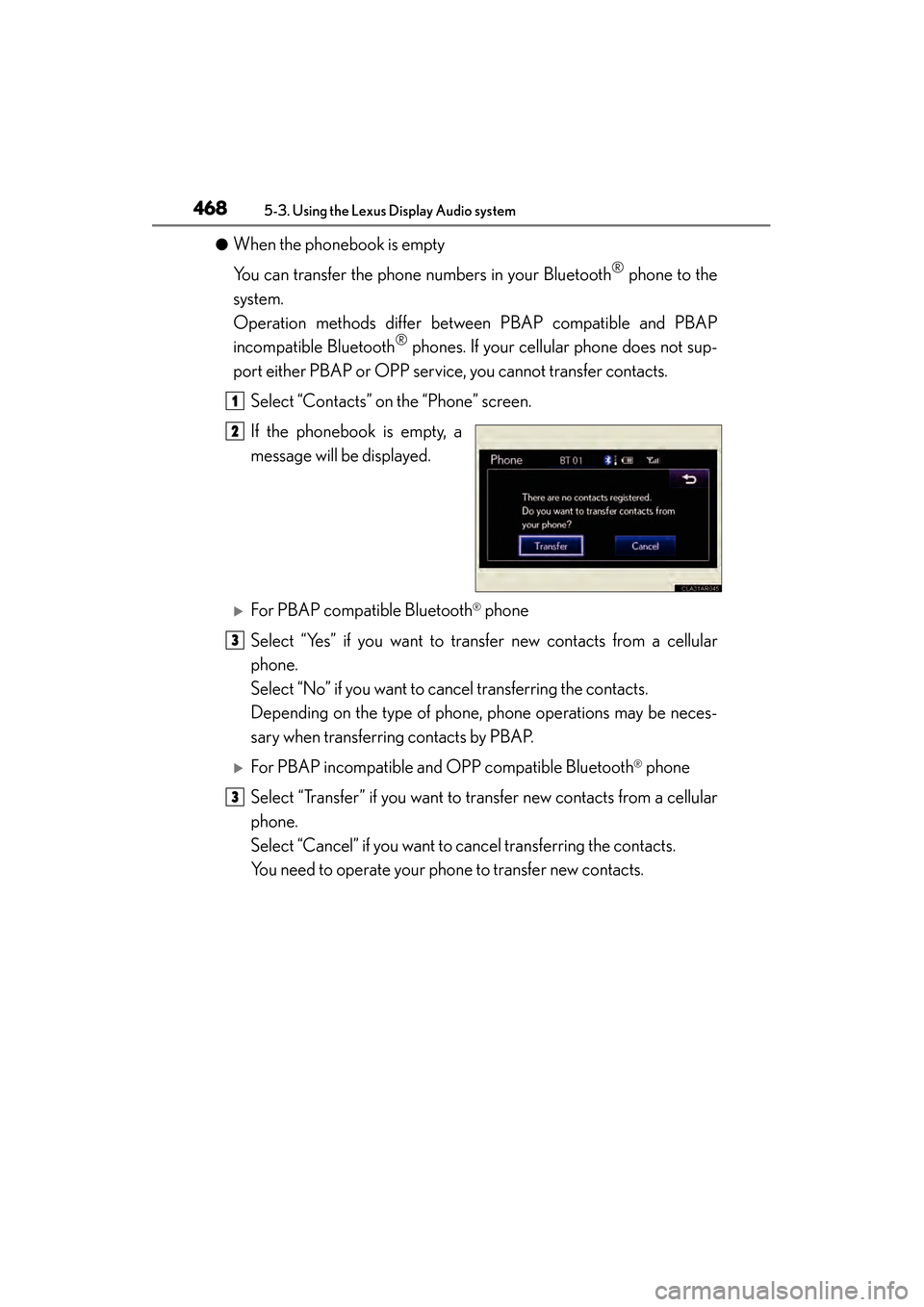
Select “Contacts” on the “Phone” screen.
If the phonebook is empty, a
message will be displayed.
XFor PBAP compatible Bluetooth® phone
Select “Yes” if you want to transfer new contacts from a cellular
phone.
Select “No” if you want to cancel transferring the contacts.
Depending on the type of phone, phone operations may be neces-
sary when transferring contacts by PBAP.
XFor PBAP incompatible and OPP compatible Bluetooth® phone
Select “Transfer” if you want to transfer new contacts from a cellular
phone.
Select “Cancel” if you want to cancel transferring the contacts.
You need to operate your phone to transfer new contacts.
1
2
3
3
Page 476 of 918
ES350_300h_OM_OM33A60U_(U)
4755-3. Using the Lexus Display Audio system
5
Interior features
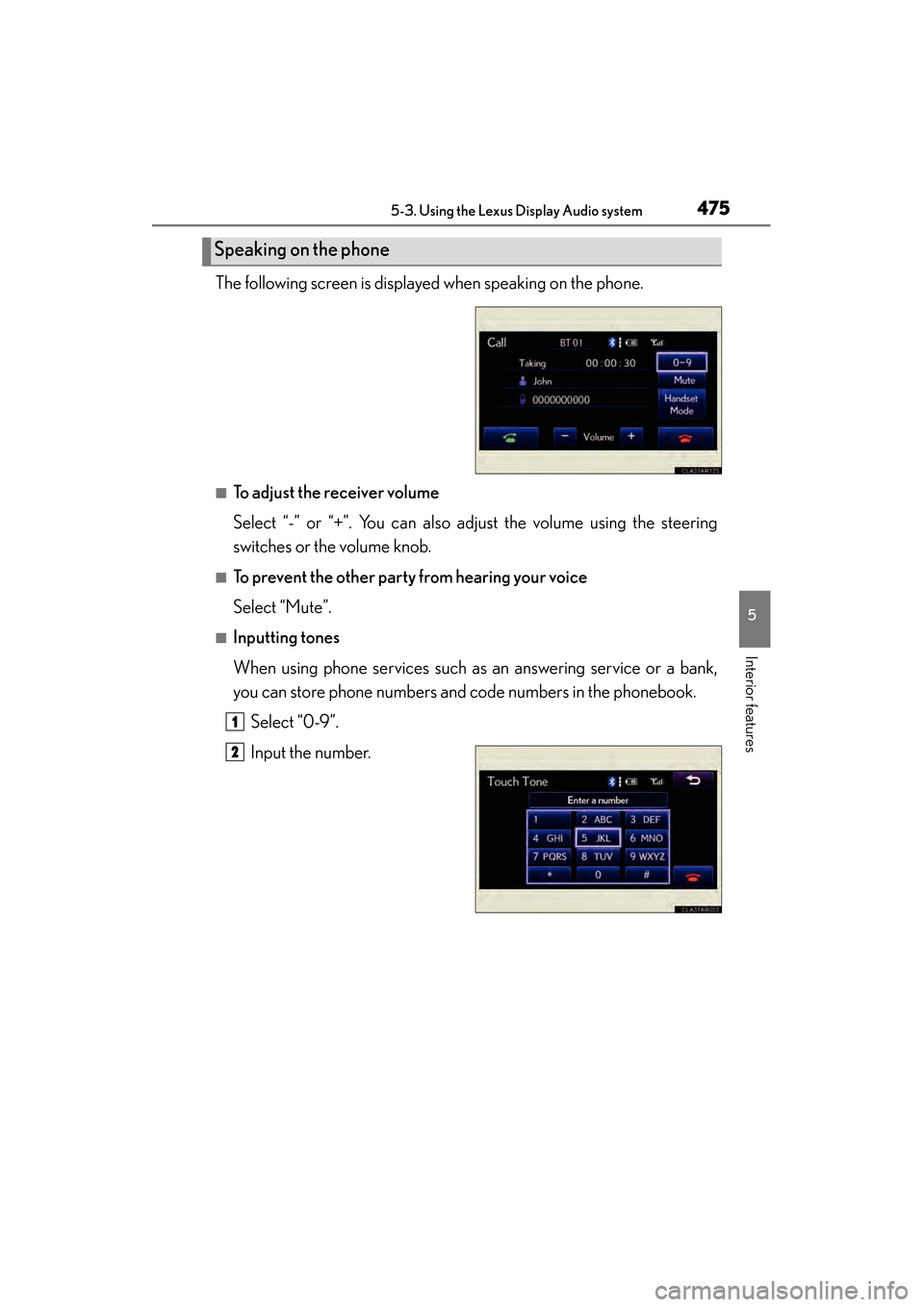
The following screen is displayed when speaking on the phone.
■To adjust the receiver volume
Select “-” or “+”. You can also adjust the volume using the steering
switches or the volume knob.
■To prevent the other party from hearing your voice
Select “Mute”.
■Inputting tones
When using phone services such as an answering service or a bank,
you can store phone numbers and code numbers in the phonebook.Select “0-9”.
Input the number.
Speaking on the phone
1
2
Page 483 of 918
482
ES350_300h_OM_OM33A60U_(U)
5-3. Using the Lexus Display Audio system
■Managing the contacts
●Transferring a phone number
You can transfer the phone numbers in your Bluetooth
® phone to the
system. Operation methods differ between PBAP compatible and
PBAP incompatible Bluetooth
® phones. If your cellular phone does
not support either PBAP or OPP services, you cannot transfer con-
tacts.
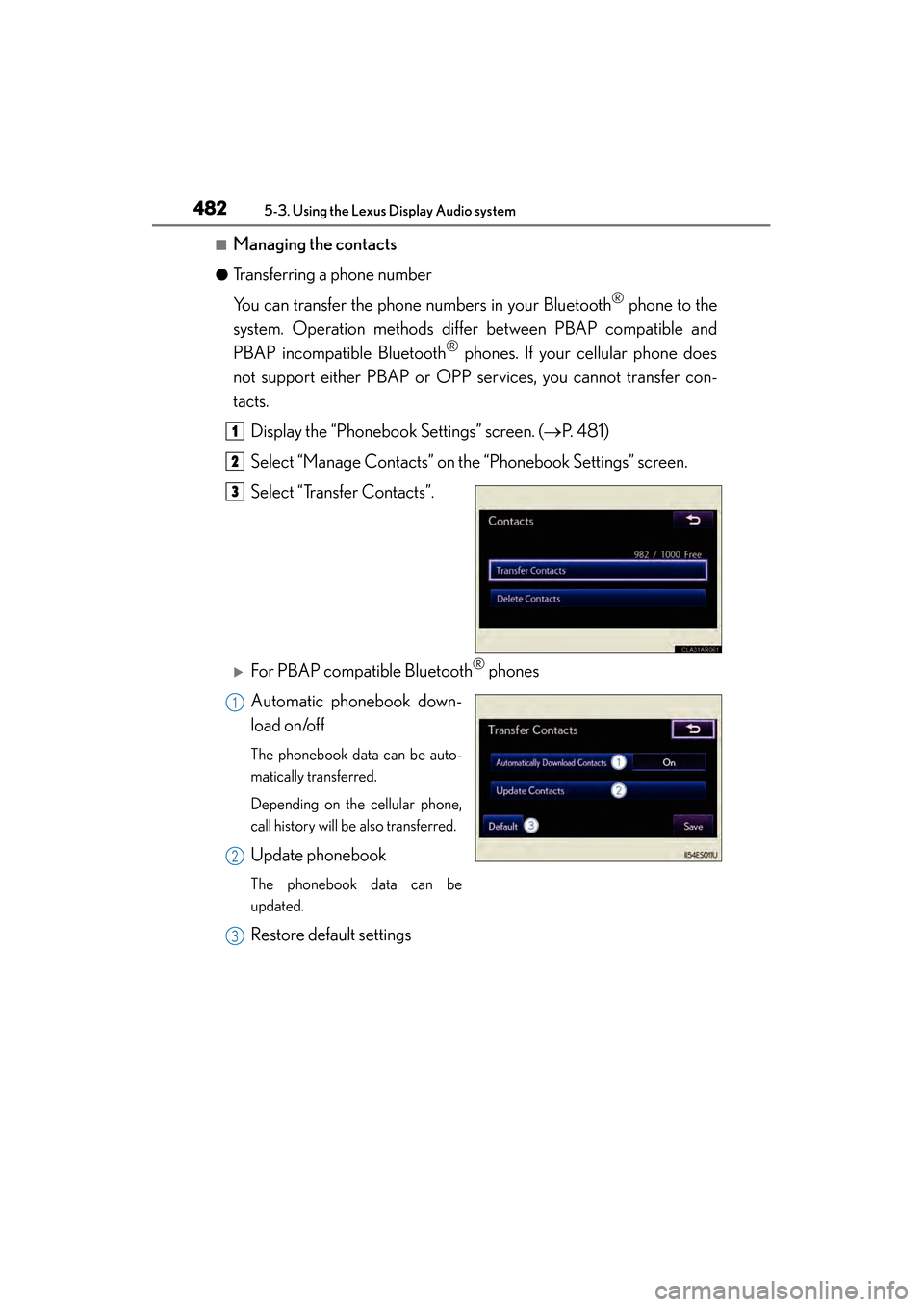
Display the “Phonebook Settings” screen. ( →P. 4 8 1 )
Select “Manage Contacts” on the “Phonebook Settings” screen.
Select “Transfer Contacts”.
XFor PBAP compatible Bluetooth® phones
Automatic phonebook down-
load on/off
The phonebook data can be auto-
matically transferred.
Depending on the cellular phone,
call history will be also transferred.
Update phonebook
The phonebook data can be
updated.
Restore default settings
1
2
3
1
2
3
Page 485 of 918
484
ES350_300h_OM_OM33A60U_(U)
5-3. Using the Lexus Display Audio system
■Phonebook data
Phonebook data is managed for every registered phone. When another phone is
connecting, you cannot read the registered data.
■Setting the phonebook in a different way (To display the “Contacts” screen)Display the “Phone” screen. ( →P. 4 5 9 )
Select “Contacts” on the “Phone” screen.
Select “Options” on the “Contacts” screen.
Select “Manage Contacts” on the “Contacts” screen.
■When transferring a phone number
Transfer the phone number while engine is running
If your cellular phone is OPP or PBAP compatible, you may need to input “1234” by
your cellular phone for OBEX certification.
■When you have selected “Update Contacts” to transfer the phone number
●If your cellular phone does not support PBAP service, you cannot use this function.
●If your phone supports PBAP service, you can transfer the phonebook data with-
out operating your phone.
■When you have selected “Replace Contacts” or “Add Contacts” to transfer the
phone number
If your cellular phone does not support OPP service, you cannot use these functions.
You can transfer the phonebook data only by operating your phone.
■Transferring the phone number in a different way (To display the “Transfer Con-
tacts” screen) Display the “Phone” screen. ( →P. 4 5 9 )
Select “Contacts” on the “Phone” screen.
Select “Transfer” on the “Contacts” screen.
■Transferring the phone number while Bluetooth® audio is playing
Bluetooth
® audio will disconnect. It will reconnect automatically when data transfer
finishes. It will not be reconnected depending on the phone you are using.
1
2
3
4
1
2
3
Page 486 of 918
ES350_300h_OM_OM33A60U_(U)
4855-3. Using the Lexus Display Audio system
5
Interior features
■Deleting the phonebook data in a different wayDisplay the “Phone” screen. ( →P. 4 5 9 )
Select “Contacts” on the “Phone” screen.
Choose the desired data from the list.
Select “Options” on the “Contact” screen.
Select “Delete” on the “Contact” screen.
A confirmation message will be displayed. If everything is correct, select “Yes”.
If your phone supports PBAP service, “Automatically Download Contacts” setting
needs to be set to “Off”. ( →P. 4 8 2 )
When you delete a Bluetooth
® phone, the phonebook data will be deleted at the
same time.
1
2
3
4
5
6
Page 491 of 918
490
ES350_300h_OM_OM33A60U_(U)
5-3. Using the Lexus Display Audio system
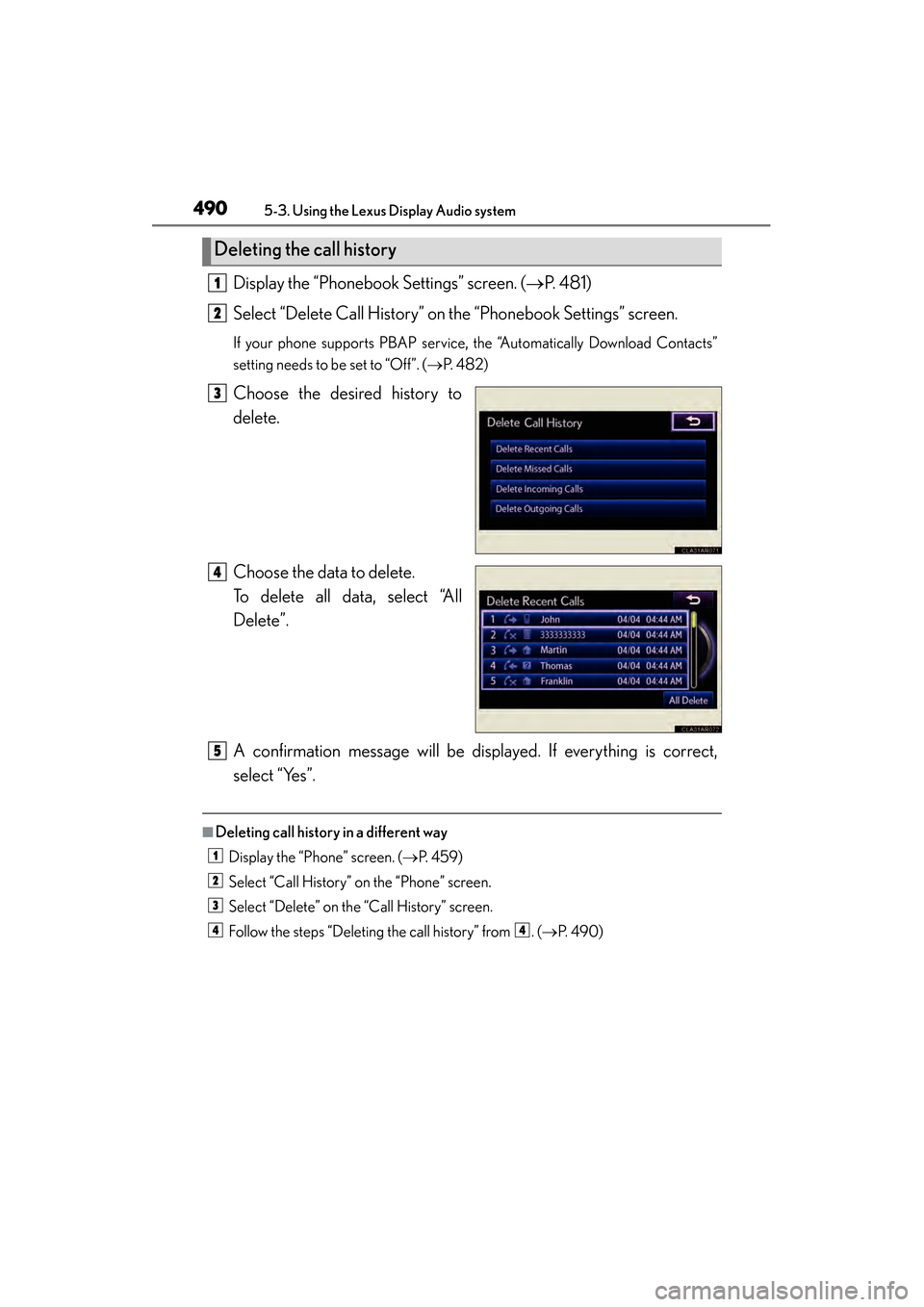
Display the “Phonebook Settings” screen. (→P. 4 8 1 )
Select “Delete Call History” on the “Phonebook Settings” screen.
If your phone supports PBAP service, the “Automatically Download Contacts”
setting needs to be set to “Off”. ( →P. 4 8 2 )
Choose the desired history to
delete.
Choose the data to delete.
To delete all data, select “All
Delete”.
A confirmation message will be displayed. If everything is correct,
select “Yes”.
■Deleting call history in a different way
Display the “Phone” screen. ( →P. 4 5 9 )
Select “Call History” on the “Phone” screen.
Select “Delete” on the “Call History” screen.
Follow the steps “Deleting the call history” from . (→ P. 4 9 0 )
Deleting the call history
1
2
3
4
5
1
2
3
44
Page 510 of 918
ES350_300h_OM_OM33A60U_(U)
5095-4. Using the audio system
5
Interior features
■When the 12-volt battery is disconnected
All preset stations are erased.
■Reception sensitivity
●Cargo loaded on the roof luggage carrier, especially metal objects, may adversely
affect the reception of XM® Satellite Radio.
●It is difficult to maintain perfect radio reception at all times due to the continually
changing position of the antenna, differences in signal strength and surrounding
objects, such as trains and transmitters.
●The radio antenna is mounted inside the trunk and the rear window. To maintain
clear radio reception, do not attach metallic window tinting or other metallic
objects to the antenna wire mounted inside the rear window.
■Receiving XM® Satellite Radio
An XM
® Satellite Radio is a tuner designed exclusively to receive broadcasts pro-
vided under a separate subscription. Availability is limited to the 48 contiguous
states and 10 Canadian provinces.
●XM® subscriptions
For detailed information about XM® Satellite Radio or to subscribe:
U.S.A.
Visit on the web at www.siriusxm.com
or call 1-866-635-2349.
Canada
Visit on the web at www.xmradio.ca
or call 1-877-438-9677.
●Radio ID
You will need the radio ID when activating XM
® service or reporting a problem.
Select “CH000” using , and the receiver’s 8-character ID number will
appear.
●Satellite tuner
The tuner supports only Audio Services (Music and Talk) and the accompanying
Te x t I n f o r m a t i o n o f X M
® Satellite Radio.