mirror Lexus ES300h 2014 Owner's Guide
[x] Cancel search | Manufacturer: LEXUS, Model Year: 2014, Model line: ES300h, Model: Lexus ES300h 2014Pages: 918, PDF Size: 25.26 MB
Page 170 of 918
1693-4. Adjusting the steering wheel and mirrors
3
Operation of each component
ES350_300h_OM_OM33A60U_(U)
Responding to the level of brightness of the headlights of vehicles behind,
the reflected light is automatically reduced.
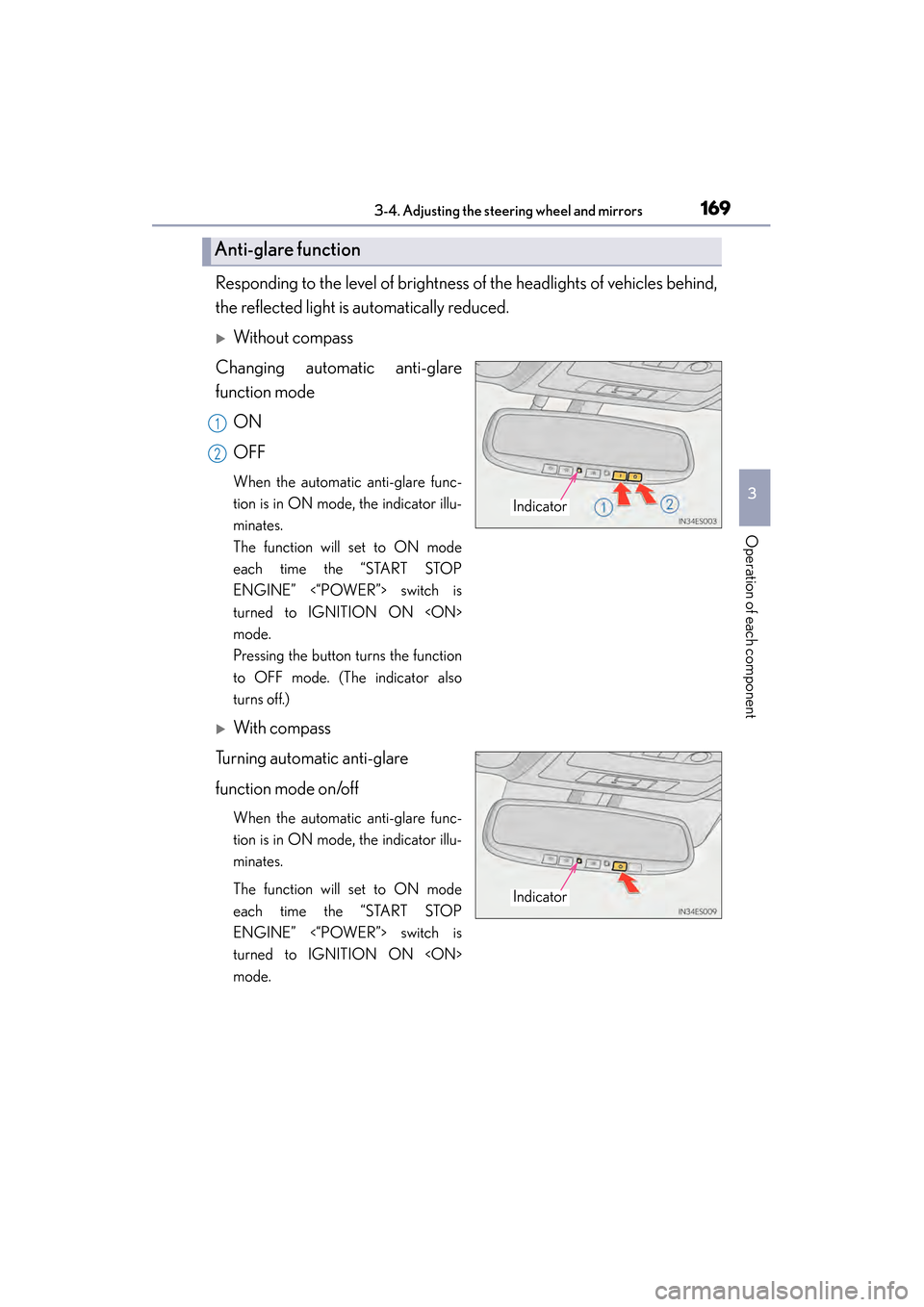
XWithout compass
Changing automatic anti-glare
function mode
ON
OFF
When the automatic anti-glare func-
tion is in ON mode, the indicator illu-
minates.
The function will set to ON mode
each time the “START STOP
ENGINE” <“POWER”> switch is
turned to IGNITION ON
mode.
Pressing the button turns the function
to OFF mode. (The indicator also
turns off.)
XWith compass
Turning automatic anti-glare
function mode on/off
When the automatic anti-glare func-
tion is in ON mode, the indicator illu-
minates.
The function will set to ON mode
each time the “START STOP
ENGINE” <“POWER”> switch is
turned to IGNITION ON
mode.
Anti-glare function
Indicator
1
2
Indicator
Page 171 of 918
1703-4. Adjusting the steering wheel and mirrors
ES350_300h_OM_OM33A60U_(U)
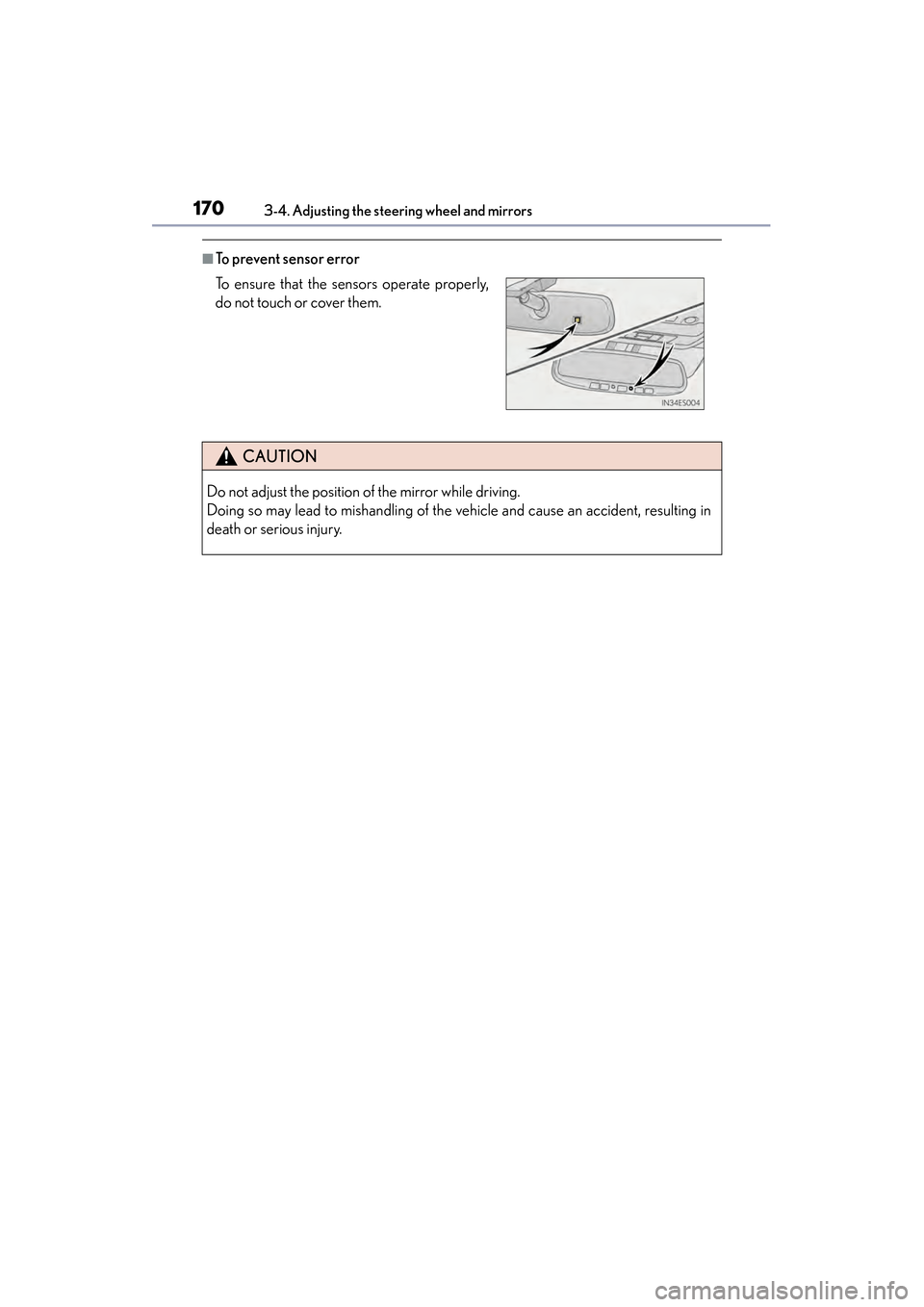
■To prevent sensor error
To ensure that the sensors operate properly,
do not touch or cover them.
CAUTION
Do not adjust the position of the mirror while driving.
Doing so may lead to mishandling of the vehicle and cause an accident, resulting in
death or serious injury.
Page 172 of 918
1713-4. Adjusting the steering wheel and mirrors
3
Operation of each component
ES350_300h_OM_OM33A60U_(U)
Outside rear view mirrors
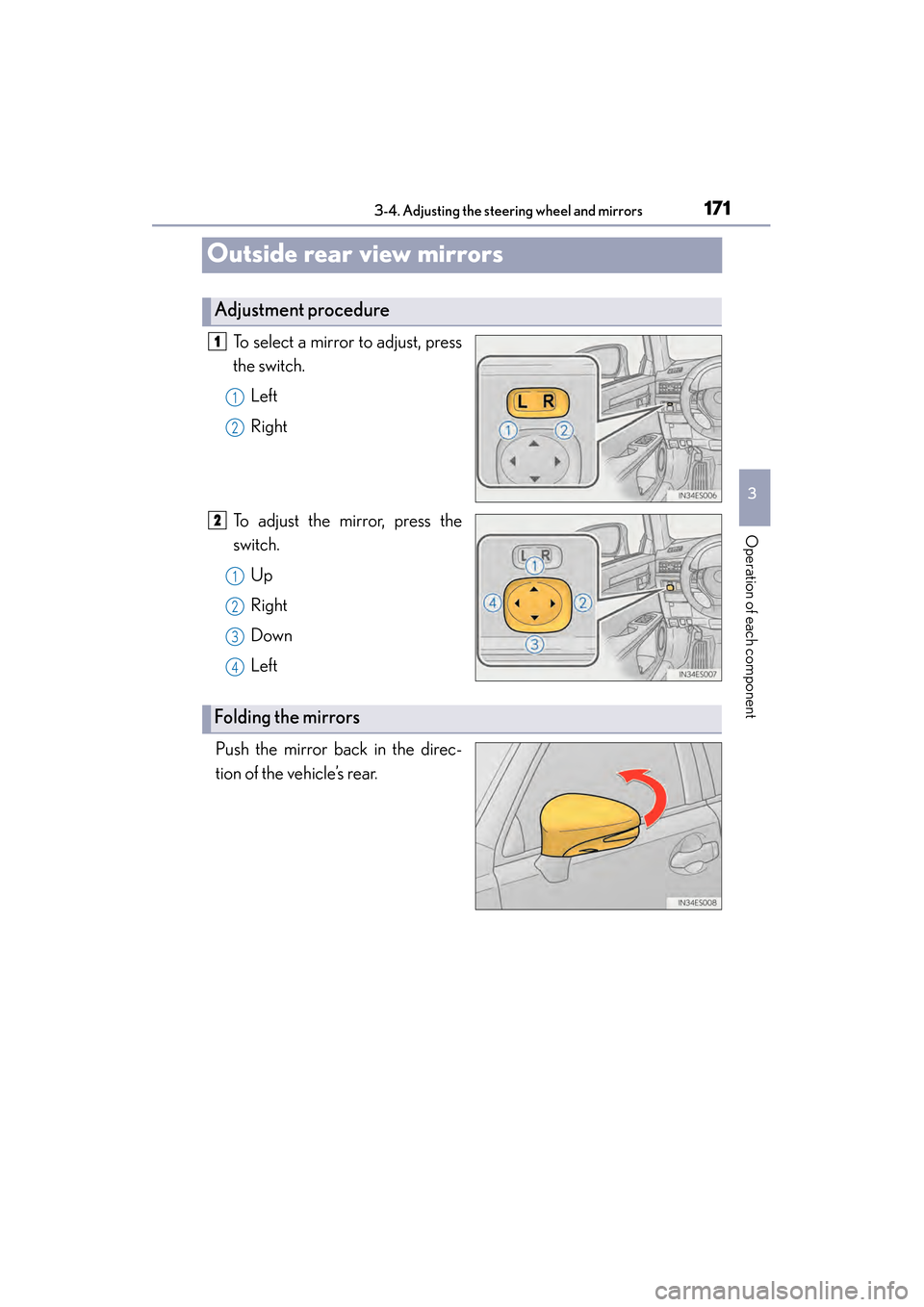
To select a mirror to adjust, press
the switch.Left
Right
To adjust the mirror, press the
switch. Up
Right
Down
Left
Push the mirror back in the direc-
tion of the vehicle’s rear.
Adjustment procedure
1
1
2
2
1
2
3
4
Folding the mirrors
Page 173 of 918
1723-4. Adjusting the steering wheel and mirrors
ES350_300h_OM_OM33A60U_(U)
■Mirror angle can be adjusted when
The “START STOP ENGINE” <“POWER”> switch is in ACCESSORY or IGNI-
TION ON
■Linked mirror function when reversing
●When either “L” or “R” of the mirror select switch is selected, the outside rear view
mirrors will automatically angle downwards when the vehicle is reversing in order
to give a better view of the ground. To disable this function, select neither “L” nor
“R”.
●If the mirror angle adjustment switch is operated while the linked mirror function is
in operation, the angle and position of the mirrors can be remembered, and the
mirrors will operate at the angle adjusted to the last time the linked mirror function
was operated.
However, because the mirrors move based on the angle they are in when the linked
mirror function is not operating, the mirror angle when the linked mirror function is
operating will also be changed if the mirrors are adjusted while the function is not
operating.
■When the mirrors are fogged up
The outside rear view mirrors can be cleared using the mirror defoggers. Turn on the
rear window defogger to turn on the outside rear view mirror defoggers. (→P. 3 7 8 )
■Automatic adjustment of the mirror angle
A desired mirror face angle can be entered to memory and recalled automatically
by the driving position memory. ( →P. 1 5 6 )
■Auto anti-glare function
When the anti-glare inside rear view mirror is set to automatic mode, the outside
rear view mirrors will activate in conjunction with the anti-glare inside rear view mir-
ror to reduce reflected light. ( →P. 1 6 9 )
Page 174 of 918
1733-4. Adjusting the steering wheel and mirrors
3
Operation of each component
ES350_300h_OM_OM33A60U_(U)
CAUTION
■Important points while driving
Observe the following precautions while driving.
Failure to do so may result in loss of control of the vehicle and cause an accident,
resulting in death or serious injury.
●Do not adjust the mirrors while driving.
●Do not drive with the mirrors folded.
●Both the driver and passenger side mirrors must be extended and properly
adjusted before driving.
■When a mirror is moving
To avoid personal injury and mirror malfunction, be careful not to get your hand
caught by the moving mirror.
■When the mirror defoggers are operating
Do not touch the rear view mirror surfaces, as they can become very hot and burn
you.
Page 189 of 918
188
ES350_300h_OM_OM33A60U_(U)
4-1. Before driving
CAUTION
Observe the following precautions.
Failure to do so may result in death or serious injury.
■When driving the vehicle
●During normal driving, do not turn off the engine
engine
control, but the power assist to these systems will be lost. This will make it more
difficult to steer and brake, so you should pull over and stop the vehicle as soon as
it is safe to do so.
However, in the event of an emergency, such as if it becomes impossible to stop
the vehicle in the normal way: →P. 74 9
●Use engine braking (downshift) to maintain a safe speed when driving down a
steep hill.
Using the brakes continuously may cause the brakes to overheat and lose effec-
tiveness. ( →P. 219, 222)
●Do not adjust the positions of the steering wheel, the seat, or the inside or outside
rear view mirrors while driving.
Doing so may result in a loss of vehicle control.
●Always check that all passengers’ arms, heads or other parts of their body are not
outside the vehicle.
●Do not drive in excess of the speed limit. Even if the legal speed limit permits it, do
not drive over 85 mph (140 km/h) unless your vehicle has high-speed capability
tires. Driving over 85 mph (140 km/h) may result in tire failure, loss of control and
possible injury. Be sure to consult a tire dealer to determine whether the tires on
your vehicle are high-speed capability tires or not before driving at such speeds.
Page 237 of 918
236
ES350_300h_OM_OM33A60U_(U)
4-3. Operating the lights and wipers
●In the situations below, the system may not be able to correctly detect the sur-
rounding brightness levels, and may flash or expose nearby pedestrians to the high
beam. Therefore, you should consider turning the high beams on or off manually
rather than relying on the Automatic High Beam system.
• In bad weather (rain, snow, fog, sandstorms etc.)
• The windshield is obscured by fog, mist, ice, dirt etc.
• The windshield is cracked or damaged.
• The camera sensor is deformed or dirty.
• The camera sensor temperature is extremely high.
• Surrounding brightness levels are equal to those of headlights, tail lights or foglights.
• Vehicles ahead have headlights or tail lights that are either switched off, dirty, are changing color, or are not aimed properly.
• When driving through an area of intermittently changing brightness and dark- ness.
• When frequently and repeatedly driving ascending/descending roads, or roads with rough, bumpy or uneven surfaces (such as stone-paved roads, gravel tracks
etc.).
• When frequently and repeatedly taking curves or driving on a winding road.
• There is a highly reflective object ahead of the vehicle, such as a sign or a mirror.
• The back of a vehicle ahead is highly reflective, such as a container on a truck.
• The vehicle’s headlights are damaged or dirty, or are not aimed properly.
• The vehicle is listing or titling, due to a flat tire, a trailer being towed etc.
• The high beam and low beam are repeatedly being switched between in an abnormal manner.
• The driver believes that the high beam may be causing problems or distress to other drivers or pedestrians nearby.
■Temporarily lowering sensor sensitivity
The sensitivity of the sensor can be temporarily lowered.
Turn the “START STOP ENGINE” <“POWER”> switch off while the following
conditions are met.
• The headlight switch is in or .
• The headlight switch lever is in high beam position.
• Automatic High Beam switch is on.
Turn the “START STOP ENGINE” <“POWER”> switch to IGNITION ON
Within 5 seconds after , repeat pulling the headlight switch lever to the origi-
nal position then pushing it to the high beam position quickly 9 times, then leave
the lever in high beam position.
Automatic High Beam (headlights) may turn on even the vehicle is stopped.
1
2
32
Page 298 of 918
ES350_300h_OM_OM33A60U_(U)
2974-5. Using the driving support systems
4
Driving
CAUTION
■When using the rear view monitor system
When backing up, be sure to check visually behind and all around the vehicle
before proceeding.
Observe the following precautions to avoid an accident that could result in death
or serious injuries.
●The rear view monitor system is a supplemental device intended to assist the
driver when backing up. Never depend on the rear view monitor system entirely
when backing up. Always make sure your intended path is clear.
Use caution, just as you would when backing up any vehicle.
●Never back up while looking only at the screen.
The image shown on the screen may differ from the actual state, and you could
collide with another vehicle or obstacles if backing up looking only at the screen,
possibly causing an accident. When backing up, be sure to check in front of and
behind the vehicle, both directly and with mirrors.
●Be sure to back up slowly, depressing the brake pedal to control vehicle speed.
●The instructions given are only guidelines.
When and how much to turn the steering wheel will vary according to traffic con-
ditions, road surface conditions, vehicle condition, etc. when parking. It is neces-
sary to be fully aware of this before using the rear view monitor system.
●When parking, be sure to check that the parking space will accommodate your
vehicle before maneuvering into it.
●Do not use system in the following cases:
• On icy or slick road surfaces, or in snow
• When using tire chains or the compact spare tire
• When the trunk lid is not closed completely
• On roads that are not flat or straight, such as curves or slopes.
●In low temperatures, the screen may darken or the image may become faint. The
image could distort when the vehicle is moving, or you may become unable to
see the image on the screen. Be sure to check direct visually and with mirror all
around the vehicle before proceeding.
●If the tire sizes are changed, the position of the fixation guide lines displayed on
the screen may change.
●The camera uses a special lens. The distances between objects and pedestrians
that appear in the image displayed on the screen will differ from the actual dis-
tances. (→P. 2 9 1 )
Page 299 of 918
298
ES350_300h_OM_OM33A60U_(U)
4-5. Using the driving support systems
CAUTION
■When using the rear view monitor system screen
●The position of the fixation guide lines displayed on the screen may change in
accordance with the number of passengers, the amount of cargo etc. Be sure to
check behind and all around the vehicle direct visually and with mirror before
proceeding.
●The vehicle width extension guide lines are wider than the actual width of the
vehicle. When backing up, be sure to check behind and all around the vehicle
direct visually and with mirror before proceeding.
Page 319 of 918
318
ES350_300h_OM_OM33A60U_(U)
4-5. Using the driving support systems
Outside rear view mirror indicator
Blind Spot Monitor function:
When a vehicle is detected in the blind spot, the outside rear view mirror indica-
tor comes on while the turn signal lever is not operated and the outside rear view
mirror indicator flashes while the turn signal lever is operated.
Rear Cross Traffic Alert function:
When a vehicle approaching from the right or left rear of the vehicle is detected,
the outside rear view mirror indicators flash.
Rear Cross Traffic Alert buzzer (Rear Cross Traffic Alert function only)
When a vehicle approaching from the right or left rear of the vehicle is detected,
a buzzer sounds from behind the rear seat.
2
3