mirror Lexus ES300h 2014 Owner's Guide
[x] Cancel search | Manufacturer: LEXUS, Model Year: 2014, Model line: ES300h, Model: Lexus ES300h 2014Pages: 918, PDF Size: 25.26 MB
Page 320 of 918
ES350_300h_OM_OM33A60U_(U)
3194-5. Using the driving support systems
4
Driving
■The outside rear view mirror indicators visibility
When under strong sunlight, the outside rear view mirror indicator may be difficult to
see.
■Rear Cross Traffic Alert buzzer hearing
Rear Cross Traffic Alert function may be difficult to hear over loud noises such as
high audio volume.
■When there is a malfunction in the Blind Spot Monitor system
If a system malfunction is detected due to any of the following reasons, warning mes-
sages will be displayed: (→P. 7 7 3 )
●There is a malfunction with the sensors
●The sensors have become dirty
●The outside temperature is extremely high or low
●The sensor voltage has become abnormal
■Certification for the Blind Spot Monitor system
XFor vehicles sold in the U.S.A.
FCC ID: OAYSRR2A
This device complies with part 15 of the FCC Rules. Operation is subject to the fol-
lowing two conditions:
(1) This device may not cause harmful interference, and
(2) this device must accept any interference received, including interference that may cause undesired operation.
FCC WARNING
Changes or modifications not expressly approved by the party responsible for com-
pliance could void the user’s authority to operate the equipment.
XFor vehicles sold in Canada
Applicable law: Canada 310
This device complies with Industry Canada licence-exempt RSS standard(s). Oper-
ation is subject to the following two condit ions: (1) this device may not cause interfer-
ence, and (2) this device must accept any interference, including interference that
may cause undesired operation of the device.
Frequency bands: 24.05-24.25 GHz
Output power: less than 20 milliwatts
Page 322 of 918
ES350_300h_OM_OM33A60U_(U)
3214-5. Using the driving support systems
4
Driving
The Blind Spot Monitor function uses radar sensors to detect vehicles that
are traveling in an adjacent lane in the area that is not reflected in the out-
side rear view mirror (the blind spot), and advises the driver of the vehicles
existence via the outside rear view mirror indicator.
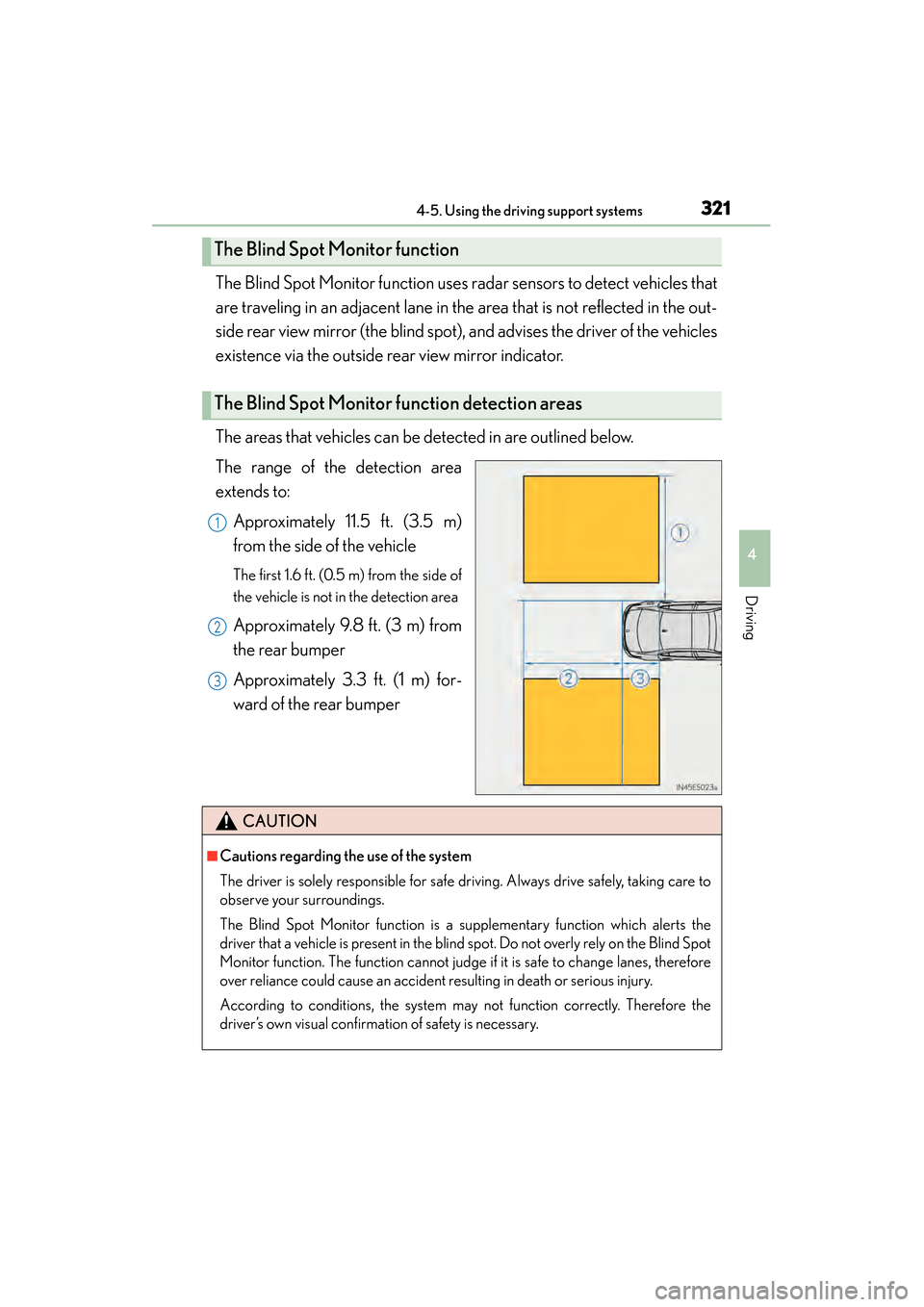
The areas that vehicles can be detected in are outlined below.
The range of the detection area
extends to:Approximately 11.5 ft. (3.5 m)
from the side of the vehicle
The first 1.6 ft. (0.5 m) from the side of
the vehicle is not in the detection area
Approximately 9.8 ft. (3 m) from
the rear bumper
Approximately 3.3 ft. (1 m) for-
ward of the rear bumper
The Blind Spot Monitor function
The Blind Spot Monitor function detection areas
1
2
3
CAUTION
■Cautions regarding the use of the system
The driver is solely responsible for safe driving. Always drive safely, taking care to
observe your surroundings.
The Blind Spot Monitor function is a supplementary function which alerts the
driver that a vehicle is present in the blind spot. Do not overly rely on the Blind Spot
Monitor function. The function cannot judge if it is safe to change lanes, therefore
over reliance could cause an accident resulting in death or serious injury.
According to conditions, the system may not function correctly. Therefore the
driver’s own visual confirmation of safety is necessary.
Page 325 of 918
324
ES350_300h_OM_OM33A60U_(U)
4-5. Using the driving support systems
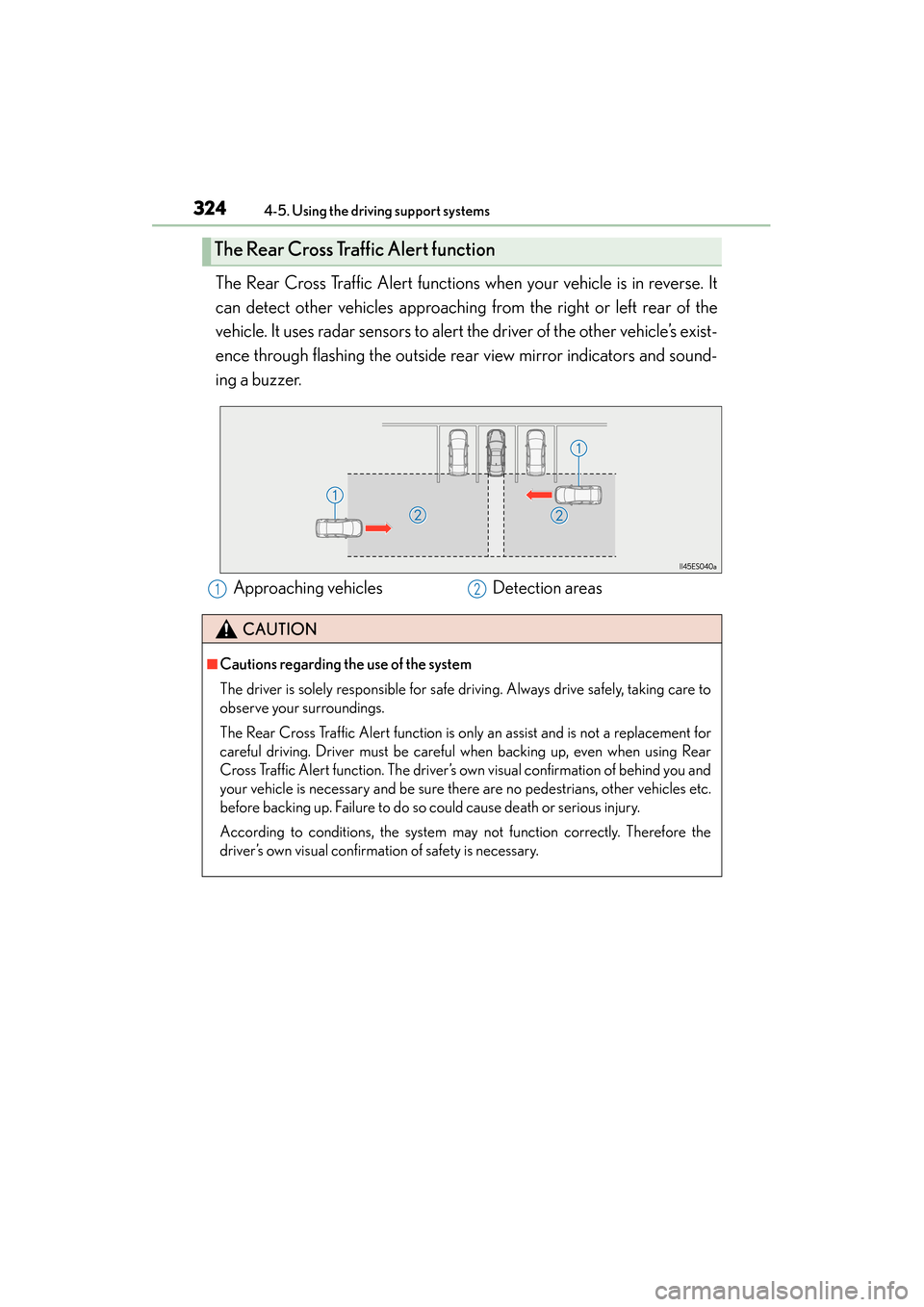
The Rear Cross Traffic Alert functions when your vehicle is in reverse. It
can detect other vehicles approaching from the right or left rear of the
vehicle. It uses radar sensors to alert the driver of the other vehicle’s exist-
ence through flashing the outside rear view mirror indicators and sound-
ing a buzzer.
The Rear Cross Traffic Alert function
Approaching vehiclesDetection areas12
CAUTION
■Cautions regarding the use of the system
The driver is solely responsible for safe driving. Always drive safely, taking care to
observe your surroundings.
The Rear Cross Traffic Alert function is only an assist and is not a replacement for
careful driving. Driver must be careful when backing up, even when using Rear
Cross Traffic Alert function. The driver’s own visual confirmation of behind you and
your vehicle is necessary and be sure there are no pedestrians, other vehicles etc.
before backing up. Failure to do so could cause death or serious injury.
According to conditions, the system may not function correctly. Therefore the
driver’s own visual confirmation of safety is necessary.
Page 337 of 918
336
ES350_300h_OM_OM33A60U_(U)
5-1. Lexus Display Audio systemLexus Display Audio system ......................................... 338
Display settings .......................... 343
Setup menu...................................345
Mobile Assistant .......................... 351
5-2. Using the air conditioning system and defogger
Automatic air conditioning system (with the Lexus
Display Audio system) ..........353
Automatic air conditioning system (without a navigation
system or the Lexus
Display Audio system) ..........365
Rear window and outside rear view mirror defoggers........... 378
Windshield wiper de-icer ...... 380 5-3. Using the Lexus
Display Audio system
Audio system (with the Lexus Display Audio system) ..........382
Using the radio............................385
Using the CD player................ 400
Playing an audio CD and MP3/WMA discs ................... 401
Listening to an iPod ...................... 411
Listening to a USB memory ......................... 419
Using the AUX port ................. 429
Listening to Bluetooth
® audio .................... 431
Optimal use of the audio system...................... 446
Using the steering wheel audio switches ..........................448
Hands-free system (for cellular phone)...................451
Using the Bluetooth
®
phone ........................................... 459
Setting the hands-free system .......................................... 478
Bluetooth
® settings ................... 491
Page 338 of 918
337
ES350_300h_OM_OM33A60U_(U)
5Interior features
5-4. Using the audio systemAudio system (without a navigation system or
the Lexus Display
Audio system) .......................... 500
Using the radio ........................... 503
Using the CD player .................. 512
Playing MP3 and WMA discs................................. 521
Operating an iPod ..................... 529
Operating a USB memory.....539
Bluetooth
® audio system ...... 548
Using the Bluetooth
®
audio system.............................. 552
Operating a Bluetooth
®
enabled portable player ....... 557
Setting up a Bluetooth
®
enabled portable player ........ 561
Bluetooth
® audio
system setup ............................. 568
Optimal use of the audio system..............................569
Using the AUX port................... 571
Using the steering wheel audio switches .......................... 573
Hands-free system (for cellular phone) ..................576
Using the hands-free system (for cellular phones) ................581
Making a phone call ................. 589
Setting a cellular phone ...........593
Security and system setup ..... 598
Using the phone book............. 603 5-5. Using the interior lights
Interior lights list ............................ 611• Interior light ..............................612
• Personal lights .........................612
5-6. Using the storage features List of storage features ..............614• Glove box .................................616
• Console box............................. 617
• Cup holders ............................ 618
• Auxiliary box ............................619
Trunk features .............................. 620
5-7. Other interior features Sun visors and vanity mirrors ................... 622
Clock............................................... 623
Power outlets ............................... 624
Heated steering wheel ............ 626
Seat heaters and ventilators ................................... 628
Armrest ..........................................630
Rear sunshade/ rear door sunshades ............... 631
Trunk storage extension .......... 634
Coat hooks ................................... 635
Assist grips.................................... 636
Garage door opener................ 637
Compass ....................................... 644
Safety Connect ........................... 649
Page 379 of 918
378
ES350_300h_OM_OM33A60U_(U)
5-2. Using the air conditioning system and defogger
Rear window and outside rear view mirror
defoggers
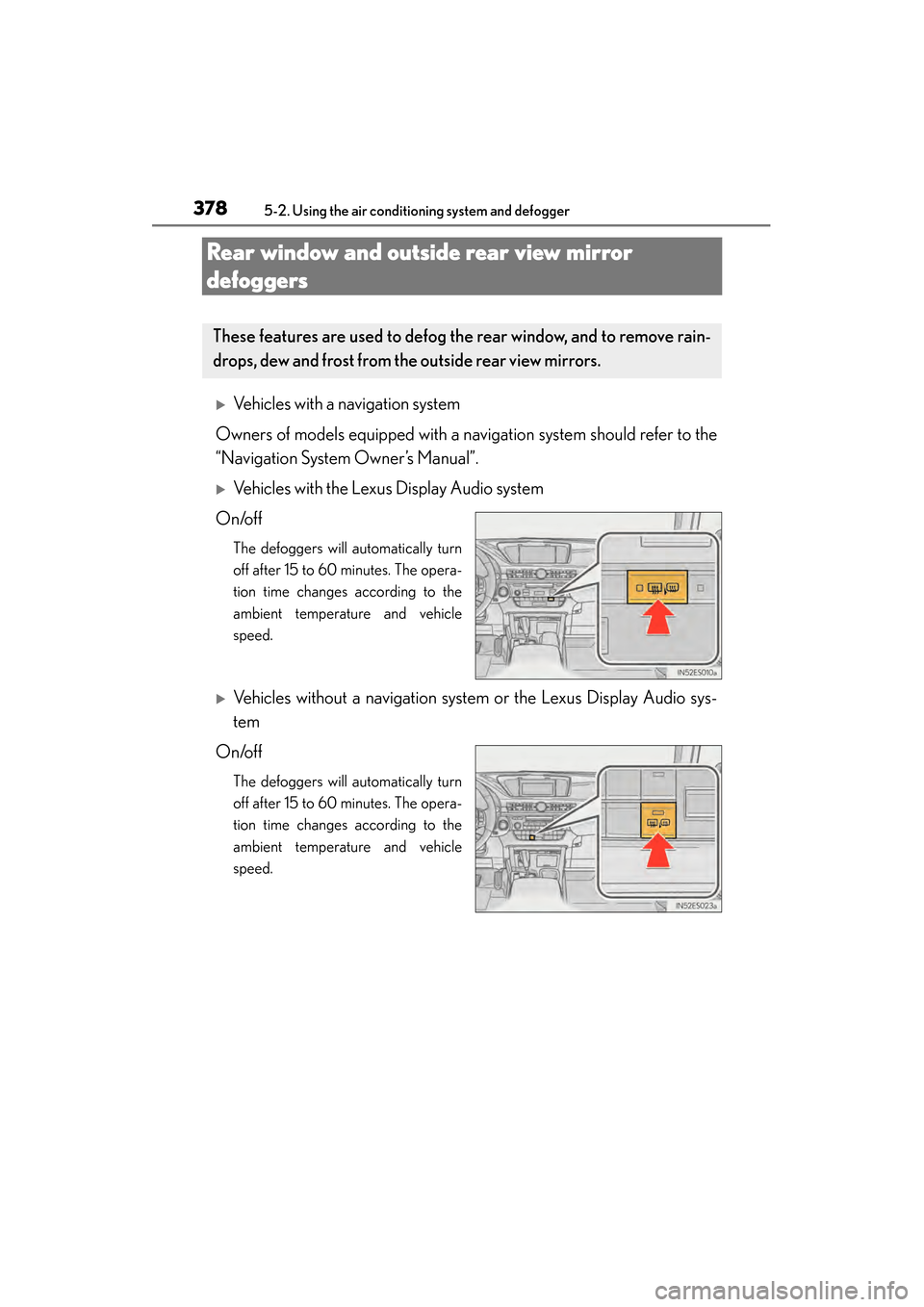
XVehicles with a navigation system
Owners of models equipped with a navigation system should refer to the
“Navigation System Owner’s Manual”.
XVehicles with the Lexus Display Audio system
On/off
The defoggers will automatically turn
off after 15 to 60 minutes. The opera-
tion time changes according to the
ambient temperature and vehicle
speed.
XVehicles without a navigation system or the Lexus Display Audio sys-
tem
On/off
The defoggers will automatically turn
off after 15 to 60 minutes. The opera-
tion time changes according to the
ambient temperature and vehicle
speed.
These features are used to defog the rear window, and to remove rain-
drops, dew and frost from th e outside rear view mirrors.
Page 380 of 918
ES350_300h_OM_OM33A60U_(U)
3795-2. Using the air conditioning system and defogger
5
Interior features
■Operating conditions
The “START STOP ENGINE” <“POWER”> switch must be in the IGNITION ON
CAUTION
■When the outside rear view mirror defoggers are on
Do not touch the rear view mirror surfaces, as they can become very hot and burn
you.
NOTICE
■To prevent 12-volt battery discharge
Turn the defoggers off when the engine
Page 623 of 918
622
ES350_300h_OM_OM33A60U_(U)
5-7. Other interior features
Sun visors and vanity mirrors
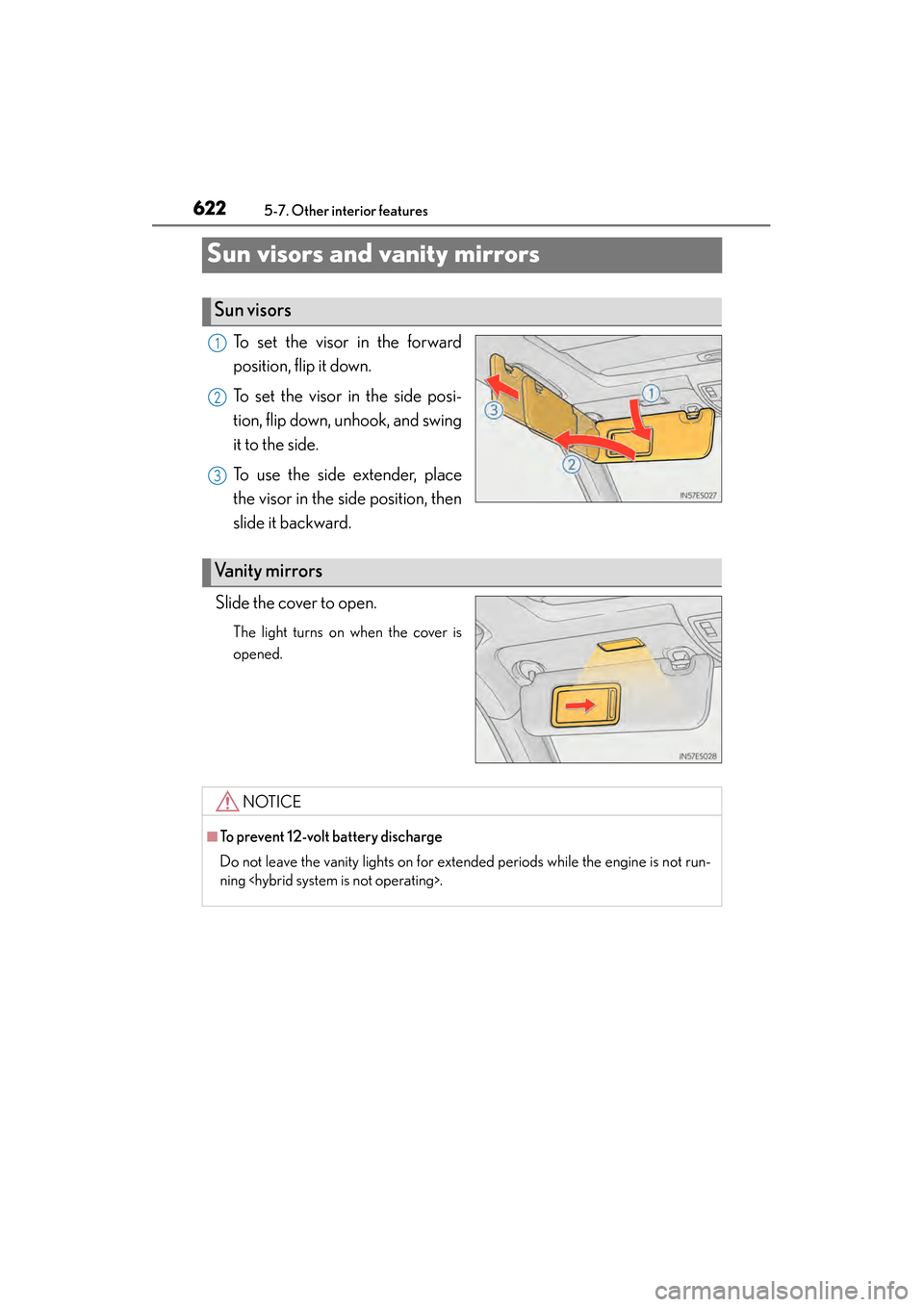
To set the visor in the forward
position, flip it down.
To set the visor in the side posi-
tion, flip down, unhook, and swing
it to the side.
To use the side extender, place
the visor in the side position, then
slide it backward.
Slide the cover to open.
The light turns on when the cover is
opened.
Sun visors
1
2
3
Va n i t y m i r r o r s
NOTICE
■To prevent 12-volt battery discharge
Do not leave the vanity lights on for extended periods while the engine is not run-
ning
Page 645 of 918
644
ES350_300h_OM_OM33A60U_(U)
5-7. Other interior features
Compass∗
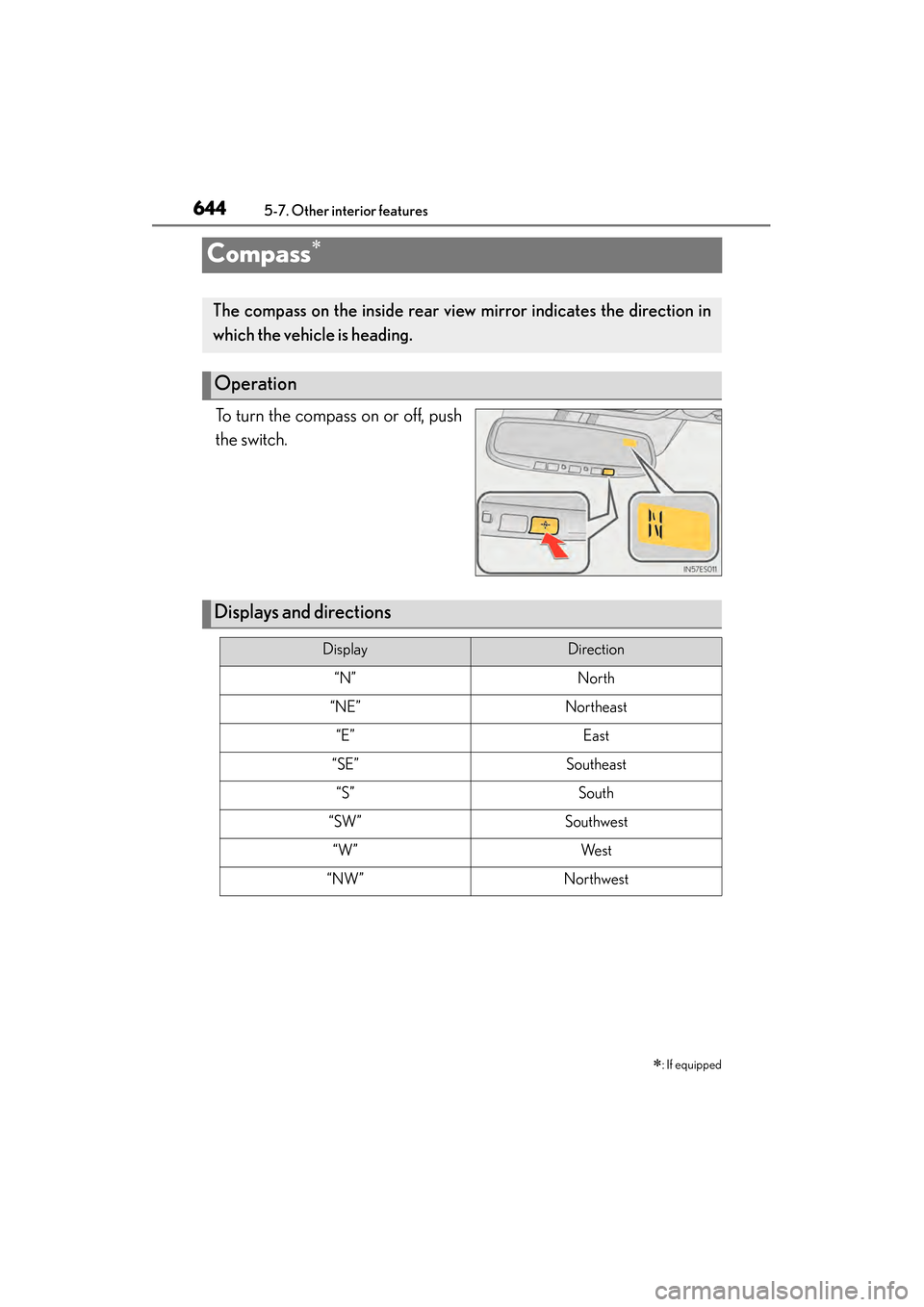
To turn the compass on or off, push
the switch.∗
: If equipped
The compass on the inside rear view mirror indicates the direction in
which the vehicle is heading.
Operation
Displays and directions
DisplayDirection
“N”North
“NE”Northeast
“E”East
“SE”Southeast
“S”South
“SW”Southwest
“W”We s t
“NW”Northwest
Page 648 of 918
ES350_300h_OM_OM33A60U_(U)
6475-7. Other interior features
5
Interior features
■Conditions unfavorable to correct operation
The compass may not show the correct direction in the following conditions:
●The vehicle is stopped immediately after turning.
●The vehicle is on an inclined surface.
●The vehicle is in a place where the earth’s magnetic field is subject to interference
by artificial magnetic fields (underground car park/parking lot, under a steel tower,
between buildings, roof car park/parking lot, near an intersection, near a large
vehicle, etc.).
●The vehicle has become magnetized.
(There is a magnet or metal object near the inside rear view mirror.)
●The 12-volt battery has been disconnected.
●A door is open.
CAUTION
■While driving the vehicle
Do not adjust the display. Adjust the display only when the vehicle is stopped.
■When doing the circling calibration
Secure a wide space, and watch out for people and vehicles in the vicinity. Do not
violate any local traffic rules while performing circling calibration.