read Lexus ES300h 2014 Owner's Guide
[x] Cancel search | Manufacturer: LEXUS, Model Year: 2014, Model line: ES300h, Model: Lexus ES300h 2014Pages: 918, PDF Size: 25.26 MB
Page 375 of 918
374
ES350_300h_OM_OM33A60U_(U)
5-2. Using the air conditioning system and defogger
■Registering air conditioning settings to electronic keys
●Unlocking the vehicle using an electronic key and turning the “START STOP
ENGINE” <“POWER”> switch to IGNITION ON
registered air conditioning settings.
●When the “START STOP ENGINE” <“POWER”> is turned off, the current air con-
ditioning settings will automatically be registered to the electronic key that was
used to unlock the vehicle.
The system may not operate correctly if more than one electronic key is in the vicinity
or if the smart access system with push-button start is used to unlock a passenger
door.
Settings for the electronic key and the corresponding door can be changed.
Contact your Lexus dealer.
■Using automatic mode
Fan speed is adjusted automatically according to the temperature setting and the
ambient conditions.
Therefore, the fan may stop for a while until warm or cool air is ready to flow immedi-
ately after is pressed.
■Fogging up of the windows
●The windows will easily fog up when the humidity in the vehicle is high. Selecting
on will dehumidify the air from the outlets and defog the windshield effectively.
●If you turn off, the windows may fog up more easily.
●The windows may fog up if the recirculated air mode is used.
■Windshield fog detection function (if equipped)
When automatic mode is set, the humidity sensor ( →P. 377) detects fog on the
windshield and controls the air conditioning system to prevent fog.
■Outside/recirculated air mode
●When driving on dusty roads such as tunnels or in heavy traffic, set the outside/
recirculated air mode button to the recirculated air mode. This is effective in pre-
venting outside air from entering the vehicl e interior. During cooling operation, set-
ting the recirculated air mode will also cool the vehicle interior effectively.
●Outside/recirculated air mode may automatically switch depending on the tem-
perature setting or the inside temperature.
Page 391 of 918
390
ES350_300h_OM_OM33A60U_(U)
5-3. Using the Lexus Display Audio system
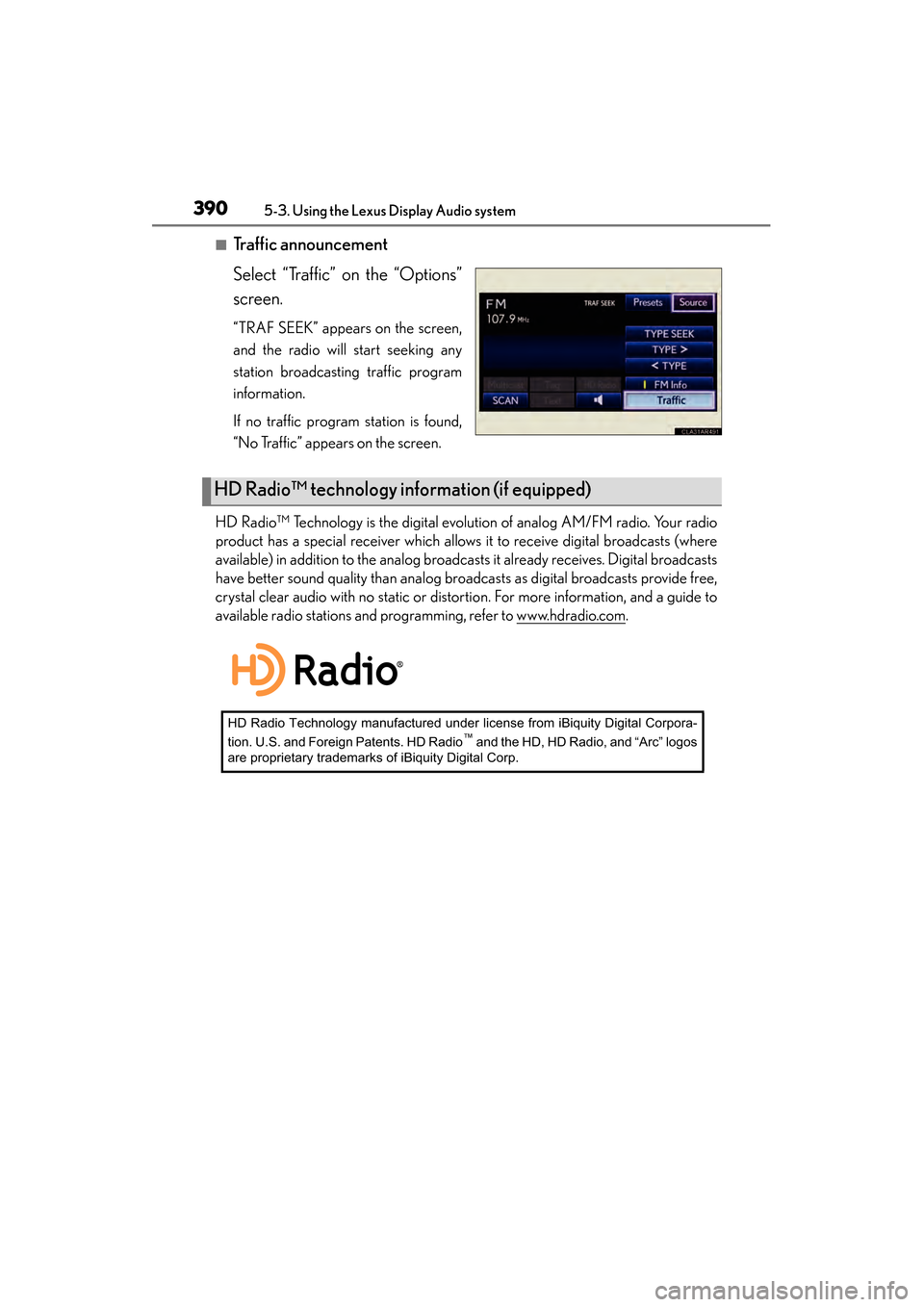
■Traffic announcement
Select “Traffic” on the “Options”
screen.
“TRAF SEEK” appears on the screen,
and the radio will start seeking any
station broadcasting traffic program
information.
If no traffic program station is found,
“No Traffic” appears on the screen.
HD Radio™ Technology is the digital evolution of analog AM/FM radio. Your radio
product has a special receiver which allows it to receive digital broadcasts (where
available) in addition to the analog broadcasts it already receives. Digital broadcasts
have better sound quality than analog broadcasts as digital broadcasts provide free,
crystal clear audio with no static or distortion. For more information, and a guide to
available radio stations and programming, refer to www.hdradio.com
.
HD Radio™ technology information (if equipped)
HD Radio Technology manufactured under license from iBiquity Digital Corpora-
tion. U.S. and Foreign Patents. HD Radio™ and the HD, HD Radio, and “Arc” logos
are proprietary trademarks of iBiquity Digital Corp.
Page 456 of 918
ES350_300h_OM_OM33A60U_(U)
4555-3. Using the Lexus Display Audio system
5
Interior features
■About the phonebook in this system
The following data is stored for every registered phone. When another phone is con-
necting, you cannot read the registered data.
●Phonebook data
●Call history date
●Speed dial
When you delete the phone, the above-mentioned data is also deleted.
■When you release your car
Be sure to initialize your data. ( →P. 3 4 7 )
■About Bluetooth®
■Compatible models
This system supports the following service.
●Bluetooth® Specification:
Ver. 1.1 or higher (Recommended: Ver. 2.1+EDR or higher)
●Profiles:
• HFP (Hands Free Profile) Ver. 1.0 or higher (Recommended: Ver. 1.5 or higher) This is a profile to allow hands-free phone calls using the cellular phone or head
sets. It has an outgoing and incoming call function.
• OPP (Object Push Profile) Ver. 1.1 or higher This is a profile to exchange phonebook data. When the Bluetooth
® phone has
PBAP and OPP, OPP cannot be used.
• PBAP (Phone Book Access Profile) Ver. 1.0 or higher This is a profile to transfer phonebook data.
If your cellular phone does not support HFP, you cannot enter the Bluetooth
® phone.
You need to take OPP or PBAP service individually.
Please go to the website at http://www.lexus.com/MobileLink
to find approved por-
table players for this system. The Bluetooth
® word mark and logos are
registered trademarks owned by Bluetooth
SIG, Inc. and any use of such marks by
PIONEER CORPORATION is under
license. Other trademarks and trade names
are those of their respective owners.
Page 485 of 918
484
ES350_300h_OM_OM33A60U_(U)
5-3. Using the Lexus Display Audio system
■Phonebook data
Phonebook data is managed for every registered phone. When another phone is
connecting, you cannot read the registered data.
■Setting the phonebook in a different way (To display the “Contacts” screen)Display the “Phone” screen. ( →P. 4 5 9 )
Select “Contacts” on the “Phone” screen.
Select “Options” on the “Contacts” screen.
Select “Manage Contacts” on the “Contacts” screen.
■When transferring a phone number
Transfer the phone number while engine is running
If your cellular phone is OPP or PBAP compatible, you may need to input “1234” by
your cellular phone for OBEX certification.
■When you have selected “Update Contacts” to transfer the phone number
●If your cellular phone does not support PBAP service, you cannot use this function.
●If your phone supports PBAP service, you can transfer the phonebook data with-
out operating your phone.
■When you have selected “Replace Contacts” or “Add Contacts” to transfer the
phone number
If your cellular phone does not support OPP service, you cannot use these functions.
You can transfer the phonebook data only by operating your phone.
■Transferring the phone number in a different way (To display the “Transfer Con-
tacts” screen) Display the “Phone” screen. ( →P. 4 5 9 )
Select “Contacts” on the “Phone” screen.
Select “Transfer” on the “Contacts” screen.
■Transferring the phone number while Bluetooth® audio is playing
Bluetooth
® audio will disconnect. It will reconnect automatically when data transfer
finishes. It will not be reconnected depending on the phone you are using.
1
2
3
4
1
2
3
Page 554 of 918
ES350_300h_OM_OM33A60U_(U)
5535-4. Using the audio system
5
Interior features
By following voice guidance instructions output from the speaker, voice
commands enable the operation of the Bluetooth
® audio system without
the need to check the display or operate .
■Operation procedure when using voice commands
Press the talk switch and follow voice guidance instructions.
■Auxiliary commands when using voice commands
The following auxiliary commands can be used when operating the sys-
tem using a voice command: “Cancel”:
Exits the Bluetooth
® audio system
“Repeat”:
Repeats the previous voice guidance instruction
“Go back”:
Returns to the previous procedure
“Help”:
Reads aloud the function summary if a help comment is registered
for the selected function
Operating the system using voice commands
Page 564 of 918
ES350_300h_OM_OM33A60U_(U)
5635-4. Using the audio system
5
Interior features
Select “Connect Audio Player (Connect)” using a voice command or.
XPattern A
Select the portable player to be used by either of the following meth-
ods, and select “Confirm” by using a voice command or :
a. Press the talk switch and say the name of the desired portable player.
b. Press the talk switch and say “List Audio Players”. When the name ofthe desired portable player is read aloud, press the talk switch.
XPattern B
Select the portable player to be used using .
XPattern A
Press the talk switch and say “From Car” or “From Audio player”, and
select “Confirm” by using a voice command or .
XPattern B
Select “From Car” or “From Audio”, using .
If “From Car” is selected, the portable player will be automatically connected
whenever the “START STOP ENGINE” <“POWER”> switch is in either ACCES-
SORY or IGNITION ON
Selecting a portable player to be used
1
2
2
3
3
Page 565 of 918
564
ES350_300h_OM_OM33A60U_(U)
5-4. Using the audio system
Select “Change Name” using a voice command or .
XPattern A
Select the name of the portable player to be changed by either of the
following methods, and select “Confirm” using a voice command or :
a. Press the talk switch and say the name of the desired portable player.
b. Press the talk switch and say “List Audio Players”. When the name of the desired portable player is read aloud, press the talk switch.
XPattern B
Select the desired portable player name to be changed using .
Press the talk switch or select “Record Name” using , and say
the new name.
Select “Confirm” using a voice command or .
Changing the registered name of a portable player
1
2
2
3
4
Page 566 of 918
ES350_300h_OM_OM33A60U_(U)
5655-4. Using the audio system
5
Interior features
Select “List Audio Players (List Audios)” using a voice command or . The list of registered portable players will be read aloud.
When listing is complete, the system returns to “BT•A Setup”.
Pressing the talk switch while the name of a portable player is being read
aloud selects the portable player, and the following functions will become
available:
●Selecting a portable player: “Connect Audio Player (Connect)”
●Changing a registered name: “Change Name”
●Deleting a portable player: “Delete Audio Player (Delete Audio)”
Listing the registered portable players
Page 568 of 918
ES350_300h_OM_OM33A60U_(U)
5675-4. Using the audio system
5
Interior features
Select “Delete Audio Player (Delete Audio)” using a voice command
or .
XPattern A
Select the portable player to be deleted by either of the following meth-
ods and select “Confirm” using a voice command or :
a. Press the talk switch and say the name of the desired portable player.
b. Press the talk switch and say “List Audio Players”. When the name ofthe desired portable player is read aloud, press the talk switch.
XPattern B
Select the desired portable player to be deleted using .
If the portable player to be deleted is paired as a Bluetooth
® phone, the
registration of the cellular phone can be deleted at the same time. A voice
guidance instruction to delete a cellular phone is heard.
Select “Yes” or “No” using a voice command or .
(Bluetooth
® phone →P. 5 7 7 )
■The number of portable players that can be registered
Up to 2 portable players can be registered in the system.
Deleting a registered portable player
1
2
2
3
Page 584 of 918
ES350_300h_OM_OM33A60U_(U)
5835-4. Using the audio system
5
Interior features
By following voice guidance instructions output from the speaker, voice
commands enable the operation of the hands-free phone system without
the need to check the display or operate .
■Operation procedure when using voice commands
Press the talk switch and follow voice guidance instructions.
■Auxiliary commands when using voice commands
The following auxiliary commands can be used when operating the sys-
tem using a voice command:
“Cancel”:
Exits the hands-free phone system
“Repeat”:
Repeats the previous voice guidance instruction
“Go back”:
Returns to the previous procedure
“Help”:
Reads aloud the function summary if a help comment is registered for
the selected function
Operating the system using voice commands