warning Lexus ES300h 2014 Owner's Guide
[x] Cancel search | Manufacturer: LEXUS, Model Year: 2014, Model line: ES300h, Model: Lexus ES300h 2014Pages: 918, PDF Size: 25.26 MB
Page 93 of 918
92
ES350_300h_OM_OM33A60U_(U)
2. Instrument cluster
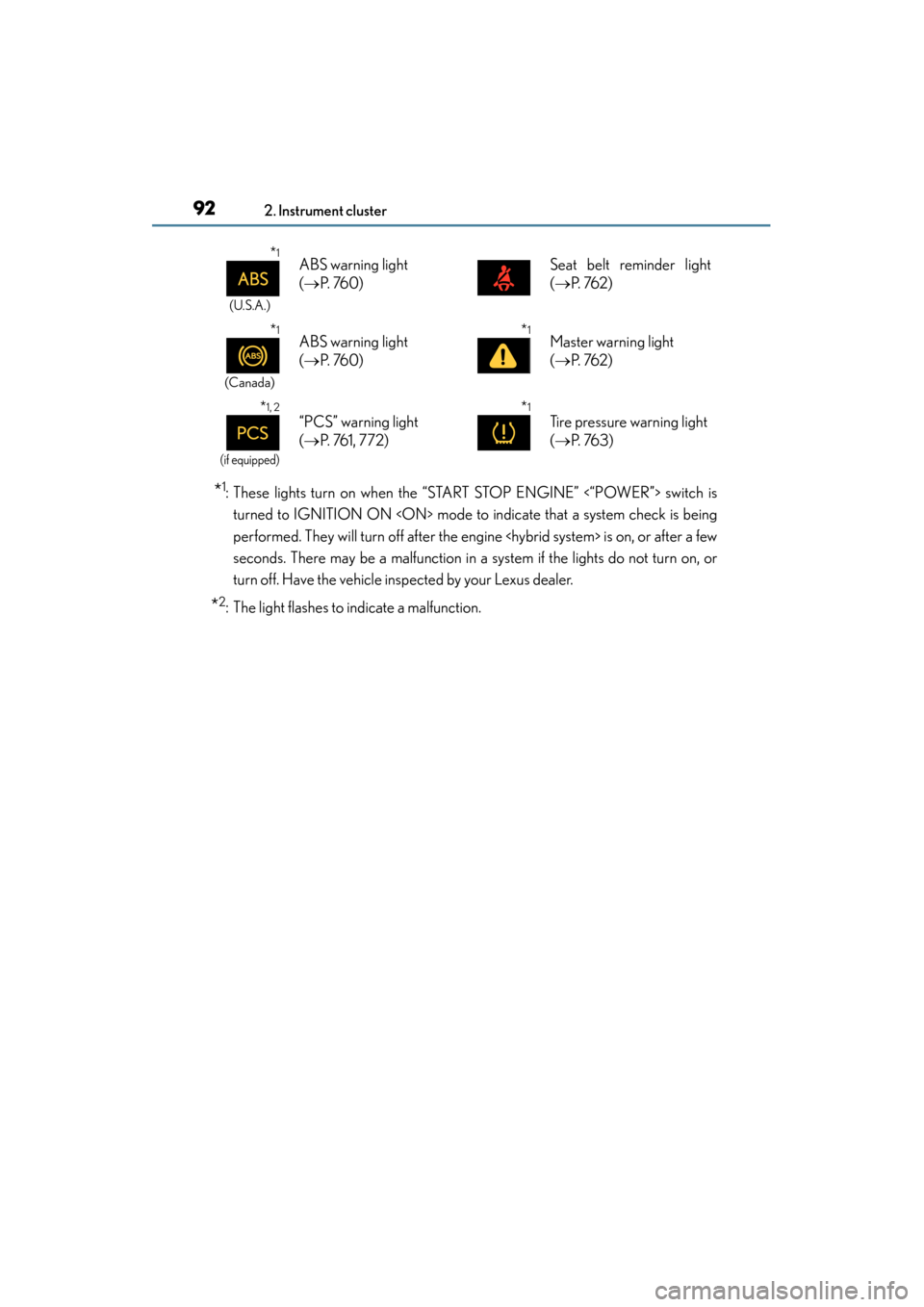
*1: These lights turn on when the “START STOP ENGINE” <“POWER”> switch isturned to IGNITION ON
performed. They will turn off after the engine
seconds. There may be a malfunction in a system if the lights do not turn on, or
turn off. Have the vehicle inspected by your Lexus dealer.
*2: The light flashes to indicate a malfunction.
*1
(U.S.A.)
ABS warning light
(→ P. 760)Seat belt reminder light
(→ P. 76 2 )
*1
(Canada)
ABS warning light
(→ P. 760)*1Master warning light
(→ P. 76 2 )
*1, 2
(if equipped)
“PCS” warning light
(→ P. 76 1 , 7 7 2 )*1
Tire pressure warning light
(→ P. 76 3 )
Page 94 of 918
ES350_300h_OM_OM33A60U_(U)
932. Instrument cluster
2
Instrument cluster
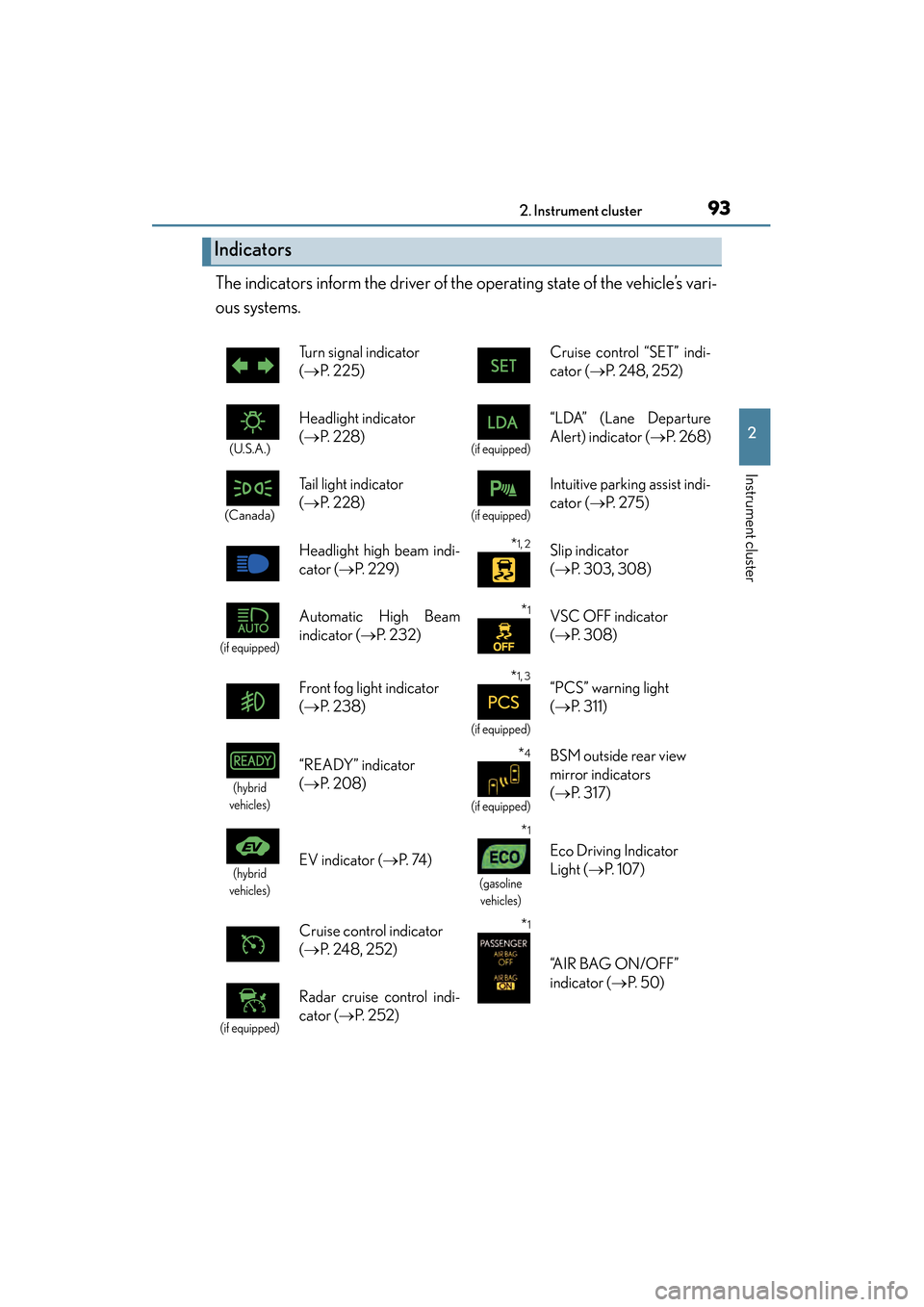
The indicators inform the driver of the operating state of the vehicle’s vari-
ous systems.
Indicators
Turn signal indicator
(→ P. 225) Cruise control “SET” indi-
cator (
→P. 248, 252)
(U.S.A.)
Headlight indicator
(→ P. 2 2 8 )
(if equipped)
“LDA” (Lane Departure
Alert) indicator ( →P. 2 6 8 )
(Canada)
Tail light indicator
(→ P. 2 2 8 )
(if equipped)
Intuitive parking assist indi-
cator ( →P. 2 7 5 )
Headlight high beam indi-
cator ( →P. 229)
*1, 2Slip indicator
(→ P. 303, 308)
(if equipped)
Automatic High Beam
indicator ( →P. 232) *1VSC OFF indicator
(→ P. 3 0 8 )
Front fog light indicator
( → P. 2 3 8 )
*1, 3
(if equipped)
“PCS” warning light
(→ P. 3 1 1 )
(hybrid
vehicles)
“READY” indicator
( → P. 2 0 8 )*4
(if equipped)
BSM outside rear view
mirror indicators
(→ P. 3 1 7 )
(hybrid
vehicles)EV indicator ( →P. 74 )
*1
(gasoline
vehicles)
Eco Driving Indicator
Light ( →P. 1 0 7 )
Cruise control indicator
( → P. 248, 252)
*1
“A I R B A G O N / O F F ”
indicator ( →P. 5 0 )
(if equipped)
Radar cruise control indi-
cator ( →P. 252)
Page 95 of 918
94
ES350_300h_OM_OM33A60U_(U)
2. Instrument cluster
*1: These lights turn on when the “START STOP ENGINE” <“POWER”> switch isturned to IGNITION ON
performed. They will turn off after the engine
seconds. There may be a malfunction in a system if the lights do not turn on, or
turn off. Have the vehicle inspected by your Lexus dealer.
*2: The light flashes to indicate that the system is operating.
*3: The light turns on when the system is turned off. The light flashes quickly to indi-cate that the system is operating.
*4: In order to confirm operation, the BSM outside rear view mirror indicators illumi-nate in the following situations:
• When the “START STOP ENGINE” <“POWER”> switch is turned to IGNI- TION ON
• When the BSM main switch is set to ON while the “START STOP ENGINE” <“POWER”> switch is in IGNITION ON
If the system is functioning correctly, the BSM outside rear view mirror indicators
will turn off after a few seconds.
If the BSM outside rear view mirror indicators do not illuminate or do not turn off,
there may be a malfunction with the system. If this occurs, have the vehicle
inspected by your Lexus dealer.
CAUTION
■If a safety system warning light does not come on
Should a safety system light such as the ABS and SRS warning light not come on
when you start the engine
not available to help protect you in an accident, which could result in death or seri-
ous injury. Have the vehicle inspected by your Lexus dealer immediately if this
occurs.
Page 101 of 918
100
ES350_300h_OM_OM33A60U_(U)
2. Instrument cluster
Multi-information display
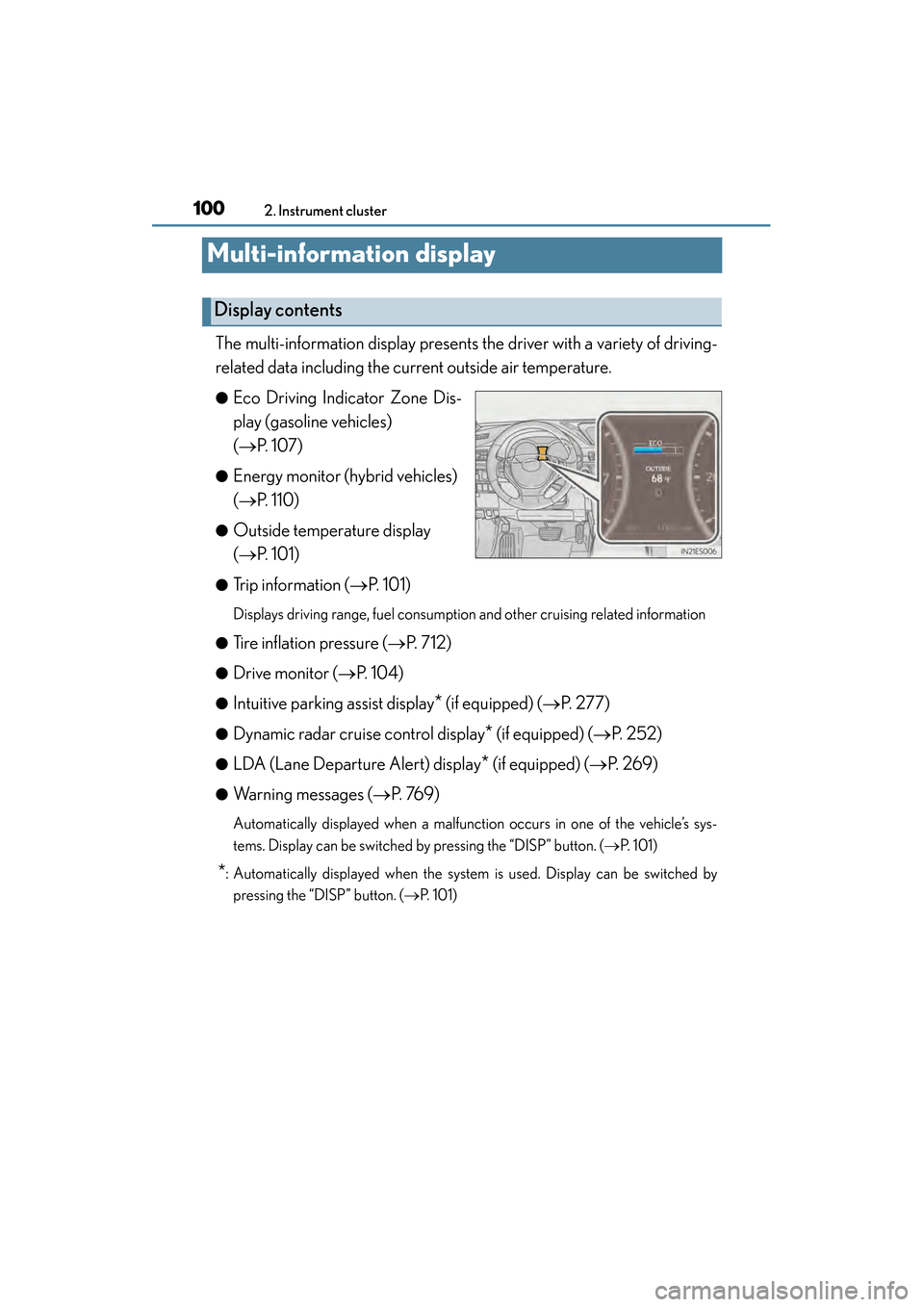
The multi-information display presents the driver with a variety of driving-
related data including the current outside air temperature.
●Eco Driving Indicator Zone Dis-
play (gasoline vehicles)
(→P. 1 0 7 )
●Energy monitor (hybrid vehicles)
(→P. 1 1 0 )
●Outside temperature display
(→P. 1 0 1 )
●Trip information ( →P. 1 0 1 )
Displays driving range, fuel consumption and other cruising related information
●
Tire inflation pressure ( →P. 712)
●Drive monitor ( →P. 1 0 4 )
●Intuitive parking assist display* (if equipped) (→ P. 2 7 7 )
●Dynamic radar cruise control display* (if equipped) (→P. 2 5 2 )
●LDA (Lane Departure Alert) display* (if equipped) (→P. 2 6 9 )
●Warning messages ( →P. 76 9 )
Automatically displayed when a malfunction occurs in one of the vehicle’s sys-
tems. Display can be switched by pressing the “DISP” button. (→ P. 1 0 1 )
*: Automatically displayed when the system is used. Display can be switched by
pressing the “DISP” button. ( →P. 101)
Display contents
Page 105 of 918
104
ES350_300h_OM_OM33A60U_(U)
2. Instrument cluster
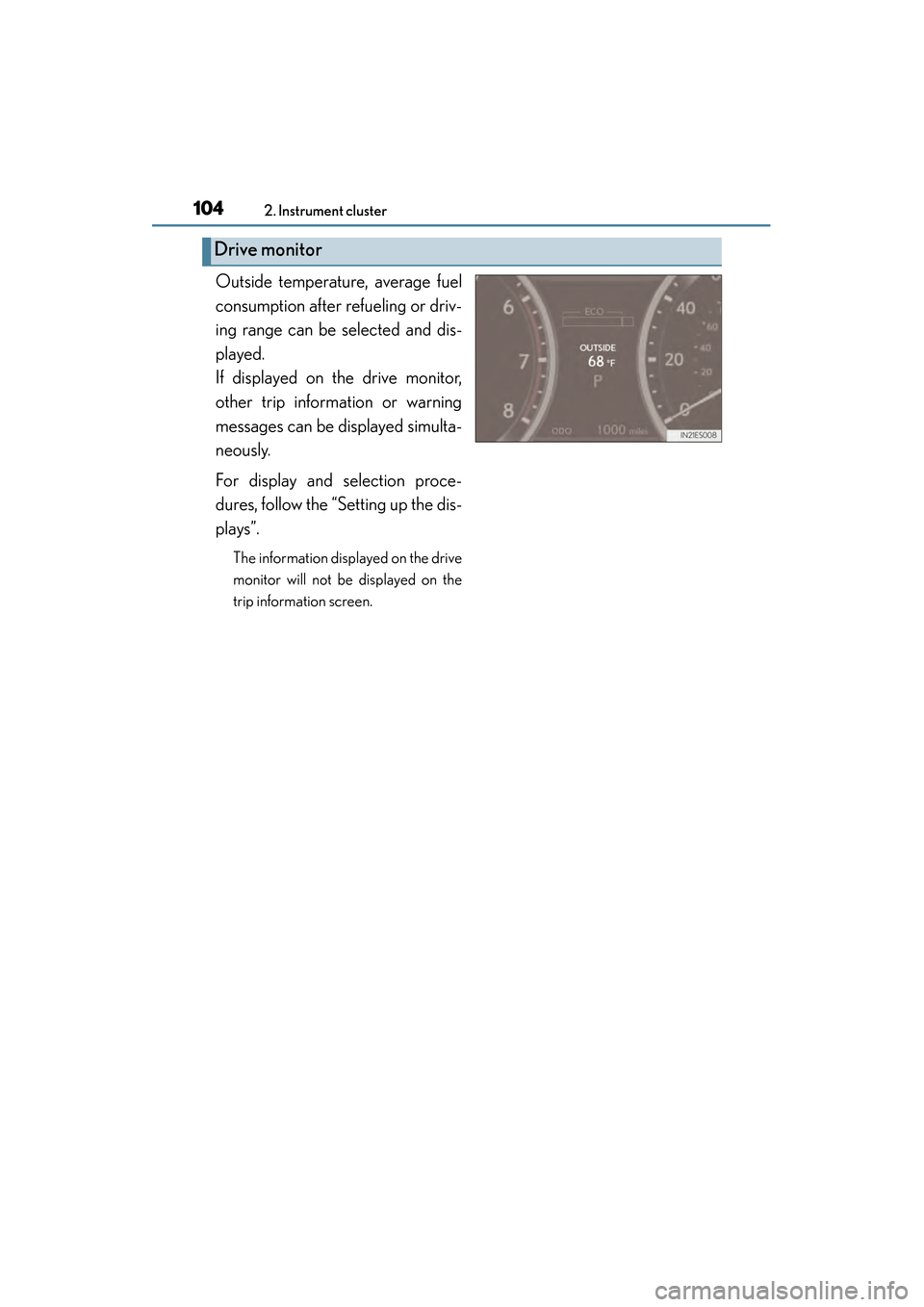
Outside temperature, average fuel
consumption after refueling or driv-
ing range can be selected and dis-
played.
If displayed on the drive monitor,
other trip information or warning
messages can be displayed simulta-
neously.
For display and selection proce-
dures, follow the “Setting up the dis-
plays”.
The information displayed on the drive
monitor will not be displayed on the
trip information screen.
Drive monitor
Page 109 of 918
108
ES350_300h_OM_OM33A60U_(U)
2. Instrument cluster
■Setting display automatic cancelation
In the following situations, setting display in which the settings can be changed
through the “DISP” button will automatically be turned off.
●When a warning message appears while the setting display is displayed
●When the vehicle begins to move while the setting display is displayed
■Tire inflation pressure
●It may take a few minutes to display the tire inflation pressure after the “START
STOP ENGINE” <“POWER”> switch is turned to IGNITION ON
may also take a few minutes to display the tire inflation pressure after inflation pres-
sure has been adjusted.
●“---” may be displayed if the tire position information cannot be determined due to
unfavorable radio wave conditions.
●Tire inflation pressure changes with temperature. The displayed values may also be
different from the values measured using a tire pressure gauge.
■Liquid crystal display
Small spots or light spots may appear on the display. This phenomenon is character-
istic of liquid crystal displays, and there is no problem continuing to use the display.
■Customization
Setting of available languages can be changed. (Customizable features →P. 8 6 2 )
Page 130 of 918
ES350_300h_OM_OM33A60U_(U)
1293-2. Opening, closing and locking the doors and trunk
3
Operation of each component
■Alarms and warning indicators
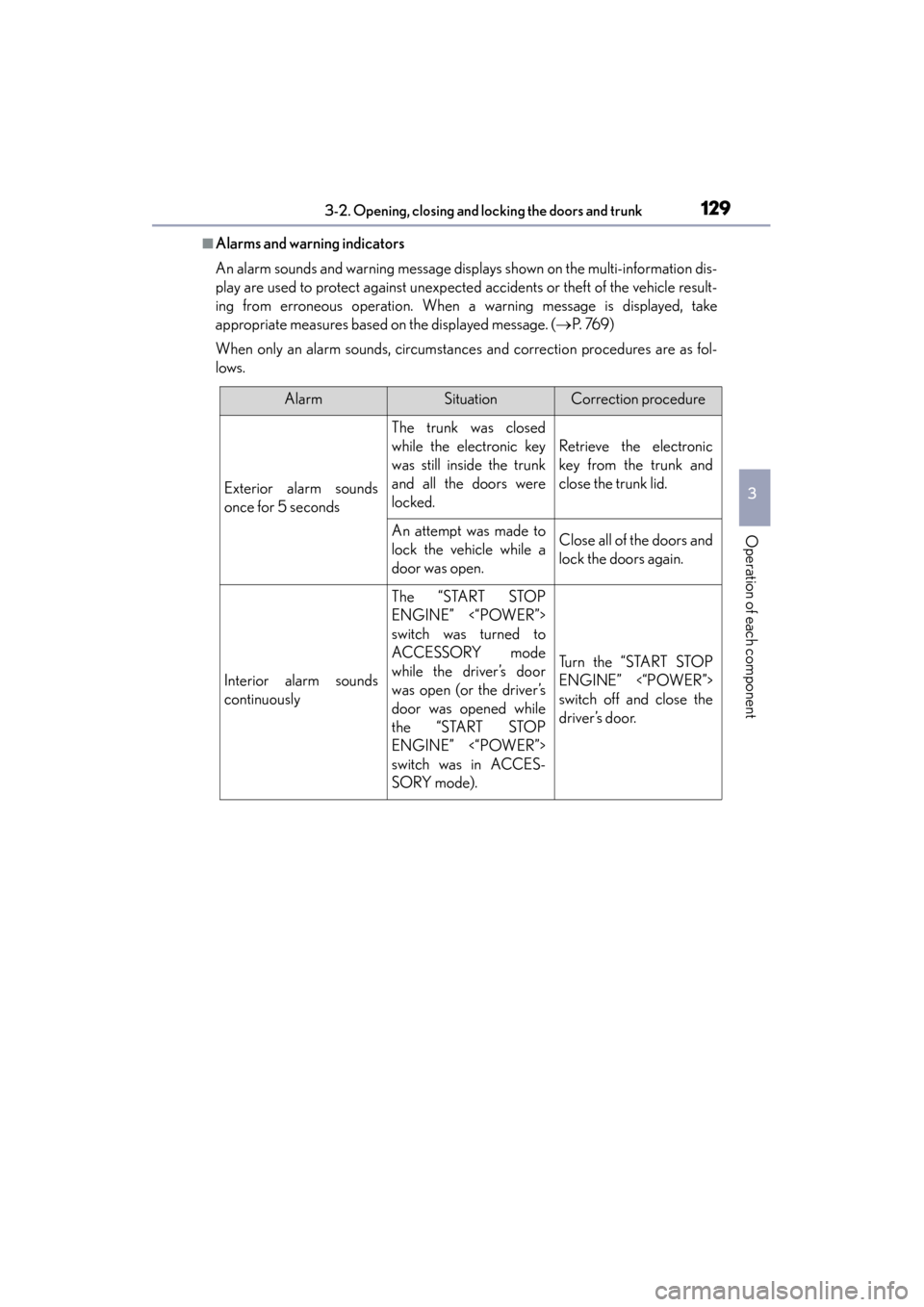
An alarm sounds and warning message displays shown on the multi-information dis-
play are used to protect against unexpected accidents or theft of the vehicle result-
ing from erroneous operation. When a warning message is displayed, take
appropriate measures based on the displayed message. (→P. 76 9 )
When only an alarm sounds, circumstances and correction procedures are as fol-
lows.
AlarmSituationCorrection procedure
Exterior alarm sounds
once for 5 seconds
The trunk was closed
while the electronic key
was still inside the trunk
and all the doors were
locked.
Retrieve the electronic
key from the trunk and
close the trunk lid.
An attempt was made to
lock the vehicle while a
door was open.Close all of the doors and
lock the doors again.
Interior alarm sounds
continuously
The “START STOP
ENGINE” <“POWER”>
switch was turned to
ACCESSORY mode
while the driver’s door
was open (or the driver’s
door was opened while
the “START STOP
ENGINE” <“POWER”>
switch was in ACCES-
SORY mode).
Turn the “START STOP
ENGINE” <“POWER”>
switch off and close the
driver’s door.
Page 138 of 918
ES350_300h_OM_OM33A60U_(U)
1373-2. Opening, closing and locking the doors and trunk
3
Operation of each component
■Certification for the smart access system with push-button start
XFor vehicles sold in the U.S.A., Hawaii, Guam and Puerto Rico
FCC ID: HYQ23AAB FCC ID: HYQ14FBA
FCC ID: NI4TMLF10-8 FCC ID: NI4TMLF10-3
FCC ID: NI4TMLF10-50 FCC ID: NI4TMLF10-51
NOTE:
This device complies with part 15 of the FCC Rules. Operation is subject to the fol-
lowing two conditions: (1) This device may not cause harmful interference, and (2)
this device must accept any interference received, including interference that may
cause undesired operation.
FCC WARNING:
Changes or modifications not expressly approved by the party responsible for com-
pliance could void the user’s authority to operate the equipment.
XFor vehicles sold in Canada
NOTE:
Operation is subject to the following two conditions: (1) this device may not cause
interference, and (2) this device must accept any interference, including interfer-
ence that may cause undesired operation of the device.
This device complies with Industry Canada licence-exempt RSS standard(s). Oper-
ation is subject to the following two condit ions: (1) this device may not cause interfer-
ence, and (2) this device must accept any interference, including interference that
may cause undesired operation of the device.
Page 142 of 918
ES350_300h_OM_OM33A60U_(U)
1413-2. Opening, closing and locking the doors and trunk
3
Operation of each component
■If the wireless remote control does not operate properly
Locking and unlocking the doors and opening the trunk: Use the mechanical key.
(→ P. 8 1 0 )
■Electronic key battery depletion
→P. 1 3 6
■When the electronic key battery is fully depleted
→P. 7 1 9
■Confirmation of the registered key number
The number of keys already registered to the vehicle can be confirmed. Ask your
Lexus dealer for details.
■Customization
Settings (e.g. wireless remote control system) can be changed.
(Customizable features: → P. 8 6 2 )
■Certification for wireless remote control
XFor vehicles sold in the U.S.A., Hawaii, Guam and Puerto Rico
FCC ID: HYQ23AAB FCC ID: HYQ14FBA
NOTE:
This device complies with part 15 of the FCC Rules. Operation is subject to the fol-
lowing two conditions: (1) This device may not cause harmful interference, and (2)
this device must accept any interference received, including interference that may
cause undesired operation.
FCC WARNING:
Changes or modifications not expressly approved by the party responsible for com-
pliance could void the user’s authority to operate the equipment.
XFor vehicles sold in Canada
NOTE:
Operation is subject to the following two conditions: (1) this device may not cause
interference, and (2) this device must accept any interference, including interfer-
ence that may cause undesired operation of the device.
Page 177 of 918
176
ES350_300h_OM_OM33A60U_(U)
3-5. Opening, closing the windows and moon roof
■Door lock linked window operation
●The power windows can be opened and closed using the mechanical key.*
(→ P. 8 1 0 )
●The power windows can be opened using the wireless remote control.* (→ P. 1 3 9 )
*: These settings must be customized at your Lexus dealer.
■When the 12-volt battery is disconnected
The window lock switch is disabled. If necessary, press the window lock switch after
reconnecting the battery.
■Power windows open warning buzzer
The buzzer sounds and a message is shown on the multi-information display in the
instrument cluster when the “START STOP ENGINE” <“POWER”> switch is turned
off and the driver’s door is opened with the power windows open.
■Customization
Settings (e.g. linked door lock operation) can be changed.
(Customizable features: →P. 8 6 2 )
CAUTION
Observe the following precautions.
Failure to do so may result in death or serious injury.
■Closing the windows
●Check to make sure that all passengers do not have any part of their body in a
position where it could be caught when a window is being operated.
●Do not allow children to operate the power windows.
Closing a power window on someone can cause serious injury, and in some
instances, even death.
■Jam protection function
●Never use any part of your body to intentionally activate the jam protection func-
tion.
●The jam protection function may not work if something gets caught just before
the window fully closes.