ad blue Lexus ES300h 2014 Warranty and Services Guide / (OM33A60U) Owner's Guide
[x] Cancel search | Manufacturer: LEXUS, Model Year: 2014, Model line: ES300h, Model: Lexus ES300h 2014Pages: 917, PDF Size: 11.11 MB
Page 455 of 917

ES350_300h_OM_OM33A60U_(U)
4555-3. Using the Lexus Display Audio system
5
Interior features
■About the phonebook in this system
The following data is stored for every registered phone. When another phone is con-
necting, you cannot read the registered data.
●Phonebook data
●Call history date
●Speed dial
When you delete the phone, the abov e-mentioned data is also deleted.
■When you release your car
Be sure to initialize your data. (P. 3 4 7 )
■About Bluetooth®
■Compatible models
This system supports the following service.
●Bluetooth® Specification:
Ver. 1.1 or higher (Recommended: Ver. 2.1+EDR or higher)
●Profiles:
• HFP (Hands Free Profile) Ver. 1.0 or higher (Recommended: Ver. 1.5 or higher) This is a profile to allow hands-free phone calls using the cellular phone or head
sets. It has an outgoing and incoming call function.
• OPP (Object Push Profile) Ver. 1.1 or higher This is a profile to exchange ph onebook data. When the Bluetooth
® phone has
PBAP and OPP, OPP cannot be used.
• PBAP (Phone Book Access Profile) Ver. 1.0 or higher This is a profile to transfer phonebook data.
If your cellular phone does not supp ort HFP, you cannot enter the Bluetooth
® phone.
You need to take OPP or PBAP service individually.
Please go to the website at http://www.lexus.com/MobileLink
to find approved por-
table players for this system. The Bluetooth
® word mark and logos are
registered trademarks owned by Bluetooth
SIG, Inc. and any use of such marks by PIO-
NEER CORPORATION is under license.
Other trademarks and trade names are those
of their respective owners.
Page 458 of 917

458
ES350_300h_OM_OM33A60U_(U)
5-3. Using the Lexus Display Audio system
CAUTION
■Caution while driving
Do not use a cellular phone or connect the Bluetooth
® phone.
■Caution regarding interference with electronic devices
●Your audio unit is fitted with Bluetooth® antennas. People with implantable car-
diac pacemakers, cardiac resynchronization therapy-pacemakers or implantable
cardioverter defibrillators should maintain a reasonable distance between them-
selves and the Bluetooth
® antennas. The radio waves may affect the operation of
such devices.
●Before using Bluetooth® devices, users of any electrical medical device other
than implantable cardiac pacemakers, cardiac resynchronization therapy-pace-
makers or implantable cardioverter defibrillators should consult the manufac-
turer of the device for information about its operation under the influence of radio
waves. Radio waves could have unexpect ed effects on the operation of such
medical devices.
NOTICE
■To prevent damage to cellular phones
Do not leave cellular phones in the vehicle. The temperature inside the vehicle may
become high, resulting in damage to the phone.
Page 459 of 917

459
ES350_300h_OM_OM33A60U_(U)
5-3. Using the Lexus Display Audio system
5
Interior features
Using the Bluetooth® phone
Device name
Bluetooth
® connection status (P. 453)
Dialing from history ( P. 4 6 9 )
Speed dialing ( P. 4 6 9 )
Dialing from the phonebook ( P. 4 6 7 )
Dialing by inputting a number ( P. 466)
Connecting a Bluetooth
® phone ( P. 4 6 2 )
To display the screen shown above, press on the steering wheel or
press the “MENU” button on the Lexu s Display Audio controller and then
select “Phone” on the “Menu” screen.
1
2
3
4
5
6
7
Page 460 of 917
460
ES350_300h_OM_OM33A60U_(U)
5-3. Using the Lexus Display Audio system
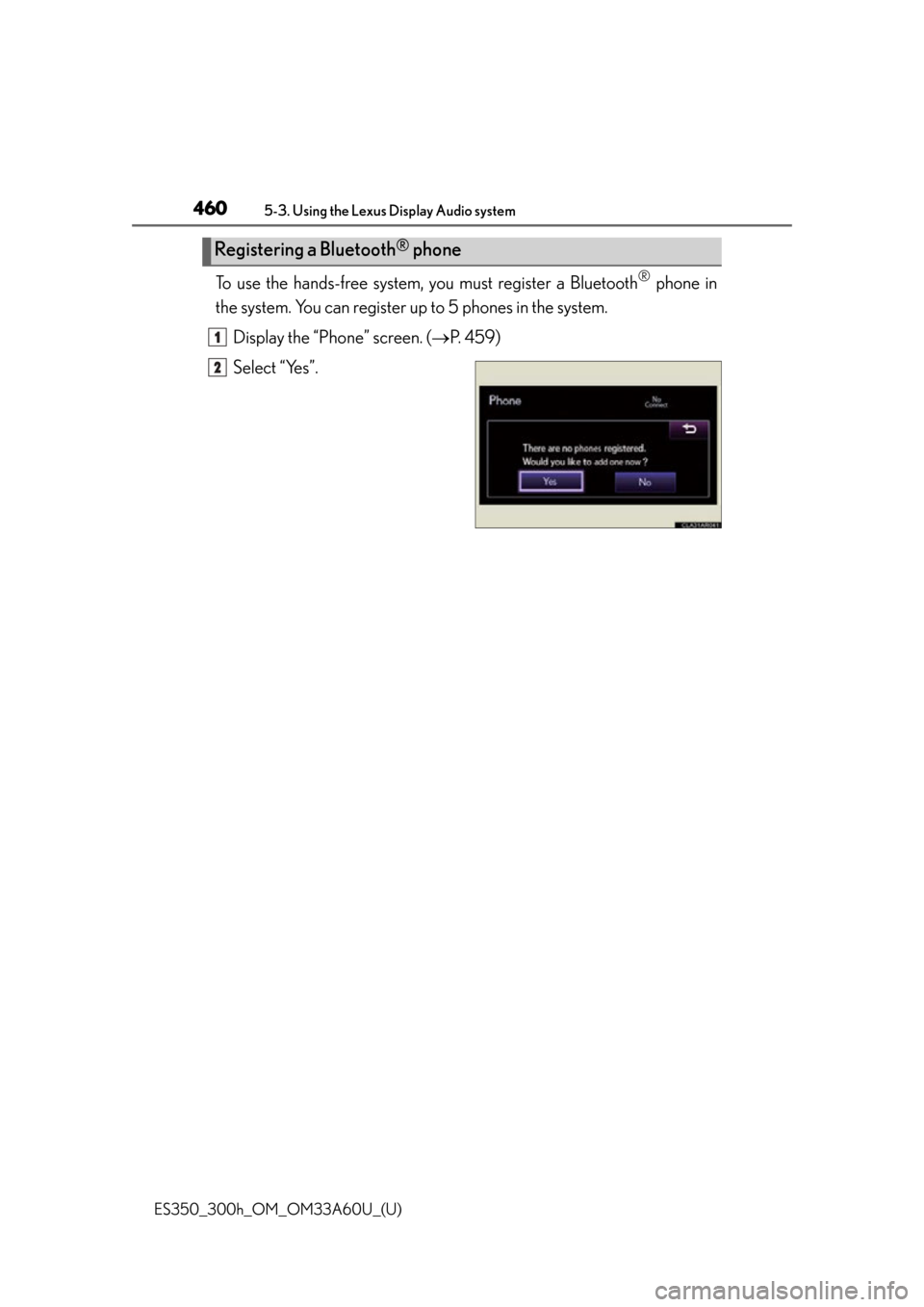
To use the hands-free system, you must register a Bluetooth® phone in
the system. You can register up to 5 phones in the system.
Display the “Phone” screen. ( P. 4 5 9 )
Select “Yes”.
Registering a Bluetooth® phone
1
2
Page 461 of 917
ES350_300h_OM_OM33A60U_(U)
4615-3. Using the Lexus Display Audio system
5
Interior features
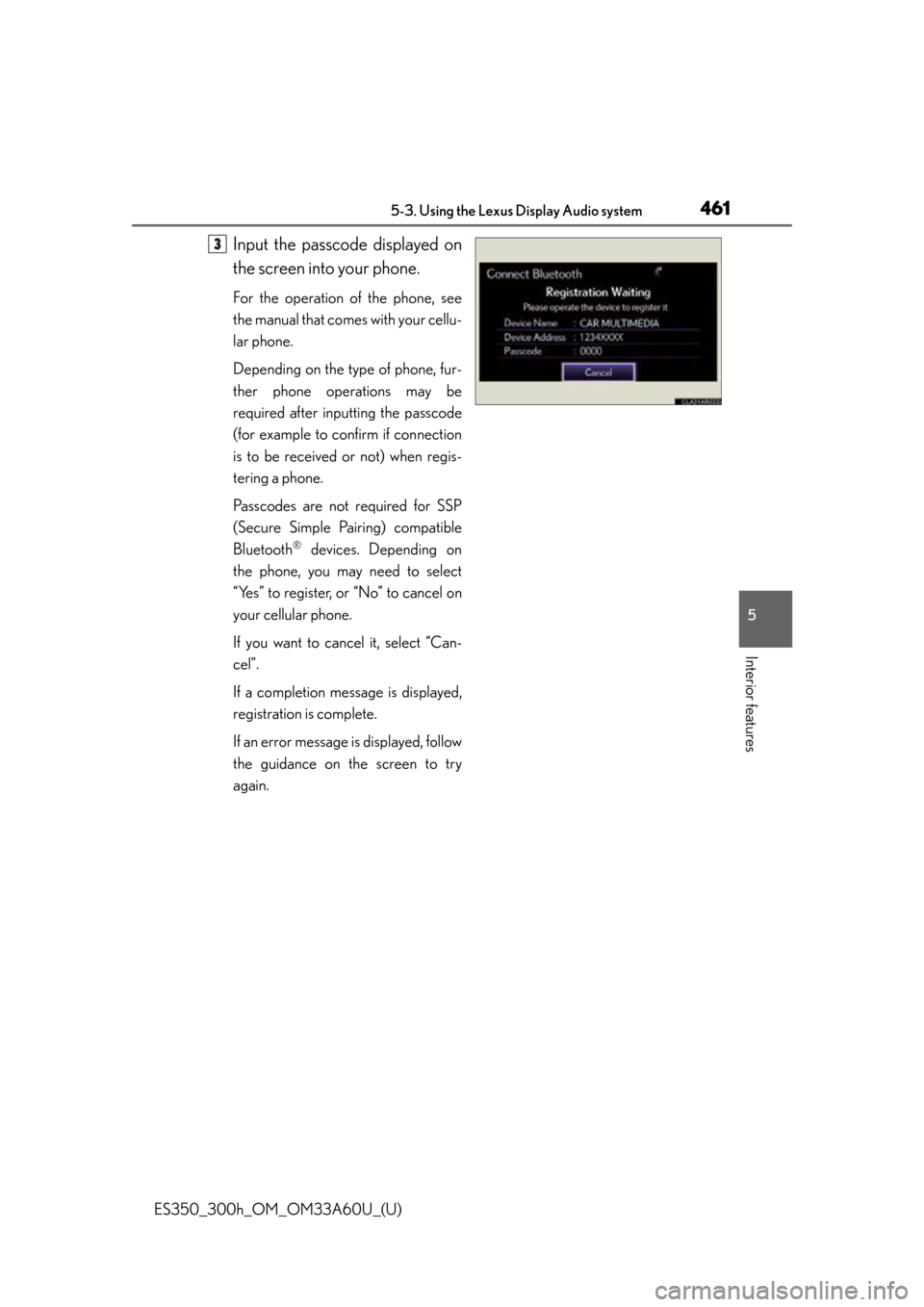
Input the passcode displayed on
the screen into your phone.
For the operation of the phone, see
the manual that comes with your cellu-
lar phone.
Depending on the type of phone, fur-
ther phone operations may be
required after inputting the passcode
(for example to confirm if connection
is to be received or not) when regis-
tering a phone.
Passcodes are not required for SSP
(Secure Simple Pairing) compatible
Bluetooth
® devices. Depending on
the phone, you may need to select
“Yes” to register, or “No” to cancel on
your cellular phone.
If you want to cancel it, select “Can-
cel”.
If a completion message is displayed,
registration is complete.
If an error message is displayed, follow
the guidance on the screen to try
again.
3
Page 462 of 917
462
ES350_300h_OM_OM33A60U_(U)
5-3. Using the Lexus Display Audio system
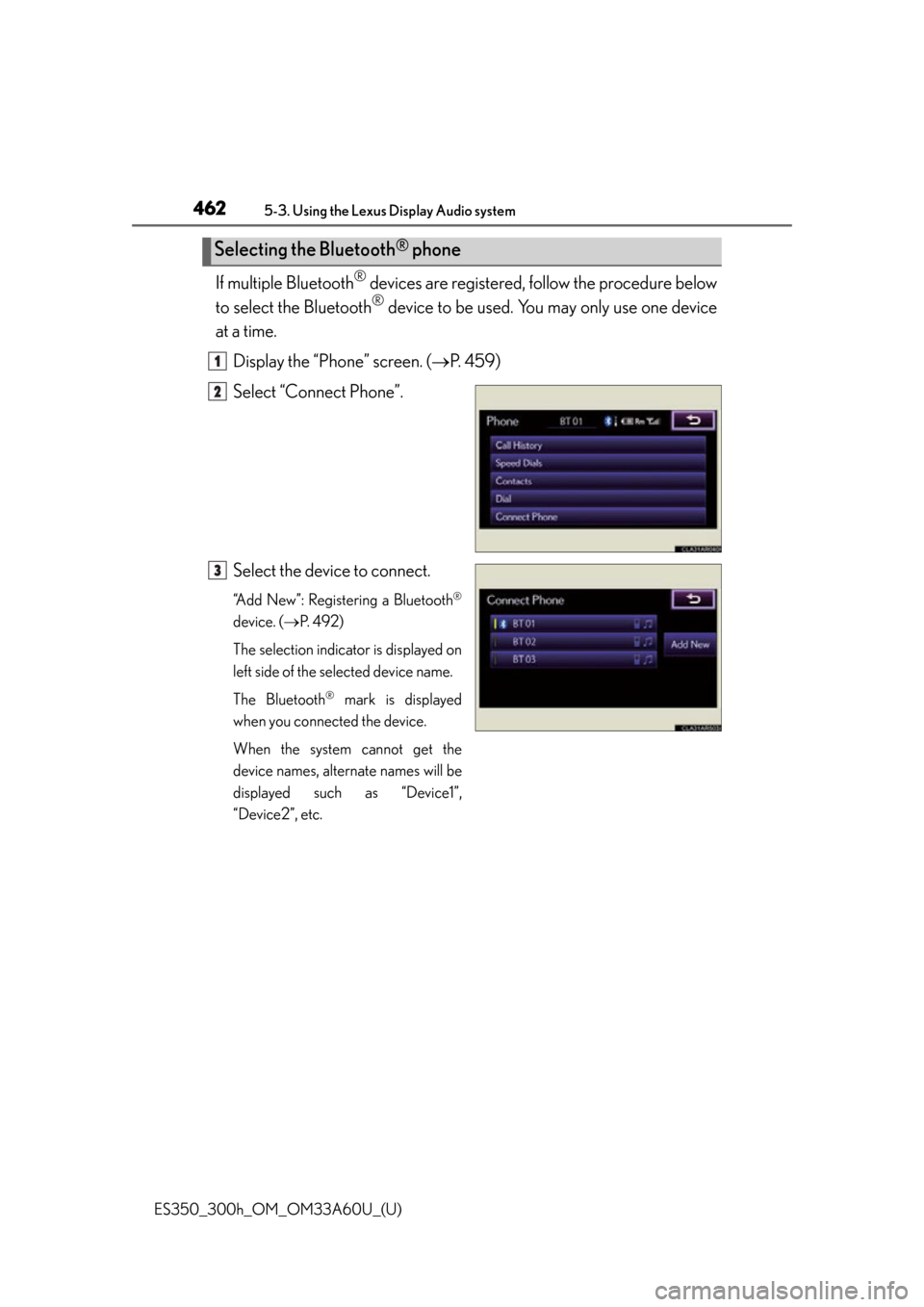
If multiple Bluetooth® devices are registered, follow the procedure below
to select the Bluetooth
® device to be used. You may only use one device
at a time.
Display the “Phone” screen. ( P. 4 5 9 )
Select “Connect Phone”.
Select the device to connect.
“Add New”: Registering a Bluetooth®
device. ( P. 4 9 2 )
The selection indicator is displayed on
left side of the selected device name.
The Bluetooth
® mark is displayed
when you connected the device.
When the system cannot get the
device names, alternate names will be
displayed such as “Device1”,
“Device2”, etc.
Selecting the Bluetooth® phone
1
2
3
Page 463 of 917

ES350_300h_OM_OM33A60U_(U)
4635-3. Using the Lexus Display Audio system
5
Interior features
There are two connecting methods available-automatic and manual.
■Automatic
When you register your phone, auto connection will be activated.
Always set it to this mo de and leave the Bluetooth
® phone in a place
where connection can be established.
When the “START STOP ENGINE” <“POWER”> switch is turned to
ACCESSORY or IGNITION ON
for a nearby cellular phone you have registered.
Next, the system automatically connec ts with the most recent of the
phones connected to in the past. Then, the connection result is dis-
played.
Depending on the type of phone, phone operations may be required
(to confirm if connection is to be received or not) even when automati-
cally connected.
Connecting a Bluetooth® phone
Page 464 of 917
464
ES350_300h_OM_OM33A60U_(U)
5-3. Using the Lexus Display Audio system
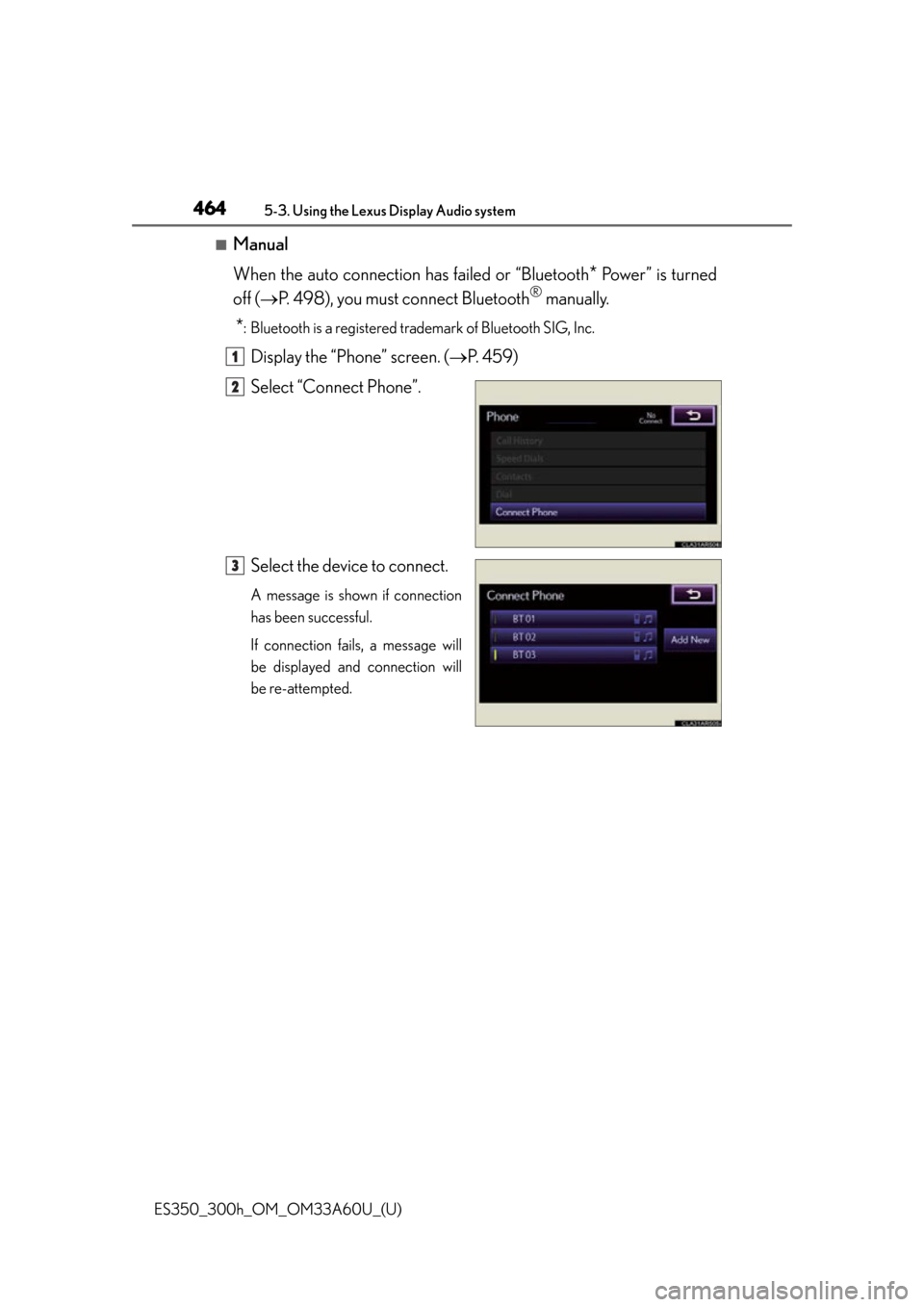
■Manual
When the auto connection has failed or “Bluetooth
* Power” is turned
off ( P. 498), you must connect Bluetooth
® manually.
*: Bluetooth is a registered trad emark of Bluetooth SIG, Inc.
Display the “Phone” screen. (P. 4 5 9 )
Select “Connect Phone”.
Select the device to connect.
A message is shown if connection
has been successful.
If connection fails, a message will
be displayed and connection will
be re-attempted.
1
2
3
Page 465 of 917

ES350_300h_OM_OM33A60U_(U)
4655-3. Using the Lexus Display Audio system
5
Interior features
■Reconnecting to the Bluetooth® phone
If the system cannot connect due to poor signal strength with the “START STOP
ENGINE” <“POWER”> switch in ACCESSORY or IGNITION ON
the system will automatically attempt to reconnect.
If the phone is turned off, the system will not attempt to reconnect. In this case, con-
nection must be made manually, or the phone must be re-selected.
■Connecting the phone while Bluetooth® audio is playing
●Bluetooth® audio will stop temporarily.
●It may take time to connect.
Page 466 of 917
466
ES350_300h_OM_OM33A60U_(U)
5-3. Using the Lexus Display Audio system
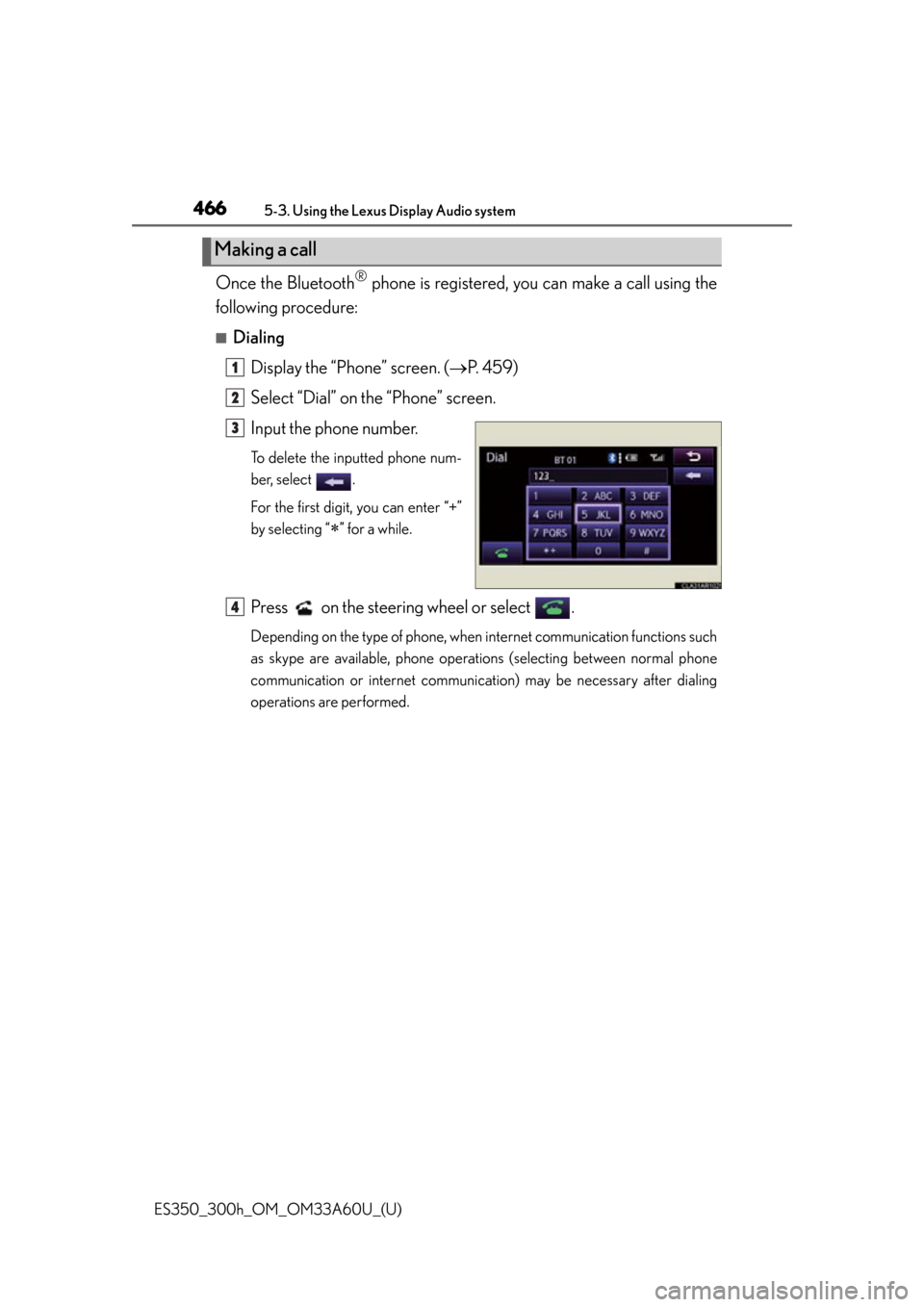
Once the Bluetooth® phone is registered, you can make a call using the
following procedure:
■Dialing
Display the “Phone” screen. ( P. 4 5 9 )
Select “Dial” on the “Phone” screen.
Input the phone number.
To delete the inputted phone num-
ber, select .
For the first digit, you can enter “+”
by selecting “
” for a while.
Press on the steering wheel or select .
Depending on the type of phone, when internet communication functions such
as skype are available, phone operations (selecting between normal phone
communication or internet communication) may be necessary after dialing
operations are performed.
Making a call
1
2
3
4