ad blue Lexus ES300h 2015 Navigation Manual
[x] Cancel search | Manufacturer: LEXUS, Model Year: 2015, Model line: ES300h, Model: Lexus ES300h 2015Pages: 409, PDF Size: 24.08 MB
Page 357 of 409

356
1. LEXUS ENFORM-OVERVIEW
ES350/300h_Navi_OM33B43U_(U)14.06.23 13:49
2. TYPE A: FUNCTION ACHIEVED BY USING A CELLULAR PHONE
Of the functions included with Lexus Enform, the App Suite relies on the use of a cel-
lular phone.
App Suite enables applicable apps installed on a cellular phone to be displayed on and
operated from the navigation screen via a Bluetooth
®. A few settings must be per-
formed before App Suite can be used. (→ P.359)
Page 360 of 409

359
1. LEXUS ENFORM-OVERVIEW
ES350/300h_Navi_OM33B43U_(U)14.06.23 09:44
LEXUS ENFORM
9
Perform the settings in the following order.
In order to use App Suite, the following
must first be performed:
zUser registration with the service
(→ P. 3 5 9 )
z Download the App Suite application onto
your cellular phone, and login to the appli-
cation. ( →P. 3 5 9 )
z Register the cellular phone, on which the
App Suite application was installed, with
the navigation system. ( →P. 3 5 9 )
z Register a Bluetooth
® phone with the
hands-free system. ( →P. 4 8 )
1Perform user registration at
http://www.lexus.com/enform/
.
1Download the App Suite application to
your cellular phone.
2Run the App Suite application on your
cellular phone.
3Enter the information required into the
App Suite application. Login to the ap-
plication.
PREPARATION BEFORE
USING LEXUS App Suite
SETTINGS REQUIRED TO USE
LEXUS App Suite
USER REGISTRATION
1User registration
2Download the App Suite application to
your cellular phone.
3Register the cellular phone with the
navigation system.
REGISTERING THE LEXUS App
Suite APPLICATION
INFORMATION
●Applications can only be used when the
App Suite application has been down-
loaded to your cellular phone and the
application is running.
● App Suite operational procedures can
also be confirmed by visiting
http://www.lexus.com/enform/
.
● In order to use applications, it is neces-
sary to run the App Suite application on
your cellular phone.
● If an iPhone is connected via Bluetooth
®
and USB at the same time, system opera-
tion may become unstable. For known
phone compatibility information, refer to
http://www.lexus.com/enform/
.
● If a App Suite application is used while
iPod audio/video is being played back,
system operation may become unstable.
Page 370 of 409
369
2. LEXUS ENFORM OPERATION
ES350/300h_Navi_OM33B43U_(U)14.06.23 09:44
LEXUS ENFORM
9
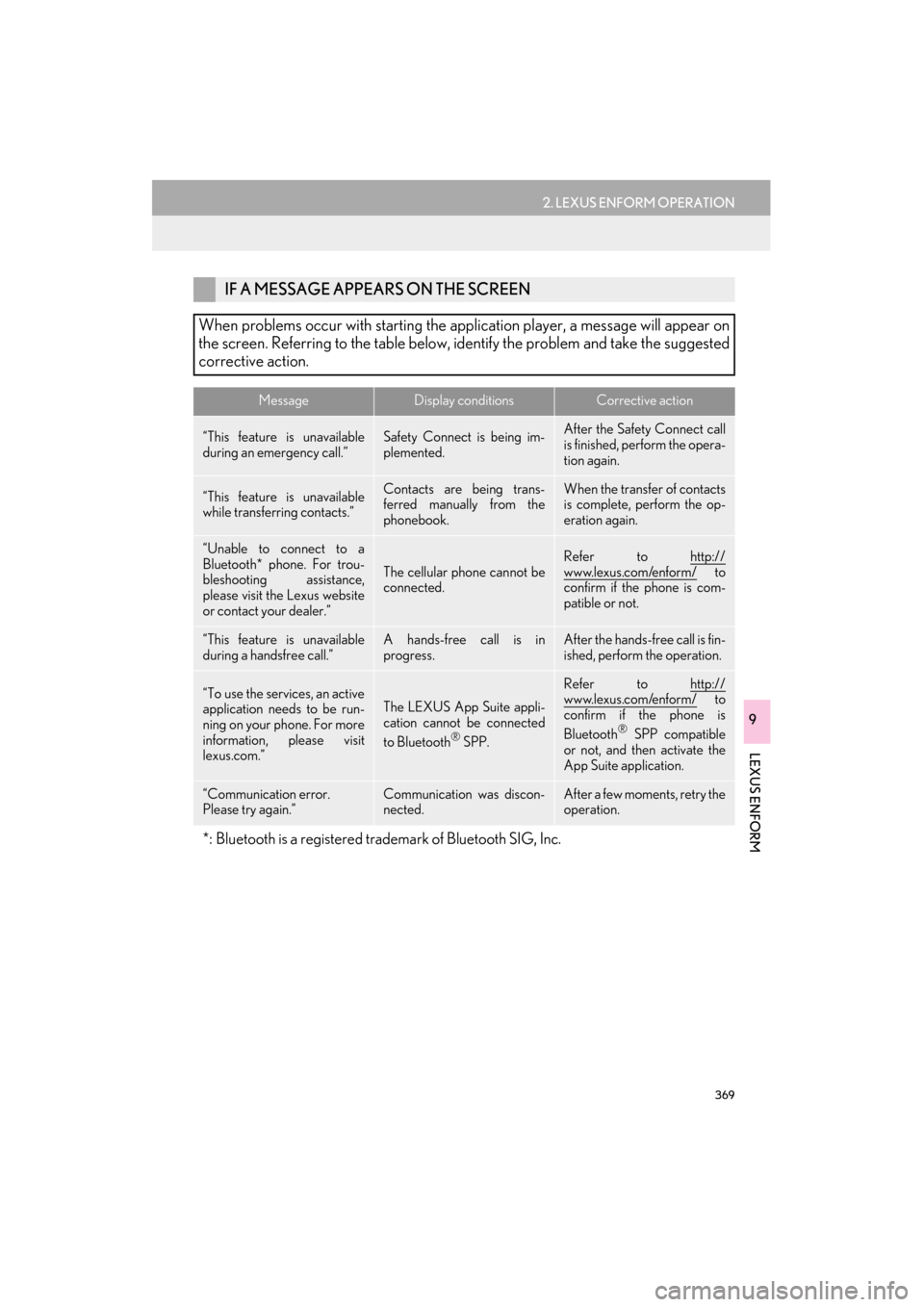
IF A MESSAGE APPEARS ON THE SCREEN
When problems occur with starting the application player, a message will appear on
the screen. Referring to the table below, identify the problem and take the suggested
corrective action.
MessageDisplay conditionsCorrective action
“This feature is unavailable
during an emergency call.”Safety Connect is being im-
plemented.After the Safety Connect call
is finished, perform the opera-
tion again.
“This feature is unavailable
while transferring contacts.”Contacts are being trans-
ferred manually from the
phonebook.When the transfer of contacts
is complete, perform the op-
eration again.
“Unable to connect to a
Bluetooth* phone. For trou-
bleshooting assistance,
please visit the Lexus website
or contact your dealer.”
The cellular phone cannot be
connected.
Refer to http://
www.lexus.com/enform/ to
confirm if the phone is com-
patible or not.
“This feature is unavailable
during a handsfree call.”A hands-free call is in
progress.After the hands-free call is fin-
ished, perform the operation.
“To use the services, an active
application needs to be run-
ning on your phone. For more
information, please visit
lexus.com.”The LEXUS App Suite appli-
cation cannot be connected
to Bluetooth
® SPP.
Refer to http://www.lexus.com/enform/ to
confirm if the phone is
Bluetooth
® SPP compatible
or not, and then activate the
App Suite application.
“Communication error.
Please try again.”Communication was discon-
nected.After a few moments, retry the
operation.
*: Bluetooth is a registered trademark of Bluetooth SIG, Inc.
Page 391 of 409
390
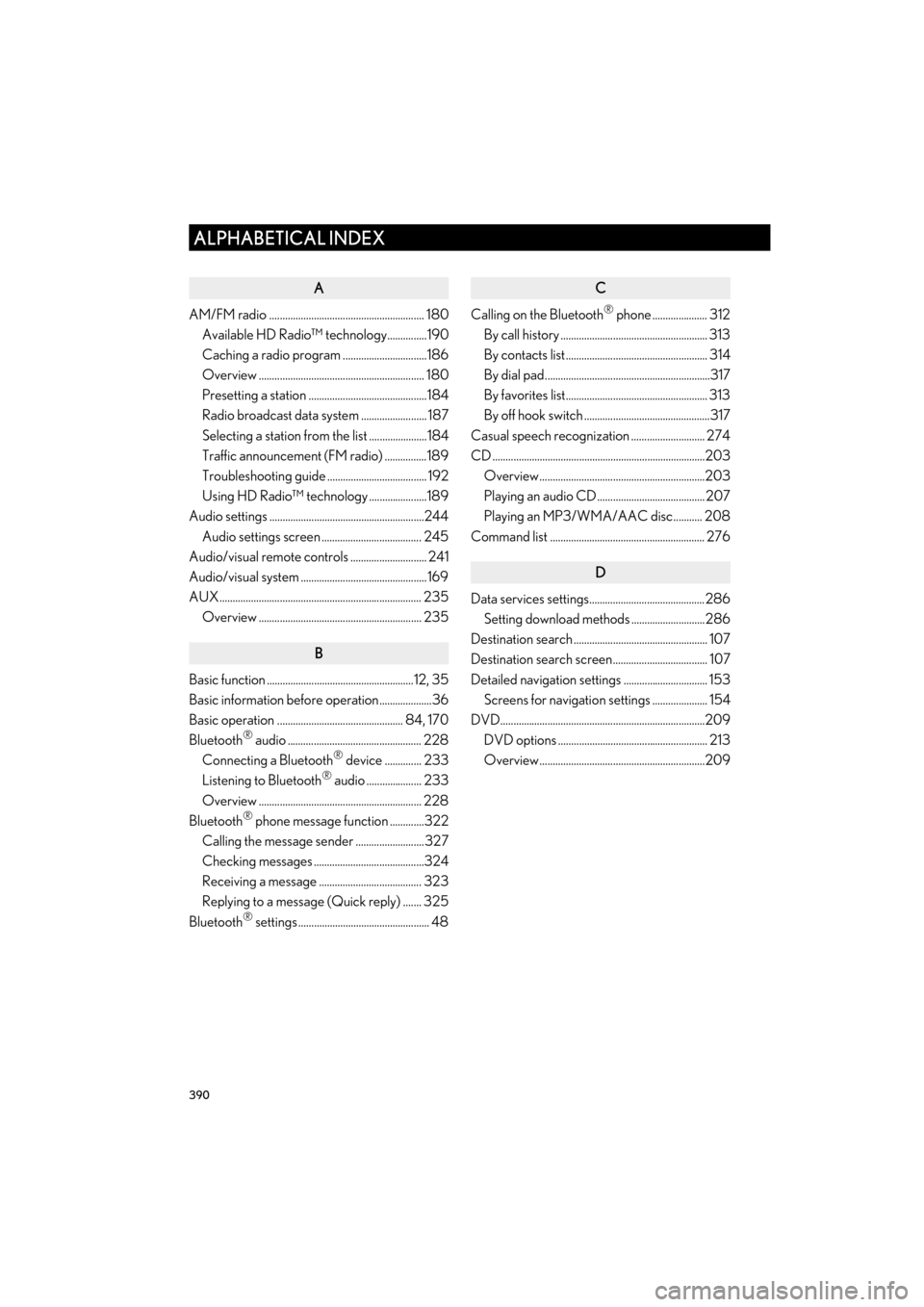
ALPHABETICAL INDEX
ES350/300h_Navi_OM33B43U_(U)14.06.23 09:44
A
AM/FM radio ........................................................... 180Available HD Radio™ technology...............190
Caching a radio program ................................186
Overview ............................................................... 180
Presetting a station .............................................184
Radio broadcast data system ......................... 187
Selecting a station from the list ......................184
Traffic announcement (FM radio) ................189
Troubleshooting guide ...................................... 192
Using HD Radio™ technology ......................189
Audio settings ...........................................................244
Audio settings screen ...................................... 245
Audio/visual remote controls ............................. 241
Audio/visual system ................................................ 169
AUX............................................................................. 235 Overview .............................................................. 235
B
Basic function ........................................................12, 35
Basic information before operation....................36
Basic operation ................................................ 84, 170
Bluetooth
® audio ................................................... 228
Connecting a Bluetooth® device .............. 233
Listening to Bluetooth® audio ..................... 233
Overview .............................................................. 228
Bluetooth
® phone message function .............322
Calling the message sender ..........................327
Checking messages ..........................................324
Receiving a message ....................................... 323
Replying to a message (Quick reply) ....... 325
Bluetooth
® settings .................................................. 48
C
Calling on the Bluetooth® phone ..................... 312
By call history ........................................................ 313
By contacts list...................................................... 314
By dial pad...............................................................317
By favorites list...................................................... 313
By off hook switch ................................................317
Casual speech recognization ............................ 274
CD .................................................................................203 Overview...............................................................203
Playing an audio CD......................................... 207
Playing an MP3/WMA/AAC disc........... 208
Command list ........................................................... 276
D
Data services settings............................................286 Setting download methods ............................286
Destination search ................................................... 107
Destination search screen.................................... 107
Detailed navigation settings ................................ 153 Screens for navigation settings ..................... 154
DVD..............................................................................209
DVD options ......................................................... 213
Overview...............................................................209
ALPHABETICAL INDEX
Page 394 of 409

393
ES350/300h_Navi_OM33B43U_(U)14.06.23 09:44
N
Navigation operation ............................................... 24
Navigation system ..................................................... 83
O
Operating information ...........................................251DVD player and disc ........................................ 253
Error messages................................................... 263
File information ................................................... 259
iPod.......................................................................... 258
Radio .........................................................................251
Terms ........................................................................261
Operation flow: Guiding the route .................... 28
Other settings ............................................................. 66
P
Parking assist guide line display mode .......... 295
Parking ................................................................... 296
Screen description ............................................ 295
Peripheral monitoring system ........................... 287
Phone ...........................................................................305
Phone operation (Hands-free system for cellular
phones) .................................................................. 306
Phone/message settings ..................................... 329
“Contact/Call History Settings” screen ..................................................................331
“Messaging Settings” screen ........................ 343
“Phone Display Settings” screen ................. 345
Phone/message settings screen ................. 329
“Sound Settings” screen.................................. 330
Q
Quick guide .....................................................................11
Quick reference .......................... 20, 84, 170, 306 Map screen ............................................................. 84
Navigation options screen ............................... 86
R
Radio operation ........................................................180
Receiving doppler weather information....... 284Displaying doppler weather information ...................................................... 284
Receiving on the Bluetooth
® phone................318
Incoming calls .......................................................318
Registering home .......................................................24
Registering preset destinations ............................26
Registering/connecting Bluetooth
®
device ........................................................................ 48
Certification .............................................................54
Profiles .......................................................................52
Registering a Bluetooth
® audio player
for the first time................................................. 50
Registering a Bluetooth
® phone
for the first time................................................. 48
Remote Touch .............................................................. 12
Route guidance ......................................................... 127
Route guidance screen .......................................... 127 During freeway driving ..................................... 130
Route overview .................................................... 129
Screen for route guidance............................... 127
Turn list screen ..................................................... 132
Turn-by-turn arrow screen.............................. 133
When approaching intersection ................... 132
Page 395 of 409

394
ALPHABETICAL INDEX
ES350/300h_Navi_OM33B43U_(U)14.06.23 09:44
S
Screen adjustment .....................................................46
Search operation ......................................................109Destination search by destination assist ..... 118
Searching by address ..........................................112
Searching by address book.............................. 119
Searching by coordinates ................................ 122
Searching by emergency .................................. 119
Searching by intersection and freeway......120
Searching by map..................................................121
Searching by point of interest ......................... 113
Searching from previous destinations ......... 118
Selecting search area ......................................... 110
Setting home as destination ............................... 111
Setting preset destinations as destination ............................................................ 111
Setting Bluetooth
® details......................................56
“Bluetooth Setup” screen...................................57
Connecting a Bluetooth
® device ................. 60
Deleting a Bluetooth® device ........................ 59
Editing the Bluetooth® device
information .......................................................... 62
Registering a Bluetooth
® device .................. 58
“System Settings” screen....................................64
Setting home as the destination .......................... 30
Setup ........................................... 153, 244, 329, 385
“Setup” screen ............................................................ 20 Some basics..................................................... 172, 307
About the contacts in the contact list ......... 310
Audio screen adjustment................................. 178
Disc slot ....................................................................174
Registering/connecting a Bluetooth
® phone ....................................... 308
Selecting an audio source ................................173
Sound settings .......................................................176
Turning the system on and off .........................172
USB/AUX port ................................................... 175
Using the phone switch/ microphone .................................................... 308
Voice command system........................ 179, 309
When selling or disposing of the vehicle ...........................................................311
Starting route guidance......................................... 123 Pausing guidance................................................ 126
Starting route guidance.................................... 123
Steering switches ..................................................... 241
Page 396 of 409

395
ES350/300h_Navi_OM33B43U_(U)14.06.23 09:44
T
Talking on the Bluetooth® phone......................319
Incoming call waiting..........................................321
Things you should know ....................................... 302
If you notice any symptoms ........................... 302
Tips for operating the audio/ visual system ..........................................................251
Tips for the navigation system .............................162
Traffic information ................................................... 102
Displaying traffic information on the map ........................................................ 105
Traffic settings ........................................................... 159 Auto avoid traffic................................................... 161
Screen for traffic settings................................. 160
Troubleshooting ...................................................... 346
Type A: Function achieved by using a cellular phone ...................................... 356
Before using the function ...............................358
Preparation before using
Lexus App Suite ............................................ 359
Type B: Function achieved by using DCM and the navigation system................. 360
Before using the function .................................361
Type C: Function achieved by using DCM ....................................................................... 363
Typical voice guidance prompts ........................134
U
USB memory ..............................................................216 Overview ................................................................216
USB audio ............................................................. 220
V
Vehicle settings ........................................................... 76Maintenance ........................................................... 77
Voice command system ........................... 265, 266
Expanded voice commands .......................... 273
Using the voice command system ..............266
Voice command system operation............. 267
Voice command system operation..................266
Voice settings............................................................... 74 Voice settings screen ..........................................75
VTR .............................................................................. 238 Overview .............................................................. 238
VTR options ......................................................... 240
W
What to do if... ...........................................................346
X
XM Satellite Radio................................................... 193Displaying the radio ID .....................................198
How to subscribe to an XM Satellite Radio......................................... 196
If the satellite radio tuner malfunctions.................................................... 200
Overview ................................................................ 193
Presetting a channel........................................... 199
Selecting a channel from the list ................... 199