audio Lexus ES300h 2015 Owner's Manual
[x] Cancel search | Manufacturer: LEXUS, Model Year: 2015, Model line: ES300h, Model: Lexus ES300h 2015Pages: 786, PDF Size: 23.74 MB
Page 450 of 786
449
ES350_300h_OM_OM33B36U_(U)
5-12. Other function
5
Lexus Display Audio system
“Information” screen
Go to “Information”: “MENU” button → “Info”
Display the fuel consumption.
(→ P. 118)
Display the “USB Photo” screen.
(→ P. 4 5 1 )
Display the weather information.
(→ P. 453)
Display the Traffic Map picture.
Available when in a traffic supported HD Radio coverage area
Go to “Traffic Map”: “MENU” button → “Info” →“Traffic Incidents”
Current position of your car
Traffic information line
The line color means the following:
Red: Heavy congestion
Yellow: Moderate traffic
Green: Free flowing traffic
Display “Information” screen
1
2
3
4
Traffic information map
1
2
Page 452 of 786
451
ES350_300h_OM_OM33B36U_(U)
5-12. Other function
5
Lexus Display Audio system
USB photo
Go to “USB Photo”: “MENU” button → “Info” → “USB1 Photo” or “USB2
Photo”
→ P. 359
Move the controller to the left to display the menu screen. Change the full screen mode.
Select to set the slide show dis-
play on/off.
Start the slide show at a selected
folder.
Change the play speed.
Change the play mode.
Move the controller to the right and select “Browse”.
Select the desired folder, and then select a desired file to begin using
the selected folder.
Connecting a USB memory device enables you to enjoy photos on the
Lexus Display Audio display.
USB photo screen
Connecting a USB memory device
Menu screen
1
2
3
4
Selecting a folder and a file
1
2
Page 454 of 786
453
ES350_300h_OM_OM33B36U_(U)
5-12. Other function
5
Lexus Display Audio system
Weather information
Go to “Weather”: “MENU” button → “Info” → “Weather”
Select the desired city/location.
Current location of your car
Select of the recently checked
location list
Select the desired location on the
recently checked location list.
Select of the National City list.
Select the region on the region list
and then select the city on the
National City list.
Select of the local location list
Select the location on the local location list.
Weather information for the selected city is displayed.
Available when in weather supported HD Radio coverage area
How to check the weather information
1
2
1
2
3
4
Page 456 of 786
455
ES350_300h_OM_OM33B36U_(U)
5-12. Other function
5
Lexus Display Audio system
Voice command system
Press the talk switch.
To cancel the voice command system,
press and hold the talk switch.
After a beep sounds, say the
desired command.
On the list screen, you can select the
desired command.
■Menu screen
To display the menu screen, move
the controller to the left.Offer examples of commands
and operation methods
Adjust the settings for voice
guidance volume and voice
recognition prompts. (“Hints”
screen) ( →P. 366)
Start over voice recognition (except “Hints” screen)
Cancel voice recognition
The voice command system enables the audio and hands-free systems
to be operated using voice commands.
Operations of the voice command system can be performed by select-
ing the menu corresponding to each function on the right part of the
screen. Even if any menu is selected , commands displayed on all menus
can be operated.
Using the voice command system
1
2
1
2
3
4
Page 458 of 786
ES350_300h_OM_OM33B36U_(U)
4575-12. Other function
5
Lexus Display Audio system
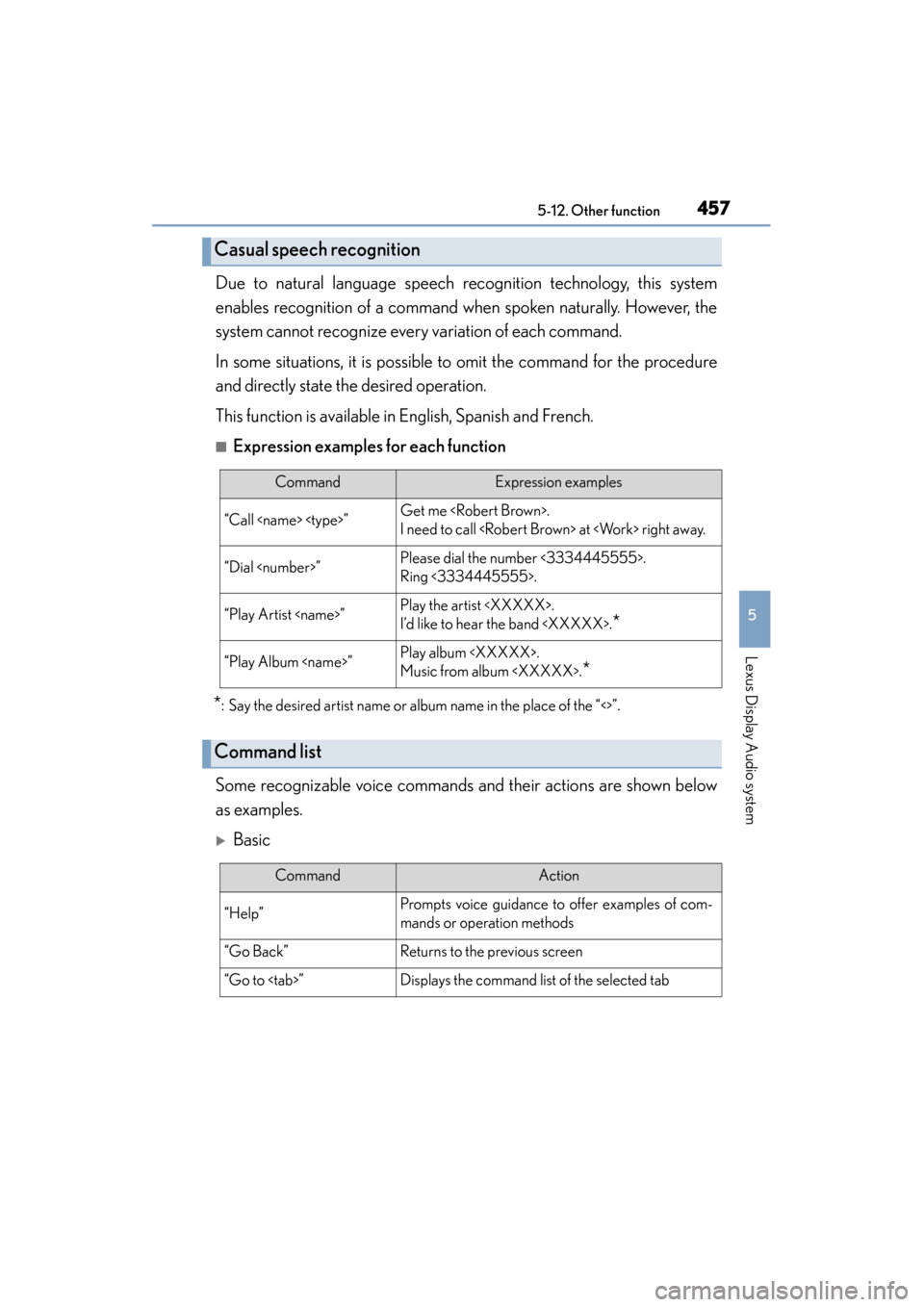
Due to natural language speech recognition technology, this system
enables recognition of a command when spoken naturally. However, the
system cannot recognize every variation of each command.
In some situations, it is possible to omit the command for the procedure
and directly state the desired operation.
This function is available in English, Spanish and French.
■Expression examples for each function
*: Say the desired artist name or album name in the place of the “<>”.
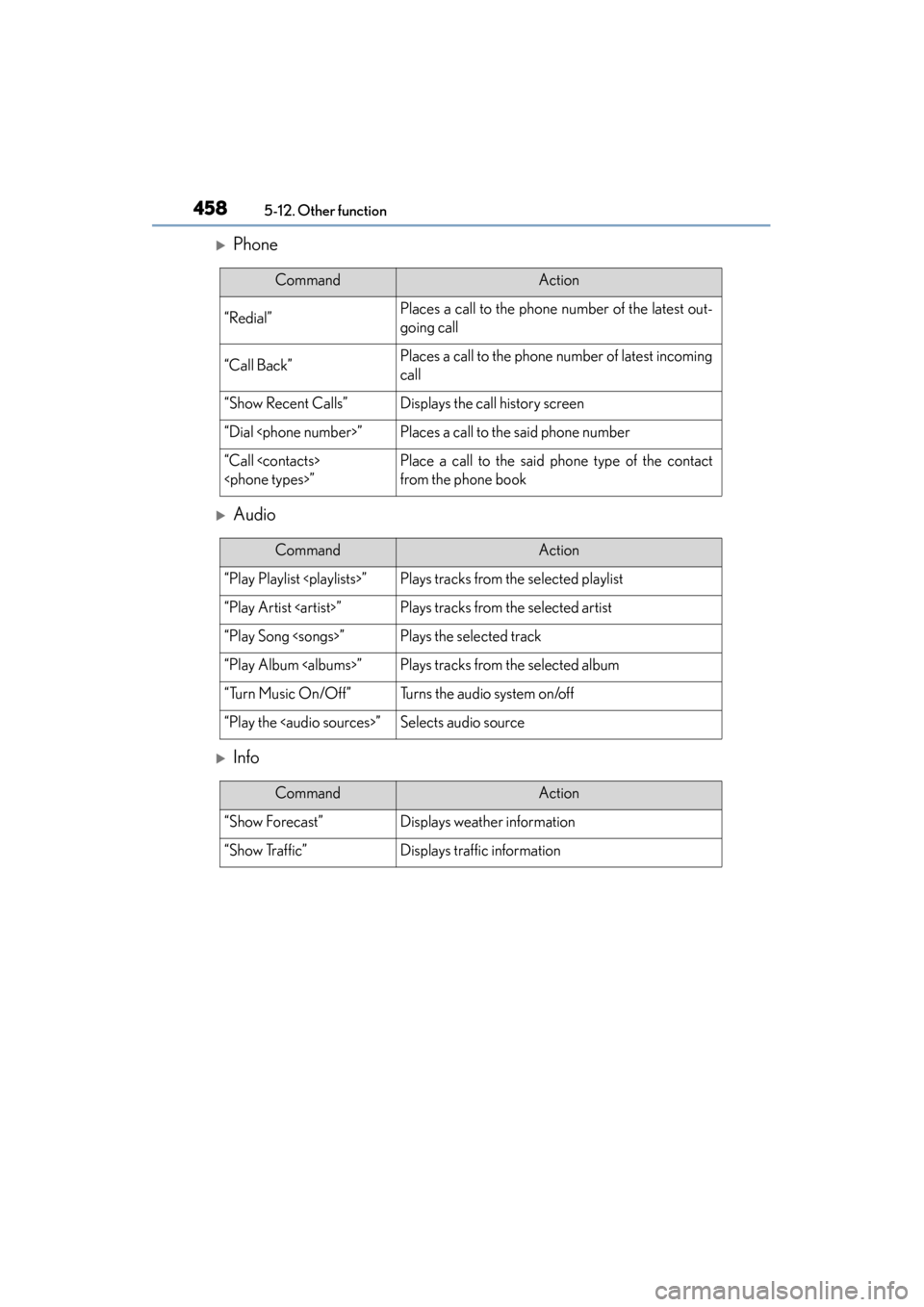
Some recognizable voice commands and their actions are shown below
as examples.
XBasic
Casual speech recognition
CommandExpression examples
“Call
I need to call
“Dial
Ring <3334445555>.
“Play Artist
I’d like to hear the band
*
“Play Album
Music from album
*
Command list
CommandAction
“Help”Prompts voice guidance to offer examples of com-
mands or operation methods
“Go Back”Returns to the previous screen
“Go to
Page 459 of 786
4585-12. Other function
ES350_300h_OM_OM33B36U_(U)
XPhone
XAudio
XInfo
CommandAction
“Redial”Places a call to the phone number of the latest out-
going call
“Call Back”Places a call to the phone number of latest incoming
call
“Show Recent Calls”Displays the call history screen
“Dial
“Call
from the phone book
CommandAction
“Play Playlist
“Play Artist
“Play Song
“Play Album
“Turn Music On/Off”Turns the audio system on/off
“Play the
Page 460 of 786
459
ES350_300h_OM_OM33B36U_(U)
5-12. Other function
5
Lexus Display Audio system
Mobile Assistant
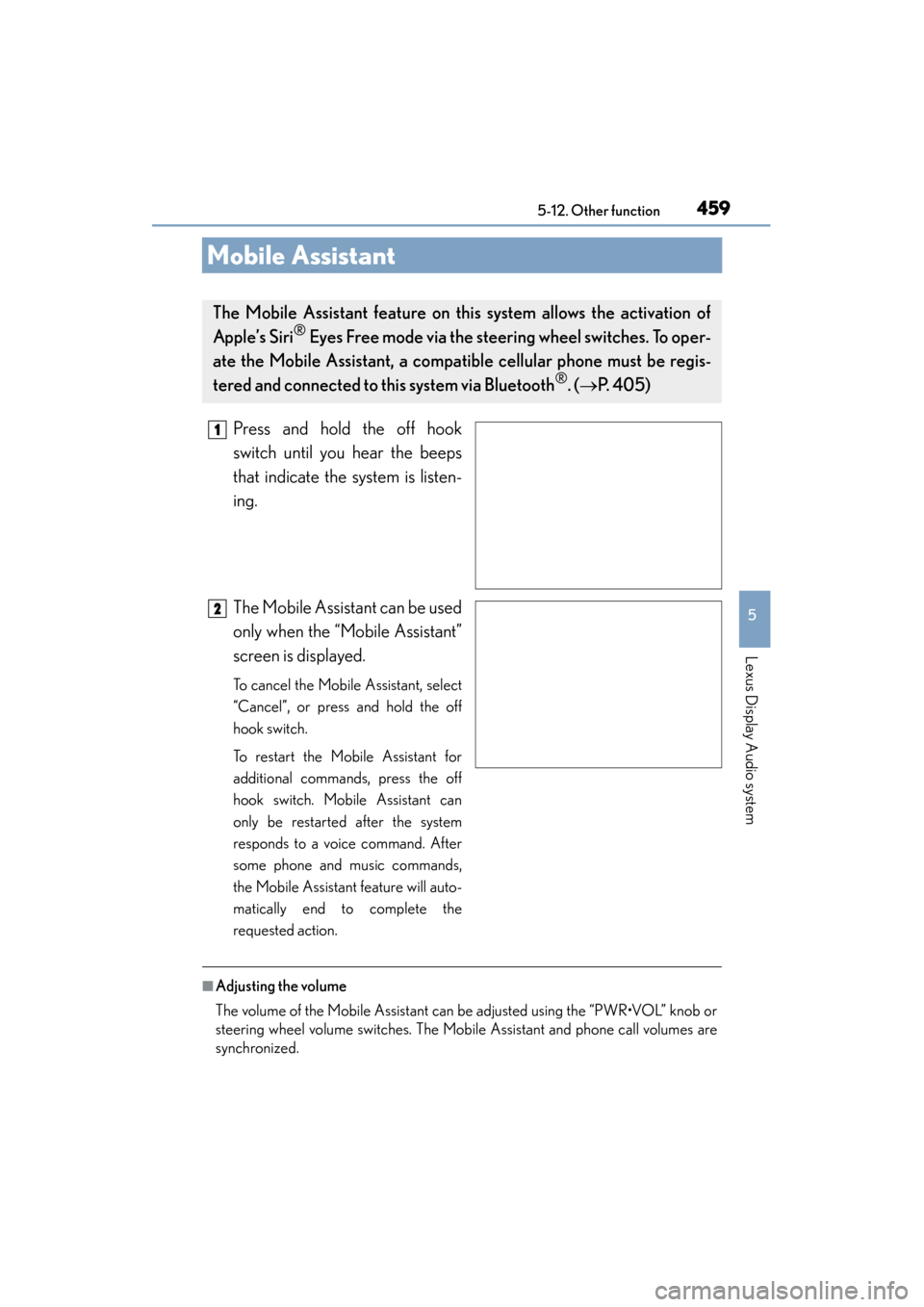
Press and hold the off hook
switch until you hear the beeps
that indicate the system is listen-
ing.
The Mobile Assistant can be used
only when the “Mobile Assistant”
screen is displayed.
To cancel the Mobile Assistant, select
“Cancel”, or press and hold the off
hook switch.
To restart the Mobile Assistant for
additional commands, press the off
hook switch. Mobile Assistant can
only be restarted after the system
responds to a voice command. After
some phone and music commands,
the Mobile Assistant feature will auto-
matically end to complete the
requested action.
■Adjusting the volume
The volume of the Mobile Assistant can be adjusted using the “PWR•VOL” knob or
steering wheel volume switches. The Mobile Assistant and phone call volumes are
synchronized.
The Mobile Assistant feature on this system allows the activation of
Apple’s Siri
® Eyes Free mode via the steering wheel switches. To oper-
ate the Mobile Assistant, a compat ible cellular phone must be regis-
tered and connected to this system via Bluetooth
®. ( → P. 405)
1
2
Page 461 of 786
4605-12. Other function
ES350_300h_OM_OM33B36U_(U)
■Microphone
●Wait for the listening beeps before using the Mobile Assistant.
●The Mobile Assistant may not recognize commands in the following situations:
• When spoken too quickly.
• When spoken at a low or high volume.
• When the roof or windows are open.
• When passengers are talking while the Mobile Assistant is being used.
• When the air conditioning system’s fan speed is set high.
• When the air conditioning vents are turned toward the microphone.
■Mobile Assistant precautions
●The available features and functions may vary based on the iOS version installed on
the connected device.
●Some Siri features are limited in Eyes Free mode. If you attempt to use an unavail-
able function, Siri will inform you that the function is not available.
●If Siri is not enabled on the cellular phone connected via Bluetooth®, an error mes-
sage will be displayed on the screen.
●While a phone call is active, the Mobile Assistant cannot be used.
●If using the navigation feature of the cellular phone, ensure the active audio source
is Bluetooth® audio or iPod in order to hear turn by turn direction prompts.
It is not necessary to speak directly into the
microphone when using the Mobile Assistant.
Page 462 of 786
461
ES350_300h_OM_OM33B36U_(U)
5-12. Other function
5
Lexus Display Audio system
LEXUS Enform Remote∗
After you sign the Telematics Subscription Service Agreement, download
the Lexus Enform Remote app from your cellular phone’s app store, and
register within the app (or enroll and complete registration at the dealer),
you can begin using these services. (→P. 513)
A variety of subscription terms are available. Contact your Lexus dealer,
or call 1-800-25-LEXUS (1-800-255-3987) for further subscription
details.
∗
: If equipped
Lexus Enform Remote is a cellular phone application that lets you view
and remotely control certain aspects of your vehicle.
For details about the functions and services of this application, refer to
http://www.lexus.com/enform/
.
Function of the Lexus Enform Remote is achieved by using an
embedded cellular device in the ve hicle (DCM: Data Communication
Module).
Subscription
Page 465 of 786
464
ES350_300h_OM_OM33B36U_(U)
6-1. Using the air conditioning system and defogger
Automatic air conditioning system
Air outlets and fan speed are automat ically adjusted according to the
temperature setting.
Vehicles with a Lexus Display Au dio system: Press the “MENU” button
on the Lexus Display Audio controller , then select “Climate” to display
the air conditioning operation screen.
For details on the Lexus Display Audio controller, refer to “Lexus
Display Audio controller” on P. 352.
Vehicles with a naviga tion system: Press the “MENU” button on the
Remote Touch, then select “Climate” to display the air conditioning
control screen.
For details on the Remote Touch, refer to the “NAVIGATION SYSTEM
OWNER’S MANUAL”.