fuel Lexus ES300h 2015 Playing an audio CD and MP3/WMA/AAC discs / (OM33B99U) Owner's Guide
[x] Cancel search | Manufacturer: LEXUS, Model Year: 2015, Model line: ES300h, Model: Lexus ES300h 2015Pages: 784, PDF Size: 9.63 MB
Page 118 of 784
118
ES350_300h_OM_OM33B99U_(U)
2. Instrument cluster
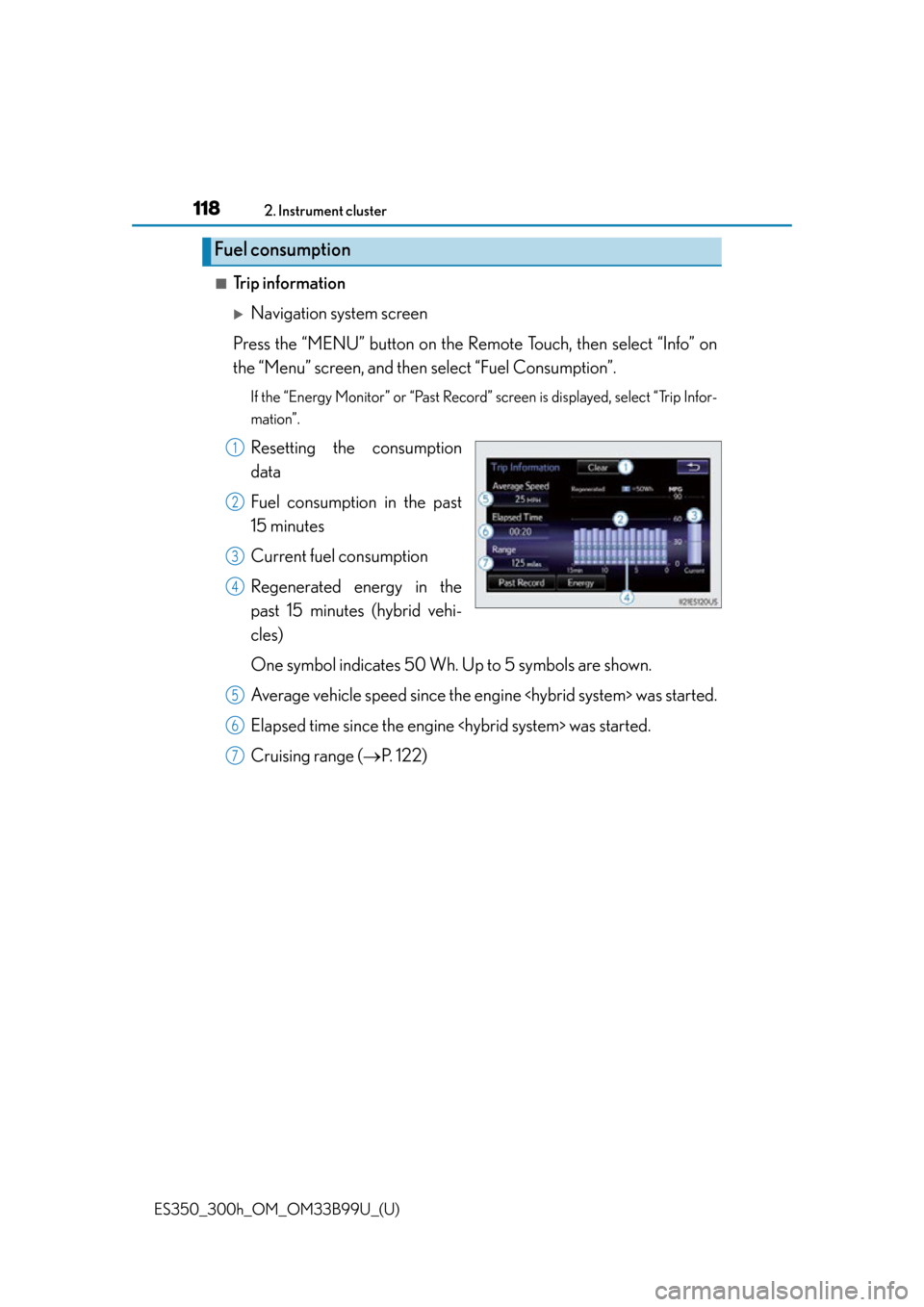
■Trip information
Navigation system screen
Press the “MENU” button on the R emote Touch, then select “Info” on
the “Menu” screen, and then select “Fuel Consumption”.
If the “Energy Monitor” or “Past Record” screen is displayed, select “Trip Infor-
mation”.
Resetting the consumption
data
Fuel consumption in the past
15 minutes
Current fuel consumption
Regenerated energy in the
past 15 minutes (hybrid vehi-
cles)
One symbol indicates 50 Wh. Up to 5 symbols are shown.
Average vehicle speed since the engine
Elapsed time since the engine
Cruising range ( P. 122)
Fuel consumption
1
2
3
4
5
6
7
Page 119 of 784
ES350_300h_OM_OM33B99U_(U)
1192. Instrument cluster
2
Instrument cluster
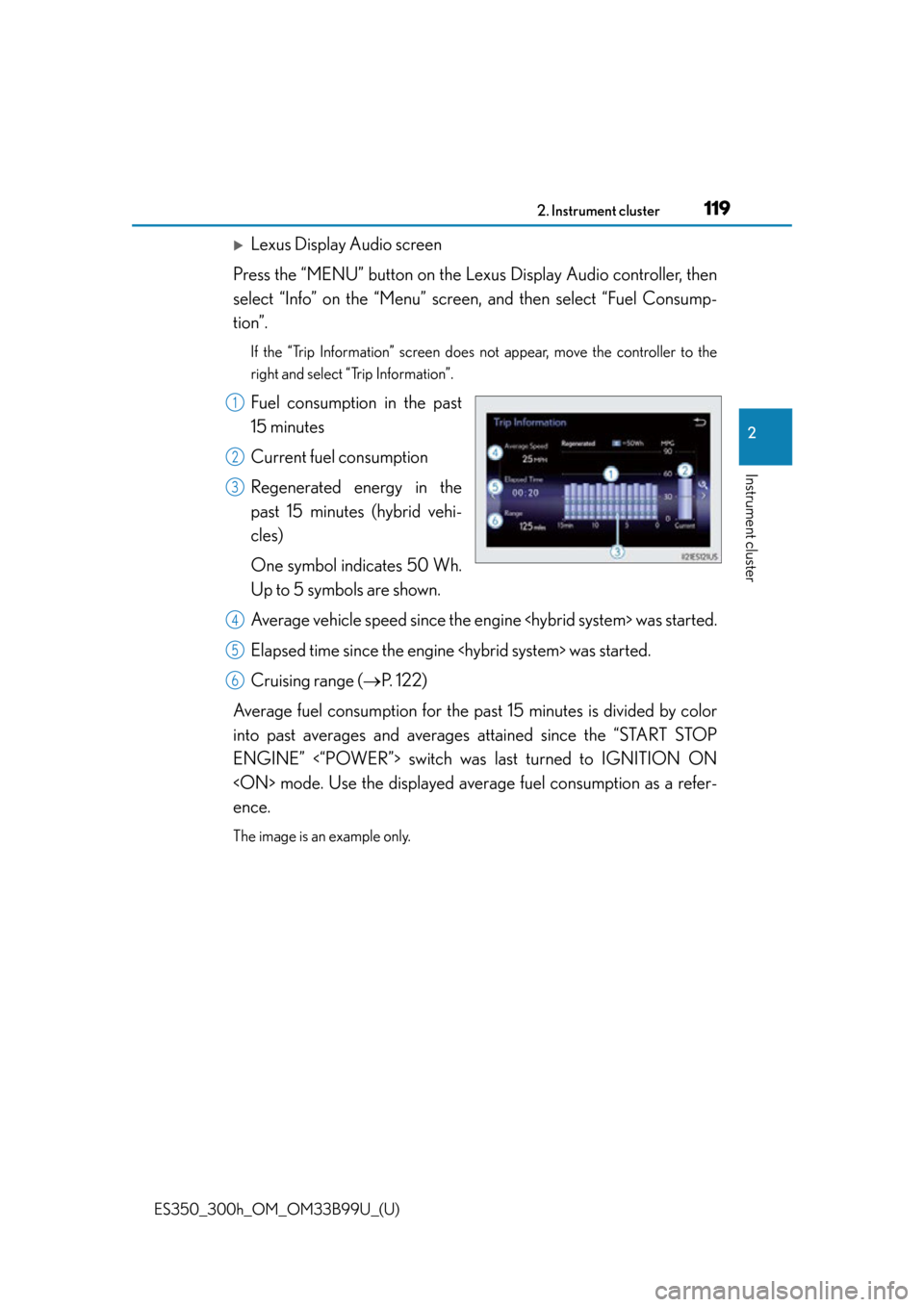
Lexus Display Audio screen
Press the “MENU” button on the Le xus Display Audio controller, then
select “Info” on the “Menu” screen, and then select “Fuel Consump-
tion”.
If the “Trip Information” screen does not appear, move the controller to the
right and select “Trip Information”.
Fuel consumption in the past
15 minutes
Current fuel consumption
Regenerated energy in the
past 15 minutes (hybrid vehi-
cles)
One symbol indicates 50 Wh.
Up to 5 symbols are shown.
Average vehicle speed since the engine
Elapsed time since the engine
Cruising range ( P. 122)
Average fuel consumption for the pa st 15 minutes is divided by color
into past averages and averages attained since the “START STOP
ENGINE” <“POWER”> switch was last turned to IGNITION ON
ence.
The image is an example only.
1
2
3
4
5
6
Page 120 of 784
120
ES350_300h_OM_OM33B99U_(U)
2. Instrument cluster
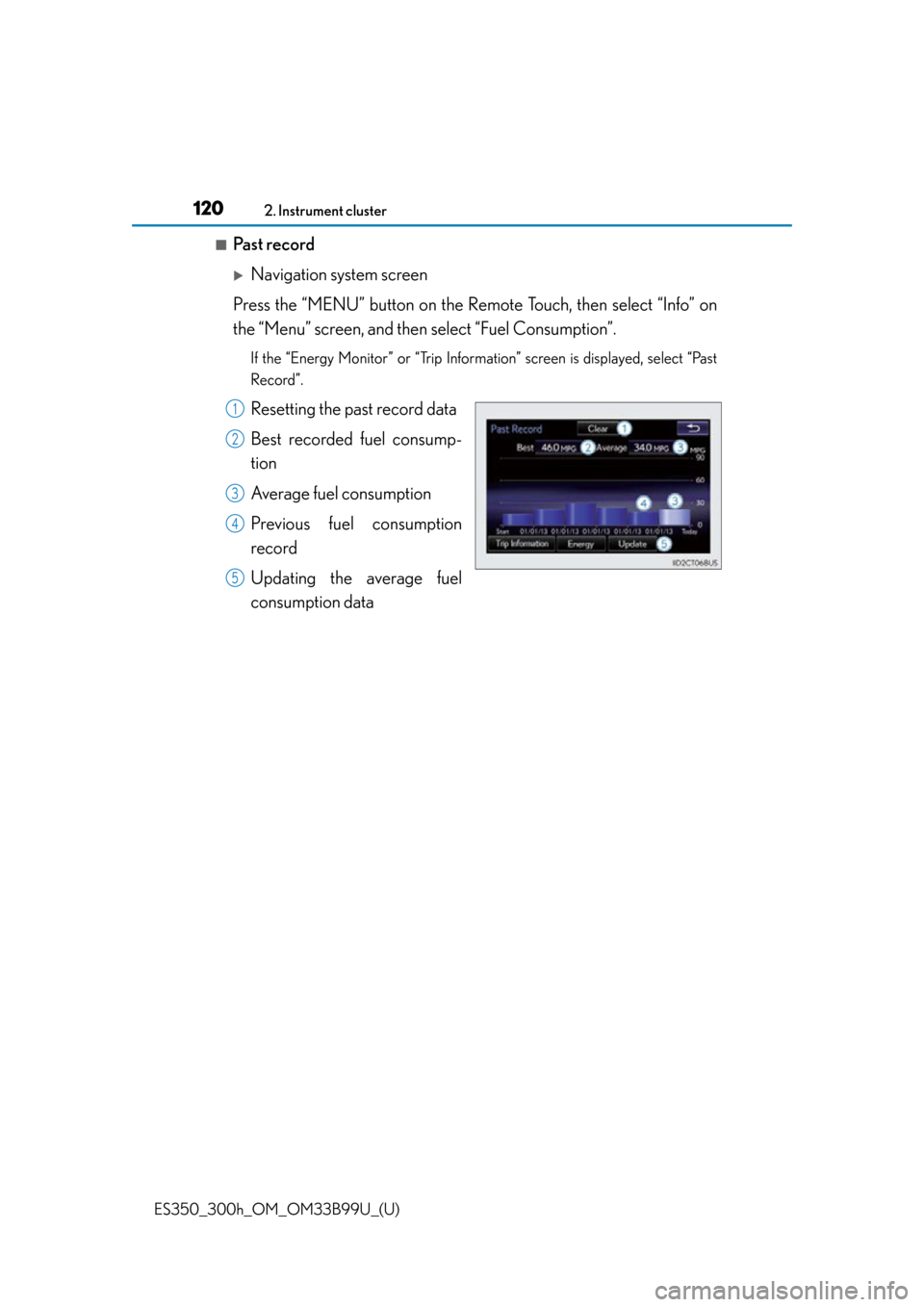
■Past record
Navigation system screen
Press the “MENU” button on the R emote Touch, then select “Info” on
the “Menu” screen, and then select “Fuel Consumption”.
If the “Energy Monitor” or “Trip Information” screen is displayed, select “Past
Record”.
Resetting the past record data
Best recorded fuel consump-
tion
Average fuel consumption
Previous fuel consumption
record
Updating the average fuel
consumption data1
2
3
4
5
Page 121 of 784
ES350_300h_OM_OM33B99U_(U)
1212. Instrument cluster
2
Instrument cluster
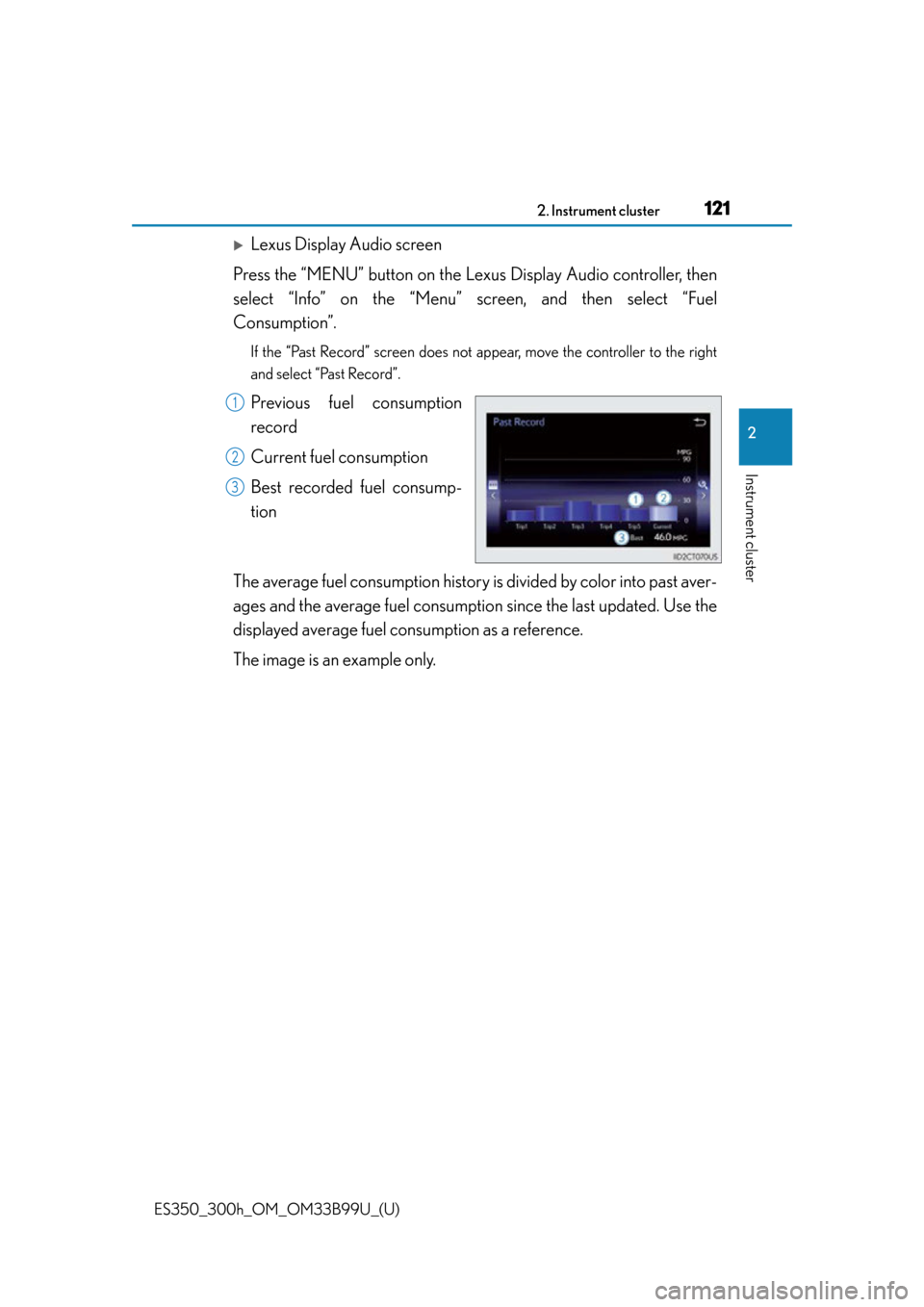
Lexus Display Audio screen
Press the “MENU” button on the Le xus Display Audio controller, then
select “Info” on the “Menu” screen, and then select “Fuel
Consumption”.
If the “Past Record” screen does not appear, move the controller to the right
and select “Past Record”.
Previous fuel consumption
record
Current fuel consumption
Best recorded fuel consump-
tion
The average fuel consumption histor y is divided by color into past aver-
ages and the average fuel consumpti on since the last updated. Use the
displayed average fuel consumption as a reference.
The image is an example only.1
2
3
Page 122 of 784

122
ES350_300h_OM_OM33B99U_(U)
2. Instrument cluster
■Updating the past record data
Vehicles with a navigation system
Update the average fuel cons umption by selecting “Update” to measure the current
fuel consumption again.
Vehicles with a Lexus Display Audio system
Update the average fuel consumption by moving the controller to the left and select
“Update” to measure the current fuel consumption again.
■Resetting the data
Vehicles with a navigation system
The fuel consumption data can be deleted by selecting “Clear”.
Vehicles with a Lexus Display Audio system
The fuel consumption data ca n be deleted by moving the controller to the left and
select “Clear”.
■Cruising range
Displays the estimated maximum distance that can be driven with the quantity of fuel
remaining.
This distance is computed based on your average fuel consumption.
As a result, the actual distance that can be driven may differ from that displayed.
Page 187 of 784

187
ES350_300h_OM_OM33B99U_(U)
4Driving
4-1. Before drivingDriving the vehicle ......................188
Cargo and luggage .................... 199
Vehicle load limits ......................202
Trailer towing ................................203
Dinghy towing..............................204
4-2. Driving procedures Engine (ignition) switch (gasoline vehicles) ................. 205
Power (ignition) switch (hybrid vehicles) ....................... 212
EV drive mode (hybrid vehicles) ....................... 219
Automatic transmission (gasoline vehicles) .................. 222
Hybrid transmission (hybrid vehicles) ...................... 226
Turn signal lever ......................... 230
Parking brake ................................ 231
Horn.................................................232
4-3. Operating the lights and wipers
Headlight switch .........................233
Automatic High Beam ............. 237
Fog light switch............................ 244
Windshield wipers and washer ................................. 245 4-4. Refueling
Opening the fuel tank cap ..... 249
4-5. Using the driving support systems
Cruise control ............................. 254
Dynamic radar cruise control ............................258
LDA (Lane Departure Alert) .........273
Intuitive parking assist ............... 281
Lexus parking assist monitor ........................................ 294
Driving mode select switch .............................................. 311
Driving assist systems................ 313
Hill-start assist control (hybrid vehicles) ....................... 319
PCS (Pre-Collision System)........... 321
BSM (Blind Spot Monitor) ..... 328 • Blind Spot Monitor function .................................... 332
• Rear Cross Traffic Alert function .................................... 335
4-6. Driving tips Hybrid vehicle driving tips (hybrid vehicles) .....................338
Winter driving tips ...................... 341
Page 190 of 784

190
ES350_300h_OM_OM33B99U_(U)
4-1. Before driving
■Breaking in your new Lexus
To extend the life of the vehicle, observing the following precautions is recom-
mended:
●For the first 186 miles (300 km):
Avoid sudden stops.
●For the first 621 miles (1000 km):
• Do not drive at extremely high speeds.
• Avoid sudden acceleration.
• Do not drive continuously in low gears.
• Do not drive at a constant speed for extended periods.
■Drum-in-disc type parking brake system
Your vehicle has a drum-in-disc type parking brake system. This type of brake system
needs bedding-down of the brake shoes peri odically or whenever the parking brake
shoes and/or drum are replaced. Have your Lexus dealer perform the bedding
down operation.
■Operating your vehicle in a foreign country
Comply with the relevant vehicle registration laws and confirm the availability of the
correct fuel. ( P. 7 1 5 )
■For efficient use (hybrid vehicles)
●Shift the shift lever to D when driving.
In the N position, the gasoline engine oper ates but electricity cannot be generated.
The hybrid battery (traction battery) will discharge, requiring unnecessary engine
power to recharge.
●Drive your vehicle smoothly.
Avoid abrupt acceleration and decelerati on. Gradual acceleration and decelera-
tion will make more effective use of the electric motor (traction motor) without hav-
ing to use gasoline engine power.
●Avoid repeated acceleration.
Repeated acceleration consumes hybrid ba ttery (traction battery) power, resulting
in poor acceleration. Battery power can be restored by driving with the accelerator
pedal slightly released.
●Shift the shift lever to P when parking.
In the N position, the hybrid battery (traction battery) does not recharge.
Leaving the shift lever in the N position for an extended period of time may dis-
charge the hybrid battery. The vehicle cannot run if the hybrid battery is dis-
charged.
Page 220 of 784

220
ES350_300h_OM_OM33B99U_(U)
4-2. Driving procedures
■Switching to EV drive mode when the gasoline engine is cold
If the hybrid system is started while the gasoline engine is cold, the gasoline engine
will start automatically in order to warm up. In this case, you will become unable to
switch to EV drive mode.
After the hybrid system has started and the “READY” indicator has illuminated,
press the EV drive mode switch before the gasoline engine starts to switch to EV
drive mode.
■Automatic cancelation of EV drive mode
When driving in EV drive mode, the gasoline engine may automatically restart in the
following situations. When EV drive mode is canceled, a buzzer will sound and the
EV indicator will flash 3 times and go off.
●The hybrid battery (traction battery) becomes low.
The remaining battery level indicated in the “Energy Monitor” screen or the multi-
information display is low. ( P. 114)
●Vehicle speed becomes more than about 25 mph (40 km/h).
●The accelerator pedal is depressed firmly.
When it is possible to inform the driver of automatic cancelation in advance, a prior
notice screen will appear on the multi-information display.
■Possible driving distance when driving in EV drive mode
EV drive mode’s possible driving distan ce ranges from a few hundred meters to
approximately 1.3 mile (2 km). Driving is possible at speeds of less than approxi-
mately 25 mph (40 km/h). However, depend ing on vehicle conditions, there are sit-
uations when EV drive mode cannot be used.
(The distance that is possible depends on the hybrid battery [traction battery] level
and driving conditions.)
■Fuel economy
Your Lexus is designed to achieve the best possible fuel economy during normal
driving (using the gasoline en gine and electric motor [traction motor]). Driving in EV
drive mode more than necessary may lower fuel economy.
Page 226 of 784
226
ES350_300h_OM_OM33B99U_(U)
4-2. Driving procedures
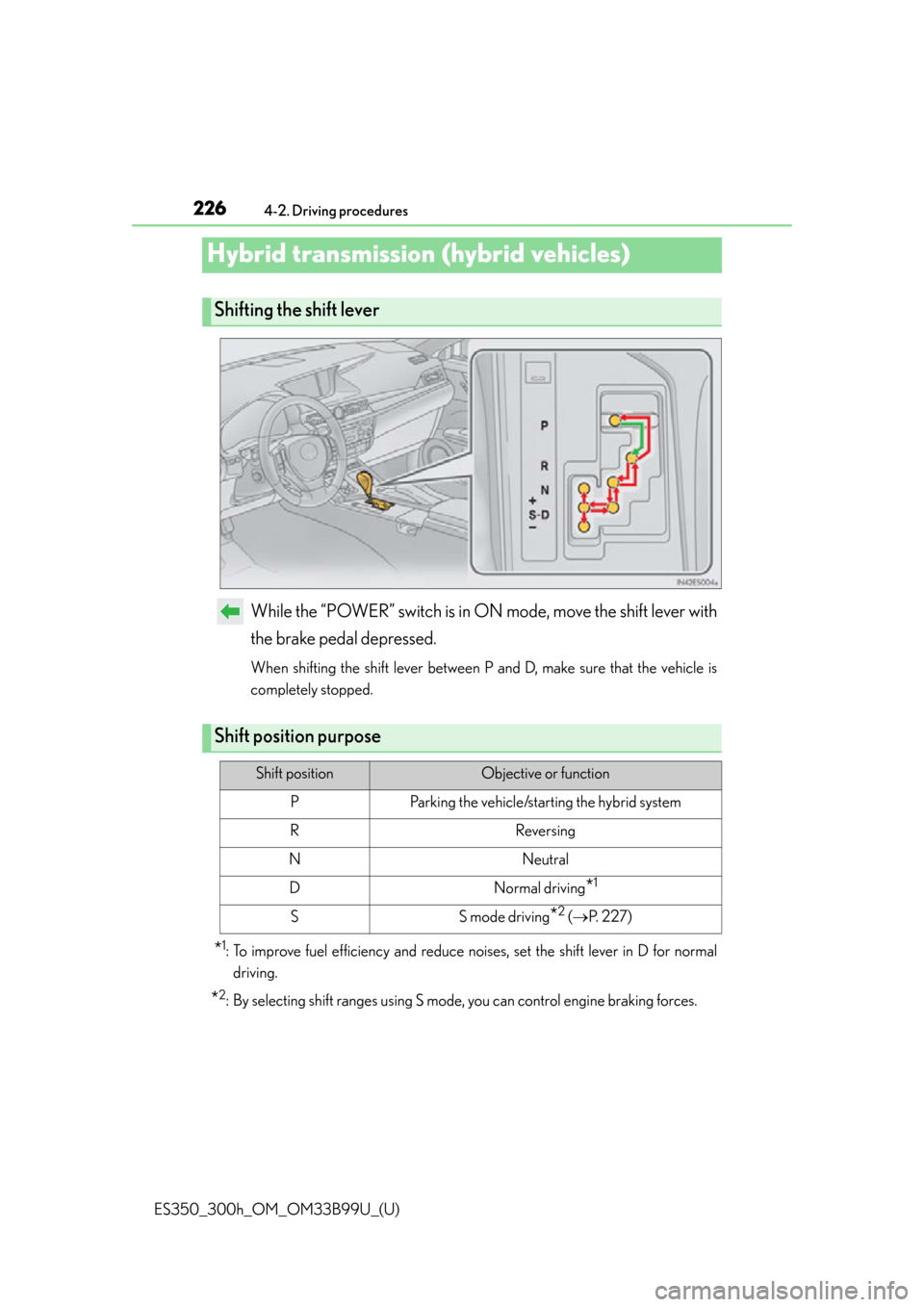
Hybrid transmission (hybrid vehicles)
While the “POWER” switch is in ON mode, move the shift lever with
the brake pedal depressed.
When shifting the shift lever between P and D, make sure that the vehicle is
completely stopped.
*1: To improve fuel efficiency and reduce noises, set the shift lever in D for normal driving.
*2: By selecting shift ranges using S mode, you can control engine braking forces.
Shifting the shift lever
Shift position purpose
Shift positionObjective or function
PParking the vehicle/starting the hybrid system
RReversing
NNeutral
DNormal driving*1
SS mode driving*2 ( P. 2 2 7 )
Page 235 of 784
ES350_300h_OM_OM33B99U_(U)
2354-3. Operating the lights and wipers
4
Driving
■Daytime running light system
●To make your vehicle more visible to other drivers, the parking lights turn on auto-
matically (at an increased intensity) whenever the engine
and the parking brake is released. Daytime running lights are not designed for use
at night.
For the U.S.A.: Daytime running lights can be turned off by operating the switch.
●Compared to turning on the headlights, the daytime running light system offers
greater durability and consumes less electricity, so it can help improve fuel econ-
omy.
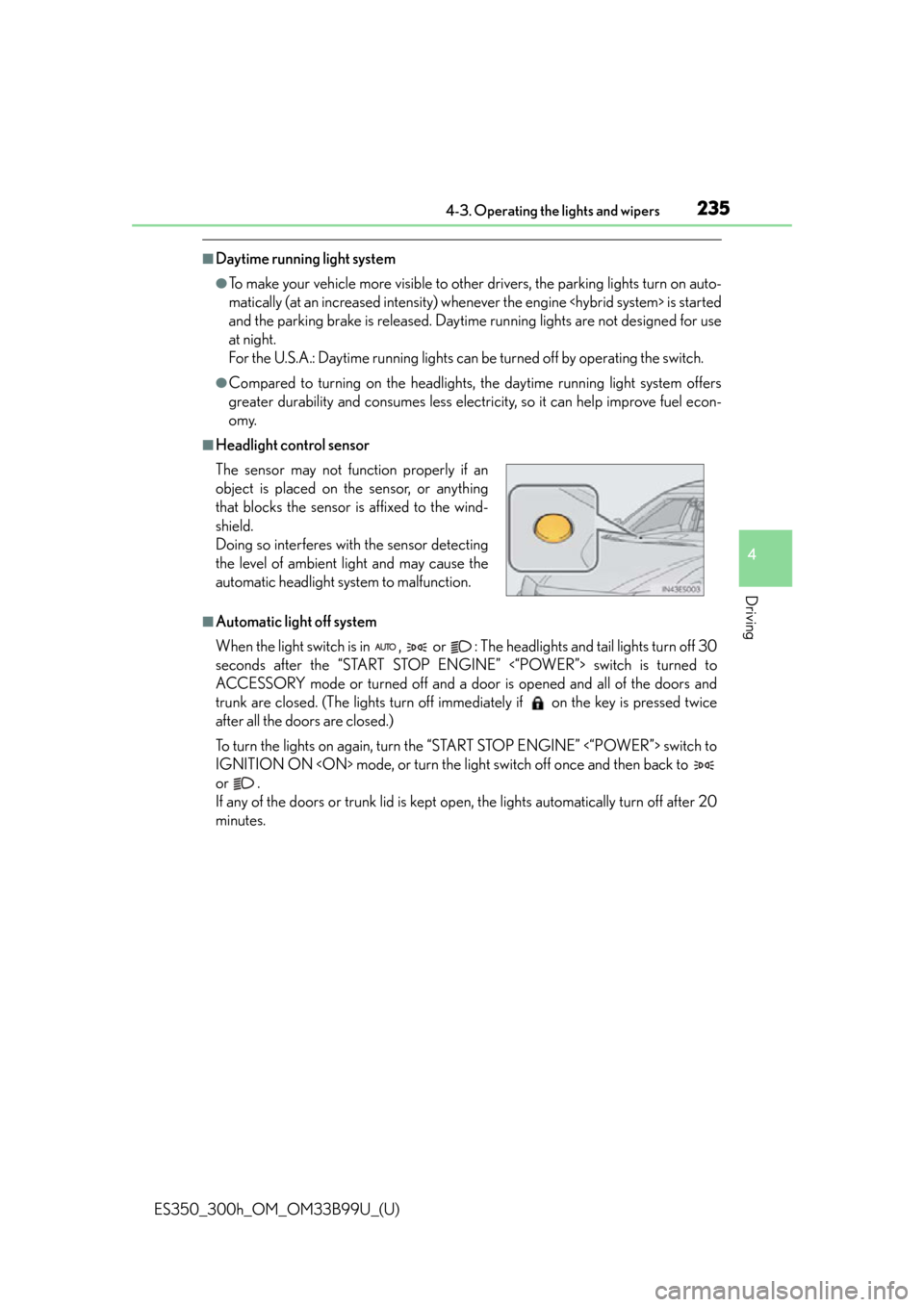
■Headlight control sensor
■Automatic light off system
When the light switch is in , or : The headlights and tail lights turn off 30
seconds after the “START STOP ENGINE” <“POWER”> switch is turned to
ACCESSORY mode or turned off and a door is opened and all of the doors and
trunk are closed. (The lights turn off imme diately if on the key is pressed twice
after all the doors are closed.)
To turn the lights on again, turn the “START STOP ENGINE” <“POWER”> switch to
IGNITION ON
or .
If any of the doors or trunk lid is kept op en, the lights automatically turn off after 20
minutes. The sensor may not func tion properly if an
object is placed on the sensor, or anything
that blocks the sensor is affixed to the wind-
shield.
Doing so interferes with the sensor detecting
the level of ambient light and may cause the
automatic headlight system to malfunction.