lights Lexus ES300h 2016 (OM33B71U) User Guide
[x] Cancel search | Manufacturer: LEXUS, Model Year: 2016, Model line: ES300h, Model: Lexus ES300h 2016Pages: 600, PDF Size: 8.59 MB
Page 47 of 600
471-1. For safe use
ES300h_OM_OM33B71U_(U)
1
For safety and security
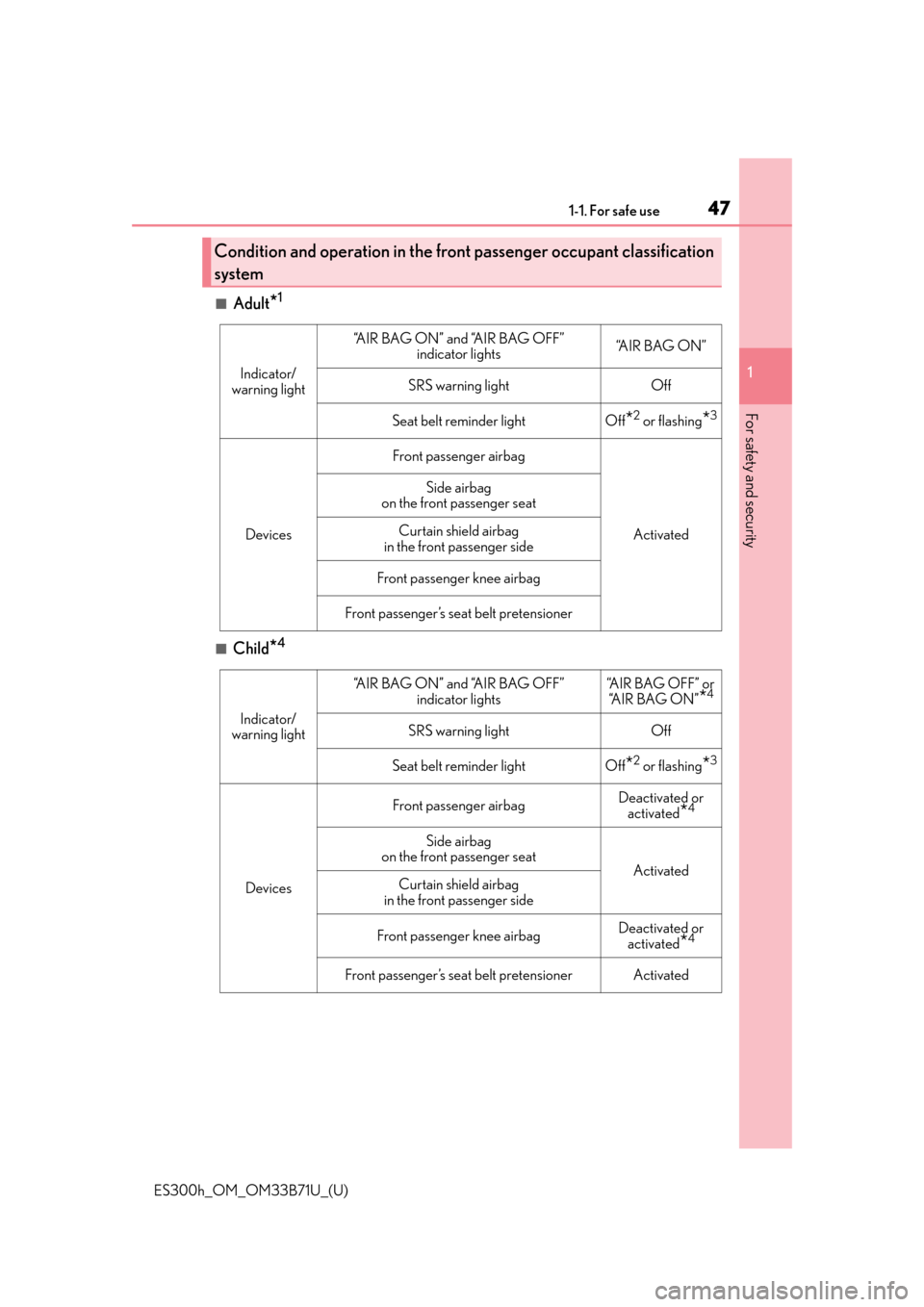
■Adult*1
■Child*4
Condition and operation in the front passenger occupant classification
system
Indicator/
warning light
“A I R B A G O N ” a n d “A I R B A G O F F ” indicator lights“A I R B A G O N ”
SRS warning lightOff
Seat belt reminder lightOff*2 or flashing*3
Devices
Front passenger airbag
Activated
Side airbag
on the front passenger seat
Curtain shield airbag
in the front passenger side
Front passenger knee airbag
Front passenger’s seat belt pretensioner
Indicator/
warning light
“A I R B A G O N ” a n d “A I R B A G O F F ” indicator lights“AIR BAG OFF” or “A I R B A G O N ”
*4
SRS warning lightOff
Seat belt reminder lightOff*2 or flashing*3
Devices
Front passenger airbagDeactivated or activated
*4
Side airbag
on the front passenger seat
ActivatedCurtain shield airbag
in the front passenger side
Front passenger knee airbagDeactivated or activated
*4
Front passenger’s seat belt pretensionerActivated
Page 48 of 600
481-1. For safe use
ES300h_OM_OM33B71U_(U)
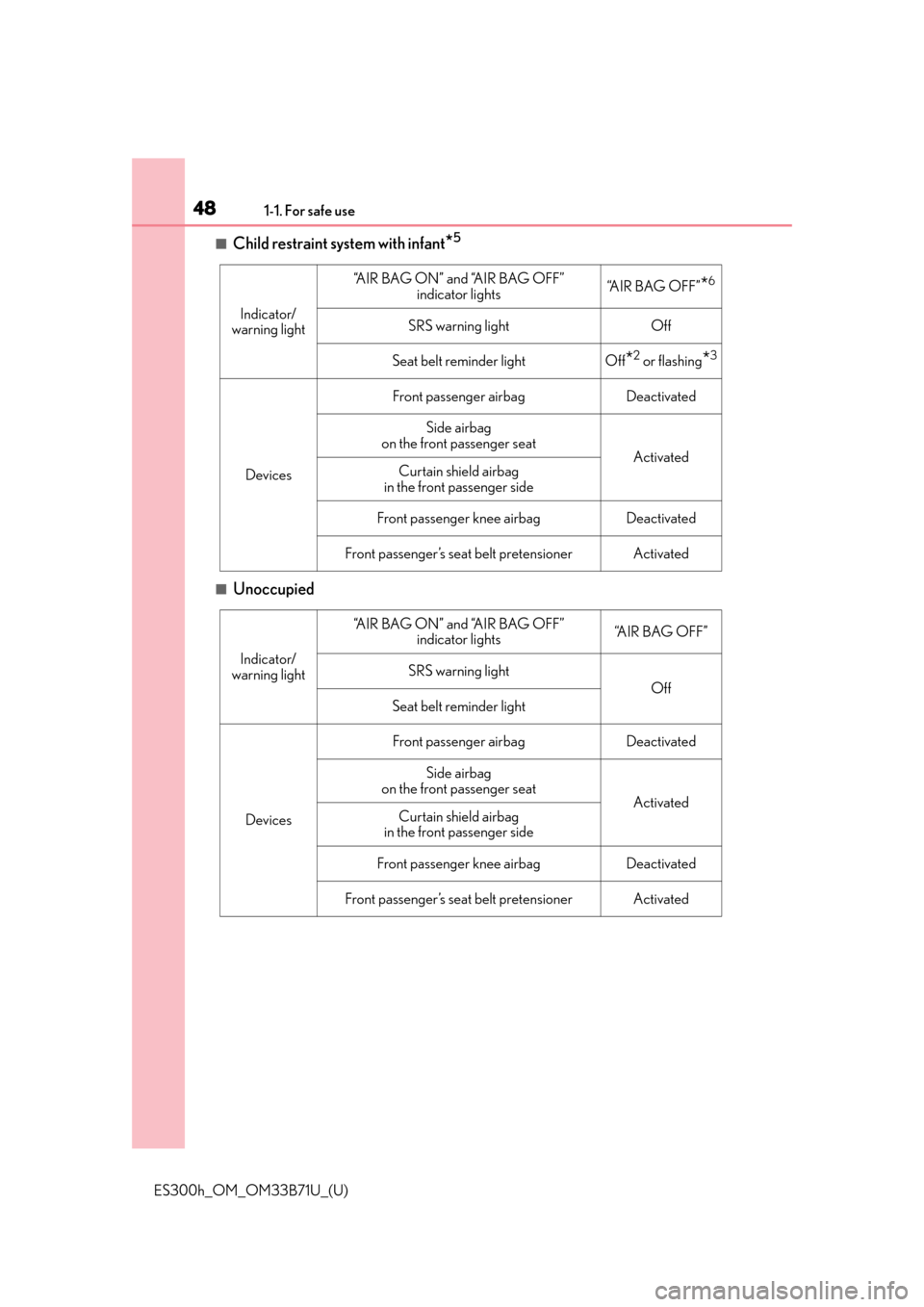
■Child restraint system with infant*5
■Unoccupied
Indicator/
warning light
“A I R B A G O N ” a n d “A I R B A G O F F ” indicator lights“AIR BAG OFF”*6
SRS warning lightOff
Seat belt reminder lightOff*2 or flashing*3
Devices
Front passenger airbagDeactivated
Side airbag
on the front passenger seat
ActivatedCurtain shield airbag
in the front passenger side
Front passenger knee airbagDeactivated
Front passenger’s seat belt pretensionerActivated
Indicator/
warning light
“A I R B A G O N ” a n d “A I R B A G O F F ” indicator lights“A I R B A G O F F ”
SRS warning light
Off
Seat belt reminder light
Devices
Front passenger airbagDeactivated
Side airbag
on the front passenger seat
ActivatedCurtain shield airbag
in the front passenger side
Front passenger knee airbagDeactivated
Front passenger’s seat belt pretensionerActivated
Page 49 of 600
491-1. For safe use
ES300h_OM_OM33B71U_(U)
1
For safety and security
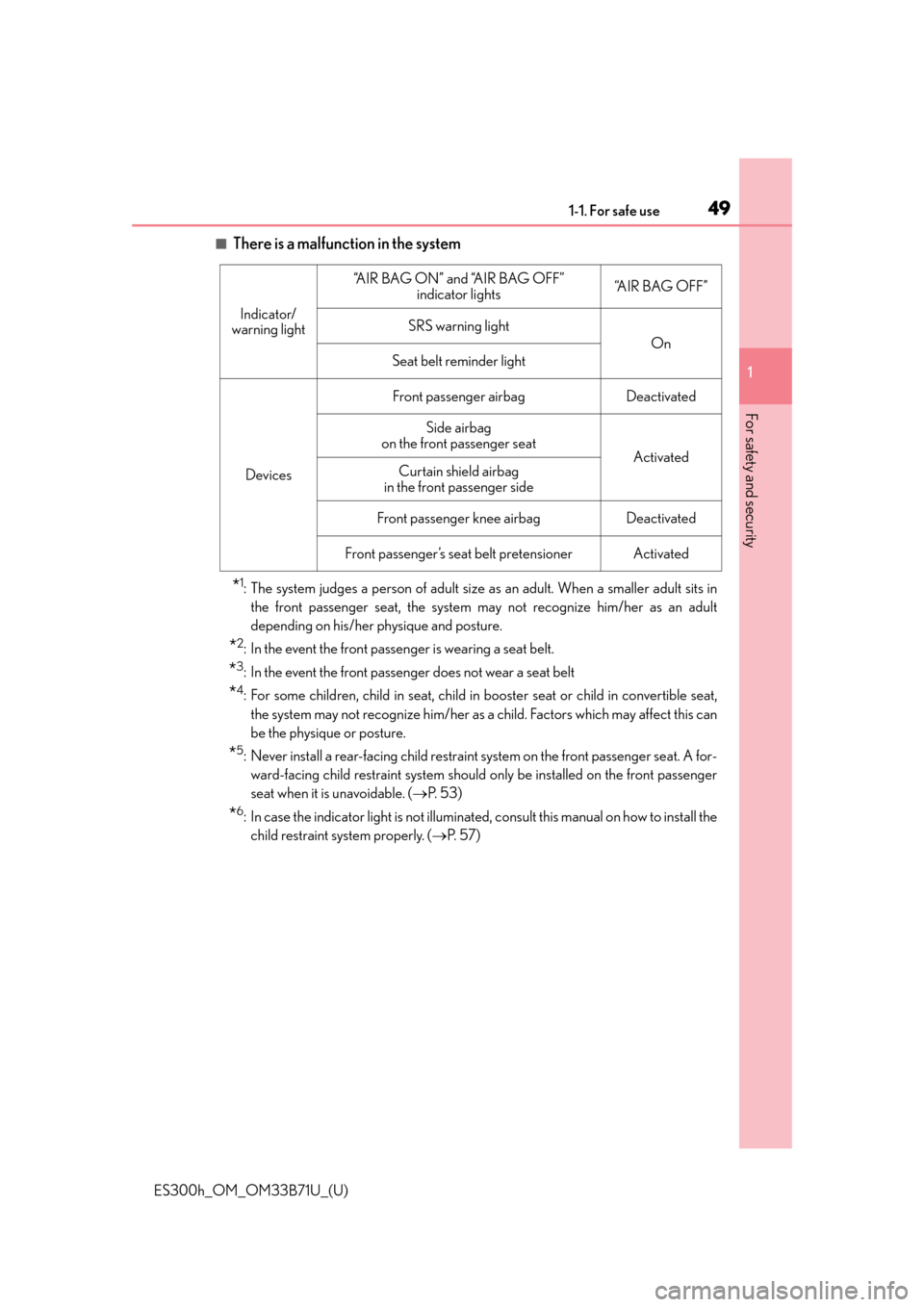
■There is a malfunction in the system
*1: The system judges a person of adult size as an adult. When a smaller adult sits in
the front passenger seat, the system may not recognize him/her as an adult
depending on his/her physique and posture.
*2: In the event the front passenger is wearing a seat belt.
*3: In the event the front passenger does not wear a seat belt
*4: For some children, child in seat, child in booster seat or child in convertible seat,
the system may not recognize him/her as a child. Factors which may affect this can
be the physique or posture.
*5: Never install a rear-facing child restraint system on the front passenger seat. A for- ward-facing child restraint system should only be installed on the front passenger
seat when it is unavoidable. ( P. 5 3 )
*6: In case the indicator light is not illuminated, consult this manual on how to install the
child restraint system properly. ( P. 5 7 )
Indicator/
warning light
“A I R B A G O N ” a n d “A I R B A G O F F ” indicator lights“A I R B A G O F F ”
SRS warning light
On
Seat belt reminder light
Devices
Front passenger airbagDeactivated
Side airbag
on the front passenger seat
ActivatedCurtain shield airbag
in the front passenger side
Front passenger knee airbagDeactivated
Front passenger’s seat belt pretensionerActivated
Page 81 of 600

81
ES300h_OM_OM33B71U_(U)
Instrument cluster2
2. Instrument clusterWarning lights and indicators .............................. 82
Gauges and meters ..................... 86
Multi-information display ........... 91
Energy monitor/ consumption screen ................. 96
Page 82 of 600
82
ES300h_OM_OM33B71U_(U)2. Instrument cluster
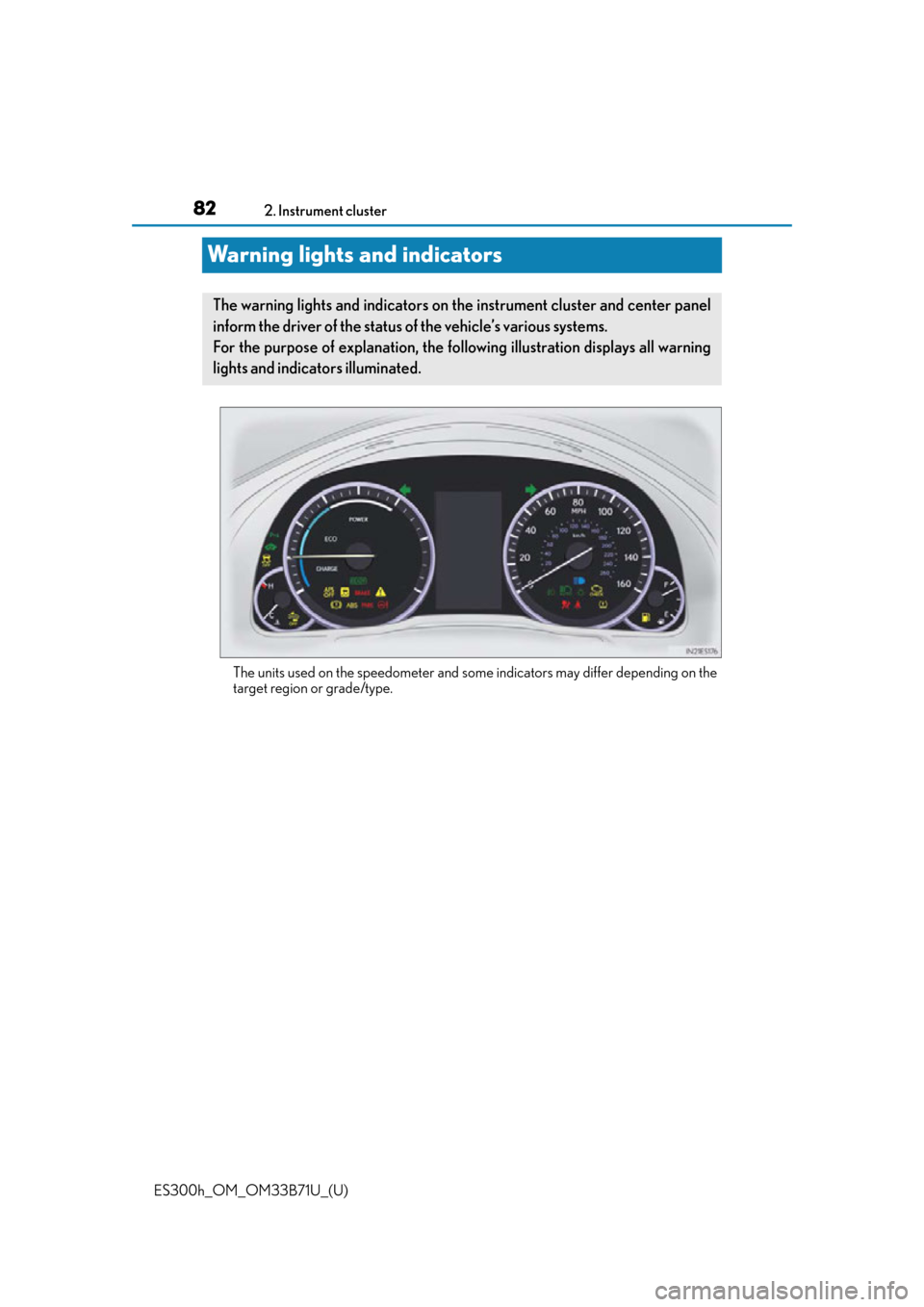
Warning lights and indicators
The units used on the speedometer and some
indicators may differ depending on the
target region or grade/type.
The warning lights and indicators on th e instrument cluster and center panel
inform the driver of the status of the vehicle’s various systems.
For the purpose of explanation, the following illustration displays all warning
lights and indicators illuminated.
Page 83 of 600
ES300h_OM_OM33B71U_(U)
832. Instrument cluster
2
Instrument cluster
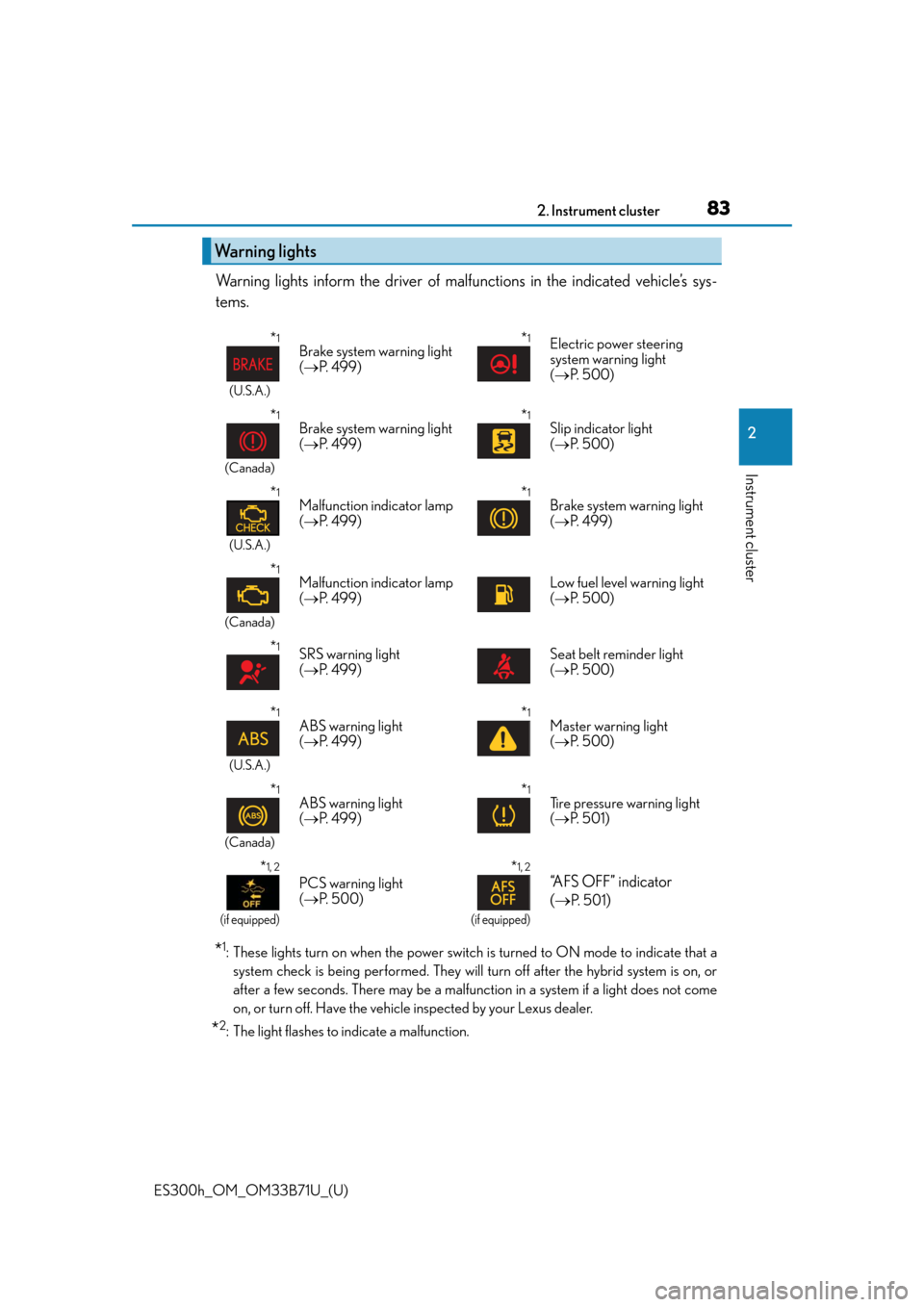
Warning lights inform the driver of malfunctions in the indicated vehicle’s sys-
tems.
*1: These lights turn on when the power switch is turned to ON mode to indicate that a system check is being performed. They will turn off after the hybrid system is on, or
after a few seconds. There may be a malfunction in a system if a light does not come
on, or turn off. Have the vehicl e inspected by your Lexus dealer.
*2: The light flashes to indicate a malfunction.
Warning lights
*1
(U.S.A.)
Brake system warning light
( P. 499)*1Electric power steering
system warning light
( P. 500)
*1
(Canada)
Brake system warning light
( P. 499)*1Slip indicator light
( P. 500)
*1
(U.S.A.)
Malfunction indicator lamp
( P. 499)*1Brake system warning light
( P. 499)
*1
(Canada)
Malfunction indicator lamp
( P. 499)Low fuel level warning light
( P. 500)
*1SRS warning light
( P. 499)Seat belt reminder light
( P. 500)
*1
(U.S.A.)
ABS warning light
( P. 499)*1Master warning light
( P. 500)
*1
(Canada)
ABS warning light
( P. 499)*1Tire pressure warning light
( P. 5 0 1 )
*1, 2
(if equipped)
PCS warning light
( P. 500)
*1, 2
(if equipped)
“AFS OFF” indicator
(
P. 5 0 1)
Page 85 of 600
ES300h_OM_OM33B71U_(U)
852. Instrument cluster
2
Instrument cluster
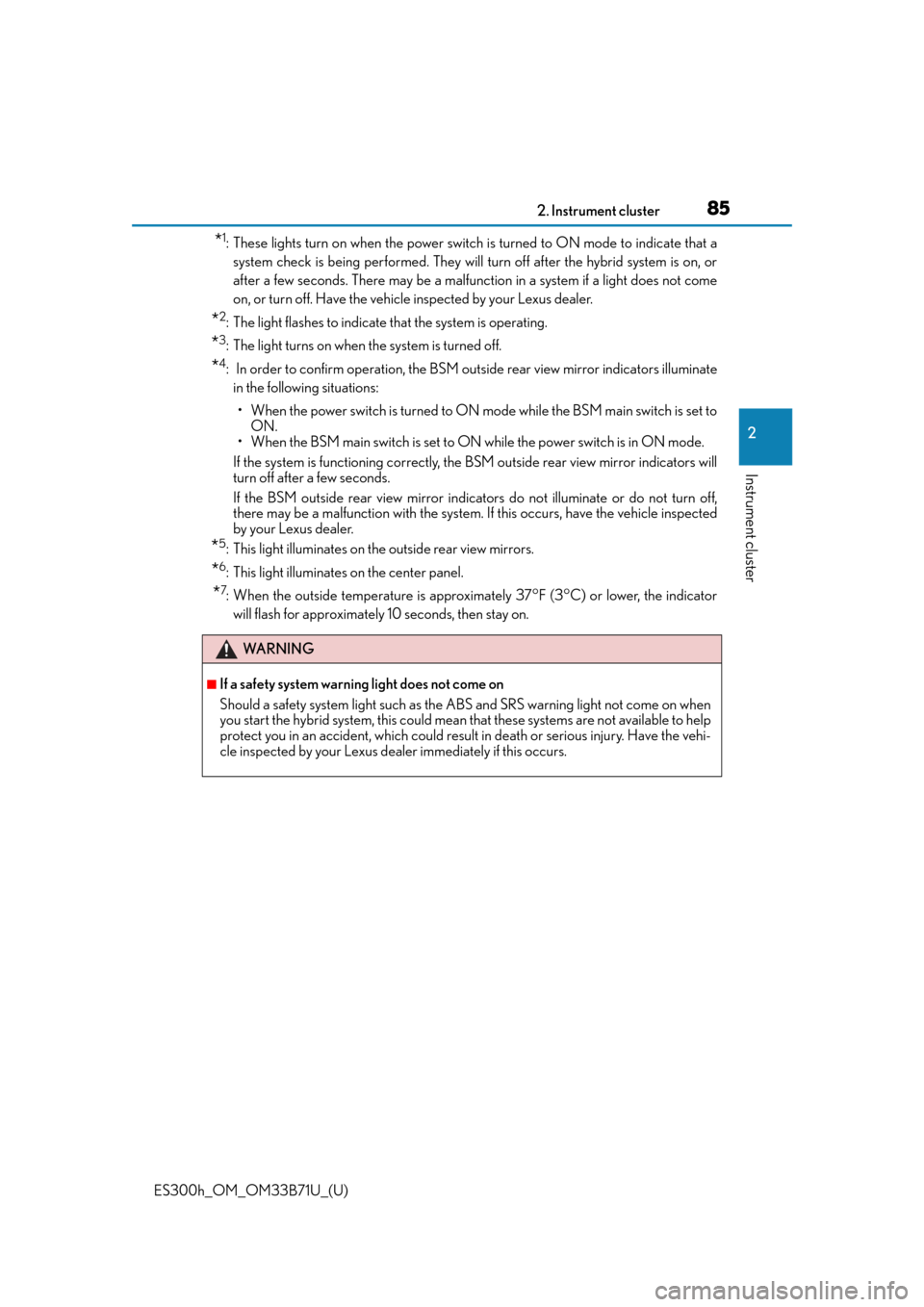
*1: These lights turn on when the power switch is turned to ON mode to indicate that asystem check is being performed. They will turn off after the hybrid system is on, or
after a few seconds. There may be a malfunction in a system if a light does not come
on, or turn off. Have the vehicl e inspected by your Lexus dealer.
*2: The light flashes to indicate that the system is operating.
*3: The light turns on when the system is turned off.
*4: In order to confirm operation, the BSM ou tside rear view mirror indicators illuminate
in the following situations:
• When the power switch is turned to ON mode while the BSM main switch is set to
ON.
• When the BSM main switch is set to ON while the power switch is in ON mode.
If the system is functioning correctly, the BSM outside rear view mirror indicators will
turn off after a few seconds.
If the BSM outside rear view mirror indica tors do not illuminate or do not turn off,
there may be a malfunction with the system. If this occurs, have the vehicle inspected
by your Lexus dealer.
*5: This light illuminates on the outside rear view mirrors.
*6: This light illuminates on the center panel.
*7: When the outside temperature is approximately 37F (3C) or lower, the indicator
will flash for approximately 10 seconds, then stay on.
WA R N I N G
■If a safety system warning light does not come on
Should a safety system light such as the ABS and SRS warning light not come on when
you start the hybrid system, this could mean that these systems are not available to help
protect you in an accident, which could result in death or serious injury. Have the vehi-
cle inspected by your Lexus dealer immediately if this occurs.
Page 87 of 600
ES300h_OM_OM33B71U_(U)
872. Instrument cluster
2
Instrument cluster
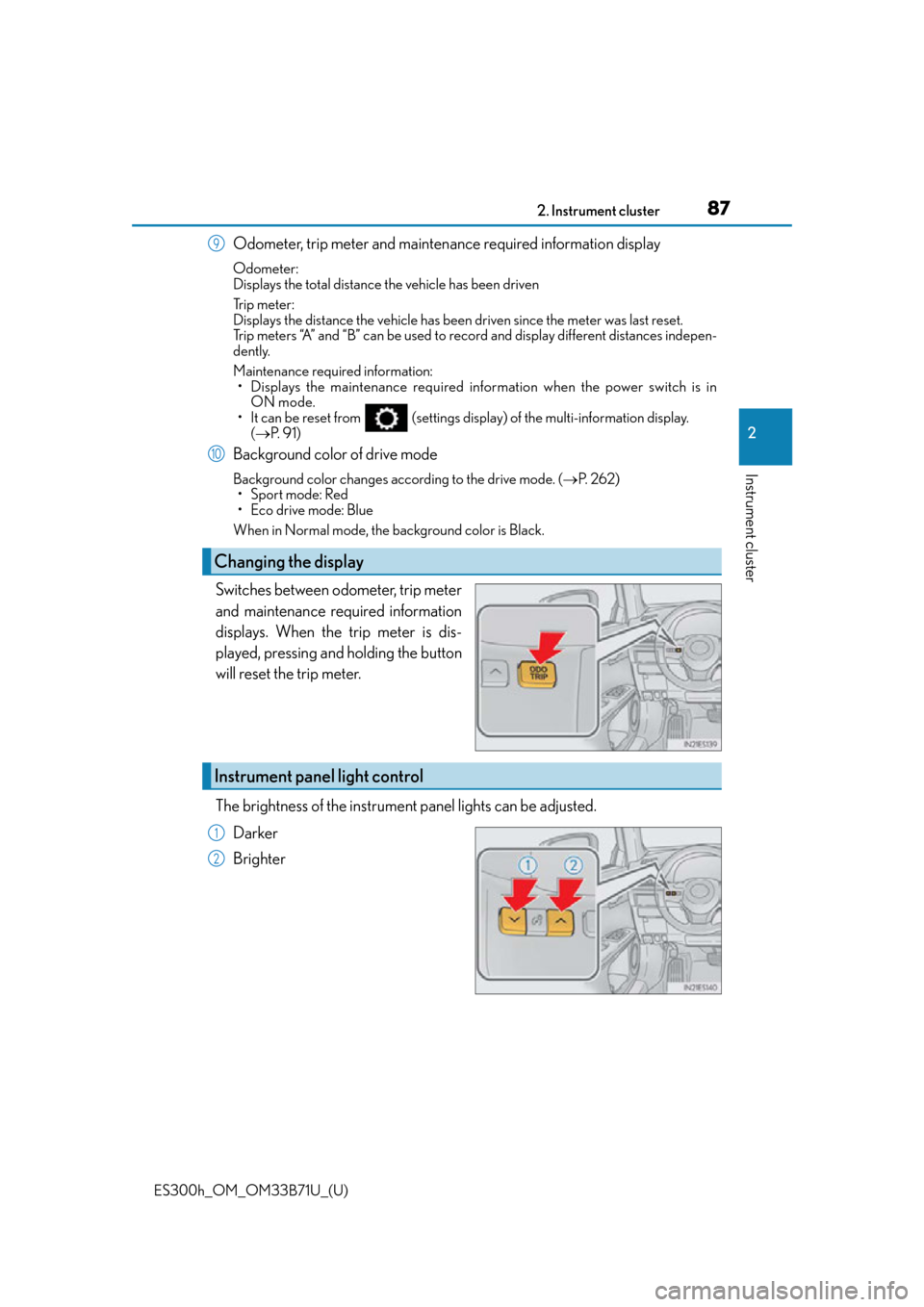
Odometer, trip meter and maintenance required information display
Odometer:
Displays the total distance the vehicle has been driven
Tr i p m e t e r :
Displays the distance the vehicle has been driven since the meter was last reset.
Trip meters “A” and “B” can be used to record and display different distances indepen-
dently.
Maintenance required information:
• Displays the maintenance required information when the power switch is in ON mode.
• It can be reset from (settings displa y) of the multi-information display.
( P. 9 1 )
Background color of drive mode
Background color changes according to the drive mode. ( P. 2 6 2 )
• Sport mode: Red
• Eco drive mode: Blue
When in Normal mode, the background color is Black.
Switches between odometer, trip meter
and maintenance required information
displays. When the trip meter is dis-
played, pressing and holding the button
will reset the trip meter.
The brightness of the instrument panel lights can be adjusted.
Darker
Brighter
Changing the display
9
10
Instrument panel light control
1
2
Page 88 of 600
88
ES300h_OM_OM33B71U_(U)2. Instrument cluster
■The meters and display illuminate when
The power switch is in ON mode.
■Instrument panel brightness adjustment
The instrument panel brig
htness levels when the tail ligh ts are on and off can be adjusted
individually. However, when the surroundings ar e bright (daytime, etc.), turning on the tail
lights will not change the instru ment panel brightness. At this time, any adjustments made
to the instrument panel bright ness levels will be applied to both settings at once.
■Limitation of brightness adjustment
The brightness of the instrume nt panel lights is automatically adjusted based on the light
sensor detecting how bright the surroundings are. However, if the instrument panel
brightness has been manually set to either th e brightest or darkest setting, the automatic
adjustment will not be performed.
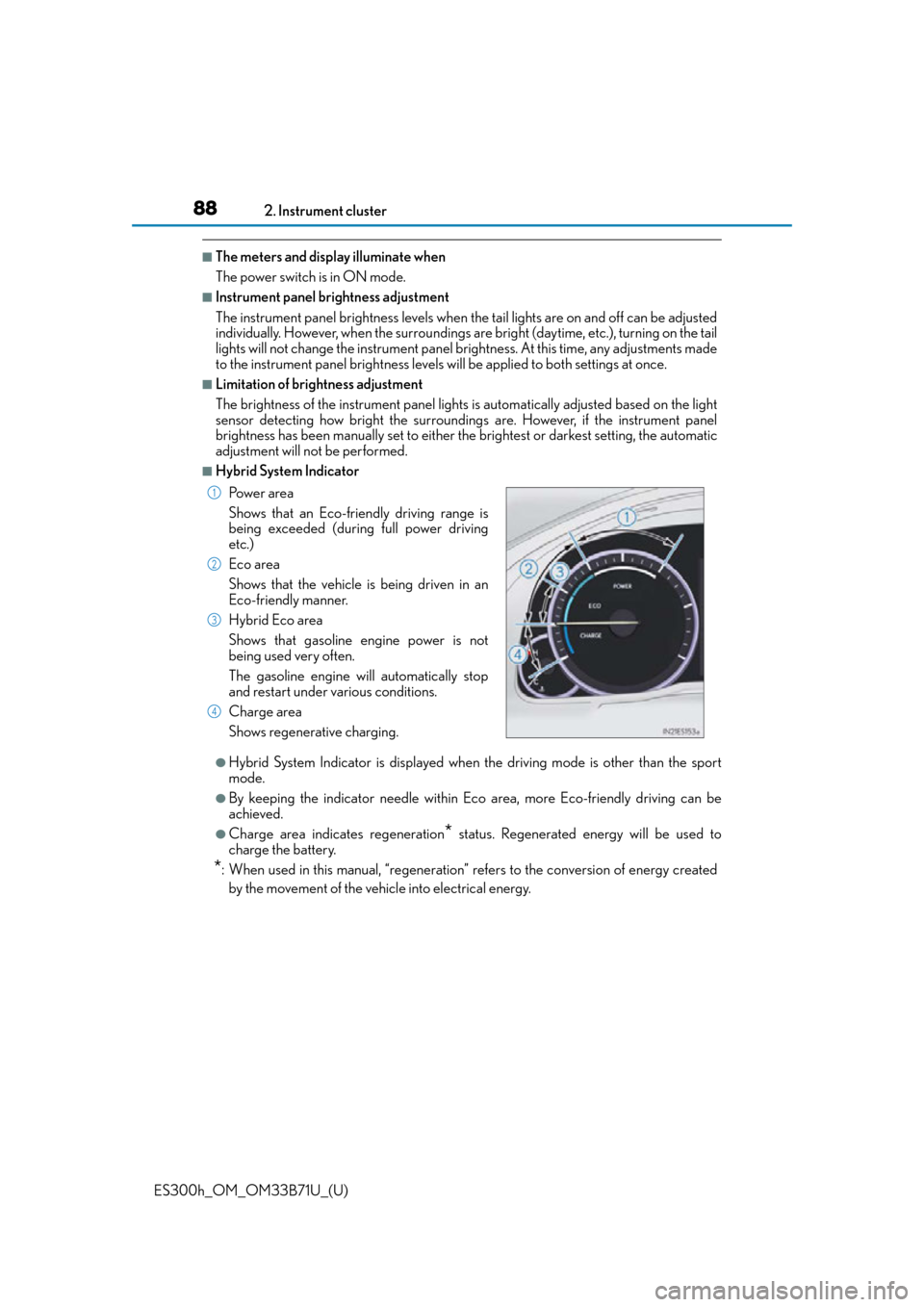
■Hybrid System Indicator
●Hybrid System Indicator is displayed when the driving mode is other than the sport
mode.
●By keeping the indicator needle within Ec o area, more Eco-friendly driving can be
achieved.
●Charge area indicates regeneration* status. Regenerated energy will be used to
charge the battery.
*: When used in this manual, “regeneration” re fers to the conversion of energy created
by the movement of the vehicle into electrical energy. Po w e r a r e a
Shows that an Eco-friendly driving range is
being exceeded (during full power driving
etc.)
Eco area
Shows that the vehicle is being driven in an
Eco-friendly manner.
Hybrid Eco area
Shows that gasoline engine power is not
being used very often.
The gasoline engine will automatically stop
and restart under various conditions.
Charge area
Shows regenerative charging.
1
2
3
4
Page 94 of 600
94
ES300h_OM_OM33B71U_(U)2. Instrument cluster
The settings of the following items can be changed, refer to P. 555
For functions that can be enabled or disabled, the function switches between on and
off each time is pressed.
●(Lane Departure Alert with steering control) (if
equipped) (
P. 2 1 3 )
●(Pre-Collision System) (if equipped) ( P. 2 0 1 )
●AFS (Adaptive Front-lighting System) ( P. 1 7 9 )
●Clock
Adjusts the hour and minute of the cl ock on the multi-information display.
●Ambient illumin.
Select to turn the ornament lights on and off.
●Vehicle Settings
• Scheduled Maintenance (P. 4 3 5 )
• Oil Maintenance ( P. 4 4 9 )
●Meter Settings
• Language
Select to change the la nguage on the display.
•Units
Select to change the unit of measure.
•EV indicator
Select to activate/deactivate the EV indicator.
• switch
Displays a procedure to register a desired screen to .
You can register 1 screen as a shortcut , which can be displayed by pressing .
• Drive information 1 /2 /3
Select to select up to 2 items that w ill be displayed on a Drive information
screen, up to 3 Drive information screens can be set.
•Pop-up display
Select to set the pop-up displays, which may appear in some situations, on/off.
• Accent color
Select to change the accent colors on the screen, such as the cursor color.
•Tachometer
Select to set the tachometer display.
• Default settings
Registered or changed meter settings w ill be deleted or returned to their
default setting.
Settings display