reset Lexus ES300h 2016 Owner's Manual (OM33B71U)
[x] Cancel search | Manufacturer: LEXUS, Model Year: 2016, Model line: ES300h, Model: Lexus ES300h 2016Pages: 600, PDF Size: 8.59 MB
Page 20 of 600
20Pictorial index
ES300h_OM_OM33B71U_(U)
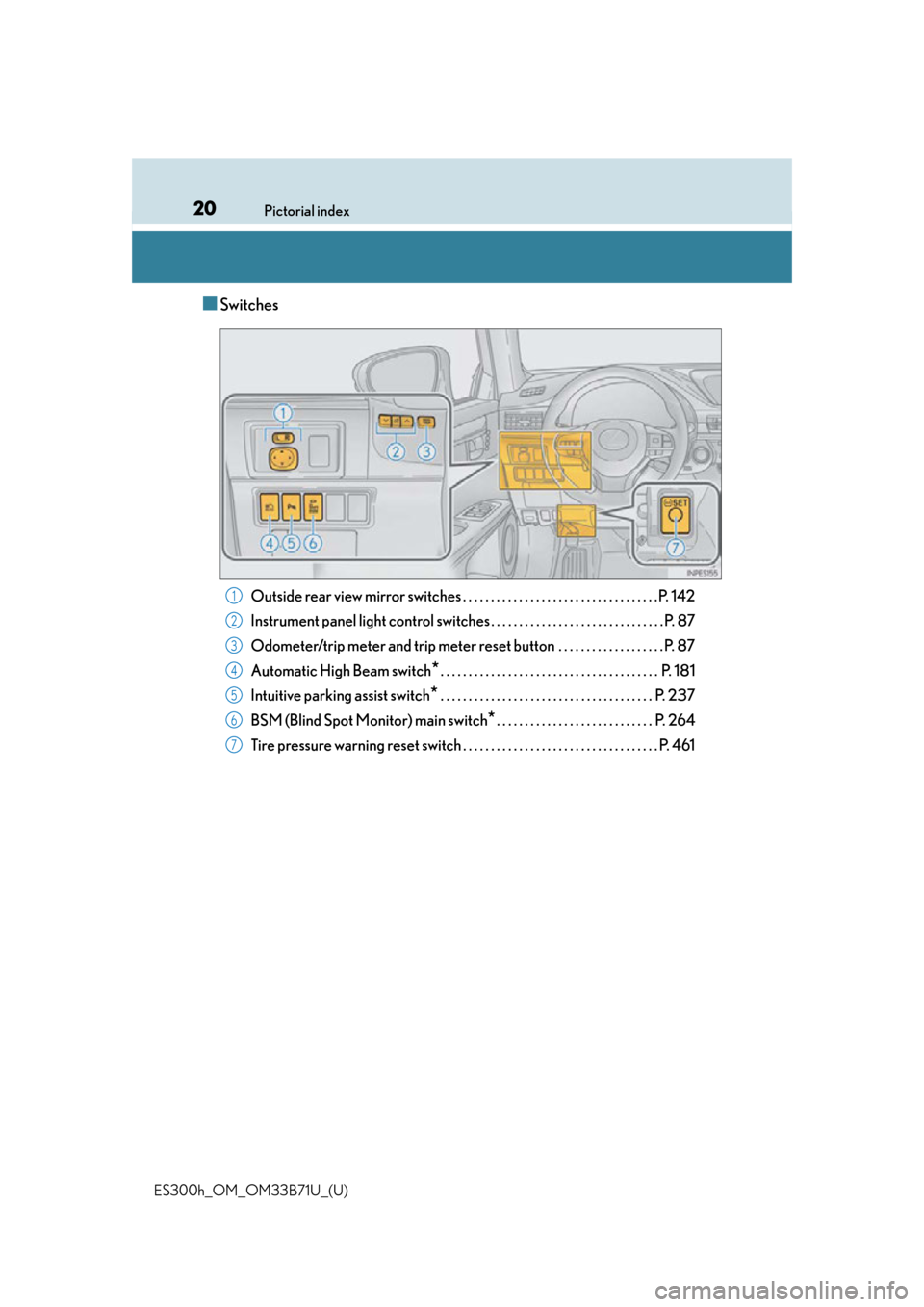
■Switches
Outside rear view mirror switches . . . . . . . . . . . . . . . . . . . . . . . . . . . . . . . . . . .P. 142
Instrument panel light control swit ches . . . . . . . . . . . . . . . . . . . . . . . . . . . . . . . P. 87
Odometer/trip meter and trip meter reset button . . . . . . . . . . . . . . . . . . . P. 87
Automatic High Beam switch
*. . . . . . . . . . . . . . . . . . . . . . . . . . . . . . . . . . . . . . . P. 181
Intuitive parking assist switch
* . . . . . . . . . . . . . . . . . . . . . . . . . . . . . . . . . . . . . . P. 237
BSM (Blind Spot Monitor) main switch
*. . . . . . . . . . . . . . . . . . . . . . . . . . . . P. 264
Tire pressure warning reset switch . . . . . . . . . . . . . . . . . . . . . . . . . . . . . . . . . . . P. 461
1
2
3
4
5
6
7
Page 87 of 600
ES300h_OM_OM33B71U_(U)
872. Instrument cluster
2
Instrument cluster
Odometer, trip meter and maintenance required information display
Odometer:
Displays the total distance the vehicle has been driven
Tr i p m e t e r :
Displays the distance the vehicle has been driven since the meter was last reset.
Trip meters “A” and “B” can be used to record and display different distances indepen-
dently.
Maintenance required information:
• Displays the maintenance required information when the power switch is in ON mode.
• It can be reset from (settings displa y) of the multi-information display.
( P. 9 1 )
Background color of drive mode
Background color changes according to the drive mode. ( P. 2 6 2 )
• Sport mode: Red
• Eco drive mode: Blue
When in Normal mode, the background color is Black.
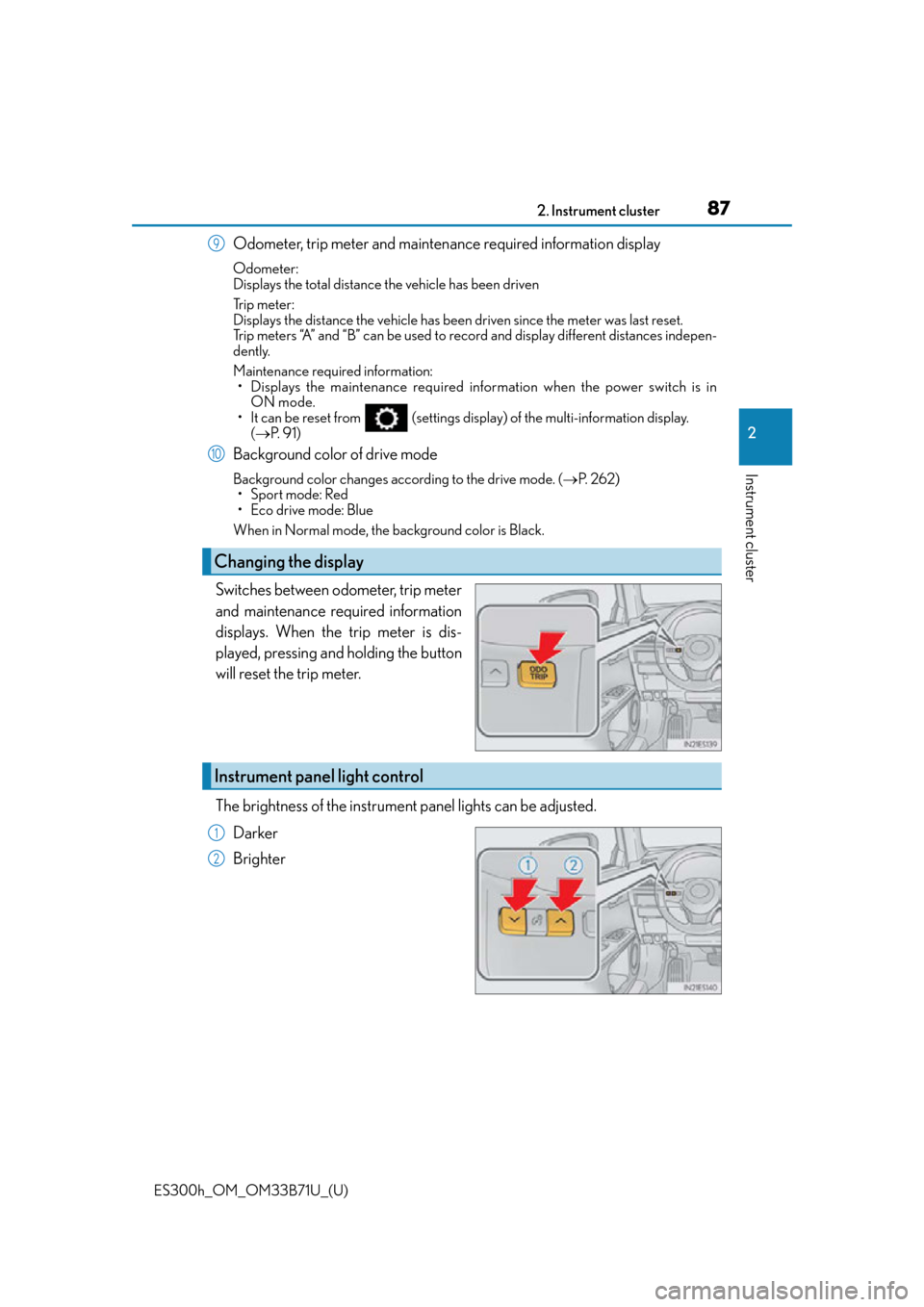
Switches between odometer, trip meter
and maintenance required information
displays. When the trip meter is dis-
played, pressing and holding the button
will reset the trip meter.
The brightness of the instrument panel lights can be adjusted.
Darker
Brighter
Changing the display
9
10
Instrument panel light control
1
2
Page 92 of 600
92
ES300h_OM_OM33B71U_(U)2. Instrument cluster
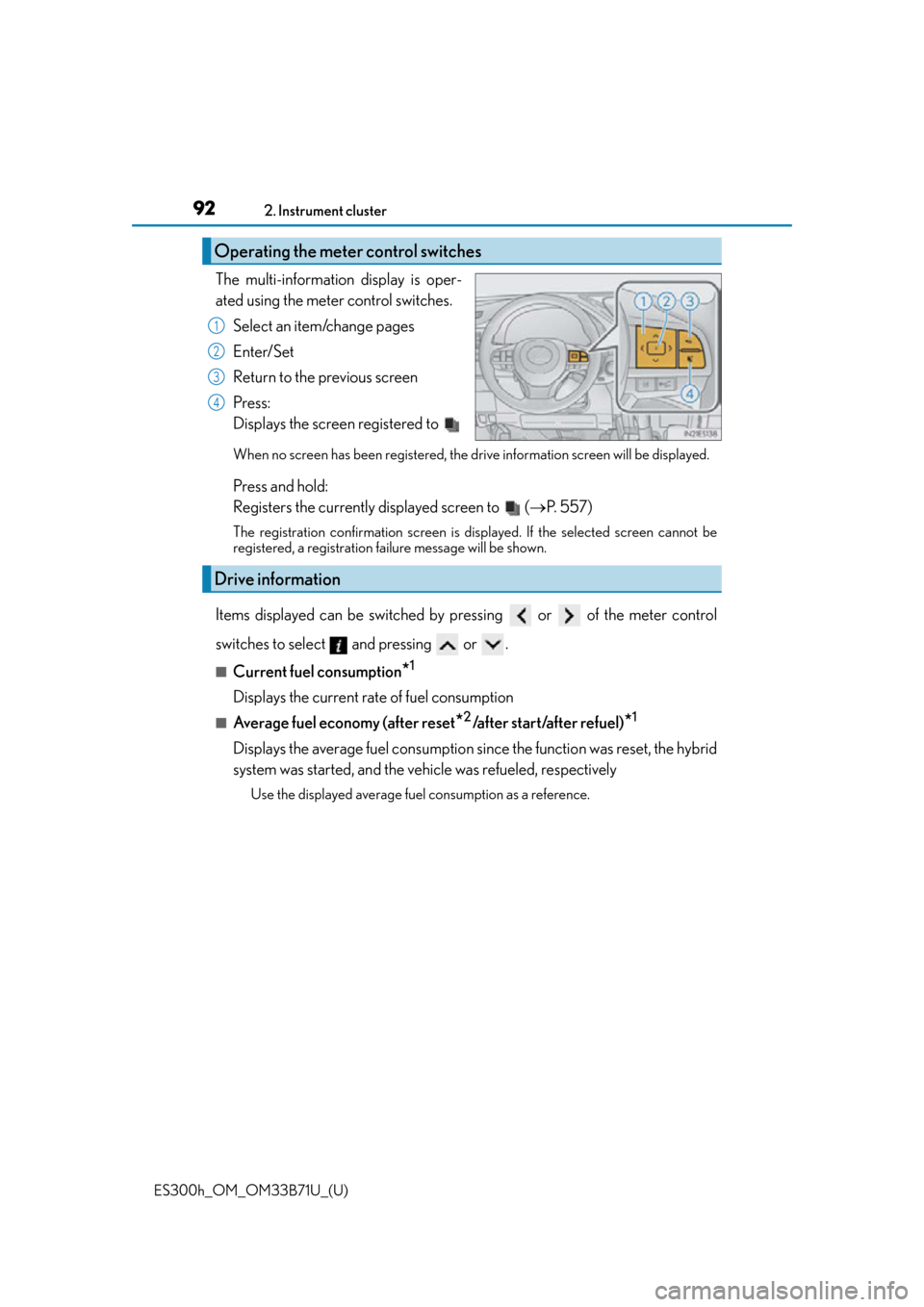
The multi-information display is oper-
ated using the meter control switches.
Select an item/change pages
Enter/Set
Return to the previous screen
Press:
Displays the screen registered to
When no screen has been registered, the drive information screen will be displayed.
Press and hold:
Registers the currently displayed screen to ( P. 5 5 7 )
The registration confirmation screen is di splayed. If the selected screen cannot be
registered, a registration failure message will be shown.
Items displayed can be switched by pressing or of the meter control
switches to select and pressing or .
■Current fuel consumption*1
Displays the current rate of fuel consumption
■Average fuel economy (after reset*2/after start/after refuel)*1
Displays the average fuel consumption si nce the function was reset, the hybrid
system was started, and the vehicle was refueled, respectively
Use the displayed average fuel consumption as a reference.
Operating the meter control switches
1
2
3
4
Drive information
Page 93 of 600

ES300h_OM_OM33B71U_(U)
932. Instrument cluster
2
Instrument cluster
■Average speed (after reset*2/a f t e r s t a r t )*1
Displays the average vehicle speed since the function was reset and the
hybrid system was started, respectively
■Elapsed time (after reset*2/after start)*1
Displays the elapsed time since the function was reset and the hybrid system
was started, respectively
■Distance (range/after start)*1
Displays the estimated maximum distance that can be driven with the quantity
of fuel remaining and the distance driven after the hybrid system was started
respectively.
• This distance is computed based on your average fuel consumption. As a result,
the actual distance that can be driven may differ from that displayed.
• When only a small amount of fuel is added to the tank, the display may not be
updated.
When refueling, turn the power switch off. If the vehicle is refueled without turning
the power switch off, the display may not be updated.
■Energy monitor
P. 9 6
■Tire inflation pressure
Displays inflation pressure of each tire.
The inflation pressure of the sp are tire will not be displayed.
■LDA (Lane Departure Alert with steering control) vehicle sway warning (if
equipped)
P. 2 1 3
■Display off
A blank screen is displayed
*1: Displayed when the item is set in “Drive In fo 1”, “Drive Info 2” or “Drive Info 3”.
( P. 5 5 7 )
*2: The function can be reset by pressing the of the meter control switches for
longer than 1 second when th e item to reset is displayed.
If there is more than one item that can be reset, the item selection screen will appear.
Page 95 of 600
ES300h_OM_OM33B71U_(U)
952. Instrument cluster
2
Instrument cluster
■System check display
After turning the power switch to ON mode, opening image is displayed while system
operation is checked. When the system check is complete, the normal screen will return.
■Suspension of the settings display
In the following situations, the settings display using the meter control switches will be
suspended.
●When a warning message appears on the multi-information display
●When the vehicle begins to move
■Tire inflation pressure
●It may take a few minutes to display the tire inflation pressure after the power switch is
turned to ON mode. It may also take a few minutes to display the tire inflation pressure
after inflation pressure has been adjusted.
●“---” may be displayed if the tire information cannot be determined due to unfavorable
radio wave conditions.
●Tire inflation pressure changes with temperat ure. The displayed values may also be dif-
ferent from the values measured using a tire pressure gauge.
■When disconnecting and reconnec ting 12-volt battery terminals
The drive information will be reset.
■Liquid crystal display
P. 8 9
WA R N I N G
■Caution for use while driving
For safety, avoid operating the meter control switch while driving as much as possible,
and do not look continuously at the multi- information display while driving. Stop the
vehicle and operate the meter control switch. Failure to do so may cause a steering
wheel operation error, resultin g in an unexpected accident.
■Cautions during setting up the display
As the hybrid system needs to be operating during setting up the display, ensure that
the vehicle is parked in a place with adequate ventilation. In a closed area such as a
garage, exhaust gases includin g harmful carbon monoxide (CO) may collect and enter
the vehicle. This may lead to death or a serious health hazard.
NOTICE
■During setting up the display
To prevent 12-volt battery discharge, ensure that the hybrid system is operating while
setting up the display features.
Page 99 of 600
ES300h_OM_OM33B71U_(U)
992. Instrument cluster
2
Instrument cluster
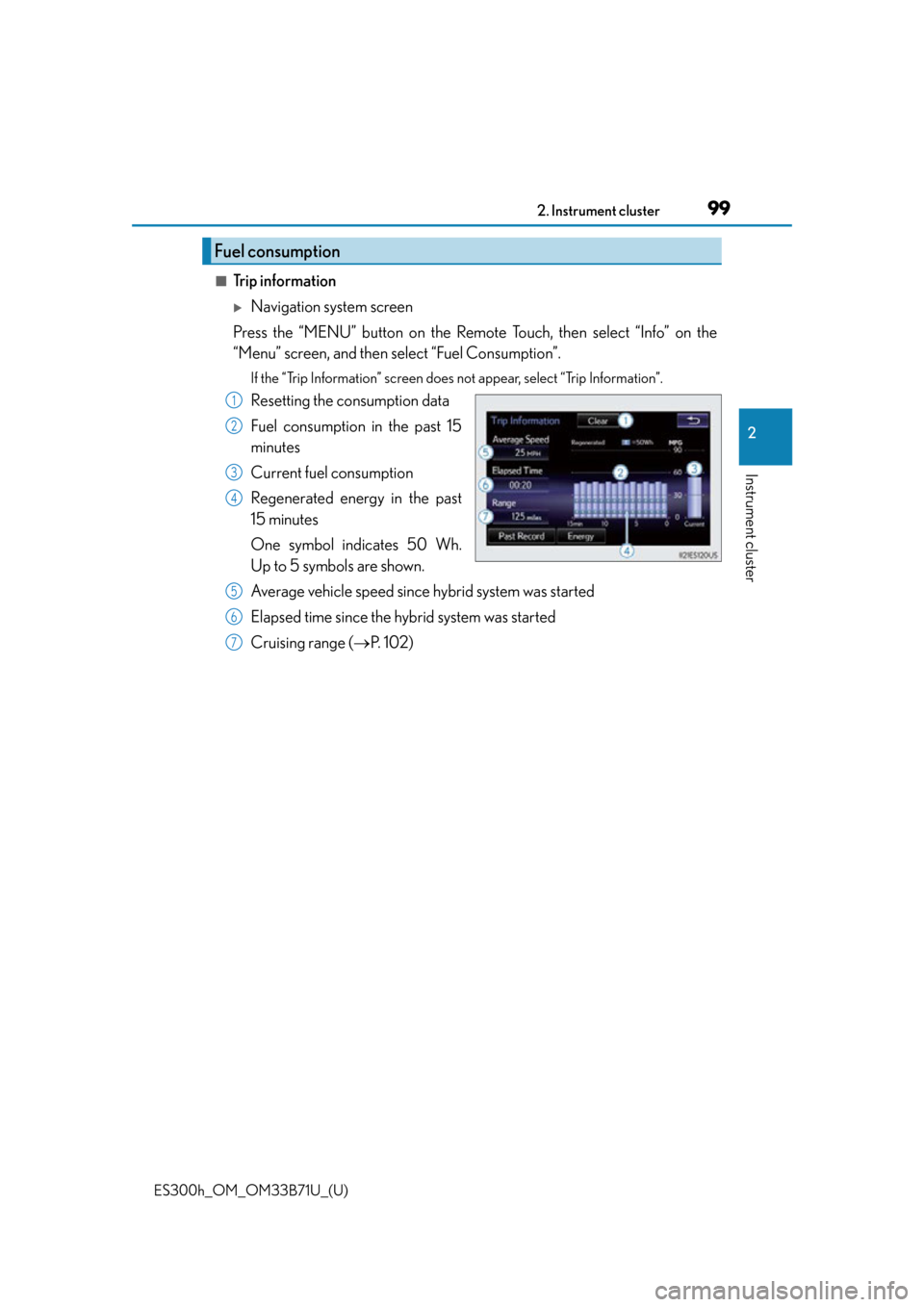
■Trip information
Navigation system screen
Press the “MENU” button on the Remote Touch, then select “Info” on the
“Menu” screen, and then select “Fuel Consumption”.
If the “Trip Information” screen does not appear, select “Trip Information”.
Resetting the consumption data
Fuel consumption in the past 15
minutes
Current fuel consumption
Regenerated energy in the past
15 minutes
One symbol indicates 50 Wh.
Up to 5 symbols are shown.
Average vehicle speed since hybrid system was started
Elapsed time since the hybrid system was started
Cruising range ( P. 1 0 2 )
Fuel consumption
1
2
3
4
5
6
7
Page 101 of 600
ES300h_OM_OM33B71U_(U)
1012. Instrument cluster
2
Instrument cluster
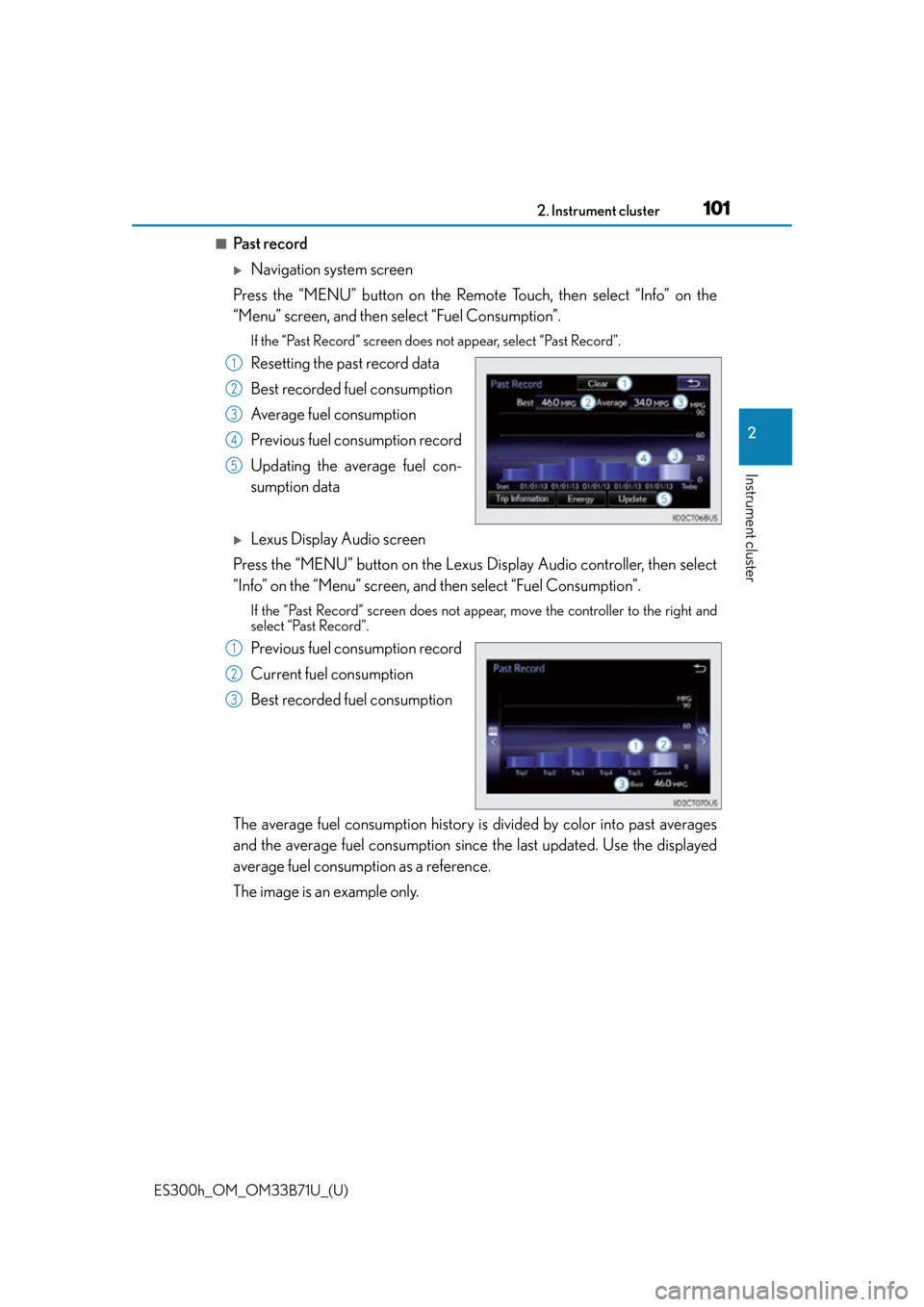
■Past record
Navigation system screen
Press the “MENU” button on the Remote Touch, then select “Info” on the
“Menu” screen, and then select “Fuel Consumption”.
If the “Past Record” screen does not appear, select “Past Record”.
Resetting the past record data
Best recorded fuel consumption
Average fuel consumption
Previous fuel consumption record
Updating the average fuel con-
sumption data
Lexus Display Audio screen
Press the “MENU” button on the Lexus Display Audio controller, then select
“Info” on the “Menu” screen, and then select “Fuel Consumption”.
If the “Past Record” screen does not appe ar, move the controller to the right and
select “Past Record”.
Previous fuel consumption record
Current fuel consumption
Best recorded fuel consumption
The average fuel consumption history is divided by color into past averages
and the average fuel consumption since the last updated. Use the displayed
average fuel consumption as a reference.
The image is an example only.
1
2
3
4
5
1
2
3
Page 102 of 600

102
ES300h_OM_OM33B71U_(U)2. Instrument cluster
■Updating the past record data
Vehicles with navigation system
Update the average fuel consumption by selecting “Update” to measure the current fuel
consumption again.
Vehicles with Lexus Display Audio system
Update the average fuel consumption by moving the controller to the left and select
“Update” to measure the current fuel consumption again.
■Resetting the data
Vehicles with navigation system
The fuel consumption data can be deleted by selecting “Clear”.
Vehicles with Lexus Display Audio system
The fuel consumption data can be deleted by moving the controller to the left and select
“Clear ”.
■Cruising range
Displays the estimated maximum distance that can be driven with the quantity of fuel
remaining.
This distance is computed based on your average fuel consumption.
As a result, the actual distance that can be driven may differ from that displayed.
Page 131 of 600
ES300h_OM_OM33B71U_(U)
1313-3. Adjusting the seats
3
Operation of each component
Your preferred driving position (the position of the driver’s seat, steering wheel
and outside rear view mirrors) can be recorded and recalled by pressing a but-
ton.
Three different driving positions can be recorded into memory.
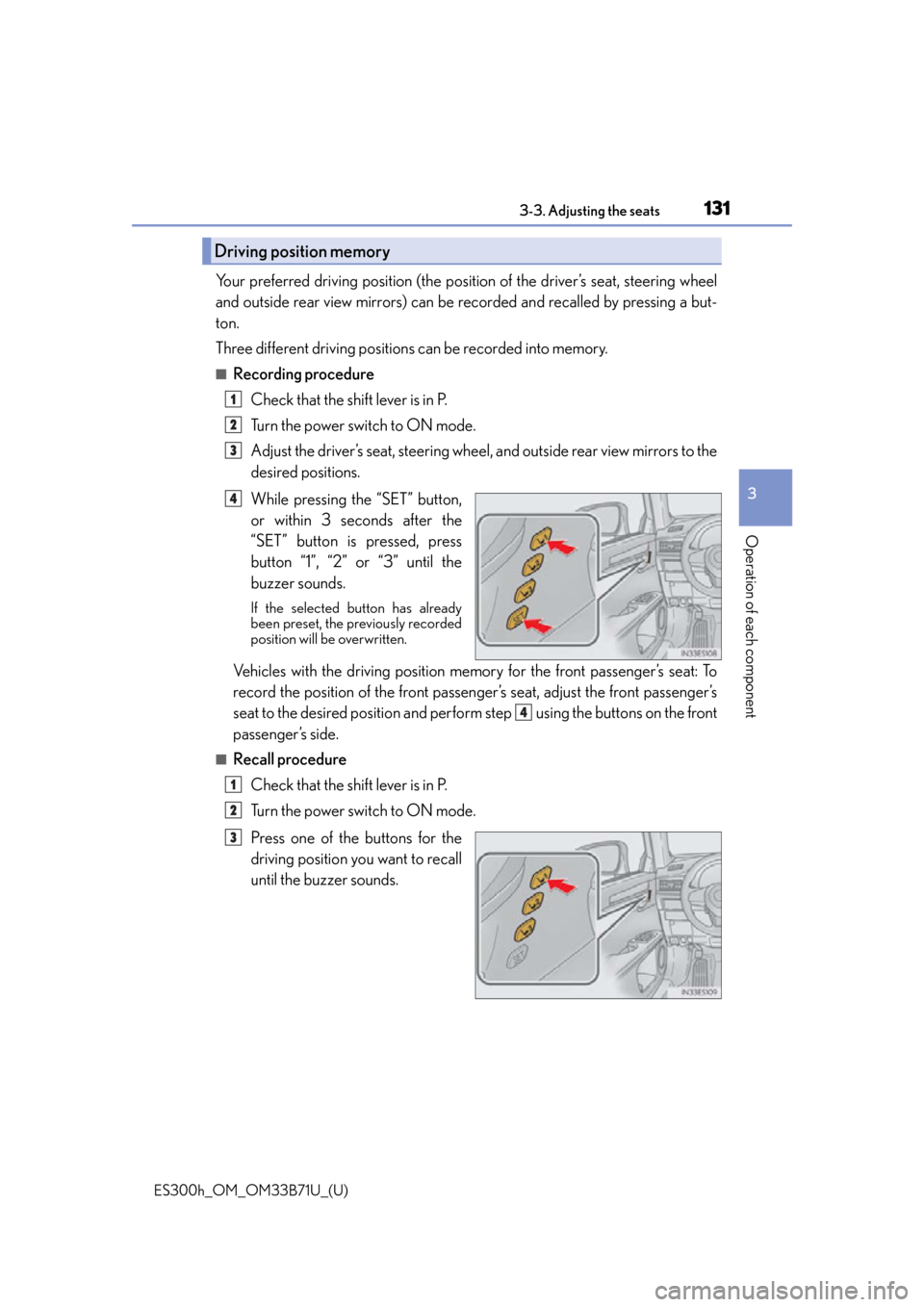
■Recording procedure
Check that the shift lever is in P.
Turn the power switch to ON mode.
Adjust the driver’s seat, steering wheel, and outside rear view mirrors to the
desired positions.
While pressing the “SET” button,
or within 3 seconds after the
“SET” button is pressed, press
button “1”, “2” or “3” until the
buzzer sounds.
If the selected button has already
been preset, the previously recorded
position will be overwritten.
Vehicles with the driving position memory for the front passenger’s seat: To
record the position of the front passenger’s seat, adjust the front passenger’s
seat to the desired position and perform step using the buttons on the front
passenger’s side.
■Recall procedure
Check that the shift lever is in P.
Turn the power switch to ON mode.
Press one of the buttons for the
driving position you want to recall
until the buzzer sounds.
Driving position memory
1
2
3
4
4
1
2
3
Page 236 of 600
236
ES300h_OM_OM33B71U_(U)4-5. Using the driving support systems
■Automatic cruise control cancelation
Cruise control will stop maintaining the vehicl
e speed in any of the following situations.
●Actual vehicle speed falls more than approximately 10 mph (16 km/h) below the preset
vehicle speed.
At this time, the memorized set speed is not retained.
●Actual vehicle speed is below approximately 25 mph (40 km/h).
●VSC is activated.
●TRAC is activated for a period of time.
●When the VSC or TRAC system is turned off by pressing the VSC OFF switch.
■If the warning message for the cruise contro l is shown on the multi-information display
Press the “ON/OFF” button once to deactivate the system, and then press the button
again to reactivate the system.
If the cruise control speed cannot be set or if the cruise control cancels immediately after
being activated, there may be a malfunction in the cruise control system. Have the vehi-
cle inspected by your Lexus dealer.
WA R N I N G
■To avoid operating the cruise control by mistake
Switch the cruise control off using th e “ON/OFF” button when not in use.
■Situations unsuitable for cruise control
Do not use cruise control in any of the following situations.
Doing so may result in loss of control and could cause an accident resulting in death or
serious injury.
●Roads where there are pedestrians, cyclists, etc.
●In heavy traffic
●On roads with sharp bends
●On winding roads
●On slippery roads, such as thos e covered with rain, ice or snow
●On steep hills
Vehicle speed may exceed the set speed when driving down a steep hill.
●During emergency towing