ad blue Lexus ES300h 2017 Navigation Manual
[x] Cancel search | Manufacturer: LEXUS, Model Year: 2017, Model line: ES300h, Model: Lexus ES300h 2017Pages: 357, PDF Size: 9.68 MB
Page 58 of 357
56
2. Bluetooth® SETTINGS
ES350/300h_Navi_OM33C79U_(U)16.06.22 14:51
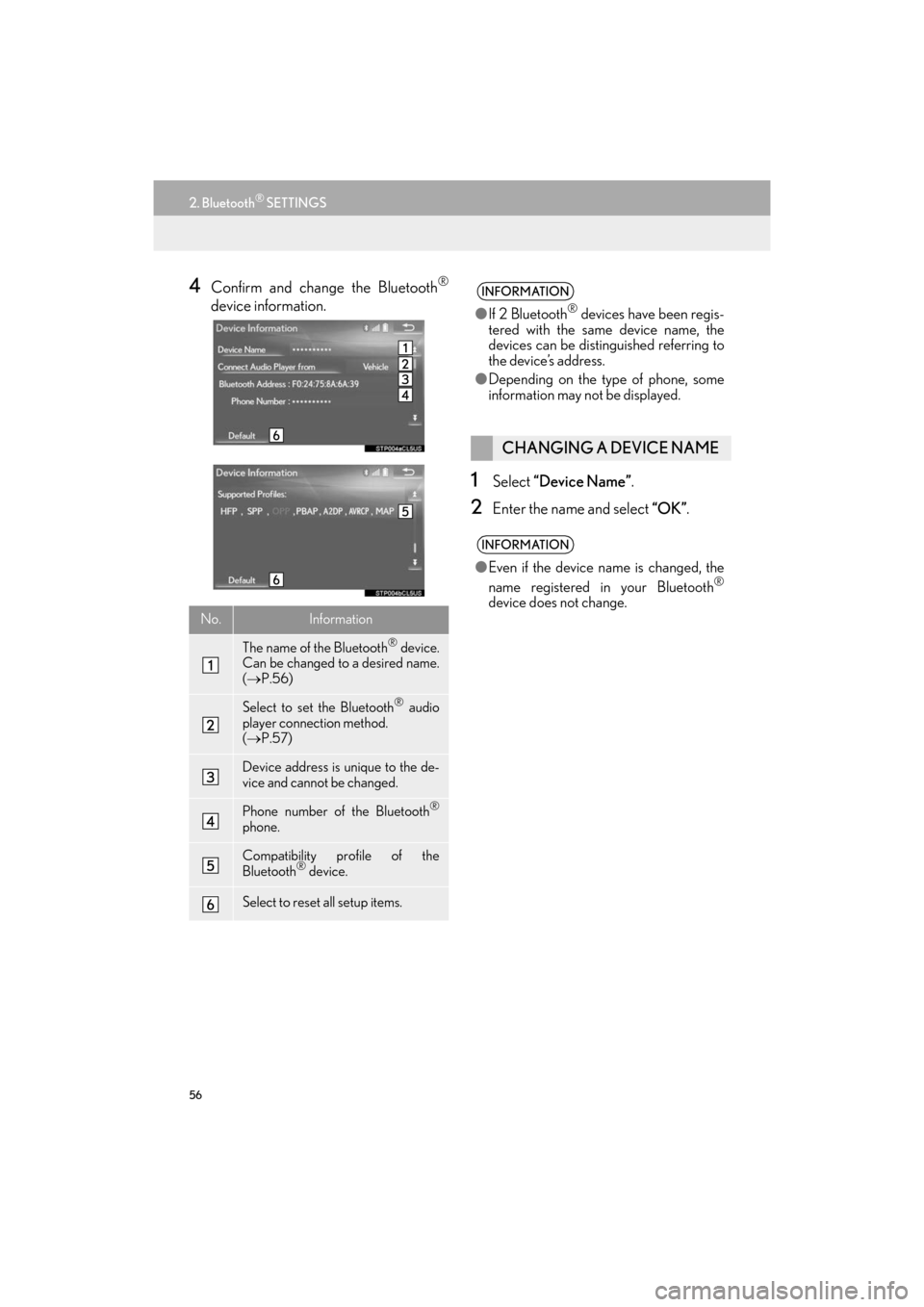
4Confirm and change the Bluetooth®
device information.
1Select “Device Name” .
2Enter the name and select “OK”.
No.Information
The name of the Bluetooth® device.
Can be changed to a desired name.
( → P.56)
Select to set the Bluetooth® audio
player connection method.
( → P.57)
Device address is unique to the de-
vice and cannot be changed.
Phone number of the Bluetooth®
phone.
Compatibility profile of the
Bluetooth® device.
Select to reset all setup items.
INFORMATION
●If 2 Bluetooth® devices have been regis-
tered with the same device name, the
devices can be distinguished referring to
the device’s address.
● Depending on the type of phone, some
information may not be displayed.
CHANGING A DEVICE NAME
INFORMATION
●Even if the device name is changed, the
name registered in your Bluetooth®
device does not change.
ES350_300h_Navi_OM33C79U_(U).book Page 56 Wednesday, June 22, 2016 2:54 PM
Page 59 of 357
57
2. Bluetooth® SETTINGS
ES350/300h_Navi_OM33C79U_(U)16.06.22 14:51
BASIC FUNCTION
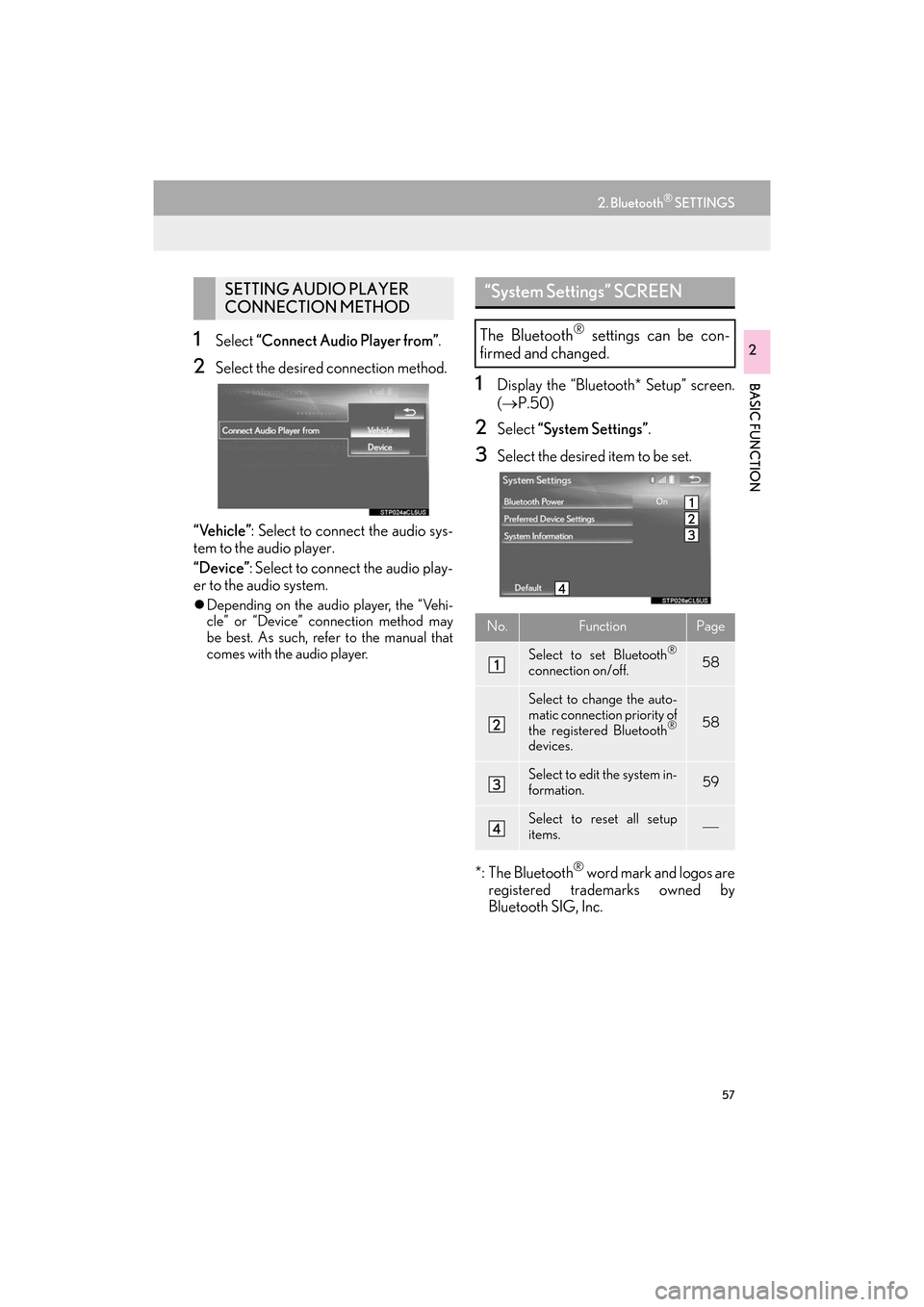
21Select “Connect Audio Player from” .
2Select the desired connection method.
“Vehicle” : Select to connect the audio sys-
tem to the audio player.
“Device” : Select to connect the audio play-
er to the audio system.
z Depending on the audio player, the “Vehi-
cle” or “Device” connection method may
be best. As such, refer to the manual that
comes with the audio player.
1Display the “Bluetooth* Setup” screen.
(→ P.50)
2Select “System Settings” .
3Select the desired item to be set.
*: The Bluetooth
® word mark and logos are
registered trademarks owned by
Bluetooth SIG, Inc.
SETTING AUDIO PLAYER
CONNECTION METHOD“System Settings” SCREEN
The Bluetooth® settings can be con-
firmed and changed.
No.FunctionPage
Select to set Bluetooth®
connection on/off.58
Select to change the auto-
matic connection priority of
the registered Bluetooth
®
devices.
58
Select to edit the system in-
formation.59
Select to reset all setup
items.
ES350_300h_Navi_OM33C79U_(U).book Page 57 Wednesday, June 22, 2016 2:54 PM
Page 60 of 357
58
2. Bluetooth® SETTINGS
ES350/300h_Navi_OM33C79U_(U)16.06.22 14:51
1Select “Bluetooth* Power”.
When “Bluetooth* Power” is on :
The Bluetooth
® device is automatically
connected when the engine
is in ACCESSORY or IGNITION ON
When “Bluetooth* Power” is off :
The Bluetooth
® device is disconnected,
and the system will not connect to it next
time.
*: The Bluetooth
® word mark and logos are
registered trademarks owned by
Bluetooth SIG, Inc.
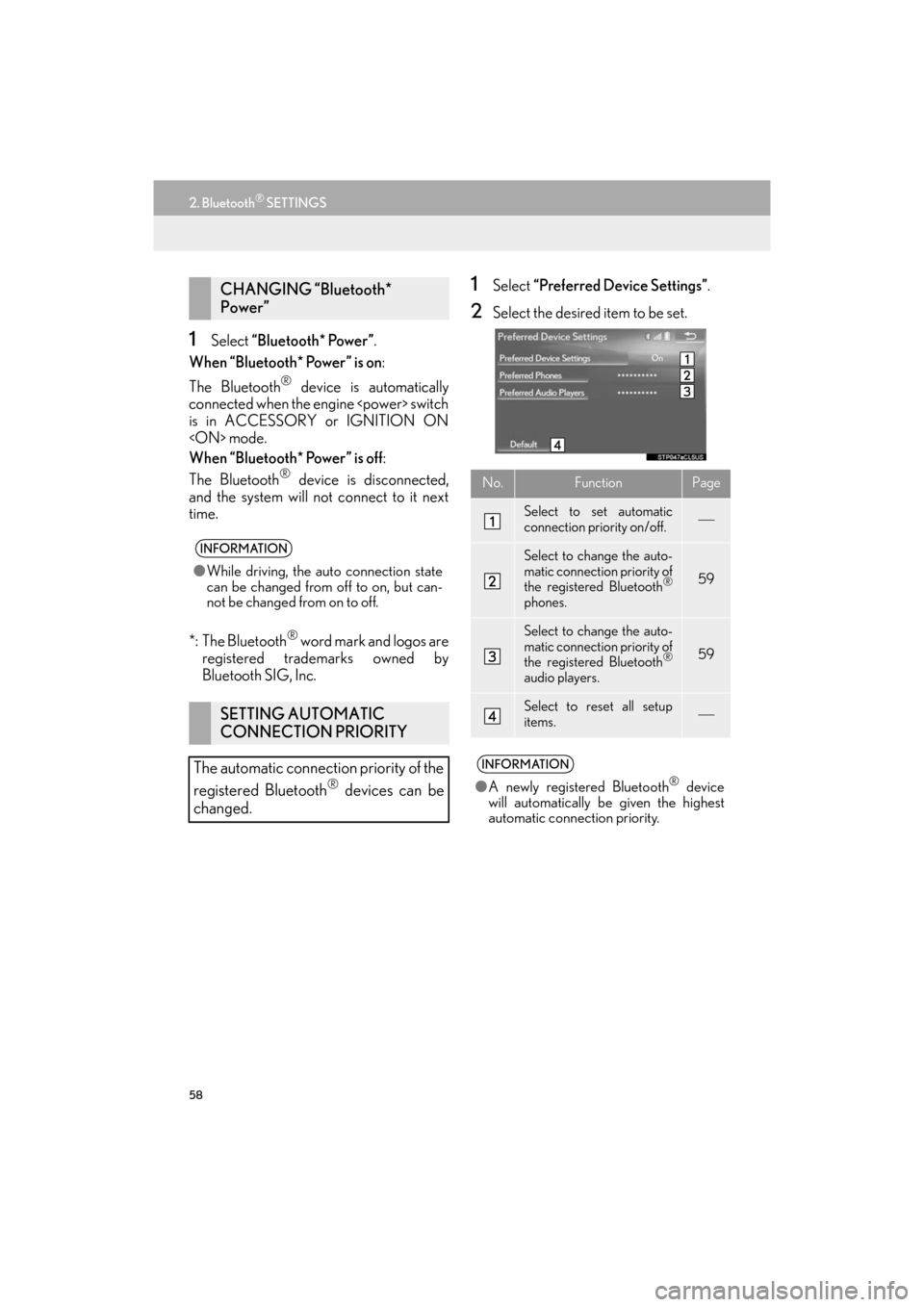
1Select “Preferred Device Settings” .
2Select the desired item to be set.
CHANGING “Bluetooth*
Power”
INFORMATION
●While driving, the auto connection state
can be changed from off to on, but can-
not be changed from on to off.
SETTING AUTOMATIC
CONNECTION PRIORITY
The automatic connection priority of the
registered Bluetooth
® devices can be
changed.
No.FunctionPage
Select to set automatic
connection priority on/off.
Select to change the auto-
matic connection priority of
the registered Bluetooth
®
phones.
59
Select to change the auto-
matic connection priority of
the registered Bluetooth
®
audio players.
59
Select to reset all setup
items.
INFORMATION
● A newly registered Bluetooth® device
will automatically be given the highest
automatic connection priority.
ES350_300h_Navi_OM33C79U_(U).book Page 58 Wednesday, June 22, 2016 2:54 PM
Page 61 of 357
59
2. Bluetooth® SETTINGS
ES350/300h_Navi_OM33C79U_(U)16.06.22 14:51
BASIC FUNCTION
2
■CHANGING PHONE AUTOMAT-
IC CONNECTION PRIORITY
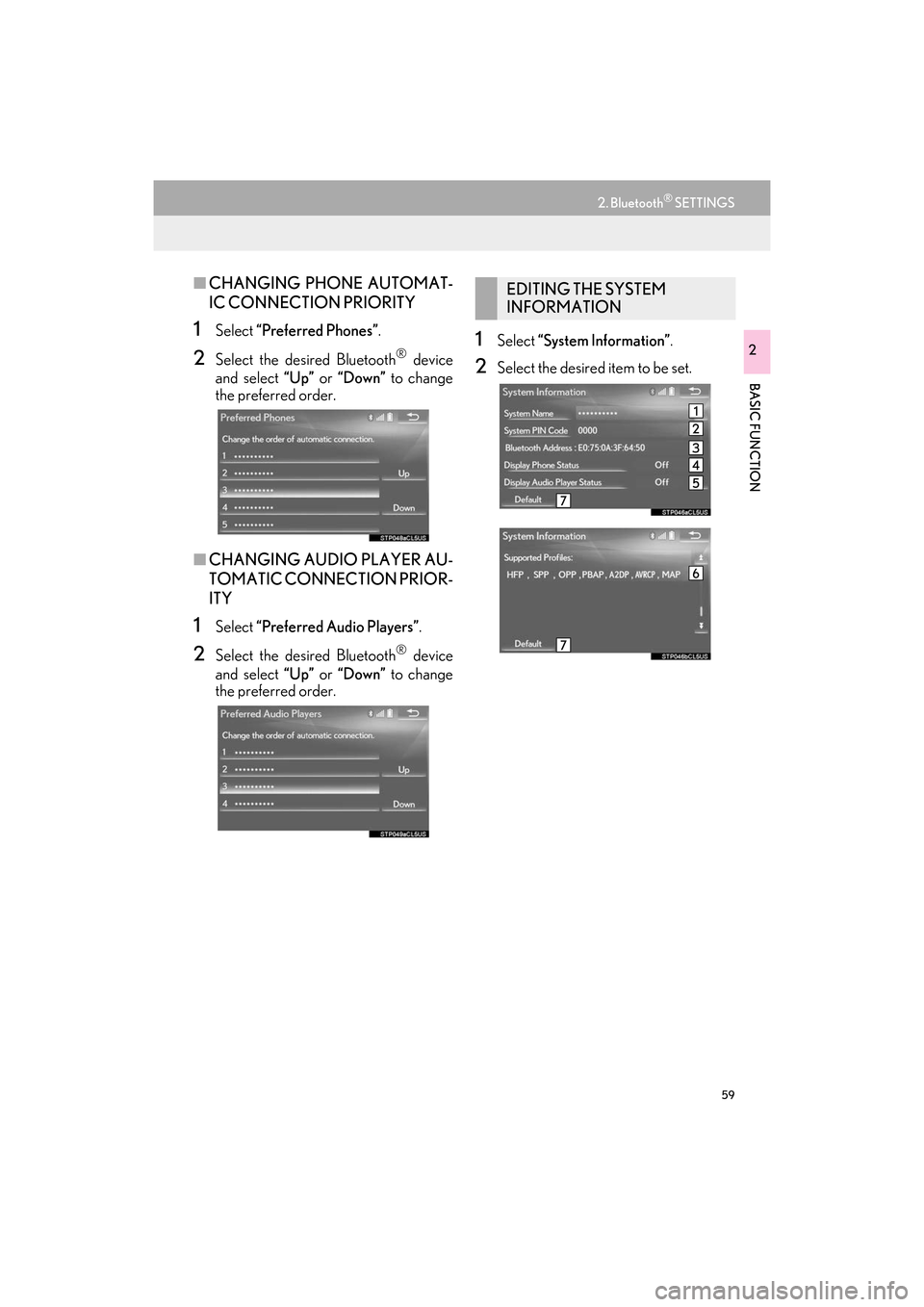
1Select “Preferred Phones” .
2Select the desired Bluetooth® device
and select “Up” or “Down” to change
the preferred order.
■ CHANGING AUDIO PLAYER AU-
TOMATIC CONNECTION PRIOR-
ITY
1Select “Preferred Audio Players” .
2Select the desired Bluetooth® device
and select “Up” or “Down” to change
the preferred order.
1Select “System Information” .
2Select the desired item to be set.
EDITING THE SYSTEM
INFORMATION
ES350_300h_Navi_OM33C79U_(U).book Page 59 Wednesday, June 22, 2016 2:54 PM
Page 62 of 357
60
2. Bluetooth® SETTINGS
ES350/300h_Navi_OM33C79U_(U)16.06.22 14:51
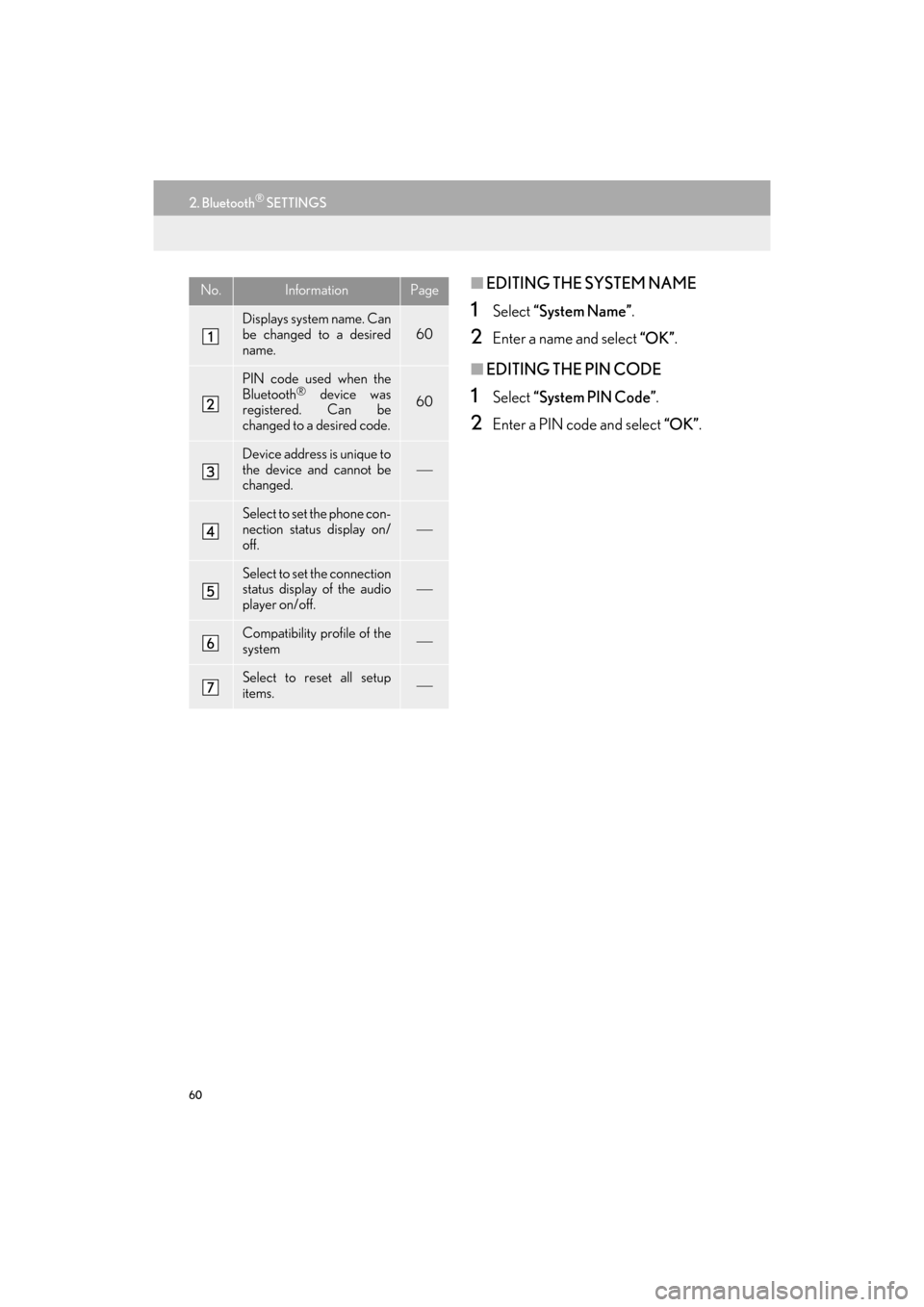
■EDITING THE SYSTEM NAME
1Select “System Name” .
2Enter a name and select “OK”.
■EDITING THE PIN CODE
1Select “System PIN Code” .
2Enter a PIN code and select “OK”.
No.InformationPage
Displays system name. Can
be changed to a desired
name.
60
PIN code used when the
Bluetooth® device was
registered. Can be
changed to a desired code.60
Device address is unique to
the device and cannot be
changed.
Select to set the phone con-
nection status display on/
off.
Select to set the connection
status display of the audio
player on/off.
Compatibility profile of the
system
Select to reset all setup
items.
ES350_300h_Navi_OM33C79U_(U).book Page 60 Wednesday, June 22, 2016 2:54 PM
Page 147 of 357
4
145
ES350/300h_Navi_OM33C79U_(U)16.06.14 11:50
1
2
3 4
5
6
7
8 9
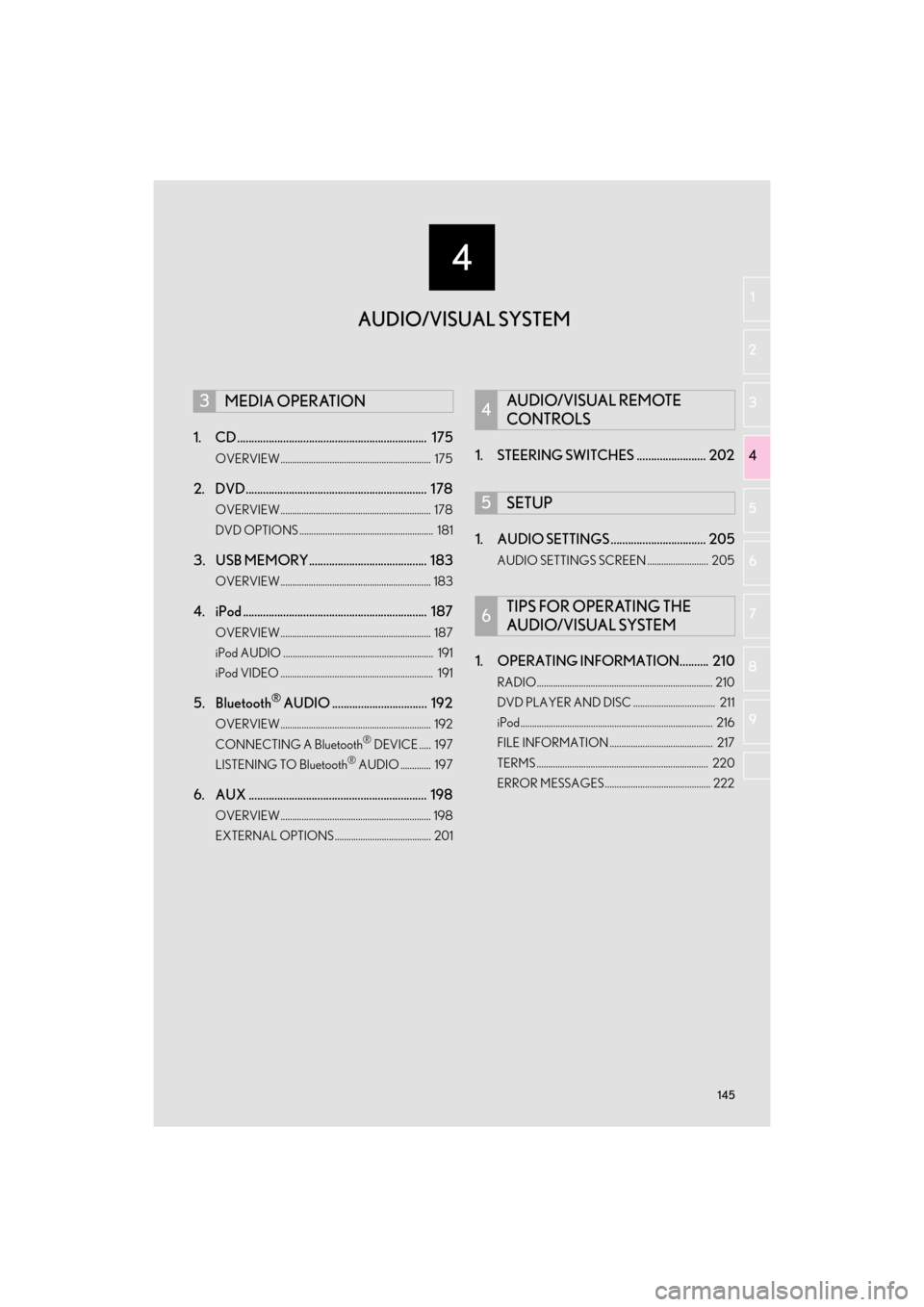
1. CD .................................................................. 175
OVERVIEW................................................................ 175
2. DVD............................................................... 178
OVERVIEW................................................................ 178
DVD OPTIONS ......................................................... 181
3. USB MEMORY......................................... 183
OVERVIEW................................................................ 183
4. iPod ................................................................ 187
OVERVIEW................................................................ 187
iPod AUDIO ................................................................ 191
iPod VIDEO ................................................................. 191
5. Bluetooth® AUDIO ................................. 192
OVERVIEW................................................................ 192
CONNECTING A Bluetooth® DEVICE ..... 197
LISTENING TO Bluetooth® AUDIO ............. 197
6. AUX .............................................................. 198
OVERVIEW................................................................ 198
EXTERNAL OPTIONS......................................... 201
1. STEERING SWITCHES ........................ 202
1. AUDIO SETTINGS ................................. 205
AUDIO SETTINGS SCREEN .......................... 205
1. OPERATING INFORMATION.......... 210
RADIO........................................................................... 210
DVD PLAYER AND DISC ................................... 211
iPod.................................................................................. 216
FILE INFORMATION ............................................ 217
TERMS ......................................................................... 220
ERROR MESSAGES............................................. 222
3MEDIA OPERATION4AUDIO/VISUAL REMOTE
CONTROLS
5SETUP
6TIPS FOR OPERATING THE
AUDIO/VISUAL SYSTEM
AUDIO/VISUAL SYSTEM
ES350_300h_Navi_OM33C79U_(U).book Page 145 Wednesday, June 22, 2016 2:54 PM
Page 149 of 357
147
1. BASIC OPERATION
ES350/300h_Navi_OM33C79U_(U)16.06.22 14:52
AUDIO/VISUAL SYSTEM
4
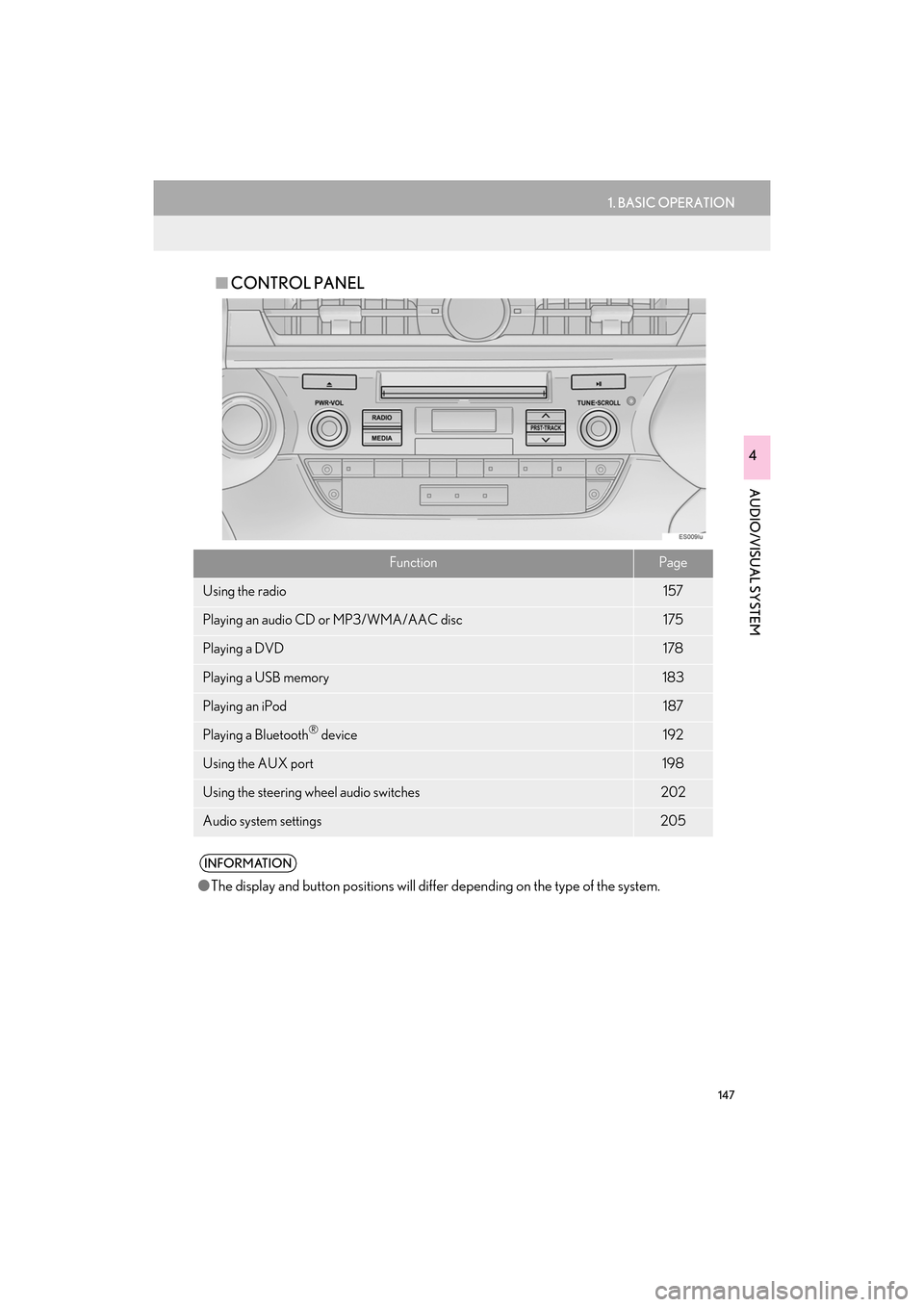
■CONTROL PANEL
FunctionPage
Using the radio157
Playing an audio CD or MP3/WMA/AAC disc175
Playing a DVD178
Playing a USB memory183
Playing an iPod187
Playing a Bluetooth® device192
Using the AUX port198
Using the steering wheel audio switches202
Audio system settings205
INFORMATION
●The display and button positions will diffe r depending on the type of the system.
ES350_300h_Navi_OM33C79U_(U).book Page 147 Wednesday, June 22, 2016 2:54 PM
Page 164 of 357

162
2. RADIO OPERATION
ES350/300h_Navi_OM33C79U_(U)16.06.22 14:52
2Select the desired cache radio opera-
tion button.
No.Function
Select: Skips backward 2 minutes
Select and hold: Fast rewinds contin-
uously
Returns to the live radio broadcast
Pauses the playback (To restart, se-
lect )
Select: Skips forward 2 minutes
Select and hold: Fast forwards con-
tinuously
Hides the cache operation buttons
Red vertical bar: Shows what portion
of the cached broadcast is currently
playing
Light blue bar: Shows time in which
cache writing is in progress
AUTOMATIC PLAYBACK OF
THE CACHE
If the radio broadcast is interrupted by
another audio output, such as an
incoming phone call, the system will
automatically cache the interrupted
portion and perform time-shift playback
when the interruption ends. To manually
operate the cache operation: ( →P.161)
INFORMATION
●The system can store up to 10 minutes.
Cached data will be erased when the
radio mode or station is changed or when
the audio system is turned off.
● If noise or silence occurs during the cach-
ing process, cache writing will continue,
with the noise or silence recorded as is. In
this case, the cached broadcast will con-
tain the noise or silence when played
back.
ES350_300h_Navi_OM33C79U_(U).book Page 162 Wednesday, June 22, 2016 2:54 PM
Page 165 of 357

163
2. RADIO OPERATION
ES350/300h_Navi_OM33C79U_(U)16.06.22 14:52
AUDIO/VISUAL SYSTEM
4
1Select “Options” .
2Select “Type”.
3Select to select a program type/channel
category.
zOnce a program type has been set, “TYPE
SEEK” will appear on the screen.
z The program list is in the following order:
• “Classical”
•“Country”
• “EasyLis” (Easy Listening)
• “Inform” (Information)
•“Jazz”
•“News”
•“Oldies”
•“Other”
•“Pop Music”
• “Religion”
•“Rock”
• “R&B” (Rhythm and Blues)
•“Sports”
•“Talk”
• “Traffic” (Not available when “HD Radio”
indicator is off.)
• “Alert” (Emergency Alert)
4Select “TYPE SEEK” and the system
will start to seek for stations in the rele-
vant program type/channel category.
RADIO BROADCAST DATA
SYSTEM
This audio system is equipped with Ra-
dio Broadcast Data Systems (RBDS).
RBDS mode allows text messages to be
received from radio stations that utilize
RBDS transmitters.
When RBDS is on, the radio can
— only select stations of a particular pro-
gram type,
— display messages from radio stations,
— search for a stronger signal station.
RBDS features are available only when
listening to an FM station that
broadcasts RBDS information and the
“FM Info” indicator is on.
SELECTING A DESIRED
PROGRAM TYPE
INFORMATION
●If no relevant program can be found, “no
type” will appear on the screen.
ES350_300h_Navi_OM33C79U_(U).book Page 163 Wednesday, June 22, 2016 2:54 PM
Page 176 of 357

174
2. RADIO OPERATION
ES350/300h_Navi_OM33C79U_(U)16.06.22 14:52
3. INTERNET RADIO
1Display the audio source selection
screen.
(→ P.149)
2Select the desired application screen
button.
zThe internet radio application screen is dis-
played.
z Perform operations according to the dis-
played application screen.
z For the instrument panel operation method
and the Remote Touch operation method:
→ P.1 4 9
z By pressing the “RADIO” button, the
“Audio” screen can be returned to.
LISTENING TO INTERNET
RADIO
One of LEXUS App Suite’s features is
the ability to listen to internet radio. In or-
der to use this service, a compatible
phone and the system needs to be set
up. For details: →P.320
INFORMATION
●Other applications can be activated
while listening to internet radio.
● An iPhone cannot be connected via
Bluetooth
® and USB connection at the
same time. However, it is possible to
recharge an iPhone while using applica-
tions by connecting via USB. The system
uses the connection method that was
used last. Therefore, if connected via
USB after Bluetooth
® connection, it is
necessary to reconnect the iPhone via
Bluetooth
®.
● Some parts of applications can be
adjusted using the switches on the steer-
ing wheel.
● For additional information, refer to
http://www.lexus.com/enform/
or call
1-800-255-3987.
ES350_300h_Navi_OM33C79U_(U).book Page 174 Wednesday, June 22, 2016 2:54 PM