fuel Lexus ES300h 2017 User Guide
[x] Cancel search | Manufacturer: LEXUS, Model Year: 2017, Model line: ES300h, Model: Lexus ES300h 2017Pages: 612, PDF Size: 14.05 MB
Page 85 of 612
ES300h_OM_OM33C75U_(U)
832. Instrument cluster
2
Instrument cluster
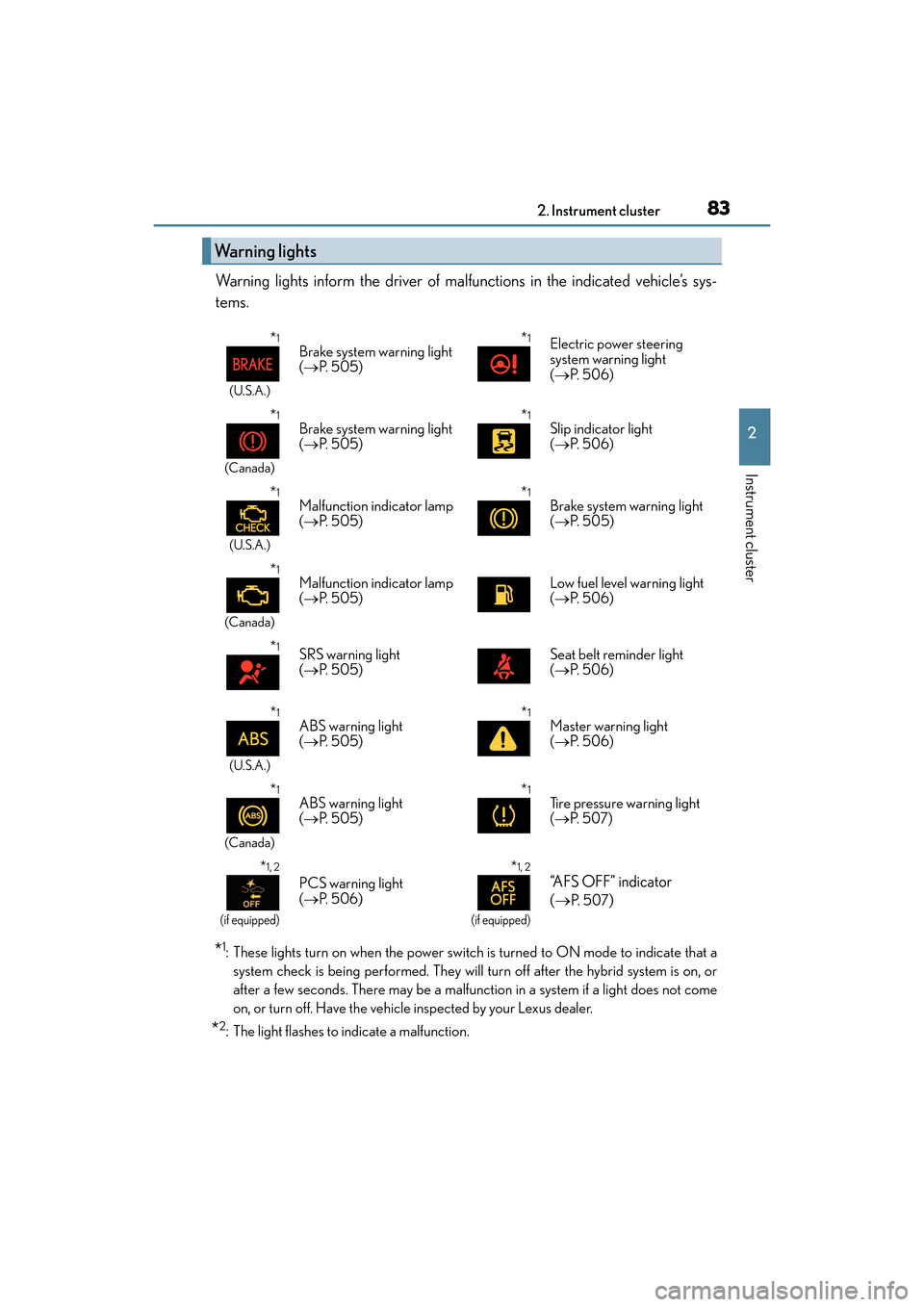
Warning lights inform the driver of malfunctions in the indicated vehicle’s sys-
tems.
*1: These lights turn on when the power switch is turned to ON mode to indicate that asystem check is being performe d. They will turn off after the hybrid system is on, or
after a few seconds. There may be a malfunction in a system if a light does not come
on, or turn off. Have the vehicle inspected by your Lexus dealer.
*2: The light flashes to indicate a malfunction.
Warning lights
*1
(U.S.A.)
Brake system warning light
( → P. 5 0 5 )*1Electric power steering
system warning light
(→ P. 5 0 6 )
*1
(Canada)
Brake system warning light
(→ P. 5 0 5 )*1Slip indicator light
(→ P. 5 0 6 )
*1
(U.S.A.)
Malfunction indicator lamp
(→ P. 5 0 5 )*1Brake system warning light
(→ P. 505)
*1
(Canada)
Malfunction indicator lamp
(→ P. 5 0 5 )Low fuel level warning light
(→ P. 5 0 6 )
*1SRS warning light
(→ P. 5 0 5 )Seat belt reminder light
(→ P. 5 0 6 )
*1
(U.S.A.)
ABS warning light
(→ P. 5 0 5 )*1Master warning light
(→ P. 5 0 6 )
*1
(Canada)
ABS warning light
(→ P. 5 0 5 )*1Tire pressure warning light
(→ P. 5 0 7 )
*1, 2
(if equipped)
PCS warning light
(→ P. 5 0 6 )
*1, 2
(if equipped)
“AFS OFF” indicator
(→
P. 5 0 7)
Page 88 of 612

86
ES300h_OM_OM33C75U_(U)2. Instrument cluster
Gauges and meters
The units used on the speedometer may differ depending on the target region.
Engine coolant temperature gauge
Displays the engine coolant temperature
Tachometer/Hybrid System Indicator
Tachometer:
Displays the engine speed in revolutions per minute.
Hybrid System Indicator:
Displays hybrid system output or regeneration level. (→
P. 8 8 )
Outside temperature
Displays the outside temperature within the range of -40 °F (-40 °C) to 122 °F
(50 °C). Low outside temperature indicator comes on when the ambient temperature
is 37 °F (3 °C) or lower.
Clock
Time can be adjusted or a clock format can be set from (settings display) of
the multi-information display. ( →P. 9 1 )
Multi-information display
Presents the driver with a variety of vehicle data ( →P. 9 1 )
Displays warning messages in case of a malfunction ( →P. 5 1 1 )
Speedometer
Displays the vehicle speed
Fuel gauge
Displays the quantity of fuel remaining in the tank
Shift position and shift range
Displays the selected shift position or selected shift range ( →P. 1 7 5 )
1
2
3
4
5
6
7
8
Page 91 of 612
ES300h_OM_OM33C75U_(U)
892. Instrument cluster
2
Instrument cluster
■Tachometer
Hybrid System Indicator switches to the tachometer when driving mode is in sport mode.
The settings of the tachometer display can be changed on the multi-information display.
( → P. 9 1 )
■Engine speed
Engine speed is precisely controlled in order to help improve fuel efficiency and reduce
exhaust emissions etc.
There are times when the engine speed that is displayed may differ even when vehicle
operation and driving conditions are the same.
■Outside temperature display
●In the following situations, the correct outside temperature may not be displayed, or the
display may take longer than normal to change.
• When stopped, or driving at low speeds (less than 12 mph [20 km/h])
• When the outside temperature has changed suddenly (at the entrance/exit of a garage, tunnel, etc.)
• When the vehicle is parked in direct sunlight
●When “--” or “E” is displayed, the system may be malfunctioning.
Take your vehicle to your Lexus dealer.
■Pop-up display
In some situations, a pop-up display will be temporarily displayed on the multi-informa-
tion display or the odometer/trip meter/ maintenance required information screen.
The pop-up display function can be set on/off. ( →P. 5 6 4 )
■Liquid crystal display
Small spots or light spots may appear on the display. This phenomenon is characteristic
of liquid crystal displays, and there is no problem continuing to use the display.
■Customization
The meter display can be customized on the multi-information display.
(Customizable features →P. 5 6 2 )
WA R N I N G
■The information display at low temperatures
Allow the interior of the vehicle to warm up before using the liquid crystal information
display. At extremely low temperatures, the information display monitor may respond
slowly, and display changes may be delayed.
For example, there is a lag between the driver’s shifting and the new gear number
appearing on the display. This lag could cause the driver to downshift again, causing
rapid and excessive engine braking and possibly an accident resulting in personal
death or injury.
Page 94 of 612
92
ES300h_OM_OM33C75U_(U)2. Instrument cluster
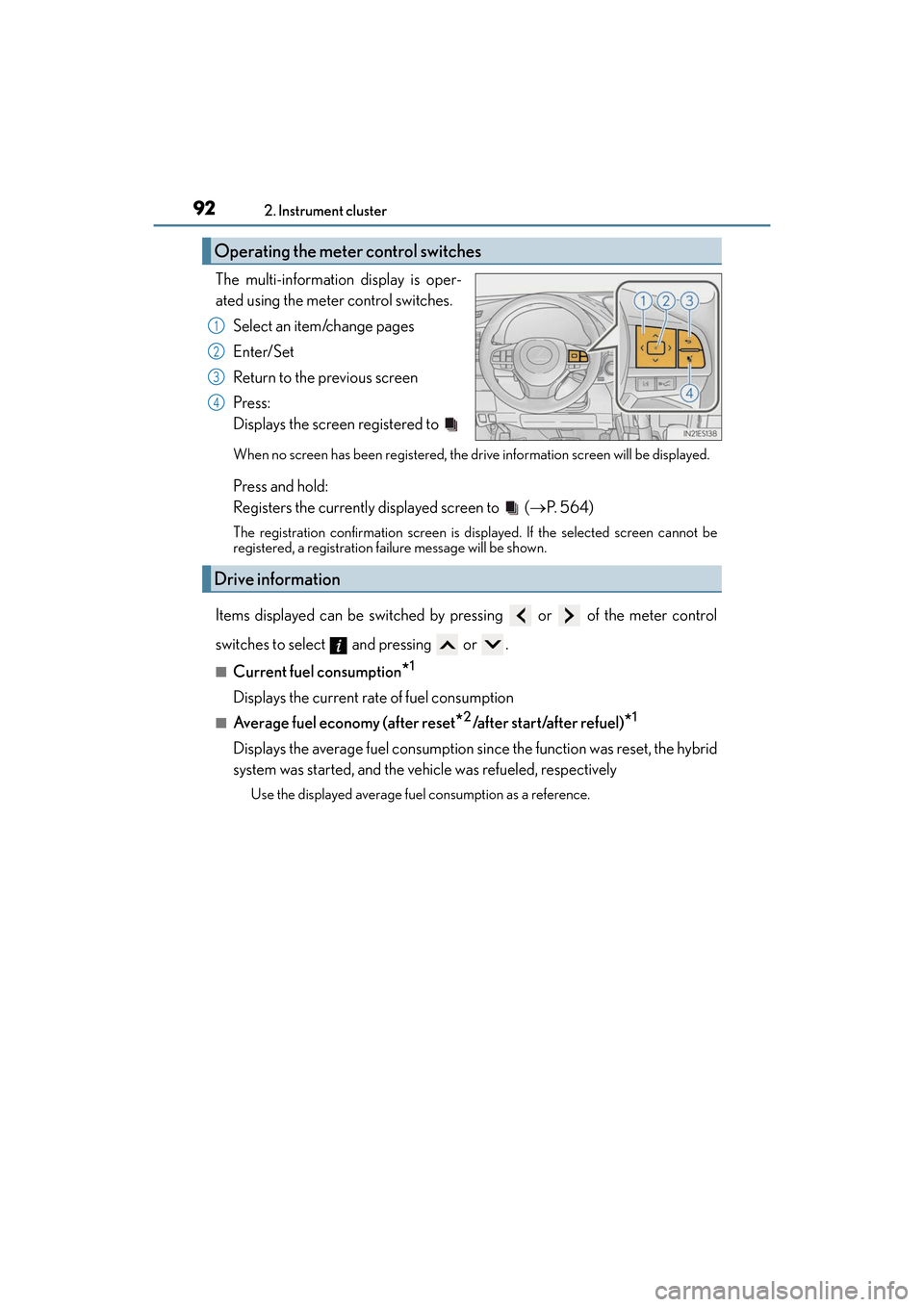
The multi-information display is oper-
ated using the meter control switches.
Select an item/change pages
Enter/Set
Return to the previous screen
Press:
Displays the screen registered to
When no screen has been re gistered, the drive information screen will be displayed.
Press and hold:
Registers the currently displayed screen to ( →P. 5 6 4 )
The registration confirmation screen is di splayed. If the selected screen cannot be
registered, a registration failure message will be shown.
Items displayed can be switched by pressing or of the meter control
switches to select and pressing or .
■Current fuel consumption*1
Displays the current rate of fuel consumption
■Average fuel economy (after reset*2/after start/after refuel)*1
Displays the average fuel consumption si nce the function was reset, the hybrid
system was started, and the vehicle was refueled, respectively
Use the displayed average fuel consumption as a reference.
Operating the meter control switches
1
2
3
4
Drive information
Page 95 of 612
ES300h_OM_OM33C75U_(U)
932. Instrument cluster
2
Instrument cluster
■Average speed (after reset*2/a f t e r s t a r t )*1
Displays the average vehicle speed since the function was reset and the
hybrid system was started, respectively
■Elapsed time (after reset*2/a f t e r s t a r t )*1
Displays the elapsed time since the function was reset and the hybrid system
was started, respectively
■Distance (range/after start)*1
Displays the estimated maximum distance that can be driven with the quantity
of fuel remaining and the distance driven after the hybrid system was started
respectively.
• This distance is computed based on your average fuel consumption. As a result,the actual distance that can be driven may differ from that displayed.
• When only a small amount of fuel is added to the tank, the display may not be
updated.
When refueling, turn the power switch off. If the vehicle is refueled without turning
the power switch off, the display may not be updated.
■Energy monitor
→ P. 9 6
■Tire inflation pressure
Displays inflation pressure of each tire.
The inflation pressure of the spare tire will not be displayed.
■LDA (Lane Departure Alert with steering control) vehicle sway warning (if
equipped)
→P. 2 1 7
■Display off
A blank screen is displayed
*1: Displayed when the item is set in “Drive Info 1”, “Drive Info 2” or “Drive Info 3”.
(→ P. 5 6 4 )
*2: The function can be reset by pressing the of the meter control switches for
longer than 1 second when the item to reset is displayed.
If there is more than one item that can be reset, the item selection screen will appear.
Page 99 of 612
ES300h_OM_OM33C75U_(U)
972. Instrument cluster
2
Instrument cluster
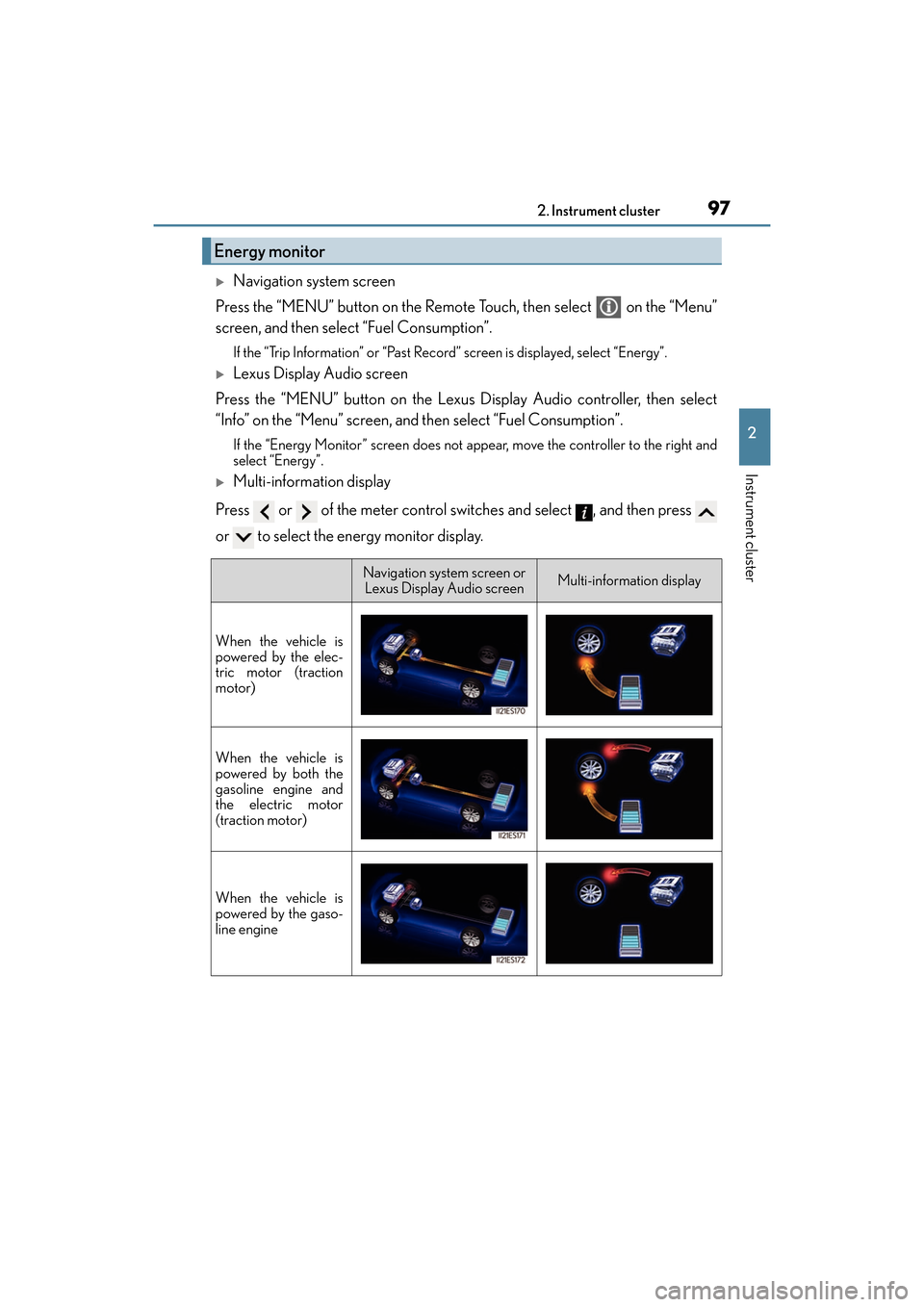
XNavigation system screen
Press the “MENU” button on the Remote Touch, then select on the “Menu”
screen, and then select “Fuel Consumption”.
If the “Trip Information” or “Past Record ” screen is displayed, select “Energy”.
XLexus Display Audio screen
Press the “MENU” button on the Lexus Display Audio controller, then select
“Info” on the “Menu” screen, and then select “Fuel Consumption”.
If the “Energy Monitor” screen does not appear, move the controller to the right and
select “Energy”.
XMulti-information display
Press or of the meter control switches and select , and then press
or to select the energy monitor display.
Energy monitor
Navigation system screen or Lexus Display Audio screenMulti-information display
When the vehicle is
powered by the elec-
tric motor (traction
motor)
When the vehicle is
powered by both the
gasoline engine and
the electric motor
(traction motor)
When the vehicle is
powered by the gaso-
line engine
Page 101 of 612
ES300h_OM_OM33C75U_(U)
992. Instrument cluster
2
Instrument cluster
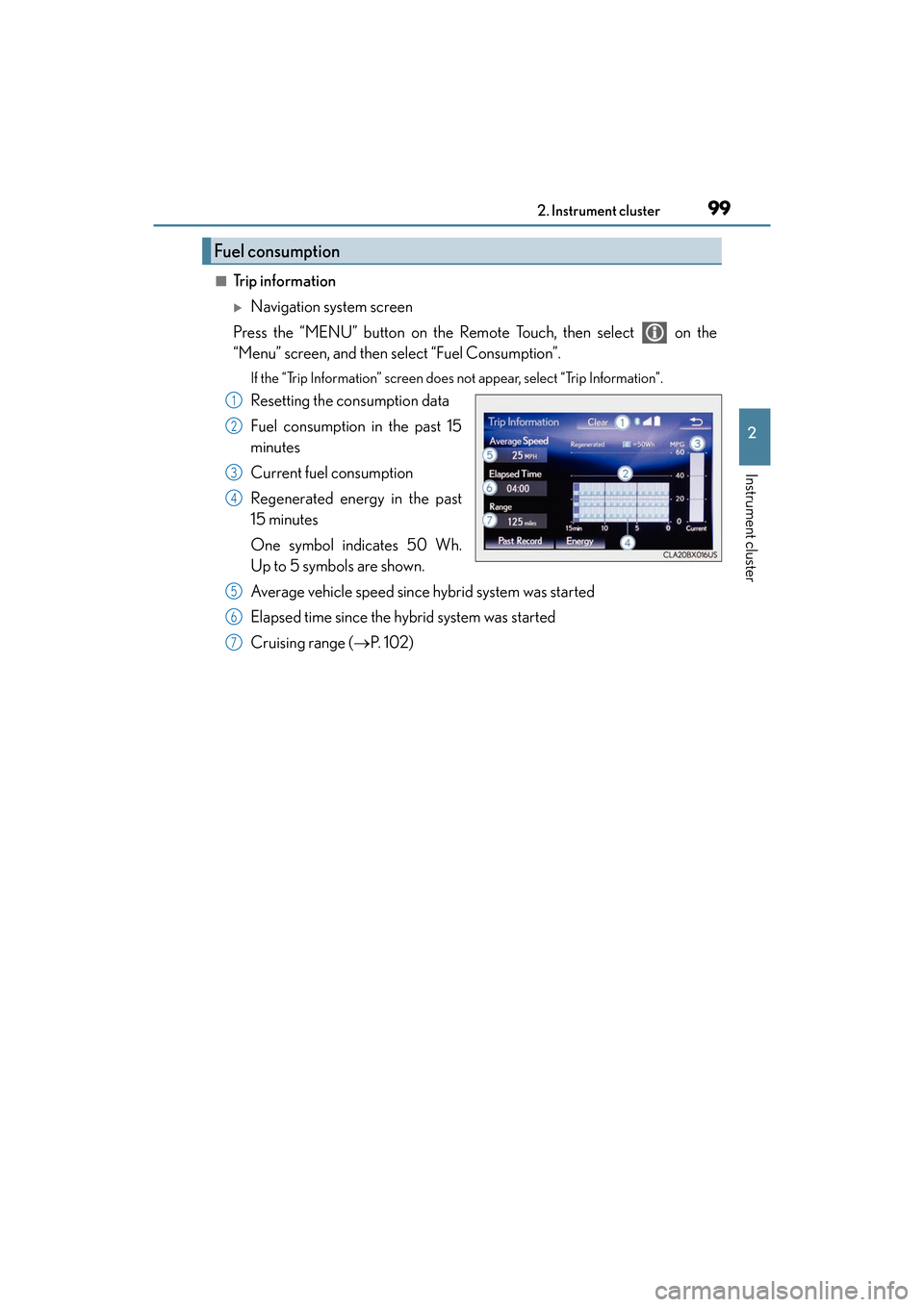
■Trip information
XNavigation system screen
Press the “MENU” button on the Remote Touch, then select on the
“Menu” screen, and then select “Fuel Consumption”.
If the “Trip Information” screen does not appear, select “Trip Information”.
Resetting the consumption data
Fuel consumption in the past 15
minutes
Current fuel consumption
Regenerated energy in the past
15 minutes
One symbol indicates 50 Wh.
Up to 5 symbols are shown.
Average vehicle speed since hybrid system was started
Elapsed time since the hybrid system was started
Cruising range ( →P. 1 0 2 )
Fuel consumption
1
2
3
4
5
6
7
Page 102 of 612
100
ES300h_OM_OM33C75U_(U)2. Instrument cluster
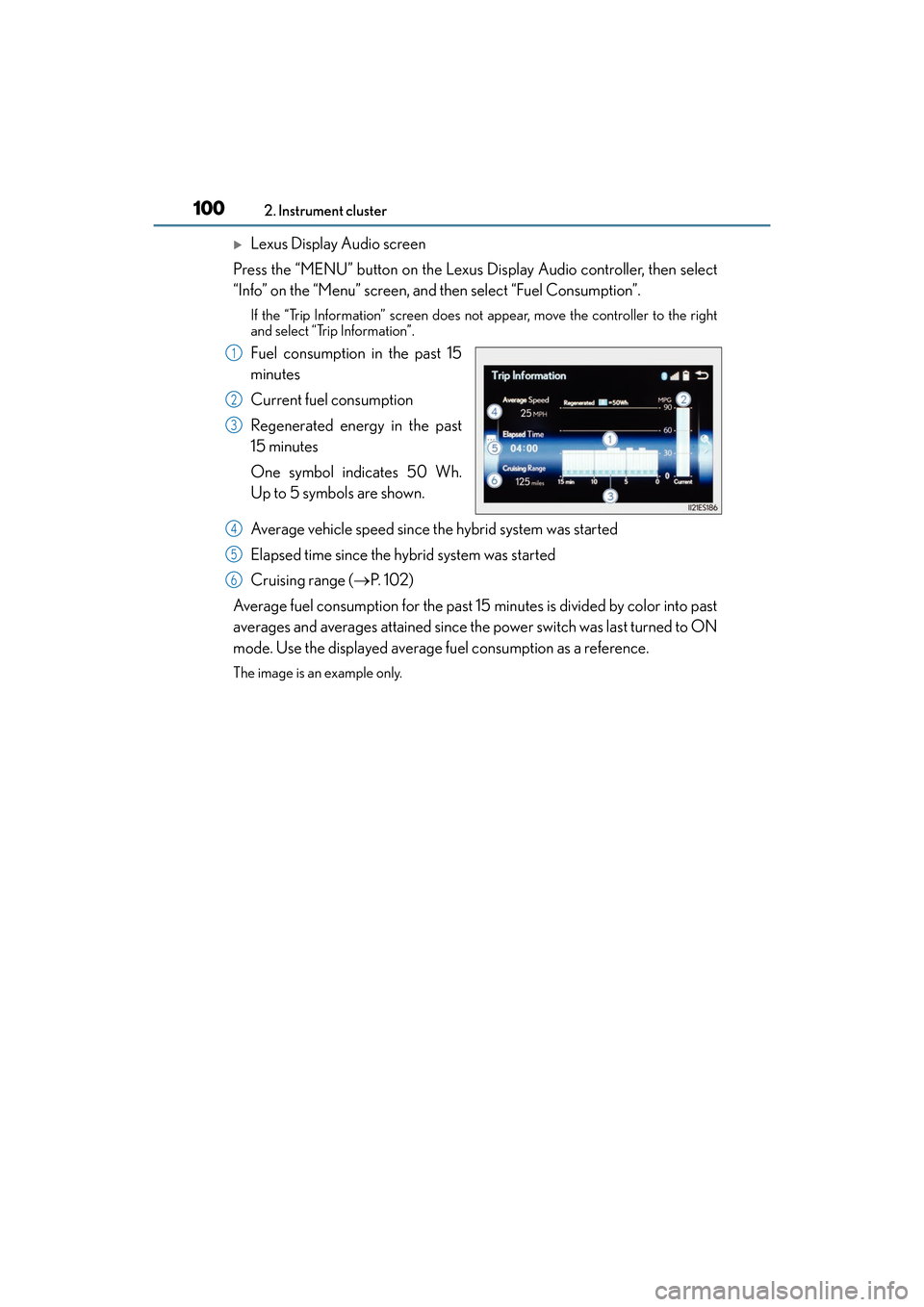
XLexus Display Audio screen
Press the “MENU” button on the Lexus Display Audio controller, then select
“Info” on the “Menu” screen, and then select “Fuel Consumption”.
If the “Trip Information” screen does not appear, move the controller to the right
and select “Trip Information”.
Fuel consumption in the past 15
minutes
Current fuel consumption
Regenerated energy in the past
15 minutes
One symbol indicates 50 Wh.
Up to 5 symbols are shown.
Average vehicle speed since the hybrid system was started
Elapsed time since the hybrid system was started
Cruising range ( →P. 1 0 2 )
Average fuel consumption for the past 15 minutes is divided by color into past
averages and averages attained since the power switch was last turned to ON
mode. Use the displayed average fuel consumption as a reference.
The image is an example only.
1
2
3
4
5
6
Page 103 of 612
ES300h_OM_OM33C75U_(U)
1012. Instrument cluster
2
Instrument cluster
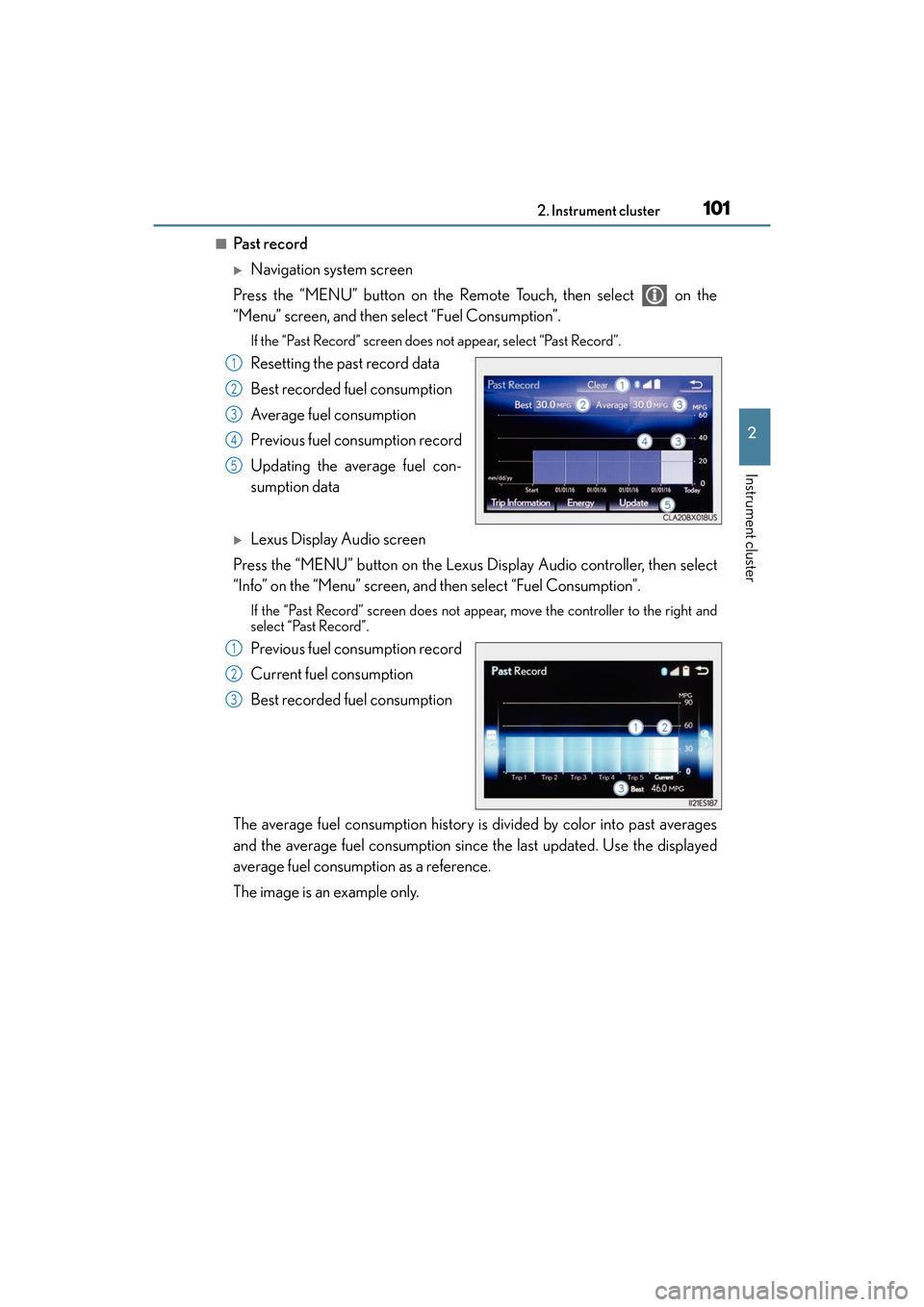
■Past record
XNavigation system screen
Press the “MENU” button on the Remote Touch, then select on the
“Menu” screen, and then select “Fuel Consumption”.
If the “Past Record” screen does not appear, select “Past Record”.
Resetting the past record data
Best recorded fuel consumption
Average fuel consumption
Previous fuel consumption record
Updating the average fuel con-
sumption data
XLexus Display Audio screen
Press the “MENU” button on the Lexus Display Audio controller, then select
“Info” on the “Menu” screen, and then select “Fuel Consumption”.
If the “Past Record” screen does not appear, move the controller to the right and
select “Past Record”.
Previous fuel consumption record
Current fuel consumption
Best recorded fuel consumption
The average fuel consumption history is divided by color into past averages
and the average fuel consumption since the last updated. Use the displayed
average fuel consumption as a reference.
The image is an example only.
1
2
3
4
5
1
2
3
Page 104 of 612
102
ES300h_OM_OM33C75U_(U)2. Instrument cluster
■Updating the past record data
XVehicles with navigation system
Update the average fuel consumption by selecting “Update” to measure the current fuel
consumption again.
XVehicles with Lexus Display Audio system
Update the average fuel consumption by moving the controller to the left and select
“Update” to measure the current fuel consumption again.
■Resetting the data
XVehicles with navigation system
The fuel consumption data can be deleted by selecting “Clear”.
XVehicles with Lexus Display Audio system
The fuel consumption data can be deleted by moving the controller to the left and select
“Clear ”.
■Cruising range
Displays the estimated maximum distance that can be driven with the quantity of fuel
remaining.
This distance is computed based on your average fuel consumption.
As a result, the actual distance that can be driven may differ from that displayed.