ad blue Lexus ES300h 2017 Quick Guide
[x] Cancel search | Manufacturer: LEXUS, Model Year: 2017, Model line: ES300h, Model: Lexus ES300h 2017Pages: 108, PDF Size: 3.81 MB
Page 3 of 108
2
ES300h_QG_OM33C90U_(U)
Hands-free System For Cellular Phone (with Lexus Display Audio System)How to register a Bluetooth
® phone .................................................................................... 67
Registering favorites .......................................................................................................... ........... 67
Dialing................................................................................................................................................. 67
Dialing from the phonebook ..................................................................................................... 67
When the phonebook is empty............................................................................................... 68
Dialing from favorites ......................................................................................................... ......... 68
To answer the phone............................................................................................................ .........69
To refuse a call ............................................................................................................... .................. 69
Operating a telephone using the steering wheel switches .......................................... 69
Hands-free System For Cellular Phone (with navigation system)
*
Bluetooth® phone pairing ........................................................................................................ 58
Contacts transfer .............................................................................................................. .............59
Calling by name................................................................................................................ ..............60
Receiving a call ............................................................................................................... ................60
Steering switches .............................................................................................................. .............60
Headlights ..............................................................................................................................................35
Head Restraints ................................................................................................................................... 22
Hybrid System ............................................................................................................................... ....... 12
Hybrid Transmission ......................................................................................................................... 30
Intuitive Parking Assist .....................................................................................................................48
Keys ............................................................................................................................................................ 18
LDA (Lane Departure Alert with steering control) ............................................................ 47
Lexus Display Audio Controller (with Lexus Display Audio System) ........................65
LEXUS Enform ................................................................................................................................... 88
LEXUS Enform Safety Connect ................................................................................................. 86
*: These features may be operated by Voice Command (See P.77)
Page 15 of 108
14
ES300h_QG_OM33C90U_(U)
Energy Monitor/Consumption Screen
■Energy monitor
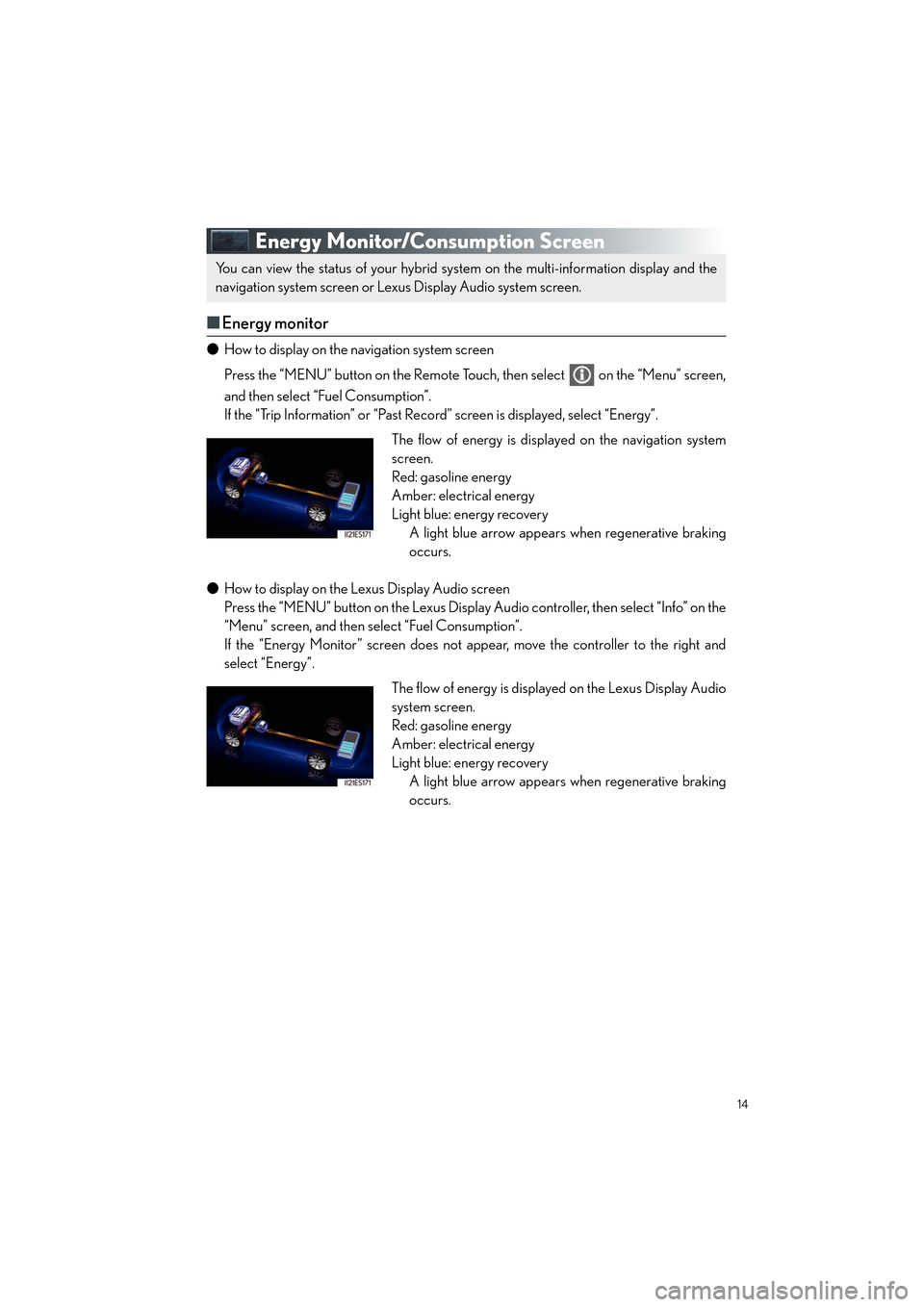
● How to display on the navigation system screen
Press the “MENU” button on the Remote Touch, then select on the “Menu” screen,
and then select “Fuel Consumption”.
If the “Trip Information” or “Past Record ” screen is displayed, select “Energy”.
● How to display on the Lexus Display Audio screen
Press the “MENU” button on the Lexus Display Audio controller, then select “Info” on the
“Menu” screen, and then select “Fuel Consumption”.
If the “Energy Monitor” screen does not appear, move the controller to the right and
select “Energy”.
You can view the status of your hybrid system on the multi-information display and the
navigation system screen or Lexus Display Audio system screen.
The flow of energy is displayed on the navigation system
screen.
Red: gasoline energy
Amber: electrical energy
Light blue: energy recovery
A light blue arrow appears when regenerative braking
occurs.
The flow of energy is displayed on the Lexus Display Audio
system screen.
Red: gasoline energy
Amber: electrical energy
Light blue: energy recoveryA light blue arrow appears when regenerative braking
occurs.
Page 16 of 108
15
ES300h_QG_OM33C90U_(U)
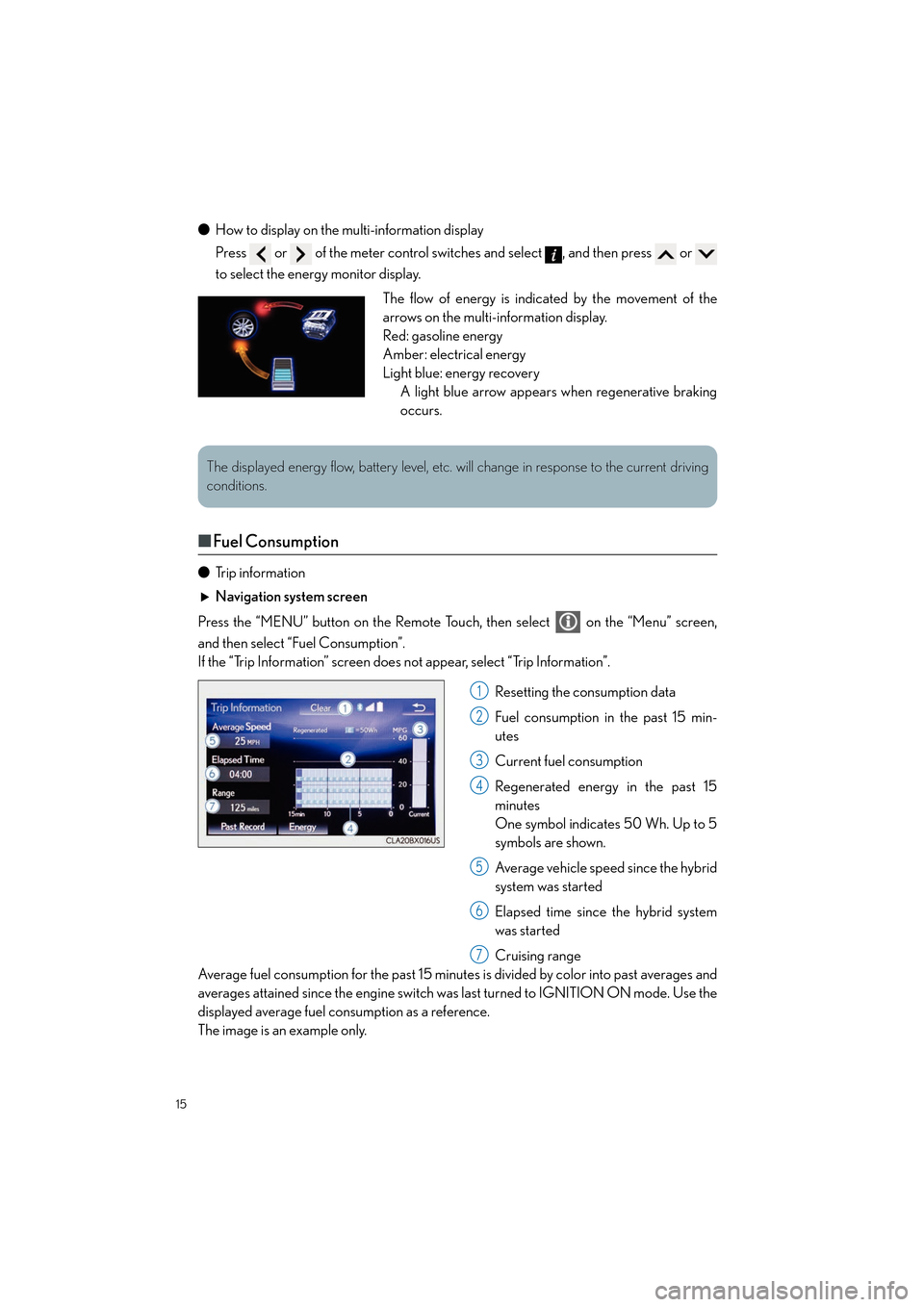
●How to display on the multi-information display
Press or of the meter control switches and select , and then press or
to select the energy monitor display.
■Fuel Consumption
● Trip information
Navigation system screen
Press the “MENU” button on the Remote Touch, then select on the “Menu” screen,
and then select “Fuel Consumption”.
If the “Trip Information” screen does not appear, select “Trip Information”.
Resetting the consumption data
Fuel consumption in the past 15 min-
utes
Current fuel consumption
Regenerated energy in the past 15
minutes
One symbol indicates 50 Wh. Up to 5
symbols are shown.
Average vehicle speed since the hybrid
system was started
Elapsed time since the hybrid system
was started
Cruising range
Average fuel consumption for the past 15 minute s is divided by color into past averages and
averages attained since the engine switch was last turned to IGNITION ON mode. Use the
displayed average fuel consumption as a reference.
The image is an example only.
The flow of energy is indicated by the movement of the
arrows on the multi-information display.
Red: gasoline energy
Amber: electrical energy
Light blue: energy recovery A light blue arrow appears when regenerative braking
occurs.
The displayed energy flow, battery level, etc. will change in response to the current driving
conditions.
1
2
3
4
5
6
7
Page 59 of 108
58
ES300h_QG_OM33C90U_(U)
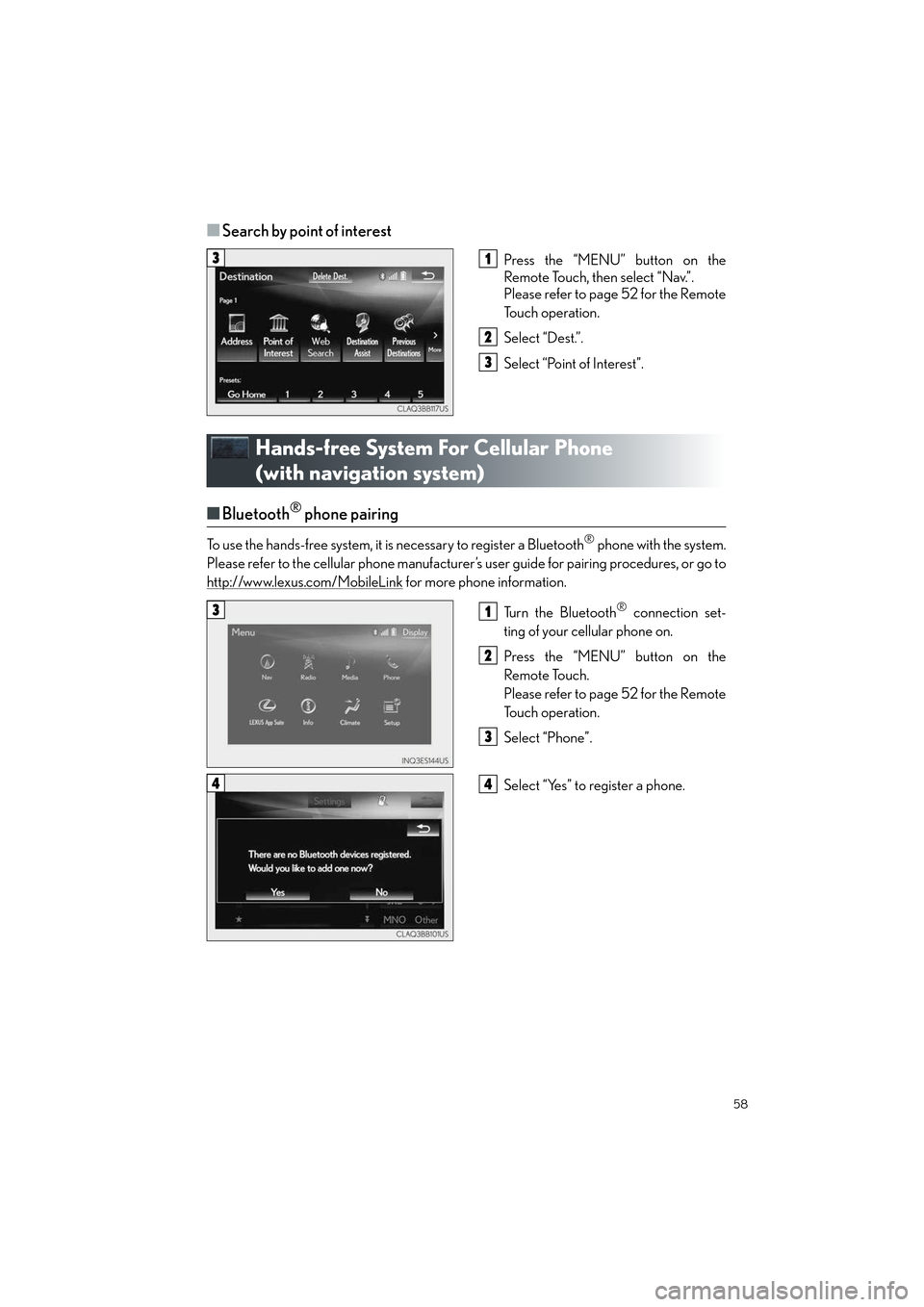
■Search by point of interest
Press the “MENU” button on the
Remote Touch, then select “Nav.”.
Please refer to page 52 for the Remote
To u c h o p e r a t i o n .
Select “Dest.”.
Select “Point of Interest”.
Hands-free System For Cellular Phone
(with navigation system)
■Bluetooth® phone pairing
To use the hands-free system, it is necessary to register a Bluetooth® phone with the system.
Please refer to the cellular phone manufacturer’s user guide for pairing procedures, or go to
http://www.lexus.com/MobileLink
for more phone information.
Tu r n t h e B l u e t o o t h
® connection set-
ting of your cellular phone on.
Press the “MENU” button on the
Remote Touch.
Please refer to page 52 for the Remote
To u c h o p e r a t i o n .
Select “Phone”.
Select “Yes” to register a phone.
31
2
3
31
2
3
44
Page 60 of 108
59
ES300h_QG_OM33C90U_(U)
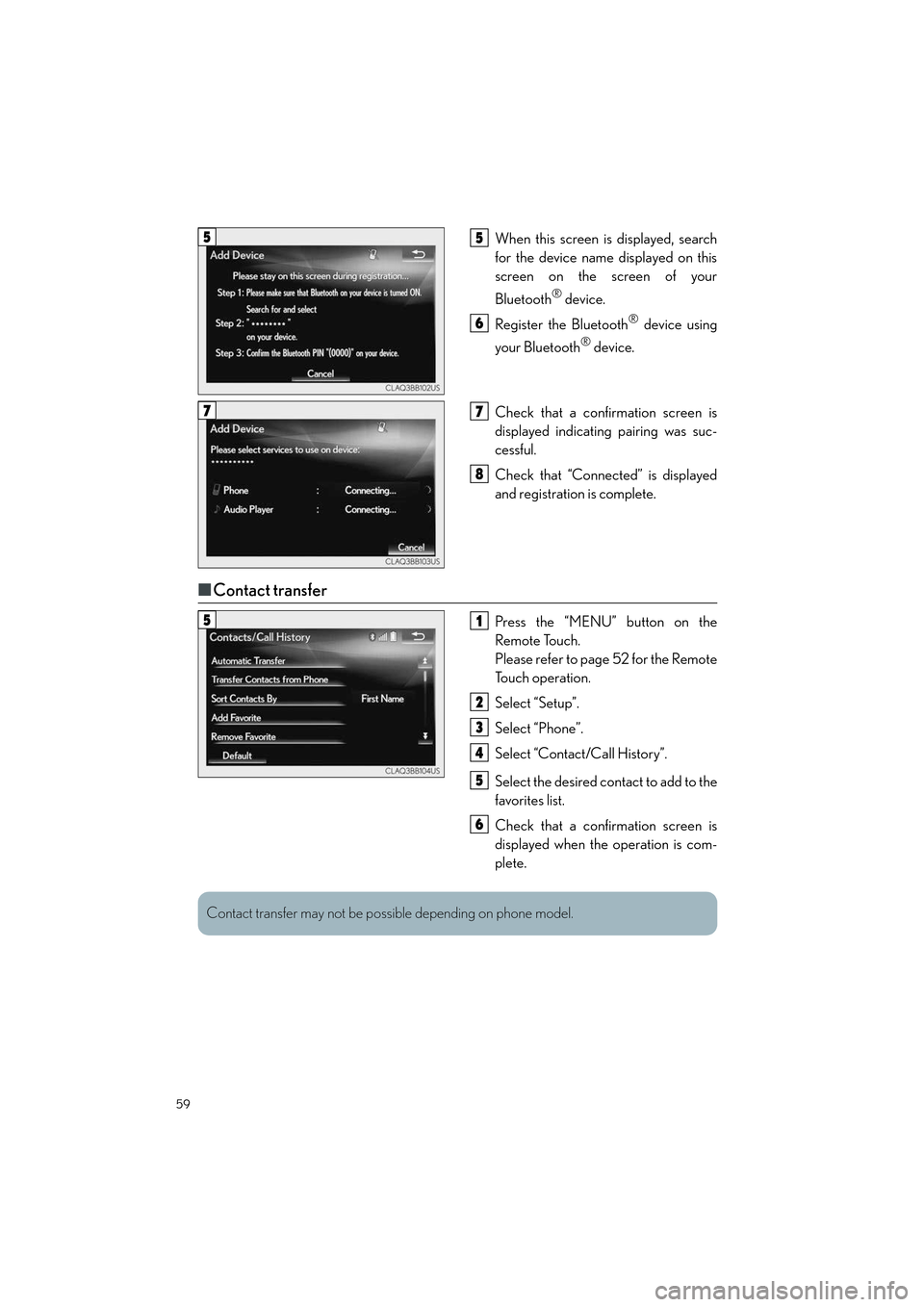
When this screen is displayed, search
for the device name displayed on this
screen on the screen of your
Bluetooth
® device.
Register the Bluetooth
® device using
your Bluetooth
® device.
Check that a confirmation screen is
displayed indicating pairing was suc-
cessful.
Check that “Connected” is displayed
and registration is complete.
■ Contact transfer
Press the “MENU” button on the
Remote Touch.
Please refer to page 52 for the Remote
To u c h o p e r a t i o n .
Select “Setup”.
Select “Phone”.
Select “Contact/Call History”.
Select the desired contact to add to the
favorites list.
Check that a confirmation screen is
displayed when the operation is com-
plete.
55
6
77
8
51
2
3
4
5
6
Contact transfer may not be possible depending on phone model.
Page 68 of 108
67
ES300h_QG_OM33C90U_(U)
Hands-free System For Cellular Phone
(with Lexus Display Audio System)
■How to register a Bluetooth® phone
Compatible Bluetooth®-equipped phones can be connected to the vehicle, enabling
hands-free operation. Please refer to the cellu lar phone manufacture’s user guide for pairing
procedures, or go to “www.lexus.com/MobileLink
” (for U.S.A.) for phone information.
Turn the Bluetooth® connection setting of your device set to on.
Go to “Bluetooth* Setup”: “MENU” button → “Setup” → “Bluetooth*”
Move the controller to the left and then select “Add Device”.
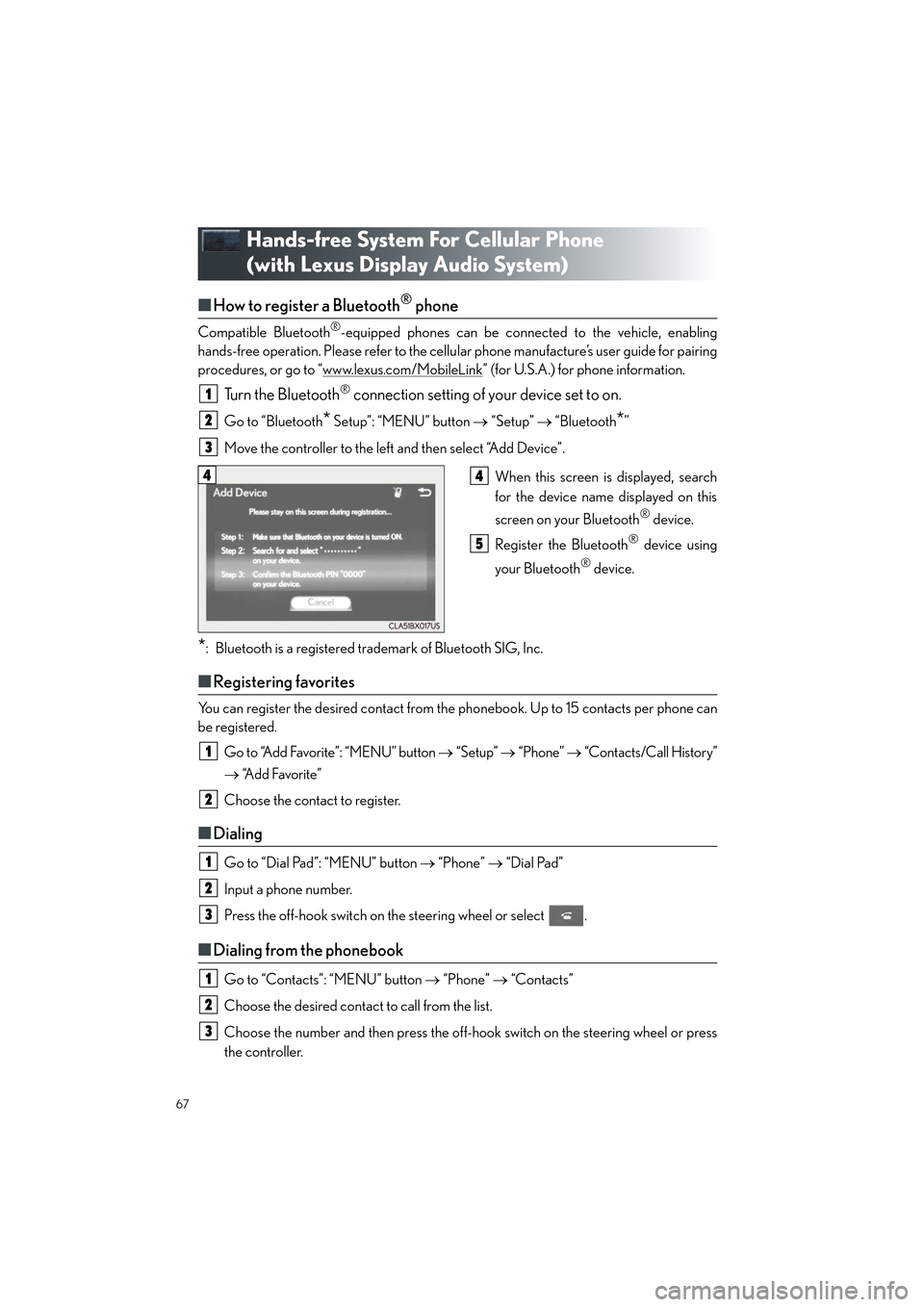
When this screen is displayed, search
for the device name displayed on this
screen on your Bluetooth
® device.
Register the Bluetooth
® device using
your Bluetooth
® device.
*: Bluetooth is a registered trademark of Bluetooth SIG, Inc.
■ Registering favorites
You can register the desired contact from the phonebook. Up to 15 contacts per phone can
be registered.
Go to “Add Favorite”: “MENU” button → “Setup” → “Phone” → “Contacts/Call History”
→ “Add Favorite”
Choose the contact to register.
■ Dialing
Go to “Dial Pad”: “MENU” button → “Phone” → “Dial Pad”
Input a phone number.
Press the off-hook switch on the steering wheel or select .
■ Dialing from the phonebook
Go to “Contacts”: “MENU” button → “Phone” → “Contacts”
Choose the desired contact to call from the list.
Choose the number and then press the off-hook switch on the steering wheel or press
the controller.
1
2
3
44
5
1
2
1
2
3
1
2
3
Page 69 of 108
68
ES300h_QG_OM33C90U_(U)
■When the phonebook is empty
You can transfer the phone numbers in a Bluetooth® phone to the system.
Operation methods differ between PBAP (Phone Book Access Profile) compatible and
PBAP incompatible Bluetooth
® phones. If the cellular phone does not support either PBAP
or OPP (Object Push Profile) service, you cannot transfer contacts.
Press the off-hook switch on the steering wheel.
If the phonebook is empty, a message will be displayed.
For a PBAP compatible Bluetooth
® phone and “Automatic Transfer” is off
To enable automatic transfer of new contacts from a cellular phone every time it is con-
nected, select “Always”.
Select “Once” if you want to transfer new contacts from a cellular phone.
For a PBAP incompatible and OPP compatible Bluetooth
® phone
Select “Transfer” and operate your cellular phone to transfer new contacts from a cellu-
lar phone.
Select “Add” if you want to add a new contact manually.
■ Dialing from favorites
You can make a call using numbers registered in the favorites.
Go to “Favorites”: “MENU” button → “Phone” → “Favorites”
Choose the desired contact to call from the list.
Choose the number and then press the off-hook switch on the steering wheel or press
the controller.
1
2
2
1
2
3
Page 73 of 108

72
ES300h_QG_OM33C90U_(U)
Media mode
ButtonFunctionTa r g e t a u d i o source
“Play”Plays or pauses a track/fileAll media
(except A/V)
“Pause”
“Track Up”
Selects a track/fileAll media
(except A/V)“Track Down”
“File Up”
“File Down”
“Folder Up”Selects a folder/albumMP3/WMA/
AAC disc, USB
“Folder Down”
“Fast Forward”Selects and hold: Fast-forward or rewind a track/
fileAll media
(except A/V)
“Rewind”
“Repeat”Selects a repeat modeAll media
(except A/V)
“Random”Selects a random/shuffle play modeAll media
(except A/V)
“Shuffle”
“Full Screen”Selects a full screen modeiPod, A/V
“Connect”Connects a Bluetooth® deviceBluetooth®
“Cover Art Set-
tings”Changes the cover art settings
CD, MP3/
WMA/AAC
disc,
Bluetooth
®
“iPod Settings”Changes iPod settingsiPod
“USB Settings”Changes USB settingsUSB
“External Video
Settings”Changes A/V settingsA/V
“Sound Settings”Changes sound settingsAll media
Page 74 of 108

73
ES300h_QG_OM33C90U_(U)
■Operating the audio system using the steering wheel switches
Volume switch
• Press: Increases/decreases volume
• Press and hold: Continuously
increases/decreases volume
Radio mode:
• Press: Selects a radio station
•Press and hold: Seeks up/down
CD, MP3/WMA/AAC disc,
Bluetooth
®, iPod or USB mode:
• Press: Selects a track/file/video
• Press and hold (except iPod): Quickly move up/down through
tracks/files/videos.
“MODE” switch
• Turns the power on, selects audio source
• Press and hold this switch to mute or pause the current operation. To can-
cel the mute or pause, press and
hold.
1
2
3
Page 81 of 108

80
ES300h_QG_OM33C90U_(U)
Audio
*: Bluetooth is a registered trademark of Bluetooth SIG, Inc.
Info (vehicles with navigation system)
CommandAction
“Play Playlist
“Play Artist
“Play Song
“Play Album
“Turn Music On”Turns the audio system on
“Turn Music Off”Turns the audio system off
“Disc”Selects the selected disc mode
“USB”Selects USB audio mode
“iPod”Selects iPod audio mode
“Bluetooth* Audio”Selects Bluetooth® audio mode
“External”Selects VTR mode
“Auxiliary”Selects AUX audio mode
CommandAction
“Destination Assist”Connects the system to the Lexus response center
“Show Forecast”Displays weather information
“Show Traffic”Displays traffic information
“Lexus Insider”Displays the Lexus insider list