Arm Lexus ES300h 2020 Owner's Guide
[x] Cancel search | Manufacturer: LEXUS, Model Year: 2020, Model line: ES300h, Model: Lexus ES300h 2020Pages: 462, PDF Size: 9.98 MB
Page 171 of 462

1694-3. Operating the lights and wipers
4
Driving
NOTICE
●Do not operate the wiper lever when
the windshield wipers are lifted. Oth-
erwise, the windshield wipers may
contact the hood, possibly resulting in
damage to the windshield wipers
and/or hood.
●Make sure that the wiper arms do not
overlap each other when returning
them. Failure to do so may cause dam-
age to the windshield wipers.
Page 172 of 462

1704-4. Refueling
4-4.Refueling
Turn the power switch off and
ensure that all the doors and win-
dows are closed.
Confirm the type of fuel.
■Fuel types
P.407
■Fuel tank opening for unleaded gasoline
To help prevent incorrect fueling, your vehi-
cle has a fuel tank opening that only accom-
modates the special nozzle on unleaded
fuel pumps.
Opening the fuel tank cap
The fuel tank of your vehicle has a
special structure, which requires a
reduction in fuel tank pressure
before refueling. After the opener
switch has been pressed, it will take
several seconds until the vehicle is
ready for refueling.
Before refueling the vehicle
WARNING
■When refueling the vehicle
Observe the following precautions while
refueling the vehicle. Failure to do so may
result in death or serious injury.
●After exiting the vehicle and before
opening the fuel door, touch an
unpainted metal surface to discharge
any static electricity. It is important to
discharge static electricity before refu-
eling because sparks resulting from
static electricity can cause fuel vapors
to ignite while refueling.
●Always hold the grips on the fuel tank
cap and turn it slowly to remove it.
A whooshing sound may be heard
when the fuel tank cap is loosened.
Wait until the sound cannot be heard
before fully removing the cap. In hot
weather, pressurized fuel may spray
out the filler neck and cause injury.
●Do not allow anyone that has not dis-
charged static electricity from their
body to come close to an open fuel
tank.
●Do not inhale vaporized fuel.
Fuel contains substances that are
harmful if inhaled.
●Do not smoke while refueling the vehi-
cle.
Doing so may cause the fuel to ignite
and cause a fire.
●Do not return to the vehicle or touch
any person or object that is statically
charged.
This may cause static electricity to
build up, resulting in a possible ignition
hazard.
■When refueling
Observe the following precautions to
prevent fuel overflowing from the fuel
tank:
●Securely insert the fuel nozzle into the
fuel filler neck.
●Stop filling the tank after the fuel noz-
zle automatically clicks off.
●Do not top off the fuel tank.
NOTICE
■Refueling
●Finish refueling within 30 minutes. If
more than 30 minutes passes, the
internal valve closes. In this condition,
fuel may overflow during the refueling
process.
Press the fuel filler door opener switch
again.
Page 254 of 462
2524-6. Driving tips
Control and maintain the vehicle at a
constant speed. Before stopping at a
toll booth or similar, allow plenty of
time to release the accelerator and
gently apply the brakes. A greater
amount of electrical energy can be
regenerated when slowing down.
Use the air conditioning only when
necessary. Doing so can help reduce
excessive gasoline consumption.
In summer: When the ambient tem-
perature is high, use the recirculated
air mode. Doing so will help to reduce
the burden on the air conditioning sys-
tem and reduce fuel consumption as
well.
In winter: Because the gasoline engine
will not automatically cut out until it and
the interior of the vehicle are warm, it
will consume fuel. Also, fuel consump-
tion can be improved by avoiding over-
use of the heater.
Make sure to check the tire inflation
pressure frequently. Improper tire infla-
tion pressure can cause poor fuel
economy.
Also, as snow tires can cause large
amounts of friction, their use on dry
roads can lead to poor fuel economy.
Use tires that are appropriate for the
season. Carrying heavy luggage will lead to
poor fuel economy. Avoid carrying
unnecessary luggage.
Installing a large
roof rack will also cause poor fuel
economy.
Since the gasoline engine starts up and
cuts out automatically when cold,
warming up the engine is unnecessary.
Moreover, frequently driving short dis-
tances will cause the engine to repeat-
edly warm up, which can lead to excess
fuel consumption.
Highway driving
Air conditioning
Checking tire inflation pressure
Luggage
Warming up before driving
Page 256 of 462
2544-6. Driving tips
or move a wiper that is frozen. Pour
warm water over the frozen area to
melt the ice. Wipe away the water
immediately to prevent it from
freezing.
To ensure proper operation of the
climate control system fan, remove
any snow that has accumulated on
the air inlet vents in front of the
windshield.
Check for and remove any excess
ice or snow that may have accumu-
lated on the exterior lights, vehicle’s
roof, chassis, around the tires or on
the brakes.
Remove any snow or mud from the
bottom of your shoes before getting
in the vehicle.
■To protect the windshield wipers
P.167
Accelerate the vehicle slowly, keep a
safe distance between you and the
vehicle ahead, and drive at a reduced
speed suitable to road conditions.
Park the vehicle and move the shift
lever to P without setting the park-
ing brake. The parking brake may
freeze up, preventing it from being
released. If the vehicle is parked
without setting the parking brake,
make sure to block the wheels.
Failure to do so may be dangerous
because it may cause the vehicle to move unexpectedly, possibly lead-
ing to an accident.
If the vehicle is parked without set-
ting the parking brake, confirm that
the shift lever cannot be moved out
of P
*.
*: The shift lever will be locked if it is
attempted to be shifted from P to any
other position with out depressing the
brake pedal. If the shift lever can be
shifted from P, there may be a problem
with the shift lock system. Have the vehi-
cle inspected by your Lexus dealer
immediately.
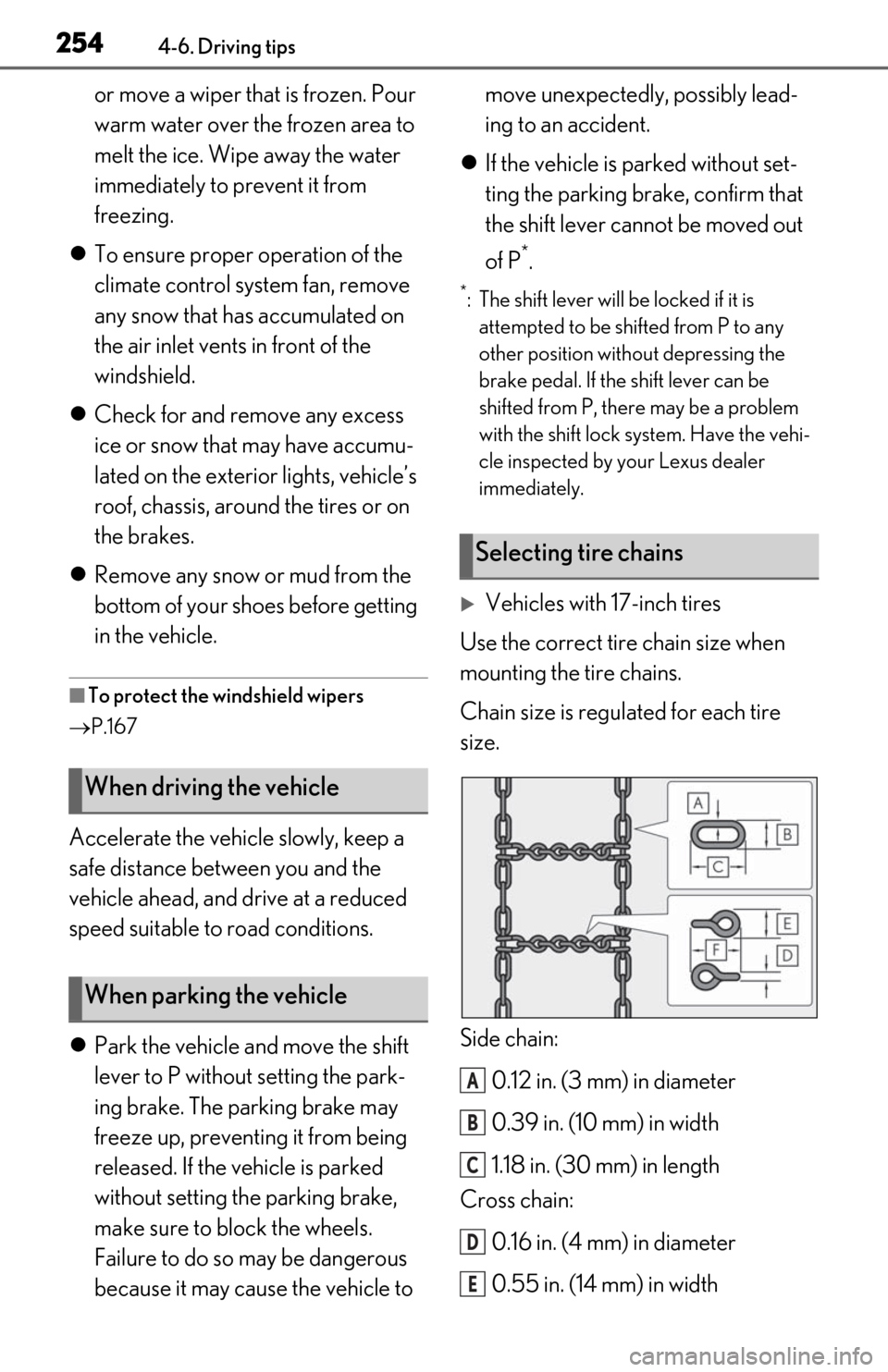
Vehicles with 17-inch tires
Use the correct tire chain size when
mounting the tire chains.
Chain size is regulated for each tire
size.
Side chain:
0.12 in. (3 mm) in diameter
0.39 in. (10 mm) in width
1.18 in. (30 mm) in length
Cross chain:
0.16 in. (4 mm) in diameter
0.55 in. (14 mm) in width
When driving the vehicle
When parking the vehicle
Selecting tire chains
A
B
C
D
E
Page 272 of 462
2705-3. Using the air conditioning system
■Eco air conditioning mode
When Eco drive mode is selected using the
Driving Mode Select switch, eco air condi-
tioning mode turns on.
When a drive mode other than Eco drive
mode is selected, eco air conditioning
mode may turn off.
1Press the automatic mode switch or
select “AUTO” on the sub function
menu. ( P.267)
2
Press the outside/recirculated air
mode switch to switch to automatic
air intake mode.
The air conditioning system automatically
switches between outside air and recircu-
lated air modes.
3Adjust the temperature setting.
4
To stop the operation, press the off
switch or select “Off” on the sub
function menu. ( P.267)
If the fan speed setting or air flow
modes are operated , the automatic
mode indicator goes off. However,
automatic mode for functions other
than that operated is maintained.
■Using automatic mode
Fan speed is adjusted automatically accord-
ing to the temperature setting and the
ambient conditions.
Therefore, the fan may stop for a while until warm or cool air is ready to flow immedi-
ately after the automatic mode switch is
pressed or “AUTO” is selected.
Cool air may blow around the upper body
even when the heater is on due to sunlight.
■Windshield fog detection function
When automatic mode is set, the humidity
sensor detects fog on the windshield and
controls the air condit ioning system to pre-
vent fog.
■Automatic mode for air intake control
In automatic mode, the system detects
exhaust gas and other pollutants and auto-
matically switches between outside air and
recirculated air modes.
When the dehumidification function is off,
and the fan is operating, turning automatic
mode on will activate the dehumidification
function. The next time the dehumidification
function is turned off, the AUTO mode for
switching between outside air and recircu-
lated air modes is canceled.
WARNING
■To prevent burns (vehicles with wind-
shield wiper de-icer)
Do not touch the glass at lower part of
the windshield or to the side of the front
pillars when the wind shield wiper de-icer
is on.
Using automatic mode
NOTICE
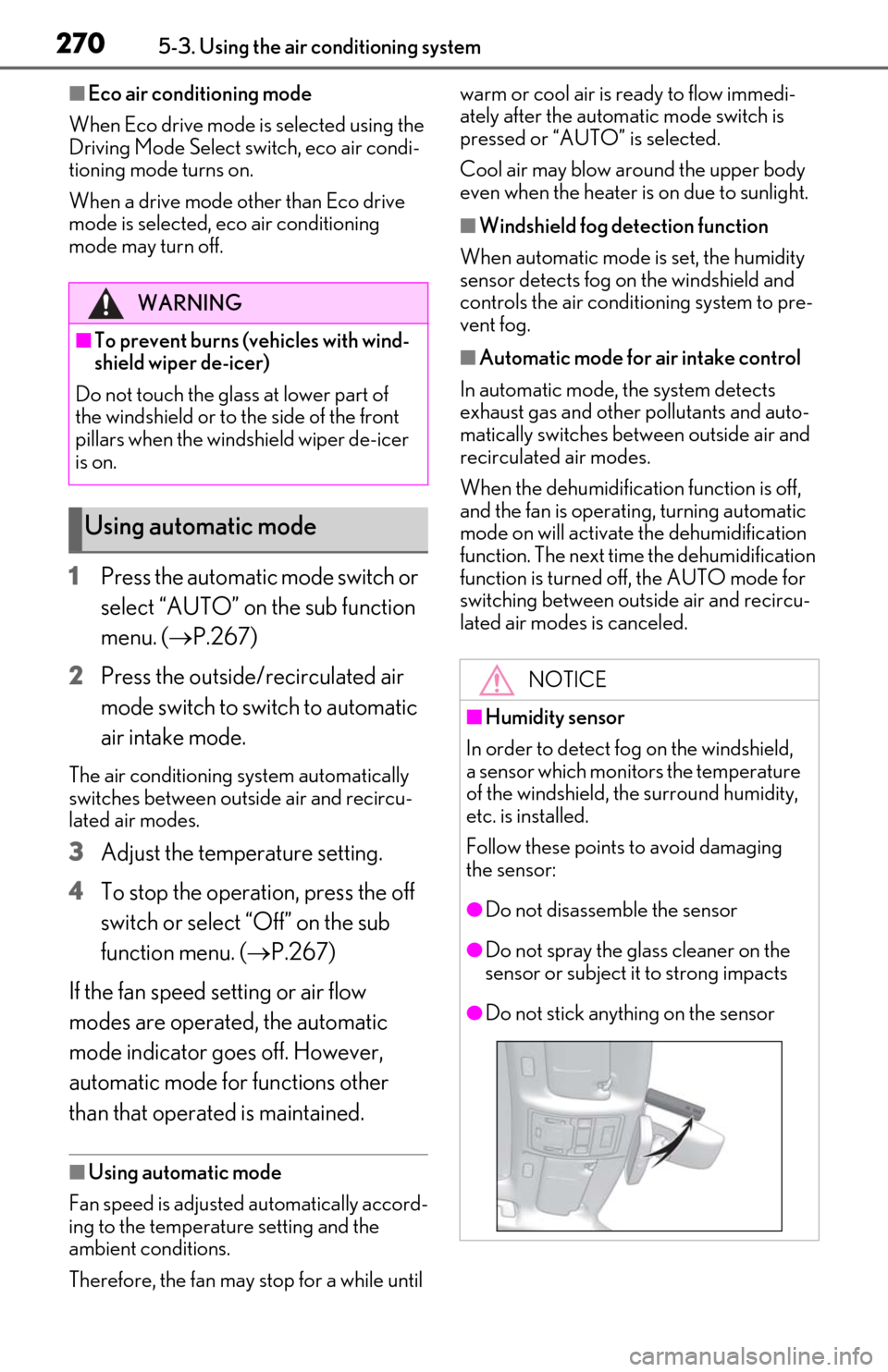
■Humidity sensor
In order to detect fog on the windshield,
a sensor which monitors the temperature
of the windshield, the surround humidity,
etc. is installed.
Follow these points to avoid damaging
the sensor:
●Do not disassemble the sensor
●Do not spray the glass cleaner on the
sensor or subject it to strong impacts
●Do not stick anything on the sensor
Page 275 of 462
2735-3. Using the air conditioning system
5
Interior features
*: If equipped
WARNING
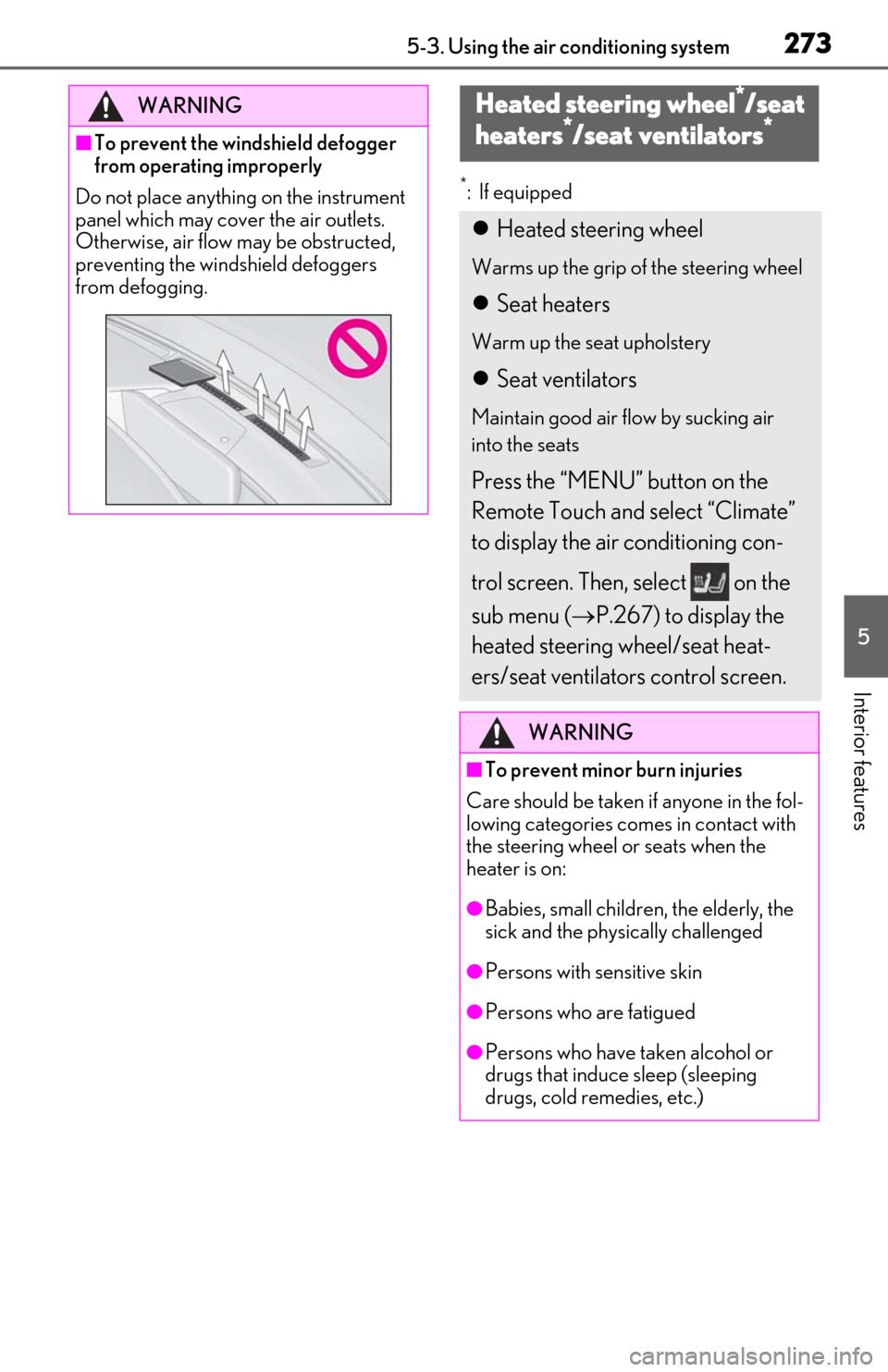
■To prevent the windshield defogger
from operating improperly
Do not place anything on the instrument
panel which may cover the air outlets.
Otherwise, air flow may be obstructed,
preventing the windshield defoggers
from defogging.
Heated steering wheel*/seat
h
eaters*/seat ventilators*
Heated steering wheel
Warms up the grip of the steering wheel
Seat heaters
Warm up the seat upholstery
Seat ventilators
Maintain good air flow by sucking air
into the seats
Press the “MENU” button on the
Remote Touch and select “Climate”
to display the air conditioning con-
trol screen. Then, select on the
sub menu ( P.267) to display the
heated steering wheel/seat heat-
ers/seat ventilators control screen.
WARNING
■To prevent minor burn injuries
Care should be taken if anyone in the fol-
lowing categories comes in contact with
the steering wheel or seats when the
heater is on:
●Babies, small children, the elderly, the
sick and the physically challenged
●Persons with sensitive skin
●Persons who are fatigued
●Persons who have taken alcohol or
drugs that induce sleep (sleeping
drugs, cold remedies, etc.)
Page 284 of 462
2825-5. Using the storage features
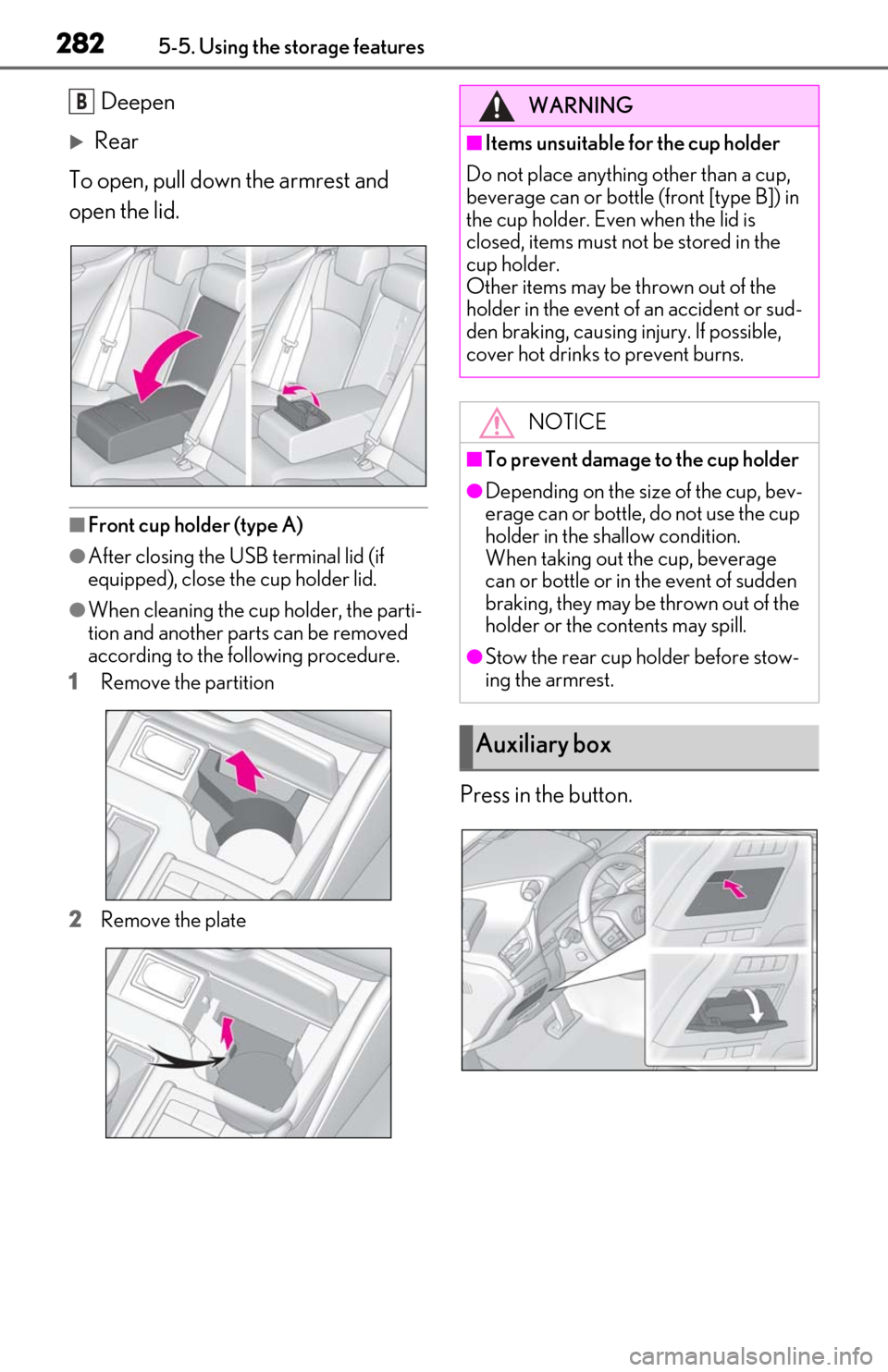
Deepen
Rear
To open, pull down the armrest and
open the lid.
■Front cup holder (type A)
●After closing the USB terminal lid (if
equipped), close the cup holder lid.
●When cleaning the cup holder, the parti-
tion and another parts can be removed
according to the following procedure.
1
Remove the partition
2
Remove the plate
Press in the button.
BWARNING
■Items unsuitable for the cup holder
Do not place anything other than a cup,
beverage can or bottle (front [type B]) in
the cup holder. Even when the lid is
closed, items must not be stored in the
cup holder.
Other items may be thrown out of the
holder in the event of an accident or sud-
den braking, causing injury. If possible,
cover hot drinks to prevent burns.
NOTICE
■To prevent damage to the cup holder
●Depending on the size of the cup, bev-
erage can or bottle, do not use the cup
holder in the shallow condition.
When taking out the cup, beverage
can or bottle or in the event of sudden
braking, they may be thrown out of the
holder or the contents may spill.
●Stow the rear cup holder before stow-
ing the armrest.
Auxiliary box
Page 290 of 462
2885-6. Using the other interior features
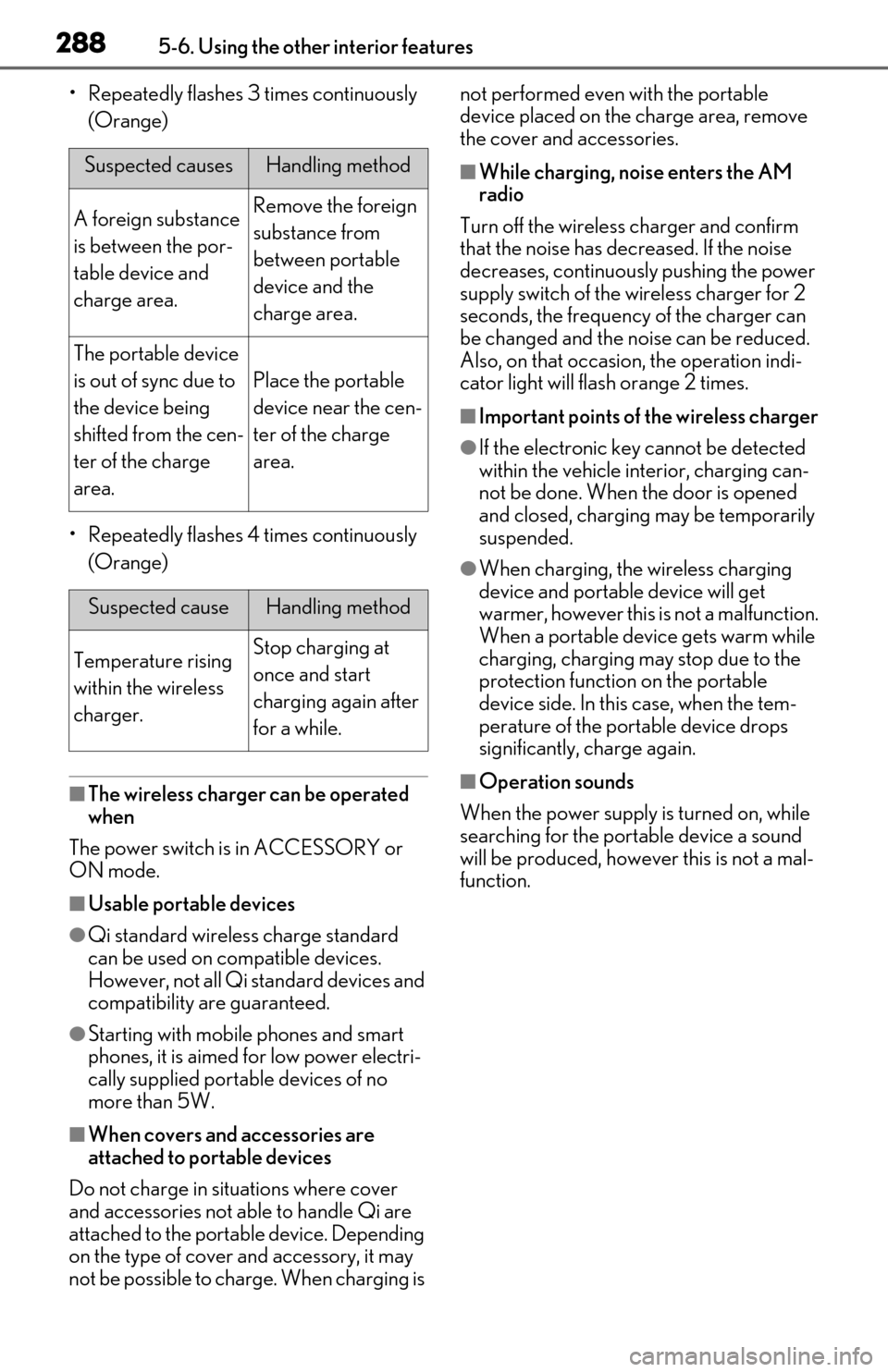
• Repeatedly flashes 3 times continuously (Orange)
• Repeatedly flashes 4 times continuously (Orange)
■The wireless charger can be operated
when
The power switch is in ACCESSORY or
ON mode.
■Usable portable devices
●Qi standard wireless charge standard
can be used on compatible devices.
However, not all Qi standard devices and
compatibility are guaranteed.
●Starting with mobile phones and smart
phones, it is aimed for low power electri-
cally supplied portab le devices of no
more than 5W.
■When covers and accessories are
attached to portable devices
Do not charge in situations where cover
and accessories not able to handle Qi are
attached to the portable device. Depending
on the type of cover and accessory, it may
not be possible to charge. When charging is not performed even with the portable
device placed on the charge area, remove
the cover and accessories.
■While charging, noise enters the AM
radio
Turn off the wireless charger and confirm
that the noise has decreased. If the noise
decreases, continuously pushing the power
supply switch of the wireless charger for 2
seconds, the frequency of the charger can
be changed and the noise can be reduced.
Also, on that occasion, the operation indi-
cator light will flash orange 2 times.
■Important points of the wireless charger
●If the electronic key cannot be detected
within the vehicle interior, charging can-
not be done. When the door is opened
and closed, charging may be temporarily
suspended.
●When charging, the wireless charging
device and portable device will get
warmer, however this is not a malfunction.
When a portable devi ce gets warm while
charging, charging may stop due to the
protection function on the portable
device side. In this case, when the tem-
perature of the port able device drops
significantly, charge again.
■Operation sounds
When the power supply is turned on, while
searching for the portable device a sound
will be produced, however this is not a mal-
function.
Suspected causesHandling method
A foreign substance
is between the por-
table device and
charge area.Remove the foreign
substance from
between portable
device and the
charge area.
The portable device
is out of sync due to
the device being
shifted from the cen-
ter of the charge
area.
Place the portable
device near the cen-
ter of the charge
area.
Suspected causeHandling method
Temperature rising
within the wireless
charger.Stop charging at
once and start
charging again after
for a while.
Page 294 of 462

2925-6. Using the other interior features
WARNING
■Caution while driving
When charging a portable device, for
safety reasons, the driver should not
operate the main the part of the portable
device while driving.
■Caution regarding interference with
electronic devices
People with implantable cardiac pace-
makers, cardiac resy nchronization ther-
apy-pacemakers or implantable
cardioverter defibrillators, as well as any
other electrical medical device, should
consult their physician about the usage of
the wireless charger.
The operations of the wireless charger
may have an affect on medical devices.
■To prevent damage or burns
Observe the following precautions.
Failure to do so may result in a possibility
of equipment failure and damage, catch
fire, burns due to overheat.
●Do not insert any metallic objects
between the charging area and the
portable device while charging
●Do not attach stickers, metallic
objects, etc., to the charger area or
portable device
●Do not cover with cloth, etc., and
charge
●Do not charge portable devices other
than designated
●Do not attempt to dismantle for disas-
sembly or modifications
●Do not hit or apply a strong force
NOTICE
■Conditions in which the function may
not operate correctly
In the following conditions, it may not
operate correctly
●The portable device is fully charged
●There is foreign matter between the
charge area and portable device
●The temperature of the portable
device gets higher from charging
●The charging surface of the portable
device is facing up
●The placement of the portable device
is out of alignmen t with the charge
area
●Near a TV tower, electric power plant,
gas station, radio stat ion, large display,
airport or other fac ility that generates
strong radio waves or electrical noise
●When the electronic key is in contact
with, or is covered by the following
metallic objects
• Cards to which aluminum foil is attached
• Cigarette boxes that have aluminum foil inside
• Metallic wallets or bags
• Coins
• Hand warmers made of metal
• Media such as CDs and DVDs
●When other wireless keys (that emit
radio waves) are being used nearby
In addition, excluding the above-men-
tioned, when the charger does not per-
form normally or the operation indicator
light is flashing continuously, it is consid-
ered that the wireless charger is malfunc-
tioning. Contact your Lexus dealer.
■To prevent failure or damage to data
●Do not bring magnetic cards, such as
credit cards, or magnetic recording
media, etc., close to the charger while
charging, otherwise, data may disap-
pear under the influence of magne-
tism. Also, do not bring precision
instruments such as wrist watches, etc.,
close to the charger, as such objects
may break.
Page 295 of 462
2935-6. Using the other interior features
5
Interior features
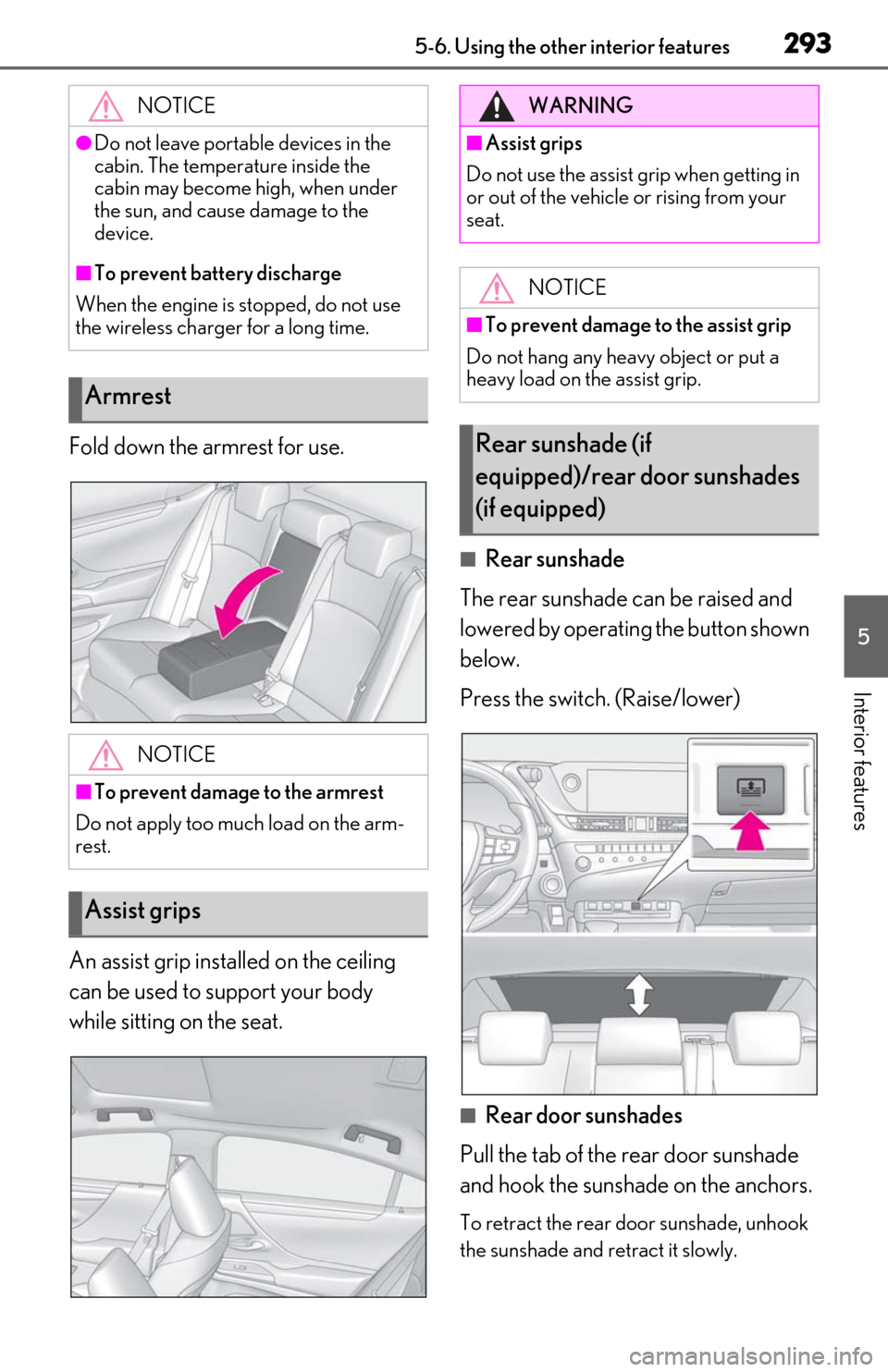
Fold down the armrest for use.
An assist grip installed on the ceiling
can be used to support your body
while sitting on the seat.
■Rear sunshade
The rear sunshade can be raised and
lowered by operating the button shown
below.
Press the switch. (Raise/lower)
■Rear door sunshades
Pull the tab of the rear door sunshade
and hook the sunshade on the anchors.
To retract the rear door sunshade, unhook
the sunshade and retract it slowly.
NOTICE
●Do not leave portab
le devices in the
cabin. The temperature inside the
cabin may become high, when under
the sun, and cause damage to the
device.
■To prevent battery discharge
When the engine is stopped, do not use
the wireless charger for a long time.
Armrest
NOTICE
■To prevent damage to the armrest
Do not apply too much load on the arm-
rest.
Assist grips
WARNING
■Assist grips
Do not use the assist grip when getting in
or out of the vehicle or rising from your
seat.
NOTICE
■To prevent damage to the assist grip
Do not hang any heavy object or put a
heavy load on the assist grip.
Rear sunshade (if
equipped)/rear door sunshades
(if equipped)