ECO mode Lexus ES300h 2020 Repair Manual
[x] Cancel search | Manufacturer: LEXUS, Model Year: 2020, Model line: ES300h, Model: Lexus ES300h 2020Pages: 462, PDF Size: 9.98 MB
Page 337 of 462
3356-3. Do-it-yourself maintenance
6
Maintenance and care
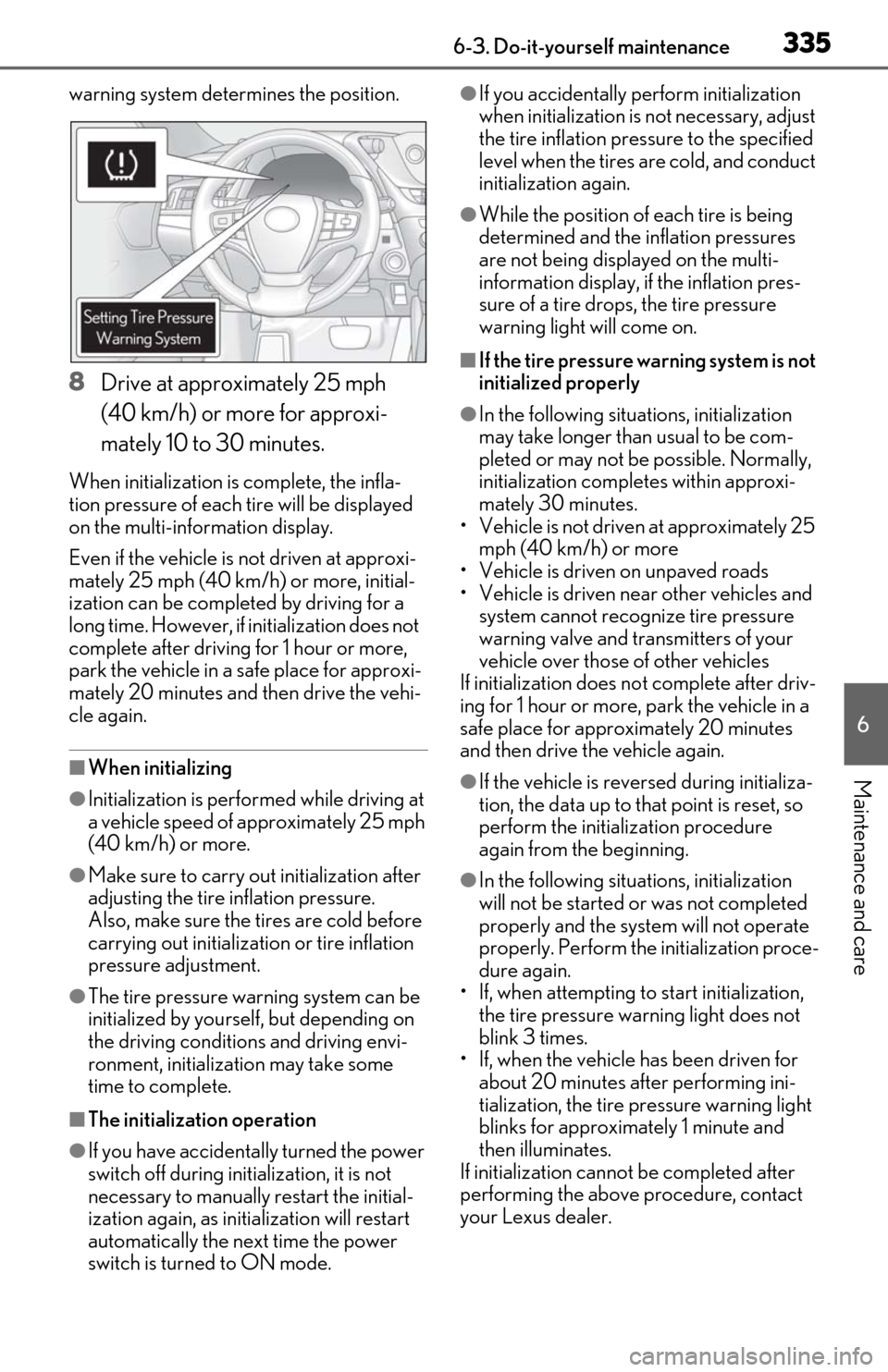
warning system determines the position.
8Drive at approximately 25 mph
(40 km/h) or more for approxi-
mately 10 to 30 minutes.
When initialization is complete, the infla-
tion pressure of each tire will be displayed
on the multi-information display.
Even if the vehicle is not driven at approxi-
mately 25 mph (40 km /h) or more, initial-
ization can be completed by driving for a
long time. However, if initialization does not
complete after driving for 1 hour or more,
park the vehicle in a safe place for approxi-
mately 20 minutes and then drive the vehi-
cle again.
■When initializing
●Initialization is perfor med while driving at
a vehicle speed of approximately 25 mph
(40 km/h) or more.
●Make sure to carry ou t initialization after
adjusting the tire inflation pressure.
Also, make sure the tires are cold before
carrying out initializat ion or tire inflation
pressure adjustment.
●The tire pressure warning system can be
initialized by yourse lf, but depending on
the driving conditions and driving envi-
ronment, initialization may take some
time to complete.
■The initialization operation
●If you have accidenta lly turned the power
switch off during initialization, it is not
necessary to manually restart the initial-
ization again, as initialization will restart
automatically the next time the power
switch is turned to ON mode.
●If you accidentally perform initialization
when initialization is not necessary, adjust
the tire inflation pressure to the specified
level when the tires are cold, and conduct
initialization again.
●While the position of each tire is being
determined and the inflation pressures
are not being displayed on the multi-
information display, if the inflation pres-
sure of a tire drops, the tire pressure
warning light will come on.
■If the tire pressure warning system is not
initialized properly
●In the following situations, initialization
may take longer than usual to be com-
pleted or may not be possible. Normally,
initialization comple tes within approxi-
mately 30 minutes.
• Vehicle is not driven at approximately 25 mph (40 km/h) or more
• Vehicle is driven on unpaved roads
• Vehicle is driven near other vehicles and system cannot recognize tire pressure
warning valve and transmitters of your
vehicle over those of other vehicles
If initialization does no t complete after driv-
ing for 1 hour or more, park the vehicle in a
safe place for approximately 20 minutes
and then drive the vehicle again.
●If the vehicle is reversed during initializa-
tion, the data up to that point is reset, so
perform the initiali zation procedure
again from the beginning.
●In the following situations, initialization
will not be started or was not completed
properly and the system will not operate
properly. Perform the initialization proce-
dure again.
• If, when attempting to start initialization,
the tire pressure warning light does not
blink 3 times.
• If, when the vehicle has been driven for about 20 minutes after performing ini-
tialization, the tire pressure warning light
blinks for approximately 1 minute and
then illuminates.
If initialization canno t be completed after
performing the above procedure, contact
your Lexus dealer.
Page 339 of 462

3376-3. Do-it-yourself maintenance
6
Maintenance and care
●ID codes can be registered by yourself,
but depending on the driving conditions
and driving environment, registration
may take some time to complete.
■Canceling ID code registration
●To cancel ID code registration after it has
been started, turn the power switch off
before driving the vehicle.
If the vehicle is driven after ID code regis-
tration is started, to cancel registration,
perform the ID code registration start
procedure again and turn the power
switch off before driving.
●If ID code registration has been canceled,
the tire pressure warning light will blink
for approximately 1 minute when the
power switch is turned to ON mode and
then illuminate. The tire pressure warning
system will be operational when the tire
pressure warning light turns off.
●If the warning light does not turn off even
after several minutes have elapsed, ID
code registration may not have been can-
celed correctly. To cancel registration,
perform the ID code registration start
procedure again and then turn the power
switch off before driving.
■If ID codes are not registered properly
●In the following situations, ID code regis-
tration may take longer than usual to be
completed or may not be possible. Nor-
mally, registration completes within
approximately 30 minutes.
• Vehicle is not parked for approximately 20 minutes or more before driving
• Vehicle is not driven at approximately 25
mph (40 km/h) or more
• Vehicle is driven on unpaved roads
• Vehicle is driven near other vehicles and
system cannot recognize tire pressure
warning valve and tran smitters of your
vehicle over those of other vehicles
• Wheel with tire pressure warning valve and transmitter installed is inside or near
the vehicle
If registration does not complete after driv-
ing for 1 hour or more, perform the ID code
registration procedure again from the
beginning.
●If the vehicle is reve rsed during registra-
tion, the data up to that point is reset, so perform the registration procedure again
from the beginning.
●In the following situations, ID code regis-
tration will not be started or was not com-
pleted properly and the system will not
operate properly. Pe
rform the ID code
registration procedure again.
• If, when attempting to start ID code regis- tration, the tire pressure warning light
does not blink slowly 3 times.
• If, when the vehicle has been driven for about 20 minutes after performing ID
code registration, the tire pressure warn-
ing light blinks for approximately 1 minute
and then illuminates.
●If ID code registration cannot be com-
pleted after performing the above proce-
dure, contact your Lexus dealer.
Page 373 of 462
3717-2. Steps to take in an emergency
7
When trouble arises
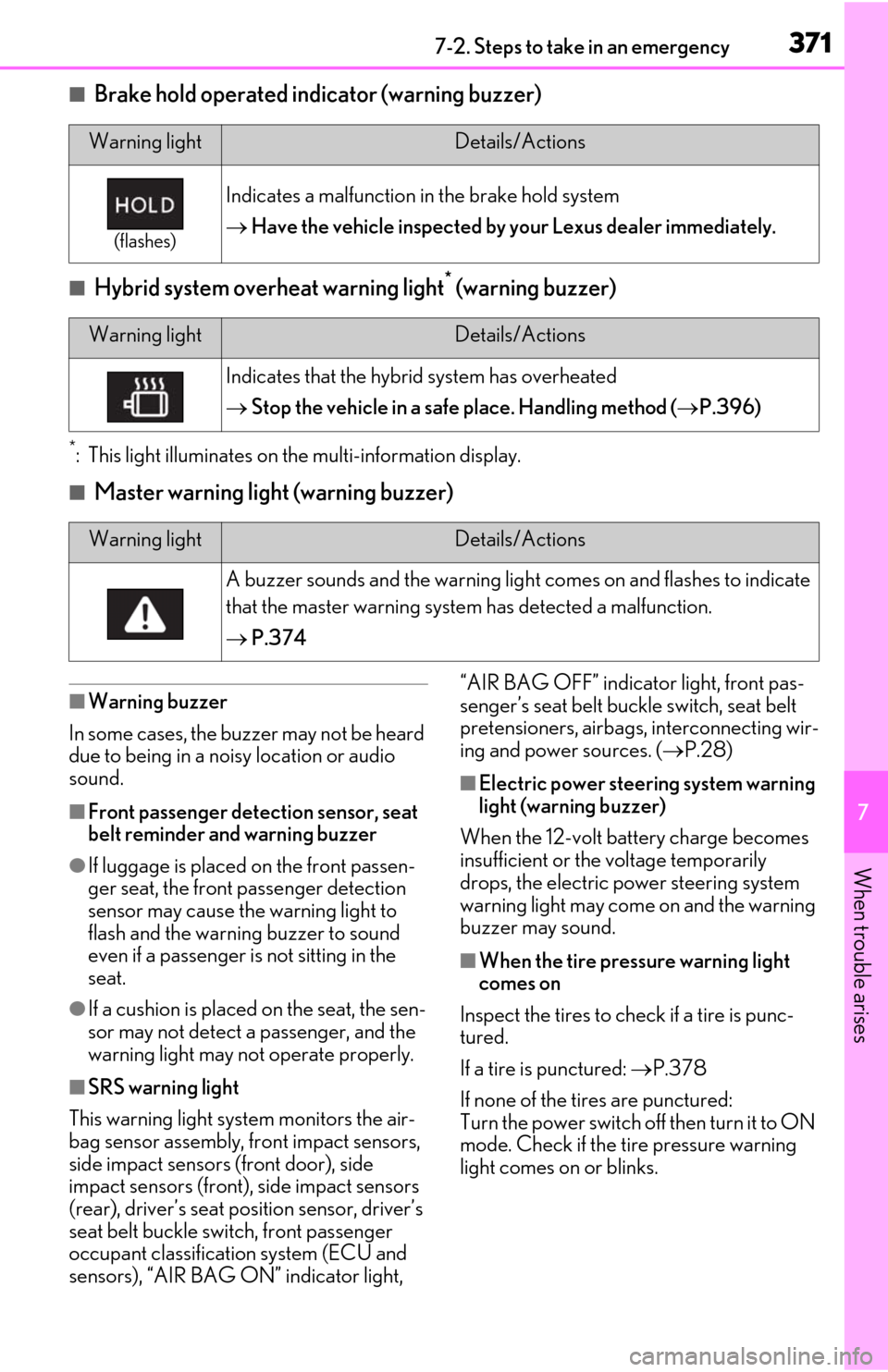
■Brake hold operated indicator (warning buzzer)
■Hybrid system overheat warning light* (warning buzzer)
*: This light illuminates on the multi-information display.
■Master warning light (warning buzzer)
■Warning buzzer
In some cases, the bu zzer may not be heard
due to being in a noisy location or audio
sound.
■Front passenger detection sensor, seat
belt reminder and warning buzzer
●If luggage is placed on the front passen-
ger seat, the front passenger detection
sensor may cause th e warning light to
flash and the warning buzzer to sound
even if a passenger is not sitting in the
seat.
●If a cushion is placed on the seat, the sen-
sor may not detect a passenger, and the
warning light may not operate properly.
■SRS warning light
This warning light system monitors the air-
bag sensor assembly, fr ont impact sensors,
side impact sensors (front door), side
impact sensors (front), side impact sensors
(rear), driver’s seat position sensor, driver’s
seat belt buckle switch, front passenger
occupant classification system (ECU and
sensors), “AIR BAG ON” indicator light, “AIR BAG OFF” indicator light, front pas-
senger’s seat belt buckle switch, seat belt
pretensioners, airbags, interconnecting wir-
ing and power sources. (
P.28)
■Electric power steering system warning
light (warning buzzer)
When the 12-volt battery charge becomes
insufficient or the voltage temporarily
drops, the electric power steering system
warning light may come on and the warning
buzzer may sound.
■When the tire pressure warning light
comes on
Inspect the tires to check if a tire is punc-
tured.
If a tire is punctured: P.378
If none of the tires are punctured:
Turn the power switch off then turn it to ON
mode. Check if the tire pressure warning
light comes on or blinks.
Warning lightDetails/Actions
(flashes)
Indicates a malfunction in the brake hold system
Have the vehicle inspected by your Lexus dealer immediately.
Warning lightDetails/Actions
Indicates that the hybrid system has overheated
Stop the vehicle in a safe place. Handling method ( P.396)
Warning lightDetails/Actions
A buzzer sounds and the warning light comes on and flashes to indicate
that the master warning system has detected a malfunction.
P.374
Page 388 of 462
3867-2. Steps to take in an emergency
of the problem:
The 12-volt battery may be dis-
charged. ( P.390)
The 12-volt battery terminal con-
nections may be loose or corroded.
( P.328)
One of the following may be the cause
of the problem:
The 12-volt battery may be dis-
charged. ( P.390)
One or both of the 12-volt battery
terminals may be disconnected.
( P.328)
Contact your Lexus dealer if the problem
cannot be repaired, or if repair procedures
are unknown.
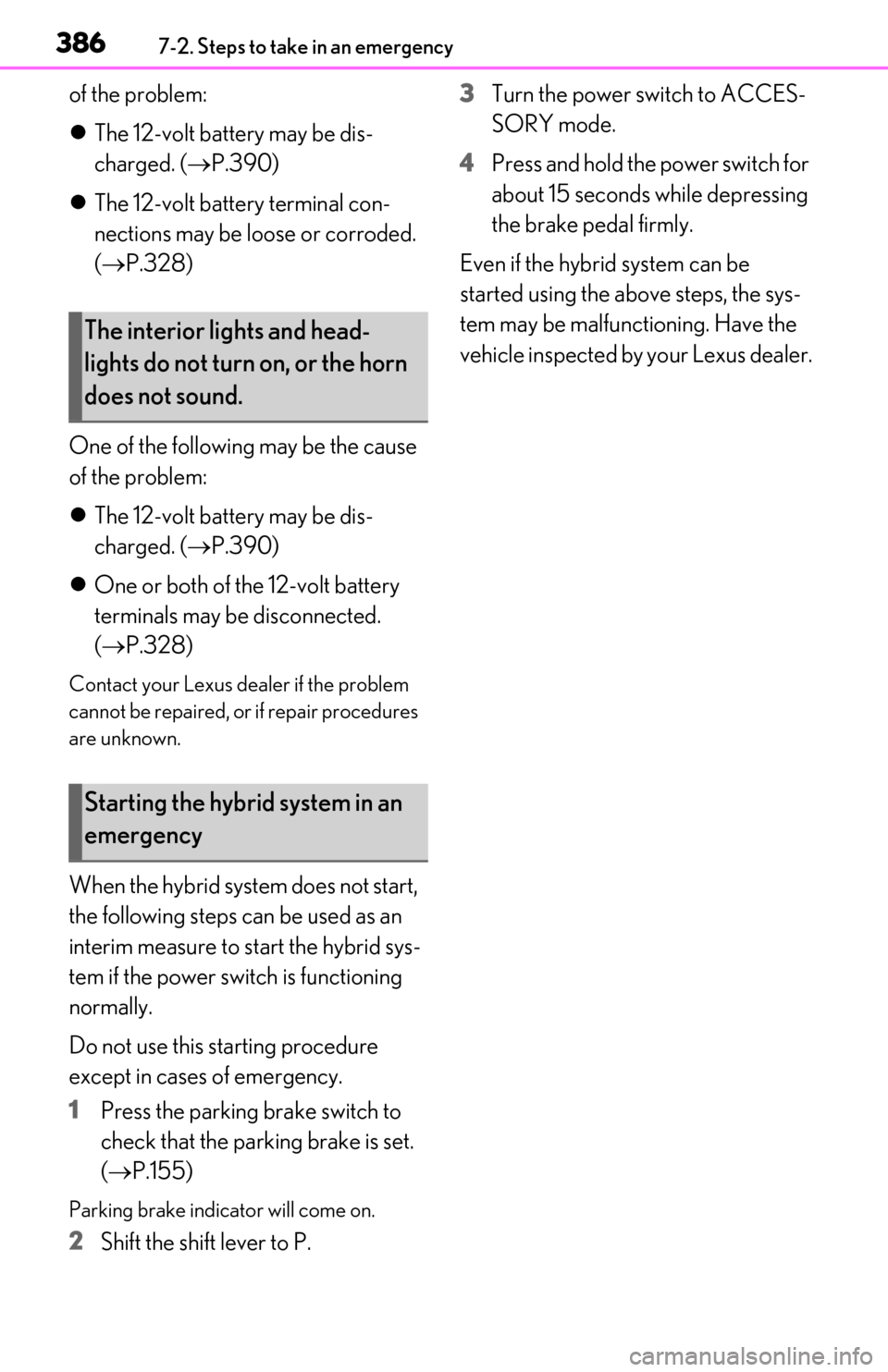
When the hybrid system does not start,
the following steps can be used as an
interim measure to start the hybrid sys-
tem if the power switch is functioning
normally.
Do not use this starting procedure
except in cases of emergency.
1 Press the parking brake switch to
check that the parking brake is set.
(P.155)
Parking brake indicator will come on.
2 Shift the shift lever to P. 3
Turn the power switch to ACCES-
SORY mode.
4 Press and hold the power switch for
about 15 seconds while depressing
the brake pedal firmly.
Even if the hybrid system can be
started using the above steps, the sys-
tem may be malfunctioning. Have the
vehicle inspected by your Lexus dealer.
The interior lights and head-
lights do not turn on, or the horn
does not sound.
Starting the hybrid system in an
emergency
Page 391 of 462

3897-2. Steps to take in an emergency
7
When trouble arises
open.
■Key linked functions
1
Closes the windows and the moon roof
(turn and hold)
2
Opens the windows and the moon roof
(turn and hold)
These settings must be customized at your
Lexus dealer.
1Ensure that the shift lever is in P and
depress the brake pedal.
2
Touch the Lexus emblem side of the
electronic key to the power switch.
When the electronic key is detected, a
buzzer sounds and the power switch will
turn to ON mode.
When the smart access system with push-
button start is deactivated in customization
setting, the power switch will turn to
ACCESSORY mode.
3Firmly depress the brake pedal and
check that is shown on the
multi-information display.
4
Press the power switch shortly and
firmly.
In the event that the hybrid system still
cannot be started, contact your Lexus
dealer.
■Stopping the hybrid system
Set the parking brake, shift the shift lever to
P and press the power switch as you nor-
mally do when stopping the hybrid system.
■Electronic key battery
As the above procedure is a temporary
measure, it is recommended that the elec-
tronic key battery be replaced immediately
when the battery is depleted. (P.346)
WARNING
■When using the mechanical key and
operating the power windows or
moon roof
Operate the power window after check-
ing to make sure that there is no possibil-
ity of any passenger having any of their
body parts caught in the window or
moon roof.
Also, do not allow ch ildren to operate the
mechanical key. It is possible for children
and other passengers to get caught in
the power window or moon roof.
Starting the hybrid system
Page 392 of 462
3907-2. Steps to take in an emergency
■Changing power switch modes
Release the brake pedal and press the
power switch in step 3 above.
The hybrid system does not start and modes
will be changed each time the switch is
pressed. ( P.146)
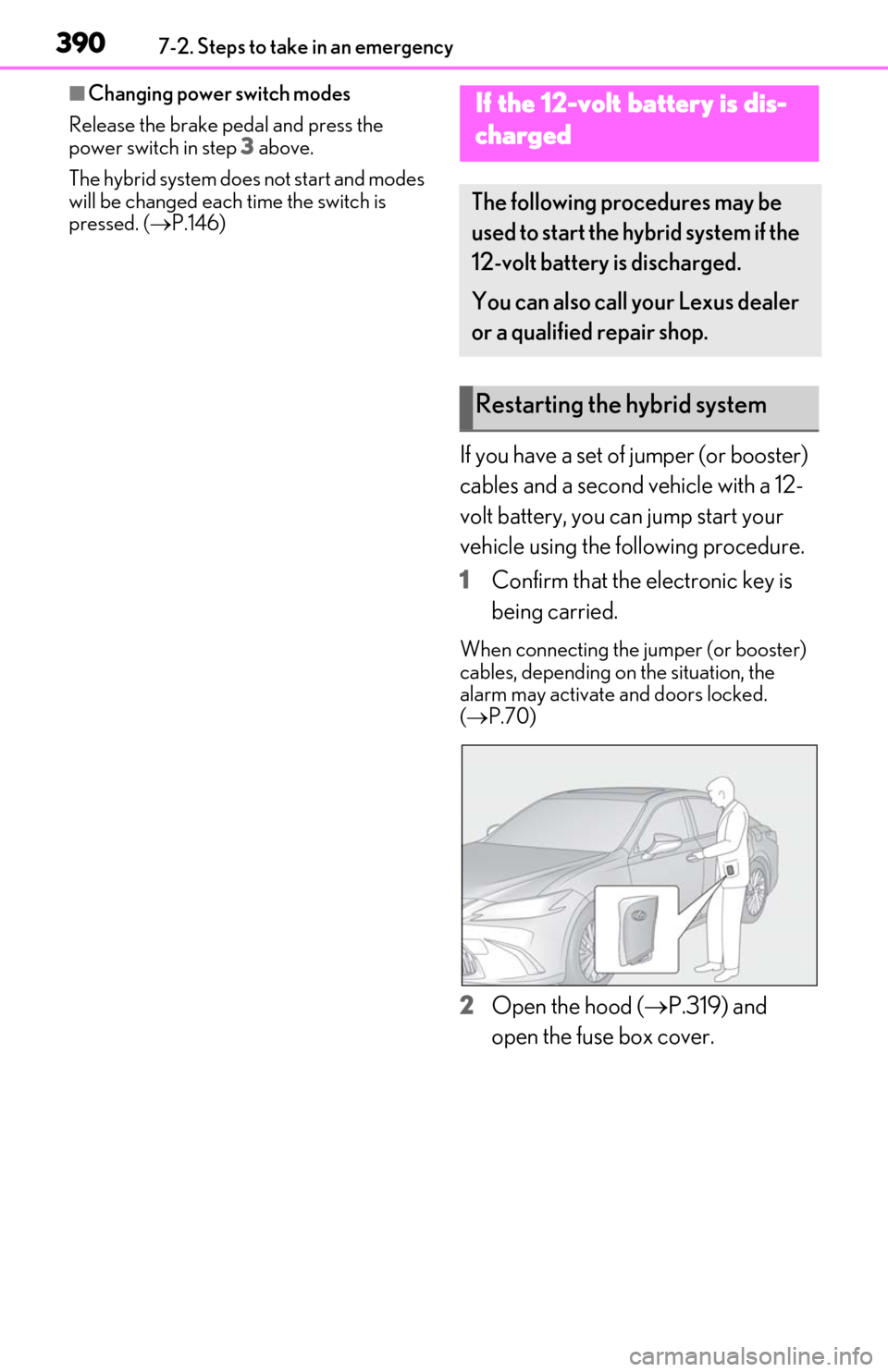
If you have a set of jumper (or booster)
cables and a second vehicle with a 12-
volt battery, you can jump start your
vehicle using the following procedure.
1 Confirm that the electronic key is
being carried.
When connecting the jumper (or booster)
cables, depending on the situation, the
alarm may activate and doors locked.
( P.70)
2 Open the hood ( P.319) and
open the fuse box cover.
If the 12-volt battery is dis-
charged
The following procedures may be
used to start the hybrid system if the
12-volt battery is discharged.
You can also call your Lexus dealer
or a qualified repair shop.
Restarting the hybrid system
Page 394 of 462

3927-2. Steps to take in an emergency
6Open and close any of the doors of
your vehicle with the power switch
off.
7 Maintain the engine speed of the
second vehicle and start the hybrid
system of your vehicle by turning
the power switch to ON mode.
8 Make sure the “READY” indicator
comes on. If the indicator does not
come on, contact your Lexus
dealer.
9 Once the vehicle’s hybrid system
has started, remove the jumper
cables in the exact reverse order
from which they were connected.
10 Close the exclusive jump starting
terminal cover, and reinstall the fuse
box cover to its original position.
Once the hybrid system starts, have the
vehicle inspected at your Lexus dealer as
soon as possible.
■Starting the hybrid system when the 12-
volt battery is discharged
The hybrid system cannot be started by
push-starting.
■To prevent 12-volt battery discharge
●Turn off the headlights and the audio sys-
tem while the hybrid system is stopped.
●Turn off any unnecessary electrical com-
ponents when the vehicle is running at a
low speed for an extended period, such
as in heavy traffic.
■When the 12-volt battery is removed or
discharged
●Information stored in the ECU is cleared.
When the 12-volt battery is depleted,
have the vehicle inspected at your Lexus
dealer.
●Some systems may require initialization.
( P.429)
■When removing the 12-volt battery ter-
minals
When the 12-volt battery terminals are
removed, the information stored in the
ECU is cleared. Before removing the 12-
volt battery terminals, contact your Lexus
dealer.
■Charging the 12-volt battery
The electricity stored in the 12-volt battery
will discharge gradually even when the
vehicle is not in use, due to natural dis-
charge and the draining effects of certain
electrical appliances. If the vehicle is left for
a long time, the 12-volt battery may dis-
charge, and the hybrid system may be
unable to start. (The 12-volt battery
recharges automatically while the hybrid
system is operating.)
■When recharging or replacing the 12-
volt battery
●In some cases, it may not be possible to
unlock the doors using the smart access
system with push-button start when the
12-volt battery is discharged. Use the
wireless remote control or the mechani-
cal key to lock or unlock the doors.
●The hybrid system may not start on the
first attempt after the 12-volt battery has
recharged but will start normally after the
second attempt. This is not a malfunction.
●The power switch mode is memorized by
the vehicle. When the 12-volt battery is
reconnected, the system will return to the
mode it was in before the 12-volt battery
was discharged. Before disconnecting
the 12-volt battery, turn the power switch
off.
If you are unsure what mode the power
switch was in before the 12-volt battery
discharged, be especially careful when
reconnecting the 12-volt battery.
■When replacing the 12-volt battery
●Use a 12-volt battery that conforms to
European regulations.
●Use a 12-volt battery that the case size is
same as the previous one (LN2), 20 hour
rate capacity (20HR) is equivalent
(60Ah) or greater, and performance rat-
ing (CCA) is equivalent (345A) or
greater.
Page 421 of 462
4198-2. Customization
8
Vehicle specifications
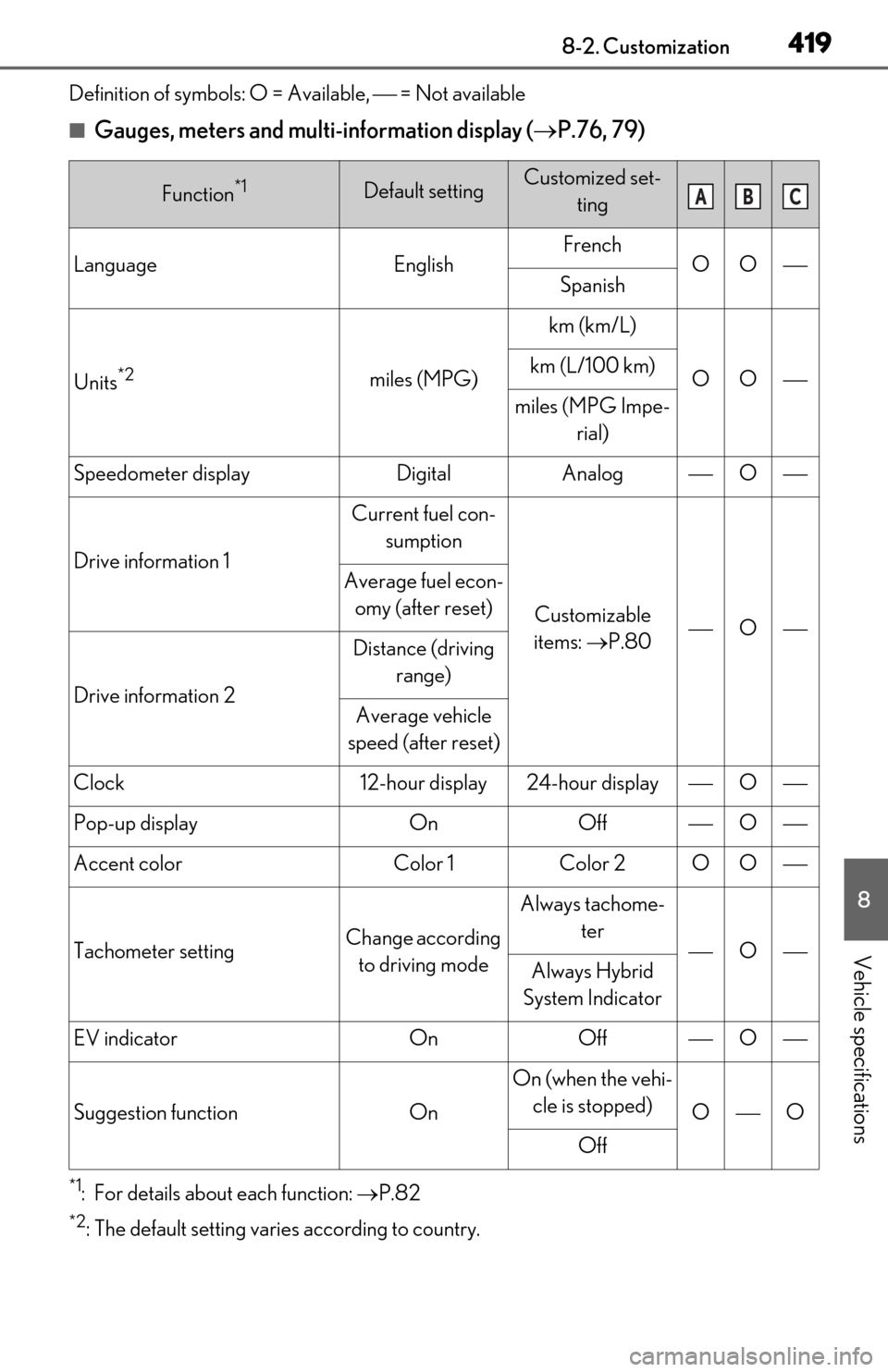
Definition of symbols: O = Available, = Not available
■Gauges, meters and multi-information display (P.76, 79)
*1: For details about each function: P.82
*2: The default setting varies according to country.
Function*1Default settingCustomized set-
ting
LanguageEnglishFrenchOOSpanish
Units*2miles (MPG)
km (km/L)
OOkm (L/100 km)
miles (MPG Impe- rial)
Speedometer displayDigitalAnalogO
Drive information 1
Current fuel con-
sumption
Customizable
items: P.80O
Average fuel econ-
omy (after reset)
Drive information 2
Distance (driving range)
Average vehicle
speed (after reset)
Clock12-hour display24-hour displayO
Pop-up displayOnOffO
Accent colorColor 1Color 2OO
Tachometer settingChange according to driving mode
Always tachome- ter
OAlways Hybrid
System Indicator
EV indicatorOnOffO
Suggestion functionOn
On (when the vehi- cle is stopped)
OO
Off
ABC
Page 429 of 462

4278-2. Customization
8
Vehicle specifications
■Seat heater*/seat ventilators* ( P.273)
*:If equipped
■Heated steering wheel* ( P.273)
*:If equipped
■Illumination ( P.277)
FunctionDefault settingCustomized set-
ting
Driver’s seat temperature pref-
erence in automatic modeStandard-2 (cooler) to 2 (warmer)OO
Passenger’s seat temperature
preference in automatic modeStandard-2 (cooler) to 2 (warmer)OO
FunctionDefault settingCustomized set- ting
Steering wheel heating prefer-
ence in automatic modeStandard-2 (low) to 2 (high)OO
FunctionDefault settingCustomized set-ting
Time elapsed before the interior
lights turn off15 seconds
Off
OO7.5 seconds
30 seconds
Operation after the power
switch is turned offOnOffO
Operation when the doors are
unlockedOnOffO
Operation when you approach
the vehicle with the electronic
key on your person
OnOffO
Footwell lightsOnOffO
Instrument panel ornament
light
* and door trim ornament
lights
*
OnOffO
ABC
ABC
ABC
Page 430 of 462
4288-2. Customization
*:If equipped
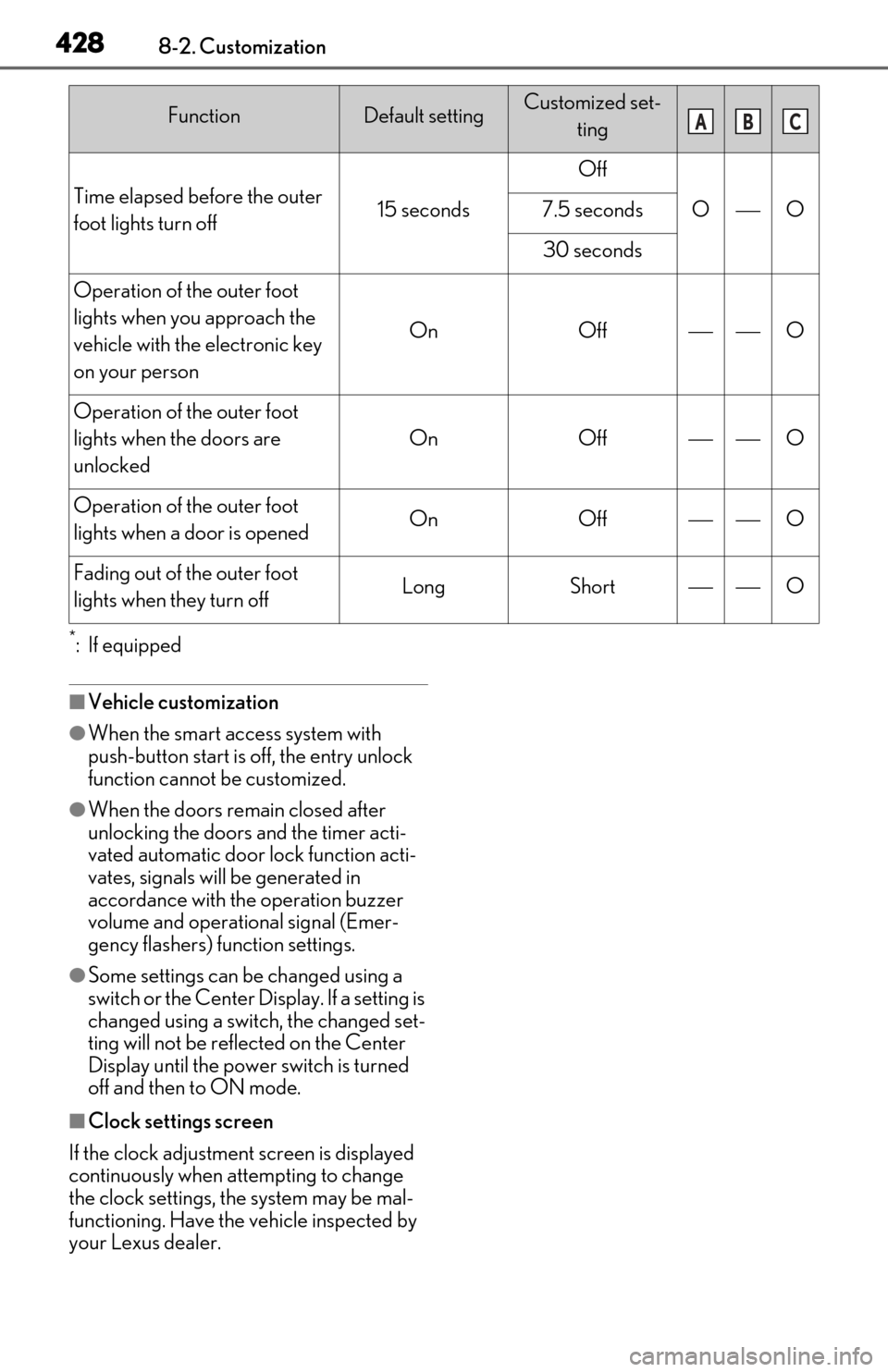
■Vehicle customization
●When the smart access system with
push-button start is off, the entry unlock
function cannot be customized.
●When the doors remain closed after
unlocking the doors and the timer acti-
vated automatic door lock function acti-
vates, signals will be generated in
accordance with the operation buzzer
volume and operational signal (Emer-
gency flashers) function settings.
●Some settings can be changed using a
switch or the Center Display. If a setting is
changed using a switch, the changed set-
ting will not be reflected on the Center
Display until the power switch is turned
off and then to ON mode.
■Clock settings screen
If the clock adjustment screen is displayed
continuously when attempting to change
the clock settings, the system may be mal-
functioning. Have the vehicle inspected by
your Lexus dealer.
Time elapsed before the outer
foot lights turn off15 seconds
Off
OO7.5 seconds
30 seconds
Operation of the outer foot
lights when you approach the
vehicle with the electronic key
on your person
OnOffO
Operation of the outer foot
lights when the doors are
unlocked
OnOffO
Operation of the outer foot
lights when a door is openedOnOffO
Fading out of the outer foot
lights when they turn offLongShortO
FunctionDefault settingCustomized set-
tingABC