brake light LEXUS ES300h 2021 User Guide
[x] Cancel search | Manufacturer: LEXUS, Model Year: 2021, Model line: ES300h, Model: LEXUS ES300h 2021Pages: 464, PDF Size: 9.55 MB
Page 147 of 464
1474-2. Driving procedures
4
Driving
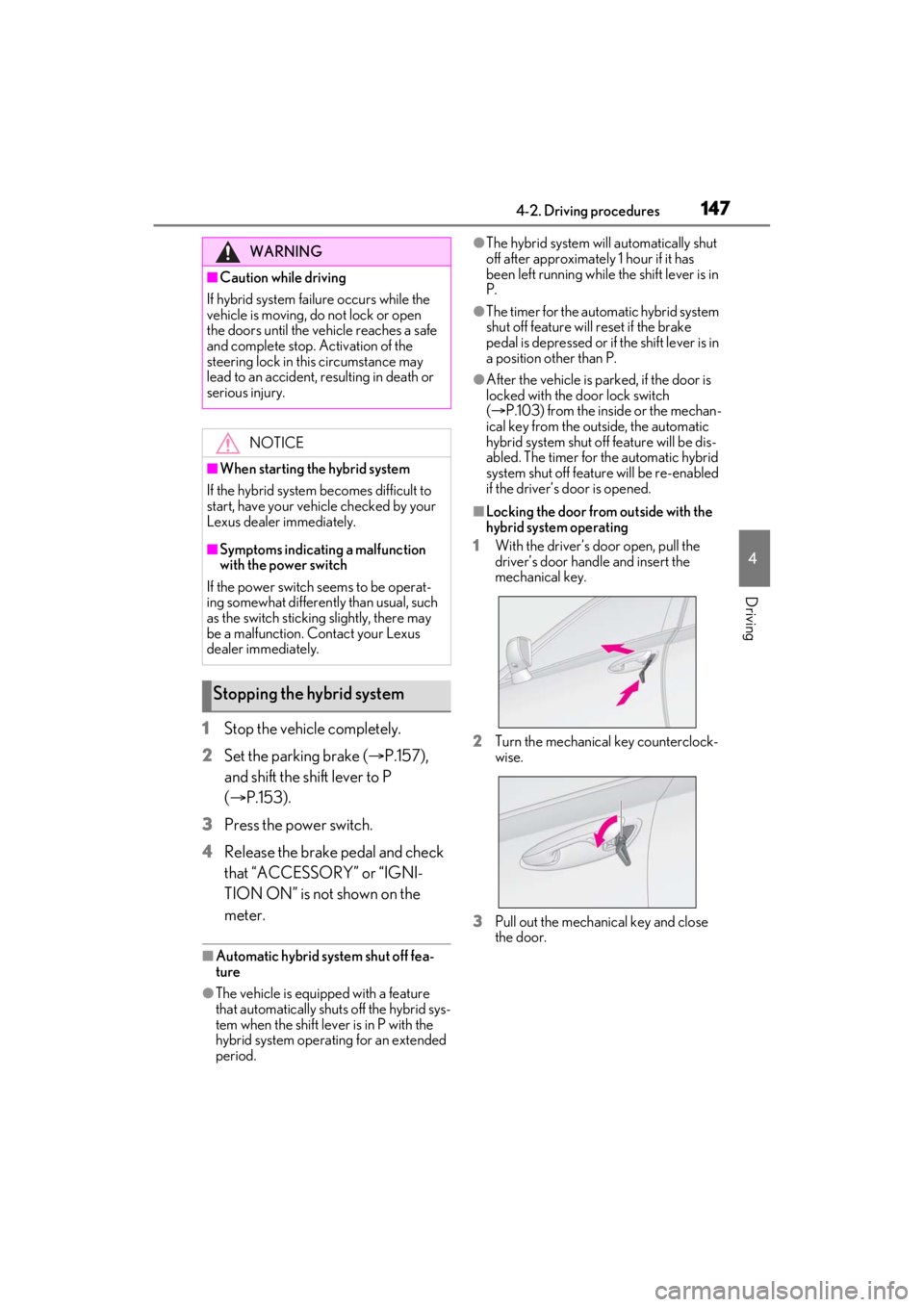
1Stop the vehicle completely.
2 Set the parking brake ( P.157),
and shift the shift lever to P
( P.153).
3 Press the power switch.
4 Release the brake pedal and check
that “ACCESSORY” or “IGNI-
TION ON” is not shown on the
meter.
■Automatic hybrid system shut off fea-
ture
●The vehicle is equipped with a feature
that automatically shuts off the hybrid sys-
tem when the shift lever is in P with the
hybrid system operating for an extended
period.
●The hybrid system will automatically shut
off after approximately 1 hour if it has
been left running while the shift lever is in
P.
●The timer for the automatic hybrid system
shut off feature will reset if the brake
pedal is depressed or if the shift lever is in
a position other than P.
●After the vehicle is parked, if the door is
locked with the door lock switch
( P.103) from the inside or the mechan-
ical key from the outside, the automatic
hybrid system shut of f feature will be dis-
abled. The timer for the automatic hybrid
system shut off featur e will be re-enabled
if the driver’s door is opened.
■Locking the door from outside with the
hybrid system operating
1 With the driver’s door open, pull the
driver’s door hand le and insert the
mechanical key.
2 Turn the mechanical key counterclock-
wise.
3 Pull out the mechanical key and close
the door.
WARNING
■Caution while driving
If hybrid system failure occurs while the
vehicle is moving, do not lock or open
the doors until the vehicle reaches a safe
and complete stop. Activation of the
steering lock in this circumstance may
lead to an accident, resulting in death or
serious injury.
NOTICE
■When starting the hybrid system
If the hybrid system becomes difficult to
start, have your vehicle checked by your
Lexus dealer immediately.
■Symptoms indicating a malfunction
with the power switch
If the power switch seems to be operat-
ing somewhat differently than usual, such
as the switch sticking slightly, there may
be a malfunction. Contact your Lexus
dealer immediately.
Stopping the hybrid system
Page 148 of 464
1484-2. Driving procedures
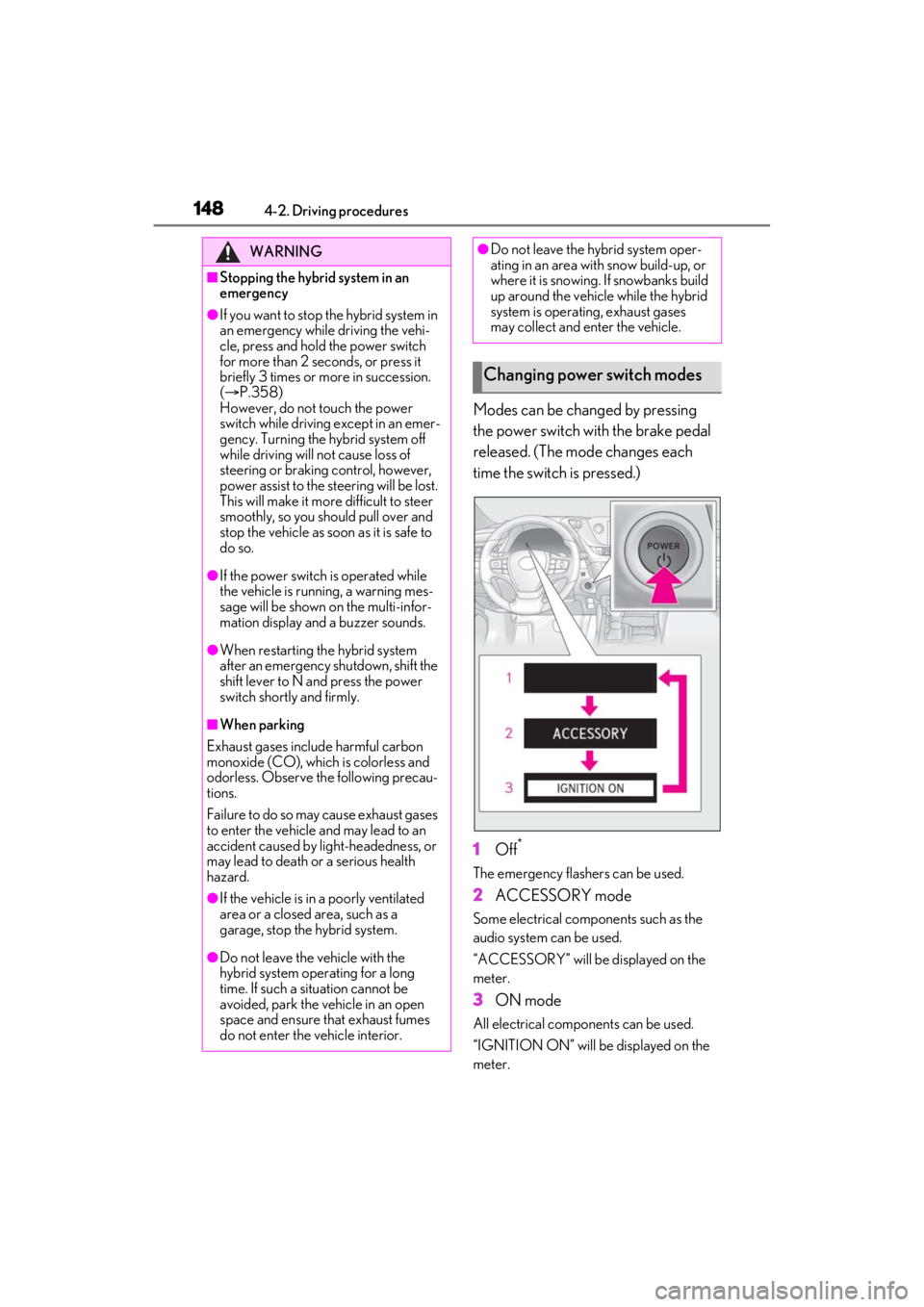
Modes can be changed by pressing
the power switch with the brake pedal
released. (The mode changes each
time the switch is pressed.)
1Off
*
The emergency flashers can be used.
2ACCESSORY mode
Some electrical components such as the
audio system can be used.
“ACCESSORY” will be displayed on the
meter.
3ON mode
All electrical components can be used.
“IGNITION ON” will be displayed on the
meter.
WARNING
■Stopping the hybrid system in an
emergency
●If you want to stop the hybrid system in
an emergency while driving the vehi-
cle, press and hold the power switch
for more than 2 seconds, or press it
briefly 3 times or more in succession.
( P.358)
However, do not touch the power
switch while driving except in an emer-
gency. Turning the hybrid system off
while driving will not cause loss of
steering or braking control, however,
power assist to the steering will be lost.
This will make it more difficult to steer
smoothly, so you should pull over and
stop the vehicle as soon as it is safe to
do so.
●If the power switch is operated while
the vehicle is running, a warning mes-
sage will be shown on the multi-infor-
mation display and a buzzer sounds.
●When restarting the hybrid system
after an emergency shutdown, shift the
shift lever to N and press the power
switch shortly and firmly.
■When parking
Exhaust gases include harmful carbon
monoxide (CO), which is colorless and
odorless. Observe the following precau-
tions.
Failure to do so may cause exhaust gases
to enter the vehicle and may lead to an
accident caused by light-headedness, or
may lead to death or a serious health
hazard.
●If the vehicle is in a poorly ventilated
area or a closed area, such as a
garage, stop the hybrid system.
●Do not leave the vehicle with the
hybrid system operating for a long
time. If such a situation cannot be
avoided, park the vehicle in an open
space and ensure that exhaust fumes
do not enter the vehicle interior.
●Do not leave the hybrid system oper-
ating in an area with snow build-up, or
where it is snowing. If snowbanks build
up around the vehicle while the hybrid
system is operating, exhaust gases
may collect and enter the vehicle.
Changing power switch modes
Page 157 of 464
1574-2. Driving procedures
4
Driving
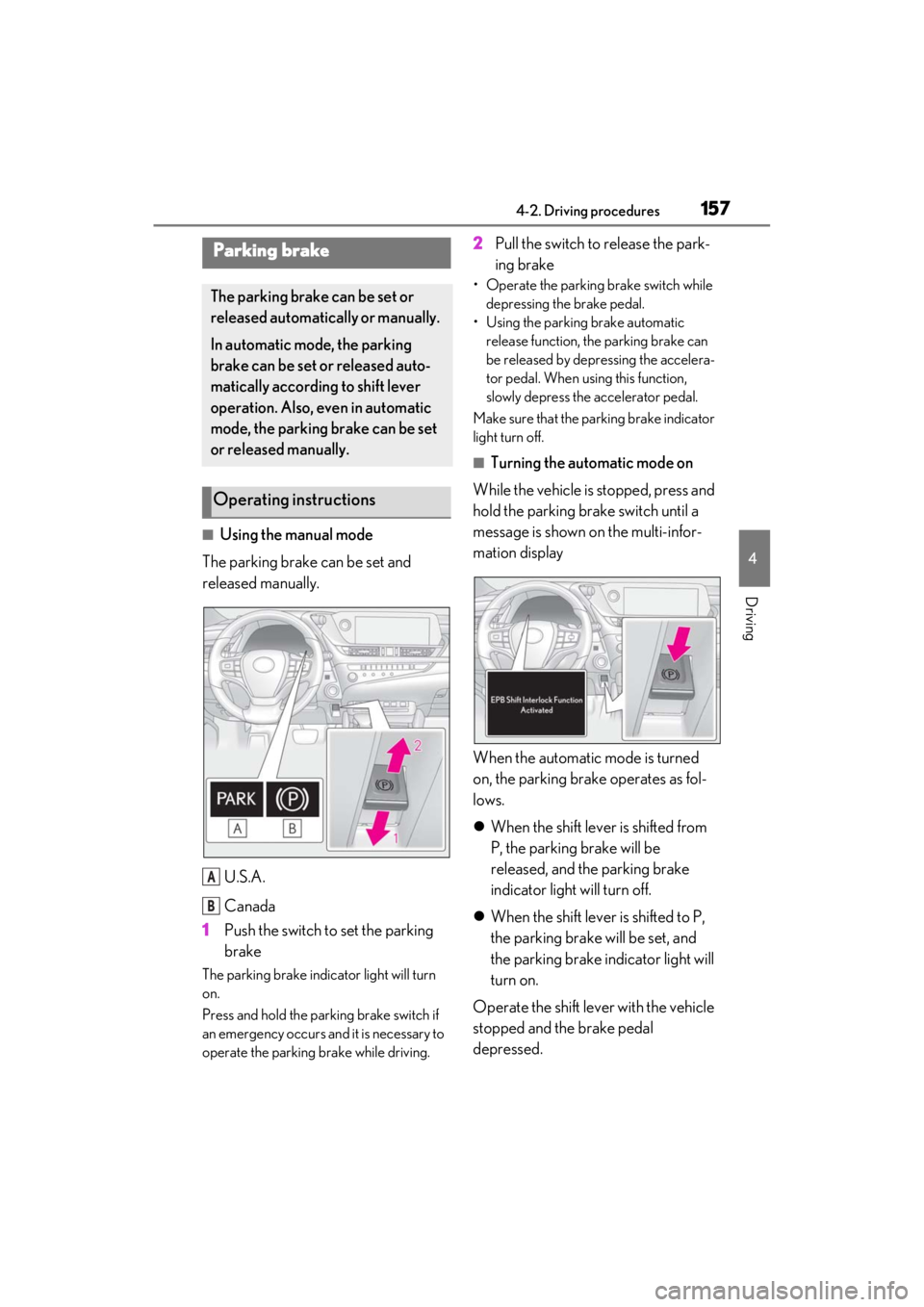
■Using the manual mode
The parking brake can be set and
released manually.
U.S.A.
Canada
1 Push the switch to set the parking
brake
The parking brake indicator light will turn
on.
Press and hold the parking brake switch if
an emergency occurs and it is necessary to
operate the parking brake while driving.
2Pull the switch to release the park-
ing brake
• Operate the parking brake switch while
depressing the brake pedal.
• Using the parking brake automatic release function, the parking brake can
be released by depressing the accelera-
tor pedal. When using this function,
slowly depress the accelerator pedal.
Make sure that the pa rking brake indicator
light turn off.
■Turning the automatic mode on
While the vehicle is stopped, press and
hold the parking brake switch until a
message is shown on the multi-infor-
mation display
When the automatic mode is turned
on, the parking brake operates as fol-
lows.
When the shift lever is shifted from
P, the parking brake will be
released, and the parking brake
indicator light will turn off.
When the shift lever is shifted to P,
the parking brake will be set, and
the parking brake indicator light will
turn on.
Operate the shift lever with the vehicle
stopped and the brake pedal
depressed.
Parking brake
The parking brake can be set or
released automatically or manually.
In automatic mode, the parking
brake can be set or released auto-
matically according to shift lever
operation. Also, even in automatic
mode, the parking brake can be set
or released manually.
Operating instructions
A
B
Page 158 of 464
1584-2. Driving procedures
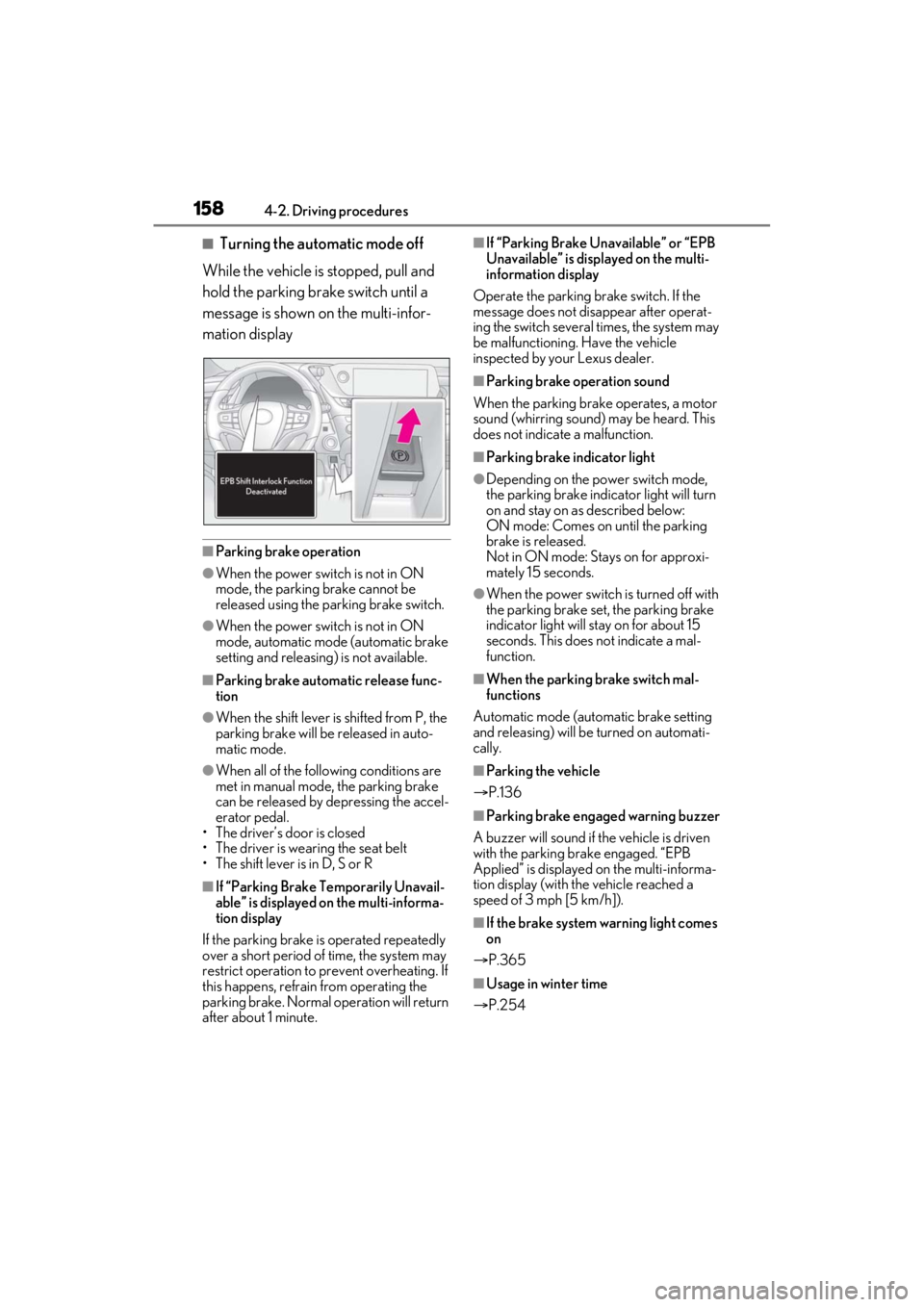
■Turning the automatic mode off
While the vehicle is stopped, pull and
hold the parking brake switch until a
message is shown on the multi-infor-
mation display
■Parking brake operation
●When the power switch is not in ON
mode, the parking brake cannot be
released using the parking brake switch.
●When the power switch is not in ON
mode, automatic mode (automatic brake
setting and releasing) is not available.
■Parking brake automatic release func-
tion
●When the shift lever is shifted from P, the
parking brake will be released in auto-
matic mode.
●When all of the foll owing conditions are
met in manual mode, the parking brake
can be released by depressing the accel-
erator pedal.
• The driver’s door is closed
• The driver is wearing the seat belt
• The shift lever is in D, S or R
■If “Parking Brake Temporarily Unavail-
able” is displayed on the multi-informa-
tion display
If the parking brake is operated repeatedly
over a short period of time, the system may
restrict operation to prevent overheating. If
this happens, refrain from operating the
parking brake. Normal operation will return
after about 1 minute.
■If “Parking Brake Unavailable” or “EPB
Unavailable” is displayed on the multi-
information display
Operate the parking brake switch. If the
message does not disappear after operat-
ing the switch several times, the system may
be malfunctioning. Have the vehicle
inspected by your Lexus dealer.
■Parking brake operation sound
When the parking brake operates, a motor
sound (whirring sound) may be heard. This
does not indicate a malfunction.
■Parking brake indicator light
●Depending on the power switch mode,
the parking brake indicator light will turn
on and stay on as described below:
ON mode: Comes on until the parking
brake is released.
Not in ON mode: Stays on for approxi-
mately 15 seconds.
●When the power switch is turned off with
the parking brake set, the parking brake
indicator light will stay on for about 15
seconds. This does not indicate a mal-
function.
■When the parking brake switch mal-
functions
Automatic mode (automatic brake setting
and releasing) will be turned on automati-
cally.
■Parking the vehicle
P.136
■Parking brake engaged warning buzzer
A buzzer will sound if the vehicle is driven
with the parking brake engaged. “EPB
Applied” is displayed on the multi-informa-
tion display (with the vehicle reached a
speed of 3 mph [5 km/h]).
■If the brake system warning light comes
on
P.365
■Usage in winter time
P.254
Page 159 of 464
1594-2. Driving procedures
4
Driving
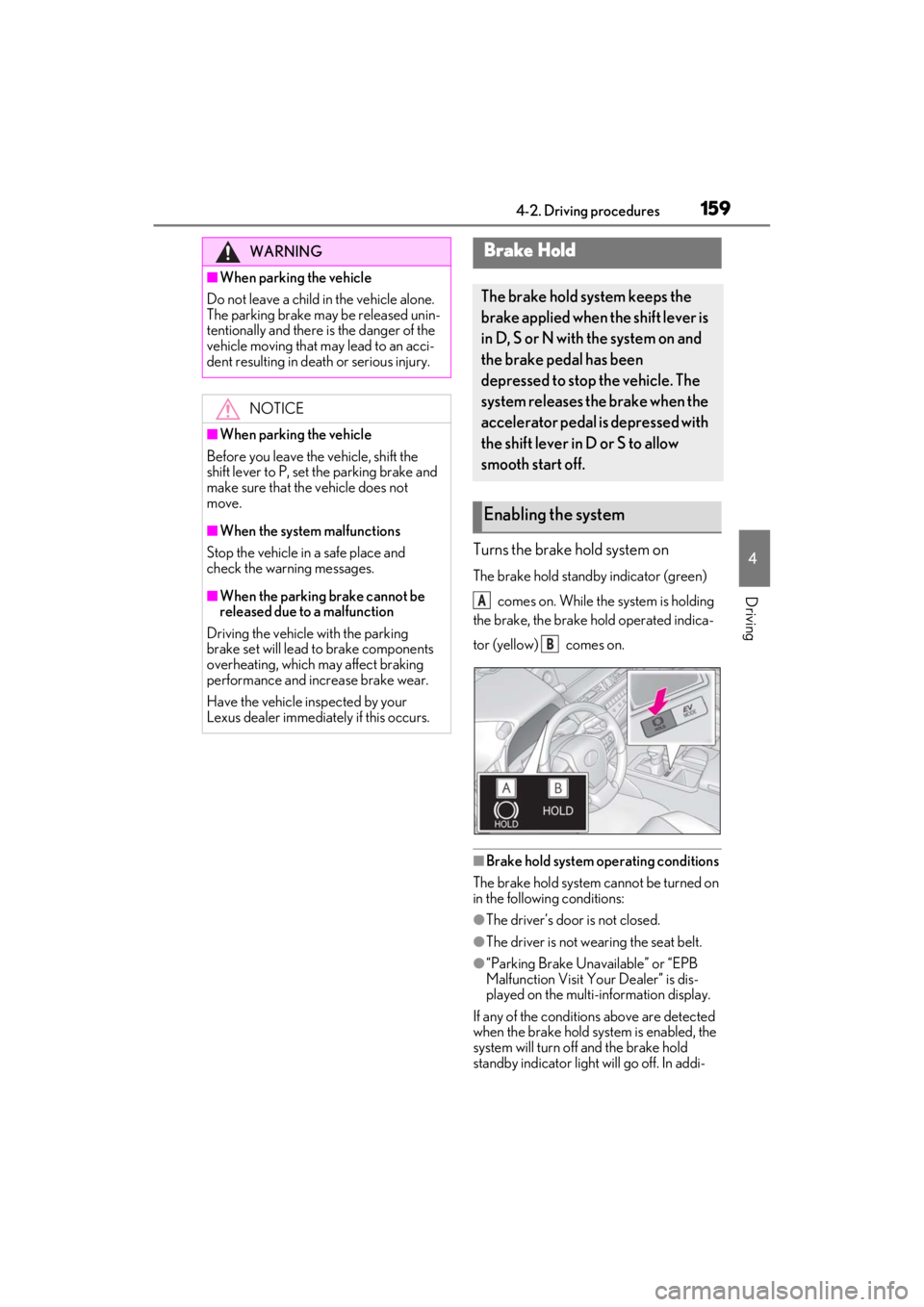
Turns the brake hold system on
The brake hold standby indicator (green) comes on. While the system is holding
the brake, the brake hold operated indica-
tor (yellow) comes on.
■Brake hold system operating conditions
The brake hold system cannot be turned on
in the following conditions:
●The driver’s door is not closed.
●The driver is not wearing the seat belt.
●“Parking Brake Unavailable” or “EPB
Malfunction Visit Your Dealer” is dis-
played on the multi-information display.
If any of the conditions above are detected
when the brake hold system is enabled, the
system will turn off and the brake hold
standby indicator light will go off. In addi-
WARNING
■When parking the vehicle
Do not leave a child in the vehicle alone.
The parking brake may be released unin-
tentionally and there is the danger of the
vehicle moving that may lead to an acci-
dent resulting in death or serious injury.
NOTICE
■When parking the vehicle
Before you leave the vehicle, shift the
shift lever to P, set the parking brake and
make sure that the vehicle does not
move.
■When the system malfunctions
Stop the vehicle in a safe place and
check the warning messages.
■When the parking brake cannot be
released due to a malfunction
Driving the vehicle with the parking
brake set will lead to brake components
overheating, which may affect braking
performance and increase brake wear.
Have the vehicle inspected by your
Lexus dealer immediately if this occurs.
Brake Hold
The brake hold system keeps the
brake applied when the shift lever is
in D, S or N with the system on and
the brake pedal has been
depressed to stop the vehicle. The
system releases the brake when the
accelerator pedal is depressed with
the shift lever in D or S to allow
smooth start off.
Enabling the system
A
B
Page 160 of 464
1604-2. Driving procedures
tion, if any of the conditions are detected
while the system is holding the brake, a
warning buzzer will sound and a message
will be shown on the multi-information dis-
play. The parking brake will then be set
automatically.
■Brake hold function
●If the brake pedal is left released for a
period of about 3 minutes after the sys-
tem has started holding the brake, the
parking brake will be set automatically. In
this case, a warning buzzer sounds and a
message is shown on the multi-informa-
tion display.
●To turn the system off while the system is
holding the brake, firmly depress the
brake pedal and press the button again.
●The brake hold function may not hold the
vehicle when the vehicle is on a steep
incline. In this situation, it may be neces-
sary for the driver to apply the brakes. A
warning buzzer will sound and the multi-
information display will inform the driver
of this situation. If a warning message is
shown on the multi-information display,
read the message and follow the instruc-
tions.
■When the parking brake is set automati-
cally while the system is holding the
brakes
Perform any of the follo wing operations to
release the parking brake.
●Depress the accelerator pedal. (The
parking brake will not be released auto-
matically if the seat belt is not fastened.)
●Operate the parking brake switch with
the brake pedal depressed.
Make sure that the pa rking brake indicator
light goes off. ( P.157)
■When an inspection at your Lexus
dealer is necessary
When the brake hold standby indicator
(green) does not illuminate even when the
brake hold switch is pressed with the brake
hold system operating conditions met, the
system may be malfun ctioning. Have the
vehicle inspected at your Lexus dealer.
■If “Brake Hold Fault Depress Brake to
Deactivate Visit Your Dealer” or
“Brake Hold Malfunction Visit Your
Dealer” is displayed on the multi-infor-
mation display
The system may be ma lfunctioning. Have
the vehicle inspected by your Lexus dealer.
■Warning message and buzzers
Warning messages and buzzers are used to
indicate a system malfunction or to inform
the driver of the need for caution. If a warn-
ing message is shown on the multi-informa-
tion display, read the message and follow
the instructions.
■If the brake hold operated indicator
flashes
P.372
WARNING
■When the vehicle is on a steep incline
When using the brake hold system on a
steep incline exercise caution. The brake
hold function may not hold the vehicle in
such a situation.
■When stopped on a slippery road
The system cannot stop the vehicle when
the gripping ability of the tires has been
exceeded. Do not use the system when
stopped on a slippery road.
NOTICE
■When parking the vehicle
The brake hold system is not designed
for use when parking the vehicle for a
long period of time. Turning the power
switch off while the system is holding the
brake may release the brake, which
would cause the vehicle to move. When
operating the power switch, depress the
brake pedal, shift the shift lever to P and
set the parking brake.
Page 161 of 464
1614-3. Operating the lights and wipers
4
Driving
4-3.Operating the lights and wipers
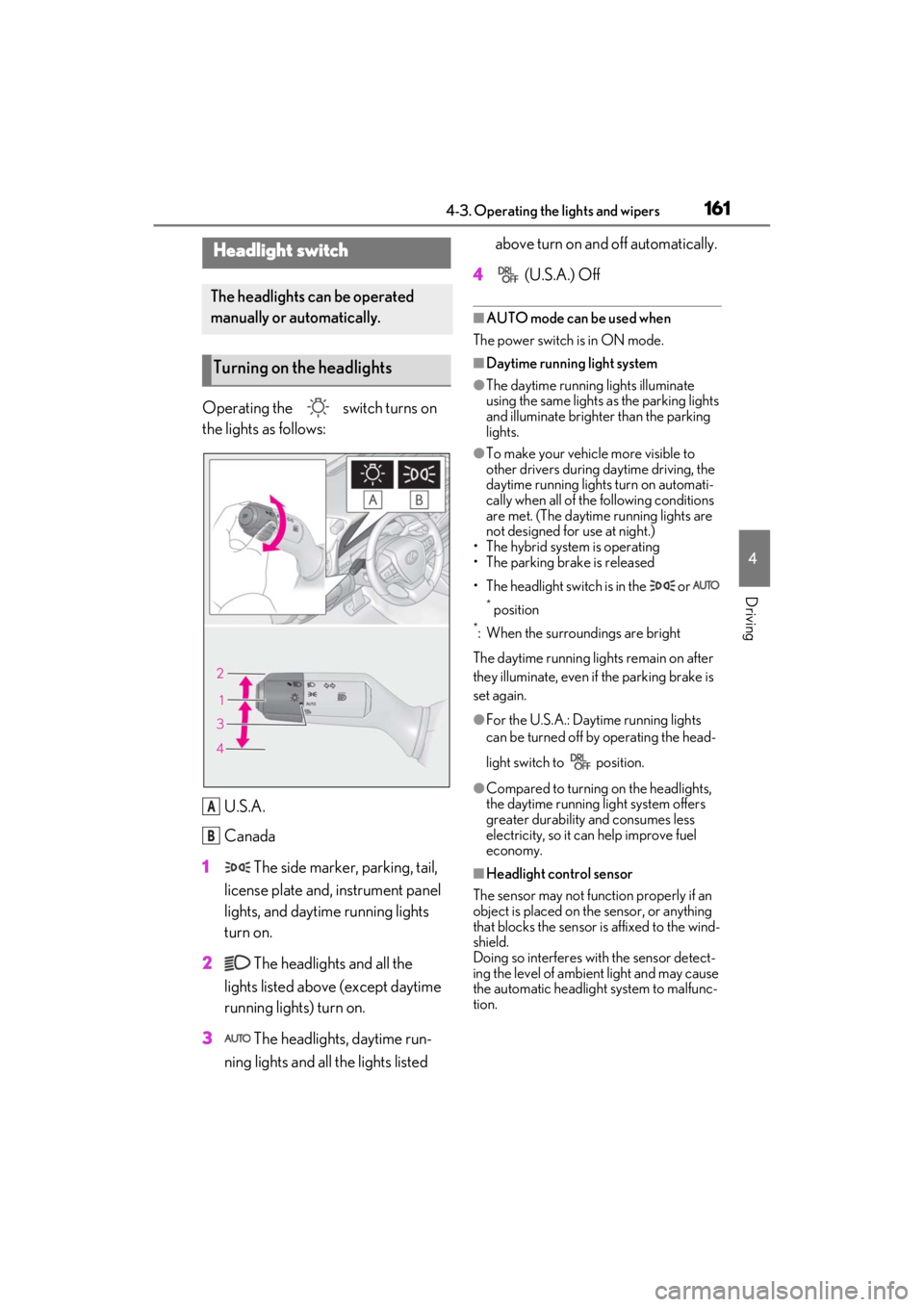
Operating the switch turns on
the lights as follows:U.S.A.
Canada
1 The side marker, parking, tail,
license plate and, instrument panel
lights, and daytime running lights
turn on.
2 The headlights and all the
lights listed above (except daytime
running lights) turn on.
3 The headlights, daytime run-
ning lights and all the lights listed above turn on and off automatically.
4 (U.S.A.) Off
■AUTO mode can be used when
The power switch is in ON mode.
■Daytime running light system
●The daytime running lights illuminate
using the same lights as the parking lights
and illuminate brighter than the parking
lights.
●To make your vehicle more visible to
other drivers during daytime driving, the
daytime running lights turn on automati-
cally when all of the following conditions
are met. (The daytime running lights are
not designed for use at night.)
• The hybrid system is operating
• The parking brake is released
• The headlight switch is in the or
* position
*: When the surroundings are bright
The daytime running lights remain on after
they illuminate, even if the parking brake is
set again.
●For the U.S.A.: Daytime running lights
can be turned off by operating the head-
light switch to position.
●Compared to turning on the headlights,
the daytime running light system offers
greater durability and consumes less
electricity, so it can help improve fuel
economy.
■Headlight control sensor
The sensor may not function properly if an
object is placed on the sensor, or anything
that blocks the sensor is affixed to the wind-
shield.
Doing so interferes with the sensor detect-
ing the level of ambien t light and may cause
the automatic headlight system to malfunc-
tion.
Headlight switch
The headlights can be operated
manually or automatically.
Turning on the headlights
A
B
Page 186 of 464
1864-5. Using the driving support systems
bicycle ridden by more than one person,
or a uniquely shaped bicycle (bicycle with
a child seat, tandem bicycle, etc.)
• If a pedestrian/or the riding height of a bicyclist ahead is shorter than approxi-
mately 3.2 ft. (1 m) or taller than approxi-
mately 6.5 ft. (2 m)
• If a pedestrian/bicyclist is wearing over- sized clothing (a rain coat, long skirt,
etc.), making their silhouette obscure
• If a pedestrian is bending forward or squatting or bicyclist is bending forward
• If a pedestrian/bicyclist is moving fast
• If a pedestrian is pushing a stroller, wheelchair, bicycle or other vehicle
• When driving in incl ement weather such
as heavy rain, fog, snow or a sandstorm
• When driving through steam or smoke
• When the surrounding area is dim, such
as at dawn or dusk, or while at night or in
a tunnel, making a detectable object
appear to be nearly the same color as its
surroundings
• When driving in a place where the sur-
rounding brightness changes suddenly,
such as at the entrance or exit of a tunnel
• After the hybrid system has started the
vehicle has not been driven for a certain
amount of time
• While making a left/right turn and for a
few seconds after makin g a left/right turn
• While driving on a curve and for a few seconds after driving on a curve
• If your vehicle is skidding
• If the front of the vehicle is raised or low- ered
• If the wheels are misaligned
• If a wiper blade is blocking the front cam- era
• The vehicle is being driven at extremely high speeds
• When driving on a hill
• If the radar sensor or front camera is mis-
aligned●In some situations su ch as the following,
sufficient braking force may not be
obtained, preventing the system from
performing properly:
• If the braking functions cannot operate to their full extent, such as when the brake
parts are extremely cold, extremely hot,
or wet
• If the vehicle is not properly maintained
(brakes or tires are excessively worn,
improper tire inflation pressure, etc.)
• When the vehicle is being driven on a
gravel road or other slippery surface
■If VSC is disabled
●If VSC is disabled ( P.249), the pre-
collision brake assist and pre-collision
braking functions are also disabled.
●The PCS warning light will turn on and
“VSC Turned OFF Pre-Collision Brake
System Unavailable” will be displayed on
the multi-information display.
Page 201 of 464
2014-5. Using the driving support systems
4
Driving
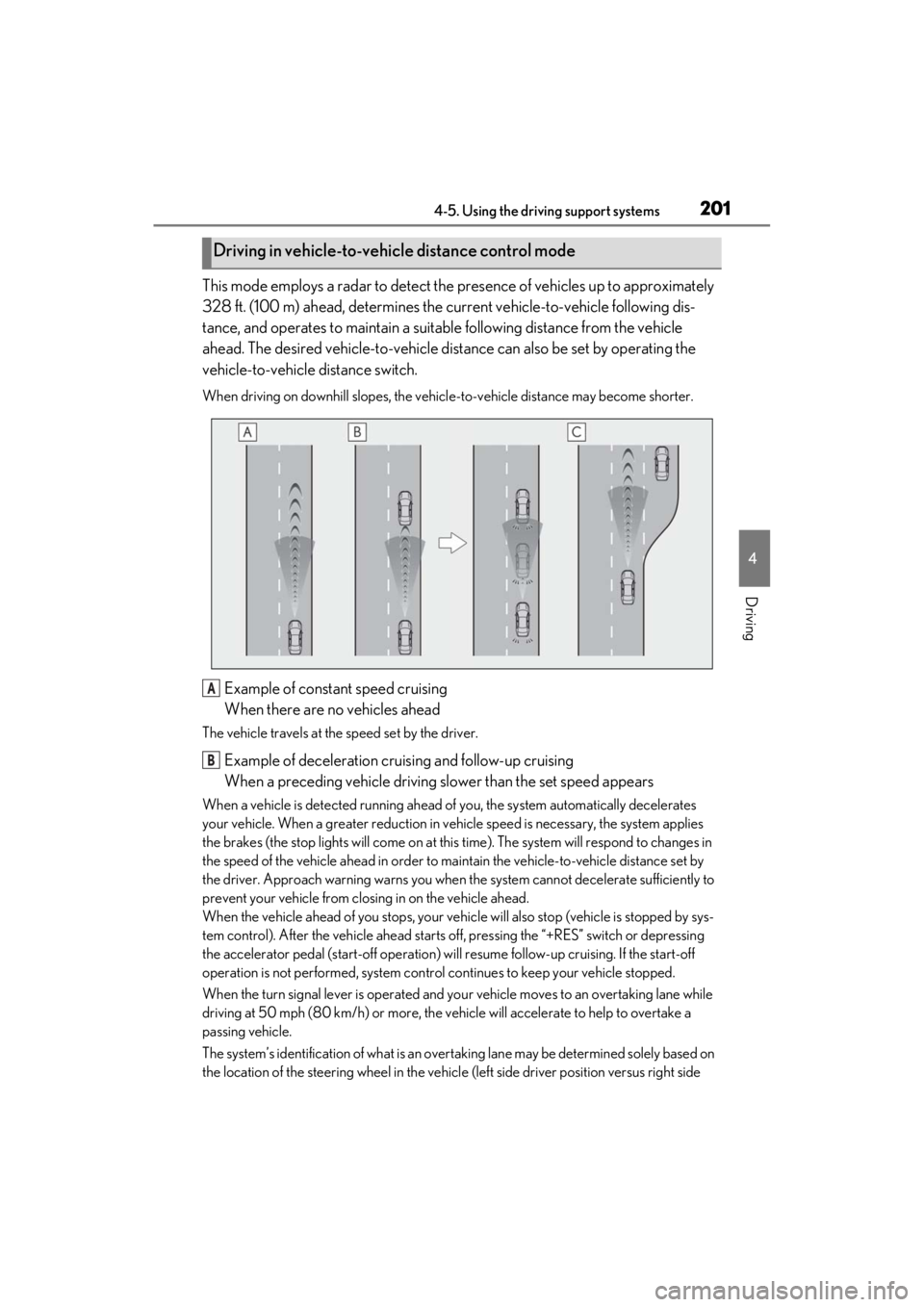
This mode employs a radar to detect the presence of vehicles up to approximately
328 ft. (100 m) ahead, determines the cu rrent vehicle-to-vehicle following dis-
tance, and operates to maintain a suitab le following distance from the vehicle
ahead. The desired vehicle-to-vehicle distance can also be set by operating the
vehicle-to-vehicle distance switch.
When driving on downhill slopes, the vehicl e-to-vehicle distance may become shorter.
Example of constant speed cruising
When there are no vehicles ahead
The vehicle travels at the speed set by the driver.
Example of deceleration cruising and follow-up cruising
When a preceding vehicle driving slower than the set speed appears
When a vehicle is detected running ahead of you, the system automatically decelerates
your vehicle. When a greater reduction in vehicle speed is necessary, the system applies
the brakes (the stop lights will come on at this time). The system will respond to changes in
the speed of the vehicle ahead in order to maintain the vehicle-to-vehicle distance set by
the driver. Approach warning warns you when th e system cannot decelerate sufficiently to
prevent your vehicle from closing in on the vehicle ahead.
When the vehicle ahead of you stops, your vehi cle will also stop (vehicle is stopped by sys-
tem control). After the vehicle ahead starts off, pressing the “+RES” switch or depressing
the accelerator pedal (start-off operation) will resume follow-up cruising. If the start-off
operation is not performed, system contro l continues to keep your vehicle stopped.
When the turn signal lever is operated and yo ur vehicle moves to an overtaking lane while
driving at 50 mph (80 km/h) or more, the vehicle will accelerate to help to overtake a
passing vehicle.
The system’s identification of what is an over taking lane may be determined solely based on
the location of the steering wheel in the vehicl e (left side driver position versus right side
Driving in vehicle-to-vehicle distance control mode
A
B
Page 214 of 464
2144-5. Using the driving support systems
When not in SPORT mode, if the Driving
Mode Select switch is turned away from
you, the “Sport” indicator comes on.
■Operation of the air conditioning sys-
tem in Eco drive mode
Eco drive mode controls the heating/cool-
ing operations and fan speed of the air con-
ditioning system to enhance fuel efficiency.
To improve air condit ioning performance,
perform the following operations:
●Turn off eco air conditioning mode
( P.270)
●Adjust the fan speed ( P.265, 268)
●Turn off Eco drive mode ( P.213)
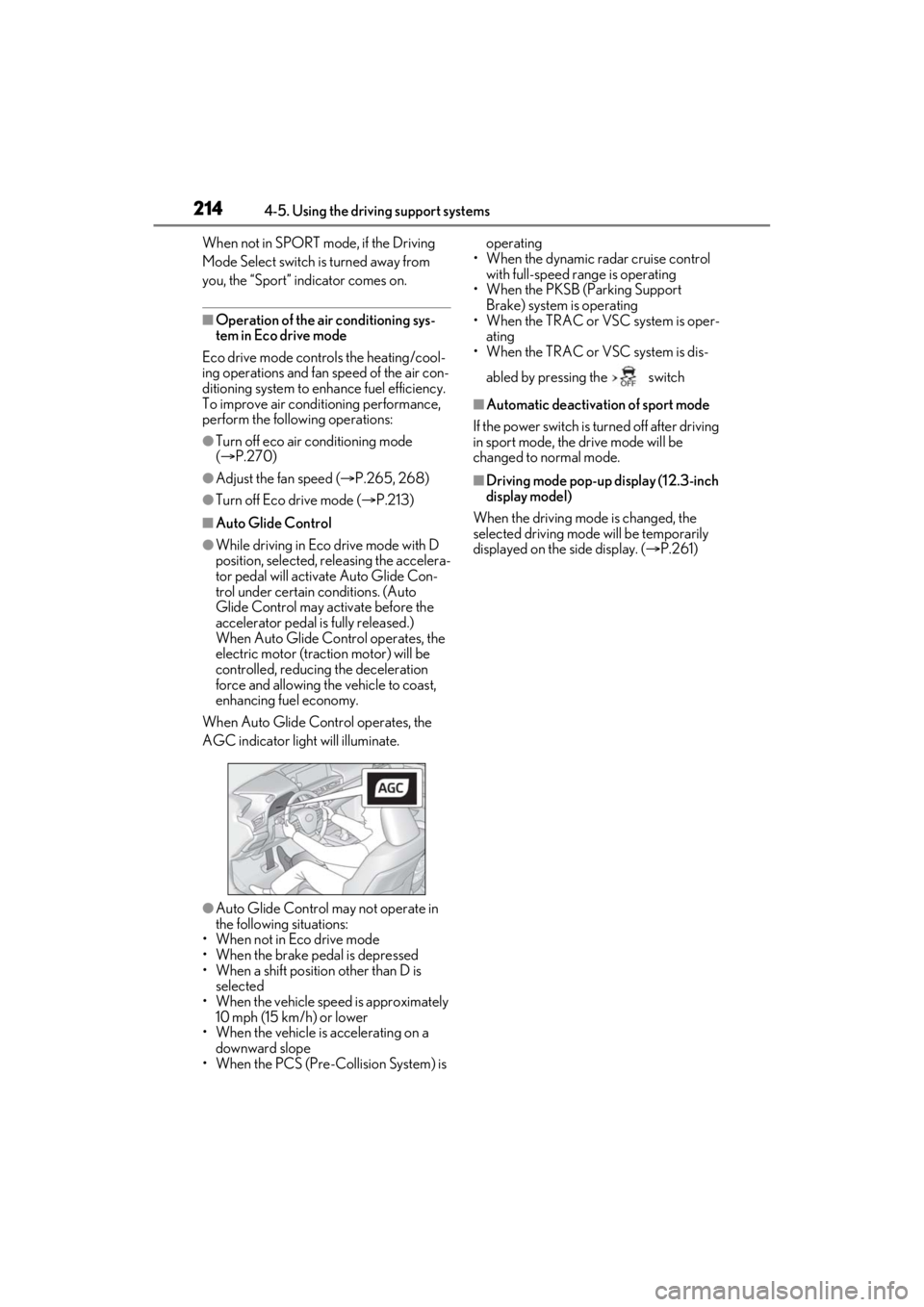
■Auto Glide Control
●While driving in Eco drive mode with D
position, selected, releasing the accelera-
tor pedal will activate Auto Glide Con-
trol under certain conditions. (Auto
Glide Control may ac tivate before the
accelerator pedal is fully released.)
When Auto Glide Control operates, the
electric motor (traction motor) will be
controlled, reducing the deceleration
force and allowing the vehicle to coast,
enhancing fuel economy.
When Auto Glide Control operates, the
AGC indicator light will illuminate.
●Auto Glide Control may not operate in
the following situations:
• When not in Eco drive mode
• When the brake pedal is depressed
• When a shift position other than D is selected
• When the vehicle speed is approximately 10 mph (15 km/h) or lower
• When the vehicle is accelerating on a downward slope
• When the PCS (Pre-Collision System) is operating
• When the dynamic radar cruise control with full-speed range is operating
• When the PKSB (Parking Support Brake) system is operating
• When the TRAC or VSC system is oper-
ating
• When the TRAC or VSC system is dis-
abled by pressing the switch
■Automatic deactivation of sport mode
If the power switch is turned off after driving
in sport mode, the drive mode will be
changed to normal mode.
■Driving mode pop-up display (12.3-inch
display model)
When the driving mode is changed, the
selected driving mode will be temporarily
displayed on the side display. ( P.261)