fuel LEXUS ES300h 2021 Owner's Manual
[x] Cancel search | Manufacturer: LEXUS, Model Year: 2021, Model line: ES300h, Model: LEXUS ES300h 2021Pages: 464, PDF Size: 9.55 MB
Page 95 of 464
952-1. Instrument cluster
2
Vehicle status information and indicators
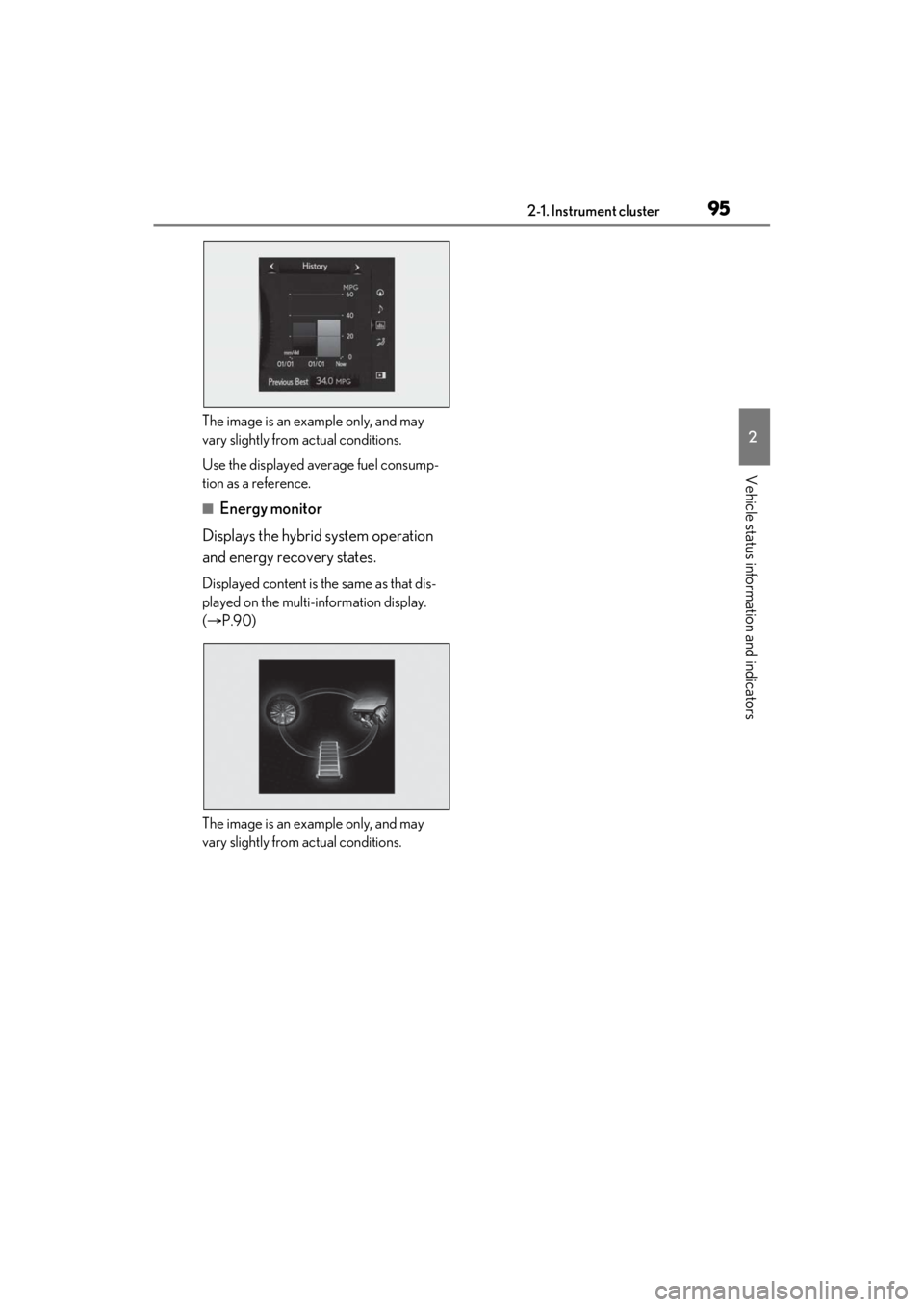
The image is an example only, and may
vary slightly from actual conditions.
Use the displayed average fuel consump-
tion as a reference.
■Energy monitor
Displays the hybrid system operation
and energy recovery states.
Displayed content is the same as that dis-
played on the multi-information display.
( P.90)
The image is an example only, and may
vary slightly from actual conditions.
Page 135 of 464
135
4
4
Driving
Driving
4-1. Before drivingDriving the vehicle ..................... 136
Cargo and luggage .................... 141
Vehicle load limits ...................... 143
Trailer towing ............................... 144
Dinghy towing ............................. 144
4-2. Driving procedures Power (ignition) switch ............ 145
EV drive mode ............................ 150
Hybrid transmission .................. 152
Turn signal lever.......................... 156
Parking brake .............................. 157
Brake Hold.................................... 159
4-3. Operating the lights and wipers
Headlight switch .......................... 161
Automatic High Beam ............. 164
Windshield wipers and washer ......................................................... 167
4-4. Refueling Opening the fuel tank cap...... 172
4-5. Using the driving support sys- tems
Lexus Safety System + 2.0 ..... 174
PCS (Pre-Collision System).. 180
LTA (Lane Tracing Assist)...... 187
RSA (Road Sign Assist) ........... 196
Dynamic radar cruise control with full-speed range....................... 198
BSM (Blind Spot Monitor) .... 208
Driving Mode Select switch .. 213PKSA (Parking Support Alert)
........................................................ 215
Intuitive parking assist .............. 216
RCTA (Rear Cross Traffic Alert) function........................................ 222
RCD (Rear Camera Detection) function........................................ 227
PKSB (Parking Support Brake) ....................................................... 229
Parking Support Brake function (static objects) ......................... 235
Parking Support Brake function (rear-crossing vehicles) ........ 241
Parking Support Brake function (rear pedestrians) .................. 245
Driving assist systems.............. 248
4-6. Driving tips Hybrid vehicle driving tips .... 252
Winter driving tips .................... 254
Page 136 of 464

1364-1. Before driving
4-1.Before driving
■Starting the hybrid system
P.145
■Driving
1 With the brake pedal depressed,
shift the shift lever to D. ( P.153)
2 If the parking brake is in manual
mode, release the parking brake.
(P.157)
3 Gradually release the brake pedal
and gently depress the accelerator
pedal to accelerate the vehicle.
■Stopping
1 With the shift in D, depress the
brake pedal.
2 If necessary, set the parking brake.
If the vehicle is to be stopped for an
extended period of time, shift the shift lever
to P. ( P.153)
■Parking the vehicle
1 With the shift lever in D, depress
the brake pedal.
2 Set the parking brake ( P.157),
and shift the shift lever to P
( P.153).
3 Press the power switch to stop the
hybrid system.
4 Lock the door, making sure that
you have the electronic key on your
person.
If parking on a hill, block the wheels as
needed.
■Starting off on a steep uphill
1 Make sure that the parking brake is
set with the brake pedal depressed,
and then shift the shift lever to D.
2 Release the brake pedal and gently
depress the accelerator pedal.
3 Release the parking brake.
■When starting off on a uphill
The hill-start assist control will activate.
( P.248)
■For fuel-efficient driving
Keep in mind that hybrid vehicles are simi-
lar to conventional vehicles, and it is neces-
sary to refrain from activities such as
sudden acceleration. ( P.252)
■Coasting (Auto Glide Control)
When Eco drive mode is selected, under
certain conditions, Auto Glide Control will
operate automatically and allow the vehicle
coast, enhancing fuel economy. ( P.214)
■Driving in the rain
●Drive carefully when it is raining, because
visibility will be reduced, the windows
may become fogged-up, and the road
will be slippery.
●Drive carefully when it starts to rain,
because the road surface will be espe-
cially slippery.
●Refrain from high speeds when driving on
an expressway in the rain, because there
may be a layer of wa ter between the tires
and the road surface, preventing the
steering and brakes from operating
properly.
■Restraining the hybrid system output
(Brake Override System)
●When the accelerato r and brake pedals
are depressed at the same time, the
hybrid system output may be restrained.
●A warning message is displayed on the
multi-information display while the sys-
tem is operating. ( P.367)
Driving the vehicle
The following procedures should be
observed to ensure safe driving:
Driving procedure
Page 137 of 464
1374-1. Before driving
4
Driving
■Restraining sudden start (Drive-Start
Control)
●When the following unusual operation is
performed, the hybrid system output may
be restrained.
• When the shift lever is shifted from R to D, D to R, N to R, P to D, or P to R (D
includes S) with the accelerator pedal
depressed, a warning message appears
on the multi-information display. If a
warning message is shown on the multi-
information display, read the message
and follow the instructions.
• When the accelerator pedal is depressed
too much while the vehicle is in reverse.
●While Drive-Start Control is being acti-
vated, your vehicle may have trouble
escaping from the mud or fresh snow. In
such case, deactivate TRAC ( P.249)
to cancel Drive-Start Control so that the
vehicle may become able to escape from
the mud or fresh snow.
■Breaking in your new Lexus
To extend the life of the vehicle, observing
the following precautions is recommended:
●For the first 186 miles (300 km):
Avoid sudden stops.
●For the first 621 miles (1000 km):
• Do not drive at extremely high speeds.
• Avoid sudden acceleration.
• Do not drive continuously in low gears.
• Do not drive at a constant speed for
extended periods.
■Operating your vehicle in a foreign
country
Comply with the relevant vehicle registra-
tion laws and confirm the availability of the
correct fuel. ( P.403)
WARNING
Observe the following precautions.
Failure to do so may result in death or
serious injury.
■When starting the vehicle
Always keep your foot on the brake
pedal while stopped with the “READY”
indicator is illuminated. This prevents the
vehicle from creeping.
■When driving the vehicle
●Do not drive if you are unfamiliar with
the location of the brake and accelera-
tor pedals to avoid depressing the
wrong pedal.
• Accidentally depressing the accelera- tor pedal instead of the brake pedal
will result in sudden acceleration that
may lead to an accident.
• When backing up, you may twist your body around, leading to a difficulty in
operating the pedals. Make sure to
operate the pedals properly.
• Make sure to keep a correct driving posture even when moving the vehicle
only slightly. This allows you to depress
the brake and accelerator pedals
properly.
• Depress the brake pedal using your right foot. Depressing the brake pedal
using your left foot may delay
response in an emer gency, resulting in
an accident.
●The driver should pay extra attention
to pedestrians when the vehicle is
powered only by the electric motor
(traction motor). As there is no engine
noise, the pedestrians may misjudge
the vehicle’s movement. Even though
the vehicle is equipped with the acous-
tic vehicle alerting system, drive with
care as pedestrians in the vicinity may
still not notice the vehicle if the sur-
rounding area is noisy.
●Do not drive the vehicle over or stop
the vehicle near flammable materials.
The exhaust system and exhaust gases
can be extremely hot. These hot parts
may cause a fire if there is any flamma-
ble material nearby.
Page 151 of 464

1514-2. Driving procedures
4
Driving
●The hybrid battery (traction battery)
becomes low.
The remaining battery level indicated in
the energy monitor display is low.
( P.90)
●Vehicle speed is high.
●The accelerator pedal is depressed firmly
or the vehicle is on a hill etc.
When it is possible to inform the driver of
automatic cancelation in advance, a prior
notice screen will appear on the multi-infor-
mation display.
■Possible driving distance when driving
in EV drive mode
EV drive mode’s possible driving distance
ranges from a few hundred meters to
approximately 0.6 mile (1 km). However,
depending on vehicle conditions, there are
situations when EV drive mode cannot be
used.
(The distance that is possible depends on
the hybrid battery [traction battery] level
and driving conditions.)
■Fuel economy
The hybrid system is designed to achieve
the best possible fuel economy during nor-
mal driving (using the gasoline engine and
electric motor [traction motor]). Driving in
EV drive mode more than necessary may
lower fuel economy.
■If “EV Mode Unavailable” is shown on
the multi-inform ation display
The EV drive mode is not available. The
reason the EV drive mode is not available
(the vehicle is idling, battery charge is low,
vehicle speed is higher than the EV drive
mode operating speed range or accelera-
tor pedal is depressed too much) may be
displayed. Use the EV drive mode when it
becomes available.
■If “EV Mode Deactivated” is shown on
the multi-inform ation display
The EV drive mode has been automatically
canceled. The reason the EV drive mode is
not available (the battery charge is low,
vehicle speed is higher than the EV drive
mode operating speed range or accelera-
tor pedal is depressed too much) may be
displayed. Drive the vehicle for a while before attempting to turn on the EV drive
mode again.
WARNING
■Caution while driving
When driving in EV drive mode, pay spe-
cial attention to the area around the vehi-
cle. Because there is no engine noise,
pedestrians, people riding bicycles or
other people and vehicles in the area
may not be aware of the vehicle starting
off or approaching them, so take extra
care while driving. Therefore, take extra
care while driving even if the acoustic
vehicle alerting system is active.
Page 152 of 464
1524-2. Driving procedures
*1: To improve fuel efficiency and reduce noise, set the shift lever in D for normal
driving. You can choose shift range
suitable for your driving situation by
operating the paddle shift switches.
*2: By selecting shift ranges using S mode,
you can control accelerating force and
engine braking forces.
■When driving with dynamic radar cruise
control with full-speed range activated
Even when performing the following
actions with the intent of enabling engine
braking, engine braking will not activate
because dynamic radar cruise control with
full speed range will not be canceled.
●While driving in the D position or S mode,
downshifting to 5 or 4. ( P.198)
●When switching the driving mode to
sport mode while driving in the D posi-
tion. ( P.213)
■Restraining sudden start (Drive-Start
Control)
P.137
■AI-SHIFT
The AI-SHIFT automatica lly selects the suit-
able gear according to driver performance
and driving conditions.
The AI-SHIFT automatically operates when
the shift lever is in D. (Shifting the shift lever
to S cancels the function.)
Hybrid transmission
Select the shift position depending
on your purpose and situation.
Shift position purpose and func-
tions
Shift posi-
tionObjective or function
PParking the vehicle/starting the hybrid system
RReversing
NNeutral
DNormal driving*1
SS mode driving*2 ( P.155)
WARNING
■When driving on slippery road sur-
faces
Do not accelerate or shift gears sud-
denly.
Sudden changes in engine braking may
cause the vehicle to sp in or skid, resulting
in an accident.
NOTICE
■Hybrid battery (t raction battery)
charge
If the shift lever is in N, the hybrid battery
(traction battery) will not be charged
even when the engine is running. There-
fore, if the vehicle is left with the shift
lever in N for a certain period of time, the
hybrid battery (traction battery) will dis-
charge, and this may re sult in the vehicle
not being able to start.
Page 161 of 464
1614-3. Operating the lights and wipers
4
Driving
4-3.Operating the lights and wipers
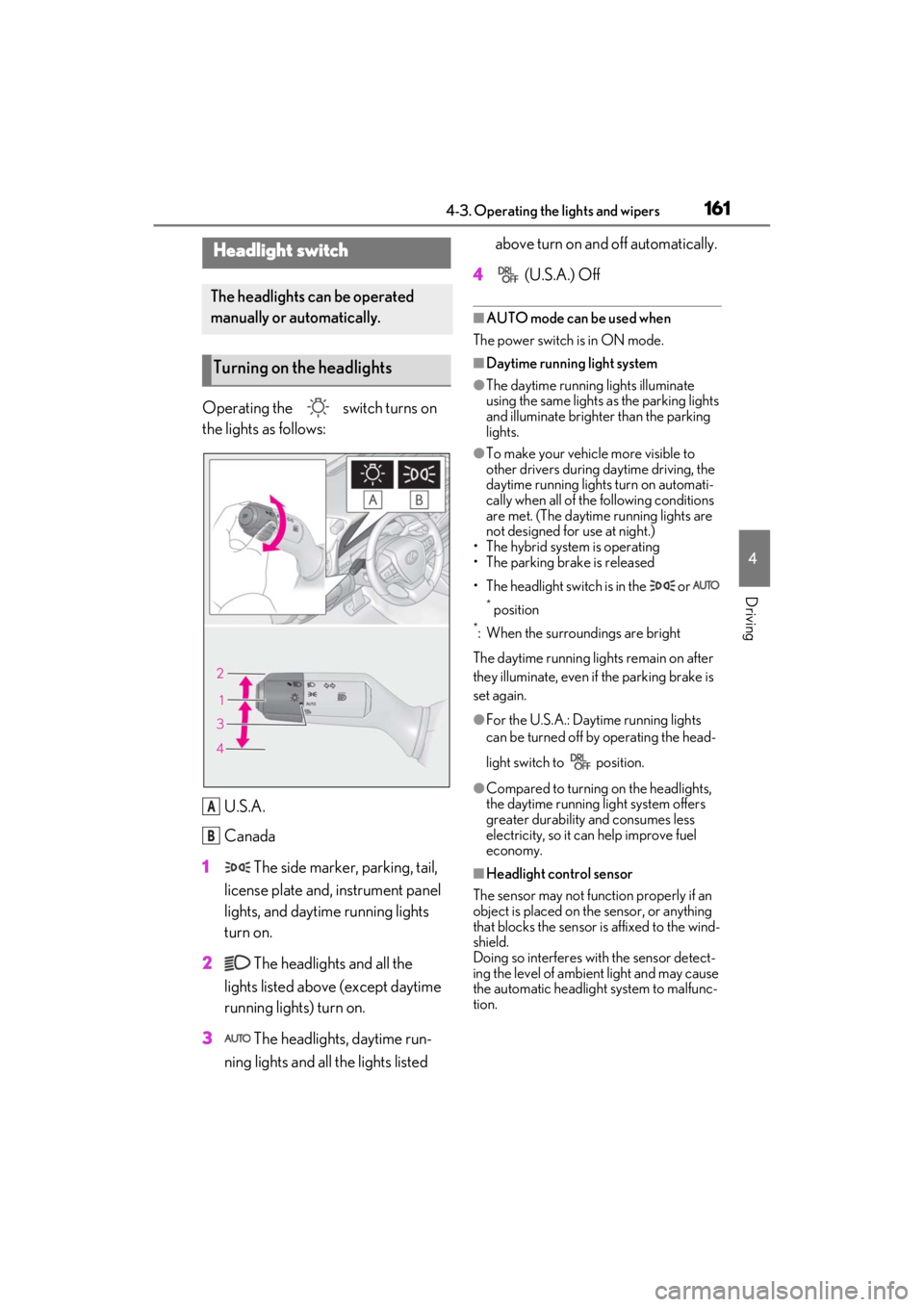
Operating the switch turns on
the lights as follows:U.S.A.
Canada
1 The side marker, parking, tail,
license plate and, instrument panel
lights, and daytime running lights
turn on.
2 The headlights and all the
lights listed above (except daytime
running lights) turn on.
3 The headlights, daytime run-
ning lights and all the lights listed above turn on and off automatically.
4 (U.S.A.) Off
■AUTO mode can be used when
The power switch is in ON mode.
■Daytime running light system
●The daytime running lights illuminate
using the same lights as the parking lights
and illuminate brighter than the parking
lights.
●To make your vehicle more visible to
other drivers during daytime driving, the
daytime running lights turn on automati-
cally when all of the following conditions
are met. (The daytime running lights are
not designed for use at night.)
• The hybrid system is operating
• The parking brake is released
• The headlight switch is in the or
* position
*: When the surroundings are bright
The daytime running lights remain on after
they illuminate, even if the parking brake is
set again.
●For the U.S.A.: Daytime running lights
can be turned off by operating the head-
light switch to position.
●Compared to turning on the headlights,
the daytime running light system offers
greater durability and consumes less
electricity, so it can help improve fuel
economy.
■Headlight control sensor
The sensor may not function properly if an
object is placed on the sensor, or anything
that blocks the sensor is affixed to the wind-
shield.
Doing so interferes with the sensor detect-
ing the level of ambien t light and may cause
the automatic headlight system to malfunc-
tion.
Headlight switch
The headlights can be operated
manually or automatically.
Turning on the headlights
A
B
Page 172 of 464
1724-4. Refueling
4-4.Refueling
Turn the power switch off and
ensure that all the doors and win-
dows are closed.
Confirm the type of fuel.
■Fuel types
P.409
■Fuel tank opening for unleaded gasoline
To help prevent incorrect fueling, your vehi-
cle has a fuel tank opening that only accom-
modates the special nozzle on unleaded
fuel pumps.
Opening the fuel tank cap
The fuel tank of your vehicle has a
special structure, which requires a
reduction in fuel tank pressure
before refueling. After the opener
switch has been pressed, it will take
several seconds until the vehicle is
ready for refueling.
Before refueling the vehicle
WARNING
■When refueling the vehicle
Observe the following precautions while
refueling the vehicle. Failure to do so
may result in death or serious injury.
●After exiting the vehicle and before
opening the fuel door, touch an
unpainted metal surface to discharge
any static electricity. It is important to
discharge static electricity before refu-
eling because sparks resulting from
static electricity can cause fuel vapors
to ignite while refueling.
●Always hold the grips on the fuel tank
cap and turn it slowly to remove it.
A whooshing sound may be heard
when the fuel tank cap is loosened.
Wait until the sound cannot be heard
before fully removing the cap. In hot
weather, pressurized fuel may spray
out the filler neck and cause injury.
●Do not allow anyone that has not dis-
charged static electricity from their
body to come close to an open fuel
tank.
●Do not inhale vaporized fuel.
Fuel contains substances that are
harmful if inhaled.
●Do not smoke while refueling the vehi-
cle.
Doing so may cause the fuel to ignite
and cause a fire.
●Do not return to the vehicle or touch
any person or object that is statically
charged.
This may cause static electricity to
build up, resulting in a possible ignition
hazard.
■When refueling
Observe the following precautions to
prevent fuel overflowing from the fuel
tank:
●Securely insert the fuel nozzle into the
fuel filler neck.
●Stop filling the tank after the fuel noz-
zle automatically clicks off.
●Do not top off the fuel tank.
NOTICE
■Refueling
●Finish refueling within 30 minutes. If
more than 30 minutes passes, the
internal valve closes. In this condition,
fuel may overflow during the refueling
process.
Press the fuel filler door opener switch
again.
Page 173 of 464
1734-4. Refueling
4
Driving
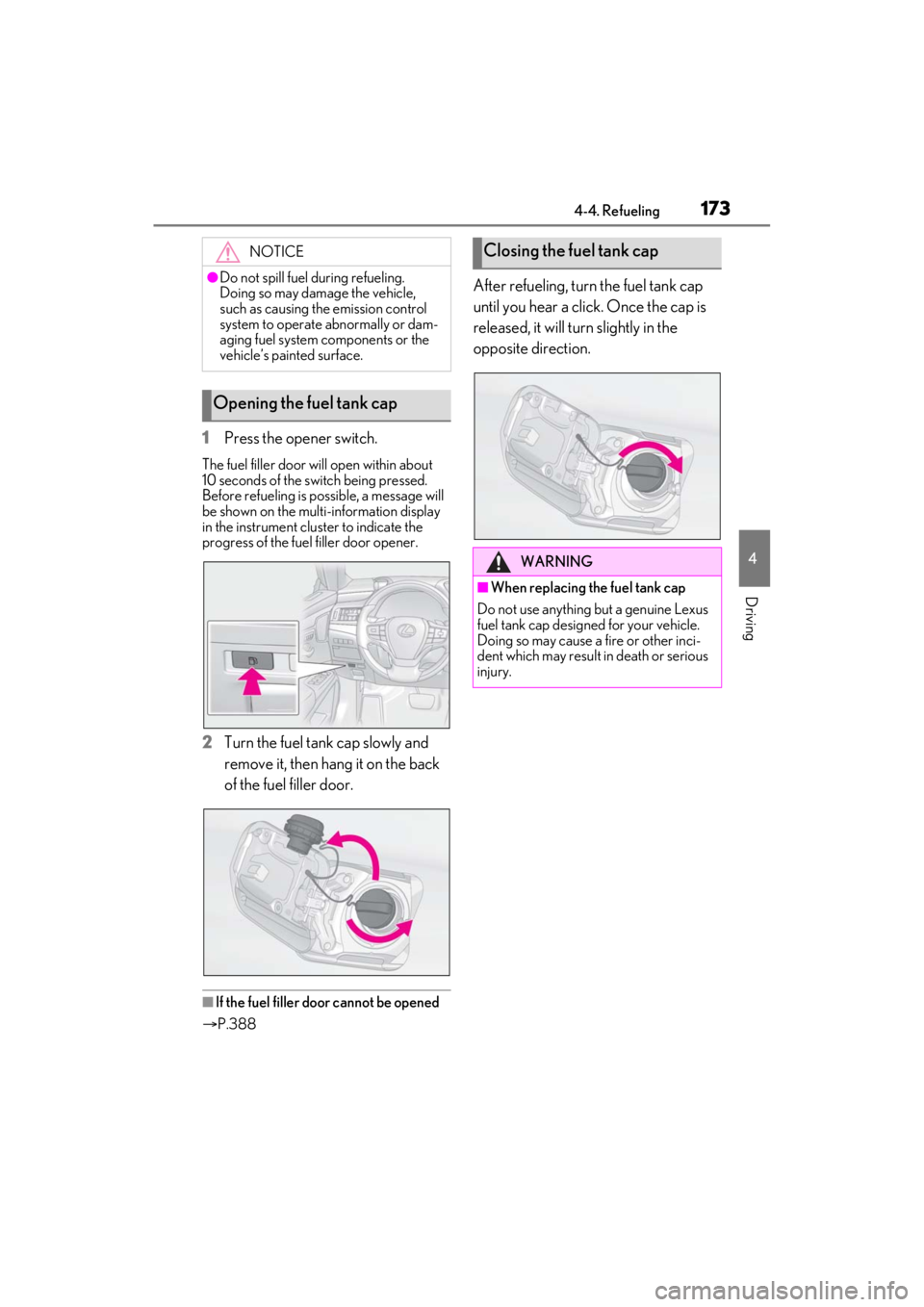
1Press the opener switch.
The fuel filler door will open within about
10 seconds of the sw itch being pressed.
Before refueling is possible, a message will
be shown on the multi-information display
in the instrument clus ter to indicate the
progress of the fuel filler door opener.
2 Turn the fuel tank cap slowly and
remove it, then hang it on the back
of the fuel filler door.
■If the fuel filler door cannot be opened
P.388
After refueling, turn the fuel tank cap
until you hear a click. Once the cap is
released, it will turn slightly in the
opposite direction.
NOTICE
●Do not spill fuel during refueling.
Doing so may damage the vehicle,
such as causing the emission control
system to operate abnormally or dam-
aging fuel system components or the
vehicle’s painted surface.
Opening the fuel tank cap
Closing the fuel tank cap
WARNING
■When replacing the fuel tank cap
Do not use anything but a genuine Lexus
fuel tank cap designed for your vehicle.
Doing so may cause a fire or other inci-
dent which may result in death or serious
injury.
Page 213 of 464
2134-5. Using the driving support systems
4
Driving
object may increase in the following situ-
ations:
• When the sensor is misaligned due to a
strong impact to the sensor or its sur-
rounding area
• When the distance between your vehicle
and a guardrail, wall, etc. that enters the
detection area is short
• When driving up an d down consecutive
steep inclines, such as hills, dips in the
road, etc.
• When vehicle lanes are narrow, or when
driving on the edge of a lane, and a vehi-
cle traveling in a lane other than the adja-
cent lanes enters the detection area
• When driving on roads with sharp bends, consecutive curves, or uneven surfaces
• When the tires are slipping or spinning
• When the distance between your vehicle
and a following vehicle is short
• When an accessory (such as a bicycle
carrier) or towing eyel et is installed to the
rear of the vehicle
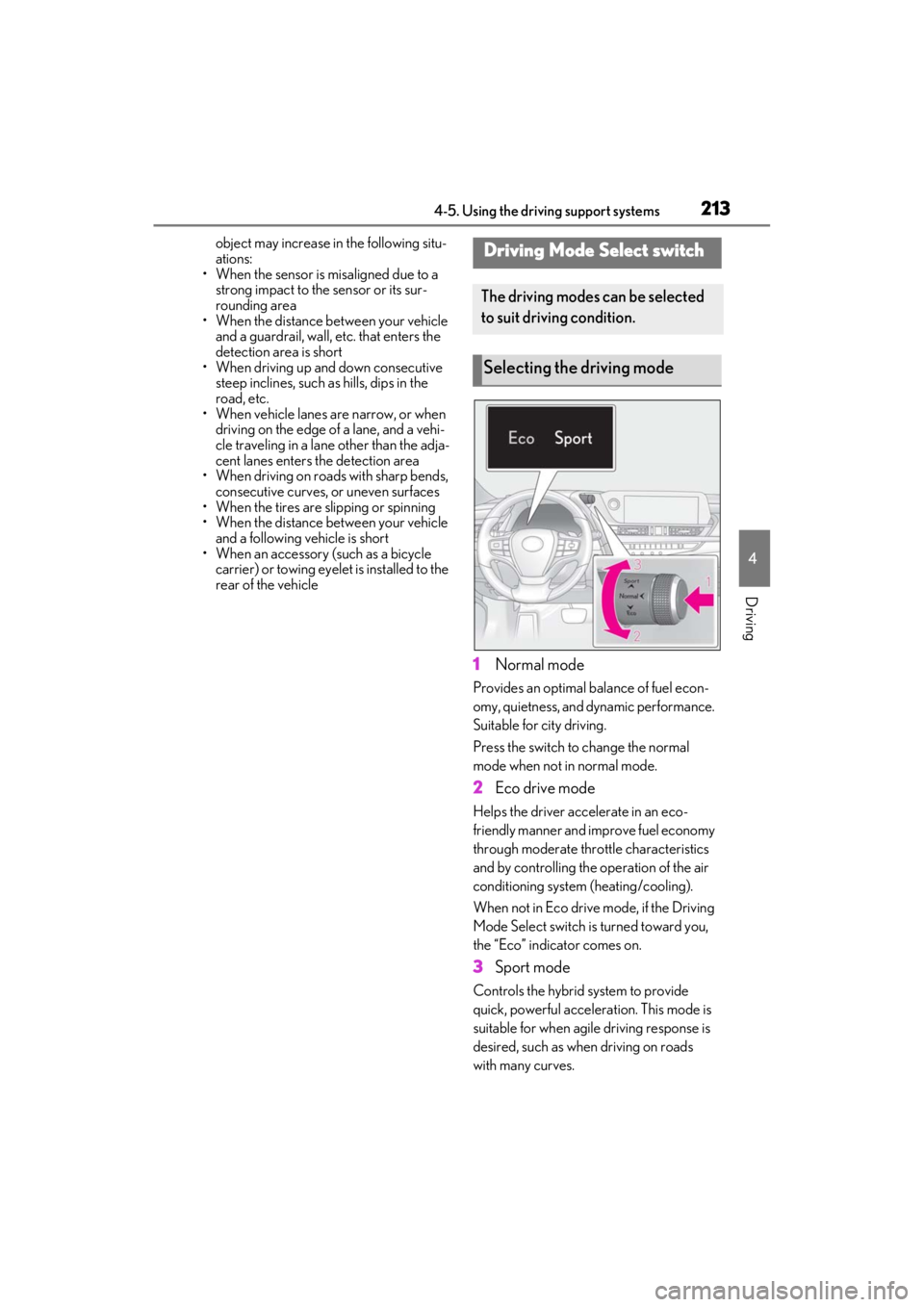
1 Normal mode
Provides an optimal ba lance of fuel econ-
omy, quietness, and dynamic performance.
Suitable for city driving.
Press the switch to change the normal
mode when not in normal mode.
2 Eco drive mode
Helps the driver acce lerate in an eco-
friendly manner and improve fuel economy
through moderate thro ttle characteristics
and by controlling the operation of the air
conditioning system (heating/cooling).
When not in Eco drive mode, if the Driving
Mode Select switch is turned toward you,
the “Eco” indicator comes on.
3 Sport mode
Controls the hybrid system to provide
quick, powerful acceleration. This mode is
suitable for when agile driving response is
desired, such as when driving on roads
with many curves.
Driving Mode Select switch
The driving modes can be selected
to suit driving condition.
Selecting the driving mode