fuel LEXUS ES300h 2021 User Guide
[x] Cancel search | Manufacturer: LEXUS, Model Year: 2021, Model line: ES300h, Model: LEXUS ES300h 2021Pages: 464, PDF Size: 9.55 MB
Page 66 of 464
661-4. Hybrid system
WARNING
●For vehicles sold in except Canada:
Do not touch the battery if liquid is
leaking from or adhering to it. If elec-
trolyte (carbonic-based organic elec-
trolyte) from the hybrid battery
(traction battery) comes into contact
with the eyes or skin, it could cause
blindness or skin wounds. In the
unlikely event that it comes into con-
tact with the eyes or skin, wash it off
immediately with a large amount of
water, and seek immediate medical
attention.
●If electrolyte is leaking from the hybrid
battery (traction battery), do not
approach the vehicle.
Even in the unlikely event that the
hybrid battery (traction battery) is
damaged, the internal construction of
the battery will prevent a large amount
of electrolyte from leaking out. How-
ever, any electrolyte that does leak out
will give off a vapor. This vapor is an
irritant to skin and eyes and could
cause acute poisoning if inhaled.
●Do not bring burning or high-tem-
perature items close to the electrolyte.
The electrolyte may ignite and cause a
fire.
●If a fire occurs in the hybrid vehicle,
leave the vehicle as soon as possible.
Never use a fire extinguisher that is not
meant for electric fires. Using even a
small amount of water may be danger-
ous.
●If your vehicle needs to be towed, do
so with front wheels raised. If the
wheels connected to the electric
motor (traction motor) are on the
ground when towing, the motor may
continue to generate electricity. This
may cause a fire. ( P.361)
●Carefully inspect the ground under the
vehicle. If you find that liquid has
leaked onto the ground, the fuel sys-
tem may have been damaged. Leave
the vehicle as soon as possible.
■Hybrid battery (traction battery)
●Your vehicle contains a sealed lithium-
ion battery.
●Never resell, hand over or modify the
hybrid battery. To prevent accidents,
hybrid batteries that have been
removed from a disposed vehicle are
collected through Lexus dealer. Do
not dispose of the battery yourself.
Unless the battery is properly col-
lected, the following may occur, result-
ing in death or serious injury:
• The hybrid battery may be illegally dis- posed of or dumped, and it is hazard-
ous to the environment or someone
may touch a high voltage part, result-
ing in an electric shock.
• The hybrid battery is intended to be used exclusively with your hybrid vehi-
cle. If the hybrid battery is used outside
of your vehicle or modified in any way,
accidents such as electric shock, heat
generation, smoke generation, an
explosion and electrolyte leakage may
occur.
When reselling or handing over your
vehicle, the possibility of an accident is
extremely high because the person
receiving the vehicle may not be aware
of these dangers.
●If your vehicle is disposed of without
the hybrid battery having been
removed, there is a danger of serious
electric shock if hi gh voltage parts,
cables and their connectors are
touched. In the event that your vehicle
must be disposed of, the hybrid battery
must be disposed of by your Lexus
dealer or a qualified service shop. If the
hybrid battery is not disposed of prop-
erly, it may cause electric shock that
can result in death or serious injury.
Page 67 of 464
671-4. Hybrid system
1
For safety and security
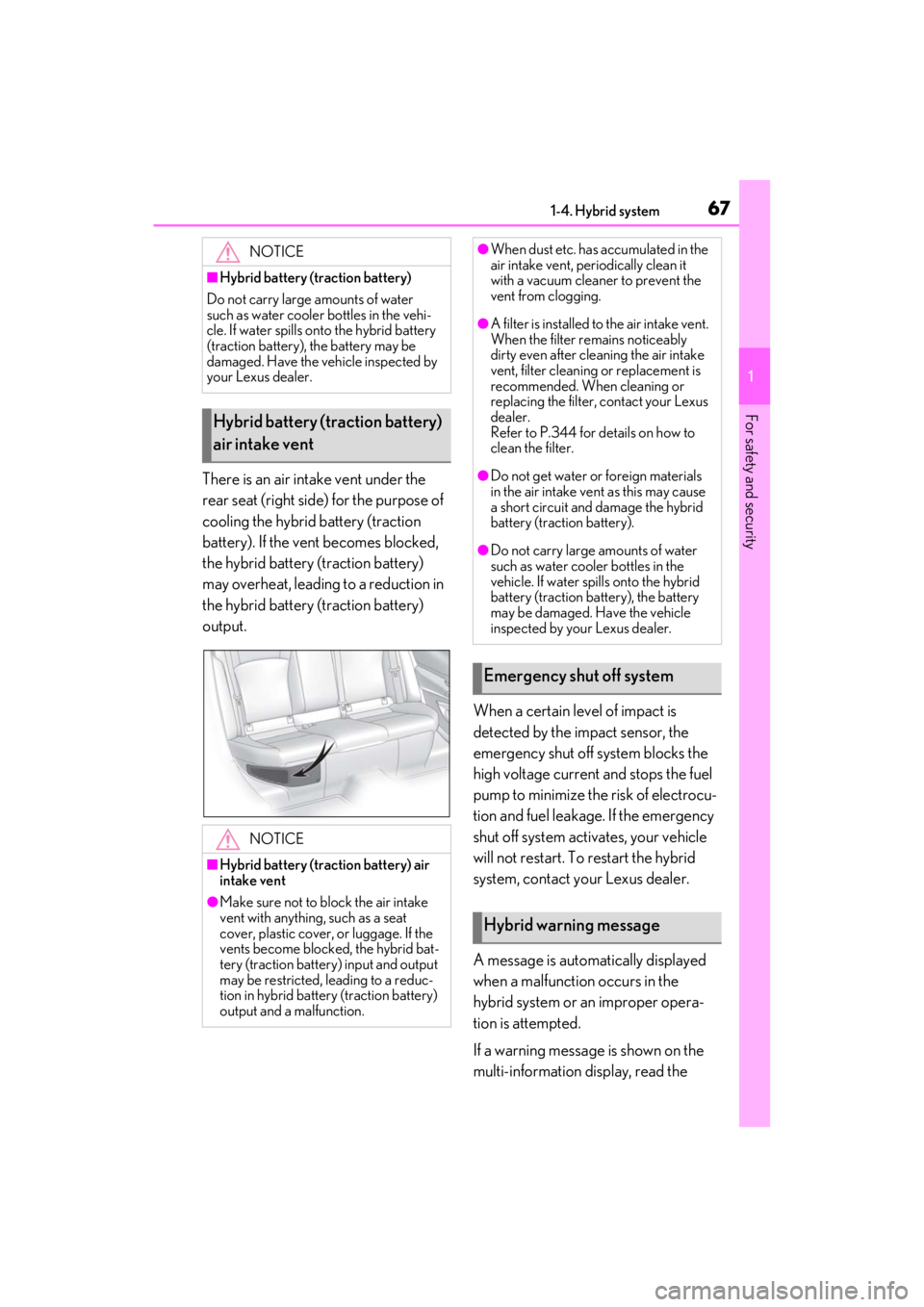
There is an air intake vent under the
rear seat (right side) for the purpose of
cooling the hybrid battery (traction
battery). If the vent becomes blocked,
the hybrid battery (traction battery)
may overheat, leading to a reduction in
the hybrid battery (traction battery)
output.When a certain level of impact is
detected by the impact sensor, the
emergency shut off system blocks the
high voltage current and stops the fuel
pump to minimize the risk of electrocu-
tion and fuel leakage. If the emergency
shut off system activates, your vehicle
will not restart. To restart the hybrid
system, contact your Lexus dealer.
A message is automatically displayed
when a malfunction occurs in the
hybrid system or an improper opera-
tion is attempted.
If a warning message is shown on the
multi-information display, read the
NOTICE
■Hybrid battery (traction battery)
Do not carry large amounts of water
such as water cooler bottles in the vehi-
cle. If water spills onto the hybrid battery
(traction battery), the battery may be
damaged. Have the vehicle inspected by
your Lexus dealer.
Hybrid battery (traction battery)
air intake vent
NOTICE
■Hybrid battery (traction battery) air
intake vent
●Make sure not to block the air intake
vent with anything, such as a seat
cover, plastic cover, or luggage. If the
vents become blocked, the hybrid bat-
tery (traction battery) input and output
may be restricted, leading to a reduc-
tion in hybrid battery (traction battery)
output and a malfunction.
●When dust etc. has accumulated in the
air intake vent, periodically clean it
with a vacuum cleaner to prevent the
vent from clogging.
●A filter is installed to the air intake vent.
When the filter re mains noticeably
dirty even after cleaning the air intake
vent, filter cleaning or replacement is
recommended. When cleaning or
replacing the filter, contact your Lexus
dealer.
Refer to P.344 for details on how to
clean the filter.
●Do not get water or foreign materials
in the air intake vent as this may cause
a short circuit and damage the hybrid
battery (traction battery).
●Do not carry large amounts of water
such as water cooler bottles in the
vehicle. If water spills onto the hybrid
battery (traction battery), the battery
may be damaged. Have the vehicle
inspected by your Lexus dealer.
Emergency shut off system
Hybrid warning message
Page 75 of 464
752-1. Instrument cluster
2
Vehicle status information and indicators
*1: These lights come on when the power switch is turned to ON mode to indi-
cate that a system check is being per-
formed. They will go off after the hybrid
system is on, or after a few seconds.
There may be a malfunction in a system
if the lights do not come on, or go off.
Have the vehicle inspected by your
Lexus dealer.
*2: This light illuminates on the multi-infor-mation display.
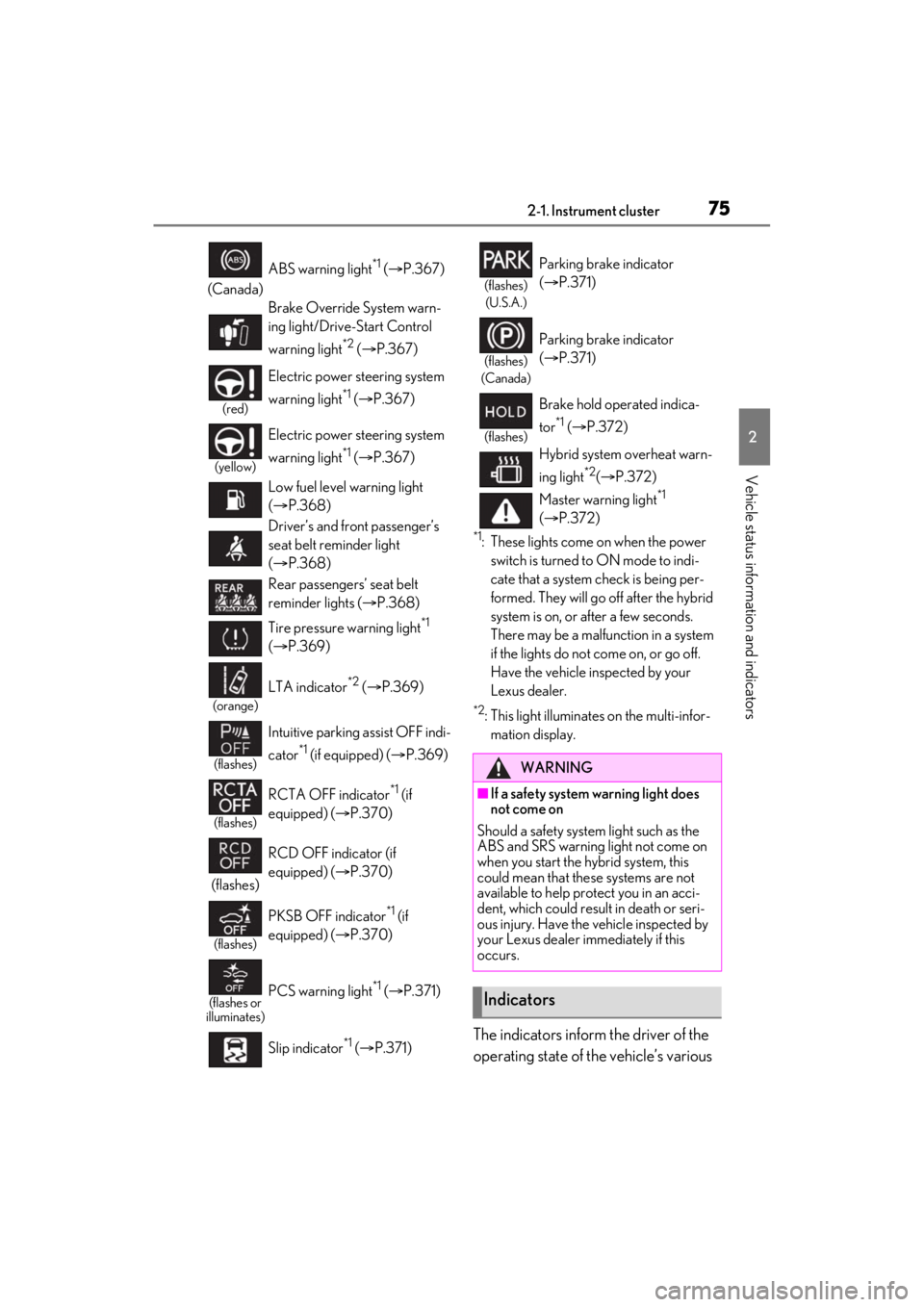
The indicators inform the driver of the
operating state of the vehicle’s various
(Canada) ABS warning light
*1 (
P.367)
Brake Override System warn-
ing light/Drive-Start Control
warning light
*2 ( P.367)
(red)
Electric power st eering system
warning light
*1 ( P.367)
(yellow)
Electric power st eering system
warning light
*1 ( P.367)
Low fuel level warning light
( P.368)
Driver’s and front passenger’s
seat belt reminder light
( P.368)
Rear passengers’ seat belt
reminder lights ( P.368)
Tire pressure warning light
*1
( P.369)
(orange)
LTA indicator*2 ( P.369)
(flashes)
Intuitive parking assist OFF indi-
cator
*1 (if equipped) ( P.369)
(flashes)
RCTA OFF indicator*1 (if
equipped) ( P.370)
(flashes) RCD OFF indicator (if
equipped) (
P.370)
(flashes)
PKSB OFF indicator*1 (if
equipped) ( P.370)
(flashes or
illuminates)PCS warning light*1 ( P.371)
Slip indicator
*1 ( P.371)
(flashes)
(U.S.A.)
Parking brake indicator
( P.371)
(flashes)
(Canada)
Parking brake indicator
( P.371)
(flashes)
Brake hold operated indica-
tor
*1 ( P.372)
Hybrid system overheat warn-
ing light
*2( P.372)
Master warning light
*1
( P.372)
WARNING
■If a safety system warning light does
not come on
Should a safety system light such as the
ABS and SRS warning light not come on
when you start the hybrid system, this
could mean that these systems are not
available to help protect you in an acci-
dent, which could result in death or seri-
ous injury. Have the vehicle inspected by
your Lexus dealer immediately if this
occurs.
Indicators
Page 78 of 464
782-1. Instrument cluster
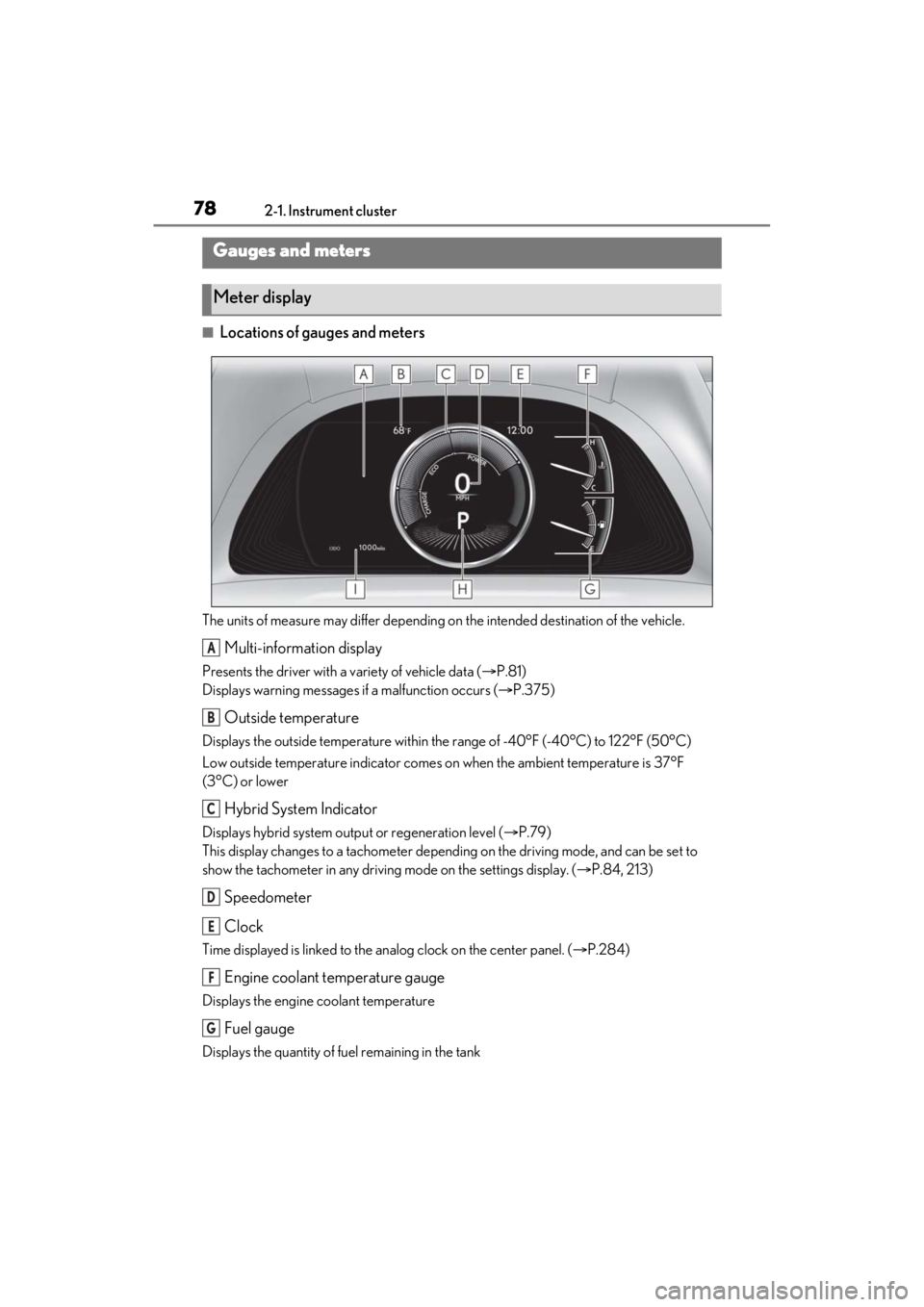
■Locations of gauges and meters
The units of measure may differ depending on the intended destination of the vehicle.
Multi-information display
Presents the driver with a variety of vehicle data ( P.81)
Displays warning messages if a malfunction occurs ( P.375)
Outside temperature
Displays the outside temperature within the range of -40°F (-40°C) to 122°F (50°C)
Low outside temperature indicator comes on when the ambient temperature is 37°F
(3°C) or lower
Hybrid System Indicator
Displays hybrid system outp ut or regeneration level (P.79)
This display changes to a tachometer depending on the driving mode, and can be set to
show the tachometer in any driving mode on the settings display. ( P.84, 213)
Speedometer
Clock
Time displayed is linked to the analog clock on the center panel. (P.284)
Engine coolant temperature gauge
Displays the engine coolant temperature
Fuel gauge
Displays the quantity of fuel remaining in the tank
Gauges and meters
Meter display
A
B
C
D
E
F
G
Page 79 of 464
792-1. Instrument cluster
2
Vehicle status information and indicators
Shift position and shift range (P.152)
Odometer and trip meter display ( P.80)
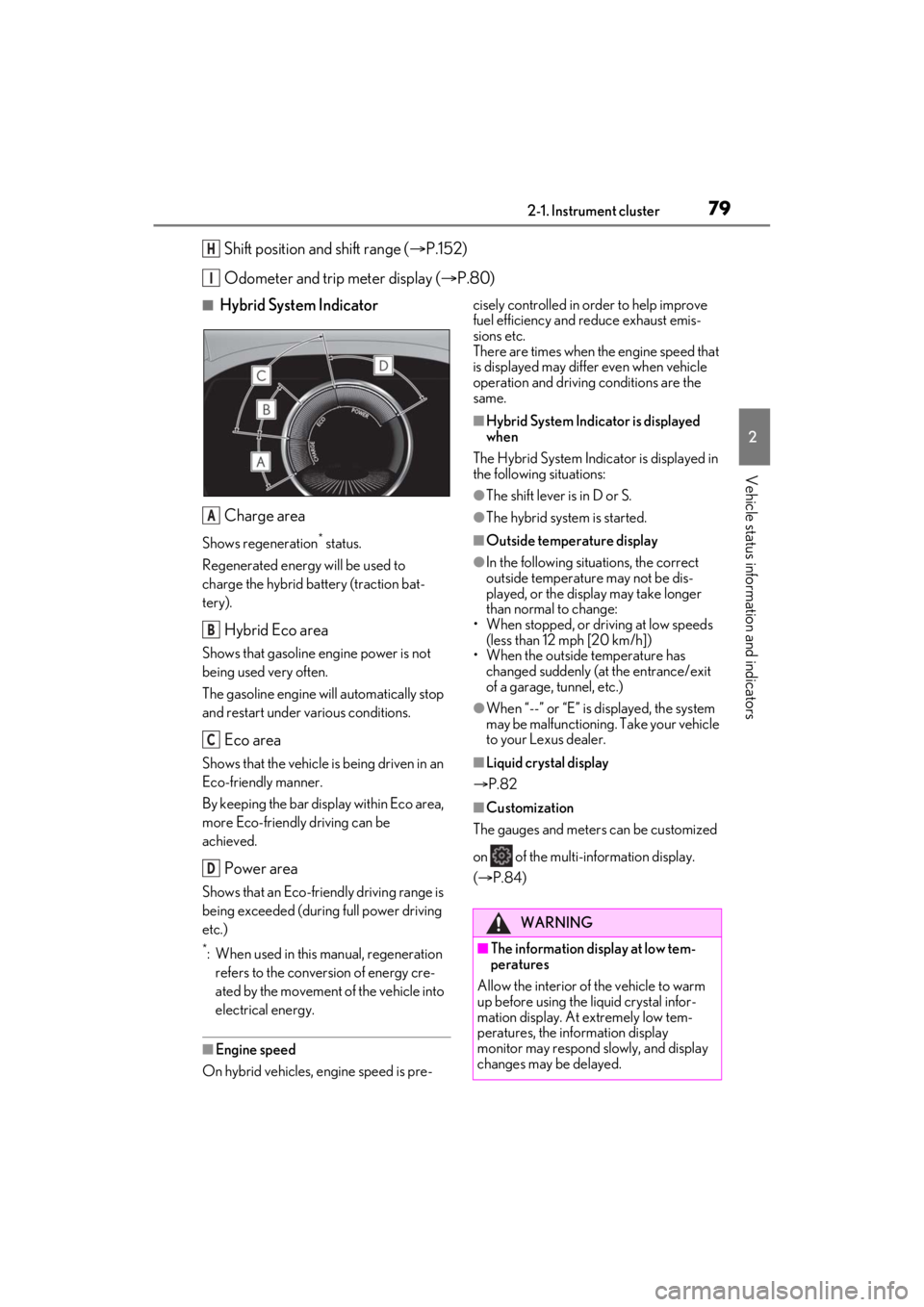
■Hybrid System Indicator
Charge area
Shows regeneration* status.
Regenerated energy will be used to
charge the hybrid battery (traction bat-
tery).
Hybrid Eco area
Shows that gasoline engine power is not
being used very often.
The gasoline engine will automatically stop
and restart under various conditions.
Eco area
Shows that the vehicle is being driven in an
Eco-friendly manner.
By keeping the bar display within Eco area,
more Eco-friendly driving can be
achieved.
Power area
Shows that an Eco-friendly driving range is
being exceeded (durin g full power driving
etc.)
*: When used in this manual, regeneration refers to the conversion of energy cre-
ated by the movement of the vehicle into
electrical energy.
■Engine speed
On hybrid vehicles, engine speed is pre- cisely controlled in order to help improve
fuel efficiency and reduce exhaust emis-
sions etc.
There are times when the engine speed that
is displayed may differ even when vehicle
operation and driving
conditions are the
same.
■Hybrid System Indicator is displayed
when
The Hybrid System Indicator is displayed in
the following situations:
●The shift lever is in D or S.
●The hybrid system is started.
■Outside temperature display
●In the following situations, the correct
outside temperature may not be dis-
played, or the display may take longer
than normal to change:
• When stopped, or driving at low speeds (less than 12 mph [20 km/h])
• When the outside temperature has changed suddenly (at the entrance/exit
of a garage, tunnel, etc.)
●When “--” or “E” is displayed, the system
may be malfunctioning. Take your vehicle
to your Lexus dealer.
■Liquid crystal display
P.82
■Customization
The gauges and meters can be customized
on of the multi-information display.
( P.84)
H
I
A
B
C
D
WARNING
■The information display at low tem-
peratures
Allow the interior of the vehicle to warm
up before using the liquid crystal infor-
mation display. At extremely low tem-
peratures, the information display
monitor may respond slowly, and display
changes may be delayed.
Page 82 of 464
822-1. Instrument cluster
■Liquid crystal display
Small spots or light spots may appear on the
display. This phenomenon is characteristic
of liquid crystal displays, and there is no
problem continuing to use the display.
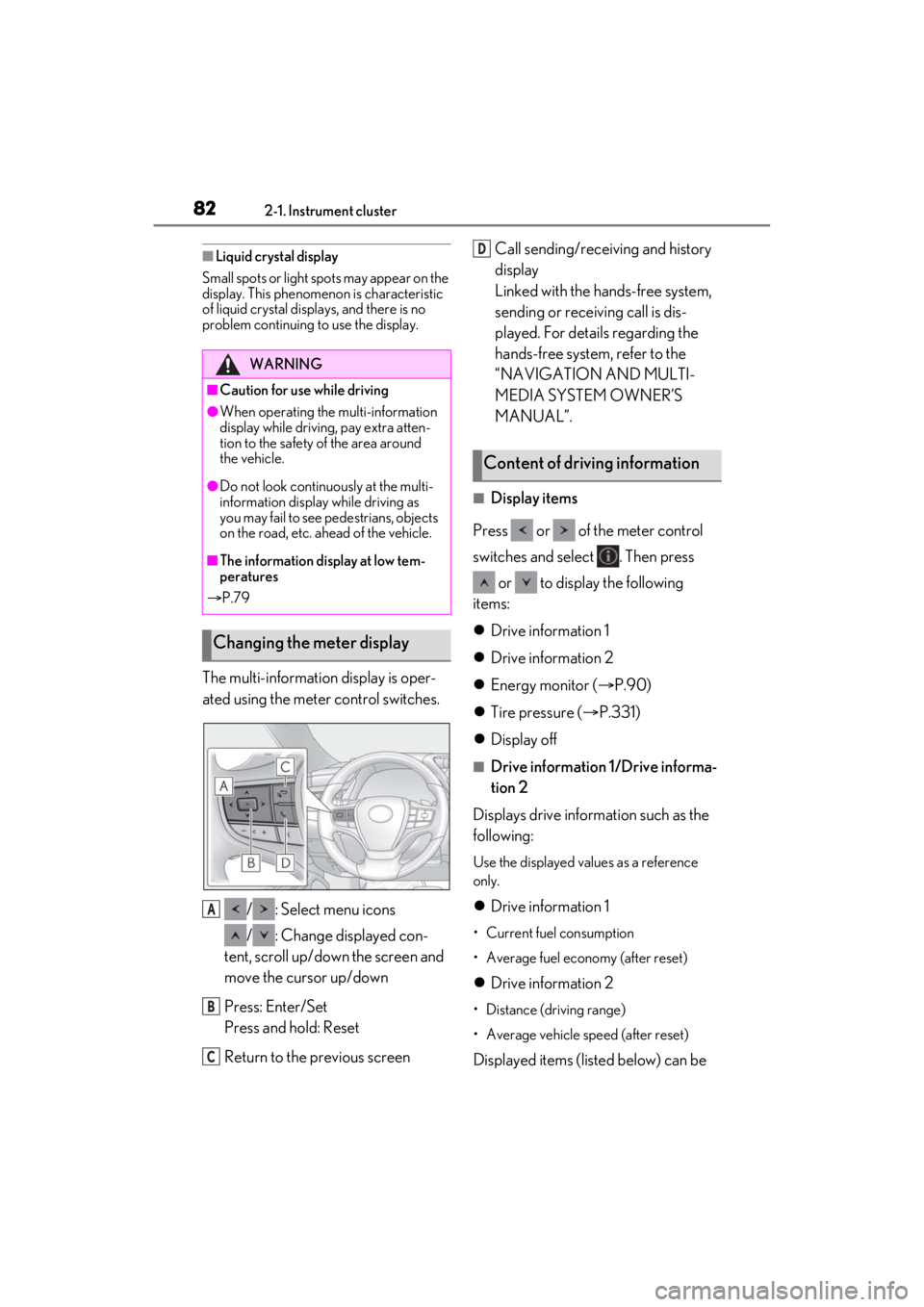
The multi-information display is oper-
ated using the meter control switches.
/ : Select menu icons
/ : Change displayed con-
tent, scroll up/down the screen and
move the cursor up/down
Press: Enter/Set
Press and hold: Reset
Return to the previous screen Call sending/receiving and history
display
Linked with the hands-free system,
sending or receiving call is dis-
played. For details regarding the
hands-free system, refer to the
“NAVIGATION AND MULTI-
MEDIA SYSTEM OWNER’S
MANUAL”.
■Display items
Press or of the meter control
switches and select . Then press or to display the following
items:
Drive information 1
Drive information 2
Energy monitor ( P.90)
Tire pressure ( P.331)
Display off
■Drive information 1/Drive informa-
tion 2
Displays drive information such as the
following:
Use the displayed values as a reference
only.
Drive information 1
• Current fuel consumption
• Average fuel economy (after reset)
Drive information 2
• Distance (driving range)
• Average vehicle speed (after reset)
Displayed items (listed below) can be
WARNING
■Caution for use while driving
●When operating the multi-information
display while driving, pay extra atten-
tion to the safety of the area around
the vehicle.
●Do not look continuously at the multi-
information display while driving as
you may fail to see pedestrians, objects
on the road, etc. ahead of the vehicle.
■The information display at low tem-
peratures
P.79
Changing the meter display
A
B
C
Content of driving information
D
Page 83 of 464
832-1. Instrument cluster
2
Vehicle status information and indicators
changed on . (P.84)
Current fuel consumption
Bar type: Displays instantaneous current
fuel consumption
Average fuel economy
After reset: Displays average fuel con-
sumption since the display was reset
*1
After start: Displays average fuel con-
sumption since hybrid system start
After refuel: Displays average fuel con-
sumption since refuel
Average vehicle speed
After reset: Displays average vehicle
speed since the display was reset
*1
After start: Displays average vehicle speed
since hybrid system start
Elapsed time
After reset: Displays elapsed time since the
display was reset
*1
After start: Displays elapsed time since
hybrid system start
Distance
Driving range: Displays driving range with
remaining fuel
*2, 3
After start: Displays the distance driven
since hybrid system start
Other
Blank: No item
*1: To reset, display the desired item and
press and hold “OK” of the meter con-
trol switches.
*2: This distance is computed based on your average fuel consumption. As a
result, the actual distance that can be
driven may differ from that displayed.
*3: When only a small amount of fuel is added to the tank, the display may not
be updated.
When refueling, turn
the power switch
off. If the vehicle is refueled without
turning the power switch off, the display
may not be updated.
Select to display the following naviga-
tion system-linked information.
Route guidance to destination
Compass display (heading-up dis-
play)
■Route guidance to destination display
When the route guidance to destination
display is enabled on th e head-up display, it
will not be displayed on the multi-informa-
tion display. ( P.87)
Select to enable se lection of an audio
source or track on the meter using the
meter control switches.
Select to display the operational status
of the following systems:
LTA (Lane Tracing Assist)
( P.187)
Dynamic radar cruise control with
full-speed range ( P.198)
RSA (Road Sign Assist) (if
equipped) ( P.196)
Navigation system-linked dis-
play (if equipped)
Audio system-linked display
Driving support system informa-
tion display
Page 90 of 464
902-1. Instrument cluster
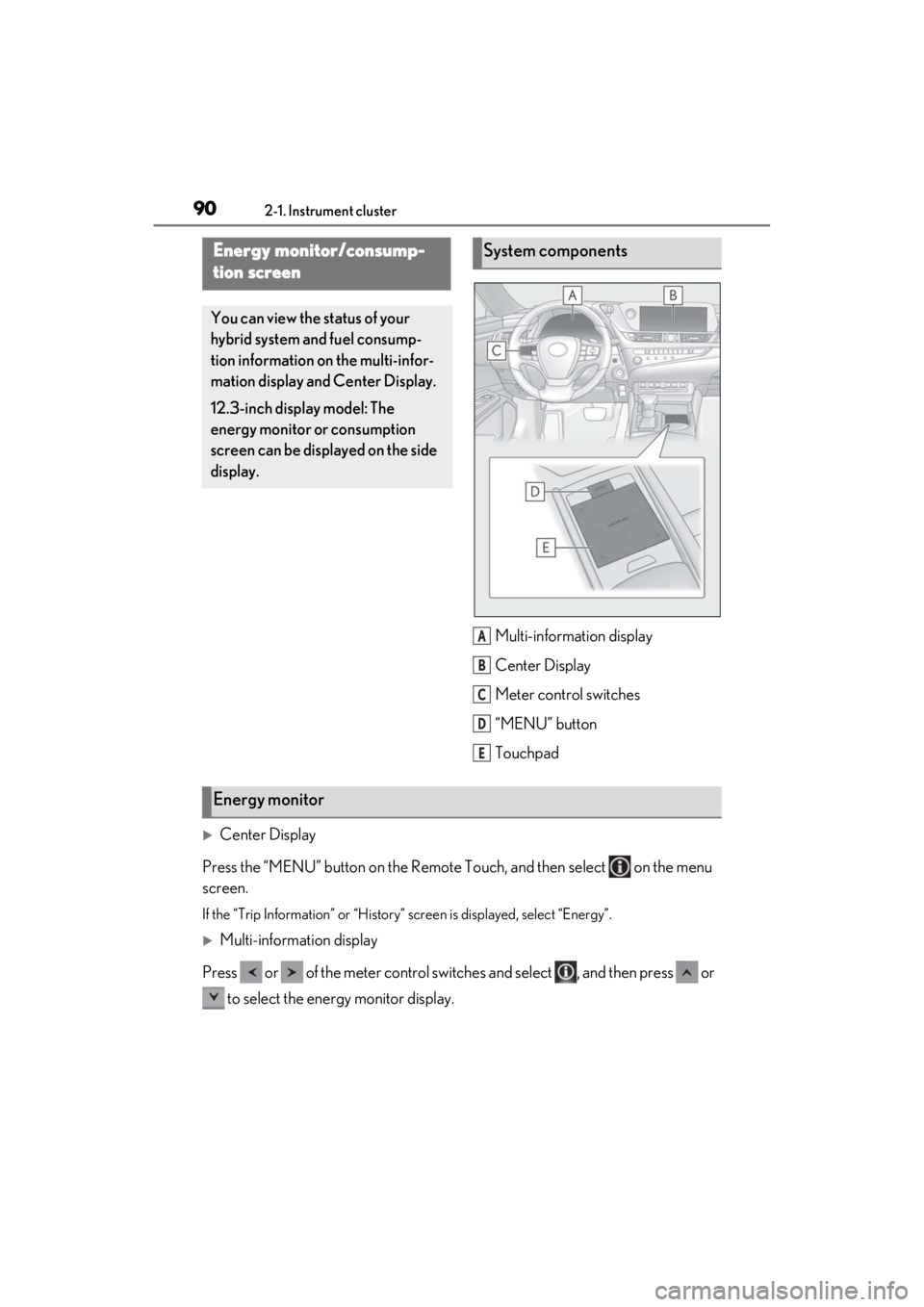
Multi-information display
Center Display
Meter control switches
“MENU” button
Touchpad
Center Display
Press the “MENU” button on the Remote Touch, and then select on the menu
screen.
If the “Trip Information” or “History” screen is displayed, select “Energy”.
Multi-information display
Press or of the meter control switch es and select , and then press or
to select the energy monitor display.
Energy monitor/consump-
tion screen
You can view the status of your
hybrid system and fuel consump-
tion information on the multi-infor-
mation display and Center Display.
12.3-inch display model: The
energy monitor or consumption
screen can be displayed on the side
display.
System components
A
B
C
D
E
Energy monitor
Page 93 of 464
932-1. Instrument cluster
2
Vehicle status information and indicators
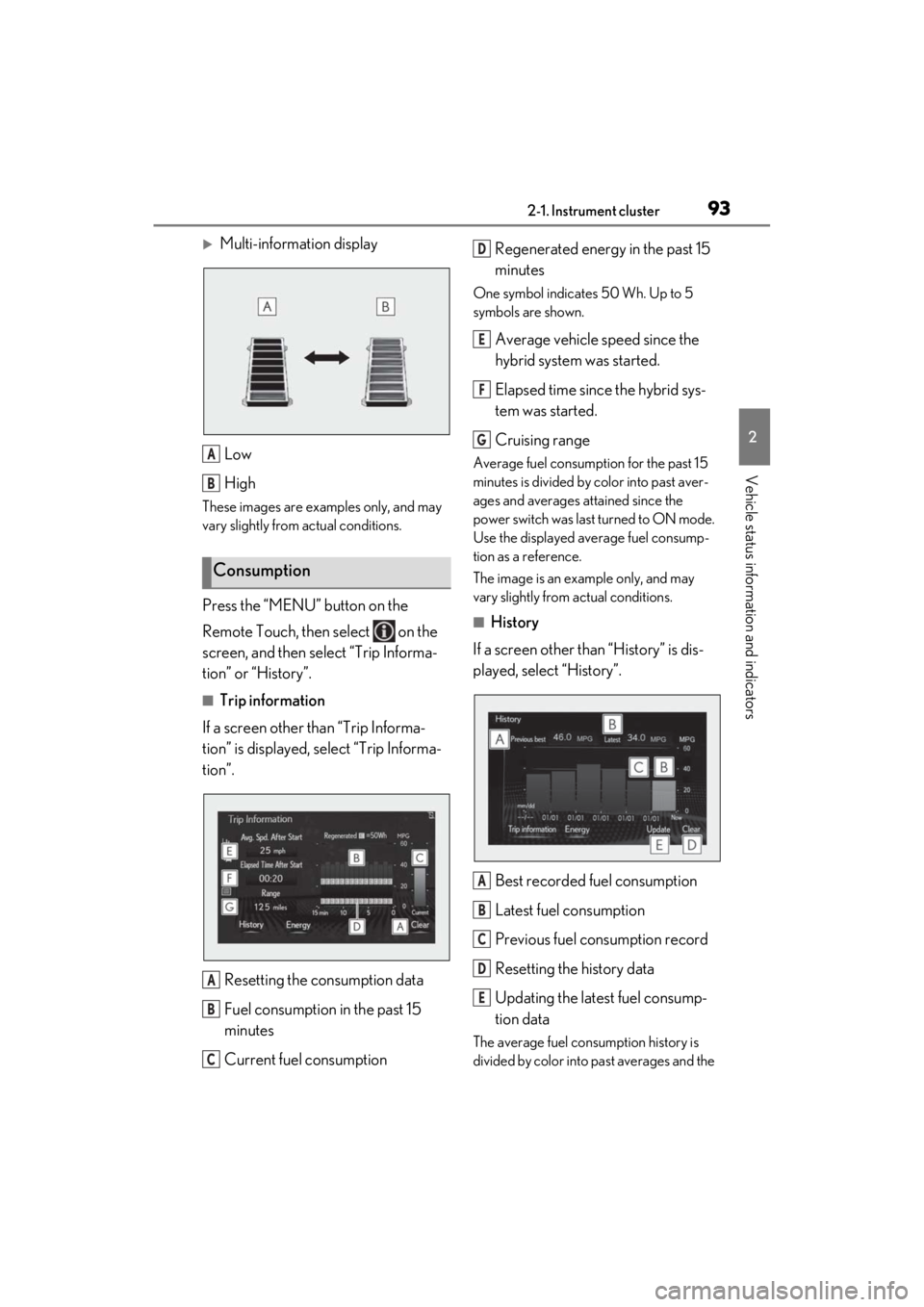
Multi-information displayLow
High
These images are examples only, and may
vary slightly from actual conditions.
Press the “MENU” button on the
Remote Touch, then select on the
screen, and then select “Trip Informa-
tion” or “History”.
■Trip information
If a screen other than “Trip Informa-
tion” is displayed, select “Trip Informa-
tion”.
Resetting the consumption data
Fuel consumption in the past 15
minutes
Current fuel consumption Regenerated energy in the past 15
minutes
One symbol indicates 50 Wh. Up to 5
symbols are shown.
Average vehicle speed since the
hybrid system was started.
Elapsed time since the hybrid sys-
tem was started.
Cruising range
Average fuel consumption for the past 15
minutes is divided by color into past aver-
ages and averages attained since the
power switch was last turned to ON mode.
Use the displayed average fuel consump-
tion as a reference.
The image is an example only, and may
vary slightly from actual conditions.
■History
If a screen other than “History” is dis-
played, select “History”.
Best recorded fuel consumption
Latest fuel consumption
Previous fuel consumption record
Resetting the history data
Updating the latest fuel consump-
tion data
The average fuel consumption history is
divided by color into past averages and the
Consumption
A
B
A
B
C
D
E
F
G
A
B
C
D
E
Page 94 of 464
942-1. Instrument cluster
average fuel consumption since the last
updated. Use the displayed average fuel
consumption as a reference.
The image is an example only, and may
vary slightly from actual conditions.
■Updating the history data
Update the latest fuel consumption by
selecting “Updat e” to measure the current
fuel consumption again.
■Resetting the data
The fuel consumption data can be deleted
by selecting “Clear”.
■Cruising range
Displays the estimated maximum distance
that can be driven with the quantity of fuel
remaining.
This distance is comp uted based on your
average fuel consumption.
As a result, the actual distance that can be
driven may differ from that displayed.
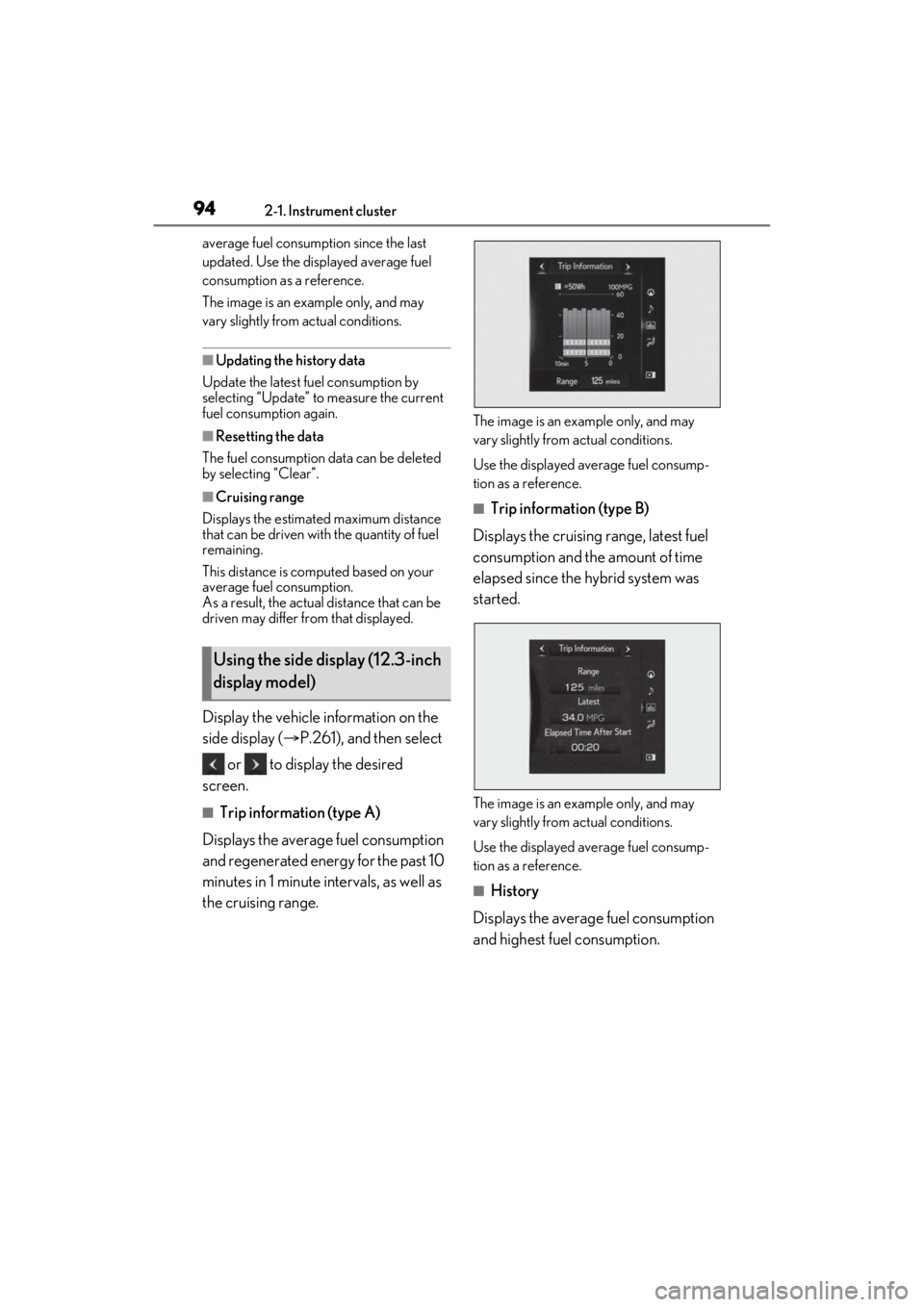
Display the vehicle information on the
side display ( P.261), and then select
or to display the desired
screen.
■Trip information (type A)
Displays the average fuel consumption
and regenerated energy for the past 10
minutes in 1 minute intervals, as well as
the cruising range.
The image is an example only, and may
vary slightly from actual conditions.
Use the displayed average fuel consump-
tion as a reference.
■Trip information (type B)
Displays the cruising range, latest fuel
consumption and the amount of time
elapsed since the hybrid system was
started.
The image is an example only, and may
vary slightly from actual conditions.
Use the displayed average fuel consump-
tion as a reference.
■History
Displays the average fuel consumption
and highest fuel consumption.
Using the side display (12.3-inch
display model)