light LEXUS ES300h 2021 Owner's Guide
[x] Cancel search | Manufacturer: LEXUS, Model Year: 2021, Model line: ES300h, Model: LEXUS ES300h 2021Pages: 464, PDF Size: 9.55 MB
Page 74 of 464
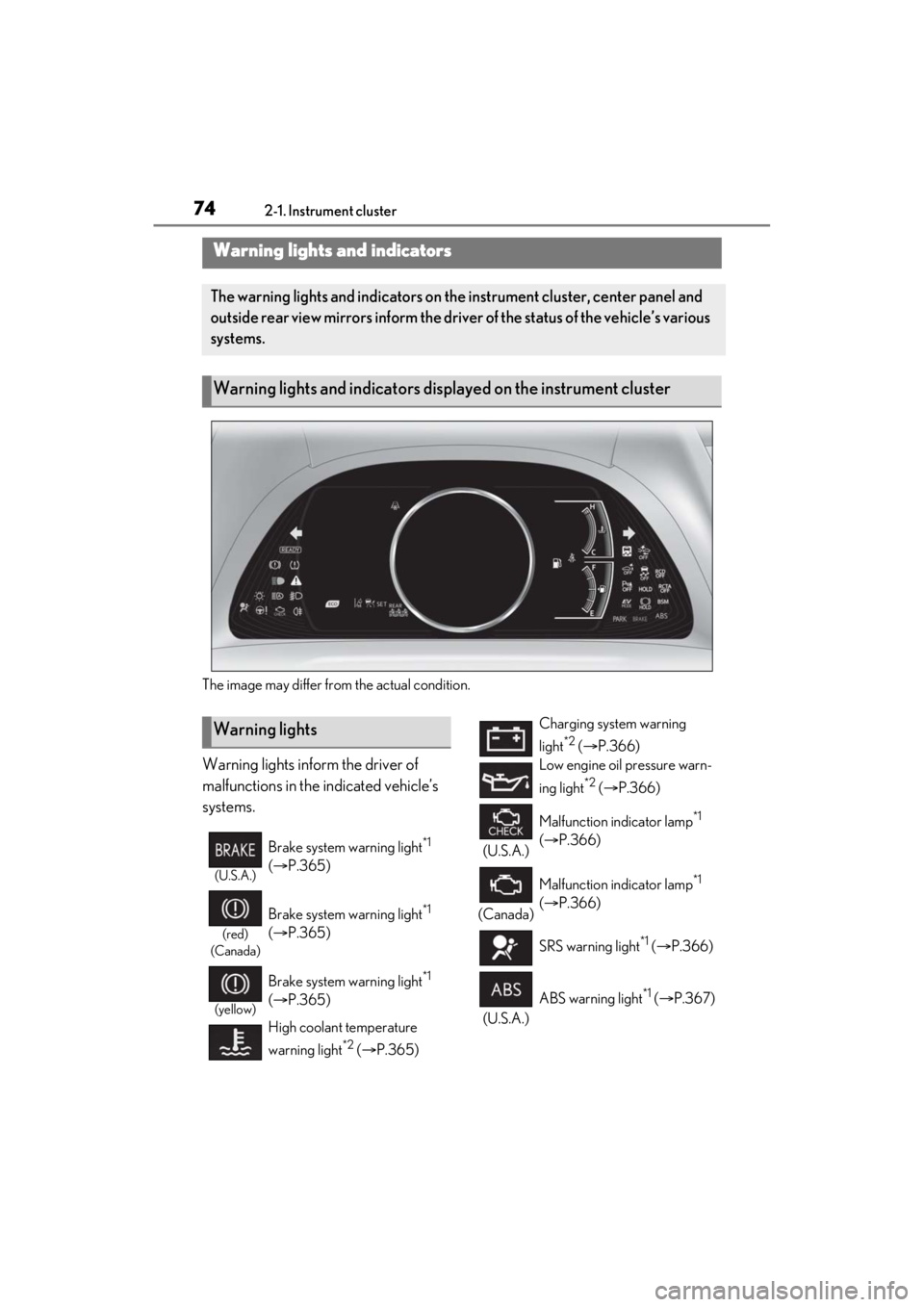
742-1. Instrument cluster
2-1.Instrument cluster
The image may differ from the actual condition.
Warning lights inform the driver of
malfunctions in the indicated vehicle’s
systems.
Warning lights and indicators
The warning lights and indicators on the instrument cluster, center panel and
outside rear view mirrors inform the driver of the status of the vehicle’s various
systems.
Warning lights and indicators displayed on the instrument cluster
Warning lights
(U.S.A.)
Brake system warning light*1
( P.365)
(red)
(Canada)
Brake system warning light*1
( P.365)
(yellow)
Brake system warning light*1
( P.365)
High coolant temperature
warning light
*2 ( P.365)
Charging system warning
light
*2 ( P.366)
Low engine oil pressure warn-
ing light
*2 ( P.366)
(U.S.A.) Malfunction indicator lamp
*1
( P.366)
(Canada) Malfunction indicator lamp
*1
( P.366)
SRS warning light
*1 ( P.366)
(U.S.A.) ABS warning light
*1 (
P.367)
Page 75 of 464
752-1. Instrument cluster
2
Vehicle status information and indicators
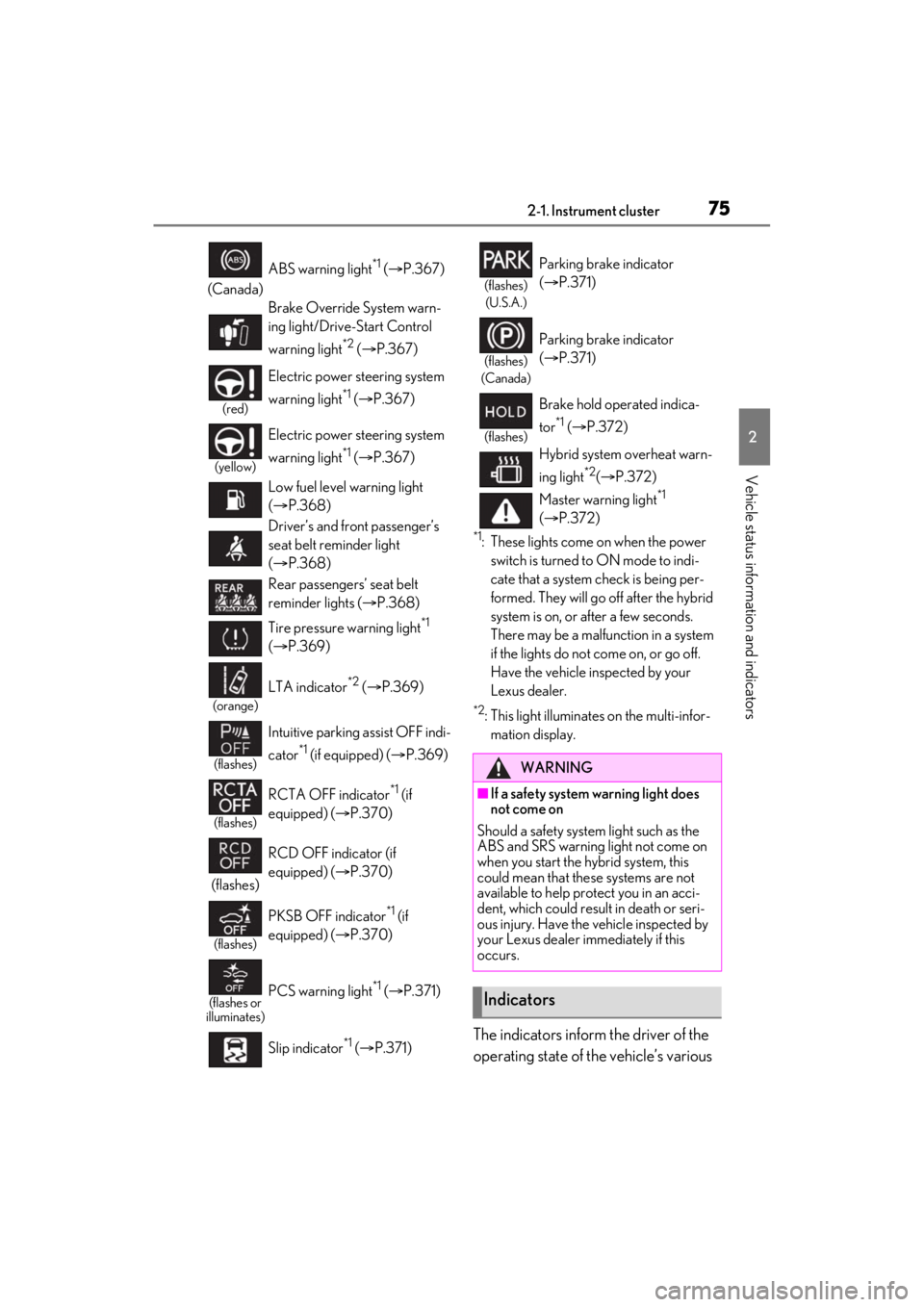
*1: These lights come on when the power switch is turned to ON mode to indi-
cate that a system check is being per-
formed. They will go off after the hybrid
system is on, or after a few seconds.
There may be a malfunction in a system
if the lights do not come on, or go off.
Have the vehicle inspected by your
Lexus dealer.
*2: This light illuminates on the multi-infor-mation display.
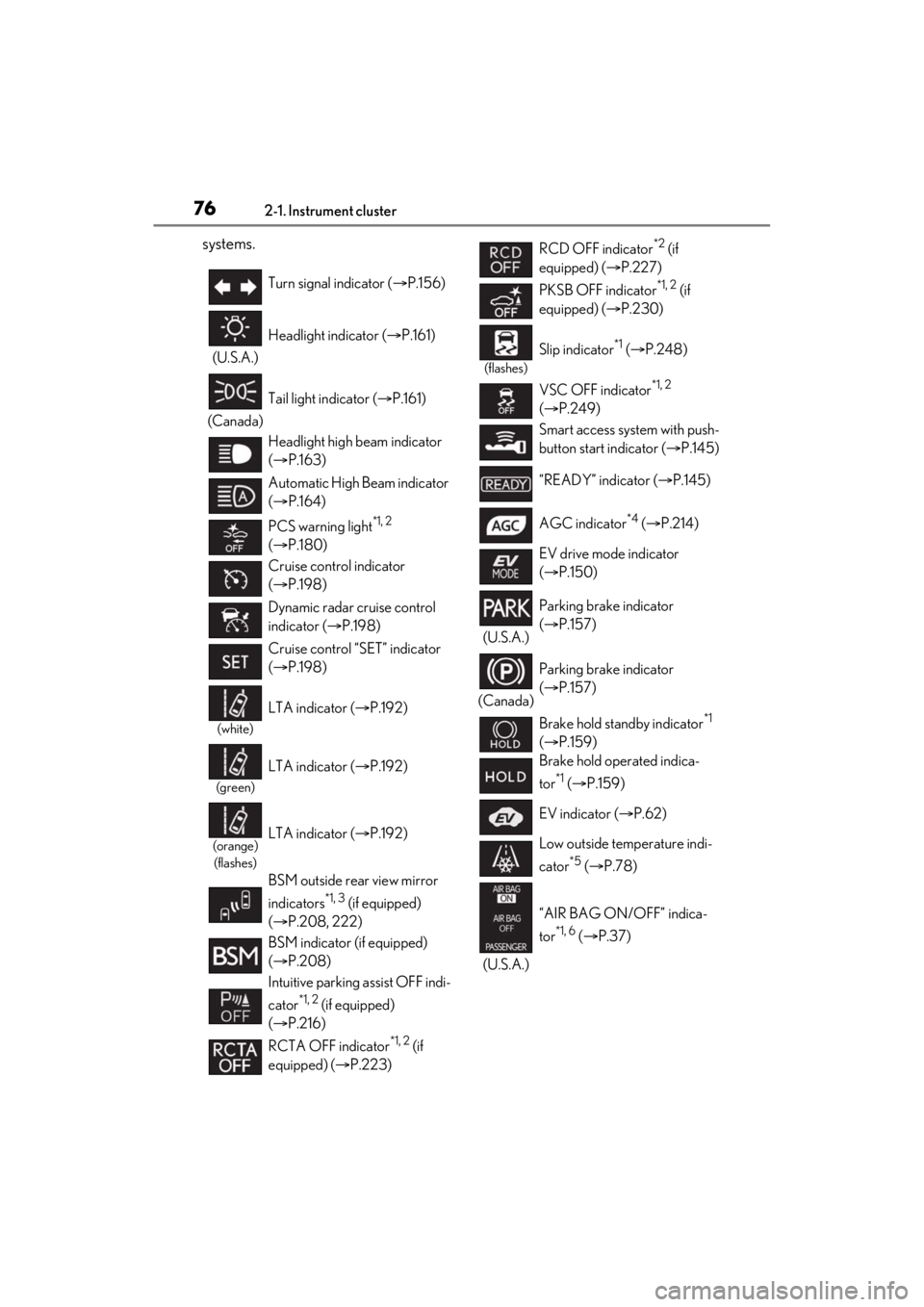
The indicators inform the driver of the
operating state of the vehicle’s various
(Canada) ABS warning light
*1 (
P.367)
Brake Override System warn-
ing light/Drive-Start Control
warning light
*2 ( P.367)
(red)
Electric power st eering system
warning light
*1 ( P.367)
(yellow)
Electric power st eering system
warning light
*1 ( P.367)
Low fuel level warning light
( P.368)
Driver’s and front passenger’s
seat belt reminder light
( P.368)
Rear passengers’ seat belt
reminder lights ( P.368)
Tire pressure warning light
*1
( P.369)
(orange)
LTA indicator*2 ( P.369)
(flashes)
Intuitive parking assist OFF indi-
cator
*1 (if equipped) ( P.369)
(flashes)
RCTA OFF indicator*1 (if
equipped) ( P.370)
(flashes) RCD OFF indicator (if
equipped) (
P.370)
(flashes)
PKSB OFF indicator*1 (if
equipped) ( P.370)
(flashes or
illuminates)PCS warning light*1 ( P.371)
Slip indicator
*1 ( P.371)
(flashes)
(U.S.A.)
Parking brake indicator
( P.371)
(flashes)
(Canada)
Parking brake indicator
( P.371)
(flashes)
Brake hold operated indica-
tor
*1 ( P.372)
Hybrid system overheat warn-
ing light
*2( P.372)
Master warning light
*1
( P.372)
WARNING
■If a safety system warning light does
not come on
Should a safety system light such as the
ABS and SRS warning light not come on
when you start the hybrid system, this
could mean that these systems are not
available to help protect you in an acci-
dent, which could result in death or seri-
ous injury. Have the vehicle inspected by
your Lexus dealer immediately if this
occurs.
Indicators
Page 76 of 464
762-1. Instrument cluster
systems.
Turn signal indicator (P.156)
(U.S.A.) Headlight indicator (
P.161)
(Canada) Tail light indicator (
P.161)
Headlight high beam indicator
( P.163)
Automatic High Beam indicator
( P.164)
PCS warning light
*1, 2
( P.180)
Cruise control indicator
( P.198)
Dynamic radar cruise control
indicator ( P.198)
Cruise control “SET” indicator
( P.198)
(white)
LTA indicator ( P.192)
(green)
LTA indicator ( P.192)
(orange)
(flashes)LTA indicator ( P.192)
BSM outside rear view mirror
indicators
*1, 3 (if equipped)
( P.208, 222)
BSM indicator (if equipped)
( P.208)
Intuitive parking assist OFF indi-
cator
*1, 2 (if equipped)
( P.216)
RCTA OFF indicator
*1, 2 (if
equipped) ( P.223)
RCD OFF indicator*2 (if
equipped) ( P.227)
PKSB OFF indicator
*1, 2 (if
equipped) ( P.230)
(flashes)
Slip indicator*1 ( P.248)
VSC OFF indicator
*1, 2
( P.249)
Smart access system with push-
button start indicator ( P.145)
“READY” indicator ( P.145)
AGC indicator
*4 ( P.214)
EV drive mode indicator
( P.150)
(U.S.A.) Parking brake indicator
(
P.157)
(Canada) Parking brake indicator
(
P.157)
Brake hold standby indicator
*1
( P.159)
Brake hold operated indica-
tor
*1 ( P.159)
EV indicator ( P.62)
Low outside temperature indi-
cator
*5 ( P.78)
(U.S.A.) “AIR BAG ON/OFF” indica-
tor
*1, 6 (
P.37)
Page 77 of 464
772-1. Instrument cluster
2
Vehicle status information and indicators
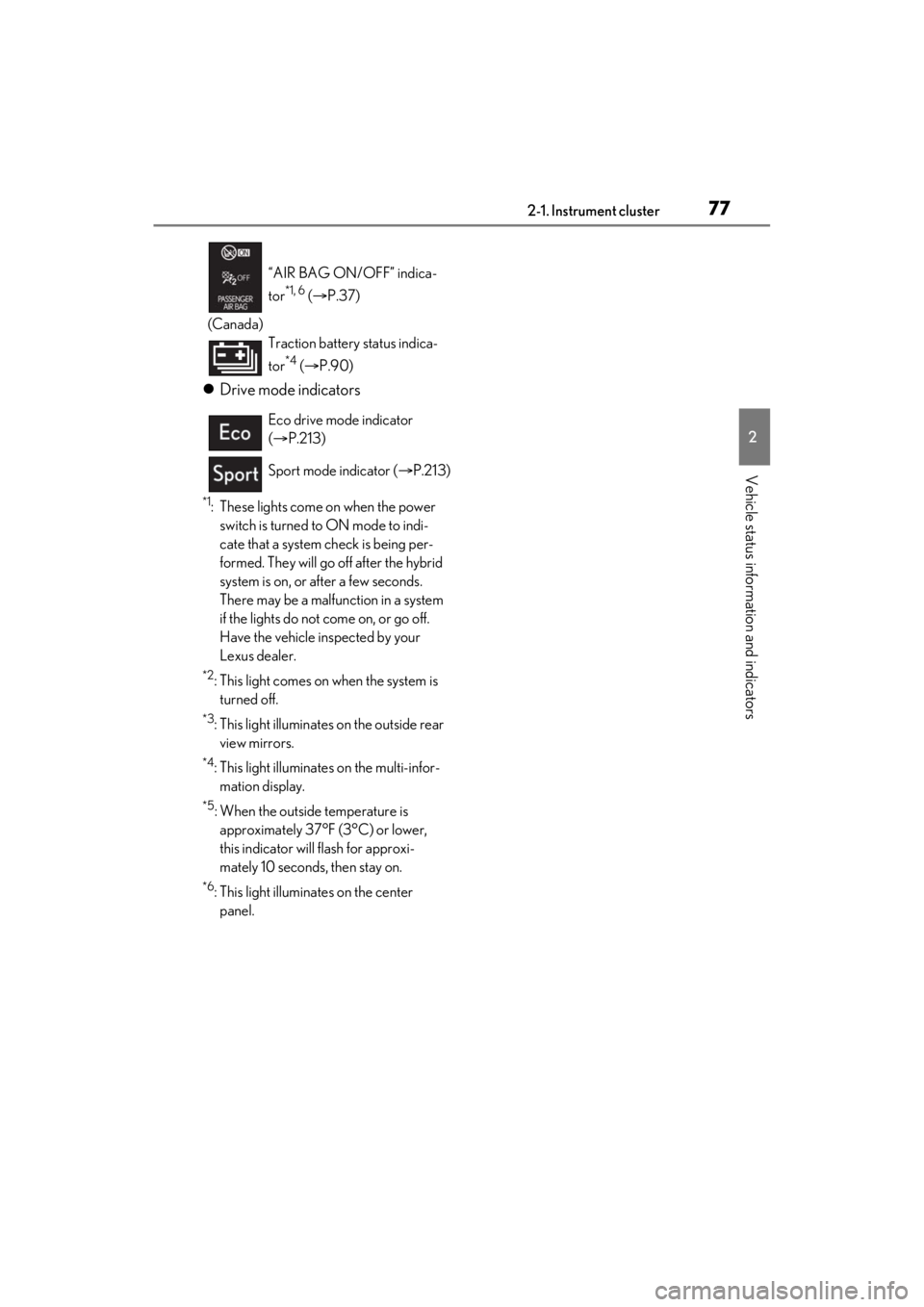
Drive mode indicators
*1: These lights come on when the power
switch is turned to ON mode to indi-
cate that a system check is being per-
formed. They will go off after the hybrid
system is on, or after a few seconds.
There may be a malfunction in a system
if the lights do not come on, or go off.
Have the vehicle inspected by your
Lexus dealer.
*2: This light comes on when the system is turned off.
*3: This light illuminates on the outside rear view mirrors.
*4: This light illuminates on the multi-infor- mation display.
*5: When the outside temperature is approximately 37°F (3°C) or lower,
this indicator will flash for approxi-
mately 10 seconds, then stay on.
*6: This light illuminates on the center panel.
(Canada)
“AIR BAG ON/OFF” indica-
tor
*1, 6 (
P.37)
Traction battery status indica-
tor
*4 ( P.90)
Eco drive mode indicator
( P.213)
Sport mode indicator ( P.213)
Page 80 of 464
802-1. Instrument cluster
■Display items
Odometer
Displays the total distance the vehicle has
been driven.
Trip meter A/trip meter B
Displays the distance the vehicle has been
driven since the meter was last reset. Trip
meters A and B can be used to record and
display different distances independently.
Distance until next engine oil
change
Displays the distance the vehicle can be
driven until an oil change is necessary.
■Changing the display
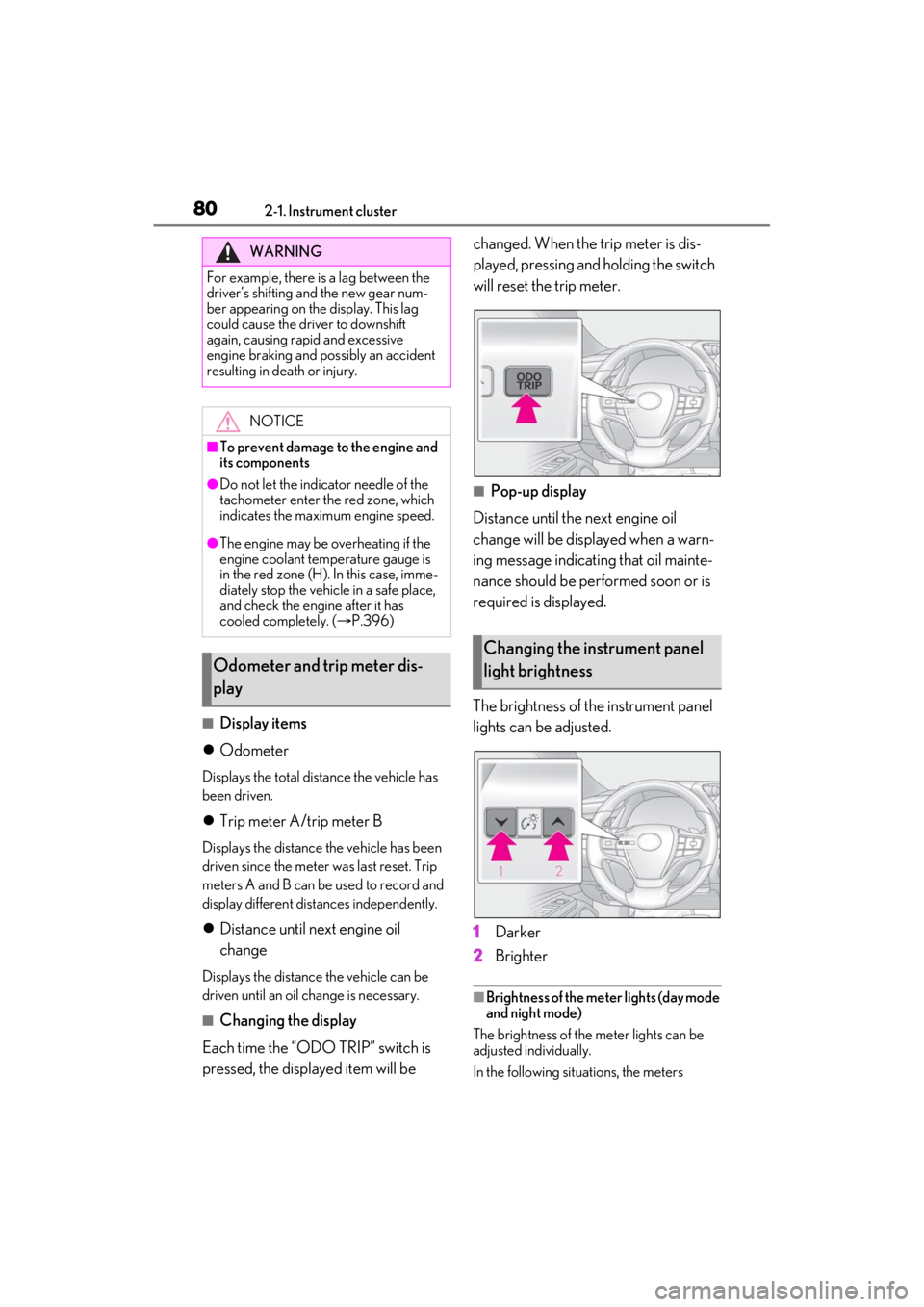
Each time the “ODO TRIP” switch is
pressed, the displayed item will be changed. When the trip meter is dis-
played, pressing and holding the switch
will reset the trip meter.
■Pop-up display
Distance until the next engine oil
change will be displayed when a warn-
ing message indicating that oil mainte-
nance should be performed soon or is
required is displayed.
The brightness of the instrument panel
lights can be adjusted.
1 Darker
2 Brighter
■Brightness of the meter lights (day mode
and night mode)
The brightness of the meter lights can be
adjusted individually.
In the following situations, the meters
WARNING
For example, there is a lag between the
driver’s shifting and the new gear num-
ber appearing on the display. This lag
could cause the driver to downshift
again, causing rapid and excessive
engine braking and possibly an accident
resulting in death or injury.
NOTICE
■To prevent damage to the engine and
its components
●Do not let the indicator needle of the
tachometer enter the red zone, which
indicates the maximum engine speed.
●The engine may be overheating if the
engine coolant temperature gauge is
in the red zone (H). In this case, imme-
diately stop the vehicle in a safe place,
and check the engine after it has
cooled completely. ( P.396)
Odometer and trip meter dis-
play
Changing the instrument panel
light brightness
Page 81 of 464
812-1. Instrument cluster
2
Vehicle status information and indicators
changes between day mode and night
mode.
●Day mode: When the tail lights are off or
when the tail lights are on but the sur-
rounding area is bright
●Night mode: When the tail lights are on
and the surrounding area is dark■Display
By selecting menu icons on the multi-
information display, a variety of driv-
ing-related information can be dis-
played. The multi-information display
can also be used to change display set-
tings and other vehicle settings.
Warning or suggestion/advice pop-up
displays are also displayed in certain
situations.
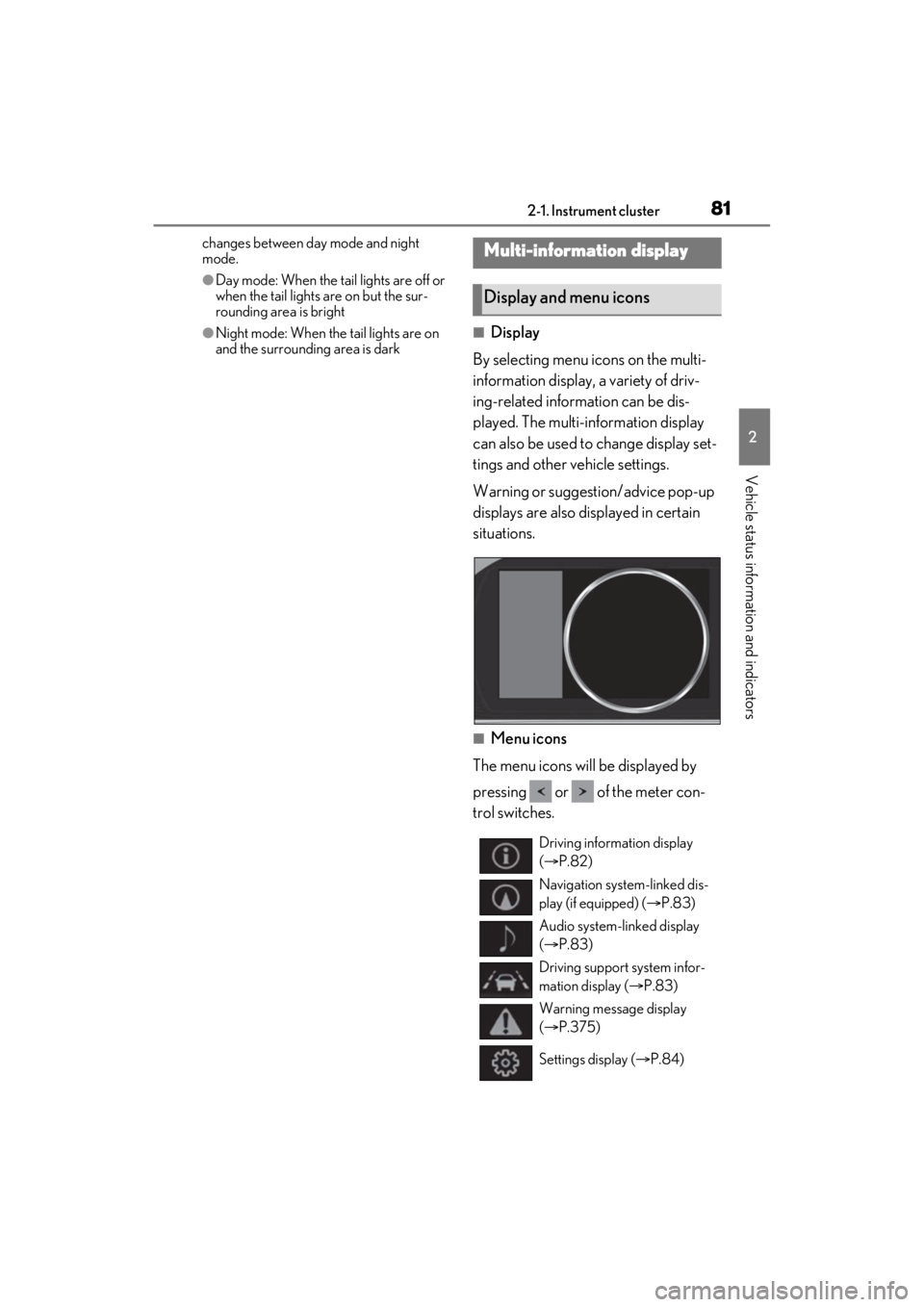
■Menu icons
The menu icons will be displayed by
pressing or of the meter con-
trol switches.
Multi-information display
Display and menu icons
Driving information display
( P.82)
Navigation system-linked dis-
play (if equipped) ( P.83)
Audio system-linked display
( P.83)
Driving support system infor-
mation display ( P.83)
Warning message display
( P.375)
Settings display ( P.84)
Page 82 of 464
822-1. Instrument cluster
■Liquid crystal display
Small spots or light spots may appear on the
display. This phenomenon is characteristic
of liquid crystal displays, and there is no
problem continuing to use the display.
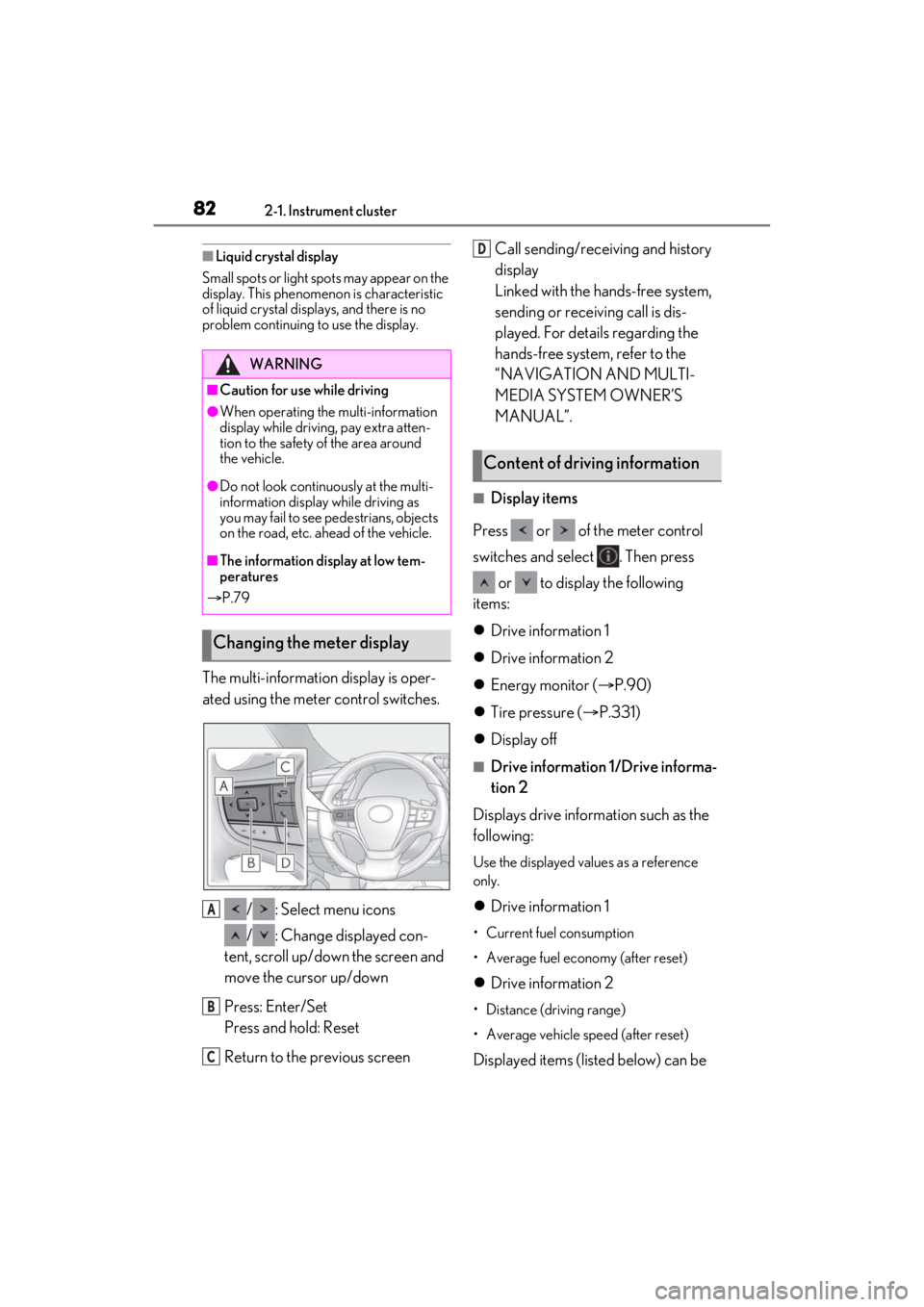
The multi-information display is oper-
ated using the meter control switches.
/ : Select menu icons
/ : Change displayed con-
tent, scroll up/down the screen and
move the cursor up/down
Press: Enter/Set
Press and hold: Reset
Return to the previous screen Call sending/receiving and history
display
Linked with the hands-free system,
sending or receiving call is dis-
played. For details regarding the
hands-free system, refer to the
“NAVIGATION AND MULTI-
MEDIA SYSTEM OWNER’S
MANUAL”.
■Display items
Press or of the meter control
switches and select . Then press or to display the following
items:
Drive information 1
Drive information 2
Energy monitor ( P.90)
Tire pressure ( P.331)
Display off
■Drive information 1/Drive informa-
tion 2
Displays drive information such as the
following:
Use the displayed values as a reference
only.
Drive information 1
• Current fuel consumption
• Average fuel economy (after reset)
Drive information 2
• Distance (driving range)
• Average vehicle speed (after reset)
Displayed items (listed below) can be
WARNING
■Caution for use while driving
●When operating the multi-information
display while driving, pay extra atten-
tion to the safety of the area around
the vehicle.
●Do not look continuously at the multi-
information display while driving as
you may fail to see pedestrians, objects
on the road, etc. ahead of the vehicle.
■The information display at low tem-
peratures
P.79
Changing the meter display
A
B
C
Content of driving information
D
Page 84 of 464
842-1. Instrument cluster
■Meter display settings that can be
changed
Language
Select to change th e language displayed.
Units
Select to change the units of measure dis-
played.
Speedometer display
Select to set the display of the speedome-
ter to digital or analog.
Drive information 1/Drive informa-
tion 2
Select to select up to 2 items ( P.82) that
will be displayed on ea ch Drive information
screen (Drive information 1 screen and
Drive information 2 sc reen) respectively.
Clock
Select to switch be tween 12-hour display
and 24-hour display.
Pop-up display
Select to enable/disable some pop-up dis-
plays for each relevant system.
Accent color
Select to change the accent color on the
screen, such as the cursor color.
Tachometer setting
Select to set the display of the Hybrid Sys-
tem Indicator or tachometer for each driv-
ing mode.
EV indicator
Select to enable/disab le the EV indicator.
Default setting
Select to reset the meter display settings to
the default setting.
■Vehicle functions and settings that
can be changed
P.420
■Suspension of the settings display
●Some settings cannot be changed while
driving. When changing settings, park
the vehicle in a safe place.
●If a warning message is displayed, opera-
tion of the settings display will be sus-
pended.
Displays suggestions to the driver in
the following situations. To select a
response to a displayed suggestion,
use the meter control switches.
■Suggestion to turn off the head-
lights
If the headlights are left on for a certain
amount of time with the headlight
switch in after the power switch
has been turned off, a suggestion mes-
Settings display
WARNING
■Cautions during setting up the dis-
play
As the hybrid system needs to be operat-
ing during setting up the display, ensure
that the vehicle is parked in a place with
adequate ventilation. In a closed area
such as a garage, ex haust gases includ-
ing harmful carbon monoxide (CO) may
collect and enter the vehicle. This may
lead to death or a serious health hazard.
NOTICE
■During setting up the display
To prevent 12-volt battery discharge,
ensure that the hybrid system is operat-
ing while setting up the display features.
Suggestion function
Page 85 of 464

852-1. Instrument cluster
2
Vehicle status information and indicators
sage will be displayed asking if you
wish to turn the headlights off.
To turn the headlights off, select “Yes”.
If a front door is opened after the power
switch is turned off, this suggestion mes-
sage will not be displayed.
■Customization
Some functions can be customized.
( P.420)
Page 92 of 464
922-1. Instrument cluster
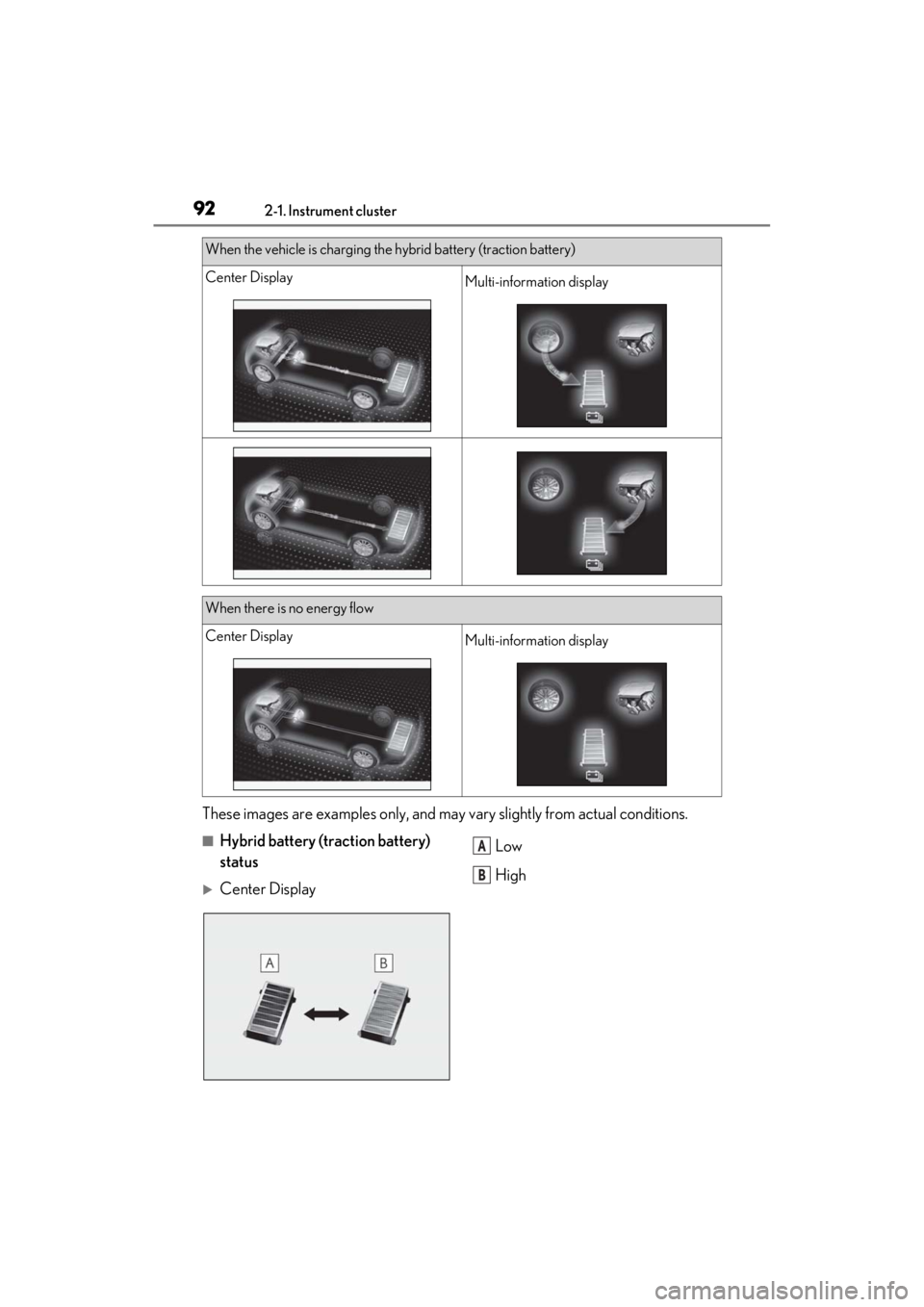
These images are examples only, and may vary slightly from actual conditions.
■Hybrid battery (traction battery)
status
Center Display Low
High
When the vehicle is charging the hybrid battery (traction battery)
Center DisplayMulti-information display
When there is no energy flow
Center DisplayMulti-information display
A
B