light LEXUS ES300h 2021 Workshop Manual
[x] Cancel search | Manufacturer: LEXUS, Model Year: 2021, Model line: ES300h, Model: LEXUS ES300h 2021Pages: 464, PDF Size: 9.55 MB
Page 111 of 464

1113-2. Opening, closing and locking the doors and trunk
3
Before driving
trical noise source which affects the sen-
sitivity of the Hands Free Power Trunk
Lid, such as a pay parking spot, gas sta-
tion, electrically heated road, or fluores-
cent light
●When the vehicle is near a TV tower,
electric power plant, radio station, large
display, airport or other facility that gen-
erates strong radio waves or electrical
noise
●When the vehicle is parked in a place
where objects such as plants are near the
rear bumper
●If luggage, etc. is set near the rear
bumper
●If accessories or a vehicle cover is
installed/removed near the rear bumper
●When the vehicle is being towed
To prevent unintentional operation, turn the
Hands Free Power Trun k Lid (kick sensor)
operation setting off.
■Open door warning buzzer
P.104
■Customization
Some functions can be customized. (Cus-
tomizable features: P.420)
The trunk opener switch can be tem-
porarily disabled to protect luggage
stored in the trunk against theft.
Turn the trunk opener main switch in
the glove box off to disable the trunk
opener. On
Off
When the trunk opener main switch is off,
the trunk lid cannot be opened even with
the wireless remote control, entry function
or Hands Free Power Trunk Lid.
■When leaving a key to the vehicle with a
parking attendant
P.100
Protecting luggage against theft
A
B
Page 121 of 464
1213-3. Adjusting the seats
3
Before driving
button is pressed, press button “1”,
“2” or “3” until the buzzer sounds.
If the selected button has already been
preset, the previously recorded position
will be overwritten.
■Seat positions that can be memorized
( P.119)
The positions adjusted by the following pro-
cedure can be recorded:
●Seat position adjustment
●Seatback angle adjustment
●Seat cushion (front) angle adjustment
●Vertical height adjustment
■In order to correctly use the driving
position memory function
If a seat position is already in the furthest
possible position and the seat is operated in
the same direction, the recorded position
may be slightly differen t when it is recalled.
1Check that the shift lever is in P.
2 Turn the power switch to ON
mode. 3
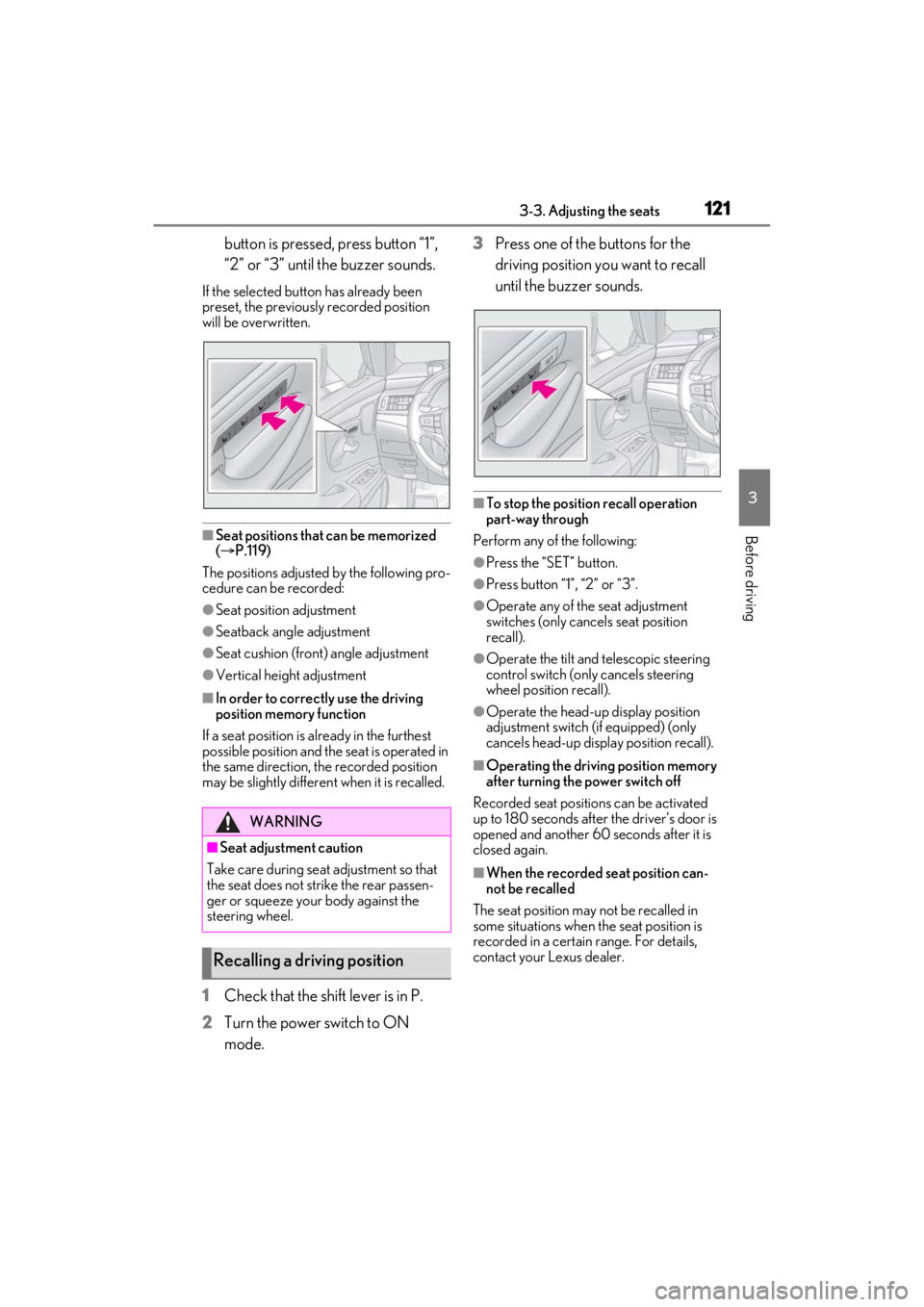
Press one of the buttons for the
driving position you want to recall
until the buzzer sounds.
■To stop the position recall operation
part-way through
Perform any of the following:
●Press the “SET” button.
●Press button “1”, “2” or “3”.
●Operate any of the seat adjustment
switches (only cancels seat position
recall).
●Operate the tilt and telescopic steering
control switch (onl y cancels steering
wheel position recall).
●Operate the head-up display position
adjustment switch (if equipped) (only
cancels head-up display position recall).
■Operating the driving position memory
after turning the power switch off
Recorded seat positions can be activated
up to 180 seconds after the driver’s door is
opened and another 60 seconds after it is
closed again.
■When the recorded seat position can-
not be recalled
The seat position may not be recalled in
some situations when the seat position is
recorded in a certain range. For details,
contact your Lexus dealer.
WARNING
■Seat adjustment caution
Take care during seat adjustment so that
the seat does not strike the rear passen-
ger or squeeze your body against the
steering wheel.
Recalling a driving position
Page 122 of 464
1223-3. Adjusting the seats
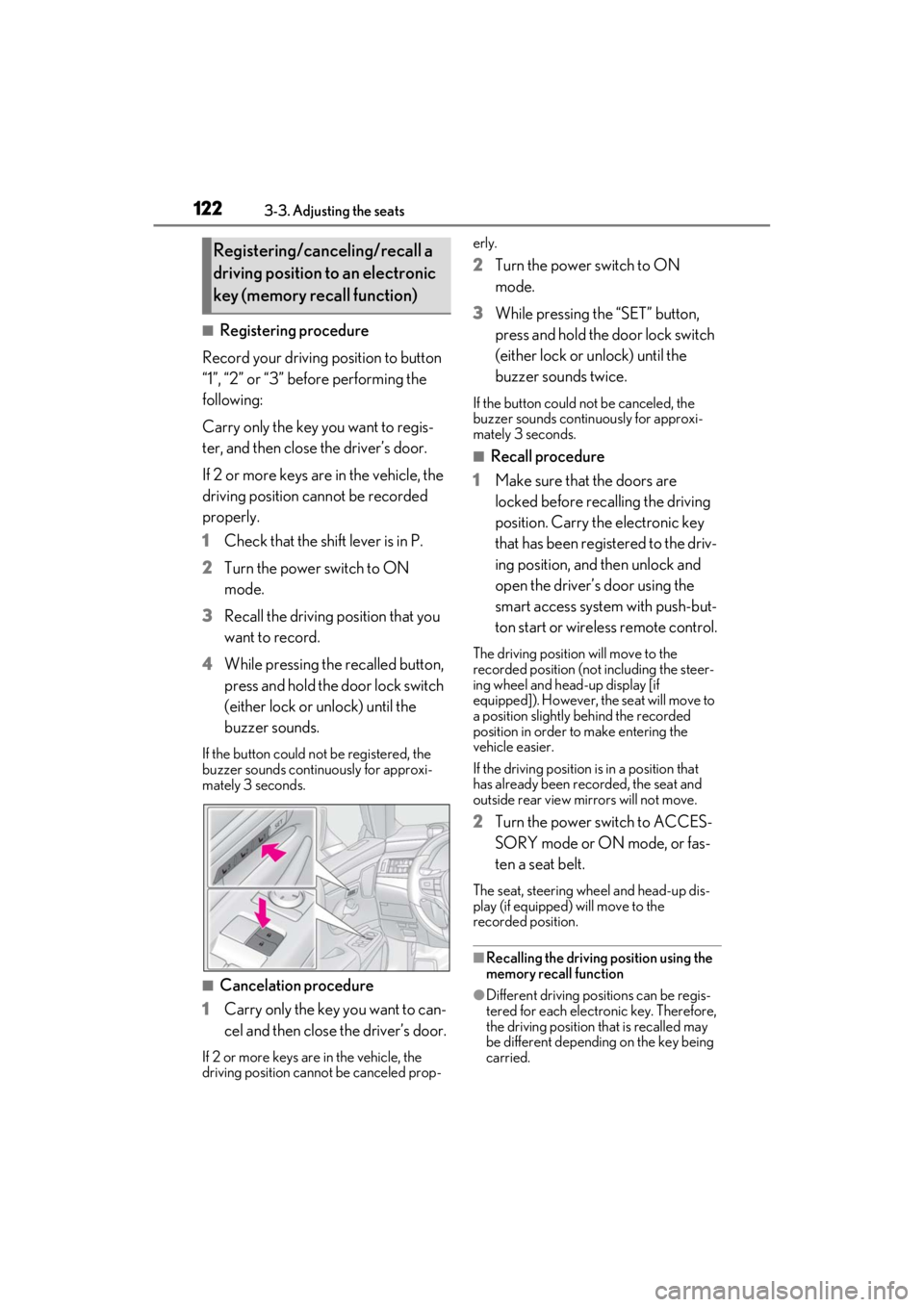
■Registering procedure
Record your driving position to button
“1”, “2” or “3” before performing the
following:
Carry only the key you want to regis-
ter, and then close the driver’s door.
If 2 or more keys are in the vehicle, the
driving position cannot be recorded
properly.
1 Check that the shift lever is in P.
2 Turn the power switch to ON
mode.
3 Recall the driving position that you
want to record.
4 While pressing the recalled button,
press and hold the door lock switch
(either lock or unlock) until the
buzzer sounds.
If the button could not be registered, the
buzzer sounds continuously for approxi-
mately 3 seconds.
■Cancelation procedure
1 Carry only the key you want to can-
cel and then close the driver’s door.
If 2 or more keys are in the vehicle, the
driving position cannot be canceled prop- erly.
2
Turn the power switch to ON
mode.
3 While pressing the “SET” button,
press and hold the door lock switch
(either lock or unlock) until the
buzzer sounds twice.
If the button could not be canceled, the
buzzer sounds continuously for approxi-
mately 3 seconds.
■Recall procedure
1 Make sure that the doors are
locked before recalling the driving
position. Carry the electronic key
that has been registered to the driv-
ing position, and then unlock and
open the driver’s door using the
smart access system with push-but-
ton start or wireless remote control.
The driving position will move to the
recorded position (not including the steer-
ing wheel and head-up display [if
equipped]). However, the seat will move to
a position slightly behind the recorded
position in order to make entering the
vehicle easier.
If the driving position is in a position that
has already been recorded, the seat and
outside rear view mirrors will not move.
2Turn the power switch to ACCES-
SORY mode or ON mode, or fas-
ten a seat belt.
The seat, steering wheel and head-up dis-
play (if equipped) will move to the
recorded position.
■Recalling the driving position using the
memory recall function
●Different driving positions can be regis-
tered for each electronic key. Therefore,
the driving position that is recalled may
be different depending on the key being
carried.
Registering/canceling/recall a
driving position to an electronic
key (memory recall function)
Page 126 of 464
1263-4. Adjusting the steering wheel and mirrors
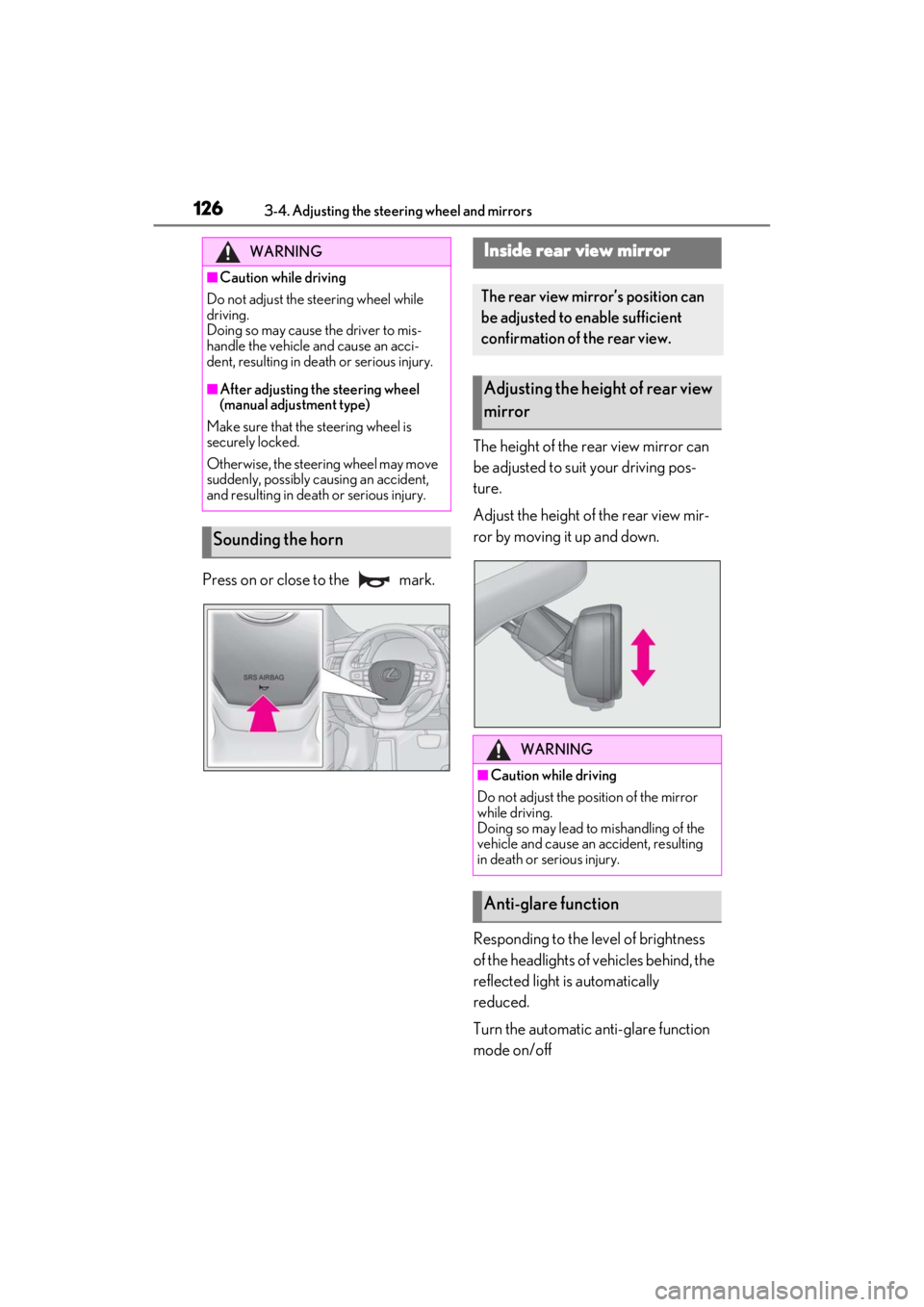
Press on or close to the mark.The height of the rear view mirror can
be adjusted to suit your driving pos-
ture.
Adjust the height of the rear view mir-
ror by moving it up and down.
Responding to the level of brightness
of the headlights of vehicles behind, the
reflected light is automatically
reduced.
Turn the automatic anti-glare function
mode on/off
WARNING
■Caution while driving
Do not adjust the steering wheel while
driving.
Doing so may cause the driver to mis-
handle the vehicle and cause an acci-
dent, resulting in death or serious injury.
■After adjusting the steering wheel
(manual adjustment type)
Make sure that the steering wheel is
securely locked.
Otherwise, the steering wheel may move
suddenly, possibly causing an accident,
and resulting in deat h or serious injury.
Sounding the horn
Inside rear view mirror
The rear view mirror’s position can
be adjusted to enable sufficient
confirmation of the rear view.
Adjusting the height of rear view
mirror
WARNING
■Caution while driving
Do not adjust the position of the mirror
while driving.
Doing so may lead to mishandling of the
vehicle and cause an accident, resulting
in death or serious injury.
Anti-glare function
Page 128 of 464
1283-4. Adjusting the steering wheel and mirrors
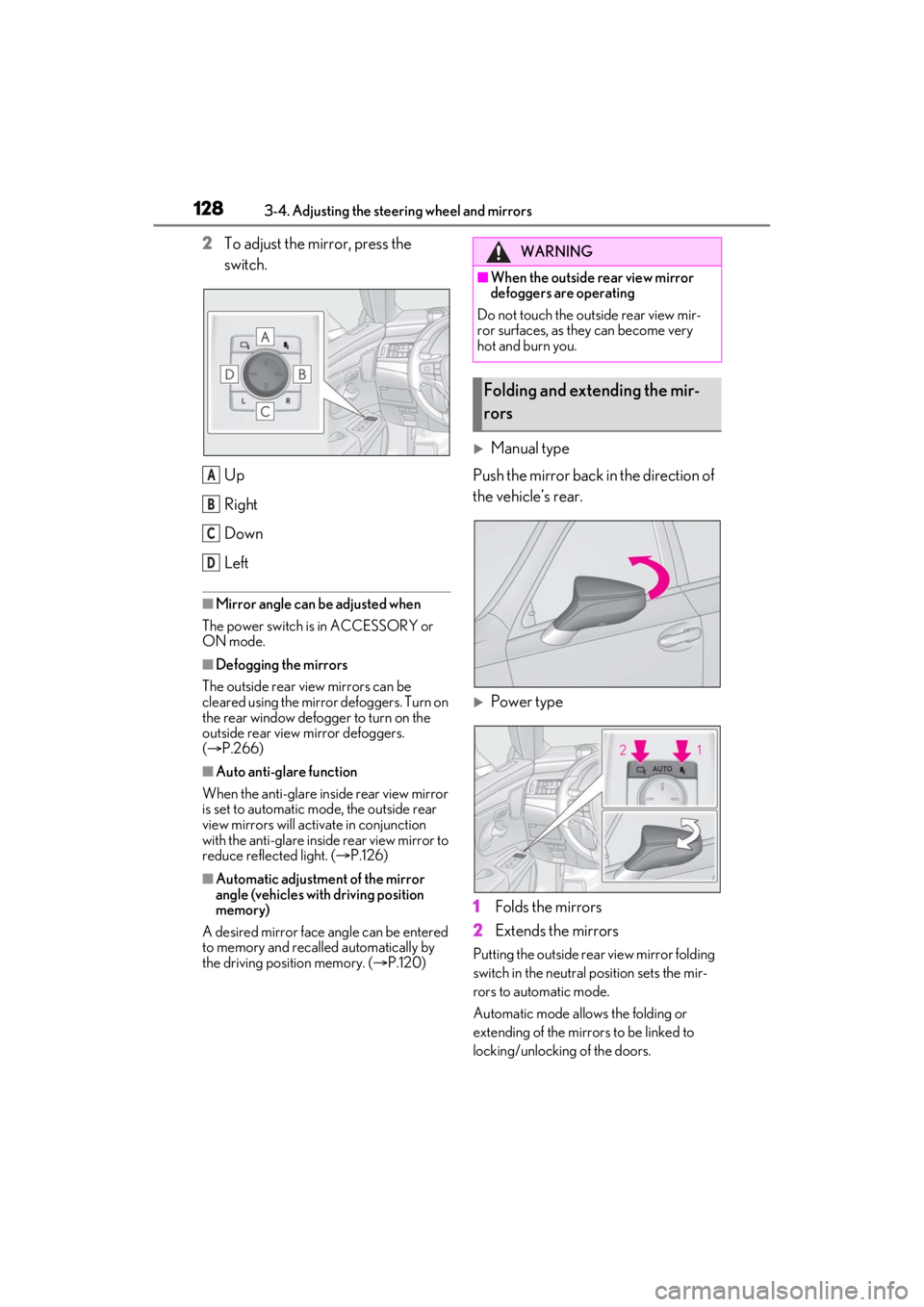
2To adjust the mirror, press the
switch.
Up
Right
Down
Left
■Mirror angle can be adjusted when
The power switch is in ACCESSORY or
ON mode.
■Defogging the mirrors
The outside rear view mirrors can be
cleared using the mirror defoggers. Turn on
the rear window defogger to turn on the
outside rear view mirror defoggers.
( P.266)
■Auto anti-glare function
When the anti-glare insi de rear view mirror
is set to automatic mode, the outside rear
view mirrors will activate in conjunction
with the anti-glare inside rear view mirror to
reduce reflected light. ( P.126)
■Automatic adjustment of the mirror
angle (vehicles with driving position
memory)
A desired mirror face angle can be entered
to memory and recalled automatically by
the driving position memory. ( P.120)
Manual type
Push the mirror back in the direction of
the vehicle’s rear.
Power type
1 Folds the mirrors
2 Extends the mirrors
Putting the outside rear view mirror folding
switch in the neutral position sets the mir-
rors to automatic mode.
Automatic mode allows the folding or
extending of the mirrors to be linked to
locking/unlocking of the doors.
A
B
C
D
WARNING
■When the outside rear view mirror
defoggers are operating
Do not touch the outside rear view mir-
ror surfaces, as they can become very
hot and burn you.
Folding and extending the mir-
rors
Page 130 of 464
1303-5. Opening and closing the windows and moon roof
3-5.Opening and closing the windows and moon roof
The power windows can be opened
and closed by one-touch operation of
the switches.
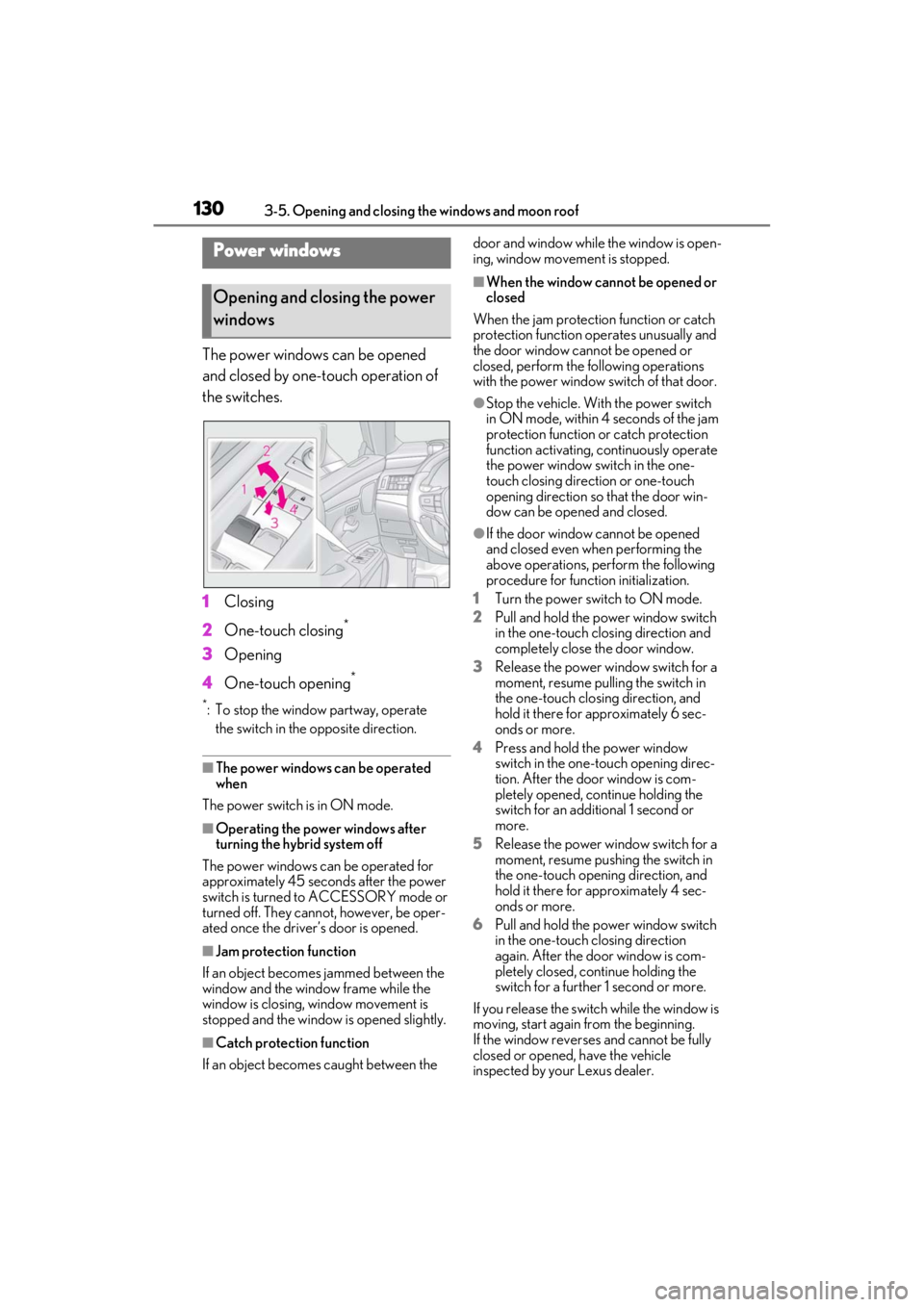
1Closing
2 One-touch closing
*
3Opening
4 One-touch opening
*
*: To stop the window partway, operate
the switch in the opposite direction.
■The power windows can be operated
when
The power switch is in ON mode.
■Operating the power windows after
turning the hybrid system off
The power windows can be operated for
approximately 45 seconds after the power
switch is turned to ACCESSORY mode or
turned off. They cannot, however, be oper-
ated once the driver’s door is opened.
■Jam protection function
If an object becomes jammed between the
window and the window frame while the
window is closing, window movement is
stopped and the window is opened slightly.
■Catch protection function
If an object becomes caught between the door and window while the window is open-
ing, window movement is stopped.
■When the window cannot be opened or
closed
When the jam protection function or catch
protection function operates unusually and
the door window cannot be opened or
closed, perform the following operations
with the power window switch of that door.
●Stop the vehicle. With the power switch
in ON mode, within 4 seconds of the jam
protection function or catch protection
function activating, continuously operate
the power window switch in the one-
touch closing direction or one-touch
opening direction so that the door win-
dow can be opened and closed.
●If the door window cannot be opened
and closed even when performing the
above operations, perform the following
procedure for function initialization.
1 Turn the power switch to ON mode.
2 Pull and hold the power window switch
in the one-touch closing direction and
completely close the door window.
3 Release the power window switch for a
moment, resume pulling the switch in
the one-touch closing direction, and
hold it there for approximately 6 sec-
onds or more.
4 Press and hold the power window
switch in the one-touch opening direc-
tion. After the door window is com-
pletely opened, continue holding the
switch for an additional 1 second or
more.
5 Release the power window switch for a
moment, resume pushing the switch in
the one-touch opening direction, and
hold it there for approximately 4 sec-
onds or more.
6 Pull and hold the power window switch
in the one-touch closing direction
again. After the door window is com-
pletely closed, continue holding the
switch for a further 1 second or more.
If you release the switch while the window is
moving, start again from the beginning.
If the window reverses and cannot be fully
closed or opened, have the vehicle
inspected by your Lexus dealer.
Power windows
Opening and closing the power
windows
Page 132 of 464
1323-5. Opening and closing the windows and moon roof
The indicator will come on and the
passenger windows will be locked.
■The power windows can be operated
when
The power switch is in ON mode.
■When the 12-volt battery is discon-
nected
The window lock switch is disabled. If nec-
essary, press the window lock switch after
reconnecting the 12-volt battery.
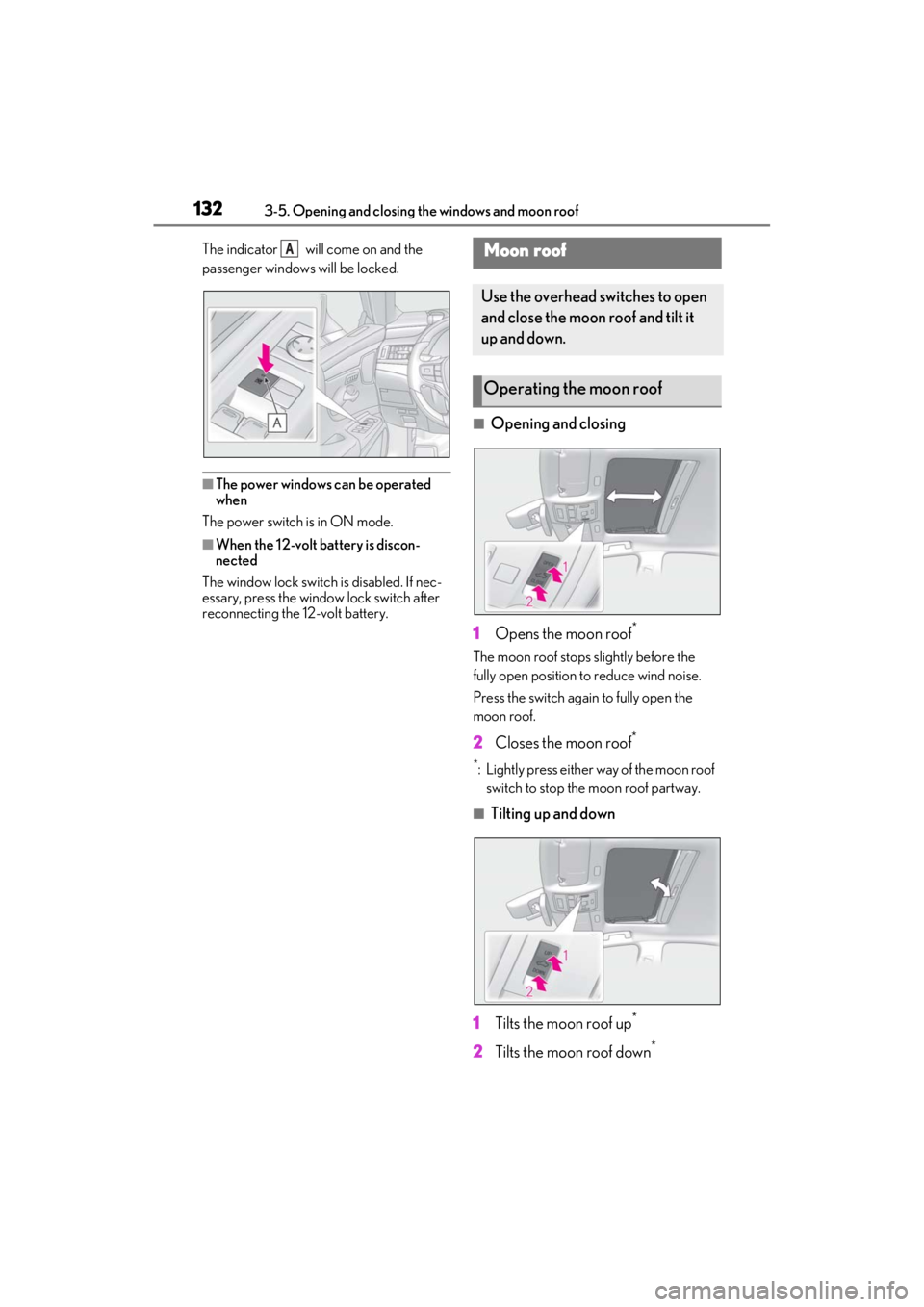
■Opening and closing
1 Opens the moon roof
*
The moon roof stops slightly before the
fully open position to reduce wind noise.
Press the switch again to fully open the
moon roof.
2 Closes the moon roof*
*: Lightly press either way of the moon roof
switch to stop the moon roof partway.
■Tilting up and down
1 Tilts the moon roof up
*
2Tilts the moon roof down*
AMoon roof
Use the overhead switches to open
and close the moon roof and tilt it
up and down.
Operating the moon roof
Page 133 of 464
1333-5. Opening and closing the windows and moon roof
3
Before driving
*: Lightly press either way of the moon roof
switch to stop the moon roof partway.
■The moon roof can be operated when
The power switch is in ON mode.
■Operating the moon roof after turning
the hybrid system off
The moon roof can be operated for approx-
imately 45 seconds after the power switch
is turned to ACCESSORY mode or turned
off. It cannot, however, be operated once
either front door is opened.
■Jam protection function
If an object is detected between the moon
roof and the frame while the moon roof is
closing or tilting down, travel is stopped and
the moon roof opens slightly.
■Sunshade
The sunshade can be opened and closed
manually. However, the sunshade will open
automatically when the moon roof is
opened.
■Door lock linked moon roof operation
●The moon roof can be opened and
closed using the mechanical key.*
( P.389)
●The moon roof can be opened using the
wireless remote control.* ( P.101)
*: These settings must be customized at
your Lexus dealer.
■When the moon roof does not close nor-
mally
Perform the following procedure:
1 Stop the vehicle.
2 Press and hold the “CLOSE” switch.
*
The moon roof will close, reopen and pause
for approximately 10 se conds. Then it will
close again and stop at the completely
closed position.
3 Check to make sure that the moon roof
is completely closed and then release
the switch.
*: If the switch is released at the incorrect
time, the procedure will have to be per- formed again from the beginning.
If the moon roof does not fully close even
after performing the above procedure cor-
rectly, have the vehicle inspected by your
Lexus dealer.
■If the moon roof does not move normally
If the moon roof does not open or close
normally or the automatic opening function
does not operate, perform the following ini-
tialization procedure.
1 Stop the vehicle.
2 Press and hold the “DOWN” switch.
*
The moon roof will stop at the tilt-up posi-
tion. After that, it will open, close, tilt up, tilt
down, and stop at the fully closed position.
3 Confirm that the moon roof has com-
pletely stopped and release the switch.
*:If you release the sw itch while the moon
roof is moving, perform the procedure
again from the beginning.
If, after performing the above procedures
correctly, the moon roof still does not open
or close normally or the automatic opening
function does not operate, have the vehicle
inspected by your Lexus dealer.
■Moon roof open warning buzzer
A buzzer sounds and a message is shown
on the multi-informat ion display when the
power switch is turned off and the driver’s
door is opened with the moon roof open.
■Customization
Settings (e.g. linked door lock operation)
can be changed. (Customizable fea-
tures: P.420)
WARNING
Observe the following precautions.
Failure to do so may cause death or seri-
ous injury.
■Opening the moon roof
●Do not allow any passengers to put
their hands or heads outside the vehi-
cle while it is moving.
●Do not sit on top of the moon roof.
Page 135 of 464
135
4
4
Driving
Driving
4-1. Before drivingDriving the vehicle ..................... 136
Cargo and luggage .................... 141
Vehicle load limits ...................... 143
Trailer towing ............................... 144
Dinghy towing ............................. 144
4-2. Driving procedures Power (ignition) switch ............ 145
EV drive mode ............................ 150
Hybrid transmission .................. 152
Turn signal lever.......................... 156
Parking brake .............................. 157
Brake Hold.................................... 159
4-3. Operating the lights and wipers
Headlight switch .......................... 161
Automatic High Beam ............. 164
Windshield wipers and washer ......................................................... 167
4-4. Refueling Opening the fuel tank cap...... 172
4-5. Using the driving support sys- tems
Lexus Safety System + 2.0 ..... 174
PCS (Pre-Collision System).. 180
LTA (Lane Tracing Assist)...... 187
RSA (Road Sign Assist) ........... 196
Dynamic radar cruise control with full-speed range....................... 198
BSM (Blind Spot Monitor) .... 208
Driving Mode Select switch .. 213PKSA (Parking Support Alert)
........................................................ 215
Intuitive parking assist .............. 216
RCTA (Rear Cross Traffic Alert) function........................................ 222
RCD (Rear Camera Detection) function........................................ 227
PKSB (Parking Support Brake) ....................................................... 229
Parking Support Brake function (static objects) ......................... 235
Parking Support Brake function (rear-crossing vehicles) ........ 241
Parking Support Brake function (rear pedestrians) .................. 245
Driving assist systems.............. 248
4-6. Driving tips Hybrid vehicle driving tips .... 252
Winter driving tips .................... 254
Page 137 of 464
1374-1. Before driving
4
Driving
■Restraining sudden start (Drive-Start
Control)
●When the following unusual operation is
performed, the hybrid system output may
be restrained.
• When the shift lever is shifted from R to D, D to R, N to R, P to D, or P to R (D
includes S) with the accelerator pedal
depressed, a warning message appears
on the multi-information display. If a
warning message is shown on the multi-
information display, read the message
and follow the instructions.
• When the accelerator pedal is depressed
too much while the vehicle is in reverse.
●While Drive-Start Control is being acti-
vated, your vehicle may have trouble
escaping from the mud or fresh snow. In
such case, deactivate TRAC ( P.249)
to cancel Drive-Start Control so that the
vehicle may become able to escape from
the mud or fresh snow.
■Breaking in your new Lexus
To extend the life of the vehicle, observing
the following precautions is recommended:
●For the first 186 miles (300 km):
Avoid sudden stops.
●For the first 621 miles (1000 km):
• Do not drive at extremely high speeds.
• Avoid sudden acceleration.
• Do not drive continuously in low gears.
• Do not drive at a constant speed for
extended periods.
■Operating your vehicle in a foreign
country
Comply with the relevant vehicle registra-
tion laws and confirm the availability of the
correct fuel. ( P.403)
WARNING
Observe the following precautions.
Failure to do so may result in death or
serious injury.
■When starting the vehicle
Always keep your foot on the brake
pedal while stopped with the “READY”
indicator is illuminated. This prevents the
vehicle from creeping.
■When driving the vehicle
●Do not drive if you are unfamiliar with
the location of the brake and accelera-
tor pedals to avoid depressing the
wrong pedal.
• Accidentally depressing the accelera- tor pedal instead of the brake pedal
will result in sudden acceleration that
may lead to an accident.
• When backing up, you may twist your body around, leading to a difficulty in
operating the pedals. Make sure to
operate the pedals properly.
• Make sure to keep a correct driving posture even when moving the vehicle
only slightly. This allows you to depress
the brake and accelerator pedals
properly.
• Depress the brake pedal using your right foot. Depressing the brake pedal
using your left foot may delay
response in an emer gency, resulting in
an accident.
●The driver should pay extra attention
to pedestrians when the vehicle is
powered only by the electric motor
(traction motor). As there is no engine
noise, the pedestrians may misjudge
the vehicle’s movement. Even though
the vehicle is equipped with the acous-
tic vehicle alerting system, drive with
care as pedestrians in the vicinity may
still not notice the vehicle if the sur-
rounding area is noisy.
●Do not drive the vehicle over or stop
the vehicle near flammable materials.
The exhaust system and exhaust gases
can be extremely hot. These hot parts
may cause a fire if there is any flamma-
ble material nearby.