parking support LEXUS ES300h 2021 Owner's Guide
[x] Cancel search | Manufacturer: LEXUS, Model Year: 2021, Model line: ES300h, Model: LEXUS ES300h 2021Pages: 464, PDF Size: 9.55 MB
Page 245 of 464
2454-5. Using the driving support systems
4
Driving
*:If equipped
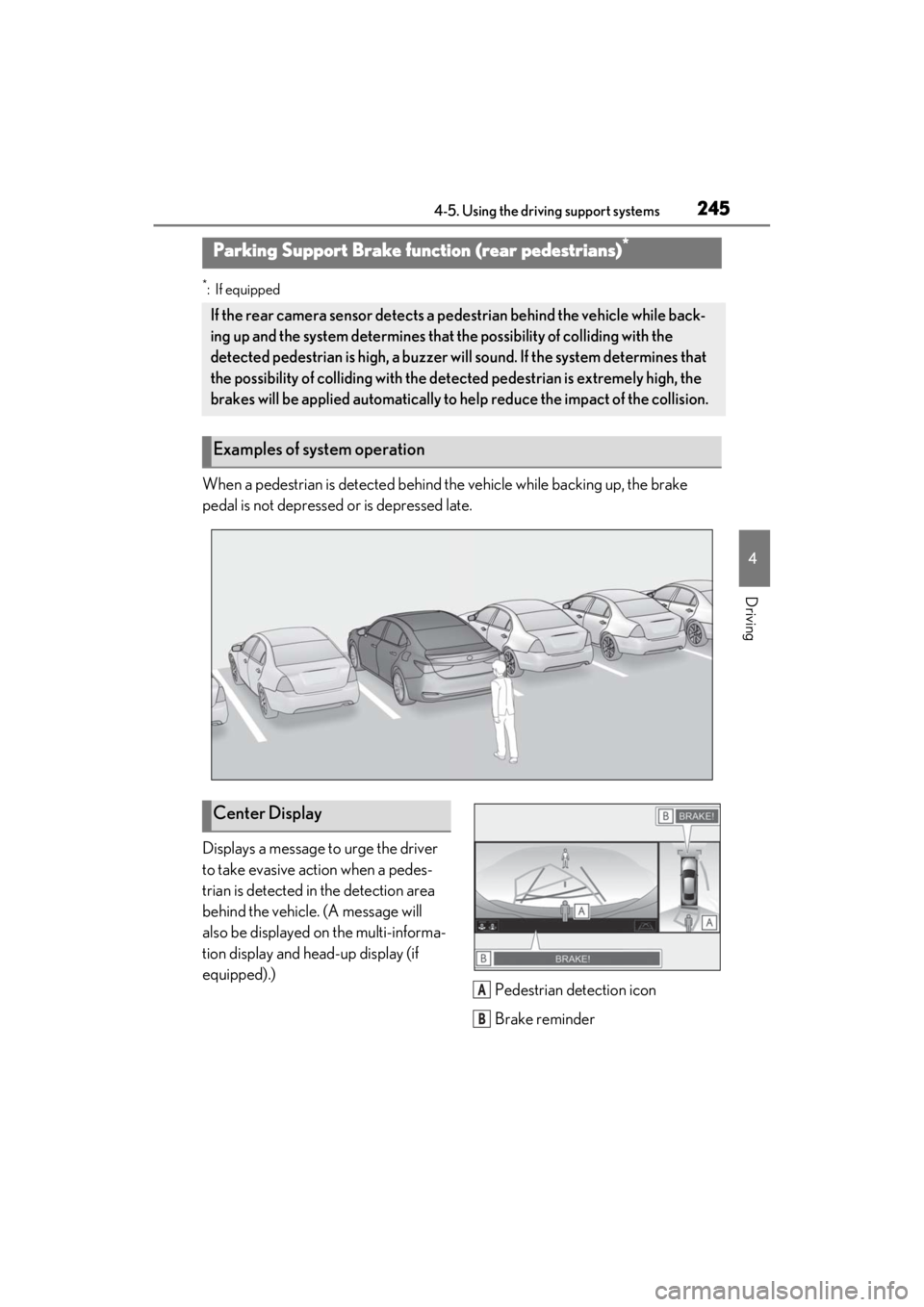
When a pedestrian is detected behind the vehicle while backing up, the brake
pedal is not depressed or is depressed late.
Displays a message to urge the driver
to take evasive action when a pedes-
trian is detected in the detection area
behind the vehicle. (A message will
also be displayed on the multi-informa-
tion display and head-up display (if
equipped).)Pedestrian detection icon
Brake reminder
Parking Support Brake function (rear pedestrians)*
If the rear camera sensor detects a pedestrian behind the vehicle while back-
ing up and the system determines that the possibility of colliding with the
detected pedestrian is high, a buzzer will sound. If the system determines that
the possibility of colliding with the dete cted pedestrian is extremely high, the
brakes will be applied automatically to he lp reduce the impact of the collision.
Examples of system operation
Center Display
A
B
Page 246 of 464
2464-5. Using the driving support systems
■Parking Support Brake function (rear
pedestrians) will operate when
The function will oper ate when the PKSB
OFF indicator is not illuminated or flashing
( P.74, 75) and all of the following condi-
tions are met:
●Hybrid system output restriction control
• The Parking Support Brake is enabled.
• The vehicle speed is 9 mph (15 km/h) or less.
• The shift position is in R.
• The rear camera sensor detects a pedes- trian behind the vehicle while backing up
and the system determines that the possi-
bility of colliding with the detected
pedestrian is high.
●Brake control • Hybrid system output restriction control
is operating.
• The Parking Support Brake determines
that an emergency brake operation is
necessary to avoid a collision with a
pedestrian.
■The Parking Support Brake function
(rear pedestrians) will stop operating
when
The function will stop operating if any of the
following conditions are met:
●Hybrid system output restriction control
• The Parking Support Brake is disabled.
• The collision becomes avoidable with normal brake operation.
• The pedestrian is no longer detected behind your vehicle.
●Brake control
• The Parking Support Brake is disabled.
• Approximately 2 seconds have elapsed
since the vehicle was stopped by brake
control.
• The brake pedal is depressed after the vehicle is stopped by brake control.
• The pedestrian is no longer detected
behind your vehicle.
■Re-enabling the Parking Support Brake
function (rear pedestrians)
P.233
■Detection area of the Parking Support
Brake function (rear pedestrians)
The detection area of the Parking Support
Brake function (rear pedestrians) differs
from the detection area of the RCD func-
tion ( P.227). Therefore, even if the RCD
function detects a pedestrian and provides
an alert, the Parking Support Brake func-
tion (rear pedestrians) may not start operat-
ing.
■Situations in which the system may not
operate properly
●Some pedestrians, such as the following,
may not be detected by the Parking Sup-
port Brake function (rear pedestrians),
preventing the function from operating
properly:
• Pedestrians who are bending forward or
squatting
• Pedestrians who are lying down
• Pedestrians who are running
WARNING
■If the Parking Support Brake function
(rear pedestrians) operates unneces-
sarily
Depress the brake pedal immediately
after the Parking Support Brake function
(rear pedestrians) operates. (Operation
of the function is canceled by depressing
the brake pedal.)
■In order to correctly use the Parking
Support Brake function (rear pedes-
trians)
Do not rely solely upon the system.
Depending on the road conditions, vehi-
cle conditions, and weather conditions,
etc., the system may not operate. The
detection capability of the rear camera is
limited. Always driv e while confirming
the safety of the surroundings of the vehi-
cle.
Also, if the PKSB OFF indicator is flash-
ing or the message indicating that the
system is unavailable is displayed over
the camera image, the system cannot be
used. However, even if the indicator is
not flashing or the message is not dis-
played, do not rely solely upon the sys-
tem and make sure to always drive while
directly confirming the safety of your sur-
roundings.
Page 247 of 464

2474-5. Using the driving support systems
4
Driving
• Pedestrians who suddenly enter the detection area
• People riding a bicycle, skateboard, or
other light vehicle
• Pedestrians wearing oversized clothing such as a rain coat, long skirt, etc., making
their silhouette obscure
• Pedestrians whose body is partially hid- den by an object, such as a cart or
umbrella
• Pedestrians which are obscured by dark- ness, such as at night
●In some situations, such as the following,
pedestrians may not be detected by the
Parking Support Brake function (rear
pedestrians), preventing the function
from operating properly:
• When backing up in inclement weather (rain, snow, fog, etc.)
• When the rear camera is obscured (dirt,
snow, ice, etc. are attached) or scratched
• When a very bright light, such as the sun, or the headlights of another vehicle,
shines directly into the rear camera
• When backing up in a place where the surrounding brightness changes sud-
denly, such as at the entrance or exit of a
garage or underground parking lot
• When backing up in a dim environment
such as during dusk or in an underground
parking lot
●Even though there are no pedestrians in
the detection area, some objects, such as
the following, may be detected, possibly
causing the Parking Support Brake func-
tion (rear pedestri ans) to operate.
• Three dimensional objects, such as a
pole, traffic cone, fence, or parked vehi-
cle
• Moving objects, such as a car or motor-
cycle
• Objects moving toward your vehicle when backing up, such as flags or pud-
dles (or airborne matter, such as smoke,
steam, rain, or snow)
• Cobblestone or gravel roads, tram rails, road repairs, white lines, pedestrian
crossings, puddles or fallen leaves on the
road
• Metal covers (gratings), such as those
used for drainage ditches
• Objects reflected in a puddle or on a wet road surface • The roadside or bumps on the road
•Shadows on the road
●In some situations, such as the following,
the Parking Support Brake function (rear
pedestrians) may operate even though
there are no pedestrians in the detection
area.
• When backing up toward the roadside or
a bump on the road
• If the vehicle is signif icantly tilted, such as
when carrying a heavy load
• When backing up toward an incline/decline
• If the suspension has been modified or
tires of a size othe r than specified are
installed
• If the rear of the vehicle is raised or low-
ered due to the carried load
• If an electronic component, such as a backlit license plate or rear fog light, is
installed near the rear camera
• If a bumper protector, such as an addi- tional trim strip, is installed to the rear
bumper
• If the orientation of the rear camera has been changed due to a collision or other
impact, or removal and installation
• If a towing eyelet is in stalled to the rear of
the vehicle
• When water is flowing over the rear cam- era lens
• When the rear camera is obscured (dirt,
snow, ice, etc. are at tached) or scratched
• If there is a flashing light in the detection area, such as the emergency flashers of
another vehicle
Page 249 of 464
2494-5. Using the driving support systems
4
Driving
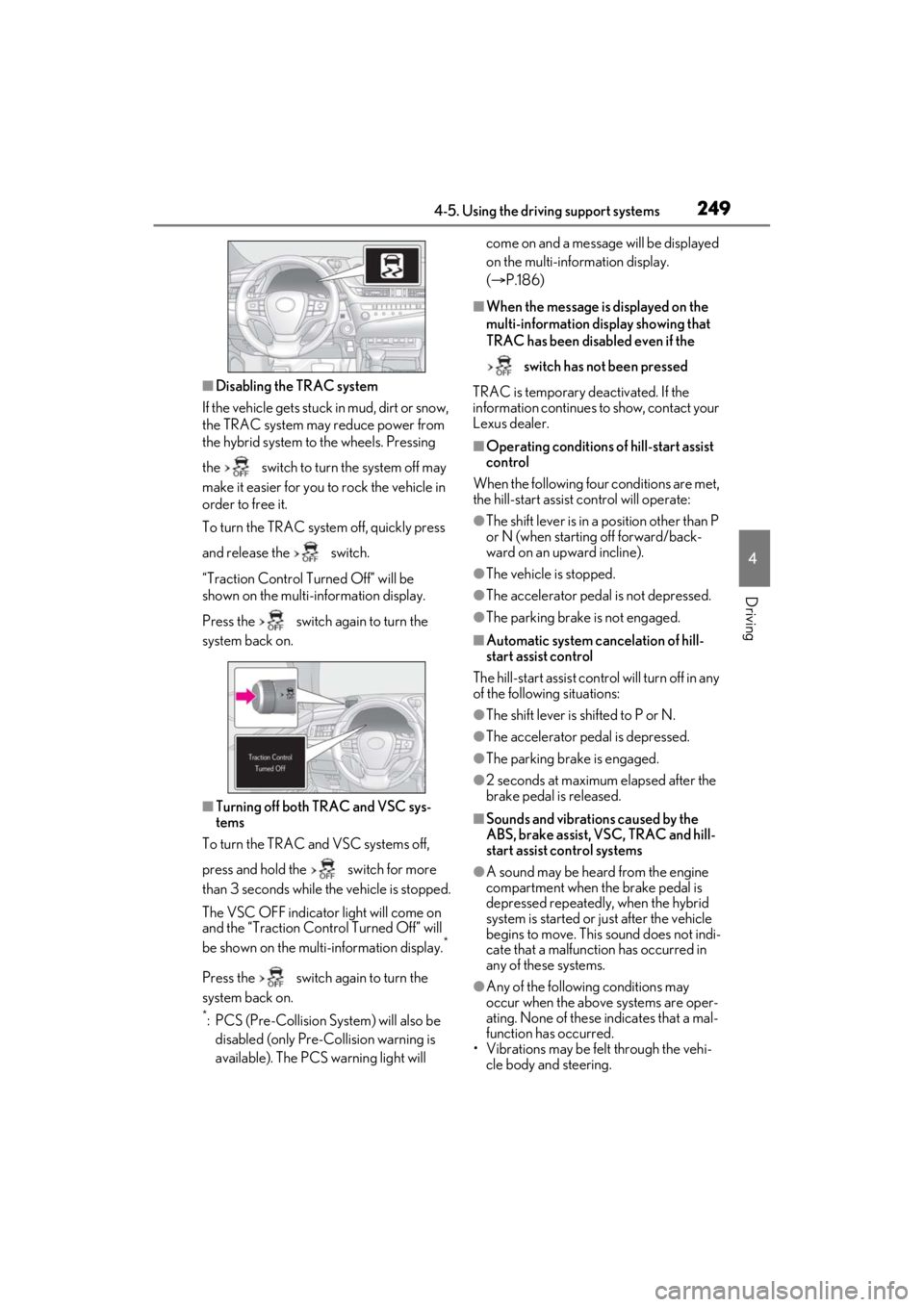
■Disabling the TRAC system
If the vehicle gets stuck in mud, dirt or snow,
the TRAC system may reduce power from
the hybrid system to the wheels. Pressing
the switch to turn the system off may
make it easier for you to rock the vehicle in
order to free it.
To turn the TRAC system off, quickly press
and release the switch.
“Traction Control Turned Off” will be
shown on the multi-information display.
Press the switch again to turn the
system back on.
■Turning off both TRAC and VSC sys-
tems
To turn the TRAC and VSC systems off,
press and hold the switch for more
than 3 seconds while the vehicle is stopped.
The VSC OFF indicator light will come on
and the “Traction Cont rol Turned Off” will
be shown on the multi-information display.
*
Press the switch again to turn the
system back on.
*: PCS (Pre-Collision System) will also be disabled (only Pre-Collision warning is
available). The PCS warning light will come on and a message will be displayed
on the multi-information display.
(
P.186)
■When the message is displayed on the
multi-information display showing that
TRAC has been disabled even if the
switch has not been pressed
TRAC is temporary deactivated. If the
information continues to show, contact your
Lexus dealer.
■Operating conditions of hill-start assist
control
When the following four conditions are met,
the hill-start assist control will operate:
●The shift lever is in a position other than P
or N (when starting off forward/back-
ward on an up ward incline).
●The vehicle is stopped.
●The accelerator pedal is not depressed.
●The parking brake is not engaged.
■Automatic system cancelation of hill-
start assist control
The hill-start assist control will turn off in any
of the following situations:
●The shift lever is shifted to P or N.
●The accelerator pedal is depressed.
●The parking brake is engaged.
●2 seconds at maximum elapsed after the
brake pedal is released.
■Sounds and vibrations caused by the
ABS, brake assist, VSC, TRAC and hill-
start assist control systems
●A sound may be heard from the engine
compartment when the brake pedal is
depressed repeatedly, when the hybrid
system is started or just after the vehicle
begins to move. This sound does not indi-
cate that a malfunction has occurred in
any of these systems.
●Any of the following conditions may
occur when the above systems are oper-
ating. None of these indicates that a mal-
function has occurred.
• Vibrations may be felt through the vehi-
cle body and steering.
Page 251 of 464
2514-5. Using the driving support systems
4
Driving
WARNING
■Stopping distance when the ABS is
operating may exceed that of normal
conditions
The ABS is not designed to shorten the
vehicle’s stopping distance. Always
maintain a safe distance from the vehicle
in front of you, especially in the following
situations:
●When driving on dirt, gravel or snow-
covered roads
●When driving with tire chains
●When driving over bumps in the road
●When driving over roads with pot-
holes or uneven surfaces
■TRAC/VSC may not operate effec-
tively when
Directional control and power may not
be achievable while driving on slippery
road surfaces, even if the TRAC/VSC
system is operating.
Drive the vehicle carefully in conditions
where stability and power may be lost.
■Active Cornering Assist does not
operate effectively when
●Do not overly rely on Active Corner-
ing Assist. Active Cornering Assist
may not operate effectively when
accelerating down slopes or driving on
slippery road surfaces.
●When Active Cornering Assist fre-
quently operates, Active Cornering
Assist may temporarily stop operating
to ensure proper operation of the
brakes, TRAC and VSC.
■Hill- start assist control does not
operate effectively when
●Do not overly rely on hill-start assist
control. Hill-start assist control may
not operate effectively on steep
inclines and roads covered with ice.
●Unlike the parking brake, hill-start
assist control is not intended to hold
the vehicle stationary for an extended
period of time. Do not attempt to use
hill-start assist control to hold the vehi-
cle on an incline, as doing so may lead
to an accident.
■When the TRAC/ABS/VSC is acti-
vated
The slip indicator light flashes. Always
drive carefully. Reckless driving may
cause an accident. Exercise particular
care when the indicator light flashes.
■When the TRAC/VSC systems are
turned off
Be especially careful and drive at a
speed appropriate to the road condi-
tions. As these are the systems to help
ensure vehicle stability and driving force,
do not turn the TRAC/VSC systems off
unless necessary.
■Secondary Collision Brake
Do not rely solely upon the Secondary
Collision Brake. This system is designed
to help reduce the possibility of further
damage due to a secondary collision,
however, that effect changes according
to various conditions. Overly relying on
the system may result in death or serious
injury.
■Replacing tires
Make sure that all ti res are of the speci-
fied size, brand, tread pattern and total
load capacity. In addition, make sure that
the tires are inflated to the recom-
mended tire inflation pressure level.
The ABS, TRAC and VSC systems will
not function correctly if different tires are
installed on the vehicle.
Contact your Lexus dealer for further
information when replacing tires or
wheels.
■Handling of tires and the suspension
Using tires with any kind of problem or
modifying the suspensi on will affect the
driving assist systems, and may cause a
system to malfunction.
Page 370 of 464
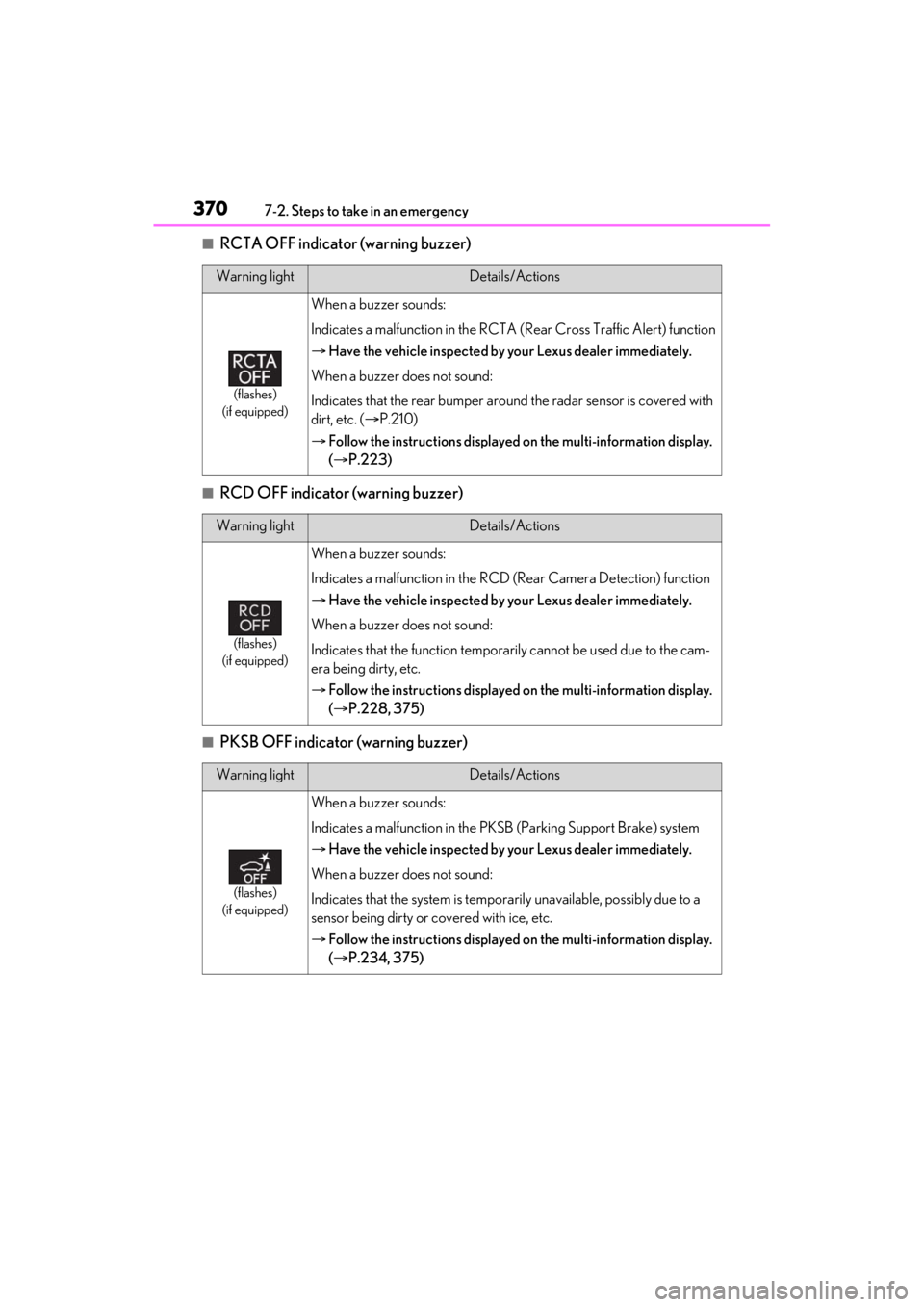
3707-2. Steps to take in an emergency
■RCTA OFF indicator (warning buzzer)
■RCD OFF indicator (warning buzzer)
■PKSB OFF indicator (warning buzzer)
Warning lightDetails/Actions
(flashes)
(if equipped)
When a buzzer sounds:
Indicates a malfunction in the RCTA (Rear Cross Traffic Alert) function
Have the vehicle inspected by your Lexus dealer immediately.
When a buzzer does not sound:
Indicates that the rear bumper around the radar sensor is covered with
dirt, etc. ( P.210)
Follow the instructions displayed on the multi-information display.
( P.223)
Warning lightDetails/Actions
(flashes)
(if equipped)
When a buzzer sounds:
Indicates a malfunction in the RCD (Rear Camera Detection) function
Have the vehicle inspected by your Lexus dealer immediately.
When a buzzer does not sound:
Indicates that the function temporarily cannot be used due to the cam-
era being dirty, etc.
Follow the instructions displayed on the multi-information display.
( P.228, 375)
Warning lightDetails/Actions
(flashes)
(if equipped)
When a buzzer sounds:
Indicates a malfunction in the PK SB (Parking Support Brake) system
Have the vehicle inspected by your Lexus dealer immediately.
When a buzzer does not sound:
Indicates that the system is temporarily unavailable, possibly due to a
sensor being dirty or covered with ice, etc.
Follow the instructions displayed on the multi-information display.
( P.234, 375)
Page 427 of 464
4278-2. Customization
8
Vehicle specifications
*:If equipped
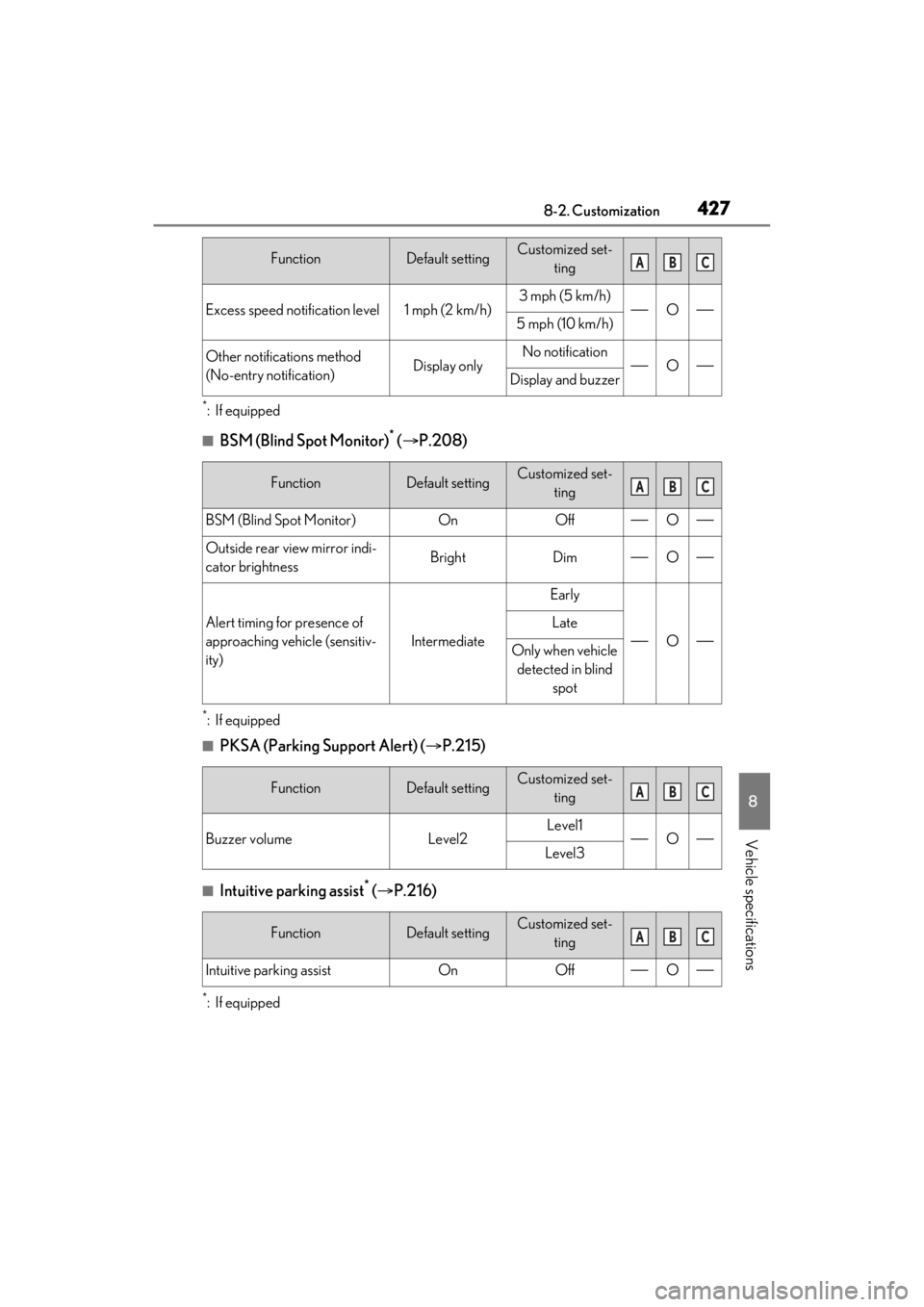
■BSM (Blind Spot Monitor)* ( P.208)
*:If equipped
■PKSA (Parking Support Alert) ( P.215)
■Intuitive parking assist* ( P.216)
*:If equipped
Excess speed notification level1 mph (2 km/h)3 mph (5 km/h)O5 mph (10 km/h)
Other notifications method
(No-entry notification)Display onlyNo notificationODisplay and buzzer
FunctionDefault settingCustomized set-
ting
BSM (Blind Spot Monitor)OnOffO
Outside rear view mirror indi-
cator brightnessBrightDimO
Alert timing for presence of
approaching vehicle (sensitiv-
ity)
Intermediate
Early
O
Late
Only when vehicle detected in blind spot
FunctionDefault settingCustomized set- ting
Buzzer volumeLevel2Level1OLevel3
FunctionDefault settingCustomized set-ting
Intuitive parking assistOnOffO
FunctionDefault settingCustomized set-tingABC
ABC
ABC
ABC
Page 428 of 464
4288-2. Customization
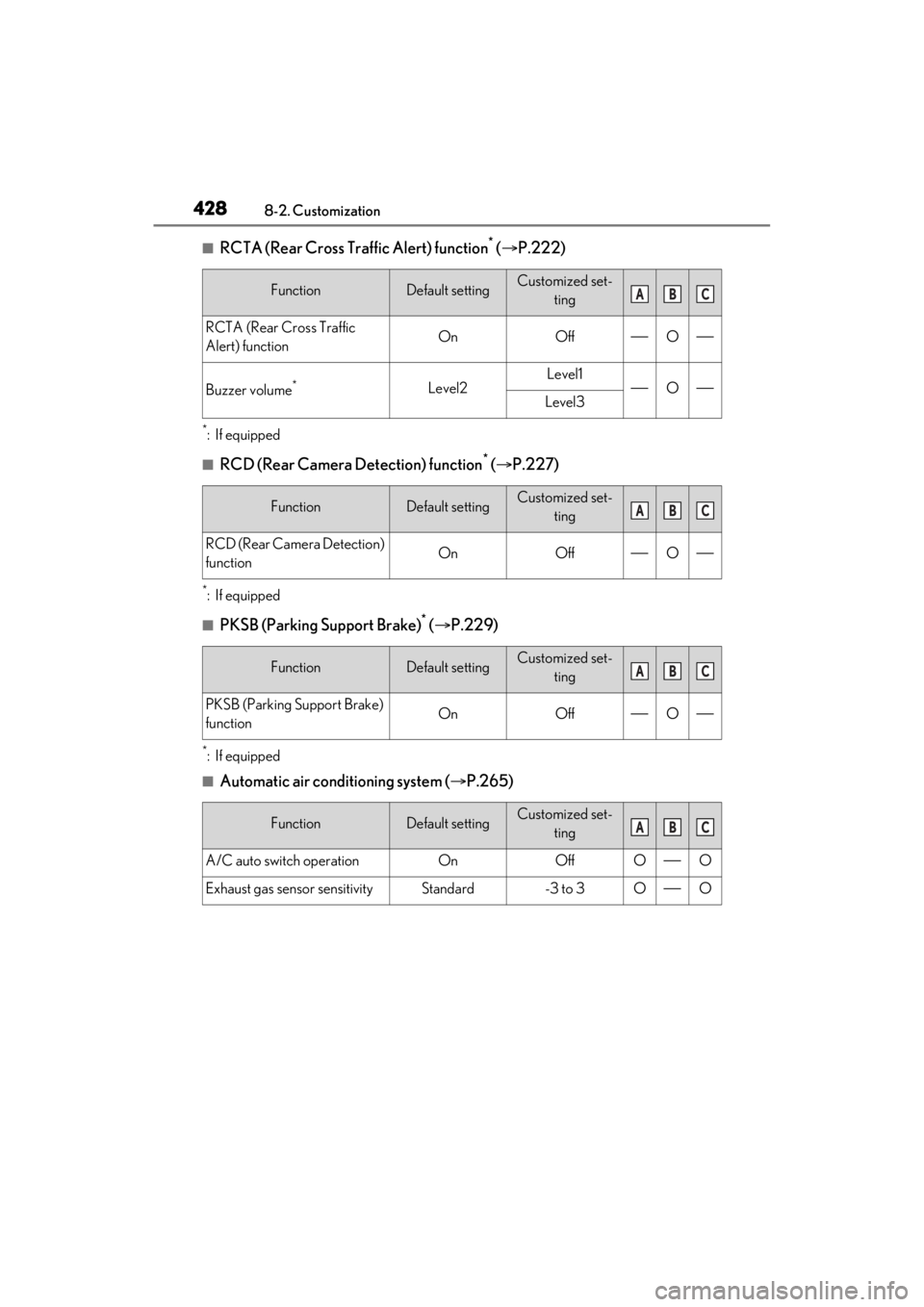
■RCTA (Rear Cross Traffic Alert) function* ( P.222)
*:If equipped
■RCD (Rear Camera Detection) function* ( P.227)
*:If equipped
■PKSB (Parking Support Brake)* ( P.229)
*:If equipped
■Automatic air conditioning system ( P.265)
FunctionDefault settingCustomized set-
ting
RCTA (Rear Cross Traffic
Alert) functionOnOffO
Buzzer volume*Level2Level1OLevel3
FunctionDefault settingCustomized set-ting
RCD (Rear Camera Detection)
functionOnOffO
FunctionDefault settingCustomized set-ting
PKSB (Parking Support Brake)
functionOnOffO
FunctionDefault settingCustomized set-ting
A/C auto switch operationOnOffOO
Exhaust gas sensor sensitivityStandard-3 to 3OO
ABC
ABC
ABC
ABC
Page 431 of 464
4318-3. Items to initialize
8
Vehicle specifications
8-3.Items to initialize
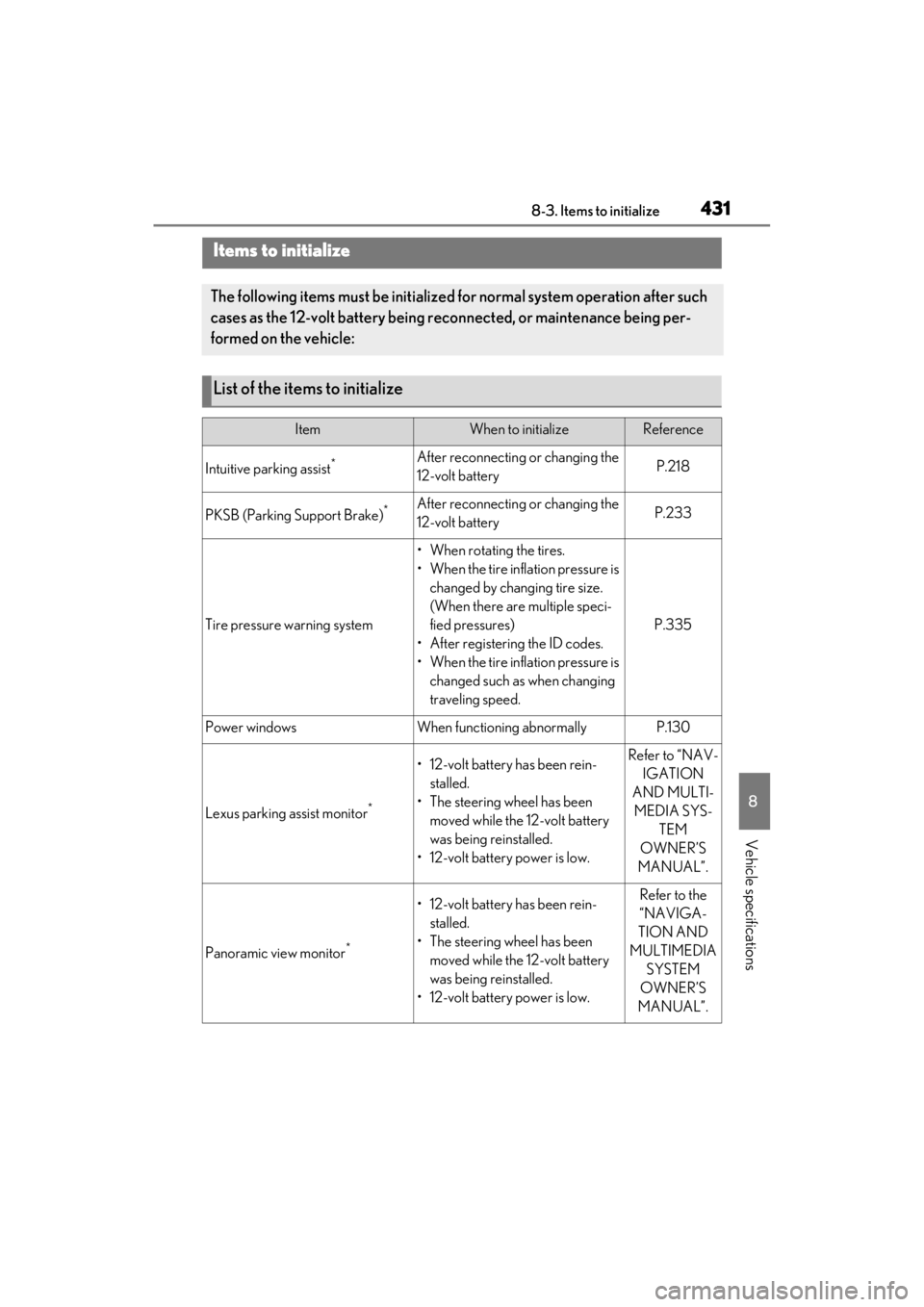
Items to initialize
The following items must be initialized for normal system operation after such
cases as the 12-volt battery being re connected, or maintenance being per-
formed on the vehicle:
List of the items to initialize
ItemWhen to initializeReference
Intuitive parking assist*After reconnecting or changing the
12-volt batteryP.218
PKSB (Parking Support Brake)*After reconnecting or changing the
12-volt batteryP.233
Tire pressure warning system
• When rotating the tires.
• When the tire inflation pressure is changed by changing tire size.
(When there are multiple speci-
fied pressures)
• After registering the ID codes.
• When the tire inflation pressure is changed such as when changing
traveling speed.
P.335
Power windowsWhen functioning abnormallyP.130
Lexus parking assist monitor*
• 12-volt battery has been rein-stalled.
• The steering wheel has been moved while the 12-volt battery
was being reinstalled.
• 12-volt battery power is low.Refer to “NAV- IGATION
AND MULTI- MEDIA SYS- TEM
OWNER’S
MANUAL”.
Panoramic view monitor*
• 12-volt battery has been rein- stalled.
• The steering wheel has been moved while the 12-volt battery
was being reinstalled.
• 12-volt battery power is low.Refer to the
“NAVIGA-
TION AND
MULTIMEDIA SYSTEM
OWNER’S
MANUAL”.
Page 450 of 464

450Alphabetical index
C
Care ...................................................... 306, 309Aluminum wheels ......................................306
Exterior ...........................................................306
Interior .............................................................309
Seat belts........................................................309
Cargo capacity...............................................143
Cargo hooks ................................................. 283
Center Display ............................................. 258
Chains .............................................................. 255
Child-protectors........................................... 104
Child restraint system................................... 43 Fixed with a LATCH system ..................50
Fixed with a seat belt....................................47
Front passenger occupant classification system ..............................................................37
Points to remember .................................... 43
Riding with children ..................................... 43
Types of child restraint system installation method ........................................................... 44
Using an anchor bracket .......................... 53
Child safety ....................................................... 43 12-volt battery precautions ....... 327, 394
Airbag precautions...................................... 33
Child restraint system................................. 44
Heated steering wheel and seat heater precautions................................................ 273
How your child should wear the seat belt ............................................................................ 25
Moon roof precautions ............................133
Power window lock switch...................... 131
Power window precautions .................... 131
Rear door child-protectors ................... 104
Seat belt extender precautions ............. 25
Seat belt precautions .................................. 43
Trunk precautions ...................................... 105
Cleaning.............................................. 306, 309 Aluminum wheels ......................................306
Exterior ...........................................................306
Interior .............................................................309
Radar sensor........................................174, 210 Seat belts ....................................................... 309
Clock ........................................................78, 284
Coat hooks..................................................... 295
Compass ......................................................... 302
Condenser ..................................................... 324
Console box ....................................................281
Console box light ..........................................281
Cooling system............................................. 323 Engine overheating.................................. 396
Hybrid system overheating .................. 397
Cornering lights .............................................163 Replacing light bulbs ................................352
Cruise control Dynamic radar cruise control with full-
speed range ............................................... 198
Cup holder .......................................................281
Current fuel consumption .......................... 82
Curtain shield airbags .................................. 28
Customizable features .............................. 420
D
Daytime running light system .................... 161
Defogger Outside rear view mirrors.....................266
Rear window ................................................266
Windshield ....................................................266
Dimension ...................................................... 402
Dinghy towing.................................................144
Display BSM (Blind Spot Monitor)................... 208
Dynamic radar cruise control with full-
speed range ............................................... 198
Energy monitor ..............................................90
Head-up display............................................86
Intuitive parking assist ................................216
LTA (Lane-Tracing Assist) .....................192
Multi-information display ........................... 81
Parking Support Brake function (rear pedestrians)...............................................245
RCD (Rear Camera Detection) ........ 227
RCTA............................................................... 222
Warning message .....................................375