seat memory LEXUS ES300h 2021 Owners Manual
[x] Cancel search | Manufacturer: LEXUS, Model Year: 2021, Model line: ES300h, Model: LEXUS ES300h 2021Pages: 464, PDF Size: 9.55 MB
Page 2 of 464
2TABLE OF CONTENTS
For your information ......................................6
Reading this manual .................................... 10
How to search ................................................. 11
Pictorial index ................................................. 12
1-1. For safe use Before driving .................................... 22
For safe driving.................................. 23
Seat belts ............................................. 24
SRS airbags ....................................... 28
Front passenger occupant classifi- cation system ................................. 37
Exhaust gas precautions ............... 42
1-2. Child safety Riding with children........................ 43
Child restraint systems ................. 43
1-3. Lexus Enform Lexus Enform Safety Connect .. 55
1-4. Hybrid system Hybrid system features ................... 61
Hybrid system precautions ......... 64
1-5. Theft deterrent system Immobilizer sy stem ........................ 69
Alarm...................................................... 71
2-1. Instrument cluster Warning lights and indicators ..... 74
Gauges and meters ....................... 78
Multi-information display.............. 81
Head-up display .............................. 86
Energy monitor/consumption screen ............................................... 903-1. Key information
Keys ...................................................... 98
3-2. Opening, closing and locking the doors and trunk
Doors .................................................. 101
Trunk .................................................. 105
Smart access system with push- button start...................................... 112
3-3. Adjusting the seats Front seats.......................................... 119
Driving position memory ........... 120
Head restraints ............................... 123
3-4. Adjusting the steering wheel and mirrors
Steering wheel ................................ 125
Inside rear view mirror ................ 126
Outside rear view mirrors.......... 127
3-5. Opening and closing the windows and moon roof
Power windows ............................. 130
Moon roof ......................................... 132
4-1. Before driving Driving the vehicle........................ 136
Cargo and luggage........................ 141
Vehicle load limits.......................... 143
Trailer towing................................... 144
Dinghy towing ................................. 144
4-2. Driving procedures Power (ignition) switch ............... 145
EV drive mode ............................... 150
1For safety and security
2Vehicle status information and
indicators
3Before driving
4Driving
Page 97 of 464
97
3
3
Before driving
Before driving
3-1. Key informationKeys ................................................... 98
3-2. Opening, closing and locking the doors and trunk
Doors................................................ 101
Trunk................................................ 105
Smart access system with push- button start .................................. 112
3-3. Adjusting the seats Front seats ...................................... 119
Driving position memory ........ 120
Head restraints............................ 123
3-4. Adjusting the steering wheel and mirrors
Steering wheel............................. 125
Inside rear view mirror............. 126
Outside rear view mirrors ...... 127
3-5. Opening and closing the win- dows and moon roof
Power windows........................... 130
Moon roof ..................................... 132
Page 120 of 464
1203-3. Adjusting the seats
*:If equipped
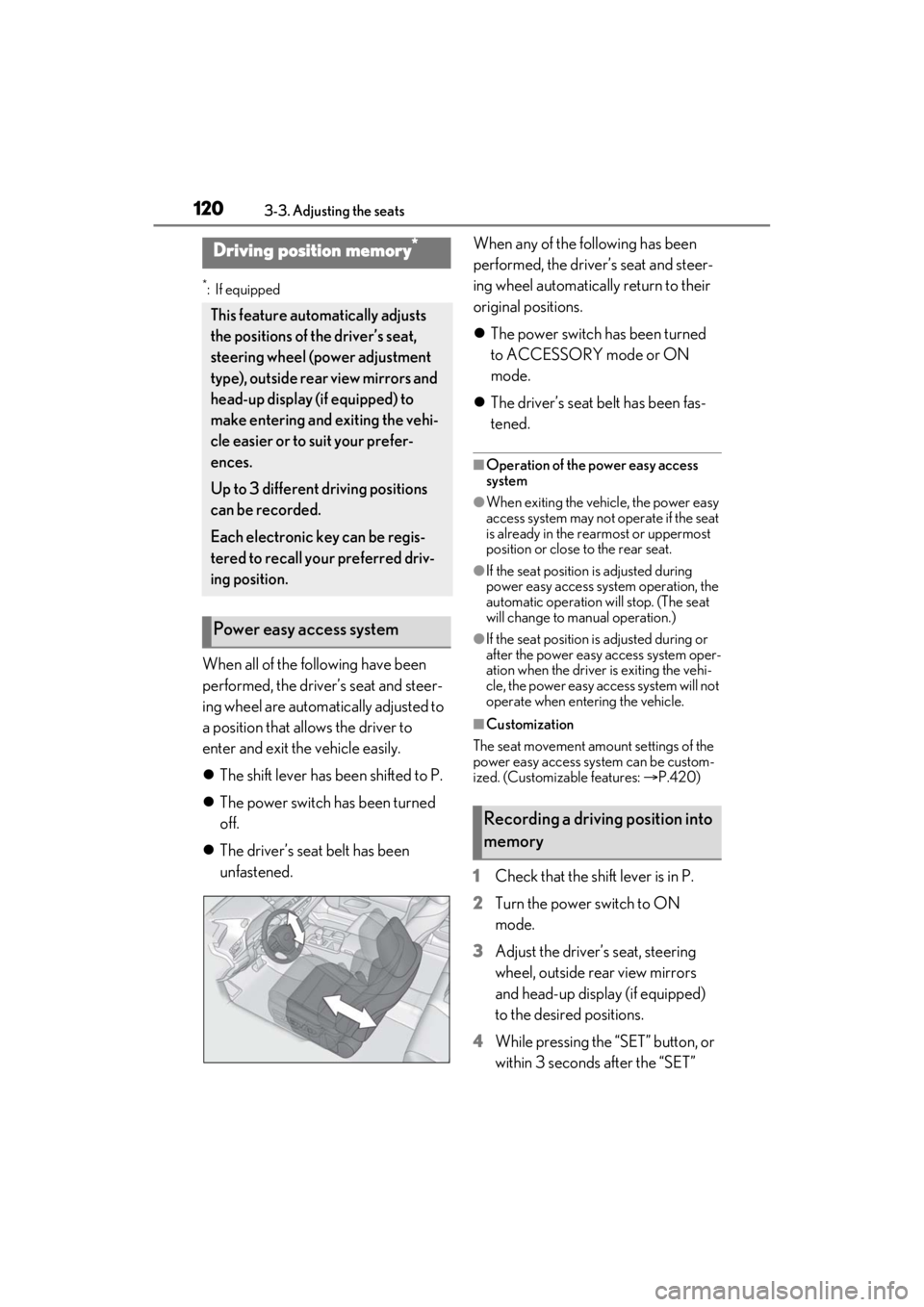
When all of the following have been
performed, the driver’s seat and steer-
ing wheel are automatically adjusted to
a position that allows the driver to
enter and exit the vehicle easily.
The shift lever has been shifted to P.
The power switch has been turned
off.
The driver’s seat belt has been
unfastened. When any of the following has been
performed, the driver’s seat and steer-
ing wheel automatically return to their
original positions.
The power switch has been turned
to ACCESSORY mode or ON
mode.
The driver’s seat belt has been fas-
tened.
■Operation of the power easy access
system
●When exiting the vehicle, the power easy
access system may not operate if the seat
is already in the rearmost or uppermost
position or close to the rear seat.
●If the seat position is adjusted during
power easy access syst em operation, the
automatic operation will stop. (The seat
will change to manual operation.)
●If the seat position is adjusted during or
after the power easy access system oper-
ation when the driver is exiting the vehi-
cle, the power easy access system will not
operate when entering the vehicle.
■Customization
The seat movement amou nt settings of the
power easy access system can be custom-
ized. (Customizable features: P.420)
1 Check that the shift lever is in P.
2 Turn the power switch to ON
mode.
3 Adjust the driver’s seat, steering
wheel, outside rear view mirrors
and head-up display (if equipped)
to the desired positions.
4 While pressing the “SET” button, or
within 3 seconds after the “SET”
Driving position memory*
This feature auto matically adjusts
the positions of the driver’s seat,
steering wheel (power adjustment
type), outside rear view mirrors and
head-up display (if equipped) to
make entering and exiting the vehi-
cle easier or to suit your prefer-
ences.
Up to 3 different driving positions
can be recorded.
Each electronic key can be regis-
tered to recall your preferred driv-
ing position.
Power easy access system
Recording a driving position into
memory
Page 121 of 464
1213-3. Adjusting the seats
3
Before driving
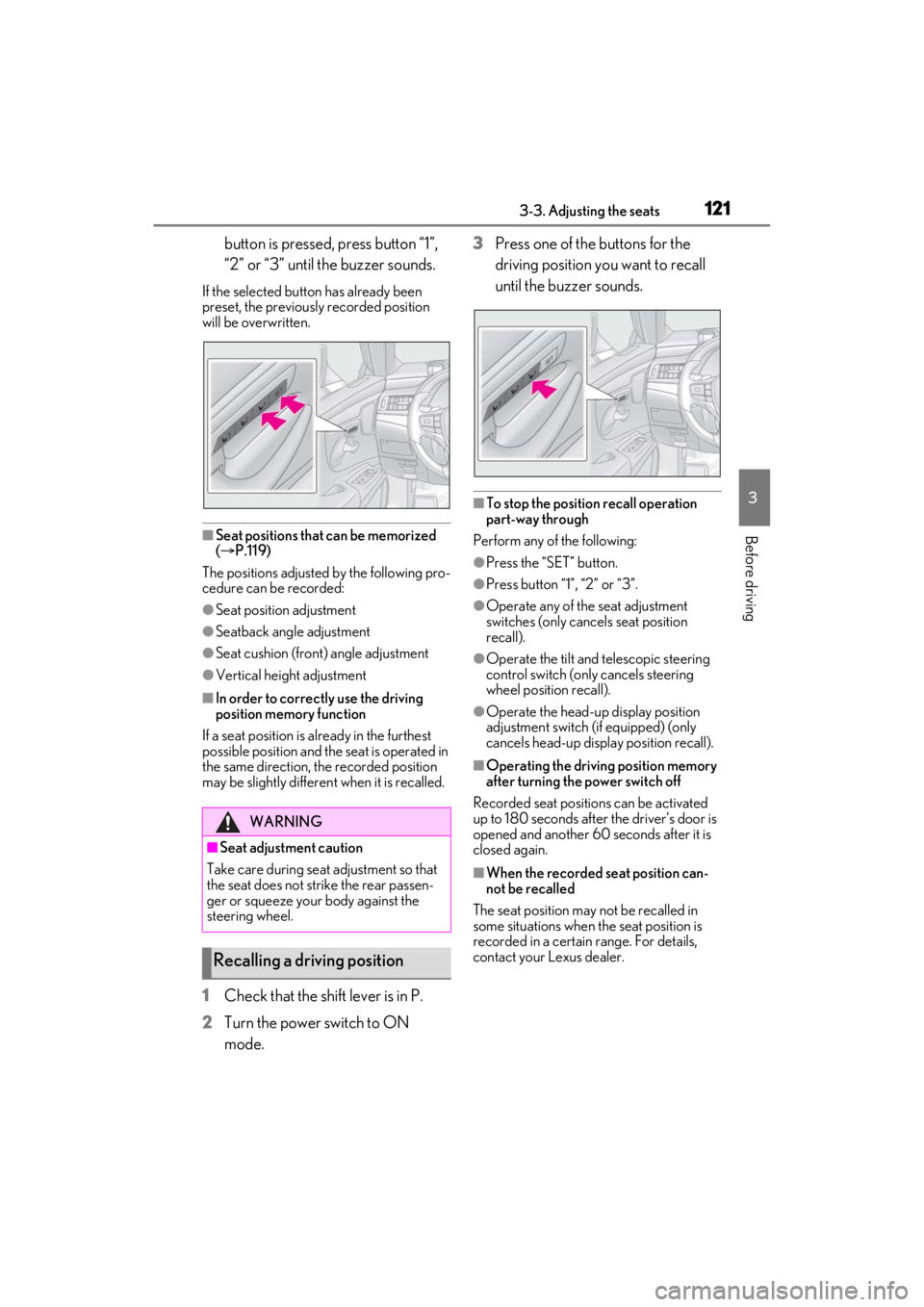
button is pressed, press button “1”,
“2” or “3” until the buzzer sounds.
If the selected button has already been
preset, the previously recorded position
will be overwritten.
■Seat positions that can be memorized
( P.119)
The positions adjusted by the following pro-
cedure can be recorded:
●Seat position adjustment
●Seatback angle adjustment
●Seat cushion (front) angle adjustment
●Vertical height adjustment
■In order to correctly use the driving
position memory function
If a seat position is already in the furthest
possible position and the seat is operated in
the same direction, the recorded position
may be slightly differen t when it is recalled.
1Check that the shift lever is in P.
2 Turn the power switch to ON
mode. 3
Press one of the buttons for the
driving position you want to recall
until the buzzer sounds.
■To stop the position recall operation
part-way through
Perform any of the following:
●Press the “SET” button.
●Press button “1”, “2” or “3”.
●Operate any of the seat adjustment
switches (only cancels seat position
recall).
●Operate the tilt and telescopic steering
control switch (onl y cancels steering
wheel position recall).
●Operate the head-up display position
adjustment switch (if equipped) (only
cancels head-up display position recall).
■Operating the driving position memory
after turning the power switch off
Recorded seat positions can be activated
up to 180 seconds after the driver’s door is
opened and another 60 seconds after it is
closed again.
■When the recorded seat position can-
not be recalled
The seat position may not be recalled in
some situations when the seat position is
recorded in a certain range. For details,
contact your Lexus dealer.
WARNING
■Seat adjustment caution
Take care during seat adjustment so that
the seat does not strike the rear passen-
ger or squeeze your body against the
steering wheel.
Recalling a driving position
Page 122 of 464
1223-3. Adjusting the seats
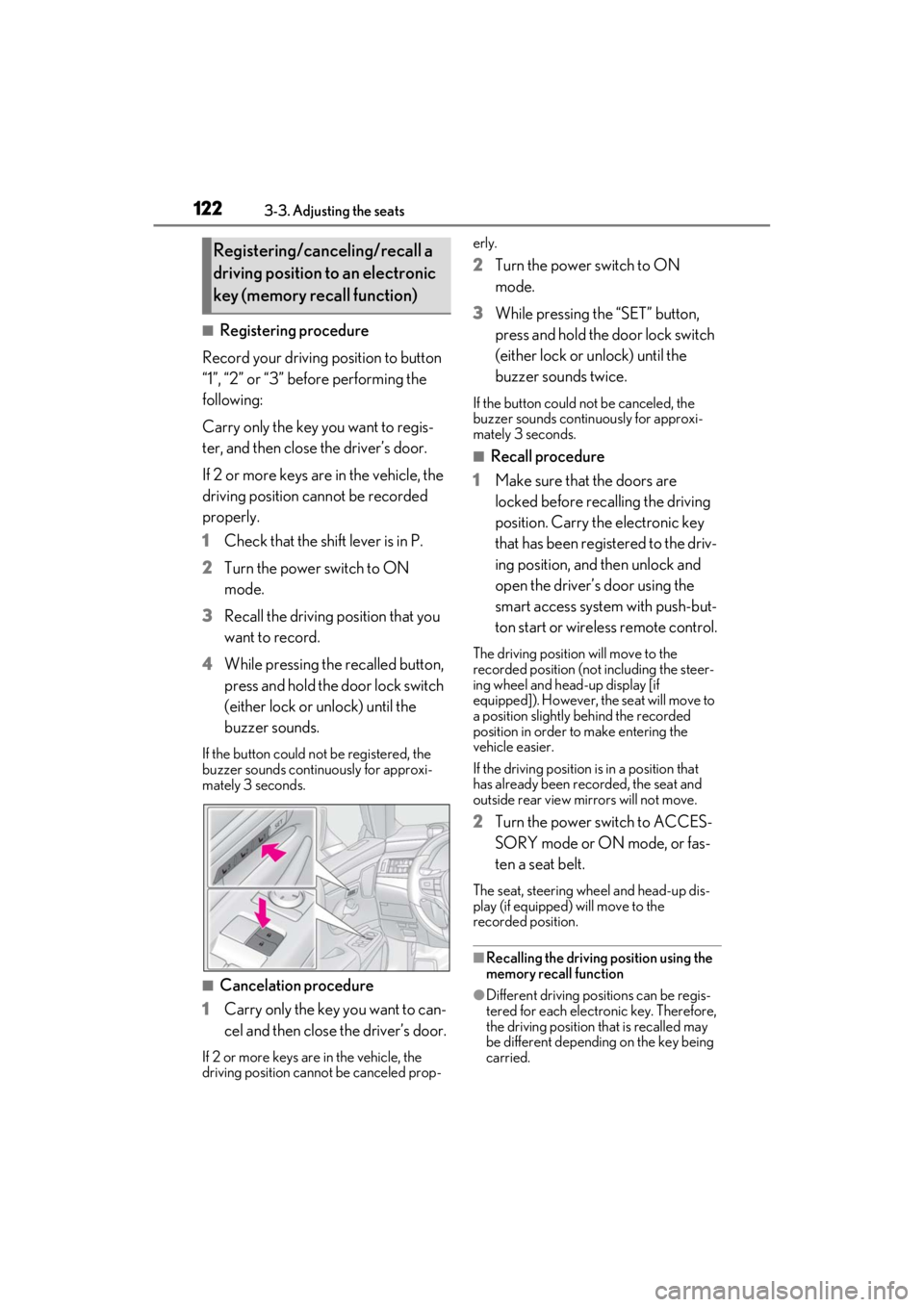
■Registering procedure
Record your driving position to button
“1”, “2” or “3” before performing the
following:
Carry only the key you want to regis-
ter, and then close the driver’s door.
If 2 or more keys are in the vehicle, the
driving position cannot be recorded
properly.
1 Check that the shift lever is in P.
2 Turn the power switch to ON
mode.
3 Recall the driving position that you
want to record.
4 While pressing the recalled button,
press and hold the door lock switch
(either lock or unlock) until the
buzzer sounds.
If the button could not be registered, the
buzzer sounds continuously for approxi-
mately 3 seconds.
■Cancelation procedure
1 Carry only the key you want to can-
cel and then close the driver’s door.
If 2 or more keys are in the vehicle, the
driving position cannot be canceled prop- erly.
2
Turn the power switch to ON
mode.
3 While pressing the “SET” button,
press and hold the door lock switch
(either lock or unlock) until the
buzzer sounds twice.
If the button could not be canceled, the
buzzer sounds continuously for approxi-
mately 3 seconds.
■Recall procedure
1 Make sure that the doors are
locked before recalling the driving
position. Carry the electronic key
that has been registered to the driv-
ing position, and then unlock and
open the driver’s door using the
smart access system with push-but-
ton start or wireless remote control.
The driving position will move to the
recorded position (not including the steer-
ing wheel and head-up display [if
equipped]). However, the seat will move to
a position slightly behind the recorded
position in order to make entering the
vehicle easier.
If the driving position is in a position that
has already been recorded, the seat and
outside rear view mirrors will not move.
2Turn the power switch to ACCES-
SORY mode or ON mode, or fas-
ten a seat belt.
The seat, steering wheel and head-up dis-
play (if equipped) will move to the
recorded position.
■Recalling the driving position using the
memory recall function
●Different driving positions can be regis-
tered for each electronic key. Therefore,
the driving position that is recalled may
be different depending on the key being
carried.
Registering/canceling/recall a
driving position to an electronic
key (memory recall function)
Page 123 of 464
1233-3. Adjusting the seats
3
Before driving
●If the a door other than the driver’s door
is unlocked with the smart access system
with push-button start, the driving posi-
tion cannot be recalled. In this case, press
the driving position button which has
been set.
■Customization
The unlock door settings of the memory
recall function can be changed.
(Customizable features: P.420)
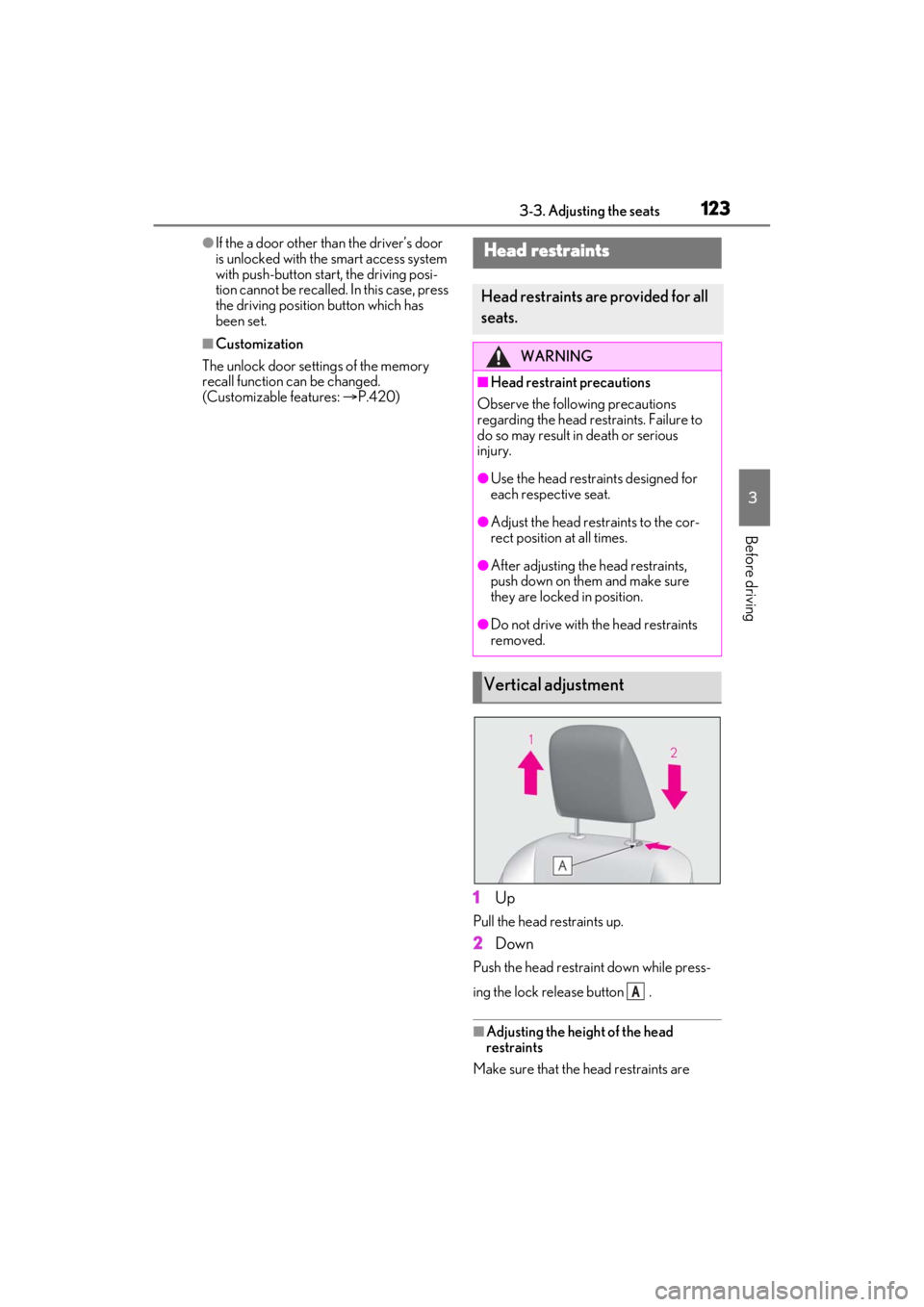
1Up
Pull the head restraints up.
2Down
Push the head restra int down while press-
ing the lock release button .
■Adjusting the heig ht of the head
restraints
Make sure that the head restraints are
Head restraints
Head restraints are provided for all
seats.
WARNING
■Head restraint precautions
Observe the following precautions
regarding the head re straints. Failure to
do so may result in death or serious
injury.
●Use the head restraints designed for
each respective seat.
●Adjust the head restraints to the cor-
rect position at all times.
●After adjusting the head restraints,
push down on them and make sure
they are locked in position.
●Do not drive with the head restraints
removed.
Vertical adjustment
A
Page 125 of 464
1253-4. Adjusting the steering wheel and mirrors
3
Before driving
3-4.Adjusting the steering wheel and mirrors
Manual adjustment type
1 Hold the steering wheel and pull
the lever down.
2 Adjust to the ideal position by mov-
ing the steering wheel horizontally
and vertically.
After adjustment, pull the lever up to
secure the steering wheel.
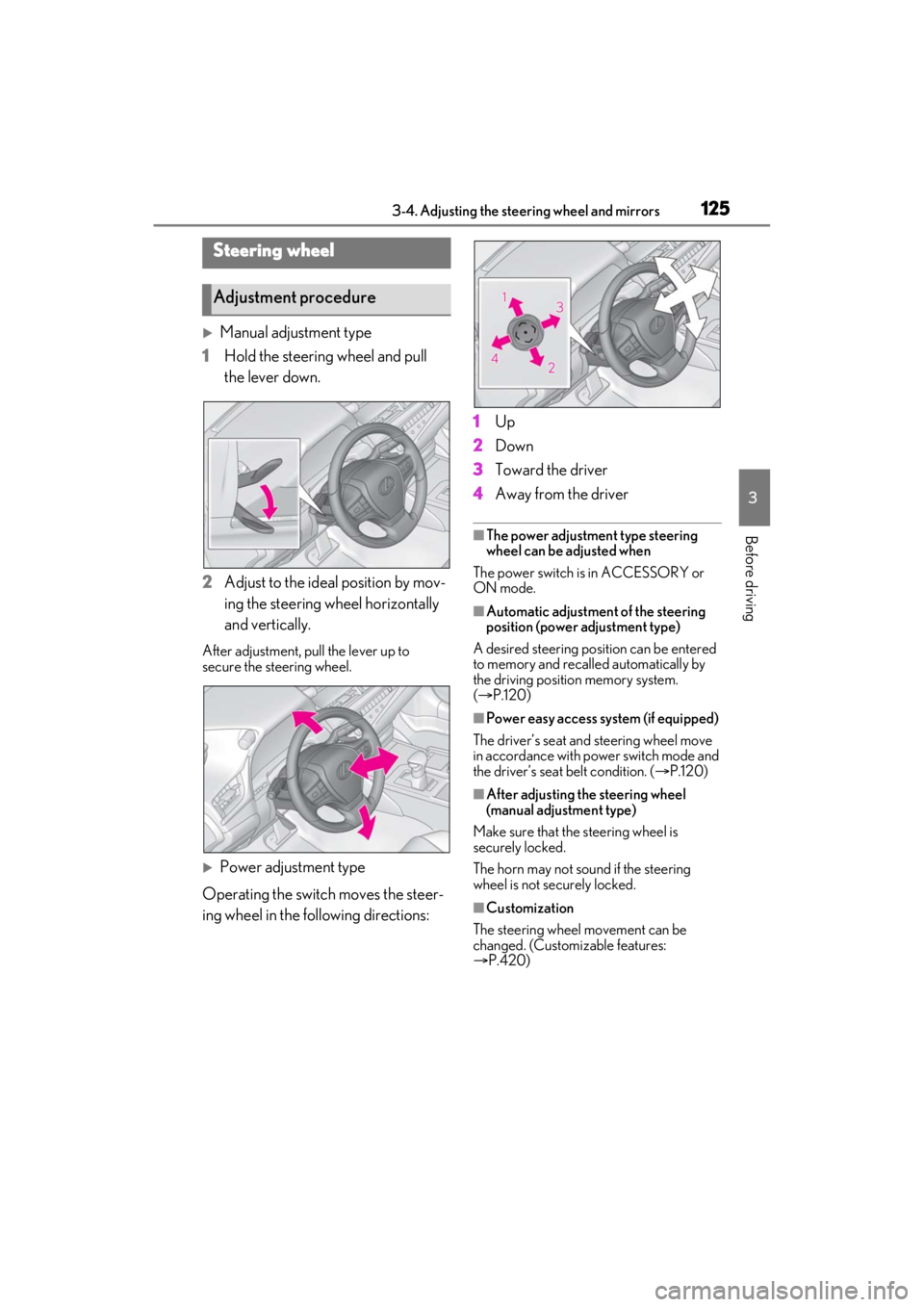
Power adjustment type
Operating the switch moves the steer-
ing wheel in the following directions: 1
Up
2 Down
3 Toward the driver
4 Away from the driver
■The power adjustment type steering
wheel can be adjusted when
The power switch is in ACCESSORY or
ON mode.
■Automatic adjustment of the steering
position (power adjustment type)
A desired steering posi tion can be entered
to memory and recalled automatically by
the driving position memory system.
( P.120)
■Power easy access system (if equipped)
The driver’s seat and steering wheel move
in accordance with power switch mode and
the driver’s seat belt condition. ( P.120)
■After adjusting the steering wheel
(manual adjustment type)
Make sure that the steering wheel is
securely locked.
The horn may not sound if the steering
wheel is not securely locked.
■Customization
The steering wheel movement can be
changed. (Customizable features:
P.420)
Steering wheel
Adjustment procedure
Page 424 of 464
4248-2. Customization
■Trunk (P.105)
*:If equipped
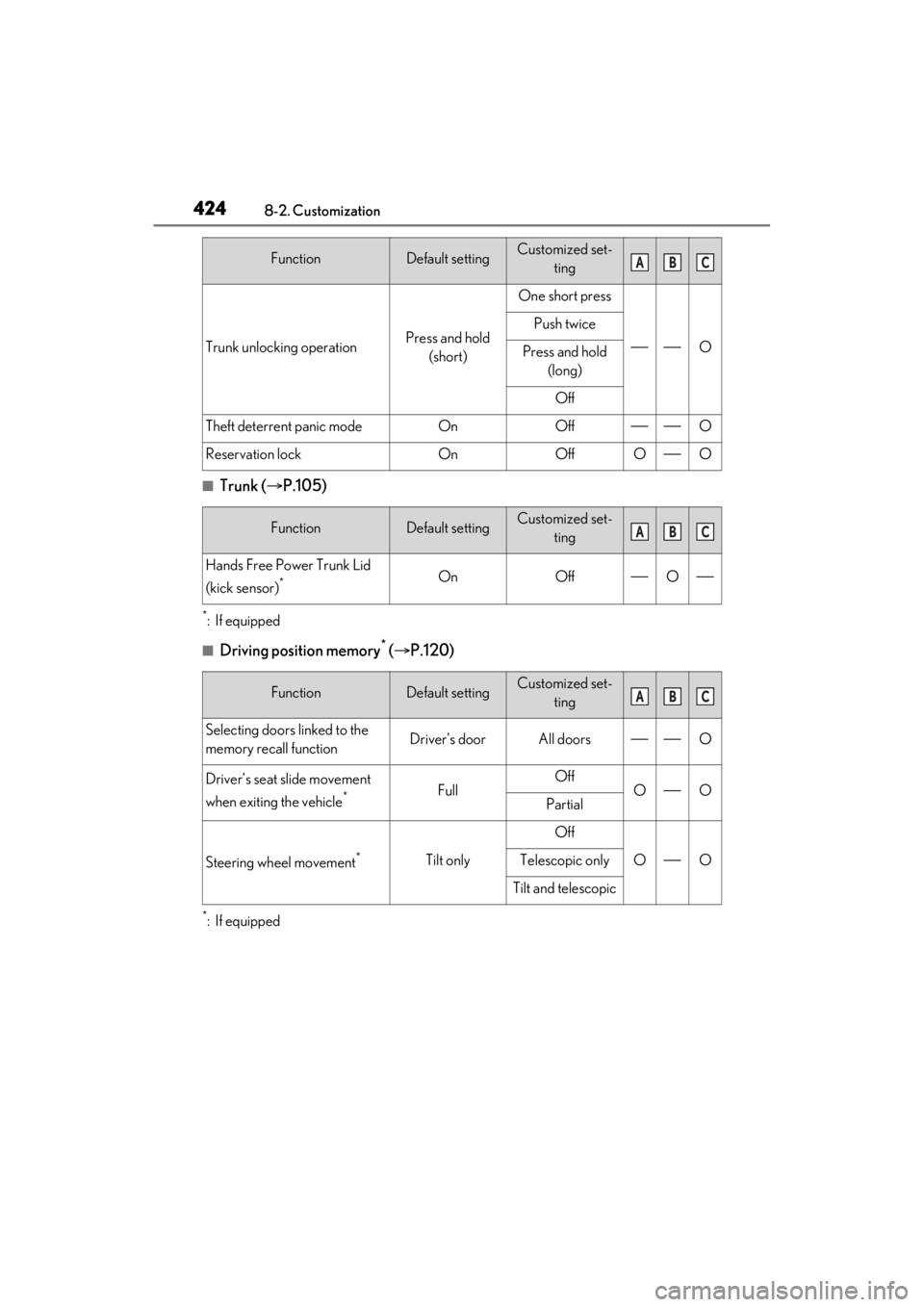
■Driving position memory* ( P.120)
*:If equipped
Trunk unlocking operationPress and hold
(short)
One short press
O
Push twice
Press and hold (long)
Off
Theft deterrent panic modeOnOffO
Reservation lockOnOffOO
FunctionDefault settingCustomized set- ting
Hands Free Power Trunk Lid
(kick sensor)
*OnOffO
FunctionDefault settingCustomized set-ting
Selecting doors linked to the
memory recall functionDriver’s doorAll doorsO
Driver’s seat slide movement
when exiting the vehicle
*FullOffOOPartial
Steering wheel movement*Tilt only
Off
OOTelescopic only
Tilt and telescopic
FunctionDefault settingCustomized set-tingABC
ABC
ABC
Page 451 of 464

Alphabetical index451
Distance until next engine oil change .... 80
Do-it-yourself maintenance ......................313
Door courtesy lights ....................................277
Door lockDoors.................................................................. 101
Smart access system with push-button start ....................................................................112
Wireless remote control........................... 99
Doors ................................................................... 101 Automatic door lock ing and unlocking
system ........................................................... 104
Door glasses ................................................. 130
Door lock.......................................................... 101
Open door warning buzzer ....... 102, 104
Outside rear view mirrors ...................... 127
Rear door child-protectors ................... 104
Drive distance .................................................. 82
Drive info 1/Drive info 2 .............................. 82
Driver’s seat position memory .................120 Driving position memory.........................120
Memory recall function ............................ 122
Drive-start control ........................................ 137
Driving................................................................136 Break-in tips ................................................... 137
Correct driving posture .............................23
Driving Mode Select switch................... 213
Hybrid vehicle driving tips .................... 252
Procedures .....................................................136
Winter drive tips......................................... 254
Driving information display ........................ 82
Driving Mode Select switch......................213
Driving range ................................................... 82
Driving support system information display ............................................................................. 83
Dynamic radar cruise control with full- speed range................................................. 198Warning message.....................................206
E
ECB (Electronically Controlled Brake Sys- tem) ................................................................ 248
Eco drive mode ..............................................213 EDR (Event data recorder) ............................7
Elapsed time ..................................................... 82
Electric motor (traction motor) .................. 61
Electric Power Steering (EPS)
Function ..........................................................248
Warning light ............................................... 367
Electronically Controlled Brake System (ECB) ............................................................ 248
Electronic key .................................................. 98 Battery-saving function.............................. 113
If the electronic key does not operate properly ...................................................... 389
Replacing the battery ............................... 347
Emergency, in case of If a warning buzzer sounds.................. 365
If a warning light turns on...................... 365
If a warning message is displayed .....375
If the 12-volt battery is discharged ..... 391
If the electronic key does not operate properly ...................................................... 389
If the fuel filler do or cannot be opened
......................................................................... 388
If the hybrid system will not start ....... 386
If the vehicle is trapped in rising water ......................................................................... 359
If you have a flat tire .................................. 379
If you lose your keys ................................ 388
If you think something is wrong..........364
If your vehicle becomes stuck ............ 399
If your vehicle has to be stopped in an emergency ................................................ 358
If your vehicle needs to be towed ...... 361
If your vehicle overheats ....................... 396
Emergency flashers ....................................358
Energy monitor ............................................... 90
Engine ACCESSORY mode............................... 148
Compartment................................................321
Hood ................................................................. 319
How to start the hybrid system............ 145
Identification number .............................. 403
If the hybrid system will not start ....... 386
Page 452 of 464

452Alphabetical index
If your vehicle has to be stopped in an
emergency ............................................... 358
Ignition switch (power switch) ..............145
Overheating.................................................396
Power switch .................................................145
Tachometer ..................................................... 78
Engine coolant.............................................. 323 Capacity .........................................................405
Checking ....................................................... 323
Preparing and checking before winter......................................................................... 254
Engine coolant temperature gauge ....... 78
Engine oil ..........................................................321 Capacity .........................................................404
Checking ......................................................... 321
Preparing and checking before winter......................................................................... 254
Warning light ...............................................366
Engine oil maintenance data .................. 323
EPS (Electric Power Steering) .............. 248 Function .......................................................... 248
Warning light ............................................... 367
EV drive mode............................................... 150
Event data recorder (EDR) ............................7
EV indicator ...................................................... 62
F
Flat tire ............................................................. 379 Tire pressure warning system ...............331
Floor mats ...........................................................22
Fluid Brake................................................................406
Hybrid transmission .................................406
Washer ........................................................... 325
Footwell light ..................................................277
Front passenger occupant classification system ...............................................................37
Front seats ......................................................... 119 Adjustment....................................................... 119
Cleaning.........................................................309
Correct driving posture .............................23
Driving position memory.........................120 Head restraints..............................................123
Memory recall function............................. 122
Power easy access system .................... 120
Seat heaters .................................................. 273
Seat position memory .............................. 120
Seat ventilators ............................................ 273
Front side marker light ................................. 161 Light switch ...................................................... 161
Front side marker lights Replacing light bulbs ................... 352, 353
Front turn signal lights .................................156 Replacing light bulbs ................... 352, 353
Turn signal lever .......................................... 156
Fuel ...................................................................... 172 Capacity ........................................................ 403
Fuel gauge ........................................................ 78
Information ................................................... 409
Refueling........................................................... 172
Type ................................................................. 403
Warning light .............................................. 368
Fuel consumption Average fuel economy .............................. 82
Current fuel consumption ........................ 82
Fuel filler door ................................................. 172 If the fuel filler do or cannot be opened
......................................................................... 388
Refueling........................................................... 172
Fuel gauge ......................................................... 78
Fuses ................................................................. 349
G
Garage door opener ................................. 296
Gauges ............................................................... 78
Glove box .........................................................281
Glove box light ...............................................281
Grocery bag hooks .................................... 283
H
Hands Free Power Trunk Lid .................. 108
Headlights ......................................................... 161 Adaptive Front-lighting System (AFS)