fuel LEXUS ES300h 2022 Owner's Manual
[x] Cancel search | Manufacturer: LEXUS, Model Year: 2022, Model line: ES300h, Model: LEXUS ES300h 2022Pages: 480, PDF Size: 27.63 MB
Page 90 of 480
882-1. Instrument cluster
After reset: Displays average fuel con-
sumption since the display was reset
*1
After start: Displays average fuel con-
sumption since hybrid system start
After refuel: Displays average fuel con-
sumption since refuel
Average vehicle speed
After reset: Displays average vehicle
speed since the display was reset
*1
After start: Displays average vehicle speed
since hybrid system start
Elapsed time
After reset: Displays elapsed time since the
display was reset
*1
After start: Displays elapsed time since
hybrid system start
Distance
Driving range: Displays driving range with
remaining fuel
*2, 3
After start: Displays the distance driven
since hybrid system start
Other
Blank: No item
*1: To reset, display the desired item and
press and hold “OK” of the meter con-
trol switches.
*2: This distance is computed based on your average fuel consumption. As a
result, the actual distance that can be
driven may differ from that displayed.
*3: When only a small amount of fuel is added to the tank, the display may not
be updated.
When refueling, turn the power switch
off. If the vehicle is refueled without
turning the power switch off, the display
may not be updated.
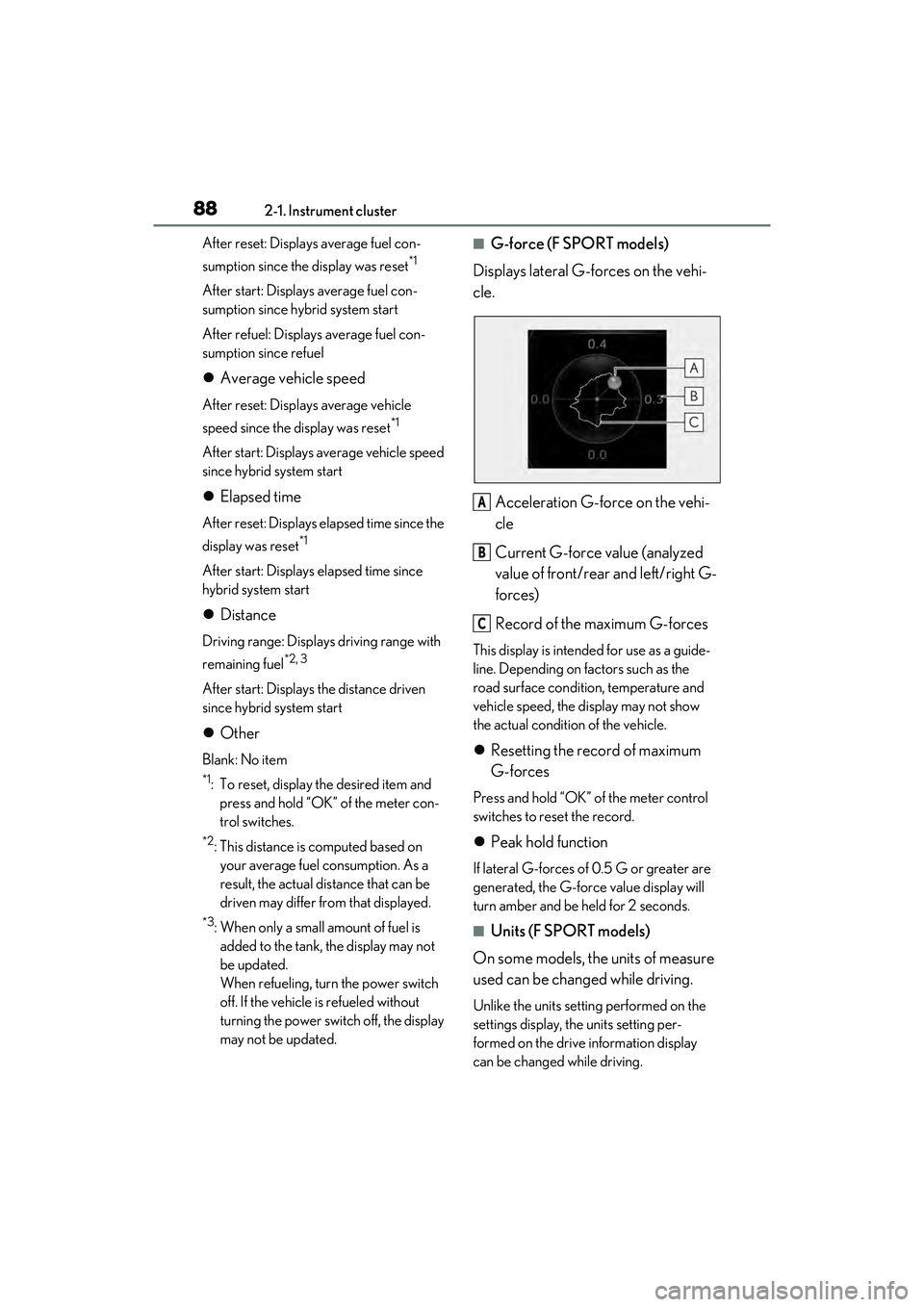
QG-force (F SPORT models)
Displays lateral G-forces on the vehi-
cle.
Acceleration G-force on the vehi-
cle
Current G-force value (analyzed
value of front/rear and left/right G-
forces)
Record of the maximum G-forces
This display is intended for use as a guide-
line. Depending on factors such as the
road surface condition, temperature and
vehicle speed, the display may not show
the actual condition of the vehicle.
Resetting the record of maximum
G-forces
Press and hold “OK” of the meter control
switches to reset the record.
Peak hold function
If lateral G-forces of 0.5 G or greater are
generated, the G-force value display will
turn amber and be held for 2 seconds.
QUnits (F SPORT models)
On some models, the units of measure
used can be changed while driving.
Unlike the units setting performed on the
settings display, the units setting per-
formed on the drive information display
can be changed while driving.
A
B
C
Page 97 of 480
952-1. Instrument cluster
2
Vehicle status information and indicators
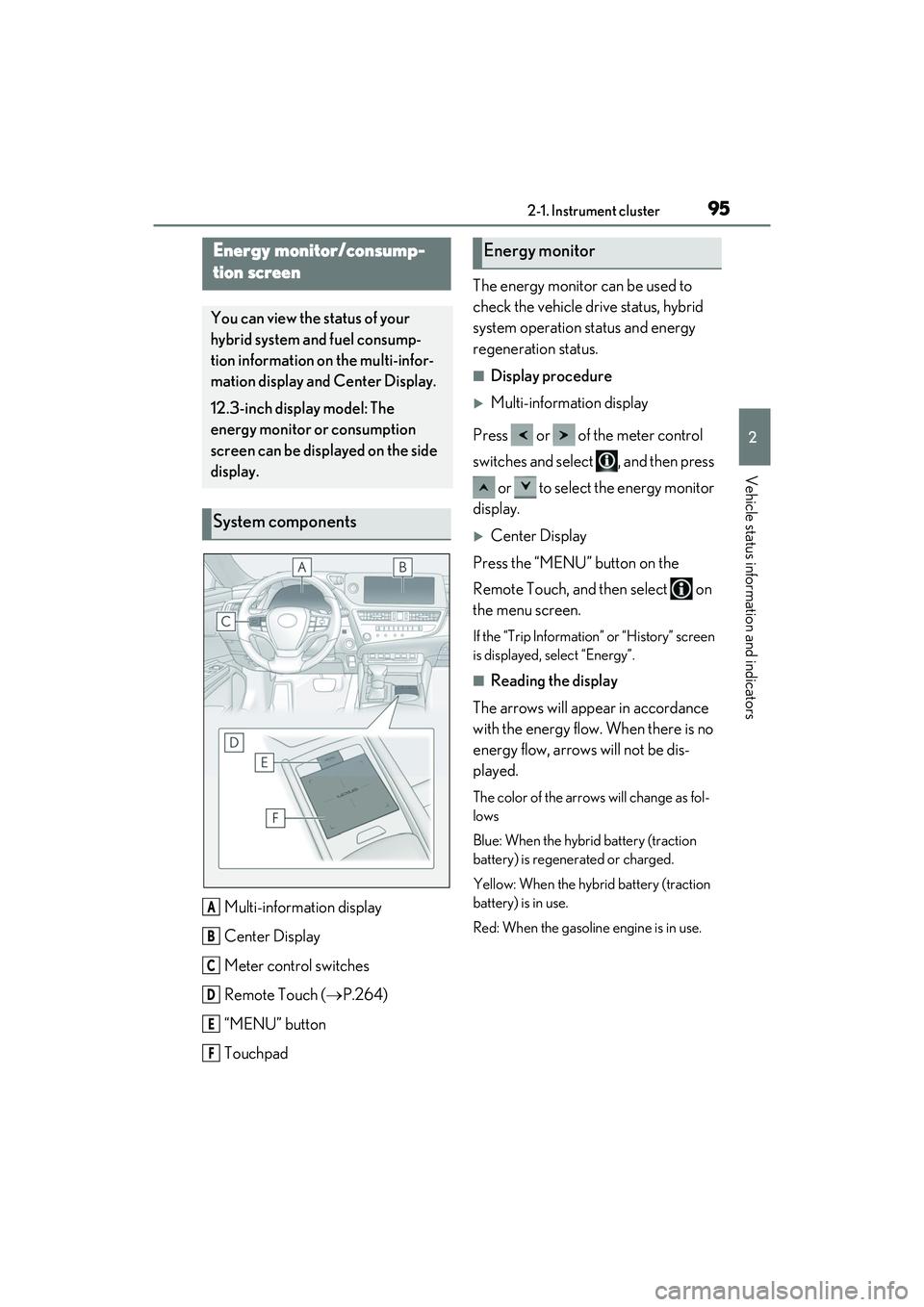
Multi-information display
Center Display
Meter control switches
Remote Touch (P.264)
“MENU” button
Touchpad The energy monitor can be used to
check the vehicle drive status, hybrid
system operation status and energy
regeneration status.
QDisplay procedure
Multi-information display
Press or of the meter control
switches and select , and then press or to select the energy monitor
display.
Center Display
Press the “MENU” button on the
Remote Touch, and then select on
the menu screen.
If the “Trip Information” or “History” screen
is displayed, select “Energy”.
QReading the display
The arrows will appear in accordance
with the energy flow. When there is no
energy flow, arrows will not be dis-
played.
The color of the arrows will change as fol-
lows
Blue: When the hybrid battery (traction
battery) is regenerated or charged.
Yellow: When the hybrid battery (traction
battery) is in use.
Red: When the gasoline engine is in use.
Energy monitor/consump-
tion screen
You can view the status of your
hybrid system and fuel consump-
tion information on the multi-infor-
mation display and Center Display.
12.3-inch display model: The
energy monitor or consumption
screen can be displayed on the side
display.
System components
A
B
C
D
E
F
Energy monitor
Page 99 of 480
972-1. Instrument cluster
2
Vehicle status information and indicators
screen, and then select “Trip Informa-
tion” or “History”.
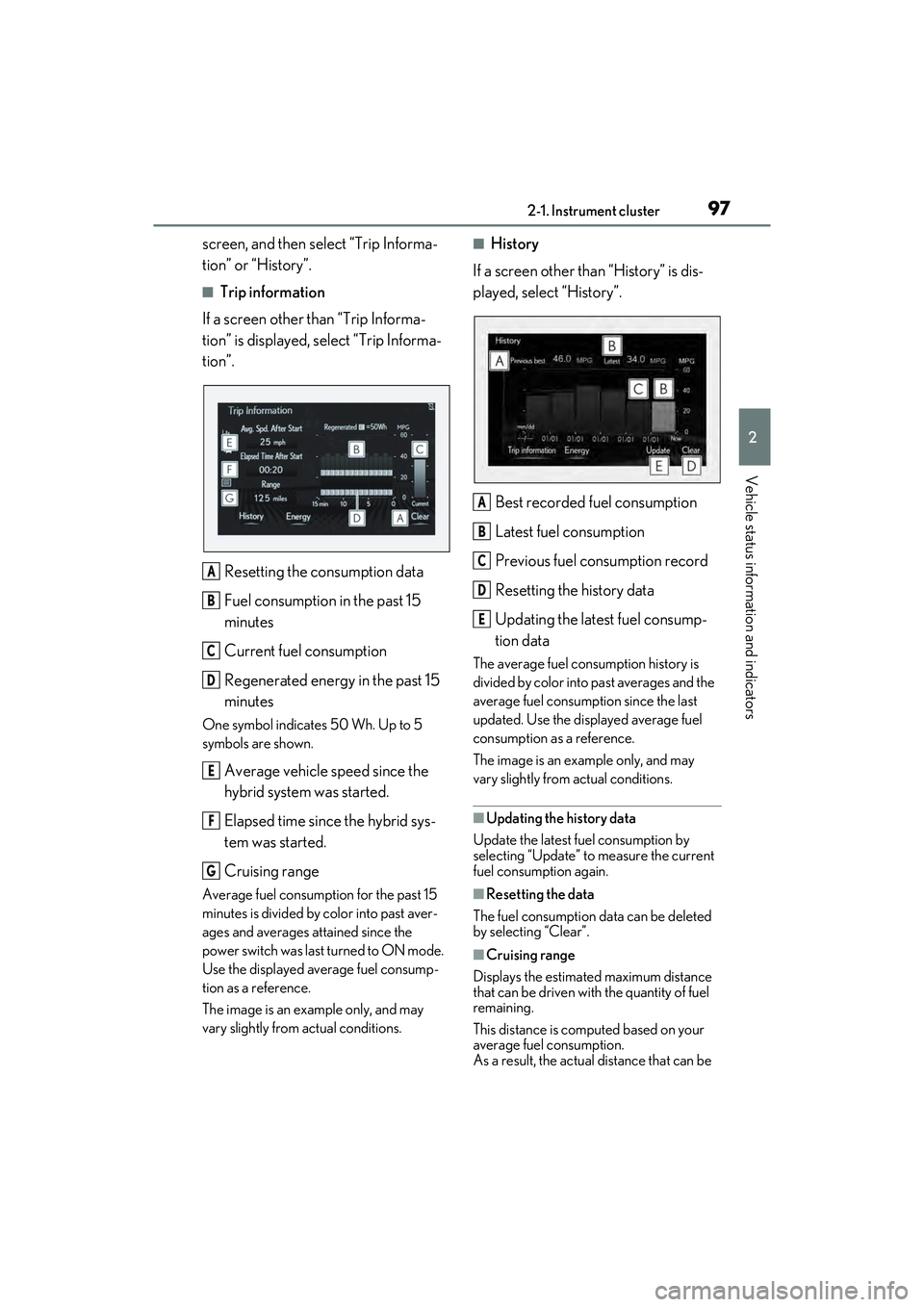
QTrip information
If a screen other than “Trip Informa-
tion” is displayed, select “Trip Informa-
tion”.
Resetting the consumption data
Fuel consumption in the past 15
minutes
Current fuel consumption
Regenerated energy in the past 15
minutes
One symbol indicates 50 Wh. Up to 5
symbols are shown.
Average vehicle speed since the
hybrid system was started.
Elapsed time since the hybrid sys-
tem was started.
Cruising range
Average fuel consumption for the past 15
minutes is divided by color into past aver-
ages and averages attained since the
power switch was last turned to ON mode.
Use the displayed average fuel consump-
tion as a reference.
The image is an example only, and may
vary slightly from actual conditions.
QHistory
If a screen other than “History” is dis-
played, select “History”.
Best recorded fuel consumption
Latest fuel consumption
Previous fuel consumption record
Resetting the history data
Updating the latest fuel consump-
tion data
The average fuel consumption history is
divided by color into past averages and the
average fuel consumption since the last
updated. Use the displayed average fuel
consumption as a reference.
The image is an example only, and may
vary slightly from actual conditions.
QUpdating the history data
Update the latest fuel consumption by
selecting “Update” to measure the current
fuel consumption again.
QResetting the data
The fuel consumption data can be deleted
by selecting “Clear”.
QCruising range
Displays the estimated maximum distance
that can be driven with the quantity of fuel
remaining.
This distance is computed based on your
average fuel consumption.
As a result, the actual distance that can be
A
B
C
D
E
F
G
A
B
C
D
E
Page 100 of 480
982-1. Instrument cluster
driven may differ from that displayed.
Display the vehicle information on the
side display (P.267), and then select
or to display the desired
screen.
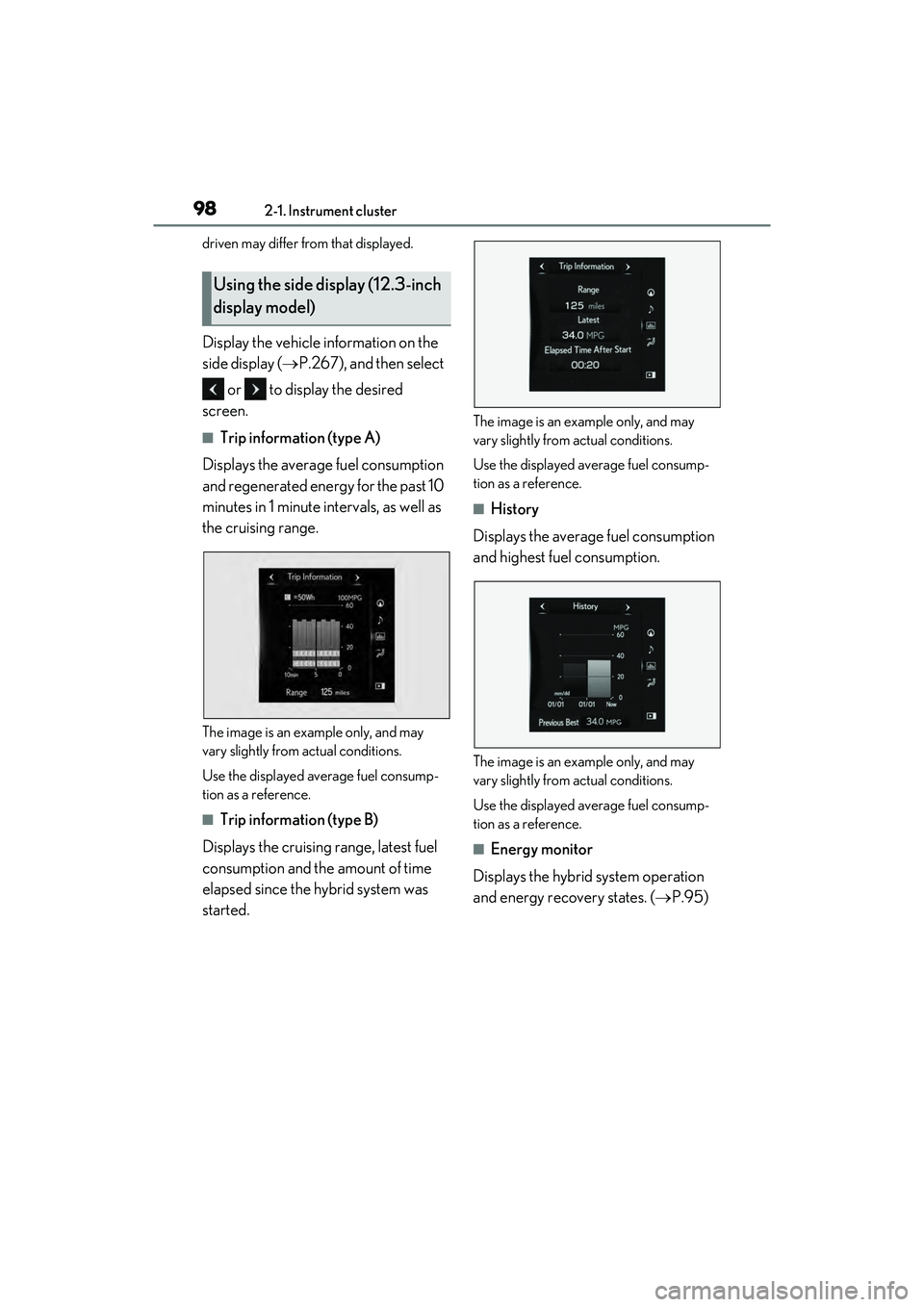
QTrip information (type A)
Displays the average fuel consumption
and regenerated energy for the past 10
minutes in 1 minute intervals, as well as
the cruising range.
The image is an example only, and may
vary slightly from actual conditions.
Use the displayed average fuel consump-
tion as a reference.
QTrip information (type B)
Displays the cruising range, latest fuel
consumption and the amount of time
elapsed since the hybrid system was
started.
The image is an example only, and may
vary slightly from actual conditions.
Use the displayed average fuel consump-
tion as a reference.
QHistory
Displays the average fuel consumption
and highest fuel consumption.
The image is an example only, and may
vary slightly from actual conditions.
Use the displayed average fuel consump-
tion as a reference.
QEnergy monitor
Displays the hybrid system operation
and energy recovery states. ( P.95)
Using the side display (12.3-inch
display model)
Page 139 of 480
137
4
4
Driving
Driving
4-1. Before drivingDriving the vehicle ..................... 138
Cargo and luggage ................... 144
Vehicle load limits ...................... 146
Trailer towing ............................... 146
Dinghy towing ............................. 147
4-2. Driving procedures Power (ignition) switch ............ 148
EV drive mode ............................ 153
Hybrid transmission .................. 154
Turn signal lever.......................... 158
Parking brake .............................. 159
Brake Hold..................................... 161
4-3. Operating the lights and wipers
Headlight switch ......................... 163
AHB (Automatic High Beam) ......................................................... 166
Windshield wipers and washer ......................................................... 169
4-4. Refueling Opening the fuel tank cap ...... 174
4-5. Using the driving support sys- tems
Lexus Safety System + 2.5 ..... 177
PCS (Pre-Collision System).. 182
LTA (Lane Tracing Assist)...... 192
RSA (Road Sign Assist) ........... 201
Dynamic radar cruise control with full-speed range ...................... 204
BSM (Blind Spot Monitor) ..... 214Driving Mode Select switch ..
219
PKSA (Parking Support Alert) ......................................................... 221
Intuitive parking assist .............. 222
RCTA (Rear Cross Traffic Alert) function....................................... 230
RCD (Rear Camera Detection) function....................................... 236
PKSB (Parking Support Brake) ....................................................... 239
Parking Support Brake function (static objects) ......................... 246
Parking Support Brake function (rear-crossing vehicles) ...... 249
Parking Support Brake function (rear pedestrians) ................... 251
Driving assist systems.............. 253
4-6. Driving tips
Hybrid vehicle driving tips .... 258
Winter driving tips .................... 260
Page 140 of 480
1384-1. Before driving
4-1. Be fore driving
QStarting the hybrid system
P.148
QDriving
1 With the brake pedal depressed,
shift the shift lever to D. ( P.155)
2 If the parking brake is in manual
mode, release the parking brake.
( P.159)
3 Gradually release the brake pedal
and gently depress the accelerator
pedal to accelerate the vehicle.
QStopping
1 With the shift in D, depress the
brake pedal.
2 If necessary, set the parking brake.
If the vehicle is to be stopped for an
extended period of time, shift the shift lever
to P. ( P.155)
QParking the vehicle
1 With the shift lever in D, depress
the brake pedal.
2 Set the parking brake ( P.159),
and shift the shift lever to P
( P.155).
3 Press the power switch to stop the
hybrid system.
4 Lock the door, making sure that
you have the electronic key on your
person.
If parking on a hill, block the wheels as
needed.
QStarting off on a steep uphill
1 Make sure that the parking brake is
set with the brake pedal depressed,
and then shift the shift lever to D.
2 Release the brake pedal and gently
depress the accelerator pedal.
3 Release the parking brake.
QWhen starting off on a uphill
The hill-start assist control will activate.
( P.253)
QFor fuel-efficient driving
Keep in mind that hybrid vehicles are simi-
lar to conventional vehicles, and it is neces-
sary to refrain from activities such as
sudden acceleration. ( P.258)
QCoasting (Auto Glide Control)
When Eco drive mode is selected, under
certain conditions, Auto Glide Control will
operate automatically and allow the vehicle
coast, enhancing fuel economy. ( P.220)
QDriving in the rain
ODrive carefully when it is raining, because
visibility will be reduced, the windows
may become fogged-up, and the road
will be slippery.
ODrive carefully when it starts to rain,
because the road surface will be espe-
cially slippery.
ORefrain from high speeds when driving on
an expressway in the rain, because there
may be a layer of water between the tires
and the road surface, preventing the
steering and brakes from operating
properly.
QRestraining the hybrid system output
(Brake Override System)
OWhen the accelerator and brake pedals
are depressed at the same time, the
hybrid system output may be restrained.
OA warning message is displayed on the
multi-information display while the sys-
tem is operating. ( P.366)
Driving the vehicle
The following procedures should be
observed to ensure safe driving:
Driving procedure
Page 141 of 480
1394-1. Before driving
4
Driving
QBreaking in your new Lexus
To extend the life of the vehicle, observing
the following precautions is recommended:
OFor the first 186 miles (300 km):
Avoid sudden stops.
OFor the first 621 miles (1000 km):
• Do not drive at extremely high speeds.
• Avoid sudden acceleration.
• Do not drive continuously in low gears.
• Do not drive at a constant speed for extended periods.
QOperating your vehicle in a foreign
country
Comply with the releva nt vehicle registra-
tion laws and confirm the availability of the
correct fuel. ( P.403)
WARNING
Observe the following precautions.
Failure to do so may result in death or
serious injury.
QWhen starting the vehicle
Always keep your foot on the brake
pedal while stopped with the “READY”
indicator is illuminated. This prevents the
vehicle from creeping.
QWhen driving the vehicle
ODo not drive if you are unfamiliar with
the location of the brake and accelera-
tor pedals to avoid depressing the
wrong pedal.
• Accidentally depressing the accelera- tor pedal instead of the brake pedal
will result in sudden acceleration that
may lead to an accident.
• When backing up, you may twist your body around, leading to a difficulty in
operating the pedals. Make sure to
operate the pedals properly.
• Make sure to keep a correct driving posture even when moving the vehicle
only slightly. This allows you to depress
the brake and accelerator pedals
properly.
• Depress the brake pedal using your right foot. Depressing the brake pedal
using your left foot may delay
response in an emer gency, resulting in
an accident.
OThe driver should pay extra attention
to pedestrians when the vehicle is
powered only by the electric motor
(traction motor). As there is minimal
motor noise, pedestrians may mis-
judge the vehicle’s movement. Even if
the Acoustic Vehicle Alerting system
is operating, drive with care as pedes-
trians in the vicinity may still not notice
the vehicle if the surrounding area is
noisy.
ODo not drive the vehicle over or stop
the vehicle near flammable materials
such as leaves, paper or rags.
The exhaust system and exhaust gases
can be extremely hot. These hot parts
may cause a fire if there is any flamma-
ble material nearby.
Page 156 of 480
![LEXUS ES300h 2022 Owners Manual 1544-2. Driving procedures
and a message will be shown on the multi-
information display.
OThe hybrid battery (traction battery)
becomes low.
The remaining hybrid battery [traction
battery] level](/img/36/58916/w960_58916-155.png "LEXUS ES300h 2022 Owners Manual 1544-2. Driving procedures
and a message will be shown on the multi-
information display.
OThe hybrid battery (traction battery)
becomes low.
The remaining hybrid battery [traction
battery] level")
1544-2. Driving procedures
and a message will be shown on the multi-
information display.
OThe hybrid battery (traction battery)
becomes low.
The remaining hybrid battery [traction
battery] level indicated in the energy
monitor display is low. (P.95)
OVehicle speed is high.
OThe accelerator pedal is depressed firmly
or the vehicle is on a hill etc.
When it is possible to inform the driver of
automatic cancelation in advance, a prior
notice screen will appear on the multi-infor-
mation display.
QPossible driving distance when driving
in EV drive mode
EV drive mode’s possible driving distance
ranges from a few hundred meters to
approximately 0.6 mile (1 km). However,
depending on vehicle conditions, there are
situations when EV drive mode cannot be
used.
(The distance that is possible depends on
the hybrid battery [traction battery] level
and driving conditions.)
QFuel economy
The hybrid system is designed to achieve
the best possible fuel economy during nor-
mal driving (using the gasoline engine and
electric motor [traction motor]). Driving in
EV drive mode more than necessary may
lower fuel economy.
*1: To improve fuel efficiency and reduce noise, set the shift lever in D for normal
driving. You can choose shift range
suitable for your driving situation by
operating the paddle shift switches.
*2: By selecting shift ranges using S mode, you can control accelerating force and
engine braking forces.
QWhen driving with dynamic radar cruise
control with full-speed range activated
Even when performing the following
actions with the intent of enabling engine
braking, engine brak ing will not activate
because dynamic radar cruise control with
full speed range will not be canceled.
OWhile driving in the D position or S mode,
downshifting to S5 or S4. ( P.204)
OWhen switching the driving mode to
sport mode while driving in the D posi-
tion. ( P.219)
WARNING
QCaution while driving
When driving in EV drive mode, pay spe-
cial attention to the area around the vehi-
cle. Because there is no engine noise,
pedestrians, people riding bicycles or
other people and vehicles in the area
may not be aware of the vehicle starting
off or approaching them. Therefore, take
extra care while driving even if the
Acoustic Vehicle Alerting System is
active.
Hybrid transmission
Select the shift position depending
on your purpose and situation.
Shift position purpose and func-
tions
Shift posi- tionObjective or function
PParking the vehicle/starting the hybrid system
RReversing
NNeutral
DNormal driving*1
SS mode driving*2 ( P.157)
Page 165 of 480
1634-3. Operating the lights and wipers
4
Driving
4-3.Op erating the lights and wipers
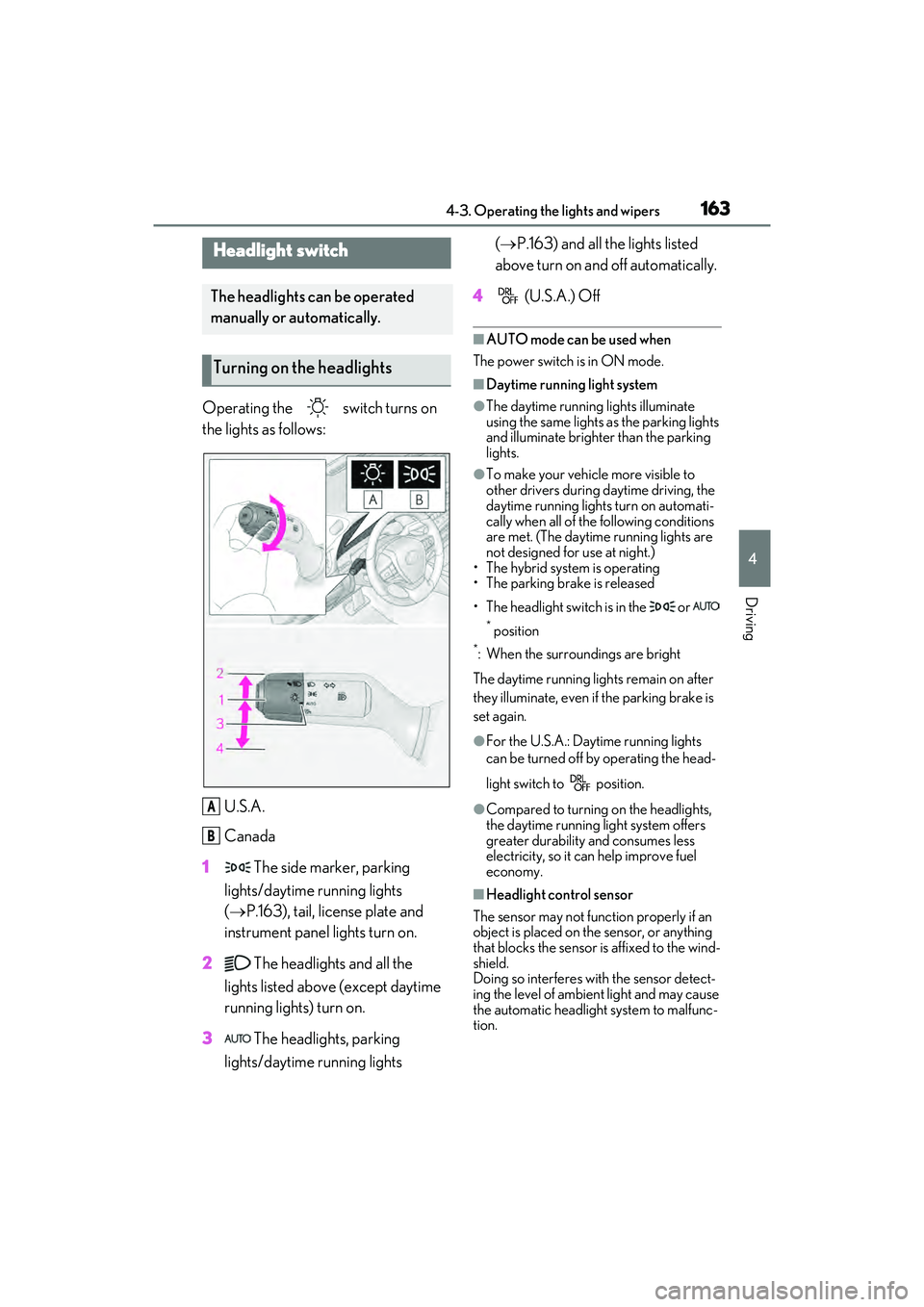
Operating the switch turns on
the lights as follows:U.S.A.
Canada
1 The side marker, parking
lights/daytime running lights
( P.163), tail, license plate and
instrument panel lights turn on.
2 The headlights and all the
lights listed above (except daytime
running lights) turn on.
3 The headlights, parking
lights/daytime running lights (
P.163) and all the lights listed
above turn on and off automatically.
4 (U.S.A.) Off
QAUTO mode can be used when
The power switch is in ON mode.
QDaytime running light system
OThe daytime running lights illuminate
using the same lights as the parking lights
and illuminate brighter than the parking
lights.
OTo make your vehicle more visible to
other drivers during daytime driving, the
daytime running lights turn on automati-
cally when all of the following conditions
are met. (The daytime running lights are
not designed for use at night.)
• The hybrid system is operating
• The parking brake is released
• The headlight switch is in the or
* position
*: When the surroundings are bright
The daytime running lights remain on after
they illuminate, even if the parking brake is
set again.
OFor the U.S.A.: Daytime running lights
can be turned off by operating the head-
light switch to position.
OCompared to turning on the headlights,
the daytime running light system offers
greater durability and consumes less
electricity, so it can help improve fuel
economy.
QHeadlight control sensor
The sensor may not function properly if an
object is placed on the sensor, or anything
that blocks the sensor is affixed to the wind-
shield.
Doing so interferes with the sensor detect-
ing the level of ambient light and may cause
the automatic headlight system to malfunc-
tion.
Headlight switch
The headlights can be operated
manually or automatically.
Turning on the headlights
A
B
Page 176 of 480

1744-4. Refueling
4-4 . Ref ueling
Close all the doors and windows,
and turn the power switch off.
Confirm the type of fuel.
QFuel types
P.410
QFuel tank opening for unleaded gasoline
To help prevent incorrect fueling, your vehi-
cle has a fuel tank opening that only accom-
modates the special nozzle on unleaded
fuel pumps.
Opening the fuel tank cap
The fuel tank of your vehicle has a
special structure, which requires a
reduction in fuel tank pressure
before refueling. After the opener
switch has been pressed, it will take
several seconds until the vehicle is
ready for refueling.
Before refueling the vehicle
WARNING
QWhen refueling the vehicle
Observe the following precautions while
refueling the vehicle. Failure to do so
may result in death or serious injury.
OAfter exiting the vehicle and before
opening the fuel door, touch an
unpainted metal surface to discharge
any static electricity. It is important to
discharge static electricity before refu-
eling because sparks resulting from
static electricity can cause fuel vapors
to ignite while refueling.
OAlways hold the grips on the fuel tank
cap and turn it slowly to remove it.
A whooshing sound may be heard
when the fuel tank cap is loosened.
Wait until the sound cannot be heard
before fully removing the cap. In hot
weather, pressurized fuel may spray
out the filler neck and cause injury.
ODo not allow anyone that has not dis-
charged static electricity from their
body to come close to an open fuel
tank.
ODo not inhale vaporized fuel.
Fuel contains substances that are
harmful if inhaled.
ODo not smoke while refueling the vehi-
cle.
Doing so may cause the fuel to ignite
and cause a fire.
ODo not return to the vehicle or touch
any person or object that is statically
charged.
This may cause static electricity to
build up, resulting in a possible ignition
hazard.
QWhen refueling
Observe the following precautions to
prevent fuel overflowing from the fuel
tank:
OSecurely insert the fuel nozzle into the
fuel filler neck.
OStop filling the tank after the fuel noz-
zle automatically clicks off.
ODo not top off the fuel tank.
NOTICE
QRefueling
OFinish refueling within 30 minutes. If
more than 30 minutes passes, the
internal valve closes. In this condition,
fuel may overflow during the refueling
process.
Press the fuel filler door opener switch
again.