change time LEXUS ES300h 2022 Owner's Guide
[x] Cancel search | Manufacturer: LEXUS, Model Year: 2022, Model line: ES300h, Model: LEXUS ES300h 2022Pages: 480, PDF Size: 27.63 MB
Page 210 of 480
![LEXUS ES300h 2022 Owners Guide 2084-5. Using the driving support systems
2Accelerate or decelerate, with
accelerator pedal operation, to the
desired vehicle speed (at or above
approximately 20 mph [30 km/h])
and press the “-S](/img/36/58916/w960_58916-209.png "LEXUS ES300h 2022 Owners Guide 2084-5. Using the driving support systems
2Accelerate or decelerate, with
accelerator pedal operation, to the
desired vehicle speed (at or above
approximately 20 mph [30 km/h])
and press the “-S")
2084-5. Using the driving support systems
2Accelerate or decelerate, with
accelerator pedal operation, to the
desired vehicle speed (at or above
approximately 20 mph [30 km/h])
and press the “-SET” switch to set
the speed.
Cruise control “SET” indicator will come
on.
The vehicle speed at the moment the
switch is released becomes the set speed.
Adjusting the set speed by the
switch
To change the set speed, press the
“+RES” or “-SET” switch until the
desired set speed is displayed.
1 Increases the speed
(Except when the vehicle has been
stopped by system control in vehicle-to-
vehicle distance control mode)
2Decreases the speed Fine adjustment: Press the switch.
Large adjustment: Press and hold the
switch to change the speed, and
release when the desired speed is
reached.
In the vehicle-to-vehicle distance con-
trol mode, the set speed will be
increased or decreased as follows:
For the U.S. mainland and Hawaii
Fine adjustment: By 1 mph (1.6 km/h)*1 or 1
km/h (0.6 mph)
*2 each time the switch is
pressed
Large adjustment: Increases or decreases
in 1mph (1.6 km/h)
*1 or 1 km/h (0.6 mph)*2
increments for as long as the switch is held
Except for the U.S. mainland and
Hawaii
Fine adjustment: By 1 mph (1.6 km/h)*1 or 1
km/h (0.6 mph)
*2 each time the switch is
pressed
Large adjustment: Increases or decreases
in 5 mph (8 km/h)
*1 or 5 km/h (3.1 mph)*2
increments for as long as the switch is held
In the constant speed control mode
( P.211), the set speed will be
increased or decreased as follows:
Fine adjustment: By 1 mph (1.6 km/h)*1 or 1
km/h (0.6 mph)
*2 each time the switch is
pressed
Large adjustment: The speed will continue
to change while the switch is held.
*1: When the set speed is shown in “MPH”
*2: When the set speed is shown in “km/h”
Increasing the set speed by the
accelerator pedal
Adjusting the set speed
Page 213 of 480
2114-5. Using the driving support systems
4
Driving
vehicle distance control mode set
speed.
In situations where vehicle-to-vehicle
distance control needs to operate,
such as when a preceding vehicle cuts
in front of your vehicle, the curve
speed reduction function will be can-
celed.
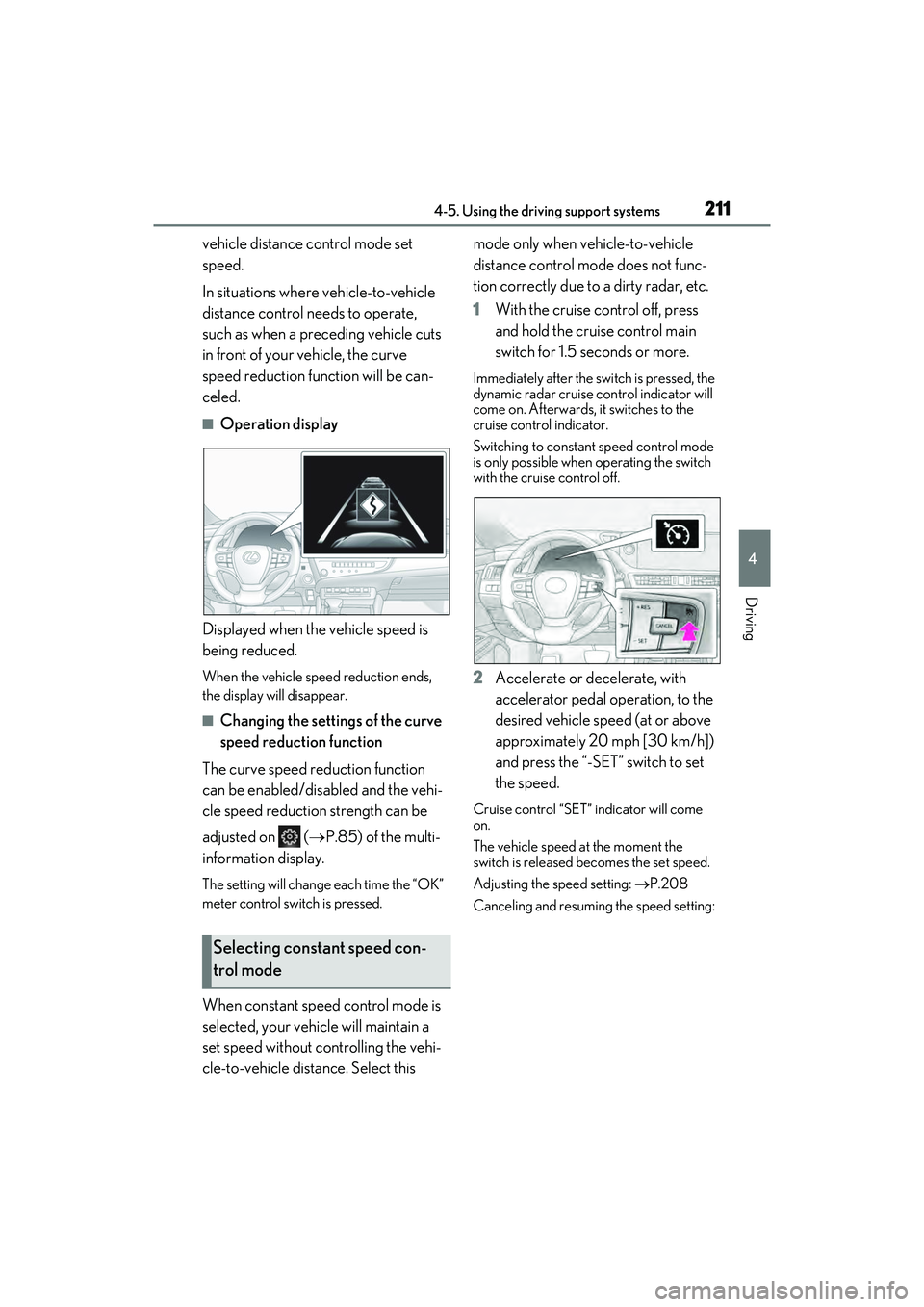
QOperation display
Displayed when the vehicle speed is
being reduced.
When the vehicle speed reduction ends,
the display will disappear.
QChanging the settings of the curve
speed reduction function
The curve speed reduction function
can be enabled/disabled and the vehi-
cle speed reduction strength can be
adjusted on ( P.85) of the multi-
information display.
The setting will change each time the “OK”
meter control switch is pressed.
When constant speed control mode is
selected, your vehicle will maintain a
set speed without controlling the vehi-
cle-to-vehicle distance. Select this mode only when vehicle-to-vehicle
distance control mode does not func-
tion correctly due to a dirty radar, etc.
1
With the cruise control off, press
and hold the cruise control main
switch for 1.5 seconds or more.
Immediately after the switch is pressed, the
dynamic radar cruise control indicator will
come on. Afterwards, it switches to the
cruise control indicator.
Switching to constant speed control mode
is only possible when operating the switch
with the cruise control off.
2Accelerate or decelerate, with
accelerator pedal operation, to the
desired vehicle speed (at or above
approximately 20 mph [30 km/h])
and press the “-SET” switch to set
the speed.
Cruise control “SET” indicator will come
on.
The vehicle speed at the moment the
switch is released becomes the set speed.
Adjusting the speed setting: P.208
Canceling and resuming the speed setting:
Selecting constant speed con-
trol mode
Page 221 of 480
2194-5. Using the driving support systems
4
Driving
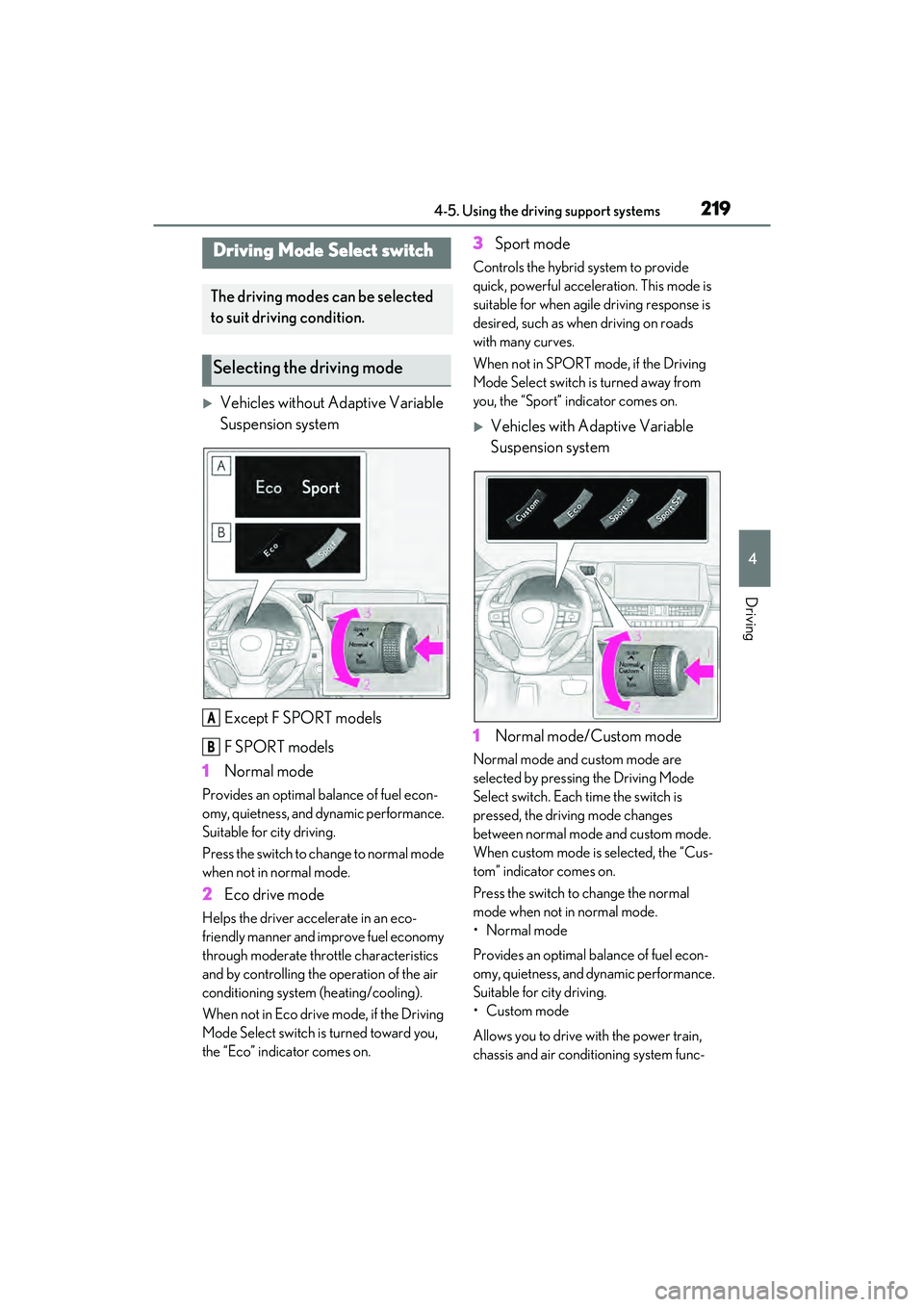
Vehicles without Adaptive Variable
Suspension systemExcept F SPORT models
F SPORT models
1 Normal mode
Provides an optimal balance of fuel econ-
omy, quietness, and dynamic performance.
Suitable for city driving.
Press the switch to change to normal mode
when not in normal mode.
2Eco drive mode
Helps the driver accelerate in an eco-
friendly manner and improve fuel economy
through moderate throttle characteristics
and by controlling the operation of the air
conditioning system (heating/cooling).
When not in Eco drive mode, if the Driving
Mode Select switch is turned toward you,
the “Eco” indicator comes on.
3Sport mode
Controls the hybrid system to provide
quick, powerful acceleration. This mode is
suitable for when agile driving response is
desired, such as when driving on roads
with many curves.
When not in SPORT mode, if the Driving
Mode Select switch is turned away from
you, the “Sport” indicator comes on.
Vehicles with Adaptive Variable
Suspension system
1 Normal mode/Custom mode
Normal mode and custom mode are
selected by pressing the Driving Mode
Select switch. Each time the switch is
pressed, the driving mode changes
between normal mode and custom mode.
When custom mode is selected, the “Cus-
tom” indicator comes on.
Press the switch to change the normal
mode when not in normal mode.
• Normal mode
Provides an optimal balance of fuel econ-
omy, quietness, and dynamic performance.
Suitable for city driving.
•Custom mode
Allows you to drive with the power train,
chassis and air conditioning system func-
Driving Mode Select switch
The driving modes can be selected
to suit driving condition.
Selecting the driving mode
A
B
Page 224 of 480
2224-5. Using the driving support systems
QAdjusting the buzzer volume
The buzzer volume can be adjusted on
the multi-information display. The vol-
ume of buzzers for the intuitive parking
assist, RCTA function and RCD func-
tion will be adjusted simultaneously.
Use the meter control switches to
change settings. ( P.86)
1 Press or to select .
2 Press or to select “PKSA”
and then press “OK”.
3 Press or to select and
then press “OK”.
Each time the switch is pressed, the vol-
ume level will change between 1, 2, and 3.
QMuting a buzzer temporarily
A mute button will be displayed on the
multi-information display when an
object or pedestrian is detected. To
mute the buzzer, press “OK”.
The buzzers for the intuitive parking
assist, RCTA function and RCD func-
tion will be muted simultaneously.
Mute will be automatically canceled in
the following situations:
When the shift position is changed.
When there is a malfunction in a
sensor or the system is temporarily
unavailable.
When the function is disabled while
it is operating.
When the power switch is turned
off.
*: If equipped
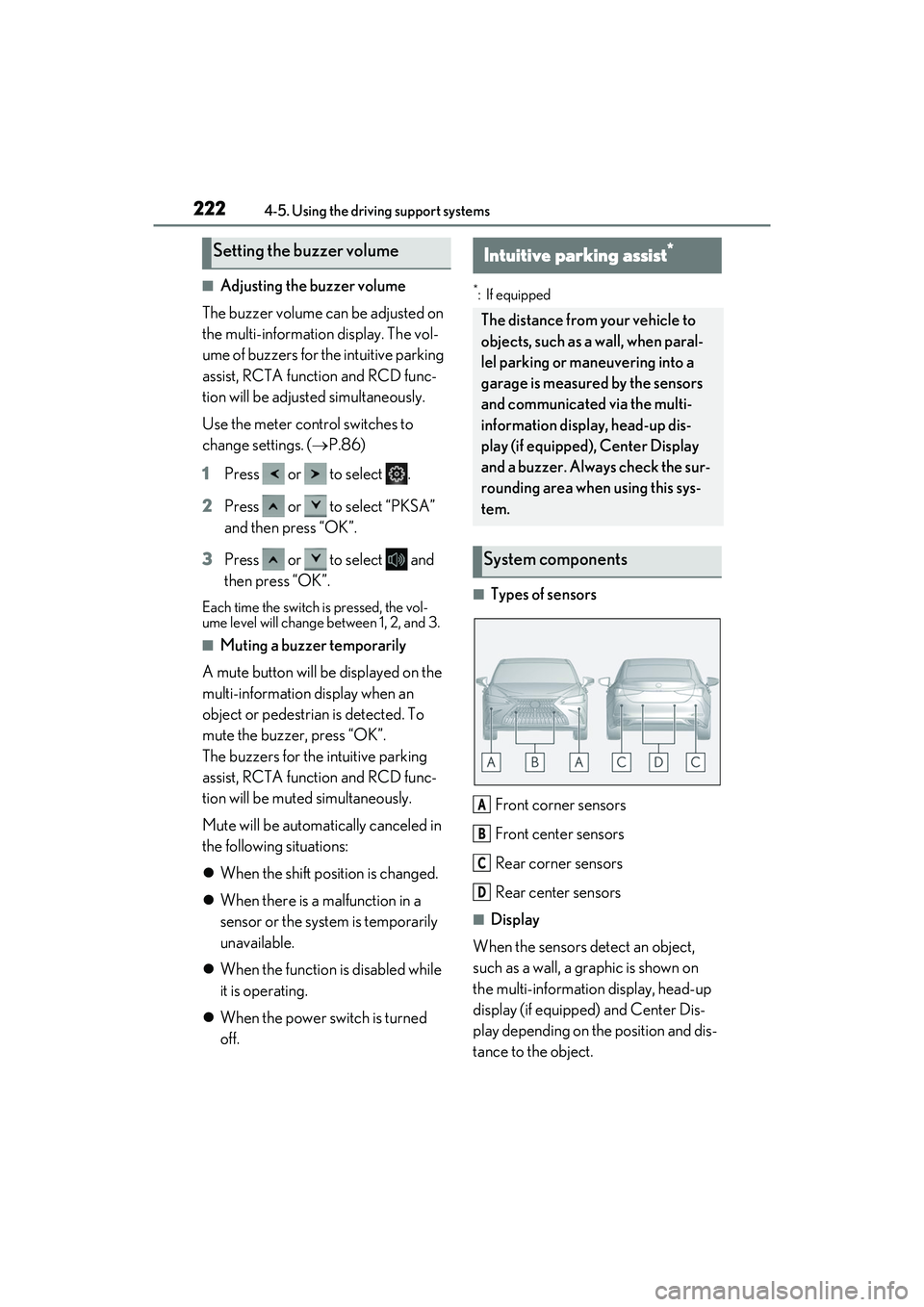
QTypes of sensors
Front corner sensors
Front center sensors
Rear corner sensors
Rear center sensors
QDisplay
When the sensors detect an object,
such as a wall, a graphic is shown on
the multi-information display, head-up
display (if equipped) and Center Dis-
play depending on the position and dis-
tance to the object.
Setting the buzzer volumeIntuitive parking assist*
The distance from your vehicle to
objects, such as a wall, when paral-
lel parking or maneuvering into a
garage is measured by the sensors
and communicated via the multi-
information display, head-up dis-
play (if equipped), Center Display
and a buzzer. Always check the sur-
rounding area when using this sys-
tem.
System components
A
B
C
D
Page 233 of 480
2314-5. Using the driving support systems
4
Driving
Use the meter control switches to
enable/disable the RCTA function.
( P.86)
Vehicles without the Intuitive park-
ing assist
1 Press or to select .
2 Press or to select “RCTA”
and then press “OK”.
3 Press or to select “RCTA”
and then press “OK”.
Vehicles with the Intuitive parking
assist
1 Press or to select .
2 Press or to select “PKSA”
and then press “OK”.
3 Press or to select “RCTA”
and then press “OK”.
When the RCTA function is disabled, the
RCTA OFF indicator ( P.74) illuminates
on the multi-information display. (Each time the power switch is turned off then
changed to ON mode, the RCTA function
will be enabled automatically.)
QOutside rear view mirror indicator visi-
bility
In strong sunlight, the outside rear view mir-
ror indicator may be difficult to see.
QHearing the RCTA buzzer
The RCTA buzzer may be difficult to hear
over loud noises, such as if the audio system
volume is high.
QWhen “Rear Cross Traffic Alert
Unavailable” is shown on the multi-
information display
Ice, snow, mud, etc., may be attached to the
rear bumper around the sensors. ( P.215)
Remove the ice, snow, mud, etc., attached
to the rear bumper around the sensors to
return the function to normal. Additionally,
the sensors may not operate normally when
driving in extremely hot or cold environ-
ments.
QRear side radar sensors
P.215
QOperation of the RCTA function
The RCTA function uses rear side radar sensors to detect vehicles approaching
from the right or left at the rear of the ve hicle and alerts the driver of the presence
of such vehicles by flashing the outside rear view mirror indicators and sounding a
buzzer.
Turning the RCTA function
on/off
NOTICE
QBefore using the RCTA function
Do not place obstacles near the sensors.
RCTA function
Page 235 of 480
2334-5. Using the driving support systems
4
Driving
QThe RCTA function is operational when
The RCTA function operates when all of the
following conditions are met:
OThe power switch is in ON mode.
OThe RCTA function is on.
OThe shift lever is in R.
OThe vehicle speed is less than approxi-
mately 5 mph (8 km/h).
OThe approaching vehicle speed is
between approximately 5 mph (8 km/h)
and 18 mph (28 km/h).
QSetting the buzzer volume
The buzzer volume can be adjusted on the
multi-information display.
Use the meter control switches to change
settings. ( P.86)
Vehicles without the Intuitive parking
assist
1 Press or to select .
2 Press or to select “RCTA”,
then press “OK”.
3 Press or to select and then
press “OK”.
Each time the switch is pressed, the volume
level will change between 1, 2 and 3.
Vehicles with the Intuitive parking assist
P.222
QMuting a buzzer temporarily
Vehicles without the Intuitive parking
assist
A mute button will be displayed on the
multi-information display when an object is
detected. To mute the buzzer, press “OK”.
OWhen the shift lever is changed.
OWhen the vehicle speed exceeds a cer-
tain speed.
OWhen the operating function is tempo-
rarily canceled.
OWhen the operating function is disabled
manually.
OWhen the power switch is turned off.
Vehicles with the Intuitive parking assist
P.222
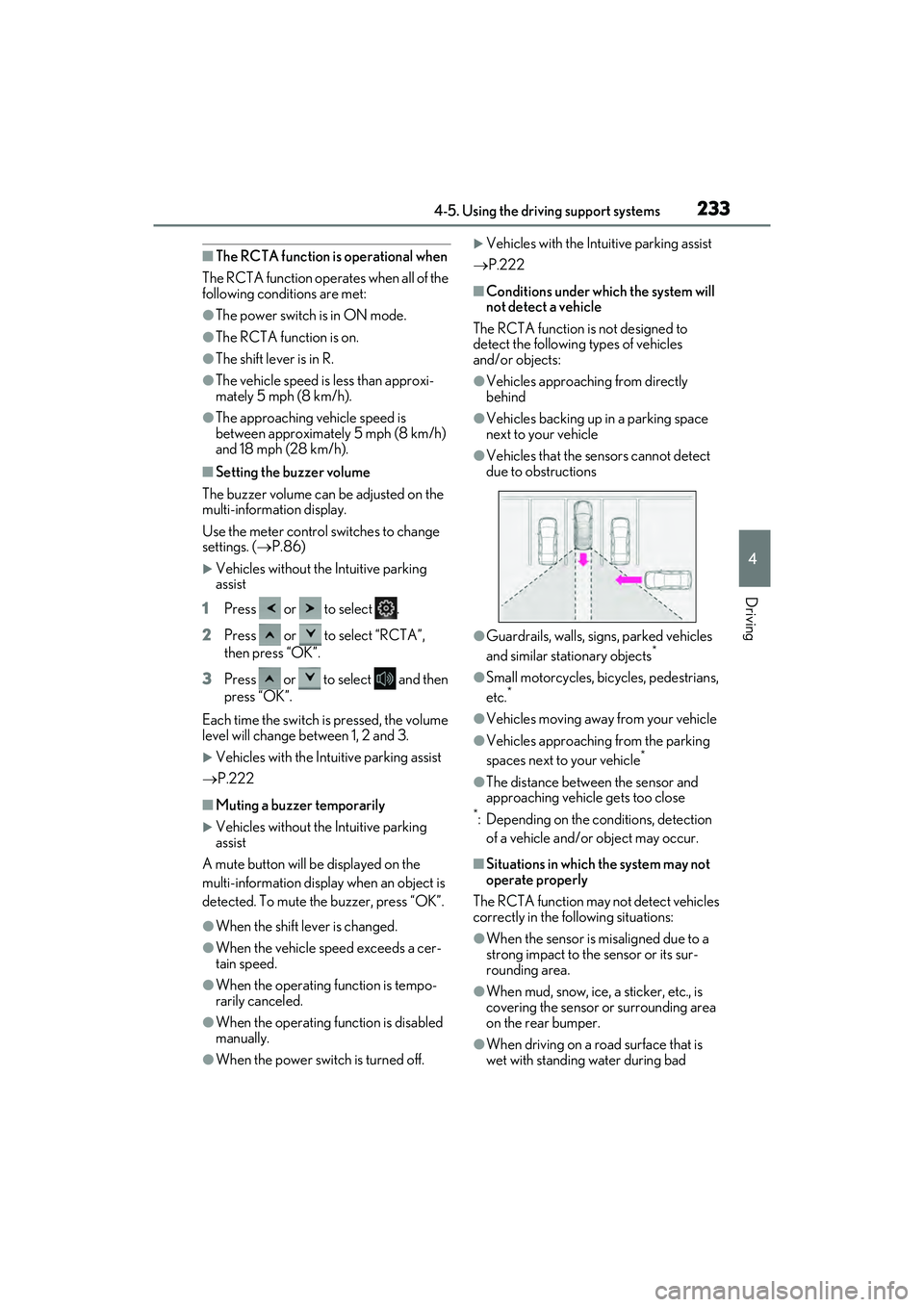
QConditions under wh ich the system will
not detect a vehicle
The RCTA function is not designed to
detect the following types of vehicles
and/or objects:
OVehicles approaching from directly
behind
OVehicles backing up in a parking space
next to your vehicle
OVehicles that the sensors cannot detect
due to obstructions
OGuardrails, walls, signs, parked vehicles
and similar stationary objects*
OSmall motorcycles, bicycles, pedestrians,
etc.*
OVehicles moving away from your vehicle
OVehicles approaching from the parking
spaces next to your vehicle*
OThe distance between the sensor and
approaching vehicle gets too close
*: Depending on the conditions, detection of a vehicle and/or object may occur.
QSituations in which the system may not
operate properly
The RCTA function may not detect vehicles
correctly in the following situations:
OWhen the sensor is misaligned due to a
strong impact to the sensor or its sur-
rounding area.
OWhen mud, snow, ice, a sticker, etc., is
covering the sensor or surrounding area
on the rear bumper.
OWhen driving on a road surface that is
wet with standing water during bad
Page 238 of 480
2364-5. Using the driving support systems
*: If equipped
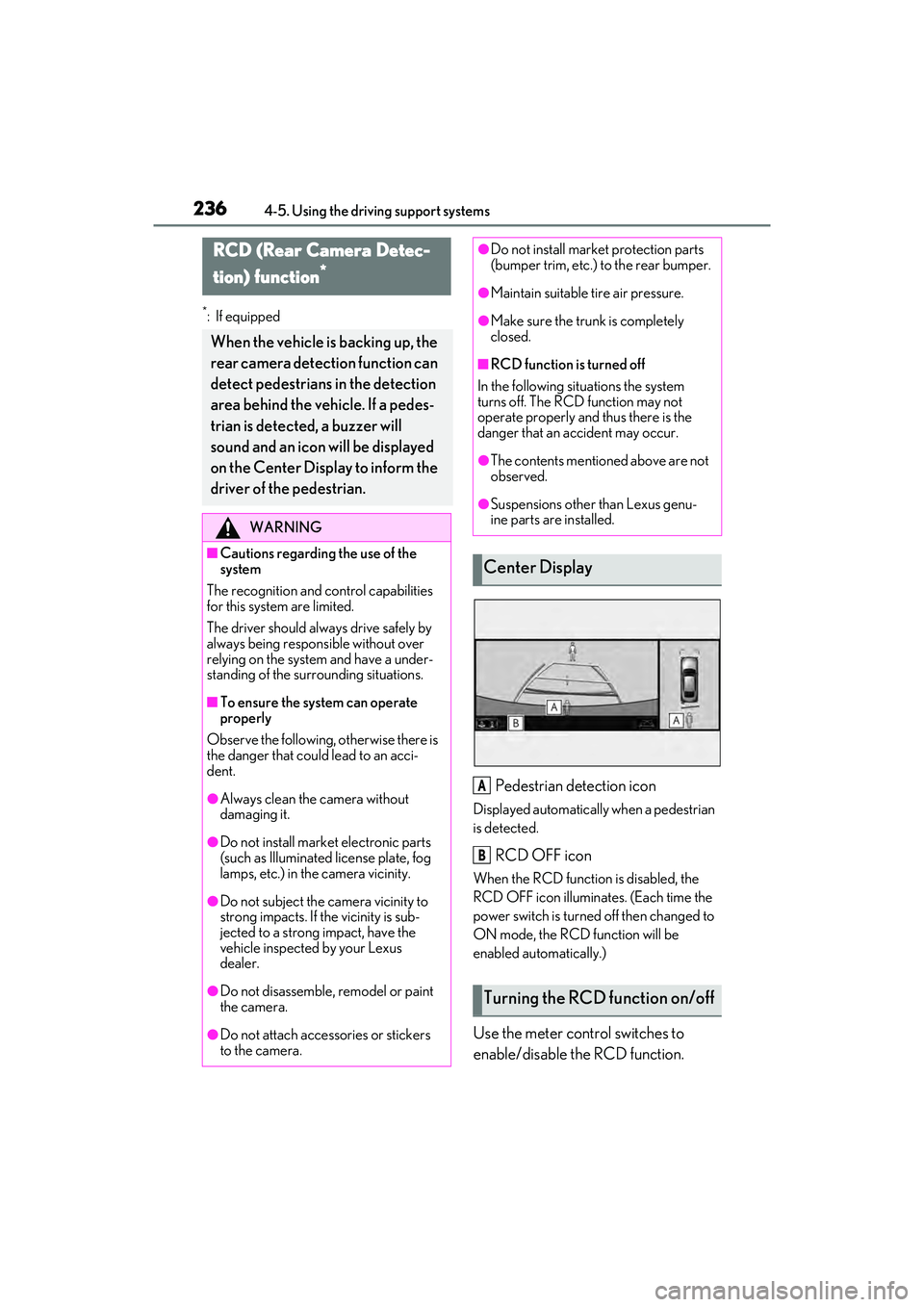
Pedestrian detection icon
Displayed automatically when a pedestrian
is detected.
RCD OFF icon
When the RCD function is disabled, the
RCD OFF icon illuminates. (Each time the
power switch is turned off then changed to
ON mode, the RCD function will be
enabled automatically.)
Use the meter control switches to
enable/disable the RCD function.
RCD (Rear Camera Detec-
tion) function
*
When the vehicle is backing up, the
rear camera detection function can
detect pedestrians in the detection
area behind the vehicle. If a pedes-
trian is detected, a buzzer will
sound and an icon will be displayed
on the Center Display to inform the
driver of the pedestrian.
WARNING
QCautions regarding the use of the
system
The recognition and control capabilities
for this system are limited.
The driver should alwa ys drive safely by
always being responsible without over
relying on the system and have a under-
standing of the surrounding situations.
QTo ensure the system can operate
properly
Observe the following, otherwise there is
the danger that could lead to an acci-
dent.
OAlways clean the camera without
damaging it.
ODo not install market electronic parts
(such as Illuminated license plate, fog
lamps, etc.) in the camera vicinity.
ODo not subject the camera vicinity to
strong impacts. If the vicinity is sub-
jected to a strong impact, have the
vehicle inspected by your Lexus
dealer.
ODo not disassemble, remodel or paint
the camera.
ODo not attach accessories or stickers
to the camera.
ODo not install market protection parts
(bumper trim, etc.) to the rear bumper.
OMaintain suitable tire air pressure.
OMake sure the trunk is completely
closed.
QRCD function is turned off
In the following situations the system
turns off. The RCD function may not
operate properly and thus there is the
danger that an accident may occur.
OThe contents mentioned above are not
observed.
OSuspensions other than Lexus genu-
ine parts are installed.
Center Display
Turning the RCD function on/off
A
B
Page 243 of 480
2414-5. Using the driving support systems
4
Driving
The Parking Support Brake can be
enabled/disabled on the multi-infor-
mation display. All of the Parking Sup-
port Brake functions (static objects,
rear-crossing vehicles, and rear
pedestrians) are enabled/disabled
simultaneously.
Use the meter control switches to
enable/disable the parking support
brake. (P.86)
1 Press or to select .
2 Press or to select and
then press “OK”.
When the Parking Support Brake is dis-
abled, the PKSB OFF indicator ( P.74)
illuminates on the multi-information dis-
play.
To re-enable the system, select on the
multi-information display, select and
turn it on. If the system is disabled, it will
remain off even if the power switch is
turned to ON mode after the power switch
has been turned off. If the hybrid system output restriction con-
trol or brake control operates, a buzzer
will sound and a message will be displayed
on the Center Display and multi-informa-
tion display, to alert the driver. On vehicles
with a head-up display, the head-up display
will display the same message as the multi-
information display.
Depending on the situation, hybrid system
output restriction control will operate to
either limit acceleration or restrict output
as much as possible.
Hybrid system output restriction
control is operating (acceleration
restriction)
Acceleration greater than a certain
amount is restricted by the system.
Center Display (Panoramic view monitor):
No warning displayed
Multi-information display: “Object
Detected Acceleration Reduced”
PKSB OFF indicator: Not illuminated
Buzzer: Does not sound
Hybrid system output restriction
control is operating (output
restricted as much as possible)
The system has determined that stronger-
than-normal brake operation is necessary.
Center Display (Panoramic view monitor):
“BRAKE!”
Multi-information display: “BRAKE!”
PKSB OFF indicator: Not illuminated
Buzzer: Short beep
Brake control is operating
NOTICE
QIf “Parking Support Brake Unavail-
able” is displayed on the multi-infor-
mation display and the PKSB OFF
indicator is flashing
If this message is displayed immediately
after the power switch is changed to ON
mode, operate the vehicle carefully, pay-
ing attention to your surroundings. It may
be necessary to drive the vehicle for a
certain amount of time before the system
returns to normal. (If the system is not
return to normal after driving for a while,
clean the rear camera lens.)
Enabling/Disabling the Parking
Support Brake
Displays and buzzers for hybrid
system output restriction control
and brake control
Page 246 of 480
2444-5. Using the driving support systems
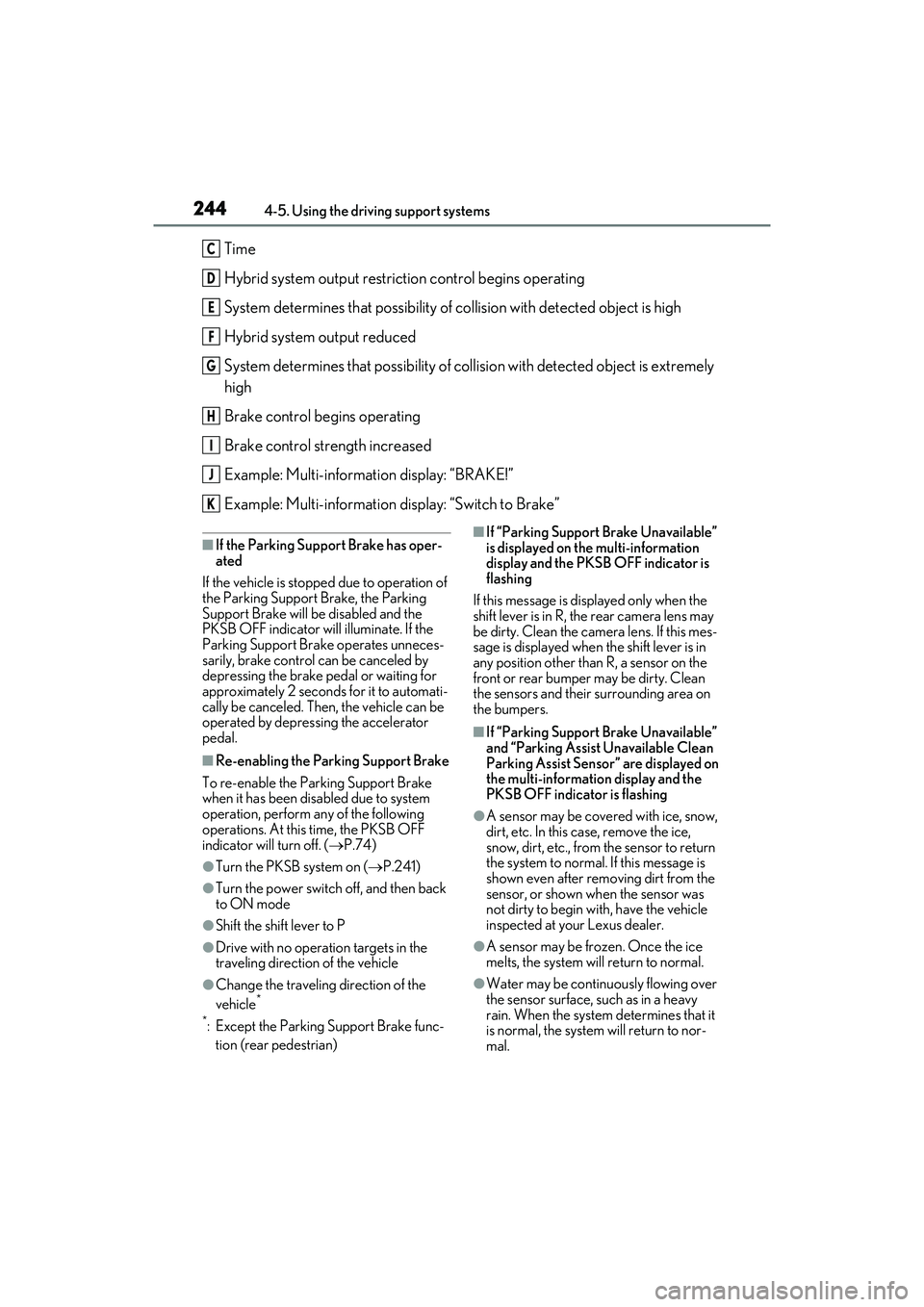
Time
Hybrid system output restriction control begins operating
System determines that possibility of collision with detected object is high
Hybrid system output reduced
System determines that possibility of collision with detected object is extremely
high
Brake control begins operating
Brake control strength increased
Example: Multi-information display: “BRAKE!”
Example: Multi-information display: “Switch to Brake”
QIf the Parking Support Brake has oper-
ated
If the vehicle is stopped due to operation of
the Parking Support Brake, the Parking
Support Brake will be disabled and the
PKSB OFF indicator will illuminate. If the
Parking Support Brake operates unneces-
sarily, brake control can be canceled by
depressing the brake pedal or waiting for
approximately 2 seconds for it to automati-
cally be canceled. Then, the vehicle can be
operated by depressing the accelerator
pedal.
QRe-enabling the Parking Support Brake
To re-enable the Parking Support Brake
when it has been disabled due to system
operation, perform any of the following
operations. At this time, the PKSB OFF
indicator will turn off. ( P.74)
OTurn the PKSB system on ( P.241)
OTurn the power switch off, and then back
to ON mode
OShift the shift lever to P
ODrive with no operation targets in the
traveling direction of the vehicle
OChange the traveling direction of the
vehicle*
*
: Except the Parking Support Brake func- tion (rear pedestrian)
QIf “Parking Support Brake Unavailable”
is displayed on the multi-information
display and the PKSB OFF indicator is
flashing
If this message is displayed only when the
shift lever is in R, the rear camera lens may
be dirty. Clean the camera lens. If this mes-
sage is displayed when the shift lever is in
any position other than R, a sensor on the
front or rear bumper may be dirty. Clean
the sensors and their surrounding area on
the bumpers.
QIf “Parking Support Brake Unavailable”
and “Parking Assist Unavailable Clean
Parking Assist Sensor” are displayed on
the multi-information display and the
PKSB OFF indicator is flashing
OA sensor may be covered with ice, snow,
dirt, etc. In this case, remove the ice,
snow, dirt, etc., from the sensor to return
the system to normal. If this message is
shown even after removing dirt from the
sensor, or shown when the sensor was
not dirty to begin with, have the vehicle
inspected at your Lexus dealer.
OA sensor may be frozen. Once the ice
melts, the system will return to normal.
OWater may be continuously flowing over
the sensor surface, such as in a heavy
rain. When the system determines that it
is normal, the system will return to nor-
mal.
C
D
E
F
G
H
I
J
K
Page 258 of 480
2564-5. Using the driving support systems
WARNING
QThe ABS does not operate effectively
when
OThe limits of tire gripping performance
have been exceeded (such as exces-
sively worn tires on a snow covered
road).
OThe vehicle hydroplanes while driving
at high speed on wet or slick roads.
QStopping distance when the ABS is
operating may exceed that of normal
conditions
The ABS is not designed to shorten the
vehicle’s stopping distance. Always
maintain a safe distance from the vehicle
in front of you, especially in the following
situations:
OWhen driving on dirt, gravel or snow-
covered roads
OWhen driving with tire chains
OWhen driving over bumps in the road
OWhen driving over roads with pot-
holes or uneven surfaces
QTRAC/VSC may not operate effec-
tively when
Directional control and power may not
be achievable while driving on slippery
road surfaces, even if the TRAC/VSC
system is operating.
Drive the vehicle carefully in conditions
where stability and power may be lost.
QActive Cornering Assist does not
operate effectively when
ODo not overly rely on Active Corner-
ing Assist. Active Cornering Assist
may not operate effectively when
accelerating down slopes or driving on
slippery road surfaces.
OWhen Active Cornering Assist fre-
quently operates, Active Cornering
Assist may temporarily stop operating
to ensure proper operation of the
brakes, TRAC and VSC.
QHill-start assist control does not oper-
ate effectively when
ODo not overly rely on hill-start assist
control. Hill-start assist control may
not operate effectively on steep
inclines and roads covered with ice.
OUnlike the parking brake, hill-start
assist control is not intended to hold
the vehicle stationary for an extended
period of time. Do not attempt to use
hill-start assist control to hold the vehi-
cle on an incline, as doing so may lead
to an accident.
QWhen the TRAC/ABS/VSC is acti-
vated
The slip indicator light flashes. Always
drive carefully. Reckless driving may
cause an accident. Exercise particular
care when the indicator light flashes.
QWhen the TRAC/VSC systems are
turned off
Be especially careful and drive at a
speed appropriate to the road condi-
tions. As these are the systems to help
ensure vehicle stability and driving force,
do not turn the TRAC/VSC systems off
unless necessary.
QSecondary Collision Brake
Do not rely solely upon the Secondary
Collision Brake. This system is designed
to help reduce the possibility of further
damage due to a secondary collision,
however, that effect changes according
to various conditions. Overly relying on
the system may result in death or serious
injury.