seats LEXUS ES300h 2022 Owner's Guide
[x] Cancel search | Manufacturer: LEXUS, Model Year: 2022, Model line: ES300h, Model: LEXUS ES300h 2022Pages: 480, PDF Size: 27.63 MB
Page 127 of 480
1253-3. Adjusting the seats
3
Before driving
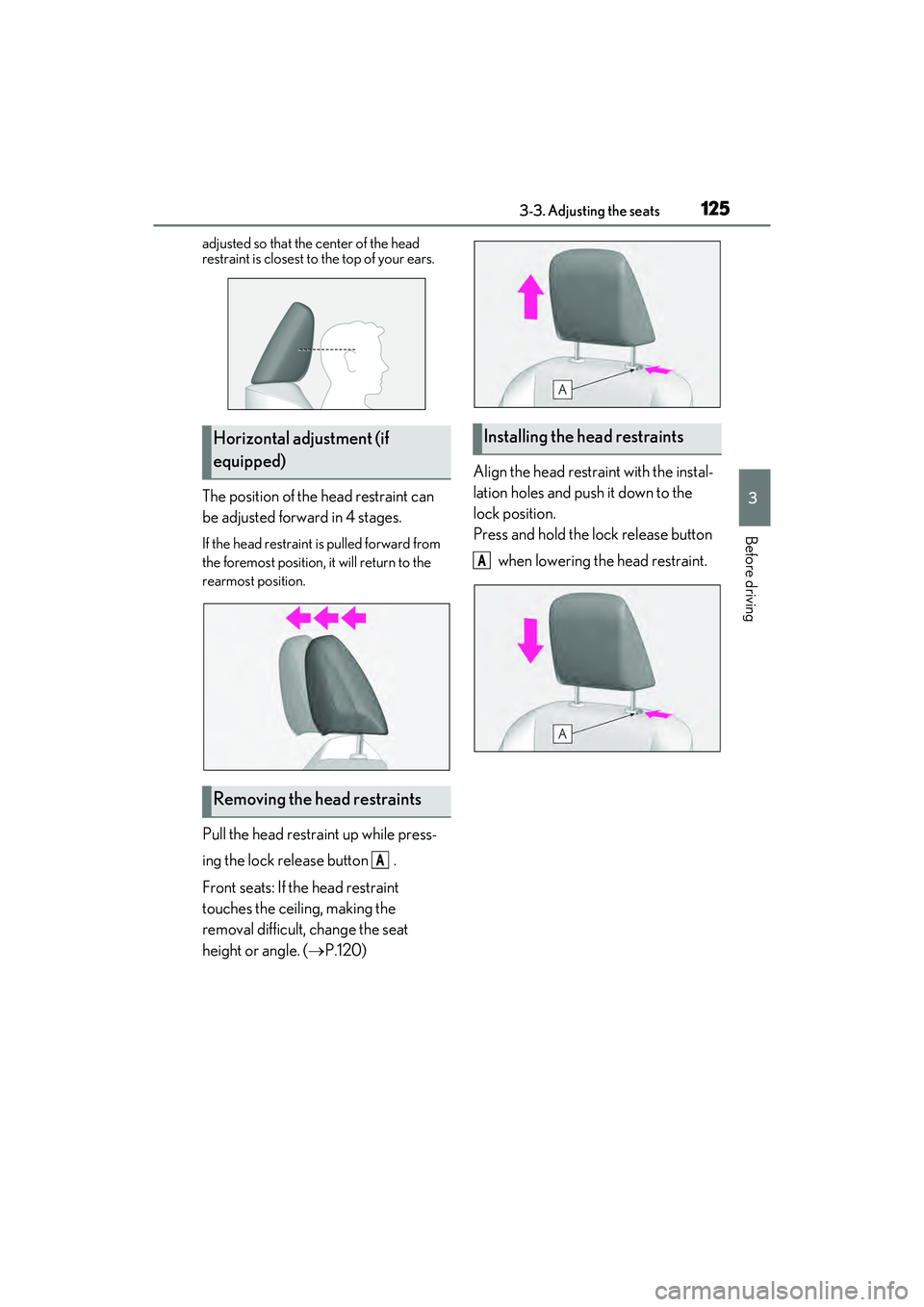
adjusted so that the center of the head
restraint is closest to the top of your ears.
The position of the head restraint can
be adjusted forward in 4 stages.
If the head restraint is pulled forward from
the foremost position, it will return to the
rearmost position.
Pull the head restraint up while press-
ing the lock release button .
Front seats: If the head restraint
touches the ceiling, making the
removal difficult, change the seat
height or angle. (P.120) Align the head restraint with the instal-
lation holes and push it down to the
lock position.
Press and hold the lock release button
when lowering the head restraint.
Horizontal adjustment (if
equipped)
Removing the head restraints
A
Installing the head restraints
A
Page 146 of 480

1444-1. Before driving
Cargo capacity depends on the total
weight of the occupants.
(Cargo capacity) = (Total load capac-
ity) (Total weight of occupants) Steps for Determining Correct Load
Limit
(1) Locate the statement “The com-
bined weight of occupants and cargo
should never exceed XXX kg or XXX
lbs.” on your vehicle’s placard.
(2) Determine the combined weight of
the driver and passengers that will be
riding in your vehicle.
(3) Subtract the combined weight of
the driver and passengers from XXX
kg or XXX lbs.
(4) The resulting figure equals the
available amount of cargo and luggage
load capacity.
For example, if the “XXX” amount
equals 1400 lbs. and there will be five
150 lb passengers in your vehicle, the
amount of available cargo and luggage
load capacity is 650 lbs. (1400 − 750
(5 150) = 650 lbs.)
(5) Determine the combined weight of
luggage and cargo being loaded on
the vehicle. That weight may not safely
exceed the available cargo and lug-
gage load capacity calculated in Step
4.
(6) If your vehicle will be towing a
trailer, load from your trailer will be
transferred to your vehicle. Consult
this manual to determine how this
reduces the available cargo and lug-
gage load capacity of your vehicle.
( P.146)Lexus does not recommend towing a
trailer with your vehicle. Your vehicle is not
designed for trailer towing.
Cargo and luggage
Take notice of the following infor-
mation about storage precautions,
cargo capacity and load:
WARNING
QThings that must not be carried in the
trunk
The following things may cause a fire if
loaded in the trunk:
OReceptacles containing gasoline
OAerosol cans
QStorage precautions
Observe the following precautions.
Failure to do so may prevent the pedals
from being depressed properly, may
block the driver’s vision, or may result in
items hitting the driver or passengers,
possibly causing an accident.
OStow cargo and luggage in the trunk
whenever possible.
ODo not place cargo or luggage in or on
the following locations.
• At the feet of the driver
• On the front passenger or rear seats (when stacking items)
• On the package tray
• On the instrument panel
• On the dashboard
• In front of the Center Display
OSecure all items in the occupant com-
partment.
Capacity and distribution
Page 276 of 480
2745-3. Using the air conditioning system
Select the air flow mode
: Air flows to the upper body
: Air flows to the upper body and feet
: Air flows to the feet
: Air flows to the feet and the wind-
shield defogger operates
Adjust the right-hand side tem-
perature setting
Function on/off indicators
When the function is on, the indicator illu-
minates on the control screen.
Sub function menu
When the sub function button on the
Remote Touch is pressed, the following
functions can be switched on and off.
: Set Lexus Climate Concierge
( P.268)
“AUTO”: Set automatic mode on/off
( P.275)
“Off”: Turn the fan off
“A/C”: Set cooling and dehumidification
function
“DUAL”: Adjust the temperature for driver
and front passenger seats separately
(“DUAL” mode) ( P.277)
: Set eco air conditioning mode
QOption control screen
Select on the sub menu to display
the option control screen.
The functions can be switched on and off.
When the function is on, the indicator illu-
minates on the screen.
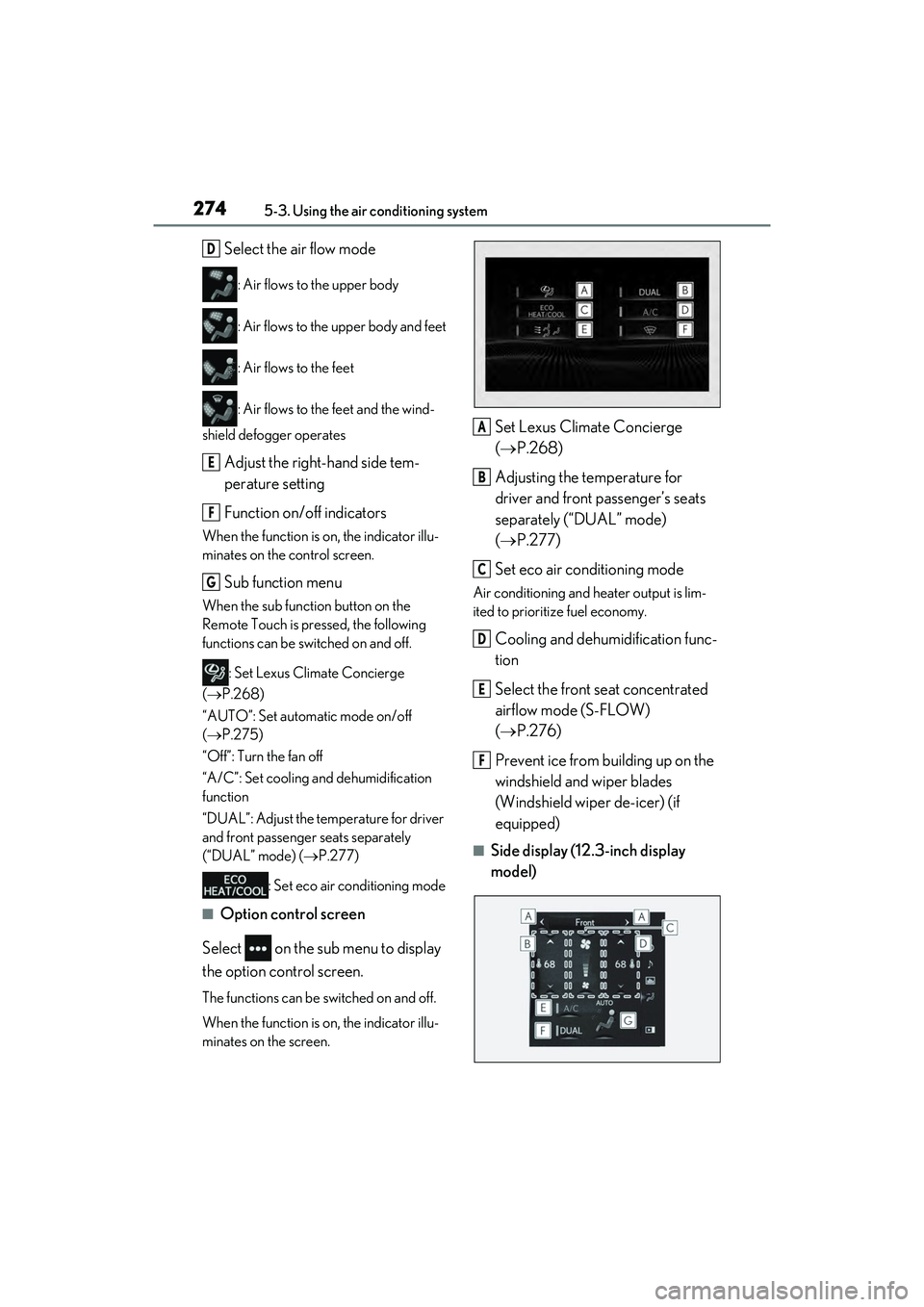
Set Lexus Climate Concierge
( P.268)
Adjusting the temperature for
driver and front passenger’s seats
separately (“DUAL” mode)
( P.277)
Set eco air conditioning mode
Air conditioning and heater output is lim-
ited to prioritize fuel economy.
Cooling and dehumidification func-
tion
Select the front seat concentrated
airflow mode (S-FLOW)
( P.276)
Prevent ice from building up on the
windshield and wiper blades
(Windshield wiper de-icer) (if
equipped)
QSide display (12.3-inch display
model)
D
E
F
G
A
B
C
D
E
F
Page 277 of 480
2755-3. Using the air conditioning system
5
Interior features
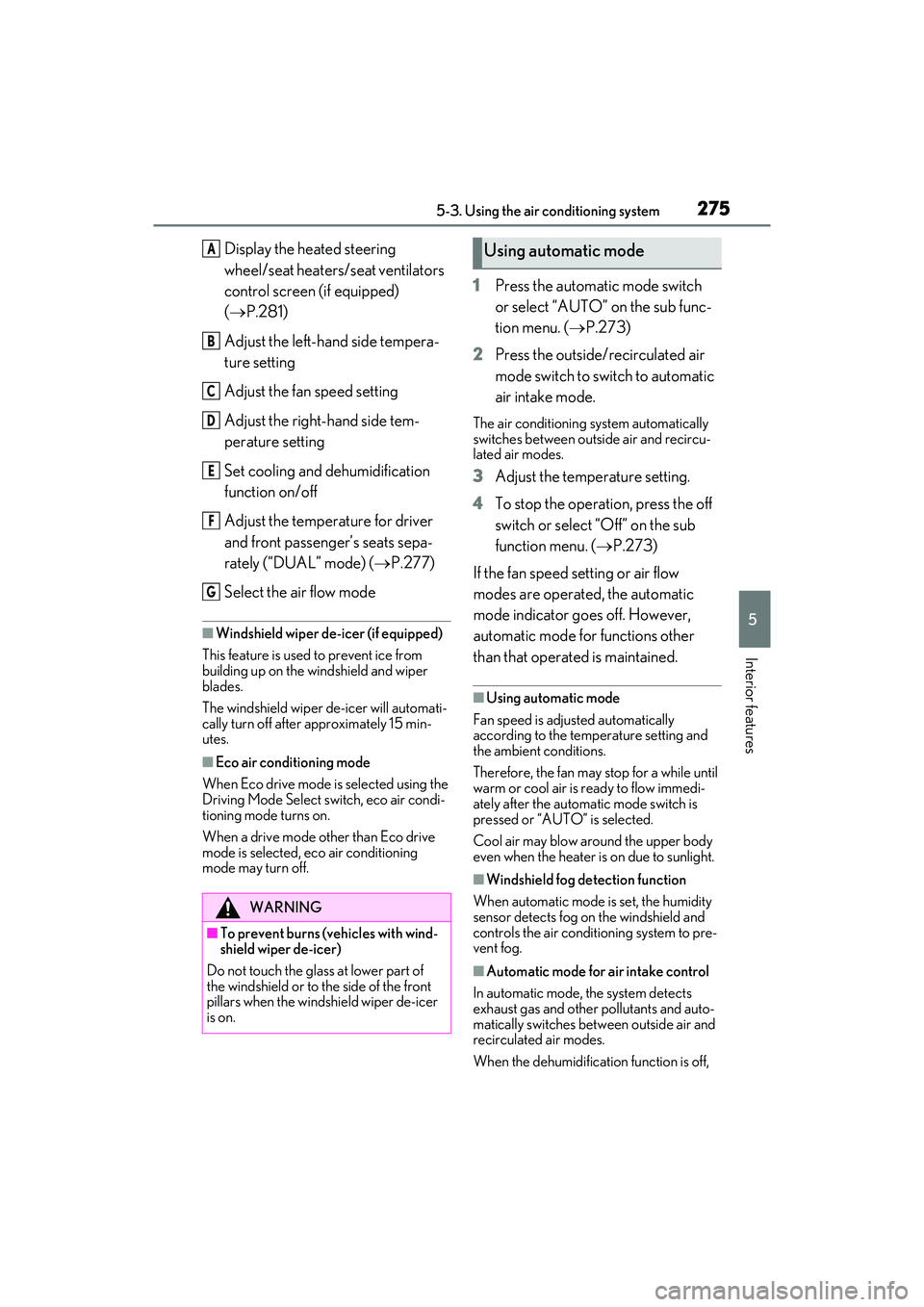
Display the heated steering
wheel/seat heaters/seat ventilators
control screen (if equipped)
( P.281)
Adjust the left-hand side tempera-
ture setting
Adjust the fan speed setting
Adjust the right-hand side tem-
perature setting
Set cooling and dehumidification
function on/off
Adjust the temperature for driver
and front passenger’s seats sepa-
rately (“DUAL” mode) ( P.277)
Select the air flow mode
QWindshield wiper de-icer (if equipped)
This feature is used to prevent ice from
building up on the windshield and wiper
blades.
The windshield wiper de-icer will automati-
cally turn off after approximately 15 min-
utes.
QEco air conditioning mode
When Eco drive mode is selected using the
Driving Mode Select switch, eco air condi-
tioning mode turns on.
When a drive mode other than Eco drive
mode is selected, eco air conditioning
mode may turn off.
1 Press the automatic mode switch
or select “AUTO” on the sub func-
tion menu. ( P.273)
2 Press the outside/recirculated air
mode switch to switch to automatic
air intake mode.
The air conditioning system automatically
switches between outside air and recircu-
lated air modes.
3Adjust the temperature setting.
4 To stop the operation, press the off
switch or select “Off” on the sub
function menu. ( P.273)
If the fan speed setting or air flow
modes are operated, the automatic
mode indicator goes off. However,
automatic mode for functions other
than that operated is maintained.
QUsing automatic mode
Fan speed is adjusted automatically
according to the temperature setting and
the ambient conditions.
Therefore, the fan may stop for a while until
warm or cool air is ready to flow immedi-
ately after the automatic mode switch is
pressed or “AUTO” is selected.
Cool air may blow around the upper body
even when the heater is on due to sunlight.
QWindshield fog detection function
When automatic mode is set, the humidity
sensor detects fog on the windshield and
controls the air conditioning system to pre-
vent fog.
QAutomatic mode for air intake control
In automatic mode, the system detects
exhaust gas and other pollutants and auto-
matically switches between outside air and
recirculated air modes.
When the dehumidification function is off,
WARNING
QTo prevent burns (vehicles with wind-
shield wiper de-icer)
Do not touch the glass at lower part of
the windshield or to the side of the front
pillars when the windshield wiper de-icer
is on.
A
B
C
D
E
F
G
Using automatic mode
Page 278 of 480
2765-3. Using the air conditioning system
and the fan is operating, turning automatic
mode on will activate the dehumidification
function. The next time the dehumidification
function is turned off, the automatic mode
for switching between outside air and recir-
culated air modes is canceled.
This function automatically controls the
air conditioning airflow so that priority
is given to the front seats. When the
front passenger seat is not occupied,
airflow may switch to only the driver’s
seat. Unnecessary air conditioning is
suppressed, contributing to increased
fuel efficiency.
Front seat concentrated airflow mode
operates in the following situations.
No passengers are detected in the rear seats
The windshield defogger is not
operating
While operating, illuminates.
QManually turning front seat con-
centrated airflow mode on/off
In front seat concentrated airflow
mode, directing airflow to the front
seats only and to all seats can be
switched via switch operation. When
the mode has been switched manually,
automatic airflow control stops operat-
ing.
Select on the center display
and switch the airflow.
Indicator illuminated: Airflow to the
front seats only
Indicator off: Airflow to all the seats
QOperation of automatic airflow control
OIn order to maintain a comfortable inte-
rior, airflow may be directed to seats
without passengers immediately after the
hybrid system is started and at other
times depending on the outside tempera-
ture.
OAfter the hybrid system is started, if pas-
sengers move around inside or enter/exit
the vehicle, the system cannot accurately
detect the presence of passengers and
automatic airflow control will not oper-
ate.
QOperation of manual airflow control
Even if the function is manually switched to
directing airflow to on ly the front seats,
when a rear seat is occupied, it may auto-
matically direct airflow to all seats.
QTo return to automatic airflow control
1 With the indicator off, turn the power
switch off.
NOTICE
QHumidity sensor
In order to detect fog on the windshield,
a sensor which monitors the temperature
of the windshield, the surround humidity,
etc. is installed.
Follow these points to avoid damaging
the sensor:
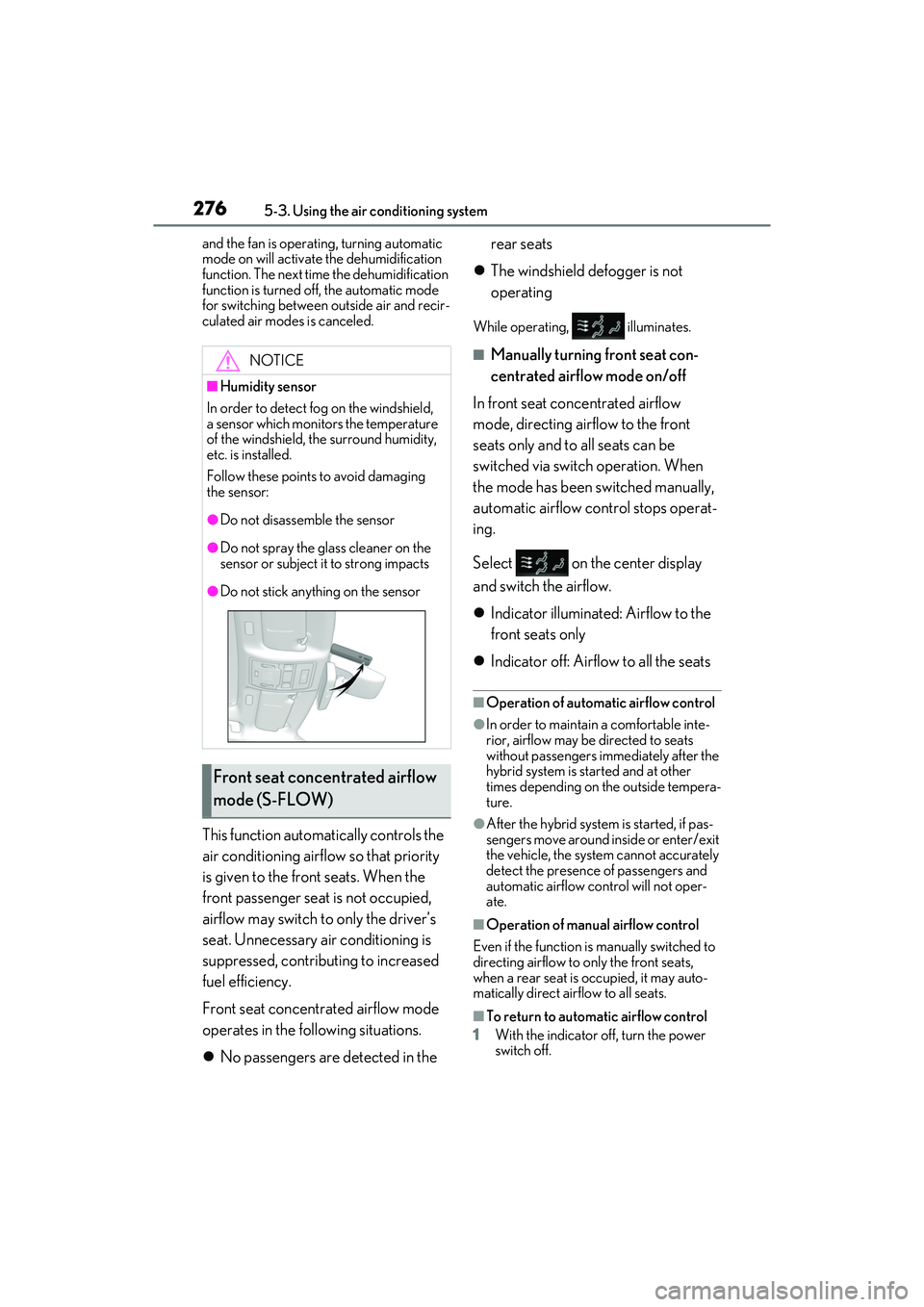
ODo not disassemble the sensor
ODo not spray the glass cleaner on the
sensor or subject it to strong impacts
ODo not stick anything on the sensor
Front seat concen trated airflow
mode (S-FLOW)
Page 279 of 480
2775-3. Using the air conditioning system
5
Interior features
2After 60 minutes or more elapse, turn
the power switch to ON mode.
To turn on the “DUAL” mode, perform
any of the following procedures:
Select “DUAL” on the sub function
menu. ( P.273)
Select “DUAL” on the option con-
trol screen.
Adjust the front passenger’s side
temperature setting.
The indicator on the main control screen
comes on when the “DUAL” mode is on.
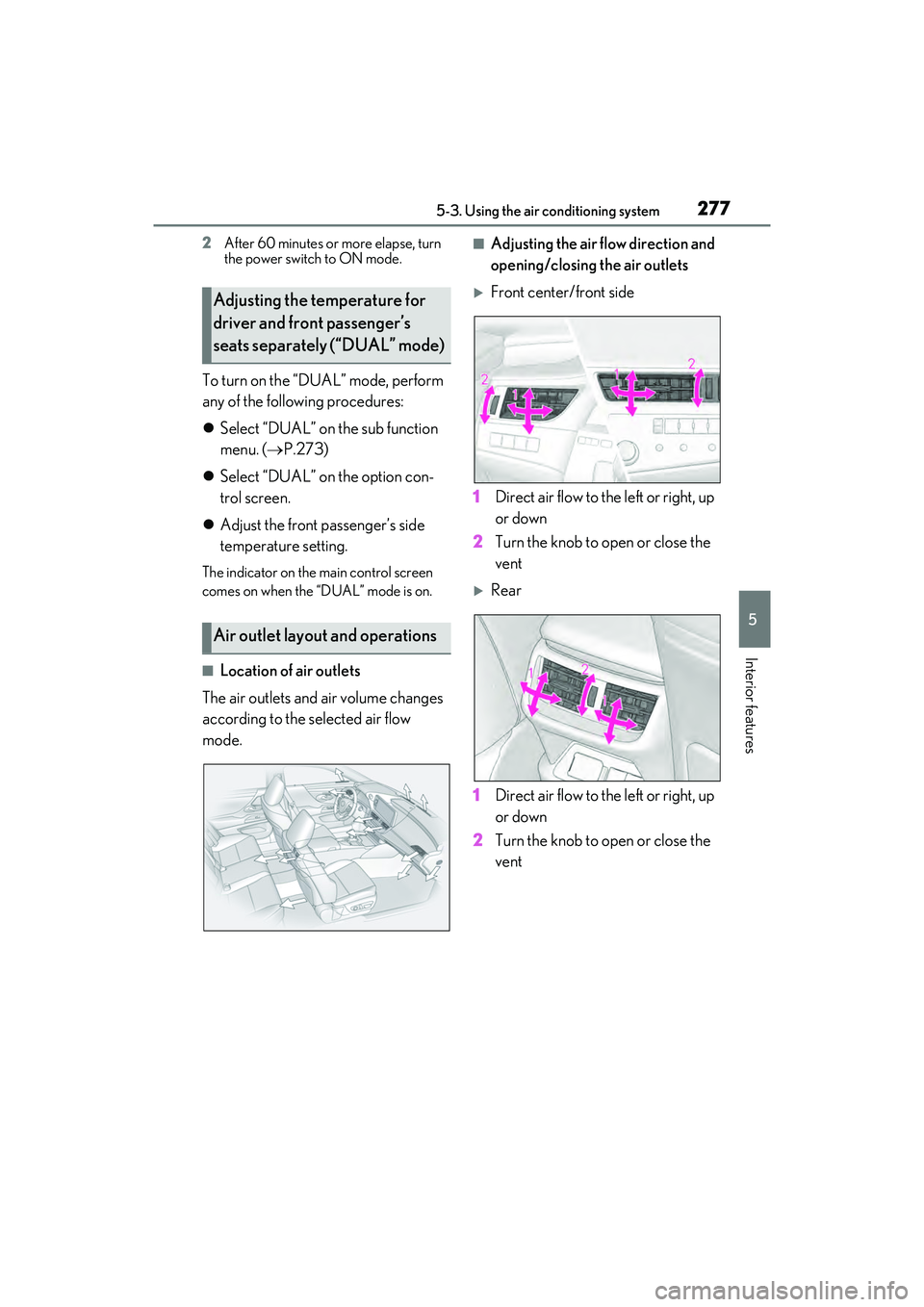
QLocation of air outlets
The air outlets and air volume changes
according to the selected air flow
mode.
QAdjusting the air flow direction and
opening/closing the air outlets
Front center/front side
1 Direct air flow to the left or right, up
or down
2 Turn the knob to open or close the
vent
Rear
1 Direct air flow to the left or right, up
or down
2 Turn the knob to open or close the
vent
Adjusting the temperature for
driver and front passenger’s
seats separately (“DUAL” mode)
Air outlet layout and operations
Page 280 of 480
2785-3. Using the air conditioning system
*: If equipped
WARNING
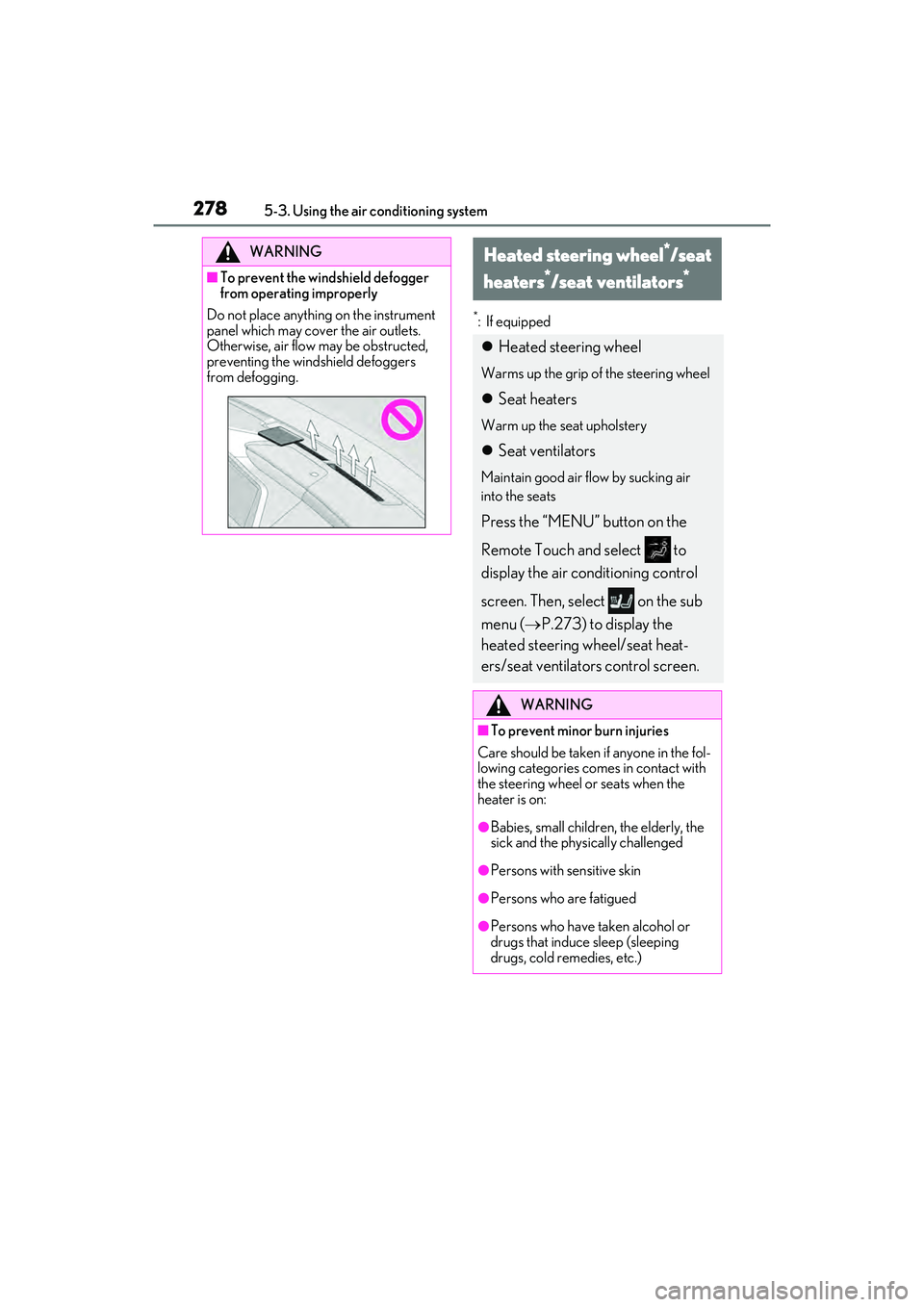
QTo prevent the windshield defogger
from operating improperly
Do not place anything on the instrument
panel which may cover the air outlets.
Otherwise, air flow may be obstructed,
preventing the windshield defoggers
from defogging.
Heated steering wheel*/seat
heaters
*/seat ventilators*
Heated steering wheel
Warms up the grip of the steering wheel
Seat heaters
Warm up the seat upholstery
Seat ventilators
Maintain good air flow by sucking air
into the seats
Press the “MENU” button on the
Remote Touch and select to
display the air conditioning control
screen. Then, select on the sub
menu ( P.273) to display the
heated steering wheel/seat heat-
ers/seat ventilators control screen.
WARNING
QTo prevent minor burn injuries
Care should be taken if anyone in the fol-
lowing categories comes in contact with
the steering wheel or seats when the
heater is on:
OBabies, small children, the elderly, the
sick and the physically challenged
OPersons with sensitive skin
OPersons who are fatigued
OPersons who have taken alcohol or
drugs that induce sleep (sleeping
drugs, cold remedies, etc.)
Page 313 of 480

3116-1. Maintenance and care
6
Maintenance and care
Remove dirt and dust using a vac-
uum cleaner. Wipe dirty surfaces
with a cloth dampened with luke-
warm water.
If dirt cannot be removed, wipe it off
with a soft cloth dampened with
neutral detergent diluted to approx-
imately 1%.
Wring out any excess water from
the cloth and thoroughly wipe off
remaining traces of detergent and
water.
QShampooing the carpets
There are several commercial foaming-
type cleaners available. Use a sponge or
brush to apply the foam. Rub in overlapping
circles. Do not use water. Wipe dirty sur-
faces and let them dry. Excellent results are
obtained by keeping the carpet as dry as
possible.
QHandling the seat belts
Clean with mild soap and lukewarm water
using a cloth or sponge. Also check the
belts periodically for excessive wear, fray-
ing or cuts.
QWhen cleaning the carpeted portions of
the glove box, console box, etc.
If a strong adhesive tape is used, there is a
possibility that the surface of the carpet
could be damaged.
Cleaning and protecting the
vehicle interior
Perform cleaning in a manner
appropriate to each component
and its material.
Protecting the vehicle interior
WARNING
QWater in the vehicle
ODo not splash or spill liquid in the vehi-
cle, such as on the floor, on the rear
seats, in the hybrid battery (traction
battery) air vents, and in the trunk.
( P.64)
Doing so may cause the hybrid bat-
tery, electrical components, etc. to
malfunction or catch fire.
ODo not get any of the SRS components
or wiring in the vehicle interior wet.
( P.28)
An electrical malfunction may cause
the airbags to deploy or not function
properly, resulting in death or serious
injury.
QCleaning the interior (especially
instrument panel)
Do not use polish wax or polish cleaner.
The instrument panel may reflect off the
windshield, obstructin g the driver’s view
and leading to an accident, resulting in
death or serious injury.
NOTICE
QCleaning detergents
ODo not use the following types of
detergent, as they may discolor the
vehicle interior or cause streaks or
damage to painted surfaces:
• Non-seat portions: Organic sub- stances such as benzene or gasoline,
alkaline or acidic solutions, dye, and
bleach
• Seats: Alkaline or acidic solutions, such as thinner, benzene, and alcohol
ODo not use polish wax or polish
cleaner. The instrument panel’s or
other interior part’s painted surface
may be damaged.
Page 319 of 480
3176-2. Maintenance
6
Maintenance and care
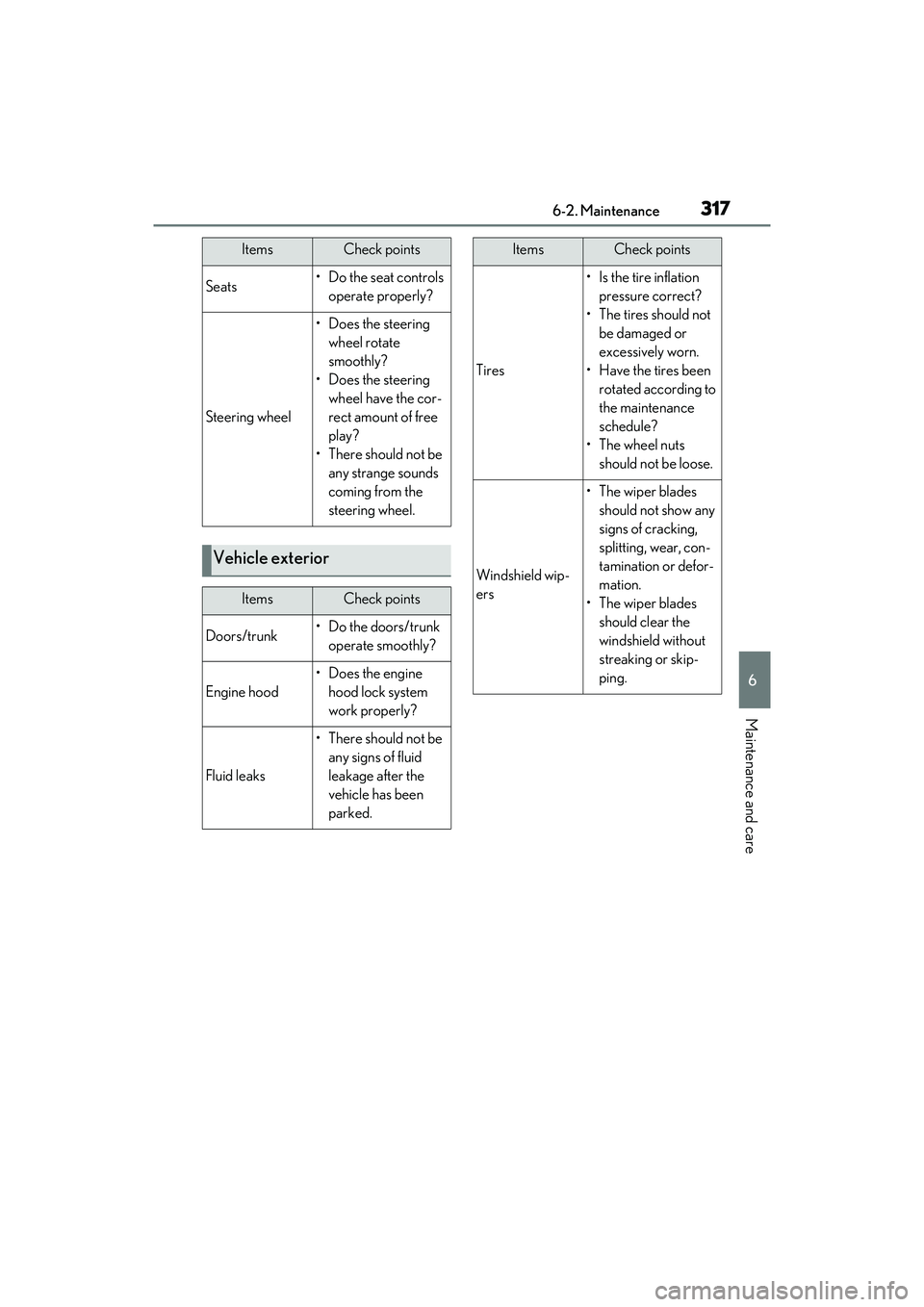
Seats• Do the seat controls operate properly?
Steering wheel
• Does the steering wheel rotate
smoothly?
• Does the steering wheel have the cor-
rect amount of free
play?
•There should not be any strange sounds
coming from the
steering wheel.
Vehicle exterior
ItemsCheck points
Doors/trunk• Do the doors/trunk operate smoothly?
Engine hood
• Does the engine hood lock system
work properly?
Fluid leaks
•There should not be any signs of fluid
leakage after the
vehicle has been
parked.
ItemsCheck points
Tires
•Is the tire inflation pressure correct?
• The tires should not be damaged or
excessively worn.
• Have the tires been rotated according to
the maintenance
schedule?
• The wheel nuts should not be loose.
Windshield wip-
ers
• The wiper blades should not show any
signs of cracking,
splitting, wear, con-
tamination or defor-
mation.
• The wiper blades should clear the
windshield without
streaking or skip-
ping.
ItemsCheck points
Page 418 of 480
4168-1. Specifications
QTraction AA, A, B, C
The traction grades, from highest to
lowest, are AA, A, B and C, and they
represent the tire’s ability to stop on
wet pavement as measured under con-
trolled conditions on specified govern-
ment test surfaces of asphalt and
concrete.
A tire marked C may have poor traction
performance.
Warning: The traction grade assigned to
this tire is based on braking (straight
ahead) traction tests and does not include
cornering (turning) traction.
QTemperature A, B, C
The temperature grades are A (the
highest), B, and C, representing the
tire’s resistance to the generation of
heat and its ability to dissipate heat when tested under controlled condi-
tions on a specified indoor laboratory
test wheel.
Sustained high temperature can cause the
material of the tire to degenerate and
reduce tire life, and excessive temperature
can lead to sudden tire failure.
Grade C corresponds to a level of perfor-
mance which all passenger car tires must
meet under the Federal Motor Vehicle
Safety Standard No. 109.
Grades B and A represent higher levels of
performance on the laboratory test wheel
than the minimum required by law.
Warning: The temperature grades of a tire
assume that it is properly inflated and not
overloaded.
Excessive speed, underinflation, or exces-
sive loading, either separately or in combi-
nation, can cause heat buildup and
possible tire failure.
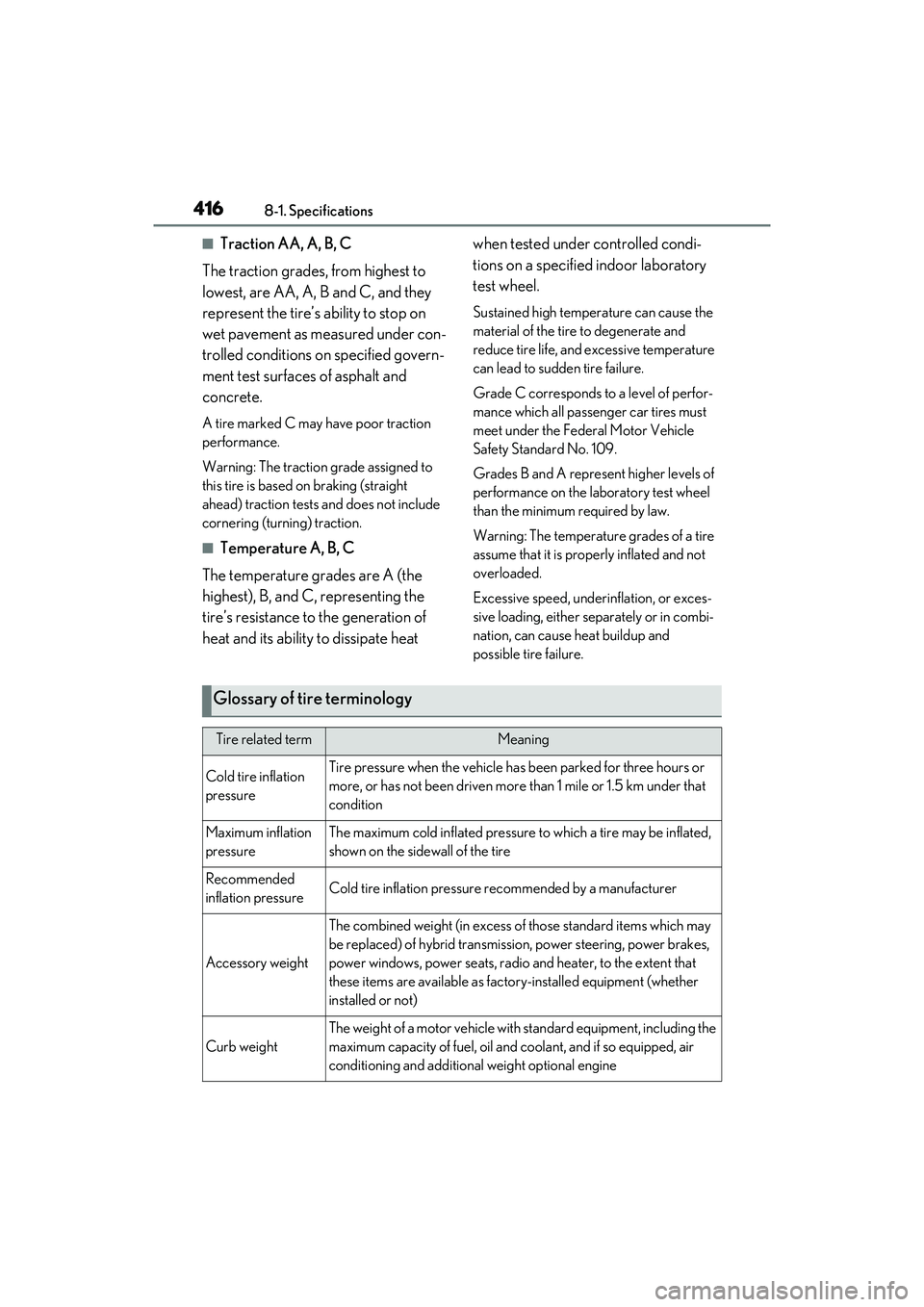
Glossary of tire terminology
Tire related termMeaning
Cold tire inflation
pressureTire pressure when the vehicle has been parked for three hours or
more, or has not been driven more
than 1 mile or 1.5 km under that
condition
Maximum inflation
pressureThe maximum cold inflated pressure to which a tire may be inflated,
shown on the sidewall of the tire
Recommended
inflation pressureCold tire inflation pressure recommended by a manufacturer
Accessory weight
The combined weight (in excess of those standard items which may
be replaced) of hybrid transmission, power steering, power brakes,
power windows, power seats, radio and heater, to the extent that
these items are available as factory-installed equipment (whether
installed or not)
Curb weight
The weight of a motor vehicle with standard equipment, including the
maximum capacity of fuel, oil and coolant, and if so equipped, air
conditioning and additional weight optional engine