lock Lexus ES350 2008 Repair Manual
[x] Cancel search | Manufacturer: LEXUS, Model Year: 2008, Model line: ES350, Model: Lexus ES350 2008Pages: 459, PDF Size: 5.93 MB
Page 230 of 459
228
3-3. Using the hands-free phone system (for cellular phone)
ES350_U_(L/O_0708)■
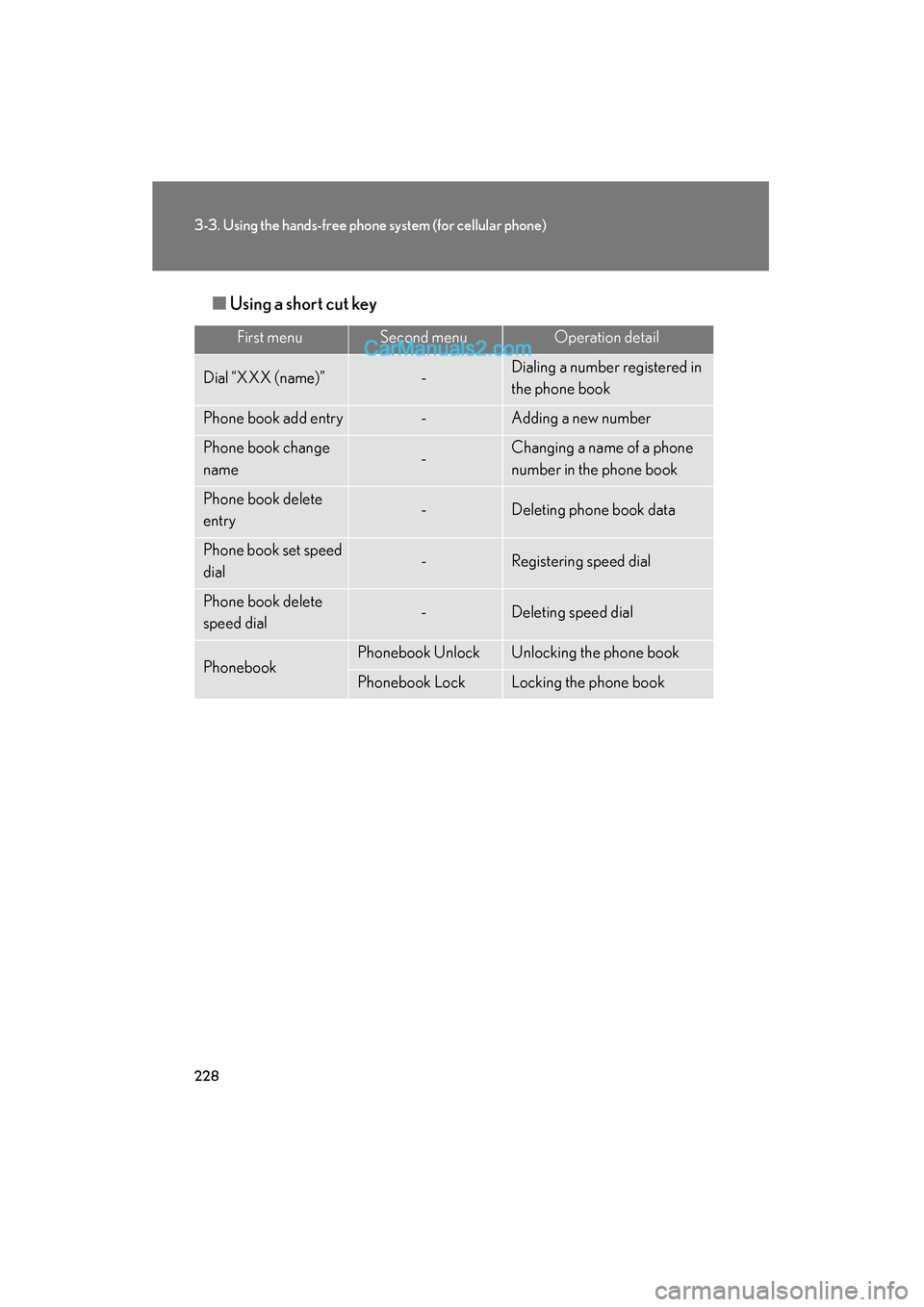
Using a short cut key
First menuSecond menuOperation detail
Dial “XXX (name)”-Dialing a number registered in
the phone book
Phone book add entry-Adding a new number
Phone book change
name-Changing a name of a phone
number in the phone book
Phone book delete
entry-Deleting phone book data
Phone book set speed
dial-Registering speed dial
Phone book delete
speed dial-Deleting speed dial
PhonebookPhonebook UnlockUnlocking the phone book
Phonebook LockLocking the phone book
Page 240 of 459
238
3-3. Using the hands-free phone system (for cellular phone)
ES350_U_(L/O_0708)
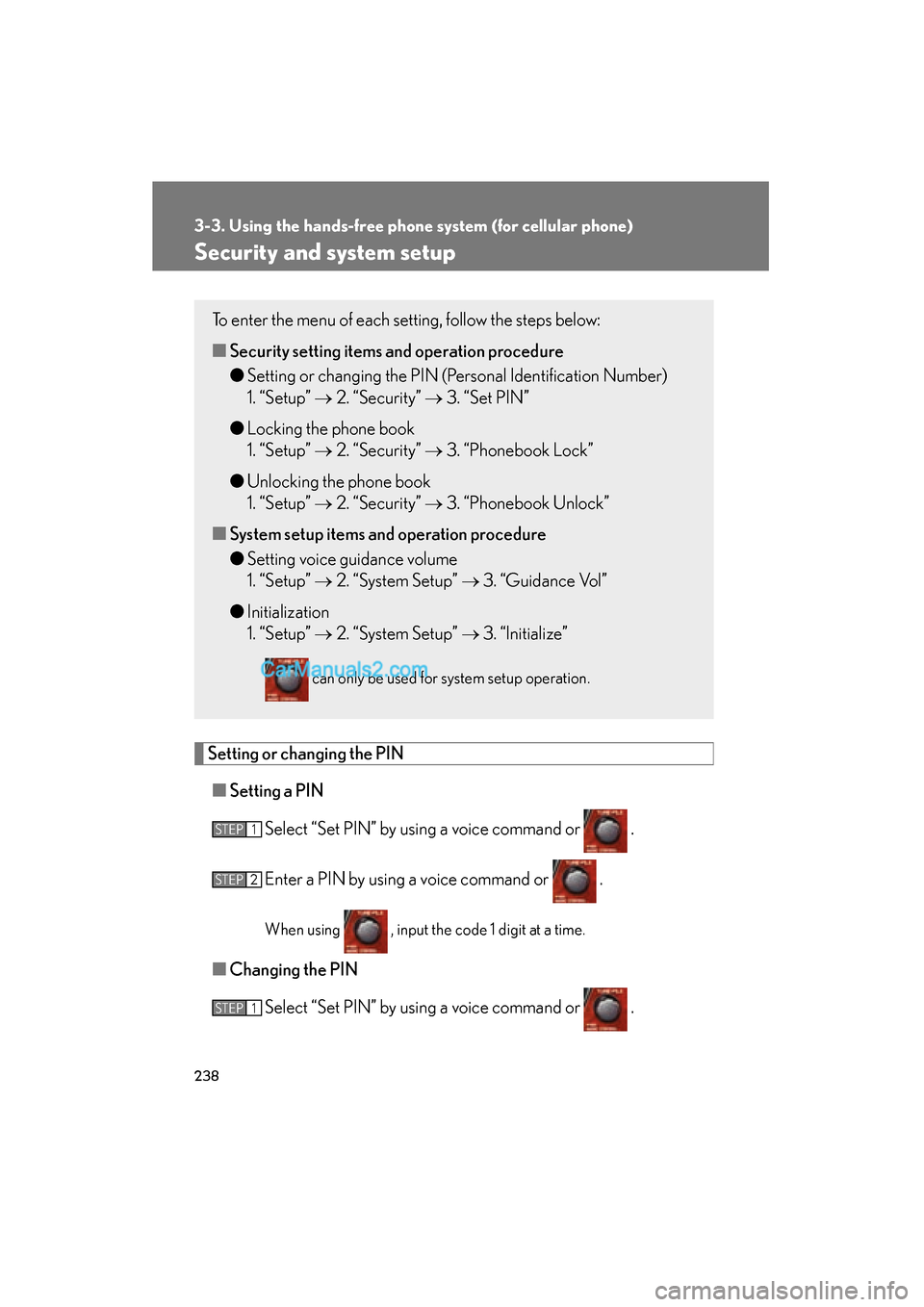
Security and system setup
Setting or changing the PIN■ Setting a PIN
Select “Set PIN” by using a voice command or .
Enter a PIN by using a voice command or .
When using , input the code 1 digit at a time.
■Changing the PIN
Select “Set PIN” by using a voice command or .
To enter the menu of each setting, follow the steps below:
■Security setting items an d operation procedure
● Setting or changing the PIN (Personal Identification Number)
1. “Setup” → 2. “Security” → 3. “Set PIN”
● Locking the phone book
1. “Setup” → 2. “Security” → 3. “Phonebook Lock”
● Unlocking the phone book
1. “Setup” → 2. “Security” → 3. “Phonebook Unlock”
■ System setup items and operation procedure
● Setting voice guidance volume
1. “Setup” → 2. “System Setup” → 3. “Guidance Vol”
● Initialization
1. “Setup” → 2. “System Setup” → 3. “Initialize”
can only be used for system setup operation.
STEP1
STEP2
STEP1
Page 241 of 459
239
3-3. Using the hands-free phone system (for cellular phone)
3
Interior features
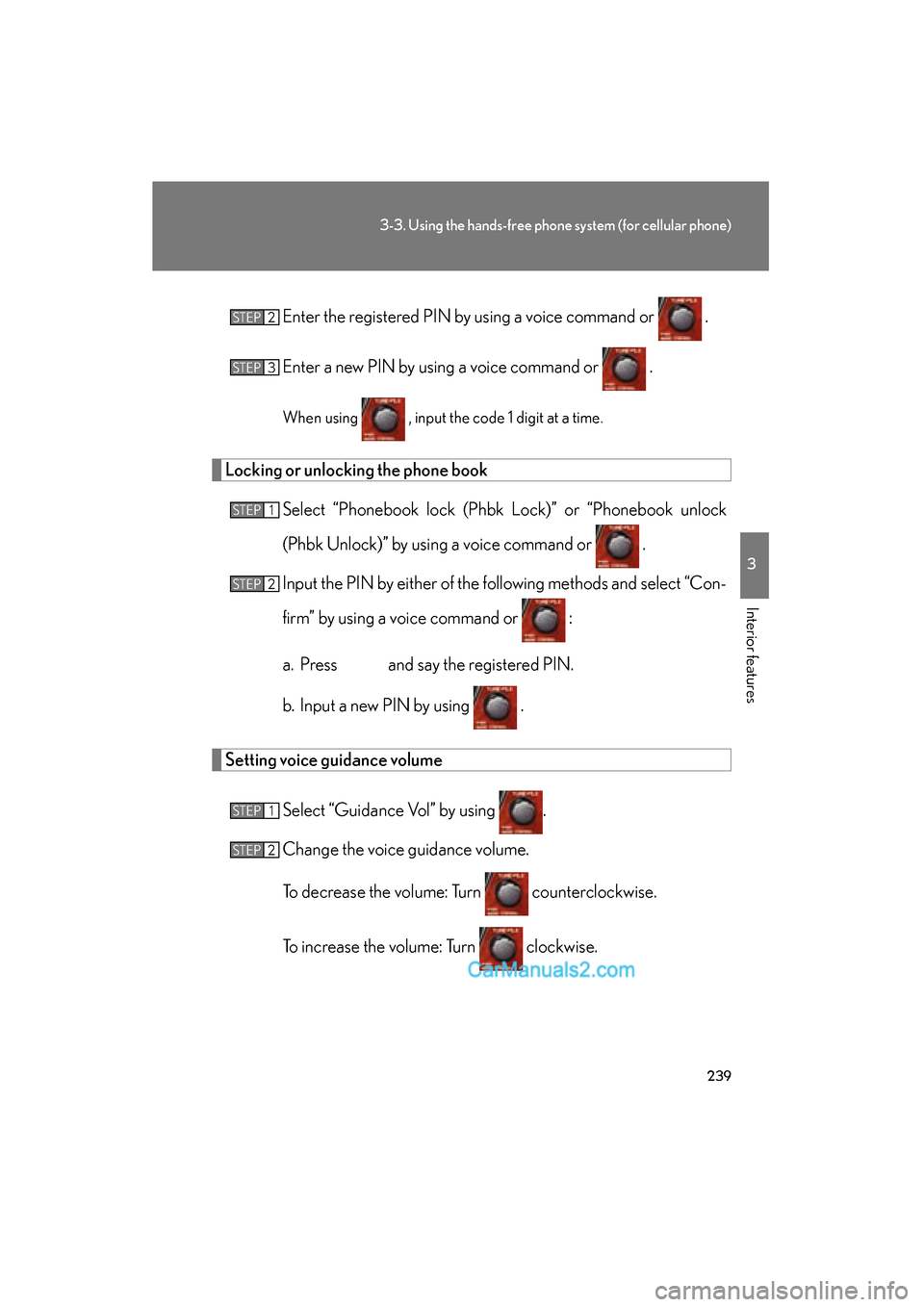
ES350_U_(L/O_0708)Enter the registered PIN by
using a voice command or .
Enter a new PIN by using a voice command or .
When using , input the code 1 digit at a time.
Locking or unlocking the phone book Select “Phonebook lock (Phbk Lock)” or “Phonebook unlock
(Phbk Unlock)” by using a voice command or .
Input the PIN by either of the following methods and select “Con-
firm” by using a voice command or :
a. Press and say the registered PIN.
b. Input a new PIN by using .
Setting voice guidance volume
Select “Guidance Vol” by using .
Change the voice guidance volume.
To decrease the volume: Turn counterclockwise.
To increase the volume: Turn clockwise.
STEP2
STEP3
STEP1
STEP2
STEP1
STEP2
Page 242 of 459
240
3-3. Using the hands-free phone system (for cellular phone)
ES350_U_(L/O_0708)
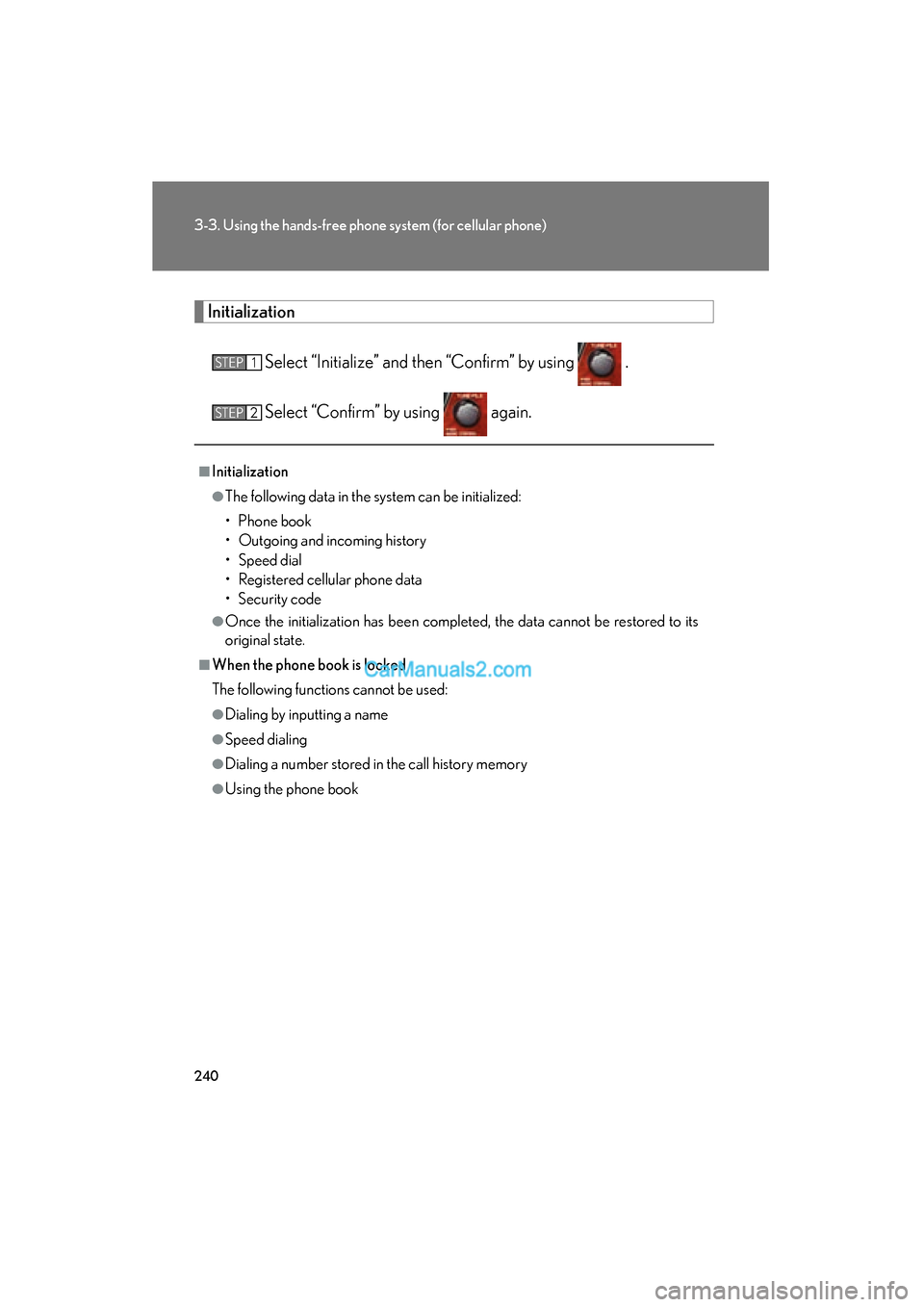
InitializationSelect “Initialize” and then “Confirm” by using .
Select “Confirm” by using again.
■Initialization
●The following data in the system can be initialized:
• Phone book
• Outgoing and incoming history
• Speed dial
• Registered cellular phone data
• Security code
●Once the initialization has been completed, the data cannot be restored to its
original state.
■When the phone book is locked
The following functions cannot be used:
●Dialing by inputting a name
●Speed dialing
●Dialing a number stored in the call history memory
●Using the phone book
STEP1
STEP2
Page 249 of 459
247
3
Interior features
ES350_U_(L/O_0708)
3-4. Using the interior lights
Interior lights list
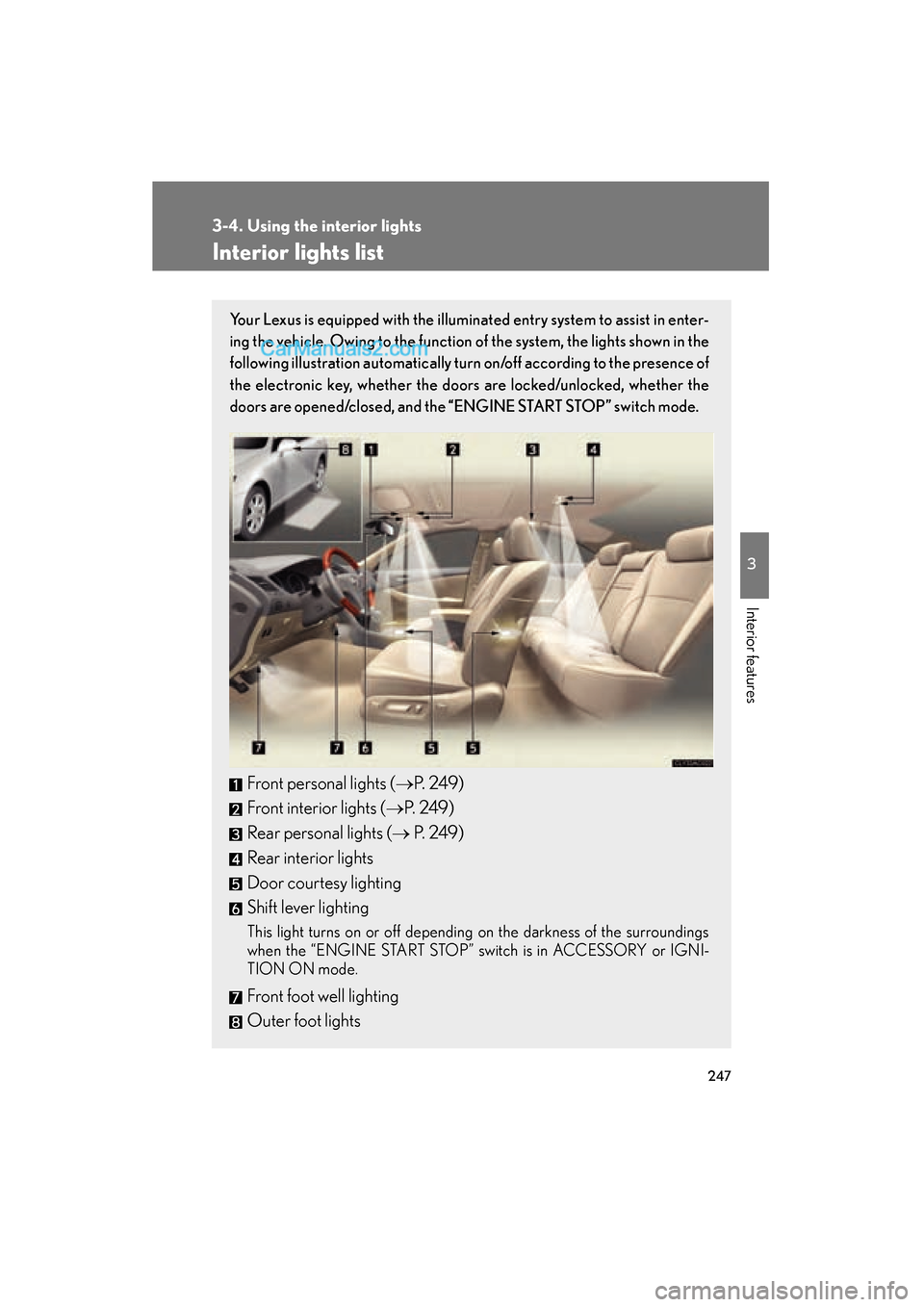
Your Lexus is equipped with the illuminated entry system to assist in enter-
ing the vehicle. Owing to the function of the system, the lights shown in the
following illustration automatically turn on/off according to the presence of
the electronic key, whether the door s are locked/unlocked, whether the
doors are opened/closed, and the “ENGINE START STOP” switch mode.
Front personal lights (→P. 2 4 9 )
Front interior lights ( →P. 2 4 9 )
Rear personal lights (→ P. 2 4 9 )
Rear interior lights
Door courtesy lighting
Shift lever lighting
This light turns on or off depending on the darkness of the surroundings
when the “ENGINE START STOP” switch is in ACCESSORY or IGNI-
TION ON mode.
Front foot well lighting
Outer foot lights
Page 251 of 459
249
3-4. Using the interior lights
3
Interior features
ES350_U_(L/O_0708)
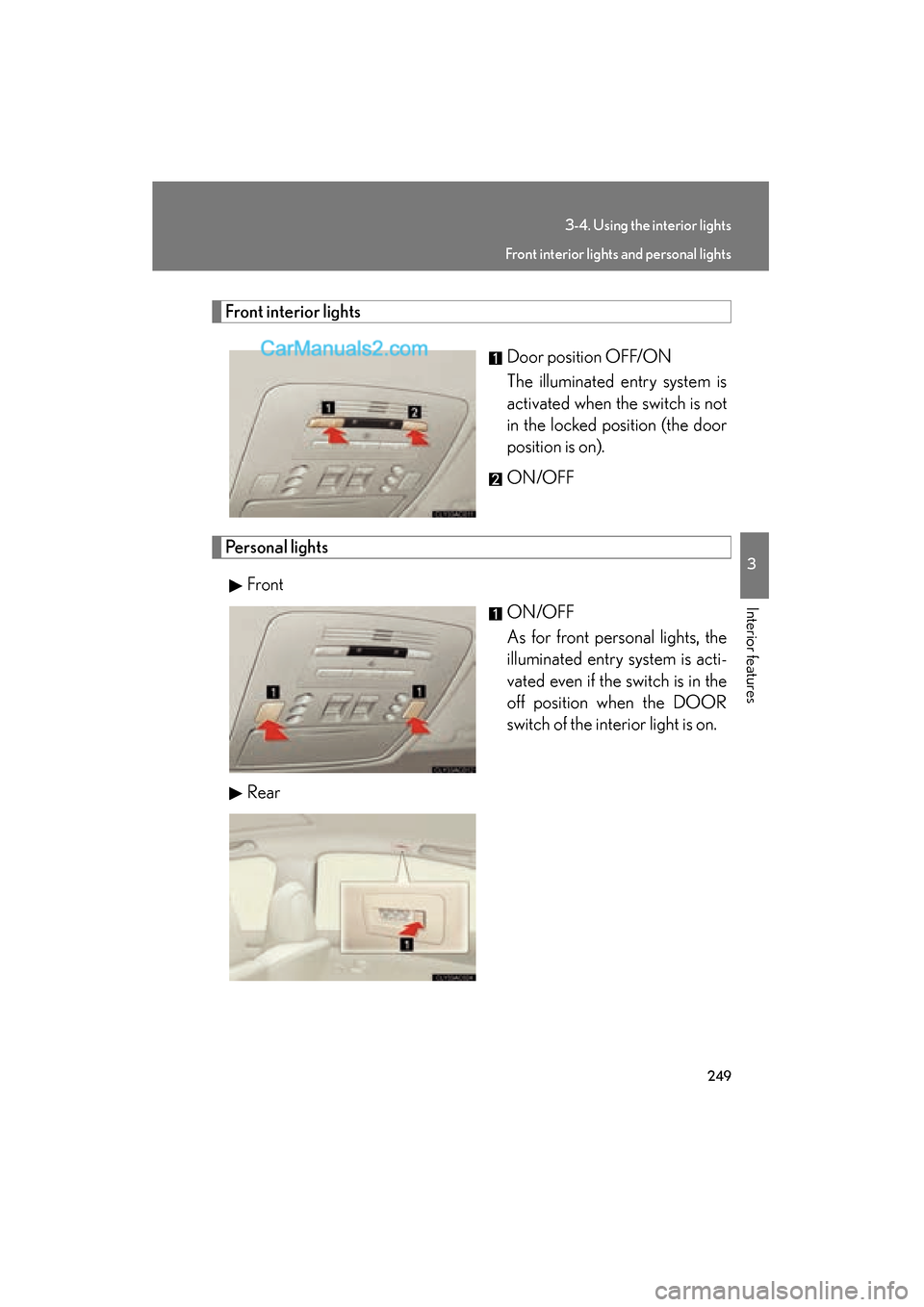
Front interior lightsDoor position OFF/ON
The illuminated entry system is
activated when the switch is not
in the locked position (the door
position is on).
ON/OFF
Personal lightsFront ON/OFF
As for front personal lights, the
illuminated entry system is acti-
vated even if the switch is in the
off position when the DOOR
switch of the interior light is on.
Rear
Front interior lights and personal lights
Page 252 of 459
250
ES350_U_(L/O_0708)
3-5. Using the storage features
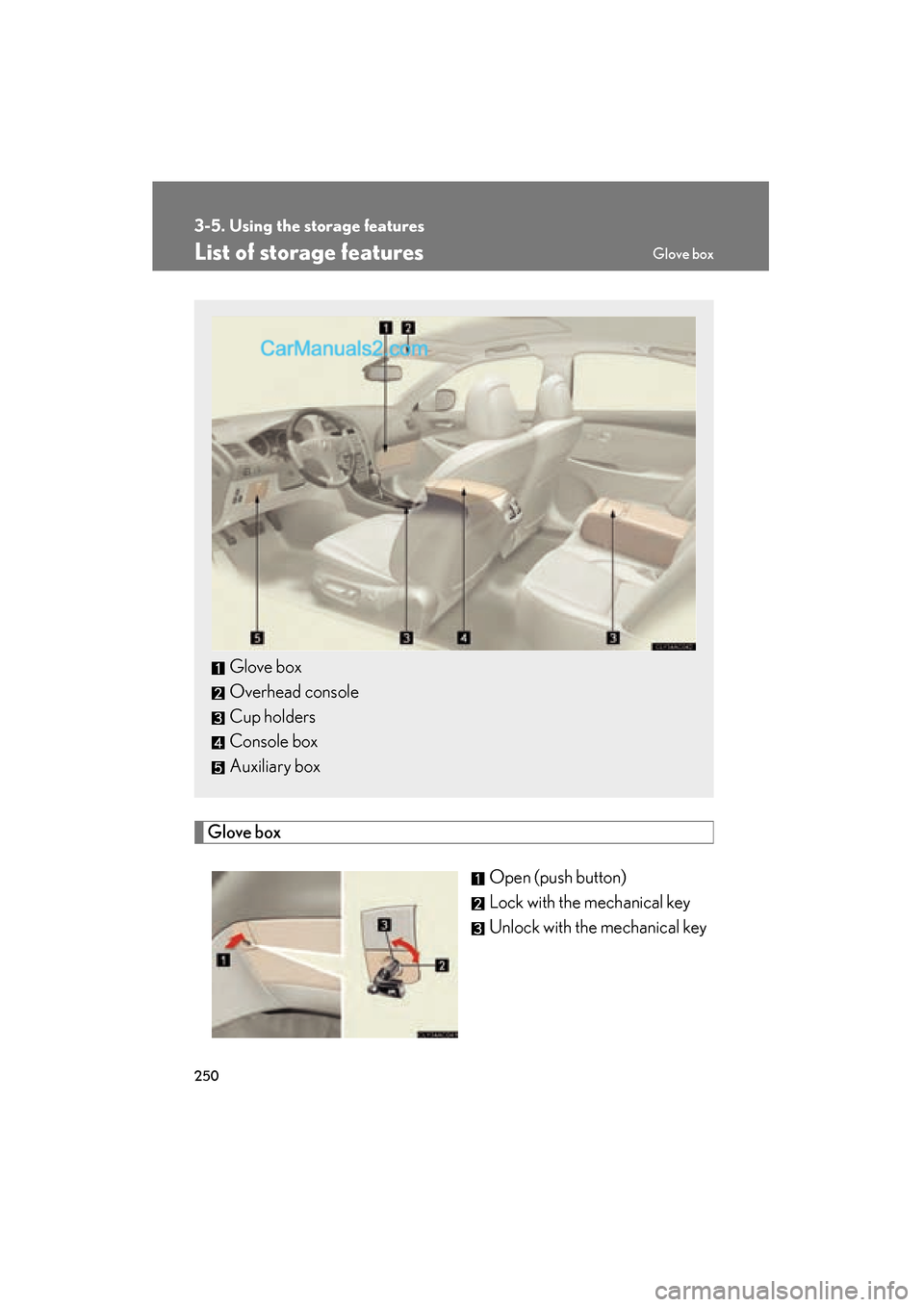
List of storage features
Glove boxOpen (push button)
Lock with the mechanical key
Unlock with the mechanical key
Glove box
Overhead console
Cup holders
Console box
Auxiliary box
Glove box
Page 261 of 459

259
3-6. Other interior features
3
Interior features
ES350_U_(L/O_0708)
Clock
■The clock is displayed when
The “ENGINE START STOP” switch is in ACCESSORY or IGNITION ON mode.
Without navigation systemAdjusts the hour.
Adjusts the minutes.
Rounds to the nearest hour.
*
*: e.g. 1:00 to 1:29 → 1:00
1:30 to 1:59 → 2:00
With navigation system
Page 270 of 459
268
3-6. Other interior features
ES350_U_(L/O_0708)
Extended trunk
CAUTION
■When not in use
Ensure that the armrest door is closed.
In the event of sudden braking, items stored in the trunk may be thrown forward into
the cabin, resulting in injury.
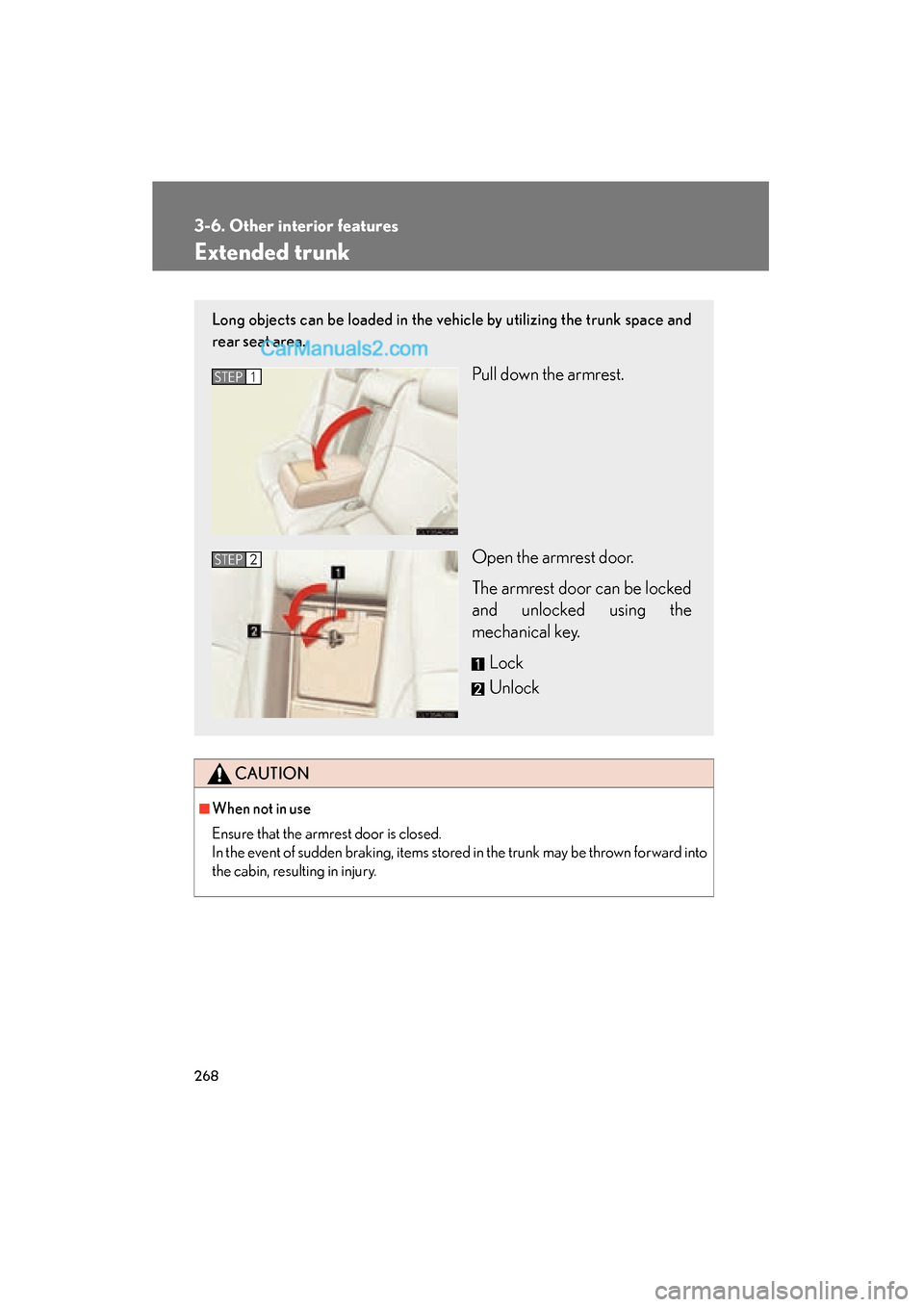
Long objects can be loaded in the vehicle by utilizing the trunk space and
rear seat area.
Pull down the armrest.
Open the armrest door.
The armrest door can be locked
and unlocked using the
mechanical key.Lock
UnlockSTEP1
STEP2
Page 274 of 459
272
3-6. Other interior features
ES350_U_(L/O_0708)
Garage door opener
The garage door opener (HomeLink Universal Transceiver) is manufactured
under license from HomeLink.
Programming the HomeLink (for USA owners)
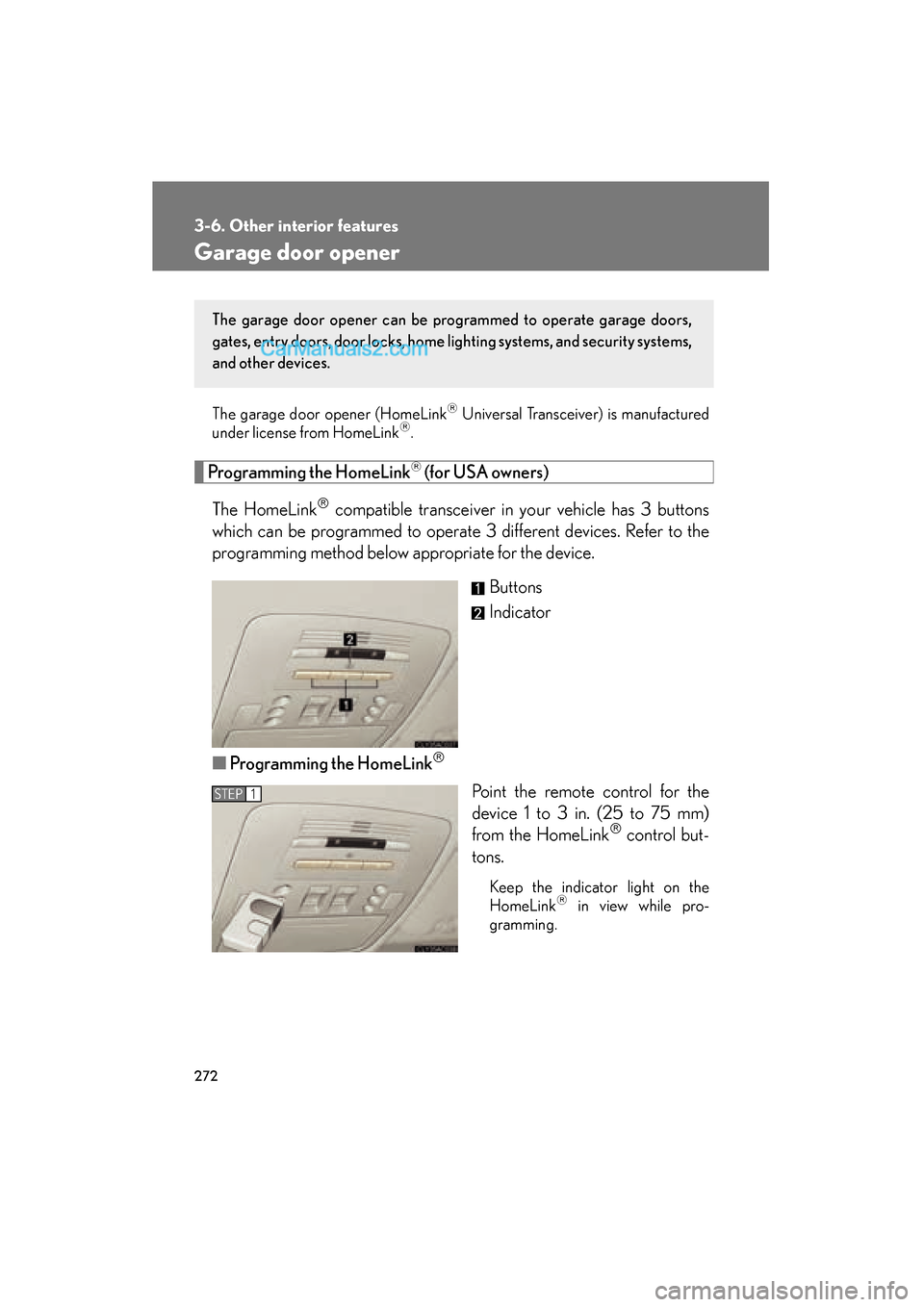
The HomeLink
compatible transceiver in your vehicle has 3 buttons
which can be programmed to operate 3 different devices. Refer to the
programming method below appropriate for the device.
Buttons
Indicator
■ Programming the HomeLink
Point the remote control for the
device 1 to 3 in. (25 to 75 mm)
from the HomeLink
control but-
tons.
Keep the indicator light on the
HomeLink in view while pro-
gramming.
The garage door opener can be pr ogrammed to operate garage doors,
gates, entry doors, door locks, home lighting systems, and security systems,
and other devices.
STEP1