pedal Lexus ES350 2009 User Guide
[x] Cancel search | Manufacturer: LEXUS, Model Year: 2009, Model line: ES350, Model: Lexus ES350 2009Pages: 475, PDF Size: 6.2 MB
Page 119 of 475
117
2-1. Driving procedures
2
When driving
ES350_U_(L/O_0808)
■If the engine does not start
The engine immobilizer system may not have been deactivated. (→P. 7 0 )
■When the “ENGINE START STOP” switch indicator flashes
The system may be malfunctioning. Have the vehicle inspected by your Lexus
dealer immediately.
■Auto power OFF function
If the vehicle is left in ACCESSORY mode for more than an hour with the shift lever
in P, the “ENGINE START STOP” switch will automatically turn off.
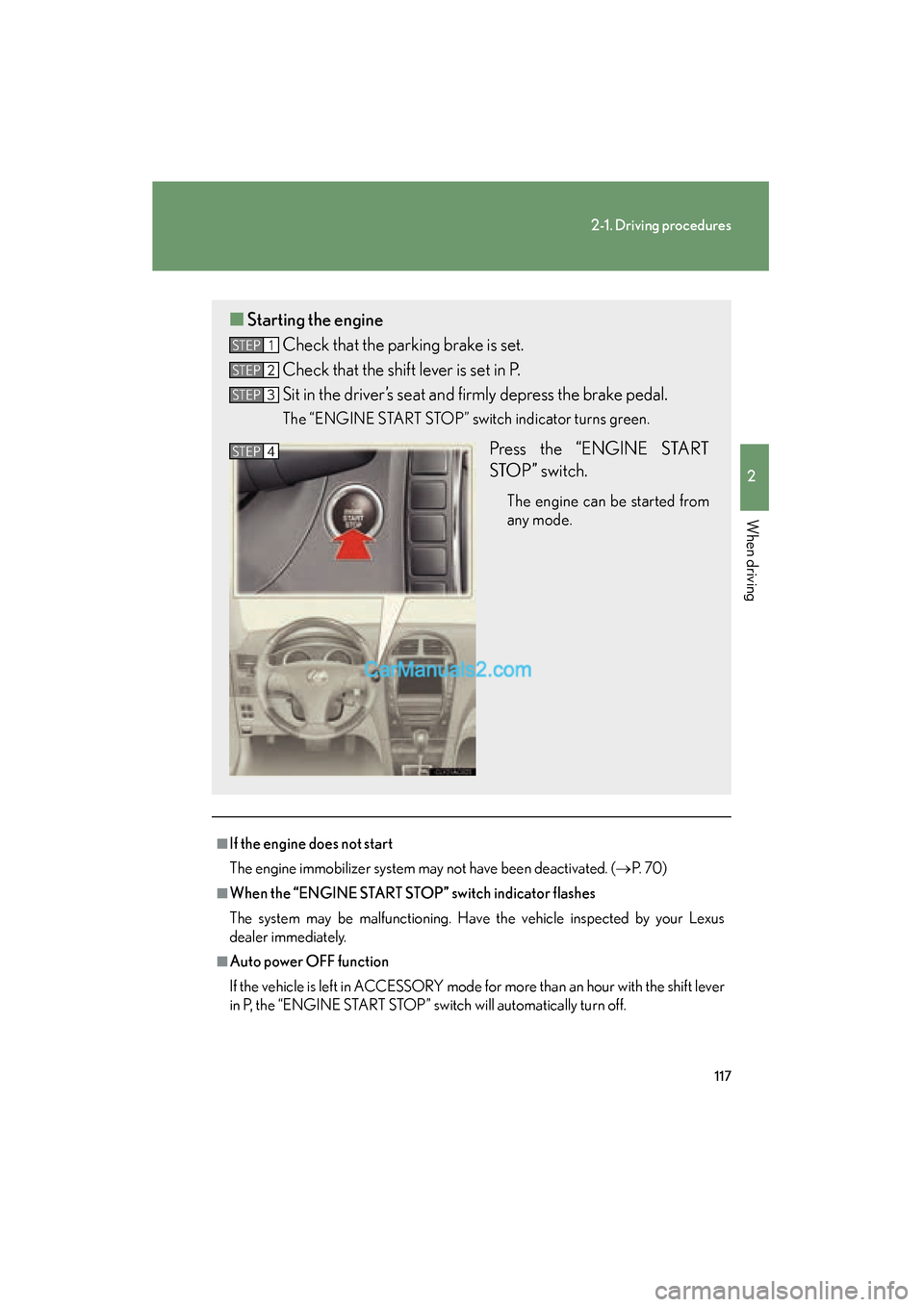
■Starting the engine
Check that the parking brake is set.
Check that the shift lever is set in P.
Sit in the driver’s seat and firmly depress the brake pedal.
The “ENGINE START STOP” switch indicator turns green.
Press the “ENGINE START
STOP” switch.
The engine can be started from
any mode.
STEP1
STEP2
STEP3
STEP4
Page 120 of 475

118
2-1. Driving procedures
ES350_U_(L/O_0808)
■Electronic key battery depletion
→P. 2 8
■When the electronic key battery is discharged
→P. 3 4 2
■Conditions affecting operation
→P. 2 6
■Note for the entry function
→P. 2 9
CAUTION
■When starting the engine
Always start the engine while sitting in the driver’s seat. Do not press the accelera-
tor pedal while starting the engine under any circumstances.
Doing so may cause an accident resulting in death or serious injury.
■Stopping the engine in an emergency
If you want to stop the engine in an emergency while driving the vehicle, push and
hold the “ENGINE START STOP” switch for more than 3 seconds.
However, do not touch the “ENGINE START STOP” switch while driving except in
an emergency. If the engine stops while the vehicle is being driven, this could lead to
an unexpected accident.
NOTICE
■To prevent battery discharge
Do not leave the “ENGINE START STOP” switch in ACCESSORY or IGNITION
ON mode for long periods without the engine running.
■When starting the engine
●Do not race a cold engine.
●If the engine becomes difficult to start or stalls frequently, have the engine
checked immediately.
Page 121 of 475
119
2-1. Driving procedures
2
When driving
ES350_U_(L/O_0808)
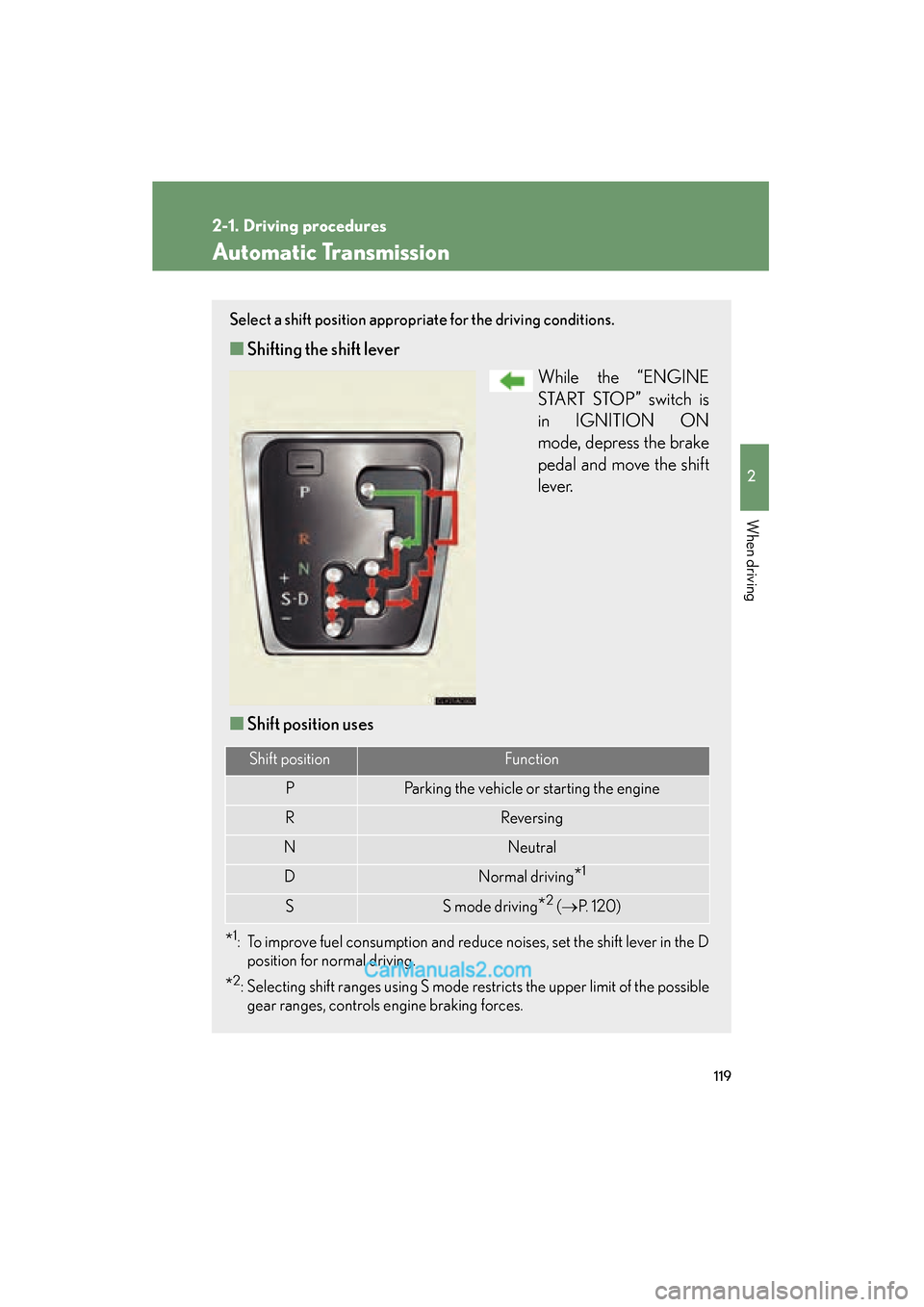
Automatic Transmission
Select a shift position appropriate for the driving conditions.
■Shifting the shift lever
While the “ENGINE
START STOP” switch is
in IGNITION ON
mode, depress the brake
pedal and move the shift
l e v e r.
■ Shift position uses
*1: To improve fuel consumption and reduce noises, set the shift lever in the D
position for normal driving.
*2: Selecting shift ranges using S mode restricts the upper limit of the possiblegear ranges, controls engine braking forces.
Shift positionFunction
PParking the vehicle or starting the engine
RReversing
NNeutral
DNormal driving*1
SS mode driving*2 ( → P. 1 2 0 )
Page 125 of 475
123
2-1. Driving procedures
2
When driving
ES350_U_(L/O_0808)
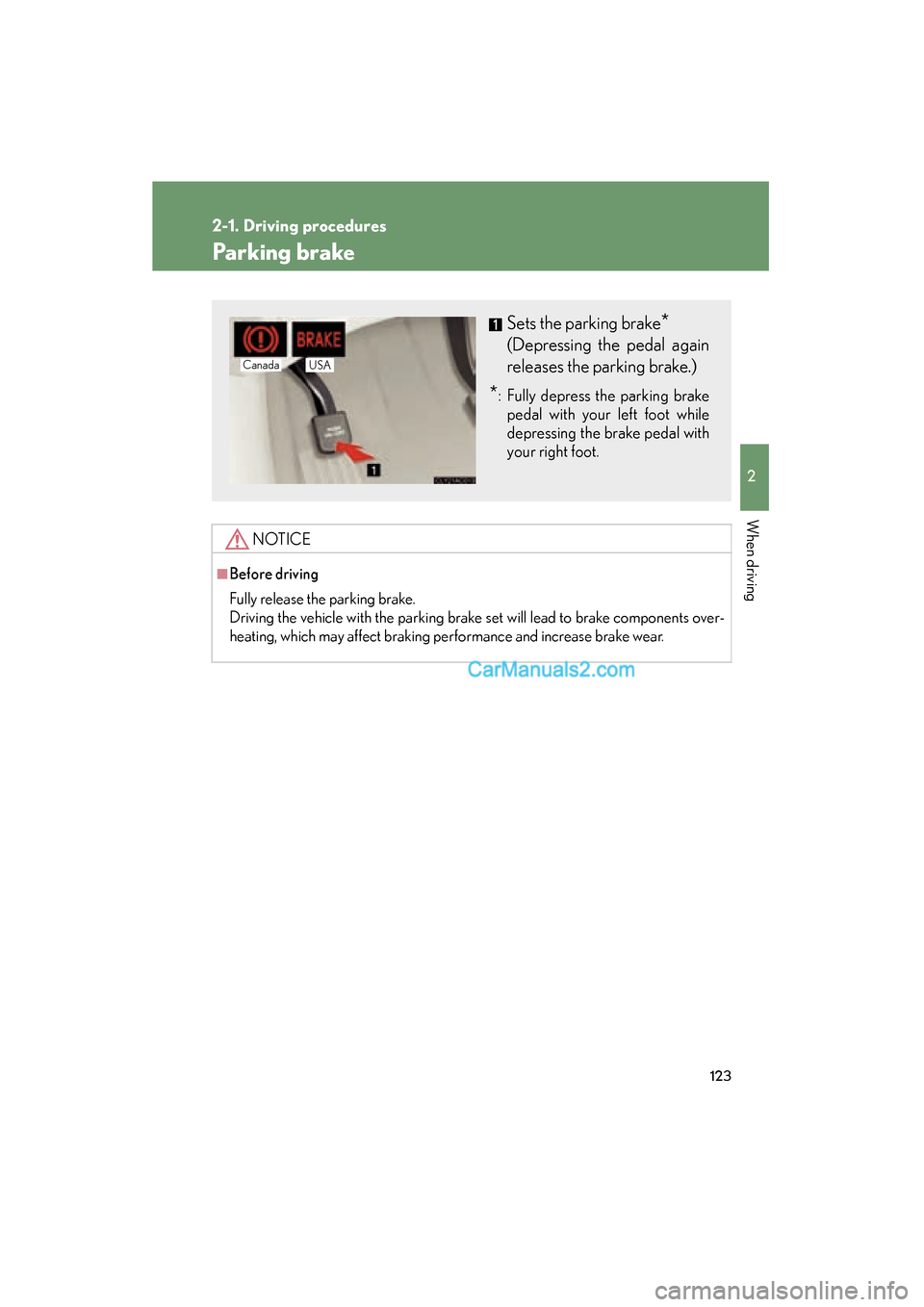
Parking brake
NOTICE
■Before driving
Fully release the parking brake.
Driving the vehicle with the parking brake set will lead to brake components over-
heating, which may affect braking performance and increase brake wear.
Sets the parking brake*
(Depressing the pedal again
releases the parking brake.)
*: Fully depress the parking brakepedal with your left foot while
depressing the brake pedal with
your right foot.
Canada USA
Page 163 of 475
161
2-4. Using other driving systems
2
When driving
ES350_U_(L/O_0808)
Driving assist systems
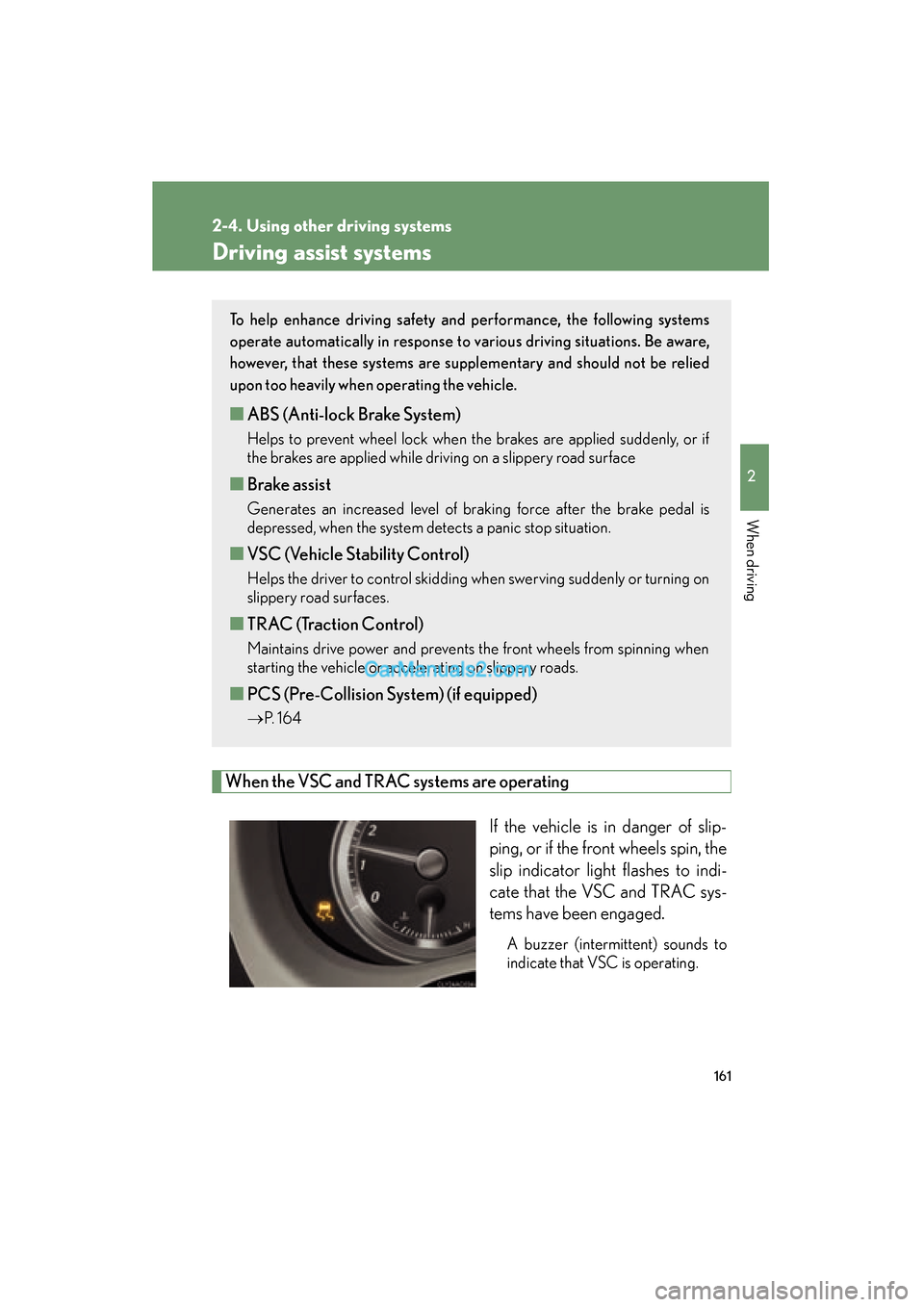
When the VSC and TRAC systems are operatingIf the vehicle is in danger of slip-
ping, or if the front wheels spin, the
slip indicator light flashes to indi-
cate that the VSC and TRAC sys-
tems have been engaged.
A buzzer (intermittent) sounds to
indicate that VSC is operating.
To help enhance driving safety and performance, the following systems
operate automatically in response to various driving situations. Be aware,
however, that these systems are suppl ementary and should not be relied
upon too heavily when operating the vehicle.
■ ABS (Anti-lock Brake System)
Helps to prevent wheel lock when the brakes are applied suddenly, or if
the brakes are applied while driving on a slippery road surface
■Brake assist
Generates an increased level of braking force after the brake pedal is
depressed, when the system detects a panic stop situation.
■VSC (Vehicle Stability Control)
Helps the driver to control skidding when swerving suddenly or turning on
slippery road surfaces.
■TRAC (Traction Control)
Maintains drive power and prevents the front wheels from spinning when
starting the vehicle or accelerating on slippery roads.
■PCS (Pre-Collision System) (if equipped)
→ P. 1 6 4
Page 164 of 475
162
2-4. Using other driving systems
ES350_U_(L/O_0808)
■Sounds and vibrations caused by the ABS, brake assist, VSC and TRAC systems
●A sound may be heard from the engine compartment when the engine is
started or just after the vehicle begins to move. This sound does not indicate that
a malfunction has occurred in any of these systems.
●Any of the following conditions may occur when the above systems are operat-
ing. None of these indicates that a malfunction has occurred.
• Vibrations may be felt through the vehicle body and steering.
• A motor sound may be heard after the vehicle comes to a stop.
• The brake pedal may pulsate slightly after the ABS is activated.
• The brake pedal may move down slightly after the ABS is activated.
CAUTION
Any of the following conditions may result in an accident which could cause death or
serious injury:
■The ABS does not operate effectively when
●The limits of tire gripping performance have been exceeded.
●The vehicle hydroplanes while driving at high speed on the wet or slick road.
■Stopping distance when the ABS is operating will exceed that of normal condi-
tions
The ABS is not designed to shorten the vehicle’s stopping distance. Always main-
tain a safe distance from the vehicle in front of you in the following situations.
●When driving on dirt, gravel or snow-covered roads
●When driving with tire chains
●When driving over bumps in the road
●When driving over roads with potholes or roads with uneven roads
■TRAC may not operate effectively when
Directional control and power may not be achievable while driving on slippery road
surfaces, even if the TRAC system is operating.
Do not drive the vehicle in conditions where stability and power may be lost.
Page 166 of 475
164
2-4. Using other driving systems
ES350_U_(L/O_0808)
PCS (Pre-Collision System)∗
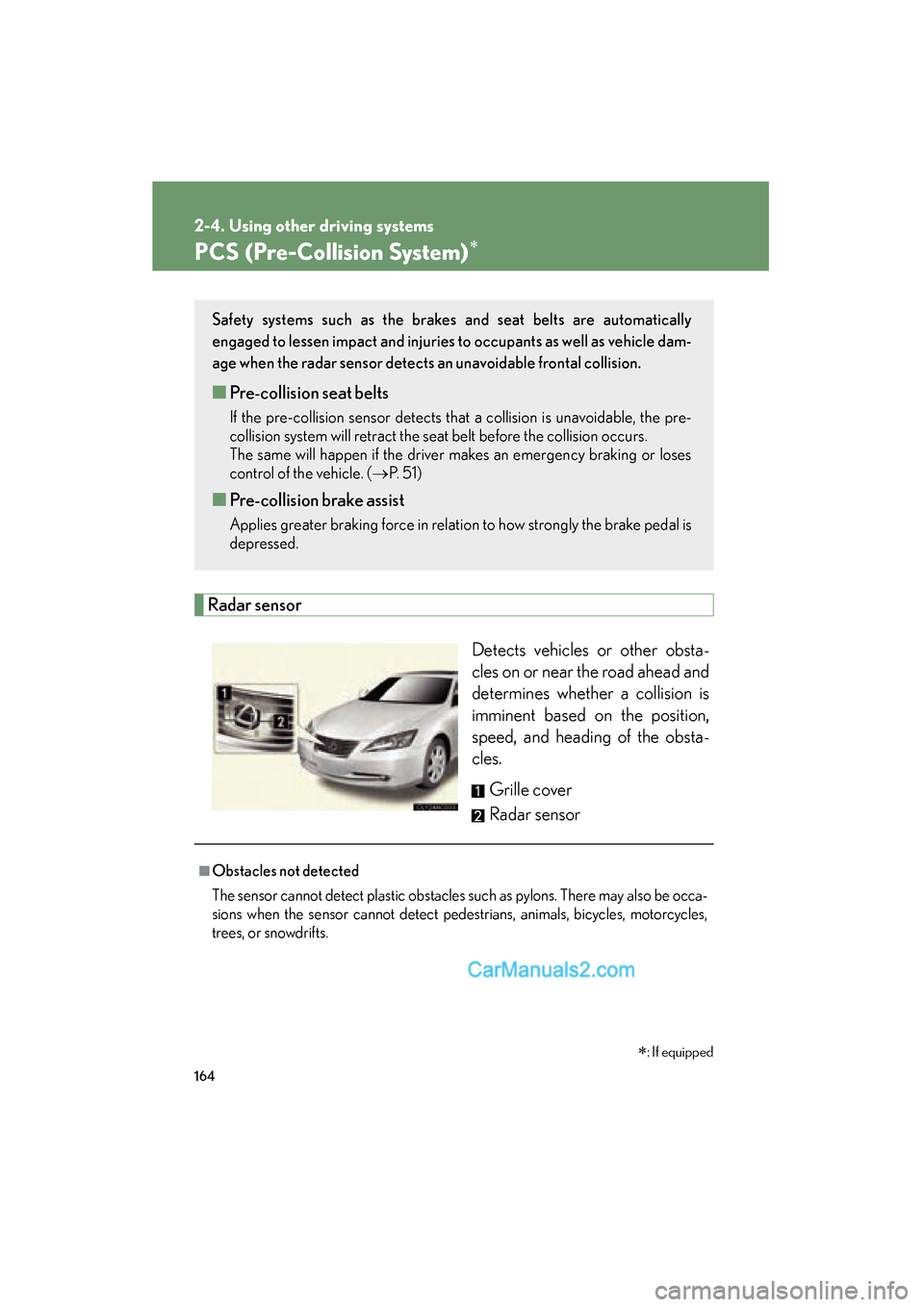
Radar sensorDetects vehicles or other obsta-
cles on or near the road ahead and
determines whether a collision is
imminent based on the position,
speed, and heading of the obsta-
cles. Grille cover
Radar sensor
Safety systems such as the brakes and seat belts are automatically
engaged to lessen impact and injuries to occupants as well as vehicle dam-
age when the radar sensor detects an unavoidable frontal collision.
■Pre-collision seat belts
If the pre-collision sensor detects that a collision is unavoidable, the pre-
collision system will retract the seat belt before the collision occurs.
The same will happen if the driver makes an emergency braking or loses
control of the vehicle. ( →P. 5 1 )
■Pre-collision brake assist
Applies greater braking force in relation to how strongly the brake pedal is
depressed.
■Obstacles not detected
The sensor cannot detect plastic obstacles such as pylons. There may also be occa-
sions when the sensor cannot detect pedestrians, animals, bicycles, motorcycles,
trees, or snowdrifts.
∗: If equipped
Page 167 of 475
165
2-4. Using other driving systems
2
When driving
ES350_U_(L/O_0808)
■The pre-collision system is operational when
●Seat belt (linked to the radar sensor)
• Vehicle speed is above 3 mph (5 km/h).
• The speed at which your vehicle is approaching the obstacle or oncomingvehicle exceeds 18 to 24 mph (30 to 40 km/h).
• The front occupants are wearing a seat belt.
●Seat belts (linked to brake operation)
• Vehicle speed is above 18 mph (30 km/h).
• The system detects sudden braking or skidding.
• The front occupants are wearing a seat belt.
●Brake assist
• Vehicle speed is above 18 mph (30 km/h).
• The speed at which your vehicle is approaching the obstacle or the vehicle is greater than 18 to 24 mph (30 to 40 km/h).
• The brake pedal is depressed.
■Conditions that may trigger the system even if there is no danger of collision
●When there is an object by the roadside at the entrance to a curve
●When passing an oncoming vehicle on a curve
●When driving over a narrow iron bridge
●When there is a metal object on the road surface
●When driving on an uneven road surface
●When passing an oncoming vehicle on a left-turn
●When your vehicle rapidly closes on the vehicle in front
When the system is activated in the situations described above there is also a possi-
bility that the seat belts will retract quickly and the brakes will be applied with a force
greater than normal. When the seat belt is locked in the retracted position, stop the
vehicle in a safe place, release the seat belt and refasten.
■When there is a malfunction in the system
Warning lights and/or warning messages will turn on or flash. ( →P. 375, 386)
Page 172 of 475
170
2-5. Driving information
ES350_U_(L/O_0808)
CAUTION
■Storage precautions
Observe the following precautions.
Failing to do so may result in death or serious injury.
●Do not place cargo or luggage in or on the following locations as the item may
get under the brake or accelerator pedal and prevent the pedals from being
depressed properly, block the driver’s vision, or hit the driver or passengers,
causing an accident.
• Driver’s feet
• Front passenger or rear seats (when stacking items)
• Package tray
• Instrument panel
• Dashboard
●Secure all items in the occupant compartment, as they may shift and injure some-
one during sudden braking, sudden swerving or an accident.
■Capacity and distribution
●Do not exceed the maximum axle weight rating or the total vehicle weight rating.
●Even if the total load of occupant's weight and the cargo load is less than the total
load capacity, do not apply the load unevenly.
Improper loading may cause deterioration of steering or braking control which
may cause death or serious injury.
Page 186 of 475
184
2-5. Driving information
ES350_U_(L/O_0808)●
Always place wheel blocks under both the vehicle and the trailer
wheels when parking. Apply the parking brake firmly, and put the
transmission in P. Avoid parking on a slope, but if unavoidable, do so
only after performing the following:
Apply the brakes and keep them applied.
Have someone place wheel blocks under both the vehicle and
trailer wheels.
When the wheel blocks are in place, release the brakes slowly
until the blocks absorb the load.
Apply the parking brake firmly.
Shift into P and turn off the engine.
● When restarting after parking on a slope:
With the transmission in the P position, start the engine. Be sure
to keep the brake pedal pressed.
Shift into 3, 2, 1, or the R position (if reversing).
Release the parking brake and brake pedal, and slowly pull or
back away from the wheel blocks.
Stop and apply the brakes.
Have someone retrieve the blocks.
CAUTION
■To avoid an accident
●Do not exceed 45 mph (72 km/h) or posted towing speed limit, whichever is
lower. As instability (swaying) of the towing vehicle-trailer combination increases
as speed increases, exceeding 45 mph (72 km/h) may cause loss of control.
●Slow down and downshift before descending steep or long downhill grades. Do
not make sudden downshifts.
●Avoid holding the brake pedal down too long or too frequently. This could cause
the brakes to overheat and result in reduced braking efficiency.
STEP1
STEP2
STEP3
STEP4
STEP5
STEP1
STEP2
STEP3
STEP4