display Lexus ES350 2009 Owner's Guide
[x] Cancel search | Manufacturer: LEXUS, Model Year: 2009, Model line: ES350, Model: Lexus ES350 2009Pages: 475, PDF Size: 6.2 MB
Page 210 of 475
208
3-2. Using the audio system
ES350_U_(L/O_0808)
■Canceling random, repeat and scan playback
Press (RAND), (RPT), or again.
■When LOAD, ERROR or WAIT is shown on the display
LOAD: This indicates that the CD player has completed loading the CD.
ERROR: This indicates is a trouble either in the CD or inside the player. The CDmay be dirty, damaged, or inserted up-side down.
WAIT: Operation is stopped due to a high temperature inside the player. Wait for
a while and then press . Contact your Lexus dealer if the CD still
cannot be played back.
■Discs that can be used
Discs with the marks shown below can be used.
Playback may not be possible depending on recording format or disc features, or
due to scratches, dirt or deterioration.
CDs with copy-protect features may not be used.
■CD player protection feature
To protect the internal components, playback is automatically stopped when a
problem is detected.
■If CDs are left inside the CD player or in the ejected position for extended peri-
ods
CDs may be damaged and may not play properly.
■Lens cleaners
Do not use lens cleaners. Doing so may damage the CD player.
Page 213 of 475
211
3-2. Using the audio system
3
Interior features
ES350_U_(L/O_0808)
Playing back MP3 and WMA discs
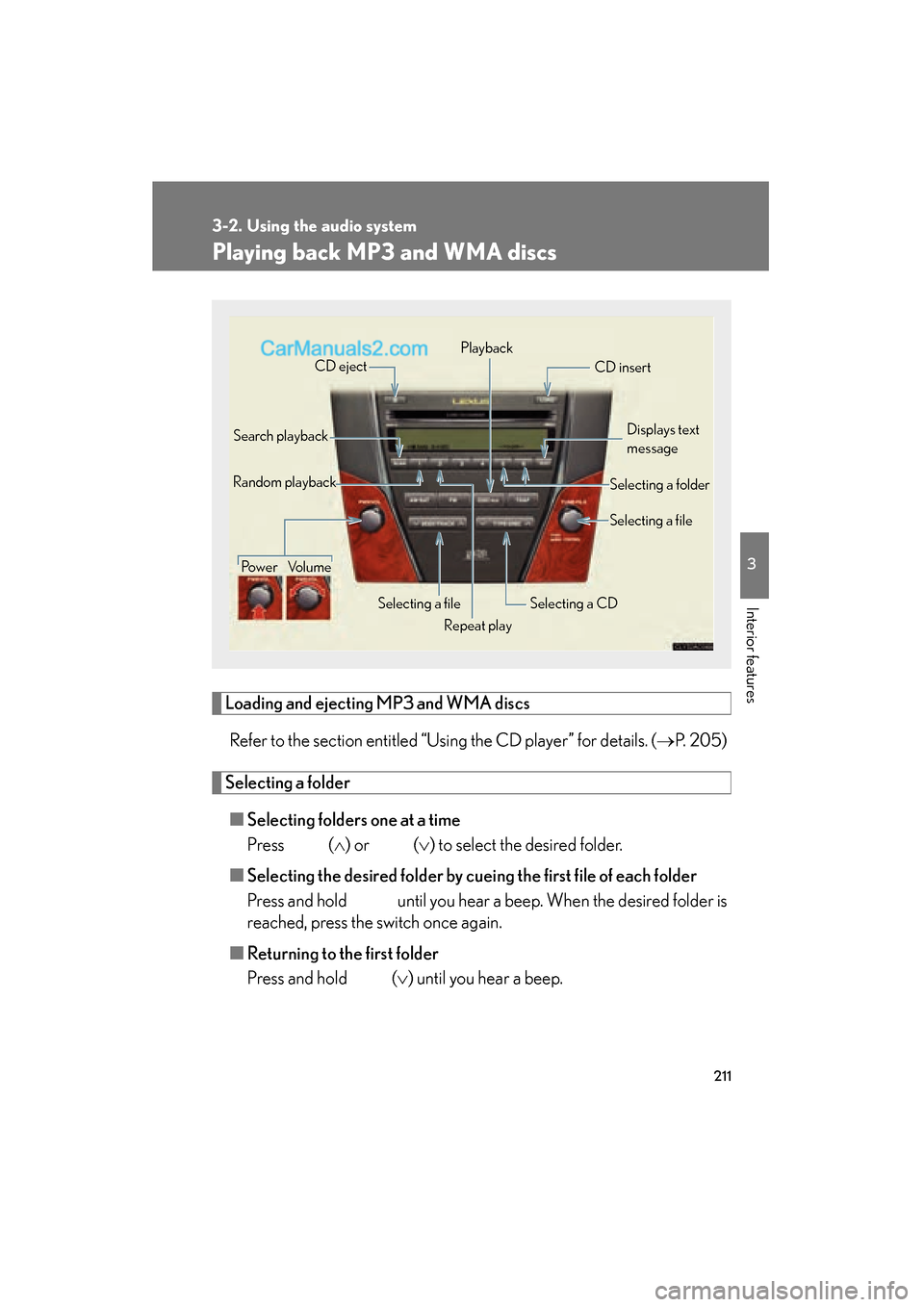
Loading and ejecting MP3 and WMA discsRefer to the section entitled “Using the CD player” for details. ( →P. 2 0 5 )
Selecting a folder
■ Selecting folders one at a time
Press ( ∧) or (∨ ) to select the desired folder.
■ Selecting the desired folder by cuei ng the first file of each folder
Press and hold until you hear a beep. When the desired folder is
reached, press the switch once again.
■ Returning to the first folder
Press and hold ( ∨) until you hear a beep.
Power Volume
Selecting a file
CD eject
Playback
Search playback CD insert
Selecting a CD
Random playback
Repeat playDisplays text
message
Selecting a file
Selecting a folder
Page 214 of 475
212
3-2. Using the audio system
ES350_U_(L/O_0808)
Selecting and scanning files■ Selecting 1 file at a time
Turn the or press ∧ or ∨ on to select the desired
file.
■ Selecting the desired file by cueing the files in the folder
Press .
When the desired file is reached, press the switch once again.
Repeat play
■ To repeat a file
Press (RPT).
Folder repeat
■ To repeat all of the files on a folder
Press and hold (RPT) until you hear a beep.
Random playback
■ To play files from a particul ar folder in random order
Press (RAND).
■ To play all of the files on a disc in random order
Press and hold (RAND) until you hear a beep.
Switching the display
Press .
Each time the switch is pressed, the display changes in the order of Folder
no./File no./Elapsed time → Folder name → File name → Album title (MP3
only) → Track title → Artist name.
Page 215 of 475
213
3-2. Using the audio system
3
Interior features
ES350_U_(L/O_0808)
■Canceling random, repeat and scan playback
Press (RAND), (RPT), or again.
■When LOAD, ERROR, WAIT or NO MUSIC is shown on the display.
LOAD: This indicates that the CD player has completed loading the CD.
ERROR: This indicates is a trouble either in the CD or inside the player. The CDmay be dirty, damaged, or inserted up-side down.
WAIT: Operation is stopped due to a high temperature inside the player. Wait for
a while and then press . Contact your Lexus dealer if the CD still
cannot be played back.
NO MUSIC: This indicates that the MP3/WMA file is not included in the CD.
■Discs that can be used
Discs with the marks shown below can be used.
Playback may not be possible depending on recording format or disc features, or
due to scratches, dirt or deterioration.
■CD player protection feature
To protect the internal components, playback is automatically stopped when a
problem is detected while the CD player is being used.
■If CDs are left inside the CD player or in the ejected position for extended peri-
ods
CDs may be damaged and may not play properly.
■Lens cleaners
Do not use lens cleaners. Doing so may damage the CD player.
Page 221 of 475
219
3-2. Using the audio system
3
Interior features
ES350_U_(L/O_0808)
Optimal use of the audio system
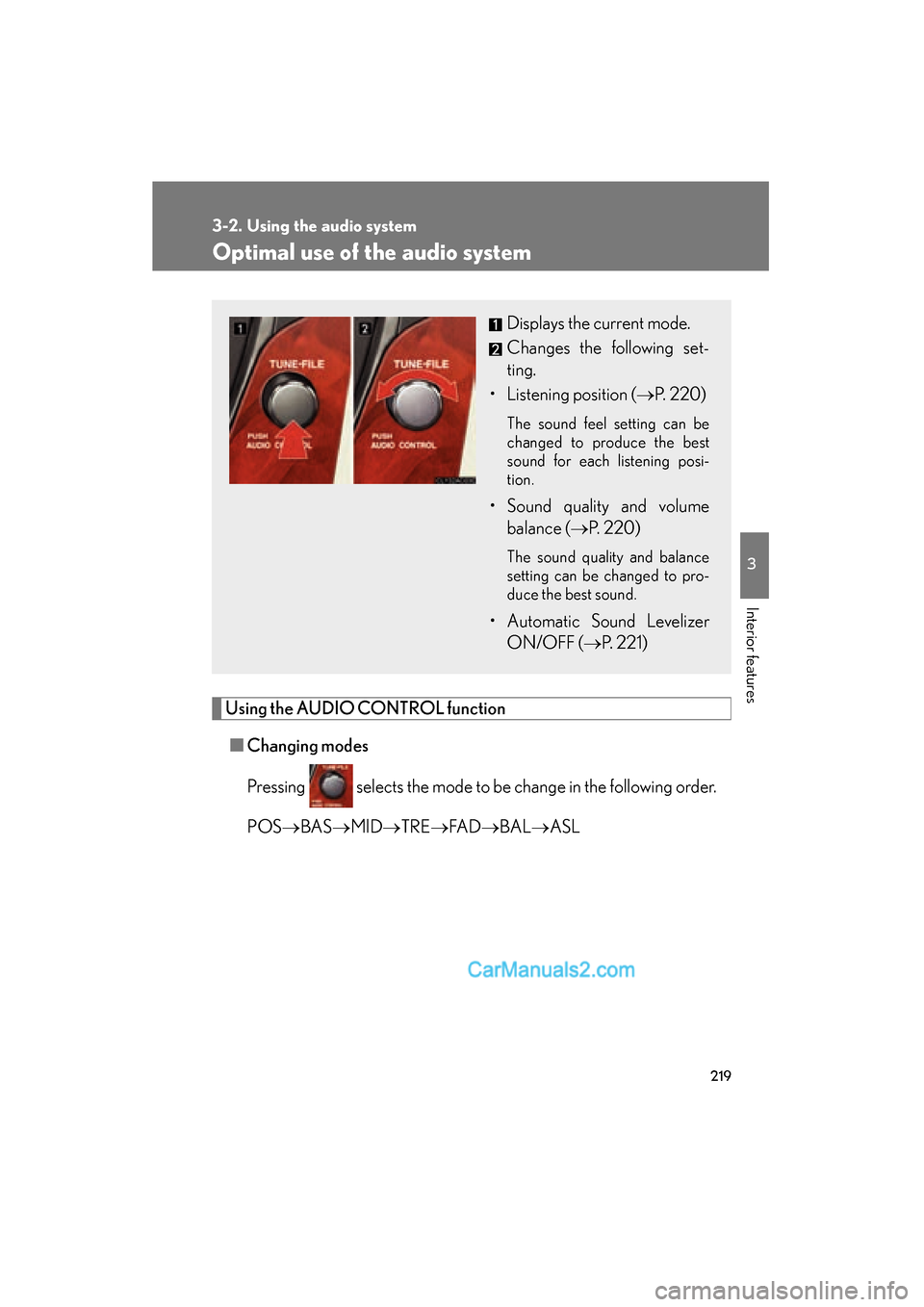
Using the AUDIO CONTROL function■ Changing modes
Pressing selects the mode to be change in the following order.
POS →BAS →MID →TRE →FA D →BAL →ASL
Displays the current mode.
Changes the following set-
ting.
• Listening position ( →P. 2 2 0 )
The sound feel setting can be
changed to produce the best
sound for each listening posi-
tion.
• Sound quality and volume
balance ( →P. 2 2 0 )
The sound quality and balance
setting can be changed to pro-
duce the best sound.
• Automatic Sound Levelizer
ON/OFF ( →P. 221)
Page 222 of 475
220
3-2. Using the audio system
ES350_U_(L/O_0808)■
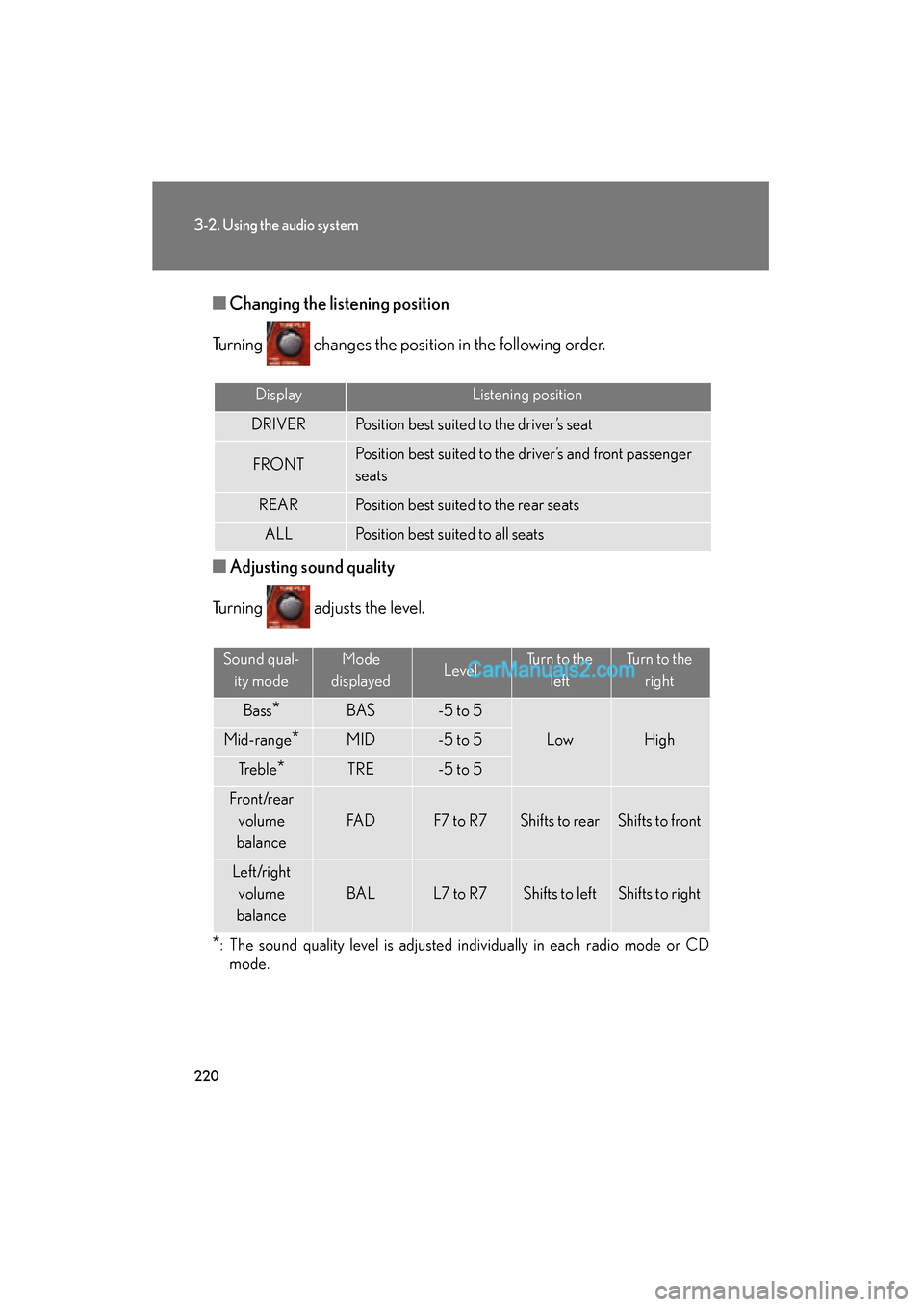
Changing the li stening position
Turning changes the position in the following order.
■ Adjusting sound quality
Turning adjusts the level.
*: The sound quality level is adjusted individually in each radio mode or CD mode.
DisplayListening position
DRIVERPosition best suited to the driver’s seat
FRONTPosition best suited to the driver’s and front passenger
seats
REARPosition best suited to the rear seats
ALLPosition best suited to all seats
Sound qual-
ity modeMode
displayedLevelTurn to the leftTurn to the right
Bass*BAS-5 to 5
LowHighMid-range*MID-5 to 5
Tr e b l e*TRE-5 to 5
F r o n t /r e a r volume
balance
FA DF7 to R7Shifts to rearShifts to front
Left/right volume
balance
BALL7 to R7Shifts to leftShifts to right
Page 230 of 475
228
3-3. Using the hands-free phone system (for cellular phone)
ES350_U_(L/O_0808)
Using the hands-free phone system (for cellular phone)
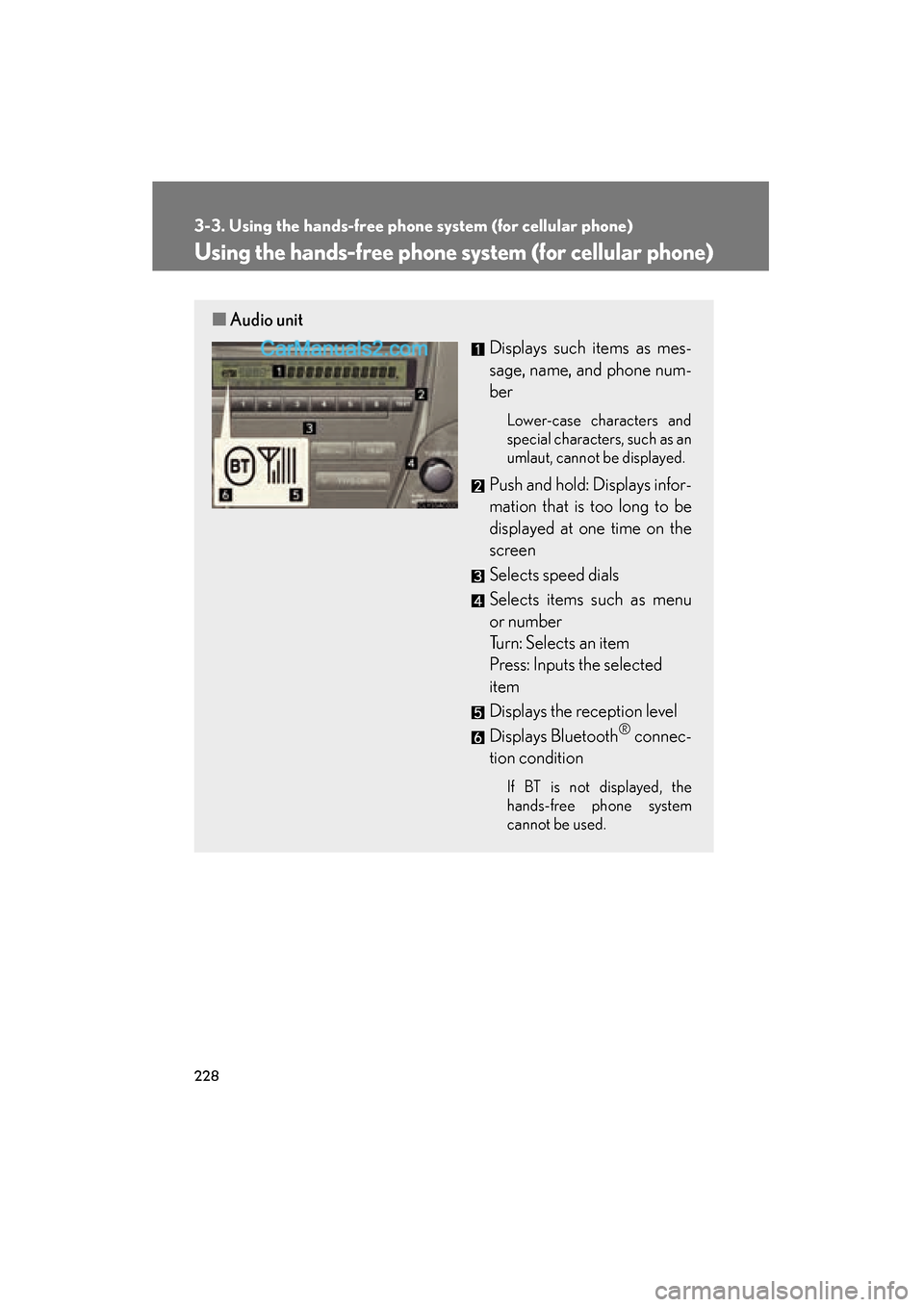
■Audio unit
Displays such items as mes-
sage, name, and phone num-
ber
Lower-case characters and
special characters, such as an
umlaut, cannot be displayed.
Push and hold: Displays infor-
mation that is too long to be
displayed at one time on the
screen
Selects speed dials
Selects items such as menu
or number
Turn: Selects an item
Press: Inputs the selected
item
Displays the reception level
Displays Bluetooth
® connec-
tion condition
If BT is not displayed, the
hands-free phone system
cannot be used.
Page 232 of 475
230
3-3. Using the hands-free phone system (for cellular phone)
ES350_U_(L/O_0808)
Operating the system by using a voice command
By following voice guidance instructions output from the speaker, voice
commands can be given to allow for operation of the hands-free phone
system without checking the display or operating .
■ Operation procedure when using a voice command
Press and say a command for a desired function.
(→ P. 2 3 2 )
■ Auxiliary commands when using a voice command
The following auxiliary commands can be used when operating the
system using a voice command:
Cancel: Exits the hands-free phone system
Repeat: Repeats the previous voice guidance instruction
Go back: Returns to the previous procedure
Help: Reads aloud the function summary if a help comment is regis-
tered for the selected function
Page 233 of 475
231
3-3. Using the hands-free phone system (for cellular phone)
3
Interior features
ES350_U_(L/O_0808)
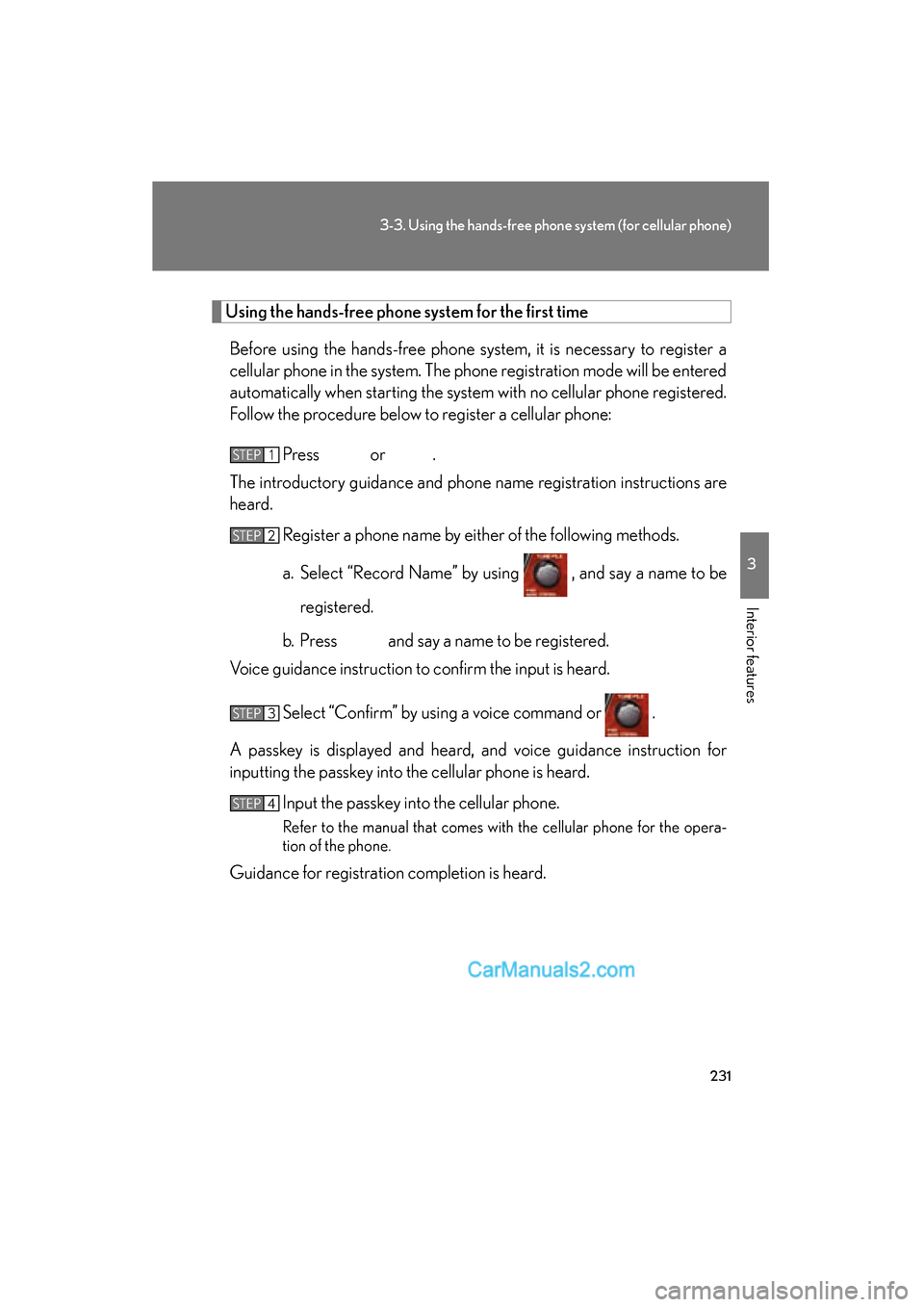
Using the hands-free phone system for the first time
Before using the hands-free phone system, it is necessary to register a
cellular phone in the system. The phone registration mode will be entered
automatically when starting the system with no cellular phone registered.
Follow the procedure below to register a cellular phone:
Press or .
The introductory guidance and phone name registration instructions are
heard.
Register a phone name by either of the following methods.
a. Select “Record Name” by using , and say a name to be
registered.
b. Press and say a name to be registered.
Voice guidance instruction to confirm the input is heard.
Select “Confirm” by using a voice command or .
A passkey is displayed and heard, and voice guidance instruction for
inputting the passkey into the cellular phone is heard. Input the passkey into the cellular phone.
Refer to the manual that comes with the cellular phone for the opera-
tion of the phone.
Guidance for registration completion is heard.
STEP1
STEP2
STEP3
STEP4
Page 251 of 475
249
3-3. Using the hands-free phone system (for cellular phone)
3
Interior features
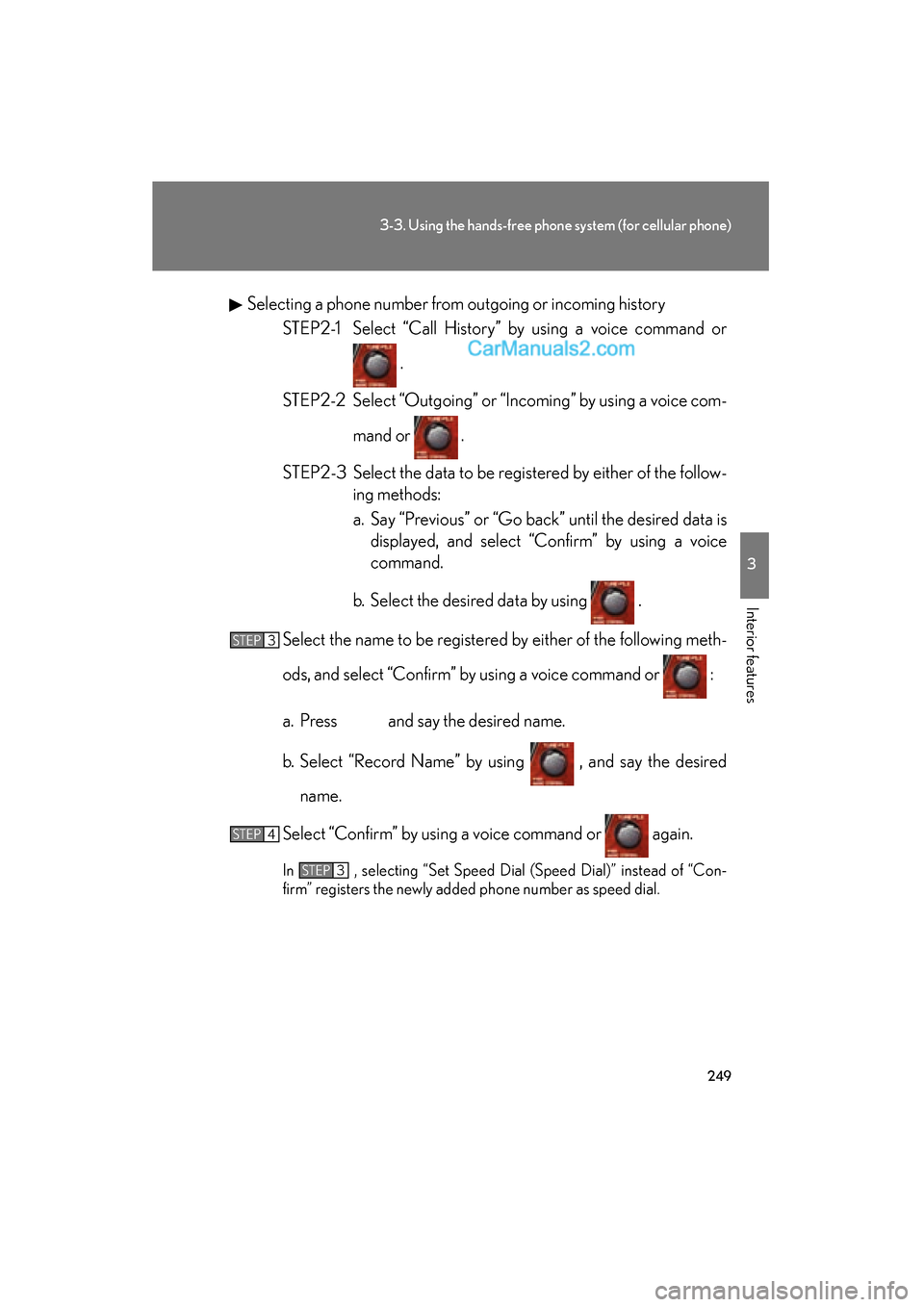
ES350_U_(L/O_0808)Selecting a phone number from outgoing or incoming history
STEP2-1 Select “Call History” by using a voice command or
.
STEP2-2 Select “Outgoing” or “Incoming” by using a voice com- mand or .
STEP2-3 Select the data to be registered by either of the follow- ing methods:
a. Say “Previous” or “Go back” until the desired data isdisplayed, and select “Confirm” by using a voice
command.
b. Select the desired data by using .
Select the name to be registered by either of the following meth-
ods, and select “Confirm” by using a voice command or :
a. Press and say the desired name.
b. Select “Record Name” by using , and say the desired name.
Select “Confirm” by using a voice command or again.
In , selecting “Set Speed Dial (Speed Dial)” instead of “Con-
firm” registers the newly added phone number as speed dial.
STEP3
STEP4
STEP3