light Lexus ES350 2009 Workshop Manual
[x] Cancel search | Manufacturer: LEXUS, Model Year: 2009, Model line: ES350, Model: Lexus ES350 2009Pages: 475, PDF Size: 6.2 MB
Page 141 of 475
139
2-3. Operating the lights and windshield wipers
2
When driving
ES350_U_(L/O_0808)
Windshield wipers and washer
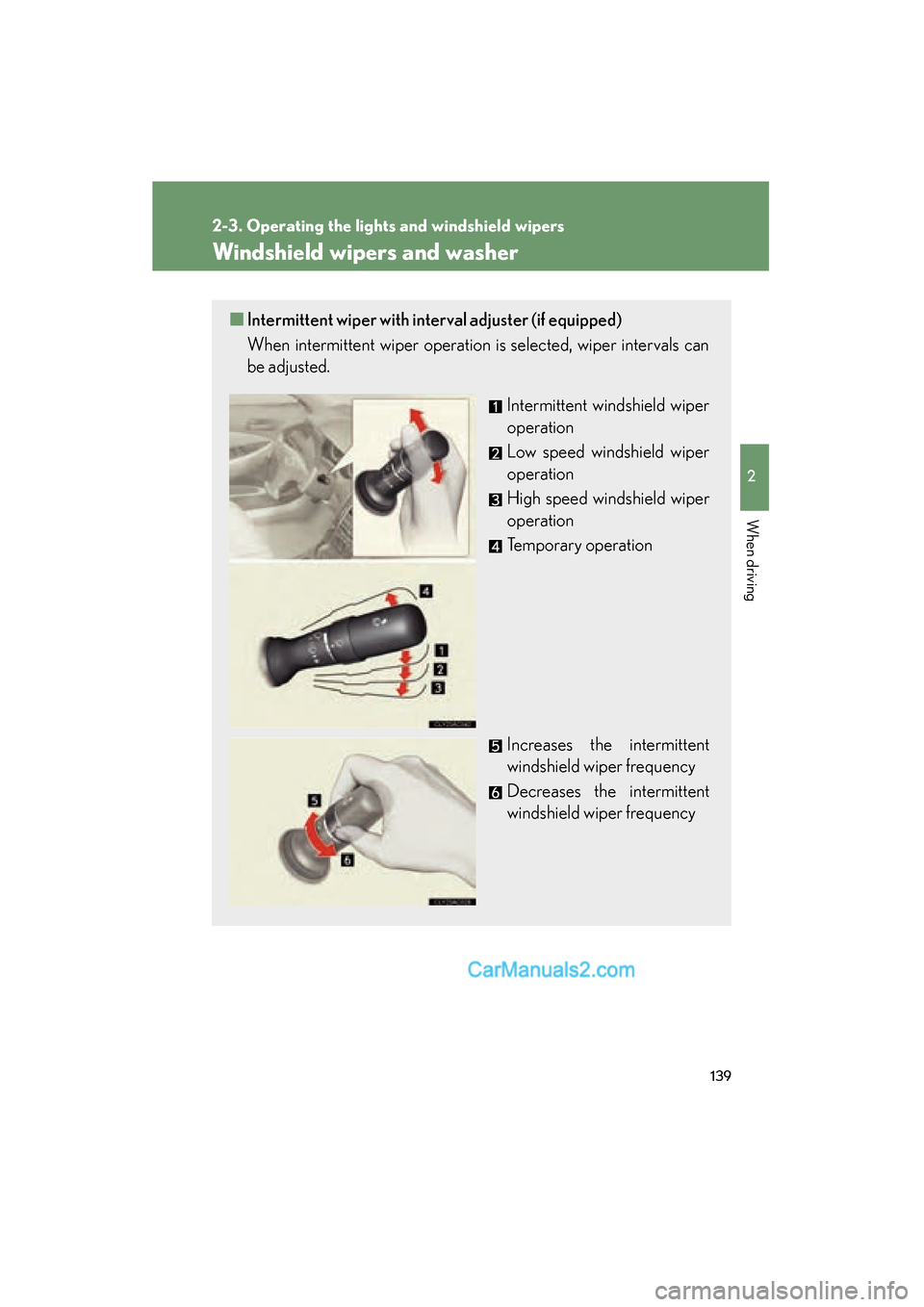
■Intermittent wiper with interval adjuster (if equipped)
When intermittent wiper operation is selected, wiper intervals can
be adjusted.
Intermittent windshield wiper
operation
Low speed windshield wiper
operation
High speed windshield wiper
operation
Temporary operation
Increases the intermittent
windshield wiper frequency
Decreases the intermittent
windshield wiper frequency
Page 142 of 475
140
2-3. Operating the lights and windshield wipers
ES350_U_(L/O_0808)
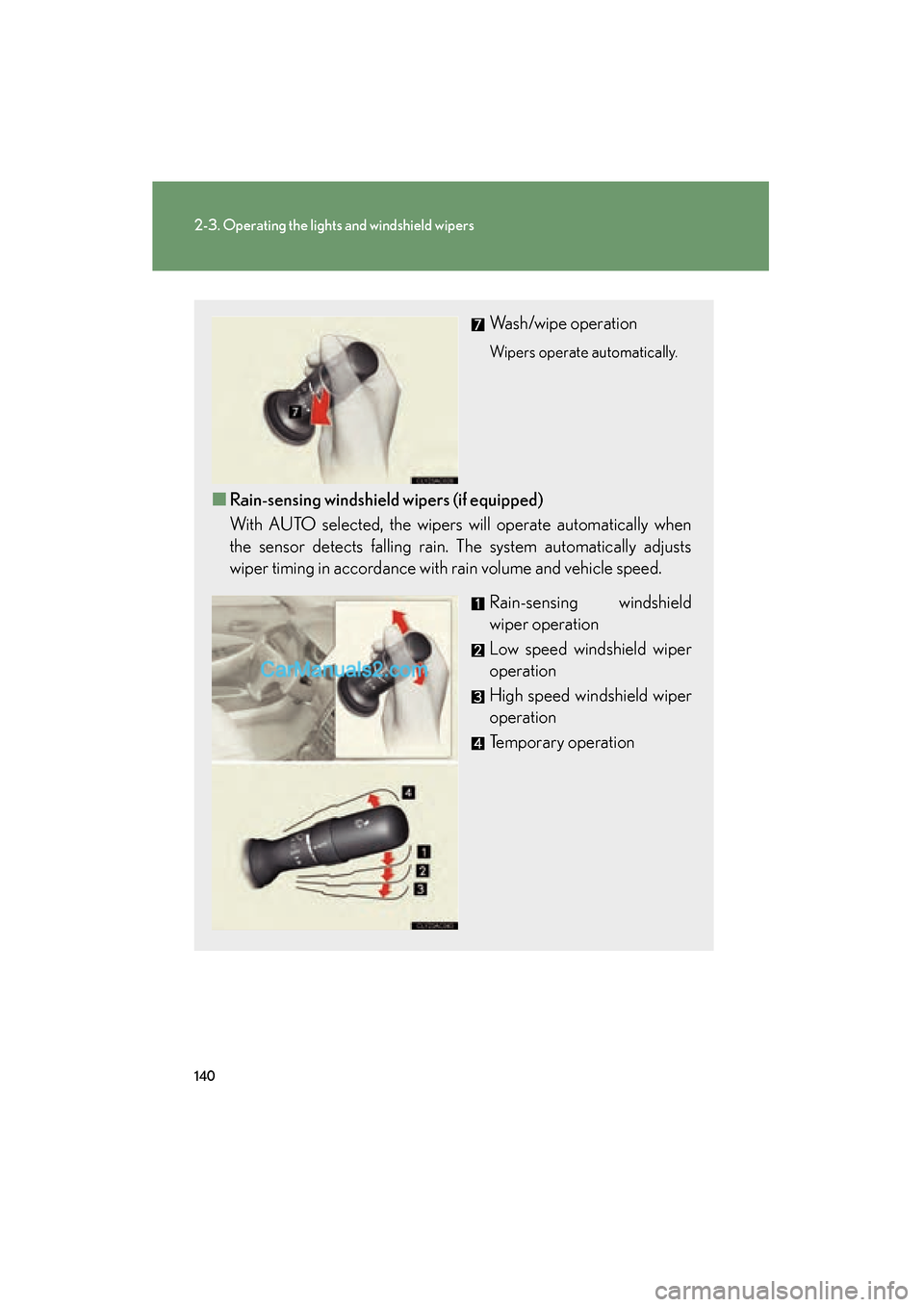
Wash/wipe operation
Wipers operate automatically.
■Rain-sensing windshield wipers (if equipped)
With AUTO selected, the wipers will operate automatically when
the sensor detects falling rain. The system automatically adjusts
wiper timing in accordance with rain volume and vehicle speed.
Rain-sensing windshield
wiper operation
Low speed windshield wiper
operation
High speed windshield wiper
operation
Temporary operation
Page 143 of 475
141
2-3. Operating the lights and windshield wipers
2
When driving
ES350_U_(L/O_0808)
■The windshield wiper and washer can be operated when
The “ENGINE START STOP” switch is in IGNITION ON mode.
■Rain drop sensor (vehicles equipped with the rain-sensing windshield wipers)
■AUTO mode
If the wiper switch is turned to AUTO position while the “ENGINE START STOP”
switch is in IGNITION ON mode, the wiper will operate once to show that AUTO
mode is activated.
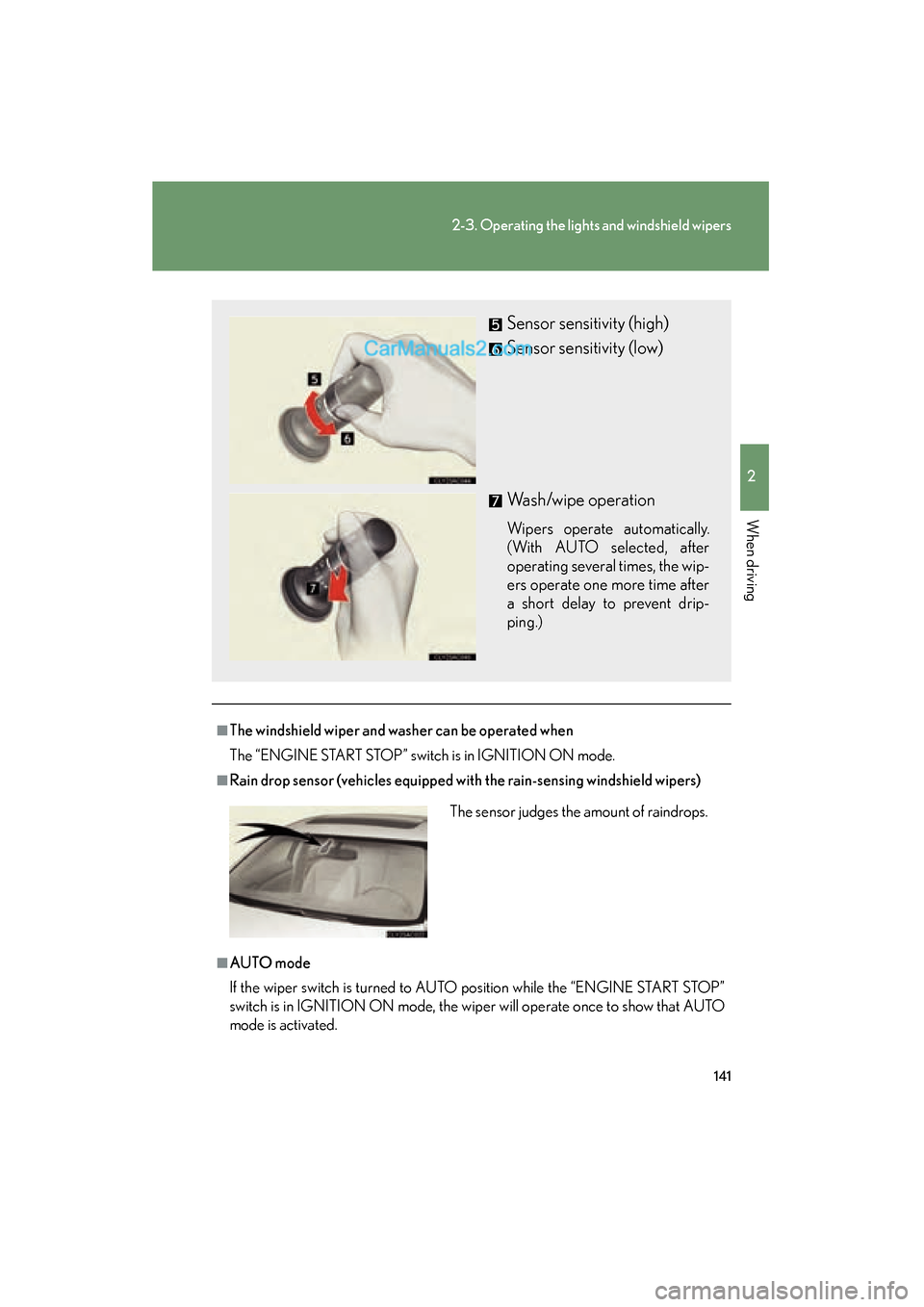
Sensor sensitivity (high)
Sensor sensitivity (low)
Wash/wipe operation
Wipers operate automatically.
(With AUTO selected, after
operating several times, the wip-
ers operate one more time after
a short delay to prevent drip-
ping.)
The sensor judges the amount of raindrops.
Page 144 of 475
142
2-3. Operating the lights and windshield wipers
ES350_U_(L/O_0808)
■If no windshield washer fluid sprays
Check that the washer nozzles are not blocked if there is washer fluid in the wind-
shield washer fluid reservoir.
CAUTION
■Caution regarding the use of windshield wipers in AUTO mode (vehicles
equipped with the rain-sensing windshield wipers)
The windshield wipers may operate unexpectedly if the sensor is touched or the
windshield is subject to vibration in AUTO mode. Take care that your fingers or any-
thing else do not become caught in the windshield wipers.
NOTICE
■When the windshield is dry
Do not use the wipers, as they may damage the windshield.
■When there is no washer fluid spray from the nozzle
Damage to the washer fluid pump may be caused if the lever is pulled toward you
and held continually.
Page 146 of 475
![Lexus ES350 2009 Workshop Manual 144
2-4. Using other driving systems
ES350_U_(L/O_0808)
■Fine adjustment of the set speed
Fine adjustment of the set speed (approximately 1.0 mph [1.6 km/h]) can be made
by lightly pressing the leve](/img/36/12989/w960_12989-145.png "Lexus ES350 2009 Workshop Manual 144
2-4. Using other driving systems
ES350_U_(L/O_0808)
■Fine adjustment of the set speed
Fine adjustment of the set speed (approximately 1.0 mph [1.6 km/h]) can be made
by lightly pressing the leve")
144
2-4. Using other driving systems
ES350_U_(L/O_0808)
■Fine adjustment of the set speed
Fine adjustment of the set speed (approximately 1.0 mph [1.6 km/h]) can be made
by lightly pressing the lever up or down and releasing it.
■Cruise control can be set when
●The shift lever is in the D or 4, 5, or 6 range of S.
●Vehicle speed is above approximately 25 mph (40 km/h).
■Accelerating
The vehicle can be accelerated normally. After acceleration, the set speed
resumes.
■Automatic cruise control cancellation
The set speed is automatically cancelled in any of the following situations.
●Actual vehicle speed falls more than 10 mph (16 km/h) below the preset vehicle
speed
At this time, the memorized set speed is not retained.
●Actual vehicle speed is below 25 mph (40km/h)
●VSC is activated
■Canceling and resuming regular acceleration
Cancel
Push the lever towards you to
cancel cruise control.
The speed setting is also can-
celed when the brakes are
applied.
Resume
To resume cruise control and
return to the set speed, push the
lever up.
Page 147 of 475
145
2-4. Using other driving systems
2
When driving
ES350_U_(L/O_0808)
■If the cruise control indicator light flashes
Turn the ON-OFF button off once, and then reactivate the system.
If the cruise control speed cannot be set or if the cruise control cancels immediately
after being activated, there may be a malfunction in the cruise control system. Have
the vehicle inspected by your Lexus dealer.
CAUTION
■To avoid inadvertent cruise control activation
Keep the ON-OFF button off when not in use.
■Situations unsuitable for cruise control
Do not use cruise control in any of the following situations.
Doing so may result in control of the vehicle being lost and could cause an accident
resulting in death or serious injury.
●In heavy traffic
●On roads with sharp bends
●On slippery roads, such as those covered with rain, ice or snow
●On steep hills
●On winding roads
●When towing a trailer
Page 152 of 475
150
2-4. Using other driving systems
ES350_U_(L/O_0808)Example of follow-up cruising (when following a vehicle driving slower
than the set speed): When the speed is set to 62 mph (100 km/h) and
the vehicle ahead is driving at 50 mph (80 km/h)
The system continues follow-up cruising while adjusting for changes in the
speed of the vehicle ahead in order to maintain the vehicle-to-vehicle dis-
tance set by the driver.
Example of acceleration (when there are no longer vehicles driving
slower than the set speed in the lane ahead): When the speed is set to
62 mph (100 km/h) and the vehicle ahead driving at 50 mph (80 km/
h) is out of the lane
When the vehicle ahead of you executes a lane change, the system slowly
accelerates until the set vehicle speed is reached. The system then returns to
fixed speed cruising.
■Fine adjustment of the set speed
Adjustment of the set speed by the following speed can be made by lightly pressing
the lever up or down and releasing it.
In the constant speed control mode: Approximately 1.0 mph (1.6 km/h)
In the vehicle-to-vehicle distance control mode: USA: Approximately 5 mph (8 km/h)
Canada: Approximately 3 mph (5 km/h)
■Dynamic radar cruise control warning lights, messages and buzzers
Warning lights, messages and buzzers are used to indicate a system malfunction or
to alert you to the need for caution while driving. ( →P. 3 8 6 )
■The dynamic radar cruise can be set when
●The shift lever is in D or the 4, 5 or 6 range of S.
●Vehicle speed is above approximately 30 mph (50 km/h).
■Accelerating
The vehicle can be accelerated normally. After acceleration, the set speed
resumes.
Page 161 of 475
159
2-4. Using other driving systems
2
When driving
ES350_U_(L/O_0808)
■Sensor detection information
●Certain vehicle conditions and the surrounding environment may affect the
ability of the sensor to correctly detect obstacles. Particular instances where this
may occur are listed below.
• There is dirt, snow or ice on the sensor.
• The sensor is frozen.
• The sensor is covered in any way.
• The vehicle is leaning considerably to one side.
• On an extremely bumpy road, on an incline, on gravel, or on grass
• The vicinity of the vehicle is noisy due to vehicle horns, motorcycle engines,air brakes of large vehicles, or other loud noises producing ultrasonic waves.
• There is another vehicle equipped with parking assist sensors in the vicinity.
• The sensor is coated with a sheet of spray or heavy rain
• The vehicle is equipped with a fender pole or wireless antenna.
• Towing eyelets are installed.
• The bumper or sensor receives a strong impact.
• The vehicle is approaching a tall or curved curb.
• In harsh sunlight or intense cold weather
In addition to the examples above, there are instances in which, because of their
shapes, signs and other objects may be judged by the sensor to be closer than they
are.
●The shape of the obstacle may prevent the sensor from detecting it. Pay particu-
lar attention to the following obstacles.
• Wires, fences, ropes etc.
• Cotton, snow and other materials that absorb radio waves
• Sharply-angled objects
• Low obstacles
• Tall obstacles with upper sections projecting outwards in the direction of your
vehicle
Page 163 of 475
161
2-4. Using other driving systems
2
When driving
ES350_U_(L/O_0808)
Driving assist systems
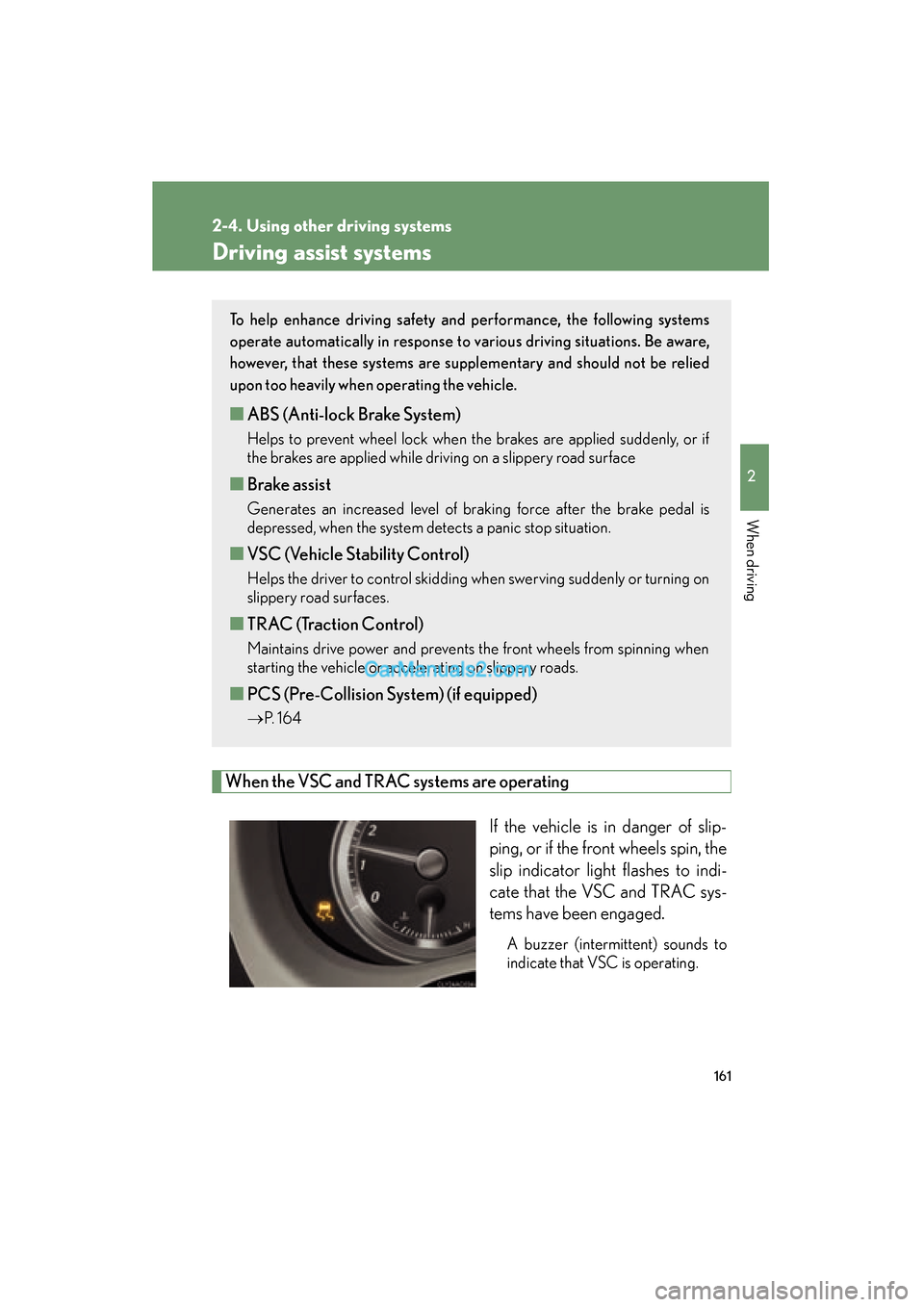
When the VSC and TRAC systems are operatingIf the vehicle is in danger of slip-
ping, or if the front wheels spin, the
slip indicator light flashes to indi-
cate that the VSC and TRAC sys-
tems have been engaged.
A buzzer (intermittent) sounds to
indicate that VSC is operating.
To help enhance driving safety and performance, the following systems
operate automatically in response to various driving situations. Be aware,
however, that these systems are suppl ementary and should not be relied
upon too heavily when operating the vehicle.
■ ABS (Anti-lock Brake System)
Helps to prevent wheel lock when the brakes are applied suddenly, or if
the brakes are applied while driving on a slippery road surface
■Brake assist
Generates an increased level of braking force after the brake pedal is
depressed, when the system detects a panic stop situation.
■VSC (Vehicle Stability Control)
Helps the driver to control skidding when swerving suddenly or turning on
slippery road surfaces.
■TRAC (Traction Control)
Maintains drive power and prevents the front wheels from spinning when
starting the vehicle or accelerating on slippery roads.
■PCS (Pre-Collision System) (if equipped)
→ P. 1 6 4
Page 164 of 475
162
2-4. Using other driving systems
ES350_U_(L/O_0808)
■Sounds and vibrations caused by the ABS, brake assist, VSC and TRAC systems
●A sound may be heard from the engine compartment when the engine is
started or just after the vehicle begins to move. This sound does not indicate that
a malfunction has occurred in any of these systems.
●Any of the following conditions may occur when the above systems are operat-
ing. None of these indicates that a malfunction has occurred.
• Vibrations may be felt through the vehicle body and steering.
• A motor sound may be heard after the vehicle comes to a stop.
• The brake pedal may pulsate slightly after the ABS is activated.
• The brake pedal may move down slightly after the ABS is activated.
CAUTION
Any of the following conditions may result in an accident which could cause death or
serious injury:
■The ABS does not operate effectively when
●The limits of tire gripping performance have been exceeded.
●The vehicle hydroplanes while driving at high speed on the wet or slick road.
■Stopping distance when the ABS is operating will exceed that of normal condi-
tions
The ABS is not designed to shorten the vehicle’s stopping distance. Always main-
tain a safe distance from the vehicle in front of you in the following situations.
●When driving on dirt, gravel or snow-covered roads
●When driving with tire chains
●When driving over bumps in the road
●When driving over roads with potholes or roads with uneven roads
■TRAC may not operate effectively when
Directional control and power may not be achievable while driving on slippery road
surfaces, even if the TRAC system is operating.
Do not drive the vehicle in conditions where stability and power may be lost.