battery Lexus ES350 2010 s User Guide
[x] Cancel search | Manufacturer: LEXUS, Model Year: 2010, Model line: ES350, Model: Lexus ES350 2010Pages: 543, PDF Size: 6.54 MB
Page 83 of 543
81
1-6. Theft deterrent system
1
Before driving
ES350_U
■Triggering of the alarm
The alarm may be triggered in the following situations.
Stopping the alarm deactivates the system.
●A person inside the vehicle opens a door, the trunk or hood.
●The battery is recharged or replaced when the vehicle is locked.
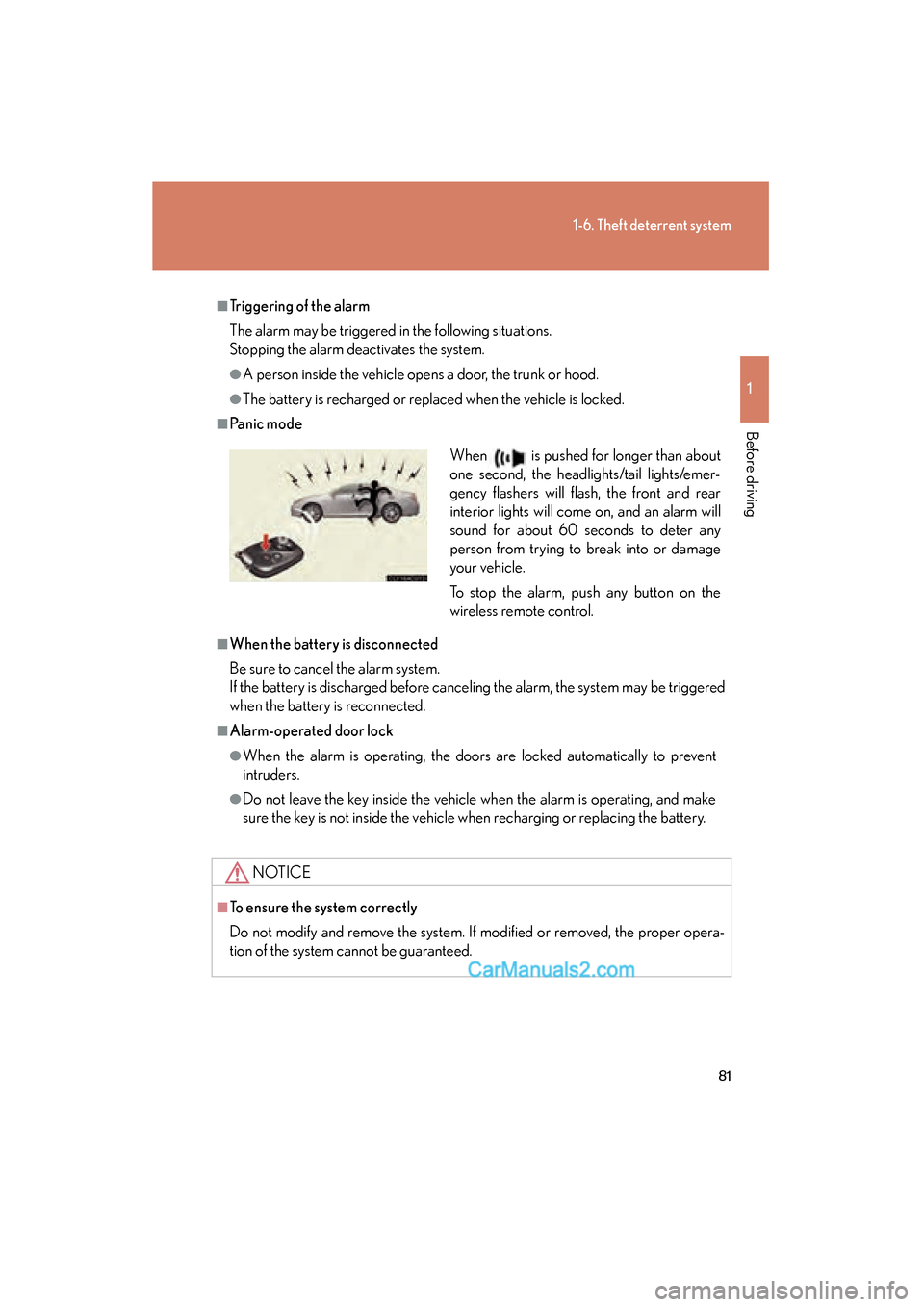
■Panic mode
■When the battery is disconnected
Be sure to cancel the alarm system.
If the battery is discharged before canceling the alarm, the system may be triggered
when the battery is reconnected.
■Alarm-operated door lock
●When the alarm is operating, the doors are locked automatically to prevent
intruders.
●Do not leave the key inside the vehicle when the alarm is operating, and make
sure the key is not inside the vehicle when recharging or replacing the battery.
NOTICE
■To ensure the system correctly
Do not modify and remove the system. If modified or removed, the proper opera-
tion of the system cannot be guaranteed.
When is pushed for longer than about
one second, the headlights/tail lights/emer-
gency flashers will flash, the front and rear
interior lights will come on, and an alarm will
sound for about 60 seconds to deter any
person from trying to break into or damage
your vehicle.
To stop the alarm, push any button on the
wireless remote control.
Page 92 of 543
90
1-7. Safety information
ES350_U
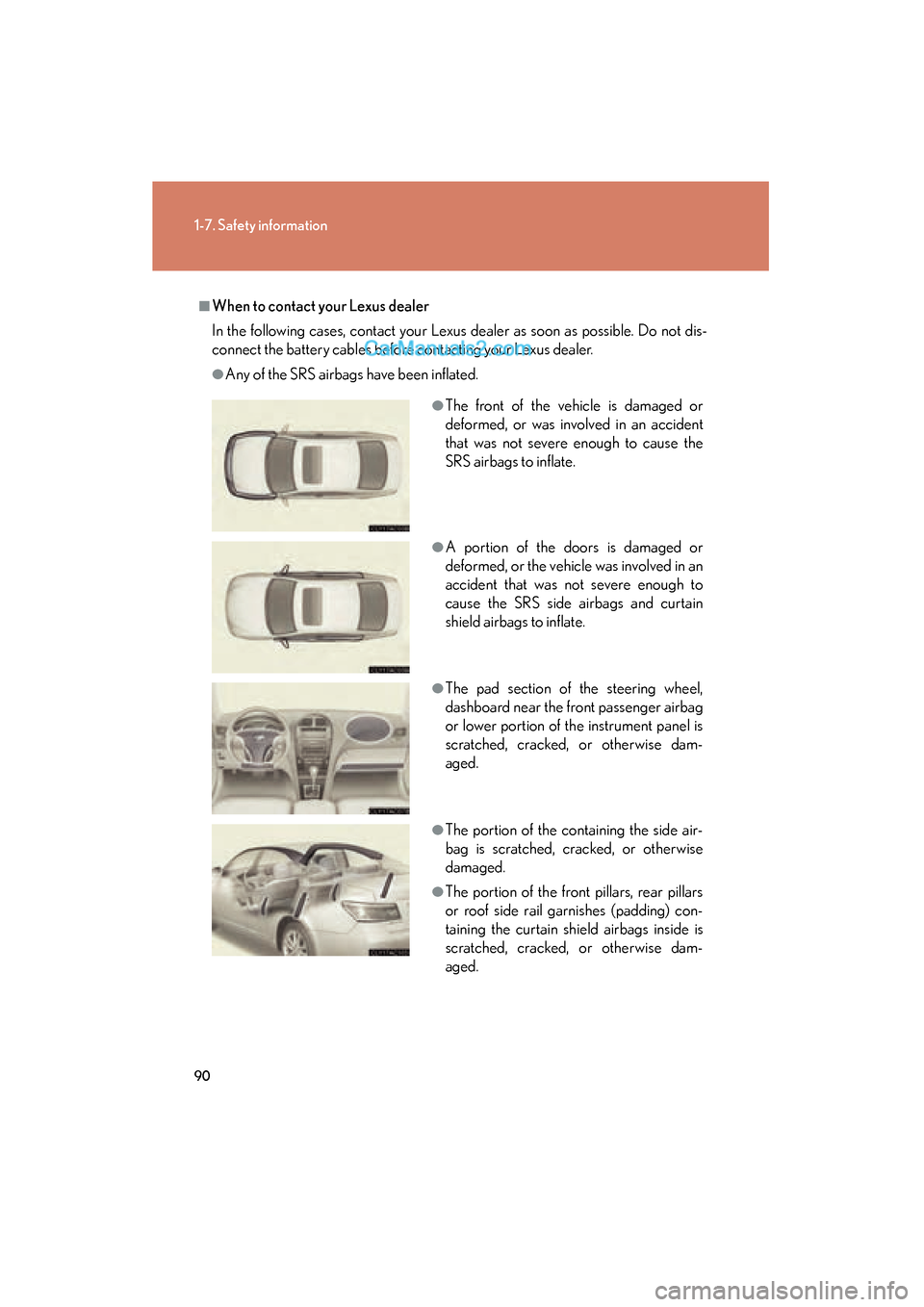
■When to contact your Lexus dealer
In the following cases, contact your Lexus dealer as soon as possible. Do not dis-
connect the battery cables before contacting your Lexus dealer.
●Any of the SRS airbags have been inflated.
●The front of the vehicle is damaged or
deformed, or was involved in an accident
that was not severe enough to cause the
SRS airbags to inflate.
●A portion of the doors is damaged or
deformed, or the vehicle was involved in an
accident that was not severe enough to
cause the SRS side airbags and curtain
shield airbags to inflate.
●The pad section of the steering wheel,
dashboard near the front passenger airbag
or lower portion of the instrument panel is
scratched, cracked, or otherwise dam-
aged.
●The portion of the containing the side air-
bag is scratched, cracked, or otherwise
damaged.
●The portion of the front pillars, rear pillars
or roof side rail garnishes (padding) con-
taining the curtain shield airbags inside is
scratched, cracked, or otherwise dam-
aged.
Page 128 of 543
126
2-1. Driving procedures
ES350_U
■Auto power OFF function
If the vehicle is left in ACCESSORY mode for more than an hour with the shift lever
in P, the “ENGINE START STOP” switch will automatically turn off.
■Electronic key battery depletion
oP. 3 2
■When the electronic key battery is discharged
oP. 4 0 4
■Conditions affecting operation
oP. 3 0
■Note for the entry function
oP. 3 3
CAUTION
■When starting the engine
Always start the engine while sitting in the driver’s seat. Do not press the accelera-
tor pedal while starting the engine under any circumstances.
Doing so may cause an accident resulting in death or serious injury.
■Stopping the engine in an emergency
If you want to stop the engine in an emergency while driving the vehicle, push and
hold the “ENGINE START STOP” switch for more than 3 seconds.
However, do not touch the “ENGINE START STOP” switch while driving except in
an emergency. If the engine stops while the vehicle is being driven, this could lead to
an unexpected accident.
Page 129 of 543
127
2-1. Driving procedures
2
When driving
ES350_U
NOTICE
■To prevent battery discharge
Do not leave the “ENGINE START STOP” switch in ACCESSORY or IGNITION
ON mode for long periods without the engine running.
■When starting the engine
●Do not race a cold engine.
●If the engine becomes difficult to start or stalls frequently, have the engine
checked immediately.
Page 149 of 543
147
2-3. Operating the lights and windshield wipers
2
When driving
ES350_U
■Automatic light off system
●When the headlights come on: The headlights and tail lights turn off 30 seconds
after all doors are closed with the “ENGINE START STOP” switch switched to
ACCESSORY mode or turned OFF. (The light turns off immediately if
the button on the key is pressed after all doors are locked.)
●When only the tail lights come on: The tail lights turn off automatically if the
“ENGINE START STOP” switch is switched to ACCESSORY mode or turned
OFF and driver’s door is opened.
To turn the lights on again, switch to IGNITION ON mode, or turn the light switch
OFF once and then back to the
or position.
■Automatic headlight leveling system (vehicles with discharge headlights)
The level of the headlights is automatically adjusted according to the number of
passengers and the loading condition of the vehicle to ensure that the headlights do
not interfere with other road users.
■If the indicator flashes... (vehicles with discharge headlights)
It may indicate a malfunction in the system. Contact your Lexus dealer.
■Customization that can be configured at Lexus dealer
Settings (e.g. light sensor sensitivity) can be changed.
(Customizable features oP. 5 1 1 )
NOTICE
■To prevent battery discharge
Do not leave the lights on longer than necessary when the engine is not running.
Page 186 of 543
184
2-5. Driving information
ES350_U
Winter driving tips
Carry out the necessary preparations and inspections before driving the
vehicle in winter. Always drive the vehicle in a manner appropriate to the
prevailing weather conditions.
■Pre-winter preparations
● Use fluids that are appropriate to the prevailing outside tempera-
tures.
• Engine oil
• Engine coolant
• Washer fluid
● Have a service technician inspect the level and specific gravity of
battery electrolyte.
● Have the vehicle fitted with four snow tires or purchase a set of
tire chains for the front tires.
Ensure that all tires are the same size and brand, and that chains match
the size of the tires.
●Tire inflation pressure falls in winter as the outside temperature
falls. Add 2.9 to 4.3 psi (20 to 30 kPa, 0.2 to 0.3 kgf/cm2 or bar)
to the standard tire inflation pressure.
Page 208 of 543
206
3-1. Using the air conditioning system and defogger
ES350_U
CAUTION
■To prevent the windshield from fogging up
Do not use during cool air operation in extremely humid weather. The dif-
ference between the temperature of the outside air and that of the windshield can
cause the outer surface of the windshield to fog up, blocking your vision.
NOTICE
■To prevent battery discharge
Do not leave the automatic air conditioning system on longer than necessary when
the engine is stopped.
Page 212 of 543
210
3-2. Using the audio system
ES350_U
CAUTION
■For vehicles sold in USA and Canada
●Part 15 of the FCC Rules
FCC Warning:
Any unauthorized changes or modifications to this equipment will void the user’s
authority to operate this device.
●Laser products
• Do not take this unit apart or attempt to make any changes yourself. This is an intricate unit that uses a laser pickup to retrieve information from the
surface of compact discs. The laser is carefully shielded so that its rays remain
inside the cabinet. Therefore, never try to disassemble the player or alter any
of its parts since you may be exposed to laser rays and dangerous voltages.
• This product utilizes a laser. Use of controls or adjustments or performance of procedures other than
those specified herein may result in hazardous radiation exposure.
NOTICE
■To prevent battery discharge
Do not leave the audio system on longer than necessary with the engine off.
■To avoid damaging the audio system
Take care not to spill drinks or other fluids over the audio system.
Page 217 of 543
215
3-2. Using the audio system
3
Interior features
ES350_U
■When the battery is disconnected
All preset stations are erased.
■Reception sensitivity
●It is difficult to maintain perfect radio reception at all times due to the continually
changing position of the antenna, differences in signal strength and surrounding
objects, such as trains and transmitters.
●The radio antenna is mounted inside the rear window. To maintain clear radio
reception, do not attach metallic window tinting or other metallic objects to the
antenna wire mounted inside the rear window.
■Receiving XM® Satellite Radio
An XM
® Satellite Radio is a tuner designed exclusively to receive broadcasts pro-
vided under a separate subscription. Availability is limited to the 48 contiguous
states and 10 Canadian provinces.
●XM® subscriptions
For detailed information about XM® Satellite Radio or to subscribe:
U.S.A.
Visit on the web at www.xmradio.com
or call 1-877-515-3987.
Canada
Visit on the web at www.xmradio.ca
or call 1-877-515-3987.
●Radio ID
You will need the radio ID when activating XM
® service or reporting a prob-
lem. Select “CH000” using , and the receiver's 8-character ID number
will appear.
●Satellite tuner
The tuner supports only Audio Services (Music and Talk) and the accompany-
ing Text Information of XM
® Satellite Radio.
Page 258 of 543
256
ES350_U
3-3. Using the Bluetooth® audio system
Bluetooth® audio system
■Conditions under which the system will not operate
●If using a portable player that does not support Bluetooth®
●If the portable player is switched off
●If the portable player is not connected
●If the portable player’s battery is low
●If the portable player is behind the seat or in the glove box or console box
●If metal is covering or touching the portable player
The Bluetooth® audio system enables you to enjoy music played on a por-
table digital audio player (portable player) from the vehicle speakers via
wireless communication.
This audio system supports Bluetooth
®, a wireless data system capable of
playing portable audio music without cables. If your portable player does
not support Bluetooth
®, the Bluetooth® audio system will not function.
Vehicles with a navigation system
Owners of models equipped with a navigation system should refer to
the “Navigation System Owner's Manual”.
Vehicles without a navigation system
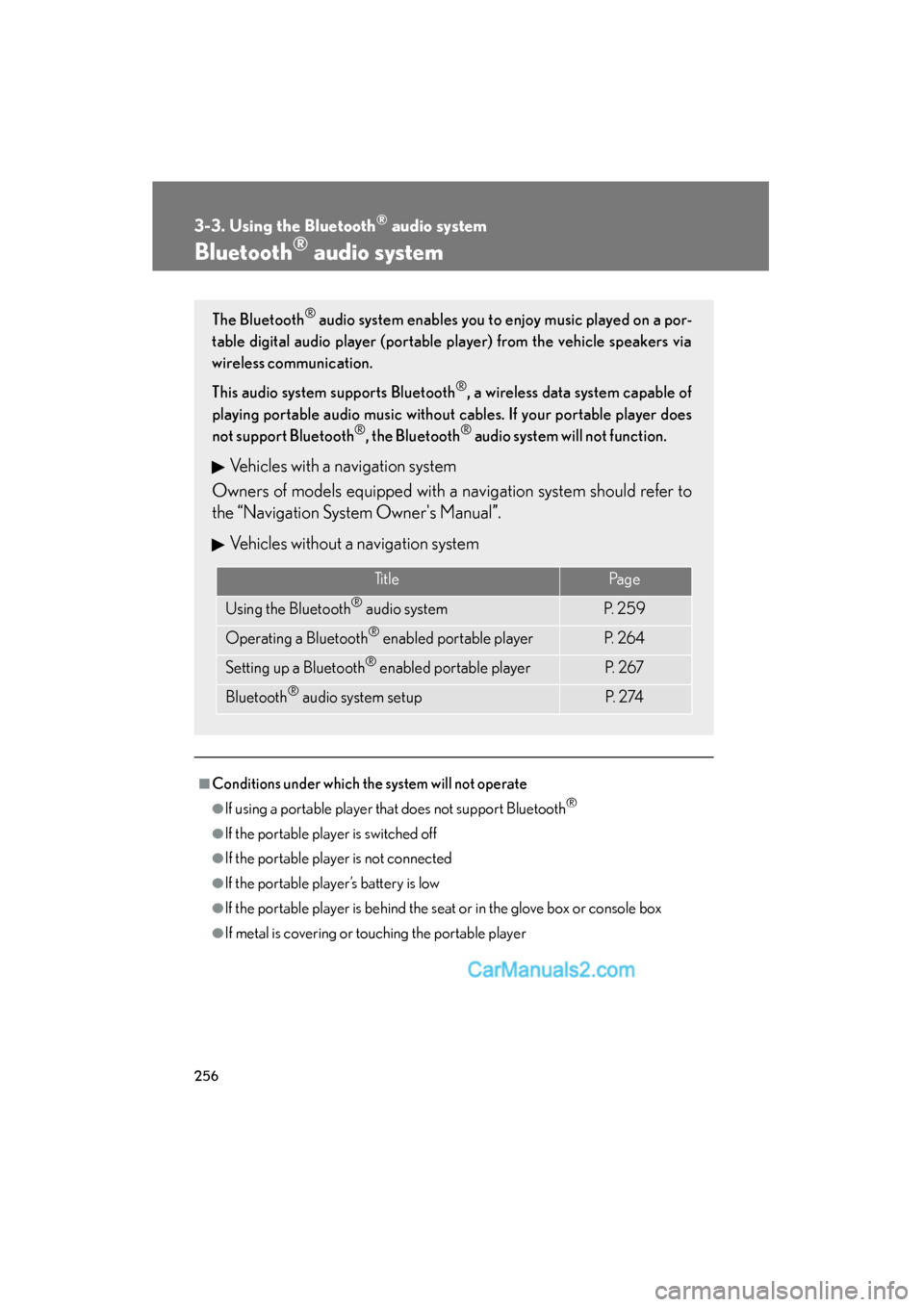
TitlePa g e
Using the Bluetooth® audio systemP. 2 5 9
Operating a Bluetooth® enabled portable playerP. 2 6 4
Setting up a Bluetooth® enabled portable playerP. 2 6 7
Bluetooth® audio system setupP. 2 74