cruise control Lexus ES350 2010 s User Guide
[x] Cancel search | Manufacturer: LEXUS, Model Year: 2010, Model line: ES350, Model: Lexus ES350 2010Pages: 543, PDF Size: 6.54 MB
Page 158 of 543
156
2-4. Using other driving systems
ES350_U
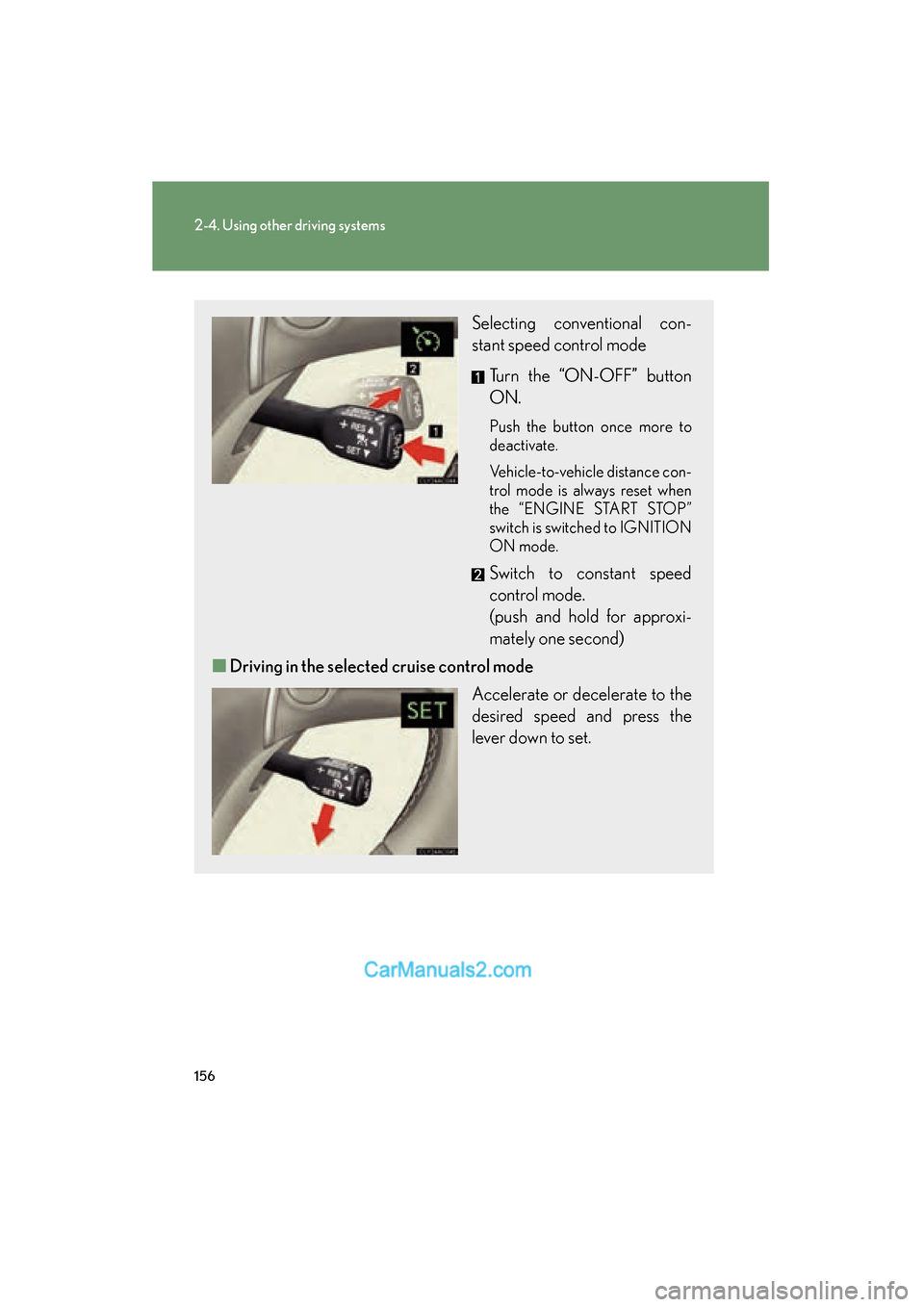
Selecting conventional con-
stant speed control mode Turn the “ON-OFF” button
ON.
Push the button once more to
deactivate.
Vehicle-to-vehicle distance con-
trol mode is always reset when
the “ENGINE START STOP”
switch is switched to IGNITION
ON mode.
Switch to constant speed
control mode.
(push and hold for approxi-
mately one second)
■ Driving in the selected cruise control mode
Accelerate or decelerate to the
desired speed and press the
lever down to set.
Page 159 of 543
157
2-4. Using other driving systems
2
When driving
ES350_U
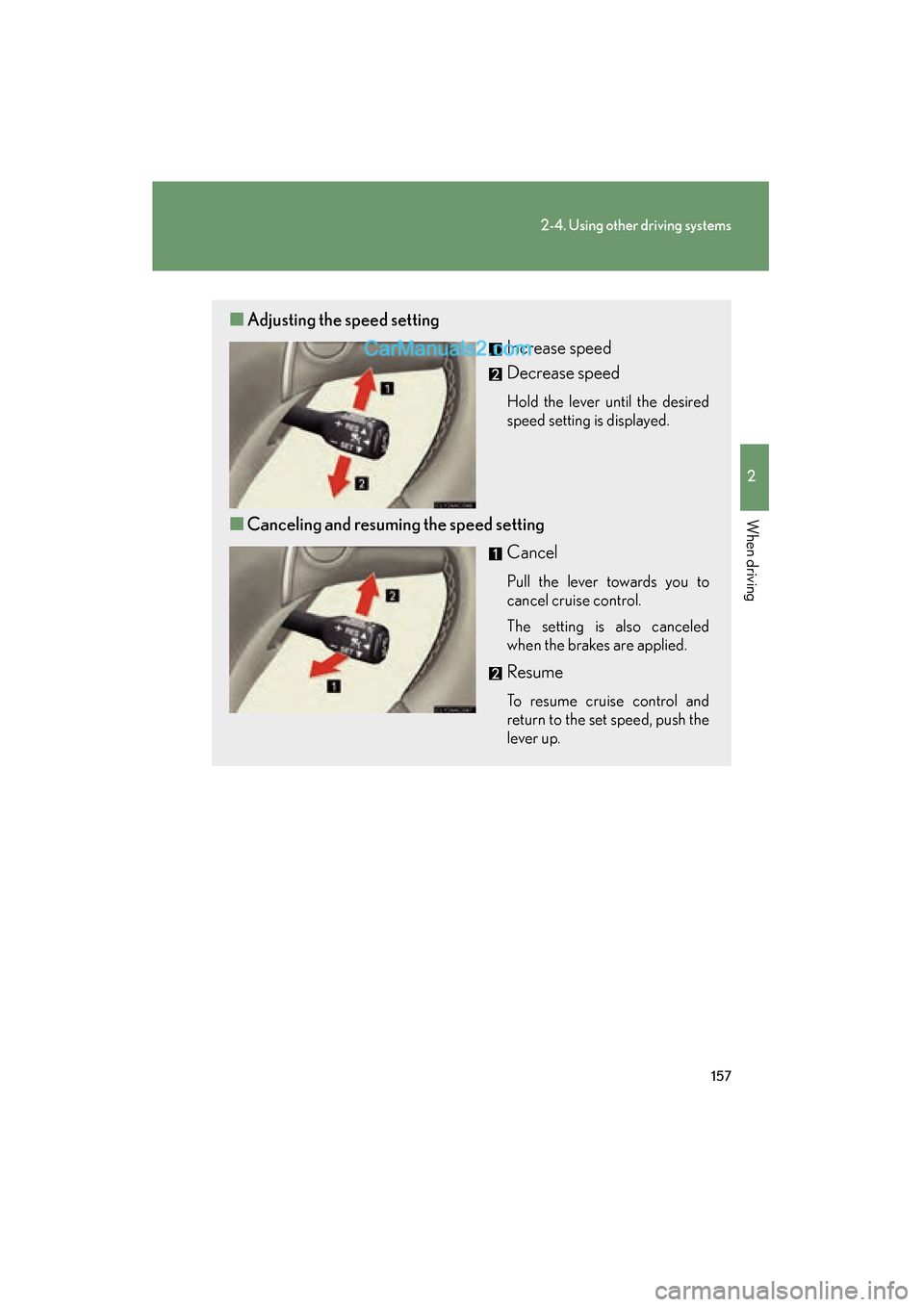
■Adjusting the speed setting
Increase speed
Decrease speed
Hold the lever until the desired
speed setting is displayed.
■Canceling and resuming the speed setting
Cancel
Pull the lever towards you to
cancel cruise control.
The setting is also canceled
when the brakes are applied.
Resume
To resume cruise control and
return to the set speed, push the
lever up.
Page 162 of 543
160
2-4. Using other driving systems
ES350_UExample of acceleration (when there are no longer vehicles driving
slower than the set speed in the lane ahead): When the speed is set to
62 mph (100 km/h) and the vehicle ahead driving at 50 mph (80 km/
h) is out of the lane
When the vehicle ahead of you executes a lane change, the system slowly
accelerates until the set vehicle speed is reached. The system then returns to
fixed speed cruising.
■Fine adjustment of the set speed
Adjustment of the set speed by the following speed can be made by lightly pressing
the lever up or down and releasing it.
In the constant speed control mode: Approximately 1.0 mph (1.6 km/h)
In the vehicle-to-vehicle distance control mode: USA: Approximately 5 mph (8 km/h)
Canada: Approximately 3 mph (5 km/h)
■Dynamic radar cruise control warning lights, messages and buzzers
Warning lights, messages and buzzers are used to indicate a system malfunction or
to alert you to the need for caution while driving. ( oP. 4 4 9 )
■Dynamic radar cruise control can be set when
●The shift lever is in D or the 4, 5 or 6 range of S.
●Vehicle speed is above approximately 30 mph (50 km/h).
■Accelerating
The vehicle can accelerate normally. After acceleration, the set speed resumes.
However, during vehicle-to-vehicle distance control mode, the vehicle speed may
decrease below the set speed in order to maintain the distance to the vehicle
ahead.
■Automatically canceling vehicle-to-vehicle distance control
Vehicle-to-vehicle distance control driving is automatically canceled in the follow-
ing situations.
●Vehicle speed falls below 25 mph (40 km/h)
●VSC is activated
●The sensor cannot operate correctly because it is covered in some way.*
Page 163 of 543
161
2-4. Using other driving systems
2
When driving
ES350_U
●The windshield wipers are operating at high speed.*
*
: Vehicle-to-vehicle distance control driving must be reset by turning the ON-OFF button on again.
If vehicle-to-vehicle distance control driving is automatically canceled for any other
reason, there may be a malfunction in the system. Contact your Lexus dealer.
■Automatically cancelling constant speed control
The set speed is automatically canceled in the following situations.
●Actual vehicle speed is more than approximately 10 mph (16 km/h) below the
preset vehicle speed
At this time, the memorized set speed is not retained.
●Vehicle speed falls below approximately 25 mph (40 km/h)
●VSC is activated
■Vehicle-to-vehicle distance settings
Select a distance from the table below. Note that the distances shown correspond
to a vehicle speed of 50 mph (80 km/h). Vehicle-to-vehicle distance increases/
decreases in accordance with vehicle speed.
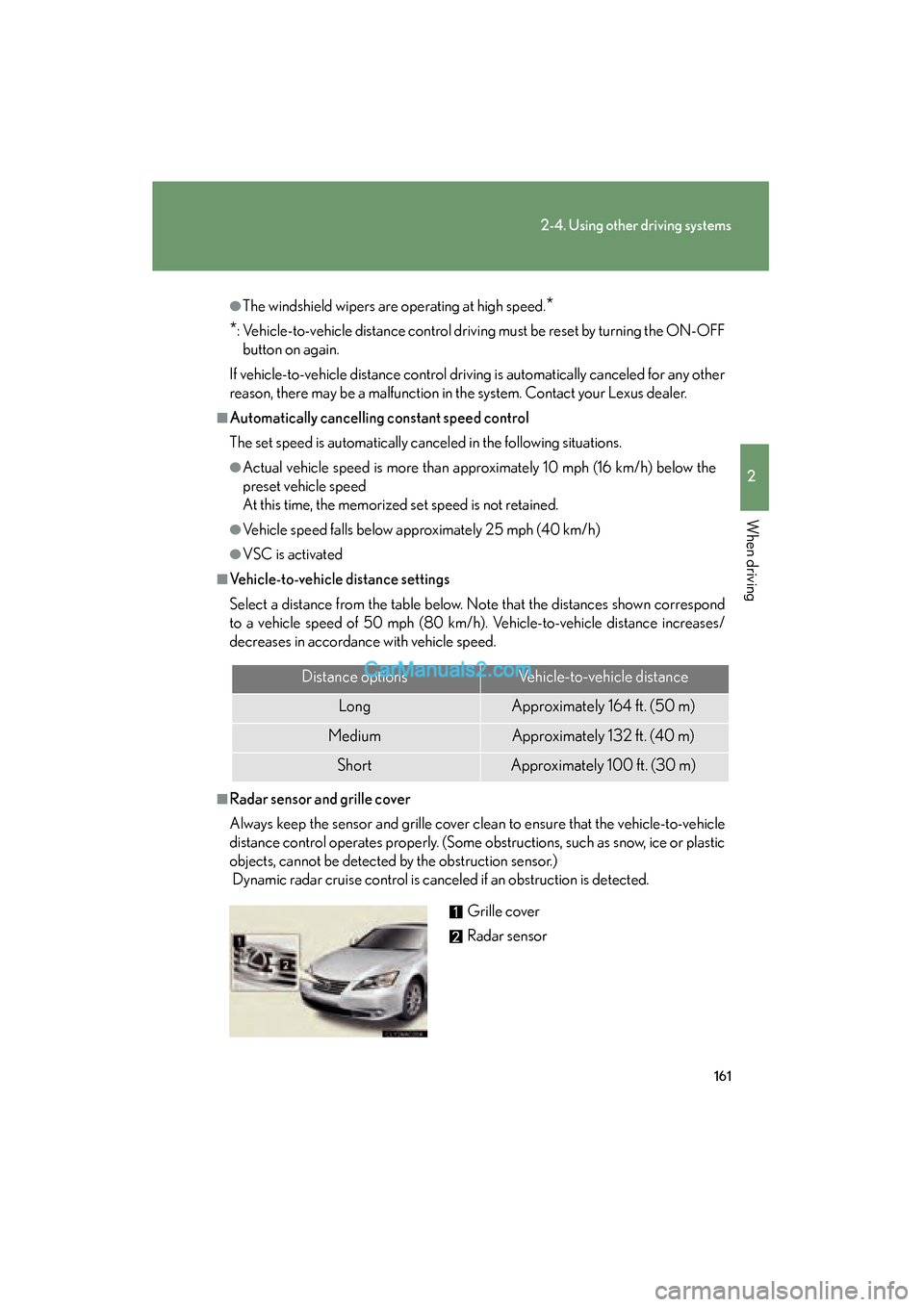
■Radar sensor and grille cover
Always keep the sensor and grille cover clean to ensure that the vehicle-to-vehicle
distance control operates properly. (Some obstructions, such as snow, ice or plastic
objects, cannot be detected by the obstruction sensor.)
Dynamic radar cruise control is canceled if an obstruction is detected.
Distance optionsVehicle-to-vehicle distance
LongApproximately 164 ft. (50 m)
MediumApproximately 132 ft. (40 m)
ShortApproximately 100 ft. (30 m)
Grille cover
Radar sensor
Page 165 of 543
163
2-4. Using other driving systems
2
When driving
ES350_U
CAUTION
■Before using dynamic radar cruise control
Do not overly rely on vehicle-to-vehicle distance control.
Be aware of the set vehicle speed. If automatic deceleration/acceleration is not
appropriate, adjust the vehicle speed, as well as the distance between your vehicle
and vehicles ahead by applying the brakes, etc.
■To avoid inadvertent cruise control activation
Keep the “ON-OFF” button off when not in use.
■Situations unsuitable for dynamic radar cruise control
Do not use dynamic radar cruise control in any of the following situations.
Doing so may result in control of the vehicle being lost and could cause an accident
resulting in death or serious injury.
●In heavy traffic
●On roads with sharp bends
●On winding roads
●On slippery roads, such as those covered with rain, ice or snow.
●On steep downhills, or where there are sudden changes between sharp up and
down gradients
●At entrances to expressways
●When weather conditions are bad enough that they may prevent the sensors
from functioning correctly (fog, snow, sandstorm, etc.)
●Where buzzer can be heard often
●When towing a trailer or emergency towing
■When the radar sensor may not be correctly detecting the vehicle ahead
Apply the brakes as necessary when any of the following types of vehicles are in
front of you.
As the sensor may not be able to correctly detect these types of vehicles, the prox-
imity alarm ( oP. 449) will not be activated, and an accident may result.
●Vehicles that cut in suddenly
●Vehicles traveling at low speeds
●Vehicles that are not moving
●Vehicles with small rear ends (trailers with no load on board etc.)
Page 166 of 543
164
2-4. Using other driving systems
ES350_U
CAUTION
●Motorcycles traveling in the same lane
■Conditions under which the vehicle-to-vehicle distance control may not function
correctly
Apply the brakes as necessary in the following conditions as the radar sensor may
not be able to correctly detect vehicles ahead, and an accident may result.
●When water or snow thrown up by the surrounding vehicles hinders the function-
ing of the sensor
●When your vehicle is pointing upwards (caused by a heavy load in the trunk, etc.)
●When the road curves or when the lanes are narrow
●When steering wheel operation or your position in the lane is unstable
●When the vehicle ahead of you decelerates suddenly
■Handling the radar sensor
Observe the following to ensure the cruise control system can function effectively:
●Keep the sensor and front grille clean at all times.
Clean the sensor and front grille with a soft cloth so you do not mark or damage
them.
●Do not subject the sensor or surrounding area to a strong impact.
If the sensor moves even slightly off position, the system may malfunction. If the
sensor or surrounding area is subject to a strong impact, always have the area
inspected and adjusted by a Lexus dealer.
●Do not disassemble the sensor.
●Do not attach accessories or stickers to the sensor, grille or surrounding area.
●Do not modify or paint the sensor and grille.
■To ensure the radar sensor functions correctly
Do not do the following to the sensor or grille cover as doing so may cause the sen-
sor not to function correctly and could result in an accident.
●Stick or attach anything to them
●Leave them dirty
●Disassemble, subject them to strong shocks
●Modify or paint them
●Replace them with non-genuine parts
Page 195 of 543
193
2-5. Driving information
2
When driving
ES350_U
CAUTION
■Hitches
Trailer hitch assemblies have different weight capacities established by the hitch
manufacturer. Even though the vehicle may be physically capable of towing a
higher weight, the operator must never exceed the maximum weight rating speci-
fied for the trailer hitch.
●If you wish to install a trailer hitch, your Lexus dealer should be consulted.
●Use only a hitch that conforms to the total trailer weight requirement.
●Follow the directions supplied by the hitch manufacturer.
●Lubricate the hitch ball with a light coat of grease.
●Remove the trailer hitch whenever you are not towing a trailer. After removing
the hitch, seal any mounting holes in the vehicle body to prevent entry of any sub-
stances into the vehicle.
■When towing a trailer
●Never tap into your vehicle's hydraulic system, as this will lower the vehicle's
braking effectiveness.
●Never tow a trailer without using a safety chain securely attached to both the
trailer and the vehicle. If damage occurs to the coupling unit or hitch ball, there is
danger of the trailer wandering into another lane.
●Do not use cruise control/dynamic radar cruise control.
Doing so may result in inappropriate control of speed and could cause serious or
fatal accident.
NOTICE
■When installing a trailer hitch
●Use only the position recommended by your Lexus dealer. Do not install the
trailer hitch on the bumper; this may cause body damage.
●Do not use axle-mounted hitches, as they can cause damage to the axle housing,
wheel bearings, wheels or tires.
■Brakes
Lexus recommends trailers with brakes that conform to any applicable federal and
state/provincial regulations.
Page 415 of 543
413
4-3. Do-it-yourself maintenance
4
Maintenance and care
ES350_U
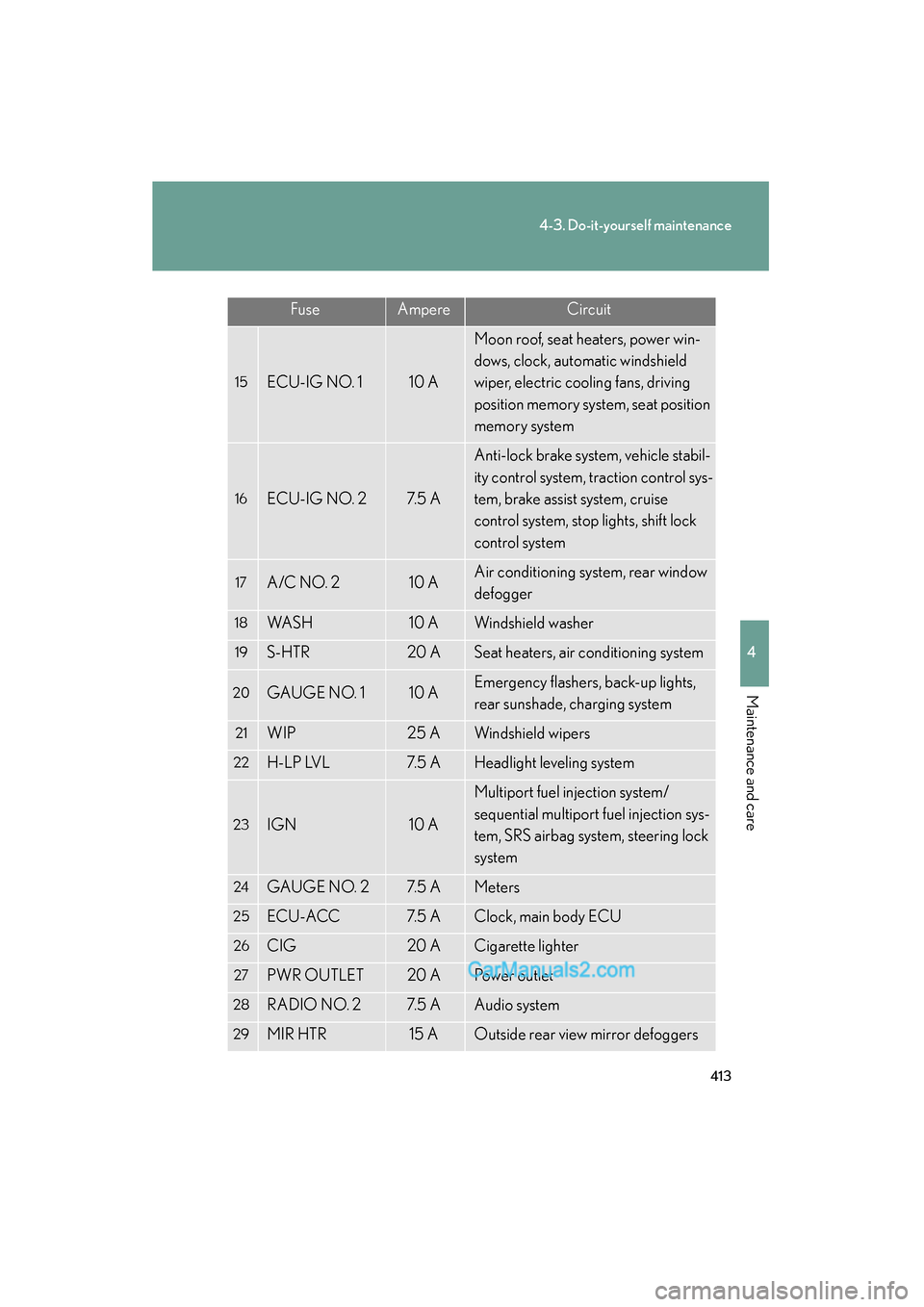
15ECU-IG NO. 110 A
Moon roof, seat heaters, power win-
dows, clock, automatic windshield
wiper, electric cooling fans, driving
position memory system, seat position
memory system
16ECU-IG NO. 27. 5 A
Anti-lock brake system, vehicle stabil-
ity control system, traction control sys-
tem, brake assist system, cruise
control system, stop lights, shift lock
control system
17A/C NO. 210 AAir conditioning system, rear window
defogger
18WA S H10 AWindshield washer
19S-HTR20 ASeat heaters, air conditioning system
20GAUGE NO. 110 AEmergency flashers, back-up lights,
rear sunshade, charging system
21WIP25 AWindshield wipers
22H-LP LVL7. 5 AHeadlight leveling system
23IGN10 A
Multiport fuel injection system/
sequential multiport fuel injection sys-
tem, SRS airbag system, steering lock
system
24GAUGE NO. 27. 5 AMeters
25ECU-ACC7. 5 AClock, main body ECU
26CIG20 ACigarette lighter
27PWR OUTLET20 APower outlet
28RADIO NO. 27. 5 AAudio system
29MIR HTR15 AOutside rear view mirror defoggers
FuseAmpereCircuit
Page 453 of 543
5
When trouble arises
451
5-2. Steps to take in an emergency
ES350_U
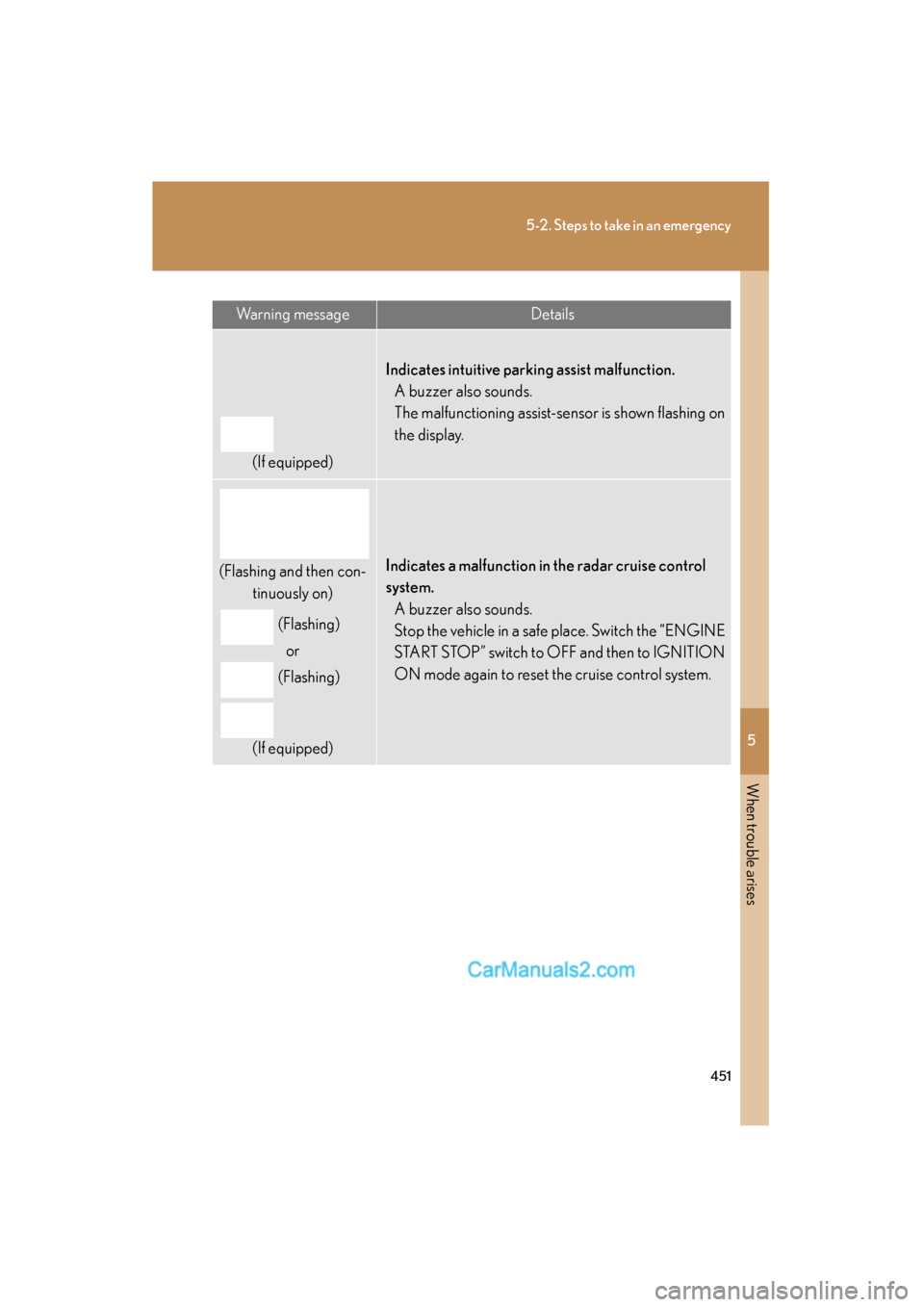
Warning messageDetails
(If equipped)
Indicates intuitive parking assist malfunction.A buzzer also sounds.
The malfunctioning assist-sensor is shown flashing on
the display.
(Flashing and then con-
tinuously on)
(Flashing)or
(Flashing)
(If equipped)Indicates a malfunction in the radar cruise control
system. A buzzer also sounds.
Stop the vehicle in a safe place. Switch the “ENGINE
START STOP” switch to OFF and then to IGNITION
ON mode again to reset the cruise control system.
Page 457 of 543
5
When trouble arises
455
5-2. Steps to take in an emergency
ES350_U
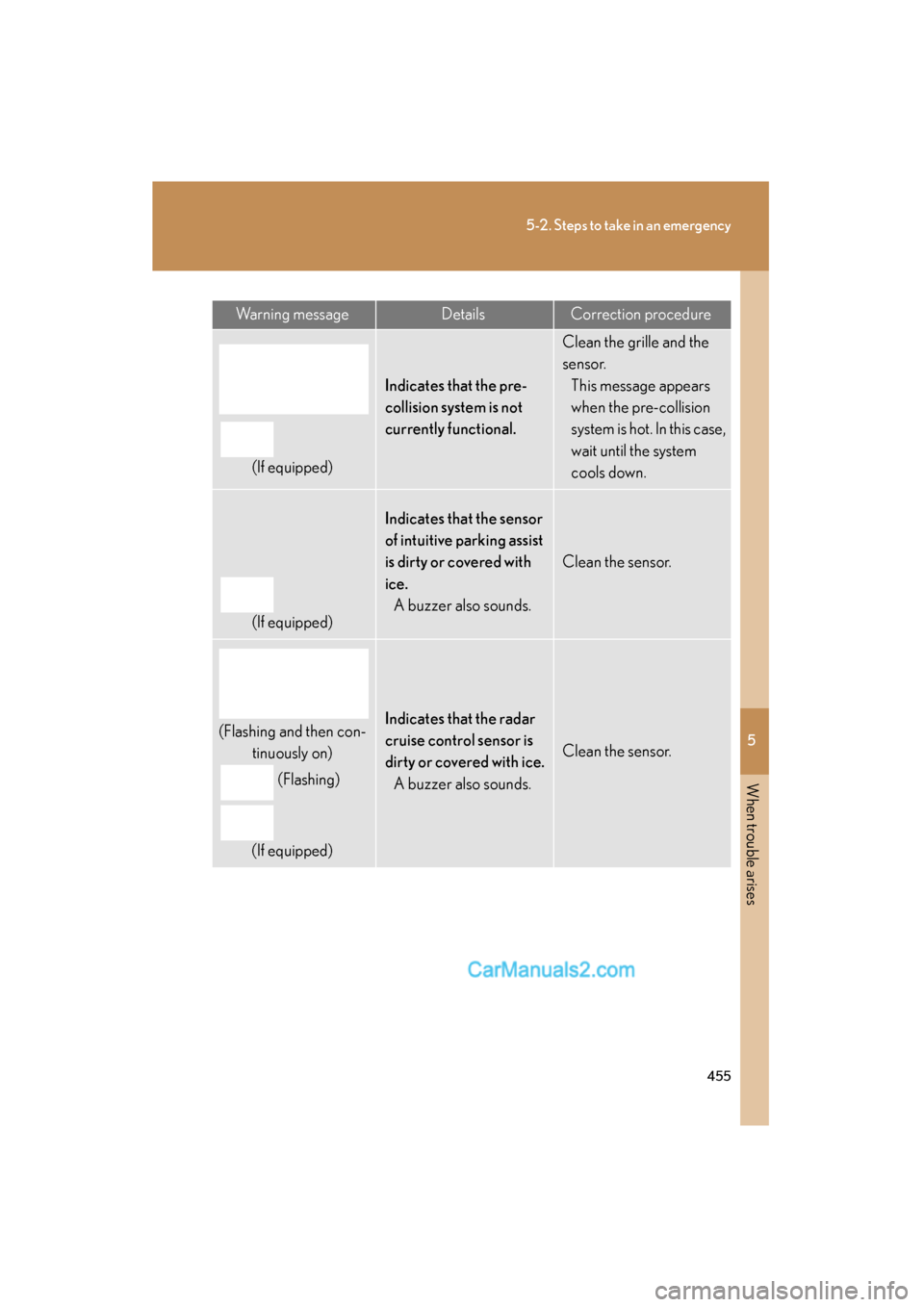
Warning messageDetailsCorrection procedure
(If equipped)
Indicates that the pre-
collision system is not
currently functional.
Clean the grille and the
sensor.This message appears
when the pre-collision
system is hot. In this case,
wait until the system
cools down.
(If equipped)
Indicates that the sensor
of intuitive parking assist
is dirty or covered with
ice.A buzzer also sounds.
Clean the sensor.
(Flashing and then con- tinuously on)
(Flashing)
(If equipped)Indicates that the radar
cruise control sensor is
dirty or covered with ice. A buzzer also sounds.
Clean the sensor.