remote control Lexus ES350 2010 s User Guide
[x] Cancel search | Manufacturer: LEXUS, Model Year: 2010, Model line: ES350, Model: Lexus ES350 2010Pages: 543, PDF Size: 6.54 MB
Page 41 of 543
39
1-2. Opening, closing and locking the doors and trunk
1
Before driving
ES350_U
■When the electronic key battery is fully depleted
oP. 4 0 4
■Conditions affecting operation
oP. 3 0
■Customization that can be configured at Lexus dealer
Settings (e.g. trunk unlocking function) can be changed.
(Customizable features oP. 5 1 1 )
■Certification for wireless remote control
For vehicles sold in the USA
FCC ID: HYQ14AAB
FCC ID: HYQ13BZH
FCC ID: HYQ14ABK
FCC ID: HYQ13BZW
NOTE:
This device complies with part 15 of the FCC Rules. Operation is subject to the fol-
lowing two conditions: (1) This device may not cause harmful interference, and (2)
this device must accept any interference received, including interference that may
cause undesired operation.
Page 43 of 543
41
1
1-2. Opening, closing and locking the doors and trunk
Before driving
ES350_U
Doors
The vehicle can be locked and unlocked using the entry function, wireless
remote control or door lock switch.
■Entry function
o P. 2 6
■ Wireless remote control
o P. 3 8
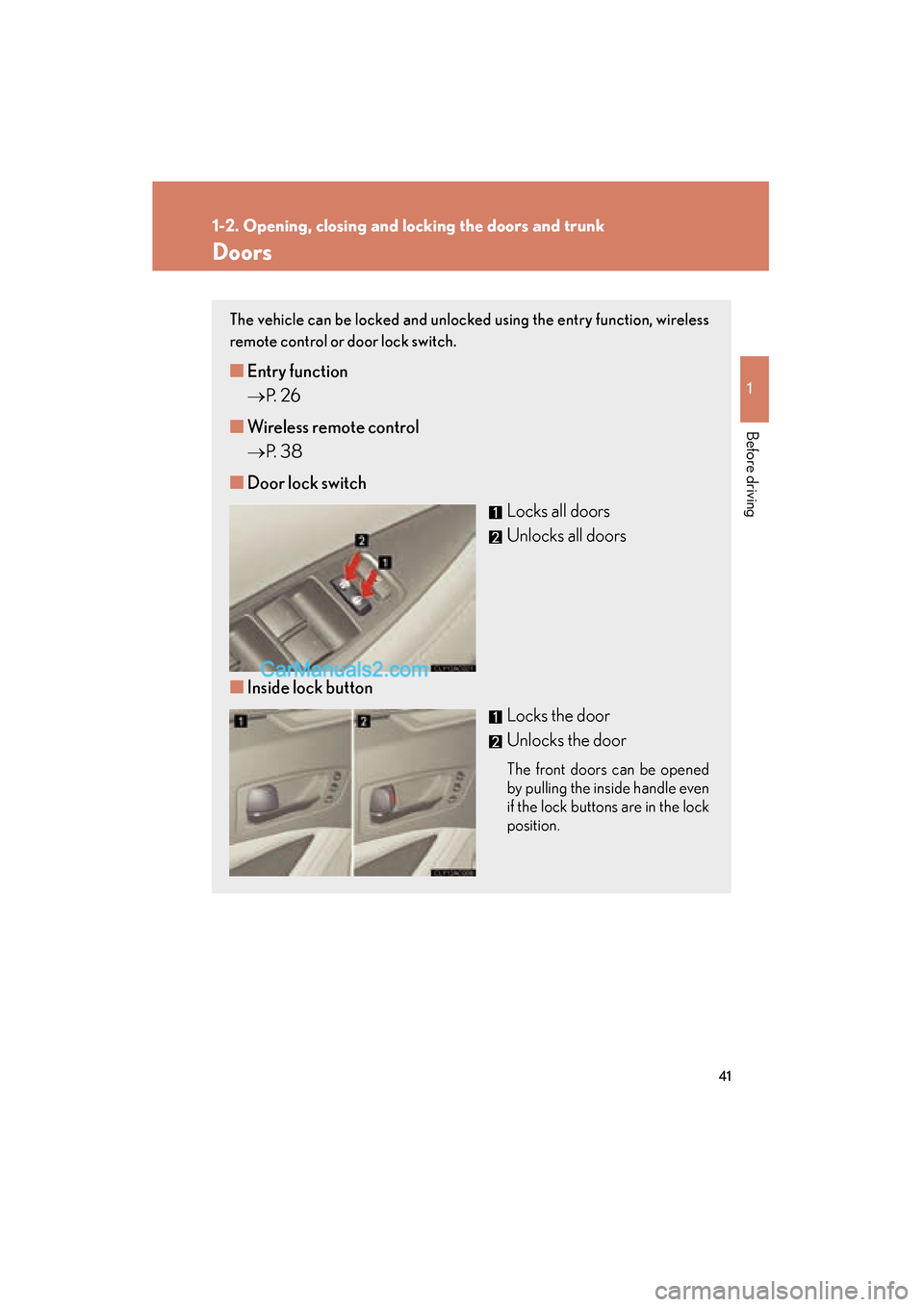
■ Door lock switch
Locks all doors
Unlocks all doors
■ Inside lock button
Locks the door
Unlocks the door
The front doors can be opened
by pulling the inside handle even
if the lock buttons are in the lock
position.
Page 47 of 543
45
1
1-2. Opening, closing and locking the doors and trunk
Before driving
ES350_U
Tr u n k
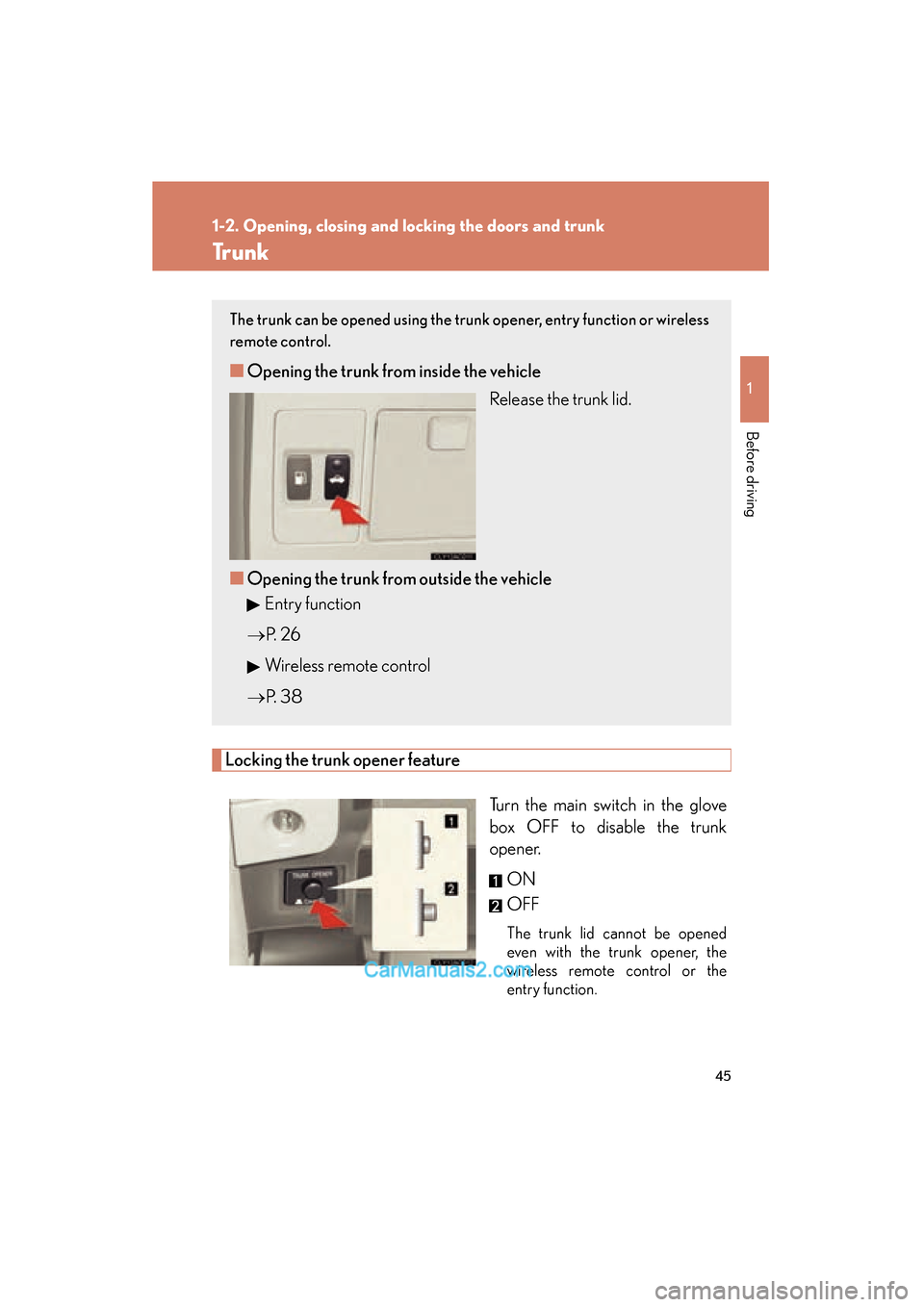
Locking the trunk opener featureTurn the main switch in the glove
box OFF to disable the trunk
opener.ON
OFF
The trunk lid cannot be opened
even with the trunk opener, the
wireless remote control or the
entry function.
The trunk can be opened using the trunk opener, entry function or wireless
remote control.
■Opening the trunk from inside the vehicle
Release the trunk lid.
■ Opening the trunk from outside the vehicle
Entry function
o P. 2 6
Wireless remote control
o P. 3 8
Page 53 of 543
51
1-3. Adjustable components (seats, mirrors, steering wheel)
1
Before driving
ES350_U
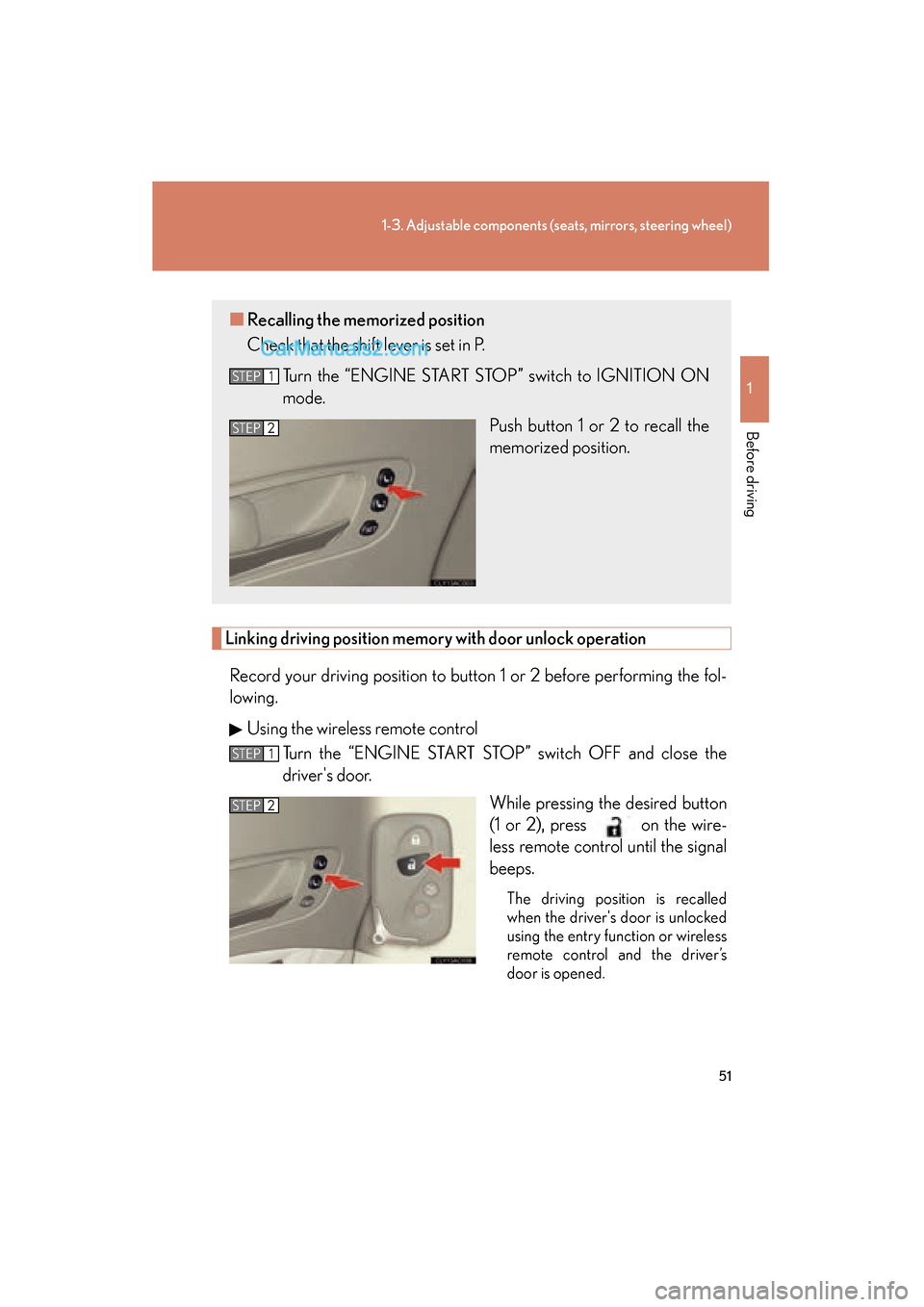
Linking driving position memory with door unlock operation
Record your driving position to button 1 or 2 before performing the fol-
lowing. Using the wireless remote control Turn the “ENGINE START STOP” switch OFF and close the
driver's door.
While pressing the desired button
(1 or 2), press on the wire-
less remote control until the signal
beeps.
The driving position is recalled
when the driver's door is unlocked
using the entry function or wireless
remote control and the driver’s
door is opened.
■Recalling the memorized position
Check that the shift lever is set in P.
Turn the “ENGINE START STOP” switch to IGNITION ON
mode. Push button 1 or 2 to recall the
memorized position.
STEP1
STEP2
STEP1
STEP2
Page 54 of 543
52
1-3. Adjustable components (seats, mirrors, steering wheel)
ES350_UOpen one of the doors.
If a door is not opened within 60 seconds after is pressed, the
doors will be locked again and the alarm will automatically be set.
In case that the alarm is triggered, immediately stop the alarm.
( o P. 8 0 )
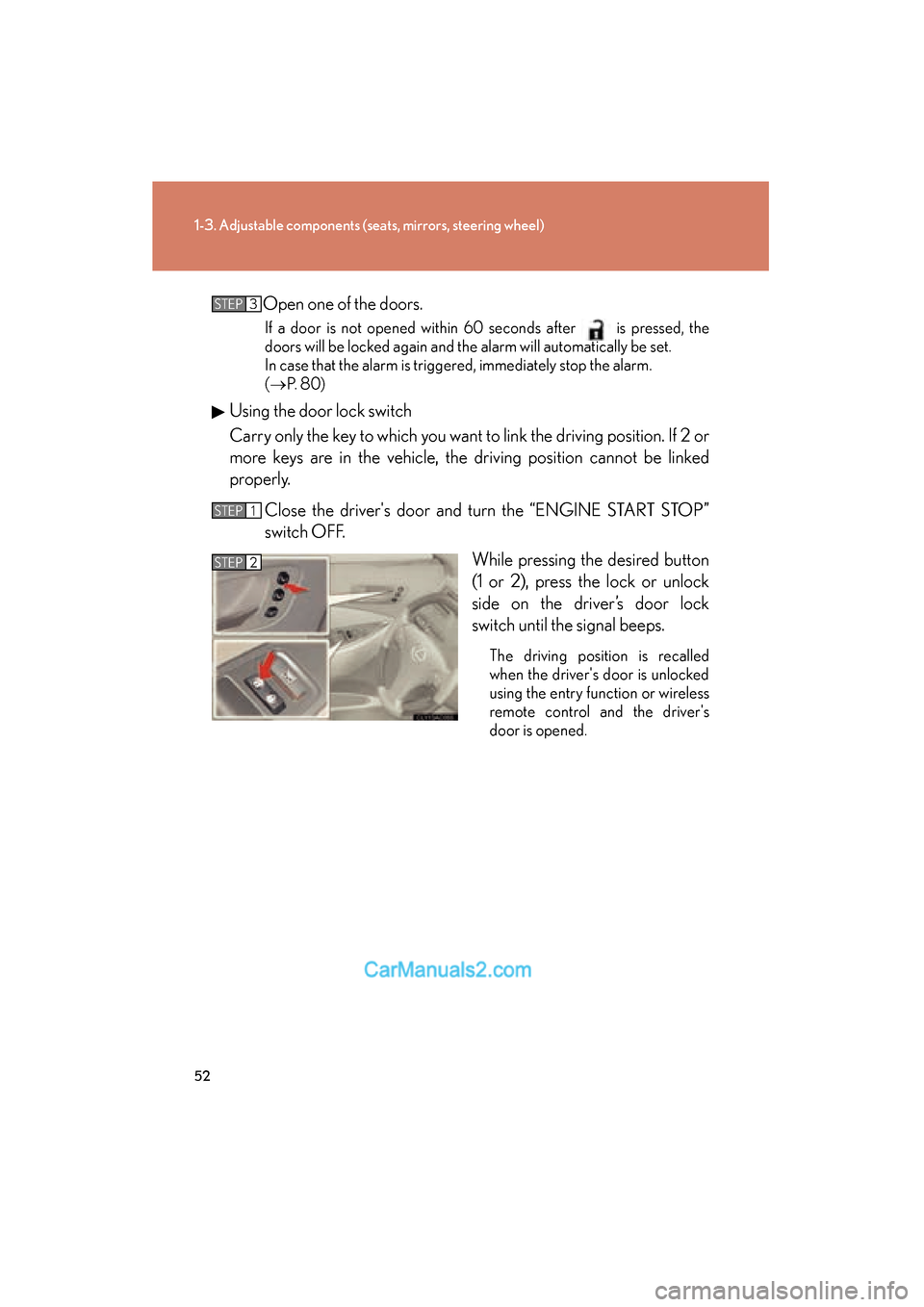
Using the door lock switch
Carry only the key to which you want to link the driving position. If 2 or
more keys are in the vehicle, the driving position cannot be linked
properly.
Close the driver's door and turn the “ENGINE START STOP”
switch OFF. While pressing the desired button
(1 or 2), press the lock or unlock
side on the driver’s door lock
switch until the signal beeps.
The driving position is recalled
when the driver's door is unlocked
using the entry function or wireless
remote control and the driver's
door is opened.
STEP3
STEP1
STEP2
Page 83 of 543
81
1-6. Theft deterrent system
1
Before driving
ES350_U
■Triggering of the alarm
The alarm may be triggered in the following situations.
Stopping the alarm deactivates the system.
●A person inside the vehicle opens a door, the trunk or hood.
●The battery is recharged or replaced when the vehicle is locked.
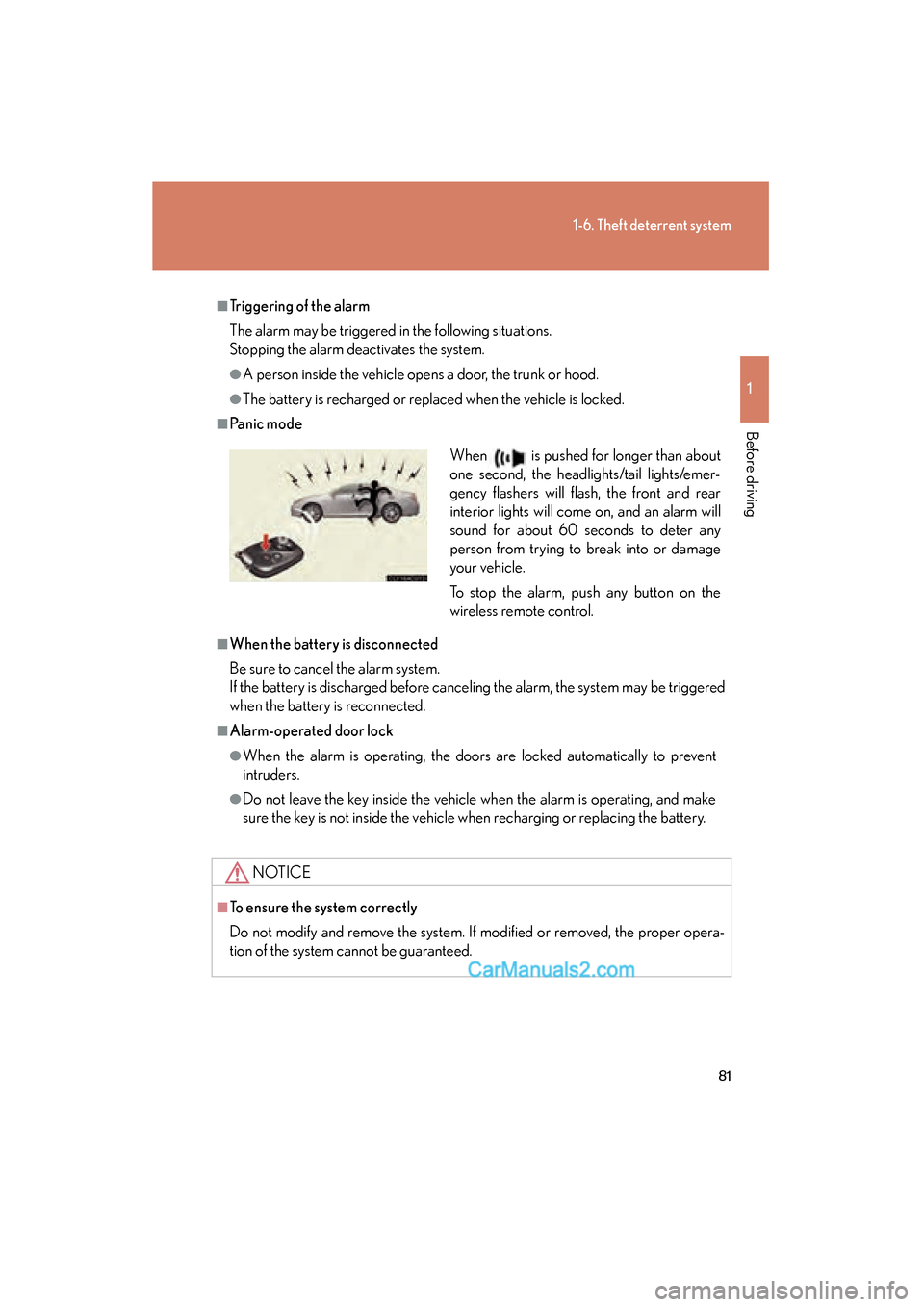
■Panic mode
■When the battery is disconnected
Be sure to cancel the alarm system.
If the battery is discharged before canceling the alarm, the system may be triggered
when the battery is reconnected.
■Alarm-operated door lock
●When the alarm is operating, the doors are locked automatically to prevent
intruders.
●Do not leave the key inside the vehicle when the alarm is operating, and make
sure the key is not inside the vehicle when recharging or replacing the battery.
NOTICE
■To ensure the system correctly
Do not modify and remove the system. If modified or removed, the proper opera-
tion of the system cannot be guaranteed.
When is pushed for longer than about
one second, the headlights/tail lights/emer-
gency flashers will flash, the front and rear
interior lights will come on, and an alarm will
sound for about 60 seconds to deter any
person from trying to break into or damage
your vehicle.
To stop the alarm, push any button on the
wireless remote control.
Page 259 of 543
257
3-3. Using the Bluetooth® audio system
3
Interior features
ES350_U
■When transferring ownership of the vehicle
Be sure to initialize the system to prevent personal data from being improperly
accessed. (oP. 300)
■About Bluetooth®
■Compatible models
●Bluetooth® specifications:
Ver. 1.1, or higher (Recommended: Ver. 1.2 or higher)
●Following Profiles:
• A2DP (Advanced Audio Distribution Profile) Ver. 1.0, or higher (Conformed:
Ver. 1.2)
• AVRCP (Audio/Video Remote Control Profile) Ver. 1.0 or higher (Con- formed: Ver. 1.3)
Portable players must correspond to the above specifications in order to be con-
nected to the Bluetooth
® audio system. However, please note that some functions
may be limited depending on the type of portable player.
■Certification for the Bluetooth® audio system
FCC ID: AJDK018
IC ID: 775E-K018
MADE IN JAPAN
This device complies with Part 15 of the FCC Rules and RSS-Gen and RSS-210 of
IC Rules. Operation is subject to the follo wing two conditions: (1) This device may
not cause harmful interference, and (2) This device must accept any interference
received, including interference that may cause undesired operation. Bluetooth is a registered trademark of
Bluetooth SIG. Inc.
Page 343 of 543
341
3-7. Other interior features
3
Interior features
ES350_U
CAUTION
■When programming a garage door or other remote control device
The garage door on other devices may operate, so ensure people and objects are
out of danger to prevent potential harm.
■Conforming to federal safety standards
Do not use the HomeLink
Page 407 of 543
405
4-3. Do-it-yourself maintenance
4
Maintenance and care
ES350_U
■If the electronic key battery is discharged
The following symptoms may occur.
●The smart access system with push-button start and wireless remote control will
not function properly.
●The operational range is reduced.
■Use a CR1632 lithium battery
●Batteries can be purchased at your Lexus dealer, jewelers, or camera stores.
●Replace only with the same or equivalent type recommended by a Lexus dealer.
●Dispose of used batteries according to the local laws.
CAUTION
■Removed battery and other parts
Keep away from children.
These parts are small and if swallowed by a child they can cause choking.
NOTICE
■For normal operation after replacing the battery
Observe the following precautions to prevent accidents.
●Always work with dry hands.
Moisture may cause the battery to rust.
●Do not touch or move any other components inside the remote control.
●Do not bend either of the battery terminals.
Page 477 of 543
5
When trouble arises
475
5-2. Steps to take in an emergency
ES350_U
If the electronic key does not operate properly
Locking and unlocking the doors and key linked functions
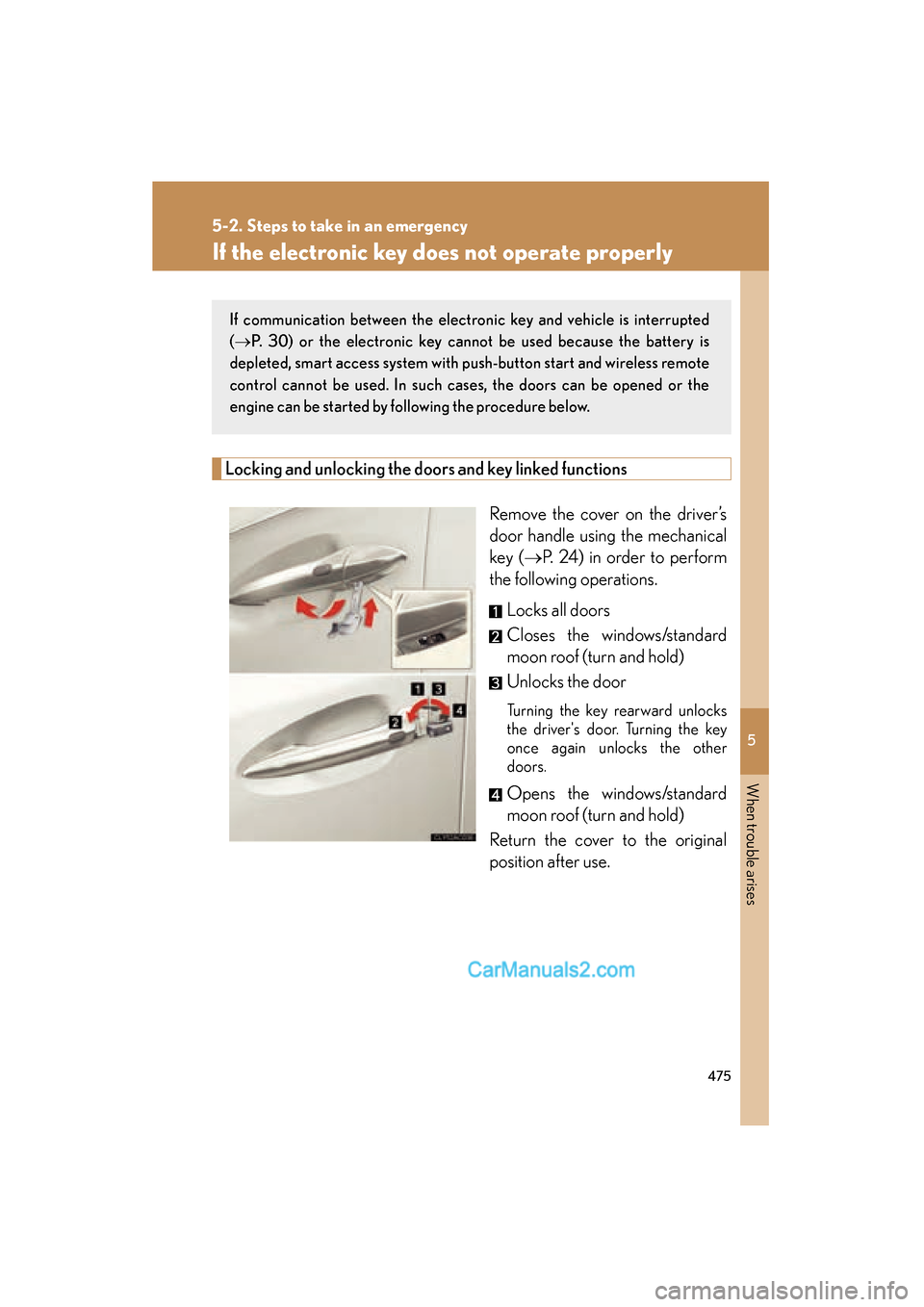
Remove the cover on the driver’s
door handle using the mechanical
key (oP. 24) in order to perform
the following operations.
Locks all doors
Closes the windows/standard
moon roof (turn and hold)
Unlocks the door
Turning the key rearward unlocks
the driver's door. Turning the key
once again unlocks the other
doors.
Opens the windows/standard
moon roof (turn and hold)
Return the cover to the original
position after use.
If communication between the electronic key and vehicle is interrupted
( o P. 30) or the electronic key cannot be used because the battery is
depleted, smart access system with push-button start and wireless remote
control cannot be used. In such cases, the doors can be opened or the
engine can be started by following the procedure below.