switch Lexus ES350 2011 s User Guide
[x] Cancel search | Manufacturer: LEXUS, Model Year: 2011, Model line: ES350, Model: Lexus ES350 2011Pages: 563, PDF Size: 6.72 MB
Page 24 of 563
ES350_U
22
Symbols used throughout this manual
Cautions & Notices
Symbols used in illustrations
CAUTION
This is a warning against anything which may cause injury to people if the warning is
ignored. You are informed about what you must or must not do in order to reduce the
risk of injury to yourself and others.
NOTICE
This is a warning against anything which may cause damage to the vehicle or its
equipment if the warning is ignored. You are informed about what you must or must
not do in order to avoid or reduce the risk of damage to your Lexus and its equipment.
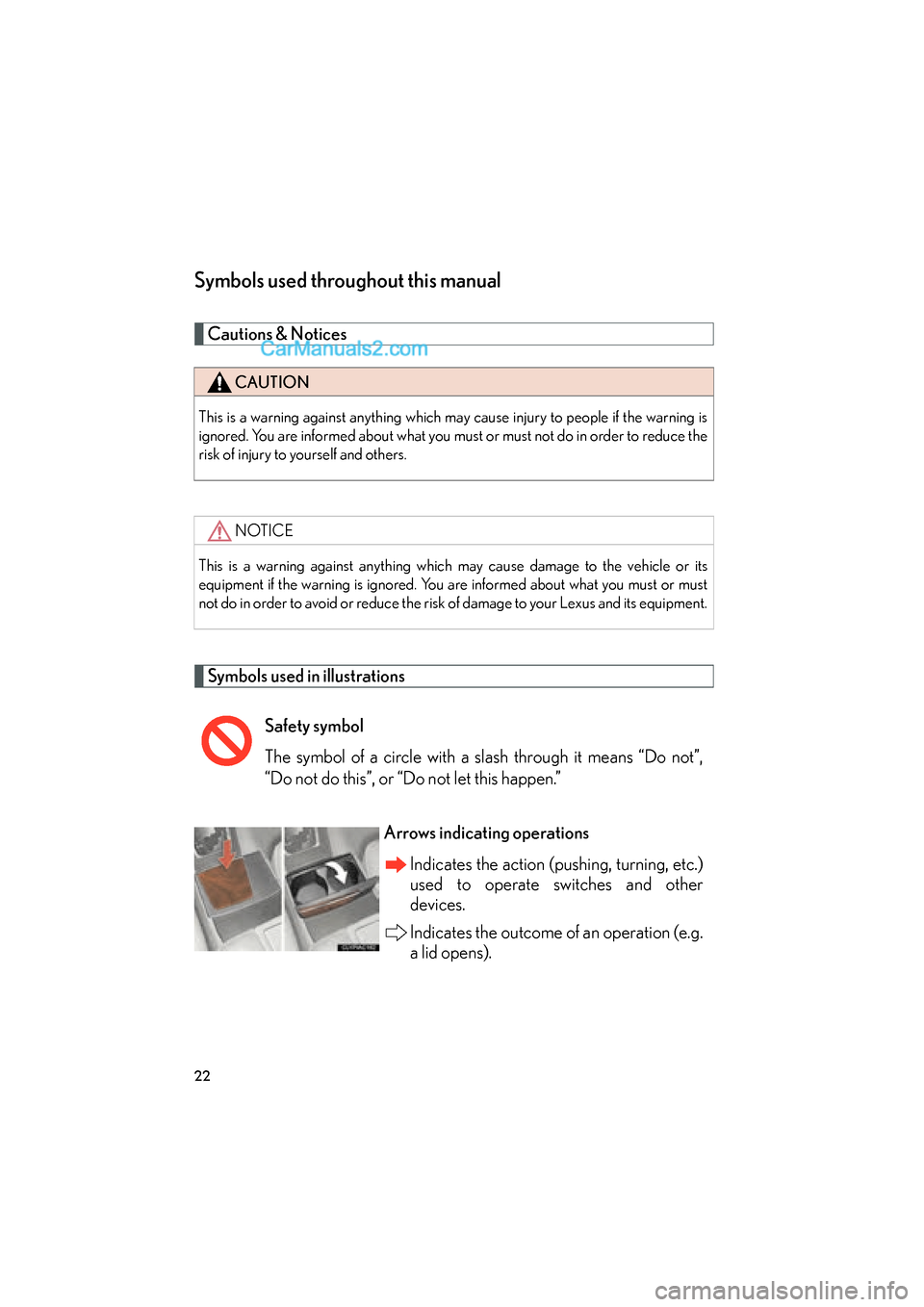
Safety symbol
The symbol of a circle with a slash through it means “Do not”,
“Do not do this”, or “Do not let this happen.”
Arrows indicating operations
Indicates the action (pushing, turning, etc.)
used to operate switches and other
devices.
Indicates the outcome of an operation (e.g.
a lid opens).
Page 26 of 563
24
ES350_U
1-1. Key information
Keys
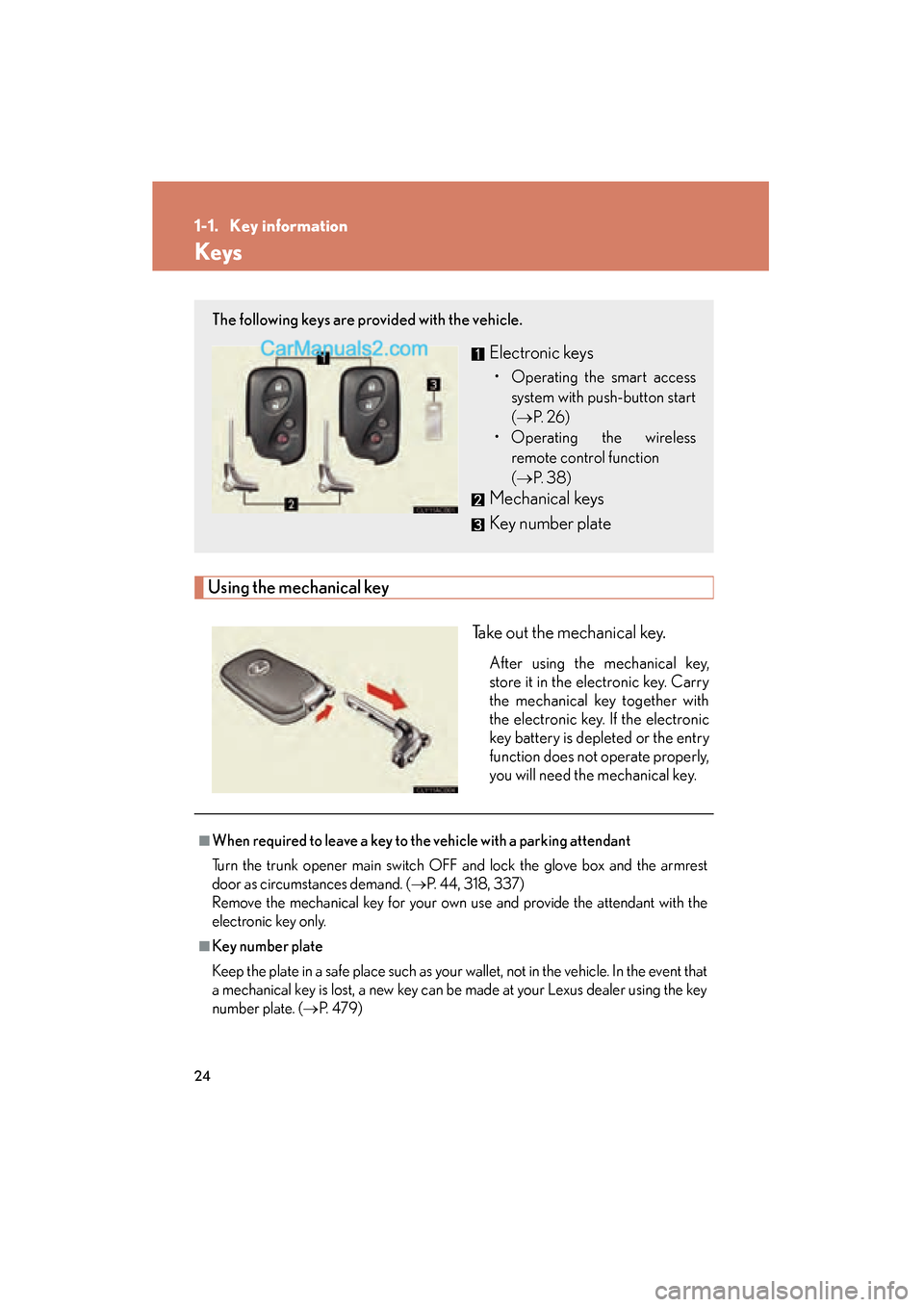
Using the mechanical keyTake out the mechanical key.
After using the mechanical key,
store it in the electronic key. Carry
the mechanical key together with
the electronic key. If the electronic
key battery is depleted or the entry
function does not operate properly,
you will need the mechanical key.
The following keys are provided with the vehicle.
Electronic keys
• Operating the smart accesssystem with push-button start
(→ P. 2 6 )
• Operating the wireless remote control function
(→ P. 3 8 )
Mechanical keys
Key number plate
■When required to leave a key to the vehicle with a parking attendant
Turn the trunk opener main switch OFF and lock the glove box and the armrest
door as circumstances demand. ( →P. 44, 318, 337)
Remove the mechanical key for your own use and provide the attendant with the
electronic key only.
■Key number plate
Keep the plate in a safe place such as your wallet, not in the vehicle. In the event that
a mechanical key is lost, a new key can be made at your Lexus dealer using the key
number plate. ( →P. 4 7 9 )
Page 33 of 563
31
1-2. Opening, closing and locking the doors and trunk
1
Before driving
ES350_U
●When carrying or using the electronic key together with the following devices
that emit radio waves
• Another vehicle's electronic key or a wireless key that emits radio waves
• Personal computers or personal digital assistants (PDAs)
• Digital audio players
• Portable game systems
●If window tint with a metallic content or metallic objects are attached to the rear
window
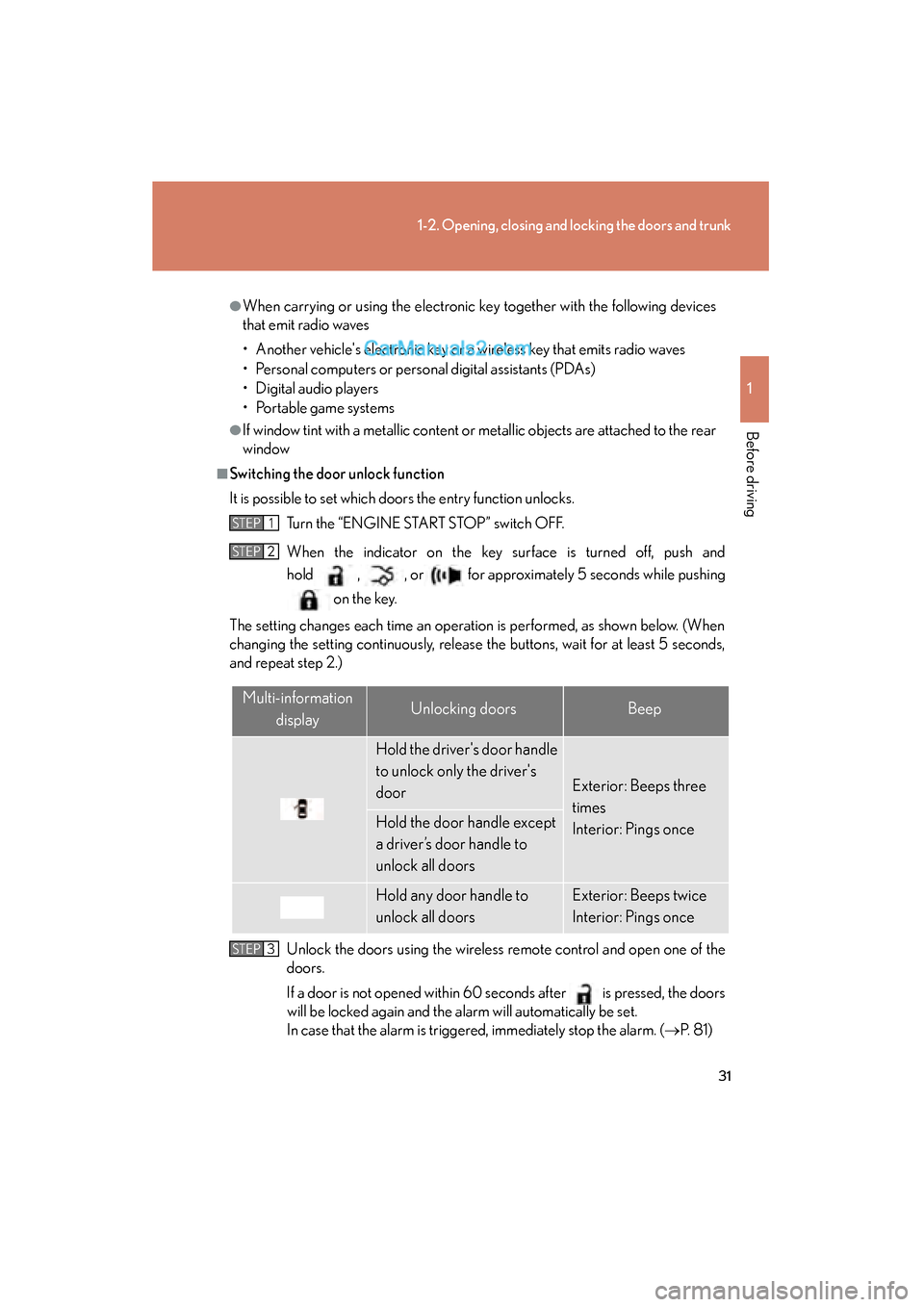
■Switching the door unlock function
It is possible to set which doors the entry function unlocks. Turn the “ENGINE START STOP” switch OFF.
When the indicator on the key surface is turned off, push and
hold , , or for approximately 5 seconds while pushing on the key.
The setting changes each time an operation is performed, as shown below. (When
changing the setting continuously, release the buttons, wait for at least 5 seconds,
and repeat step 2.)
Unlock the doors using the wireless remote control and open one of the
doors.
If a door is not opened within 60 seconds after
is pressed, the doors
will be locked again and the alarm will automatically be set.
In case that the alarm is triggered, immediately stop the alarm. ( →P. 8 1 )
STEP1
STEP2
Multi-information
displayUnlocking doorsBeep
Hold the driver's door handle
to unlock only the driver's
door
Exterior: Beeps three
times
Interior: Pings once
Hold the door handle except
a driver’s door handle to
unlock all doors
Hold any door handle to
unlock all doorsExterior: Beeps twice
Interior: Pings once
STEP3
Page 34 of 563
32
1-2. Opening, closing and locking the doors and trunk
ES350_U
■Battery-saving function
In the following circumstances, the entry function is disabled in order to prevent the
vehicle and electronic key batteries from discharging.
●When the entry function has not been used for 2 weeks or more
●When the electronic key has been left within approximately 6 ft. (2 m) of the
vehicle for 10 minutes or more
The system will resume operation when...
●The vehicle is locked using the door handle lock switch.
●The vehicle is locked/unlocked using the wireless remote control function.
( → P. 3 8 )
●The vehicle is locked/unlocked using the mechanical key. ( →P. 4 8 0 )
■Electronic key battery depletion
●The standard battery life is 1 to 2 years.
●If the battery becomes low, an alarm will sound in the cabin when the engine
stops. ( →P. 464)
●The battery becomes depleted even if the electronic key is not used because
the key always receives radio waves. If the smart access system with push-but-
ton start or the wireless remote control does not operate, or the detection area
becomes smaller, the battery may be depleted. Replace the battery when nec-
essary. ( →P. 4 1 1 )
●To avoid serious deterioration, do not leave the electronic key within 3 ft. (1 m) of
the following electrical appliances that produce a magnetic field.
• T Vs
• Personal computers
• Mobile phones, cordless phones and battery chargers
• Recharging mobile phones or cordless phones
• Glass top ranges
• Table lamps
Page 35 of 563
33
1-2. Opening, closing and locking the doors and trunk
1
Before driving
ES350_U
■To operate the system properly
Make sure to carry the electronic key when operating the system. Do not get the
electronic key too close to the vehicle when operating the system from the outside
of the vehicle.
Depending on the position and holding condition of the electronic key, the key may
not be detected correctly and the system may not operate properly. (The alarm may
go off accidentally, or the door lock prevention may not function.)
■Note for the entry function
●Even when the electronic key is within the effective range (detection areas), the
system may not operate properly in the following cases.
• The electronic key is too close to the window or outside door handle, near the
ground, or in a high place when the doors are locked or unlocked.
• The electronic key is near the ground or in a high place, or too close to the rear bumper center when the trunk is unlocked.
• The electronic key is on the instrument panel, rear package tray or floor, or in
the glove box when the engine is started or “ENGINE START STOP” switch
modes are changed.
●Do not leave the electronic key on top of the instrument panel or near the door
pockets when exiting the vehicle. Depending on the radio wave reception con-
ditions, it may be detected by the antenna outside the cabin and the door will
become lockable from the outside, possibly trapping the electronic key inside
the vehicle.
●As long as the electronic key is within the effective range, the doors may be
locked or unlocked by anyone.
●Even if the electronic key is not inside the vehicle, it may be possible to start the
engine if the electronic key is near the window.
●The doors may unlock if a large amount of water splashes on the door handle,
such as in the rain or in a car wash. (The doors will automatically be locked after
approximately 60 seconds if the doors are not opened and closed.)
●Gripping the door handle when wearing a glove may not unlock the door.
●If the wireless remote control is used to lock the doors when the electronic key
is near the vehicle, there is a possibility that the door may not be unlocked by the
entry function. (Use the wireless re mote control to unlock the doors.)
●A sudden approach to the effective range or door handle may prevent the doors
from being unlocked. In this case, return the door handle to the original position
and check that the doors unlock before pulling the door handle again.
Page 36 of 563
34
1-2. Opening, closing and locking the doors and trunk
ES350_U
■When the vehicle is not driven for extended periods
To prevent theft of the vehicle, do not leave the electronic key within 6 ft. (2 m) of
the vehicle.
■Security feature
If a door is not opened within approximately 60 seconds after the vehicle is
unlocked, the anti-theft system automatically locks the vehicle again.
■Alarms and warning indicators
A combination of exterior and interior alarms as well as warnings displayed on the
multi-information display are used to prevent theft of the vehicle and unforeseeable
accidents resulting from erroneous operation. Take appropriate measures in
response to any warning indications on the multi-information display. (→P. 455)
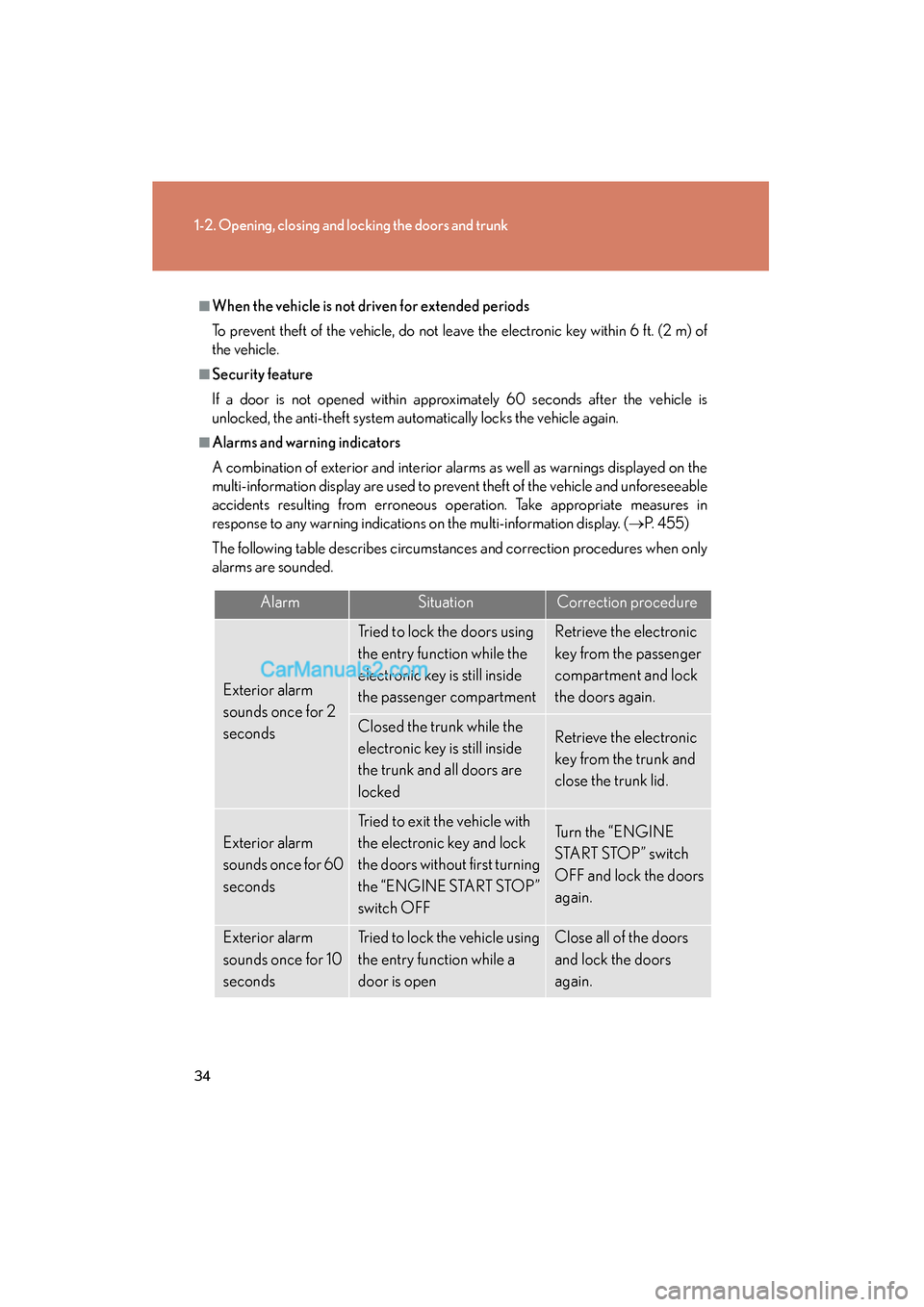
The following table describes circumstances and correction procedures when only
alarms are sounded.
AlarmSituationCorrection procedure
Exterior alarm
sounds once for 2
seconds
Tried to lock the doors using
the entry function while the
electronic key is still inside
the passenger compartmentRetrieve the electronic
key from the passenger
compartment and lock
the doors again.
Closed the trunk while the
electronic key is still inside
the trunk and all doors are
lockedRetrieve the electronic
key from the trunk and
close the trunk lid.
Exterior alarm
sounds once for 60
seconds
Tried to exit the vehicle with
the electronic key and lock
the doors without first turning
the “ENGINE START STOP”
switch OFFTurn the “ENGINE
START STOP” switch
OFF and lock the doors
again.
Exterior alarm
sounds once for 10
secondsTried to lock the vehicle using
the entry function while a
door is openClose all of the doors
and lock the doors
again.
Page 37 of 563
35
1-2. Opening, closing and locking the doors and trunk
1
Before driving
ES350_U
■If the smart access system with push-button start does not operate properly
●Locking and unlocking the doors: Use the mechanical key. (→P. 4 8 0 )
●Starting the engine: →P. 1 2 6
■When the electronic key battery is fully depleted
→P. 4 1 1
■Customization that can be configured at Lexus dealer
Settings (e.g. smart access system with push-button start) can be deactivated.
(Customizable features →P. 5 1 7 )
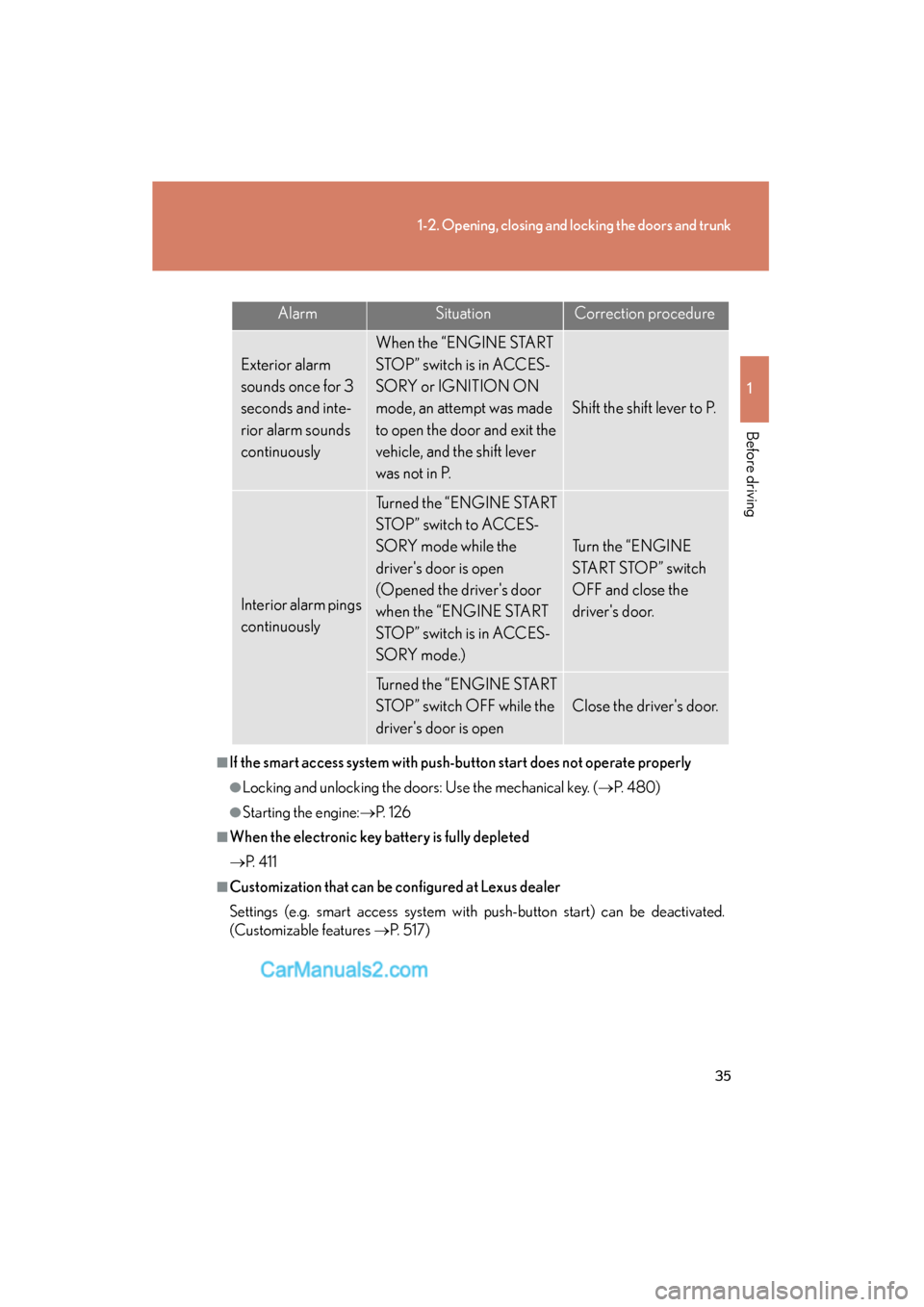
AlarmSituationCorrection procedure
Exterior alarm
sounds once for 3
seconds and inte-
rior alarm sounds
continuously
When the “ENGINE START
STOP” switch is in ACCES-
SORY or IGNITION ON
mode, an attempt was made
to open the door and exit the
vehicle, and the shift lever
was not in P.
Shift the shift lever to P.
Interior alarm pings
continuously
Turned the “ENGINE START
STOP” switch to ACCES-
SORY mode while the
driver's door is open
(Opened the driver's door
when the “ENGINE START
STOP” switch is in ACCES-
SORY mode.)
Turn the “ENGINE
START STOP” switch
OFF and close the
driver's door.
Turned the “ENGINE START
STOP” switch OFF while the
driver's door is open
Close the driver's door.
Page 42 of 563
40
1-2. Opening, closing and locking the doors and trunk
ES350_U
Doors
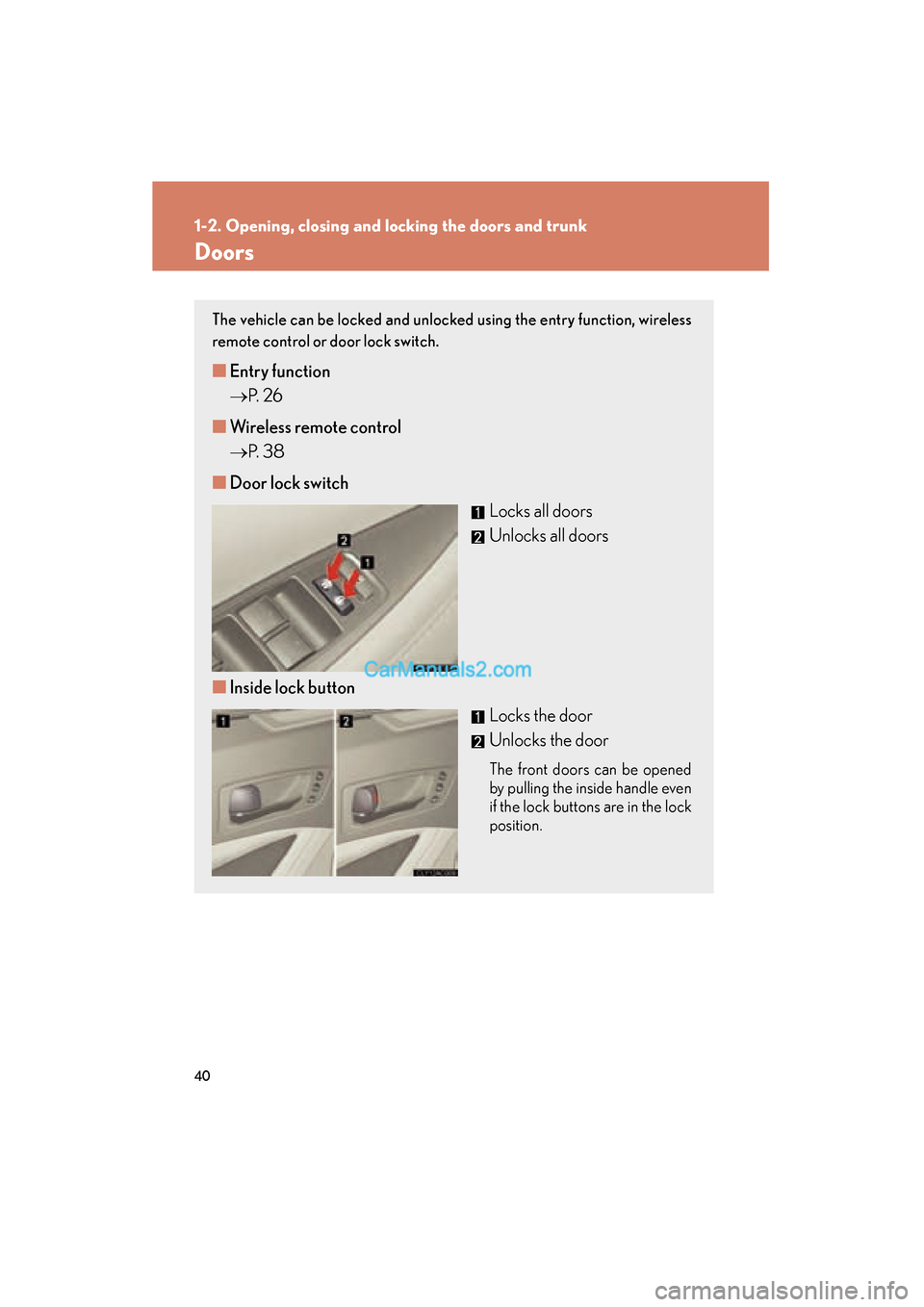
The vehicle can be locked and unlocked using the entry function, wireless
remote control or door lock switch.
■Entry function
→ P. 2 6
■ Wireless remote control
→ P. 3 8
■ Door lock switch
Locks all doors
Unlocks all doors
■ Inside lock button
Locks the door
Unlocks the door
The front doors can be opened
by pulling the inside handle even
if the lock buttons are in the lock
position.
Page 43 of 563
41
1-2. Opening, closing and locking the doors and trunk
1
Before driving
ES350_U
Locking the front doors from the outside without a keyThe door cannot be locked if the “ENGINE START STOP” switch is in
ACCESSORY or IGNITION ON mode, or the electronic key is left
inside the vehicle.
Depending on the position of the electronic key, the key may not be detected
correctly and the door may be locked.
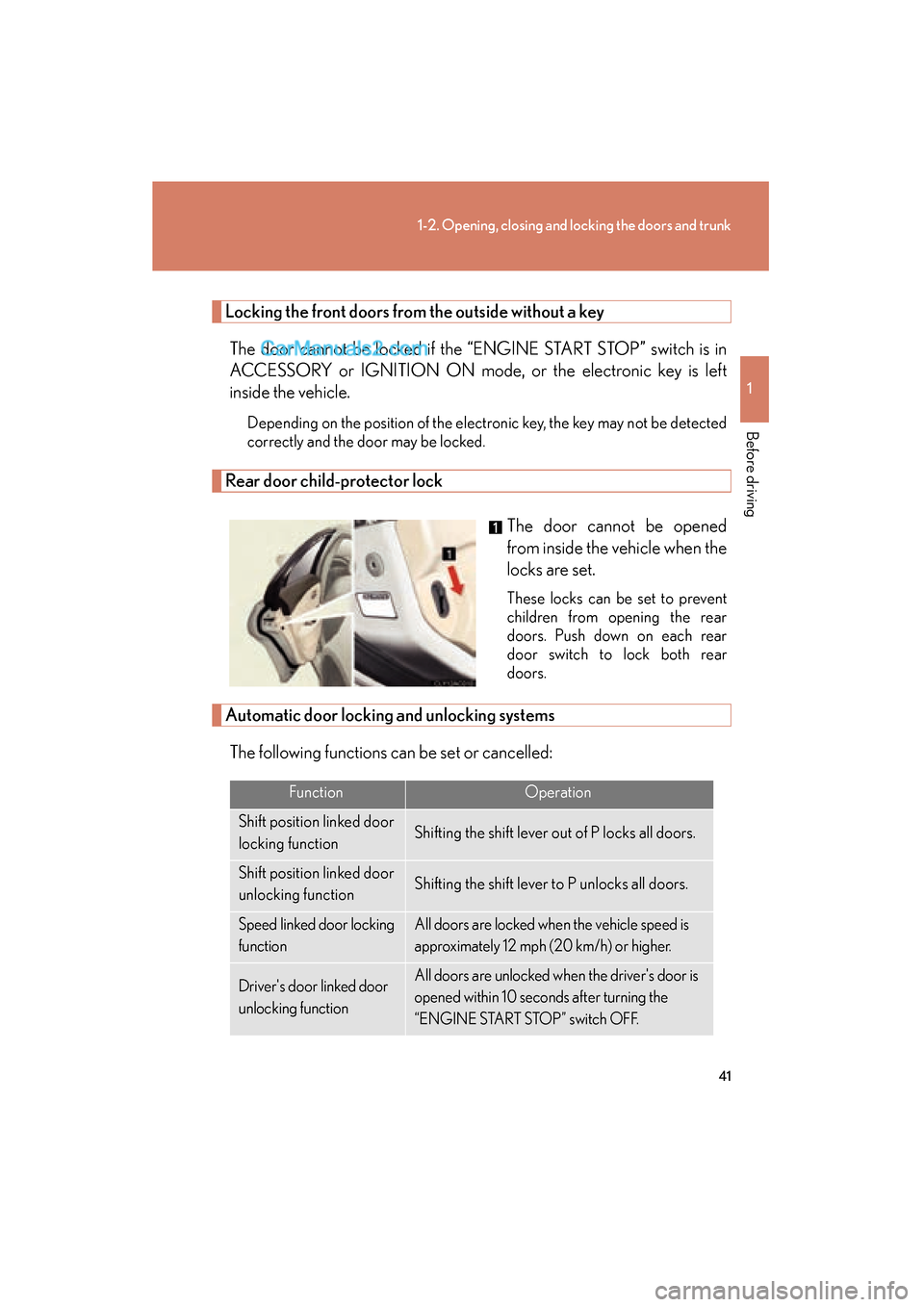
Rear door child-protector lock
The door cannot be opened
from inside the vehicle when the
locks are set.
These locks can be set to prevent
children from opening the rear
doors. Push down on each rear
door switch to lock both rear
doors.
Automatic door locking and unlocking systemsThe following functions can be set or cancelled:
FunctionOperation
Shift position linked door
locking functionShifting the shift lever out of P locks all doors.
Shift position linked door
unlocking functionShifting the shift lever to P unlocks all doors.
Speed linked door locking
functionAll doors are locked when the vehicle speed is
approximately 12 mph (20 km/h) or higher.
Driver's door linked door
unlocking functionAll doors are unlocked when the driver's door is
opened within 10 seconds after turning the
“ENGINE START STOP” switch OFF.
Page 44 of 563
42
1-2. Opening, closing and locking the doors and trunk
ES350_U■
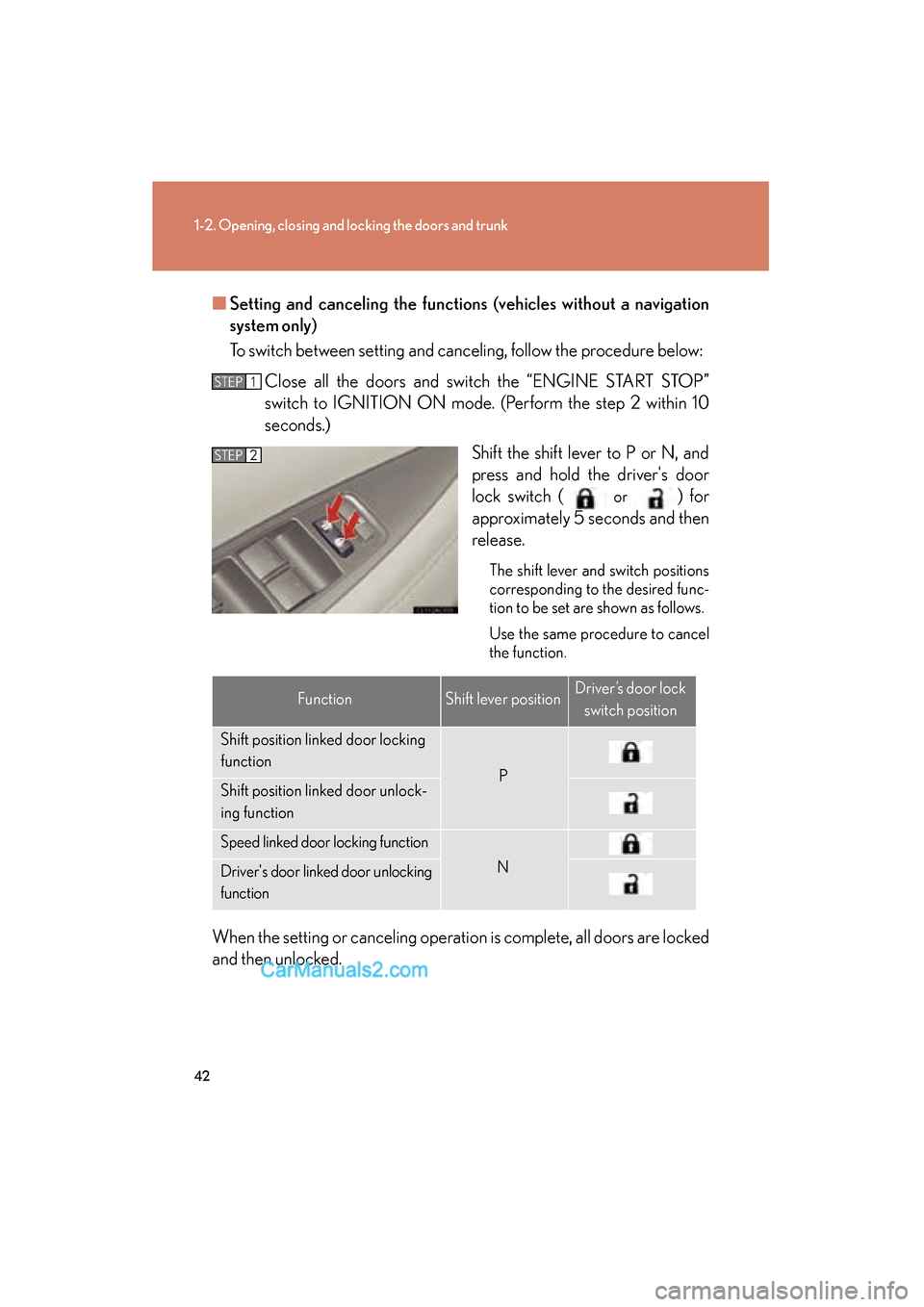
Setting and canceling the functions (vehicles without a navigation
system only)
To switch between setting and canceling, follow the procedure below:
Close all the doors and switch the “ENGINE START STOP”
switch to IGNITION ON mode. (Perform the step 2 within 10
seconds.) Shift the shift lever to P or N, and
press and hold the driver's door
lock switch (
or ) for
approximately 5 seconds and then
release.
The shift lever and switch positions
corresponding to the desired func-
tion to be set are shown as follows.
Use the same procedure to cancel
the function.
When the setting or canceling operation is complete, all doors are locked
and then unlocked.
STEP1
STEP2
FunctionShift lever positionDriver’s door lock
switch position
Shift position linked door locking
function
PShift position linked door unlock-
ing function
Speed linked door locking function
NDriver's door linked door unlocking
function