light Lexus ES350 2011 s Workshop Manual
[x] Cancel search | Manufacturer: LEXUS, Model Year: 2011, Model line: ES350, Model: Lexus ES350 2011Pages: 563, PDF Size: 6.72 MB
Page 148 of 563

146
2-2. Instrument cluster
ES350_U
■Eco Driving Indicator
■Outside temperature display
In the following situations, the correct outside temperature may not be displayed, or
the display may take longer than normal to change.
●When stopped, or driving at low speeds (less than 12 mph [20 km/h])
●When the outside temperature has changed suddenly (at the entrance/exit of a
garage, tunnel, etc.)
NOTICE
■The multi-information display at low temperatures
Allow the interior of the vehicle to warm up before using the liquid crystal informa-
tion display. At extremely low temperatures, the information display monitor may
respond slowly, and display changes may be delayed.
Eco Driving Indicator Light
During Eco-friendly acceleration (Eco
driving), Eco Driving Indicator Light will
turn on.
Eco Driving Indicator Zone Display
Suggests Zone of Eco driving with current
Eco driving ratio based on acceleration.
Zone of Eco driving
Eco driving ratio based on acceleration
Vehicle to exceed Zone of Eco driving, the
right of Eco Driving Indicator Zone Dis-
play will blink and Eco Driving Indicator
Light will turn off.
Eco Driving Indicator will operate when the
vehicle is being driven with the shift lever in D.
Page 149 of 563
147
2
When driving
ES350_U
2-3. Operating the lights and windshield wipers
Headlight switch
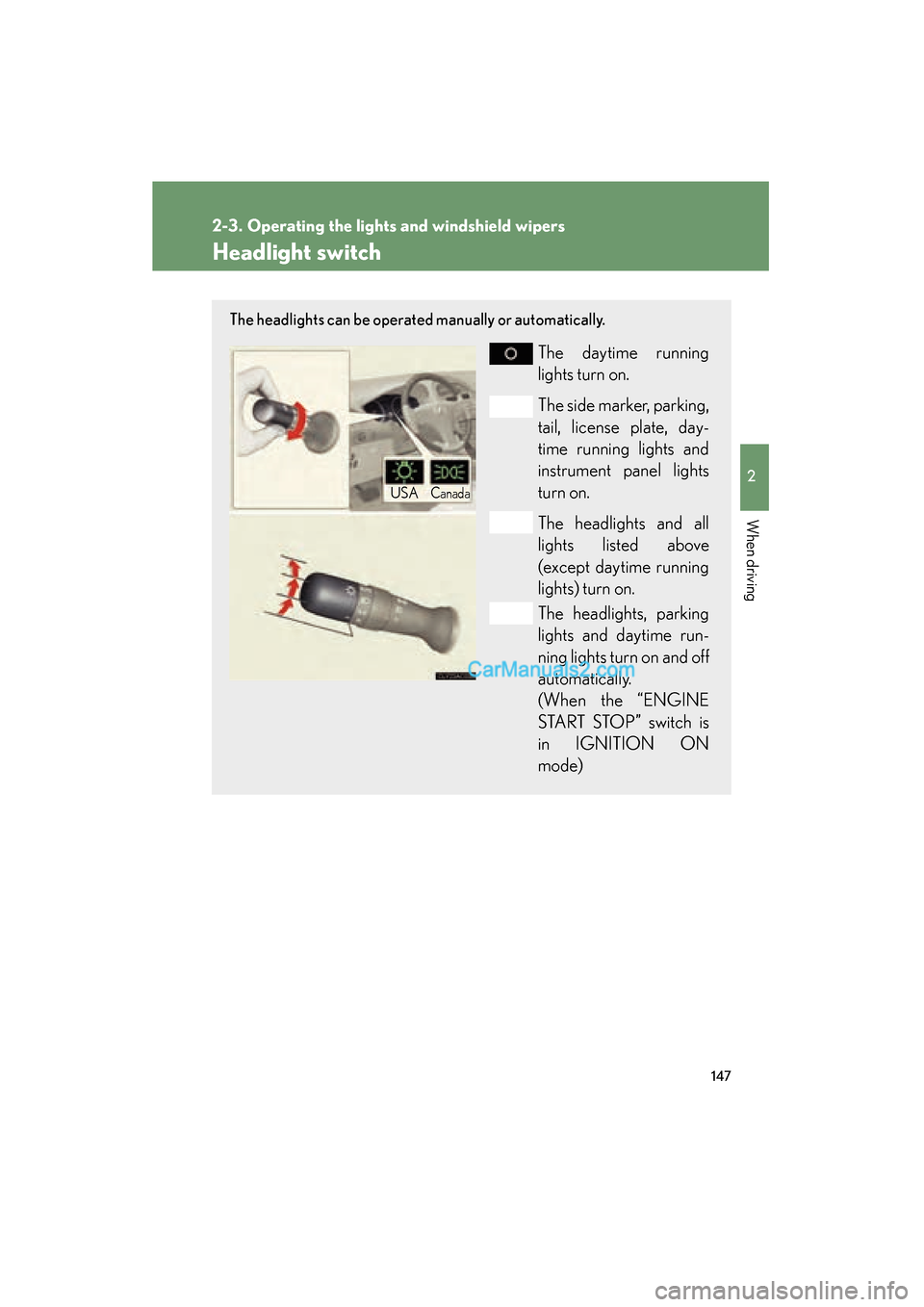
The headlights can be operated manually or automatically.
The daytime running
lights turn on.
The side marker, parking,
tail, license plate, day-
time running lights and
instrument panel lights
turn on.
The headlights and all
lights listed above
(except daytime running
lights) turn on.
The headlights, parking
lights and daytime run-
ning lights turn on and off
automatically.
(When the “ENGINE
START STOP” switch is
in IGNITION ON
mode)
USACanada
Page 150 of 563
148
2-3. Operating the lights and windshield wipers
ES350_U
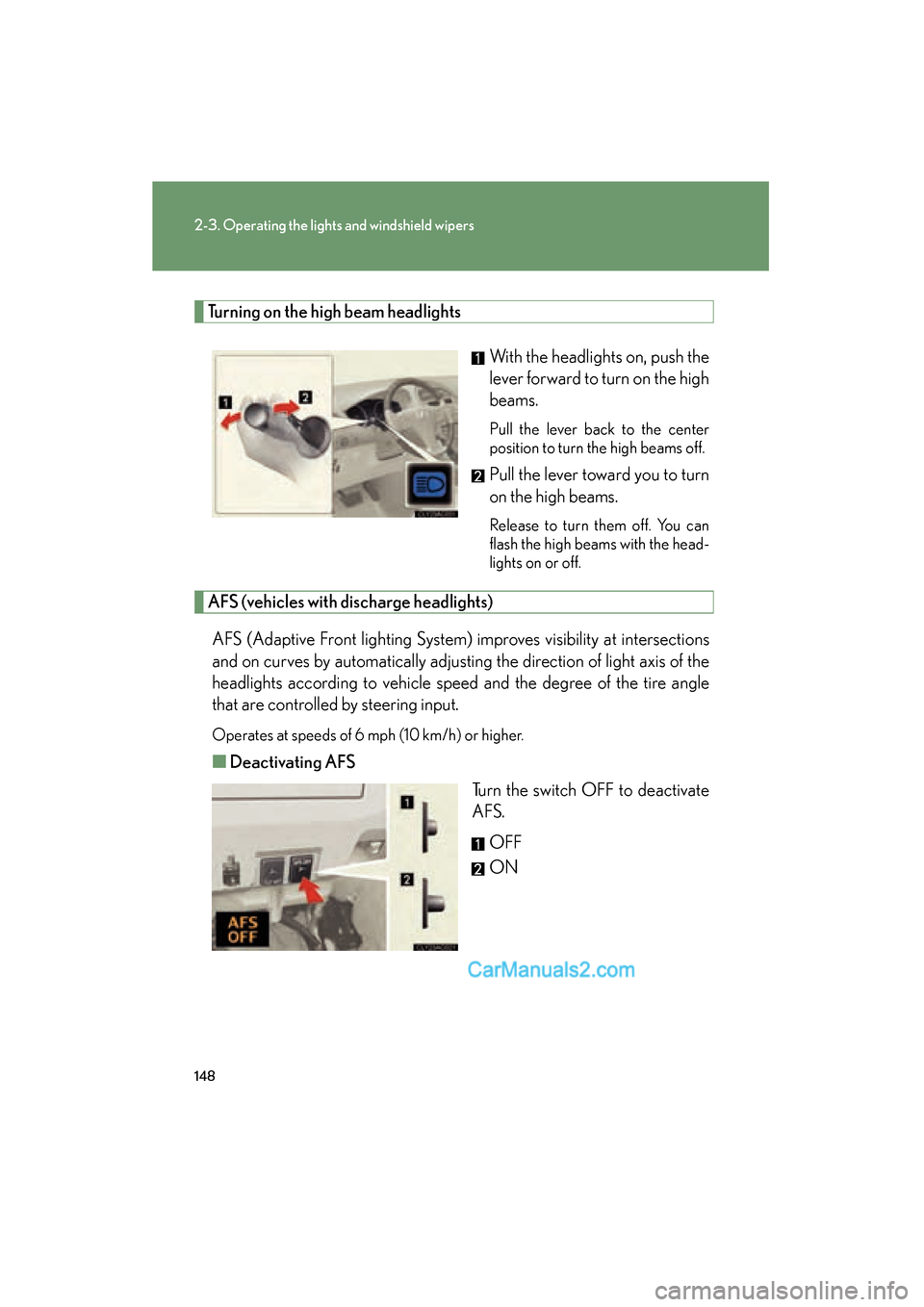
Turning on the high beam headlightsWith the headlights on, push the
lever forward to turn on the high
beams.
Pull the lever back to the center
position to turn the high beams off.
Pull the lever toward you to turn
on the high beams.
Release to turn them off. You can
flash the high beams with the head-
lights on or off.
AFS (vehicles with discharge headlights)AFS (Adaptive Front lighting System) improves visibility at intersections
and on curves by automatically adjusting the direction of light axis of the
headlights according to vehicle speed and the degree of the tire angle
that are controlled by steering input.
Operates at speeds of 6 mph (10 km/h) or higher.
■ Deactivating AFS
Turn the switch OFF to deactivate
AFS.
OFF
ON
Page 151 of 563

149
2-3. Operating the lights and windshield wipers
2
When driving
ES350_U
■Daytime running light system
●To make your vehicle more visible to other drivers, the headlights turn on auto-
matically (at a reduced intensity) whenever the engine is started and the parking
brake is released. Daytime running lights are not designed for use at night.
●Compared to turning on the headlights, the daytime running light system offers
greater durability and consumes less electricity, so it can help improve fuel
economy.
■Headlight control sensor
■Automatic light off system
●When the headlights come on: The headlights and tail lights turn off 30 seconds
after all doors are closed with the “ENGINE START STOP” switch switched to
ACCESSORY mode or turned OFF. (The light turns off immediately if
the button on the key is pressed after all doors are locked.)
●When only the tail lights come on: The tail lights turn off automatically if the
“ENGINE START STOP” switch is switched to ACCESSORY mode or turned
OFF and driver’s door is opened.
To turn the lights on again, switch to IGNITION ON mode, or turn the light switch
OFF once and then back to the
or position.
■Automatic headlight leveling system (vehicles with discharge headlights)
The level of the headlights is automatically adjusted according to the number of
passengers and the loading condition of the vehicle to ensure that the headlights do
not interfere with other road users.
■If the indicator flashes... (vehicles with discharge headlights)
It may indicate a malfunction in the system. Contact your Lexus dealer. The sensor may not function properly if an
object is placed on the sensor, or anything
that blocks the sensor is affixed to the wind-
shield.
Doing so interferes with the sensor detecting
the level of ambient light and may cause the
automatic headlight control system to mal-
function.
Page 152 of 563
150
2-3. Operating the lights and windshield wipers
ES350_U
■Customization that can be configured at Lexus dealer
Settings (e.g. light sensor sensitivity) can be changed.
(Customizable features →P. 5 1 7 )
NOTICE
■To prevent battery discharge
Do not leave the lights on longer than necessary when the engine is not running.
Page 153 of 563
151
2-3. Operating the lights and windshield wipers
2
When driving
ES350_U
Fog light switch
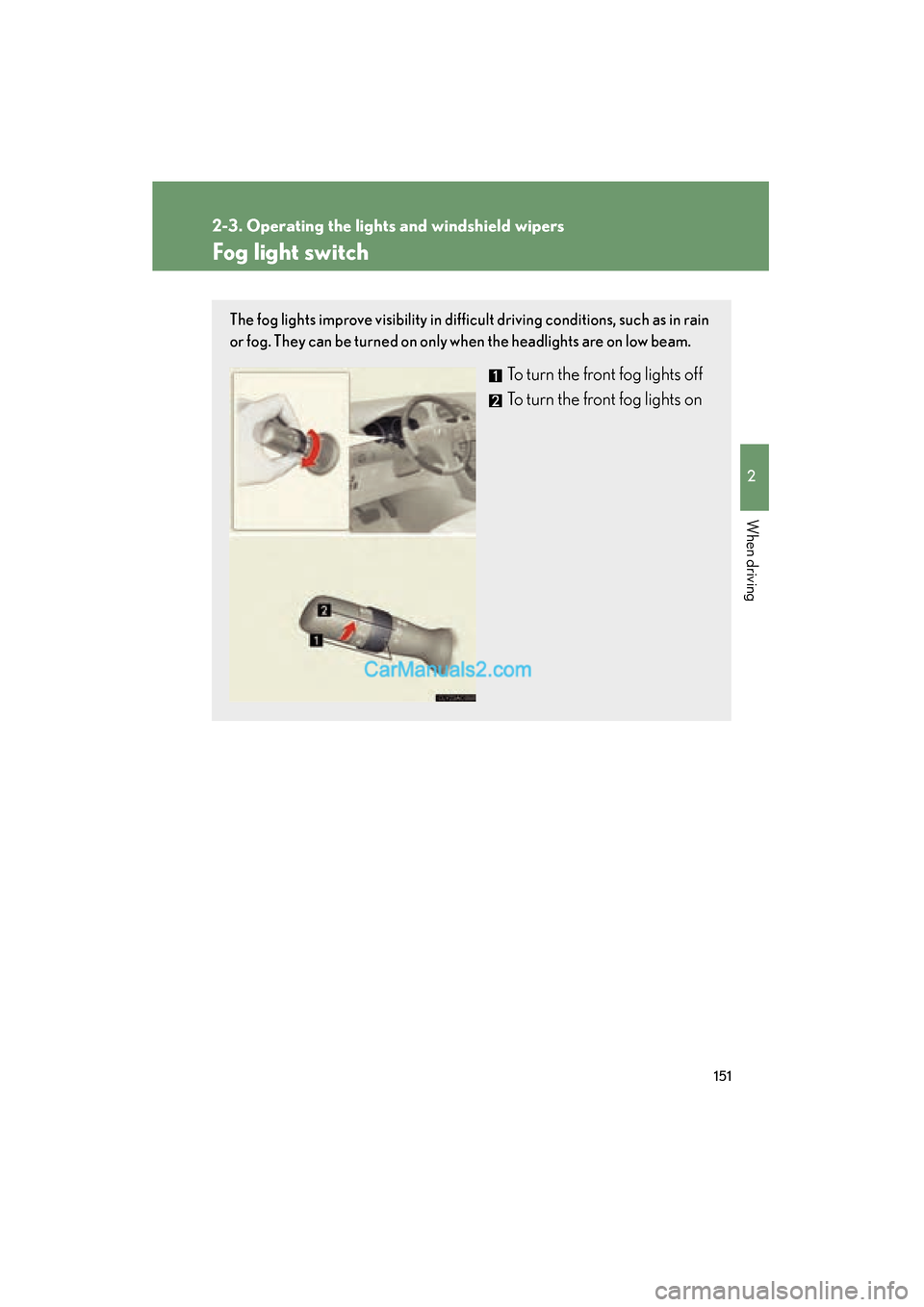
The fog lights improve visibility in difficult driving conditions, such as in rain
or fog. They can be turned on only when the headlights are on low beam.
To turn the front fog lights off
To turn the front fog lights on
Page 154 of 563
152
2-3. Operating the lights and windshield wipers
ES350_U
Windshield wipers and washer
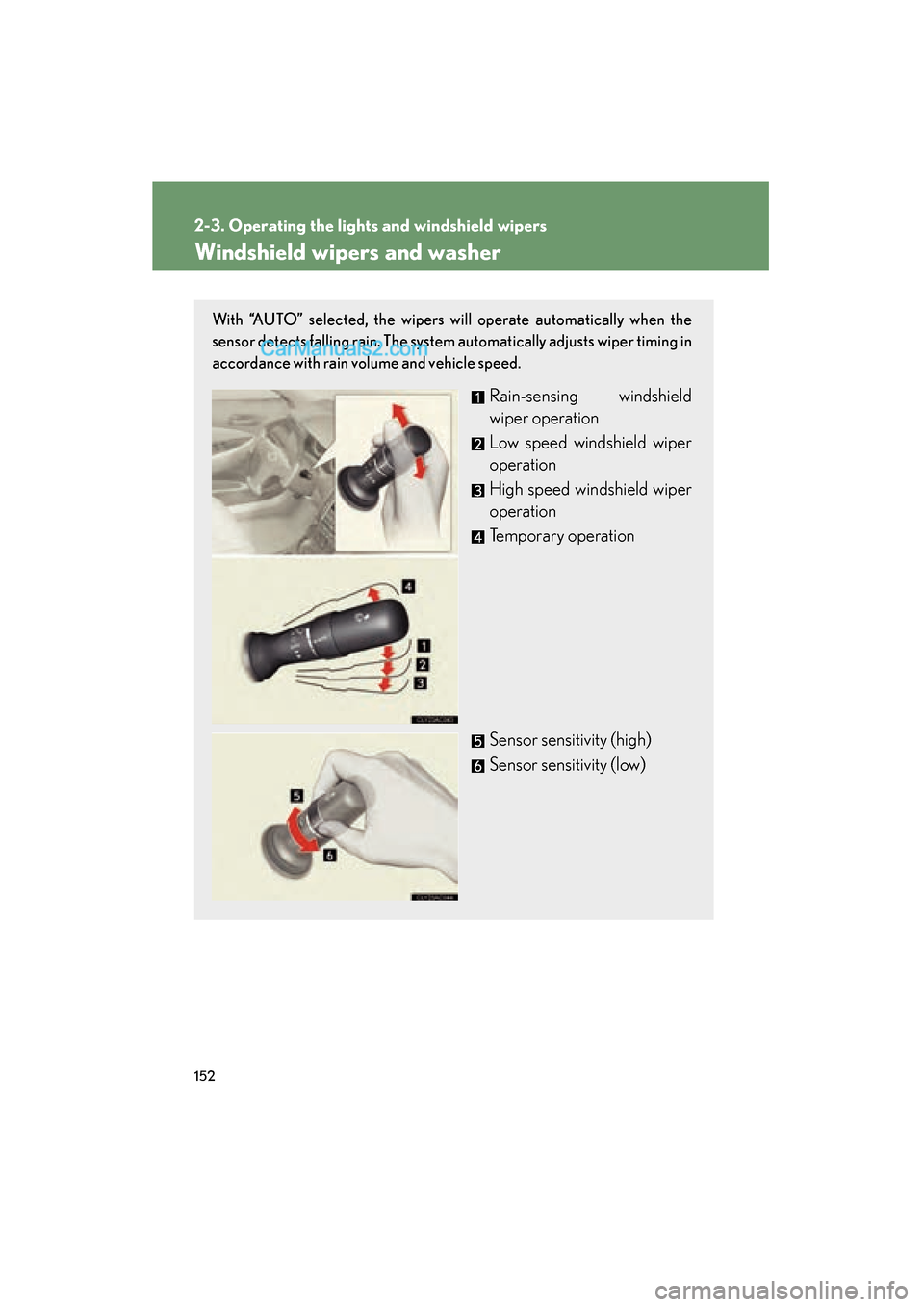
With “AUTO” selected, the wipers will operate automatically when the
sensor detects falling rain. The system automatically adjusts wiper timing in
accordance with rain volume and vehicle speed.
Rain-sensing windshield
wiper operation
Low speed windshield wiper
operation
High speed windshield wiper
operation
Temporary operation
Sensor sensitivity (high)
Sensor sensitivity (low)
Page 155 of 563
153
2-3. Operating the lights and windshield wipers
2
When driving
ES350_U
■The windshield wiper and washer can be operated when
The “ENGINE START STOP” switch is in IGNITION ON mode.
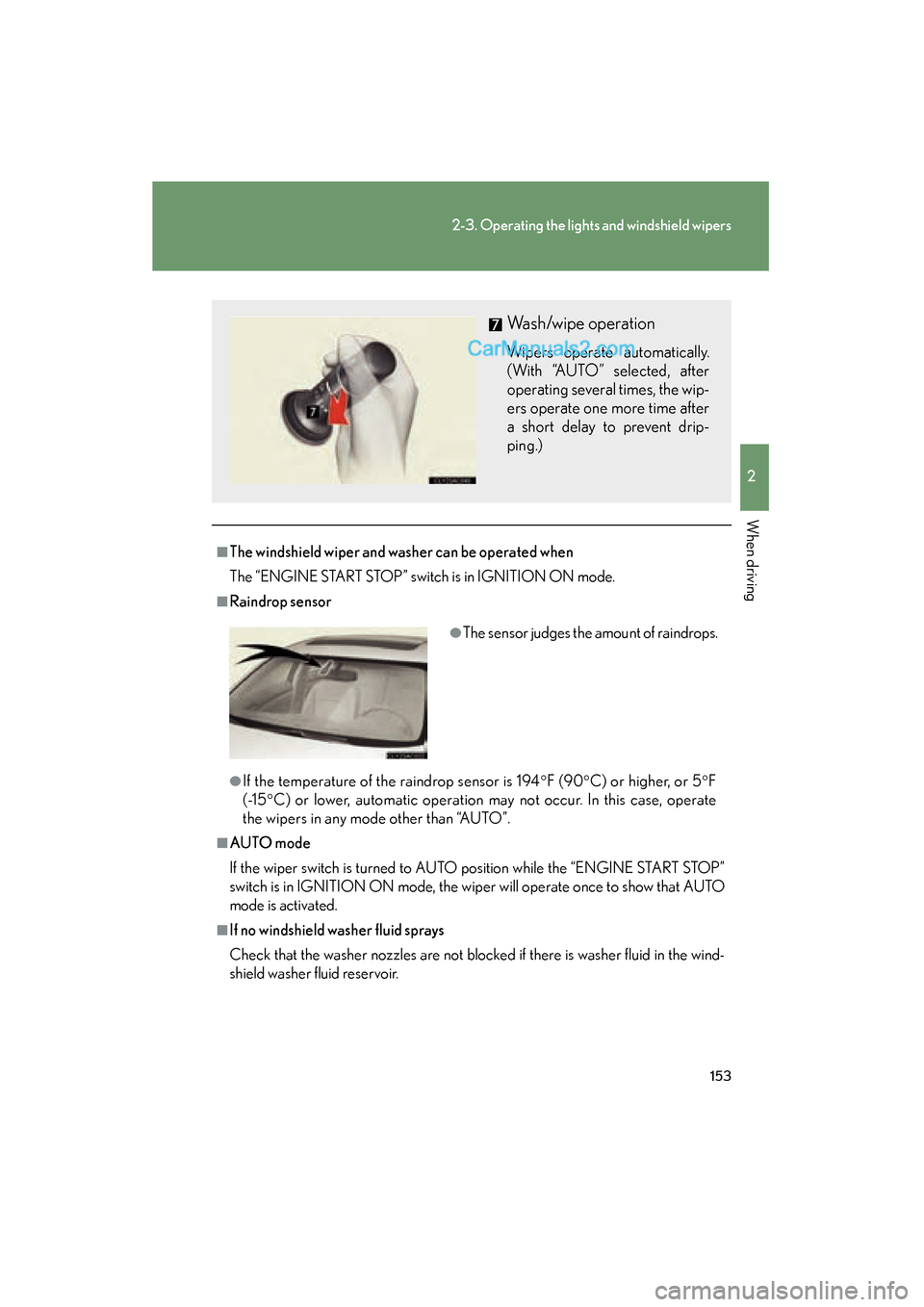
■Raindrop sensor
●If the temperature of the raindrop sensor is 194°F (90 °C) or higher, or 5 °F
( -1 5 °C) or lower, automatic operation may not occur. In this case, operate
the wipers in any mode other than “AUTO”.
■AUTO mode
If the wiper switch is turned to AUTO position while the “ENGINE START STOP”
switch is in IGNITION ON mode, the wiper will operate once to show that AUTO
mode is activated.
■If no windshield washer fluid sprays
Check that the washer nozzles are not blocked if there is washer fluid in the wind-
shield washer fluid reservoir.
Wash/wipe operation
Wipers operate automatically.
(With “AUTO” selected, after
operating several times, the wip-
ers operate one more time after
a short delay to prevent drip-
ping.)
●The sensor judges the amount of raindrops.
Page 156 of 563
154
2-3. Operating the lights and windshield wipers
ES350_U
CAUTION
■Caution regarding the use of windshield wipers in AUTO mode
The windshield wipers may operate unexpectedly if the sensor is touched or the
windshield is subjected to vibration in AUTO mode. Take care that your fingers or
anything else do not become caught in the windshield wipers.
NOTICE
■When the windshield is dry
Do not use the wipers, as they may damage the windshield.
■When there is no washer fluid spray from the nozzle
Damage to the washer fluid pump may be caused if the lever is pulled toward you
and held continually.
■When a nozzle becomes blocked
In this case, contact your Lexus dealer.
Do not try to clear it with a pin or other object. The nozzle will be damaged.
Page 158 of 563
![Lexus ES350 2011 s Workshop Manual 156
2-4. Using other driving systems
ES350_U
■Fine adjustment of the set speed
Fine adjustment of the set speed (approximately 1.0 mph [1.6 km/h]) can be made
by lightly pressing the lever up or dow](/img/36/12968/w960_12968-157.png "Lexus ES350 2011 s Workshop Manual 156
2-4. Using other driving systems
ES350_U
■Fine adjustment of the set speed
Fine adjustment of the set speed (approximately 1.0 mph [1.6 km/h]) can be made
by lightly pressing the lever up or dow")
156
2-4. Using other driving systems
ES350_U
■Fine adjustment of the set speed
Fine adjustment of the set speed (approximately 1.0 mph [1.6 km/h]) can be made
by lightly pressing the lever up or down and releasing it.
■Cruise control can be set when
●The shift lever is in the D or 4, 5, or 6 range of S.
●Vehicle speed is above approximately 25 mph (40 km/h).
■Accelerating
The vehicle can be accelerated normally. After acceleration, the set speed
resumes.
■Automatic cruise control cancellation
The set speed is automatically cancelled in any of the following situations.
●Actual vehicle speed falls more than approximately 10 mph (16 km/h) below the
preset vehicle speed.
At this time, the memorized set speed is not retained.
●Actual vehicle speed is below approximately 25 mph (40km/h).
●VSC is activated.
■Canceling and resuming regular acceleration
Cancel
Pull the lever towards you to
cancel cruise control.
The speed setting is also can-
celed when the brakes are
applied.
Resume
To resume cruise control and
return to the set speed, push the
lever up.