phone Lexus ES350 2013 Quick Guide
[x] Cancel search | Manufacturer: LEXUS, Model Year: 2013, Model line: ES350, Model: Lexus ES350 2013Pages: 112, PDF Size: 4.51 MB
Page 3 of 112
2
ES350_QG_OM33A11U_(U)
BSM (Blind Spot Monitor) ...............................................................................................................45
Consumption Screen ............................................................................................................. ...............11
Cruise Control ................................................................................................................. ..................... 37
Door Locks ..................................................................................................................... ........................ 96
Driving Mode Select Switch ..................................................................................................... ....... 46
Driving Position Memory ........................................................................................................ ..........20
Dynamic Radar Cruise Control ................................................................................................... ..39
Eco Drive Indicator ............................................................................................................ ................ 30
Engine (Ignition) Switch ...................................................................................................... .............. 22
Floor Mat ...................................................................................................................... ......................... 102
Front Seats .................................................................................................................... ........................... 18
Fuel Tank Cap .................................................................................................................. ....................100
Garage Door Opener ...................................................................................................................... 89
Hands-free System For Cellular Phone (with Lexus Display Audio)
Bluetooth
® phone pairing ......................................................................................................... 70
Phonebook transfer ............................................................................................................. ......... 70
Registering a speed dial ....................................................................................................... ........ 71
Calling by speed dial .......................................................................................................... .......... 72
Receiving a call ............................................................................................................... ................ 72
Steering switches .............................................................................................................. ............. 72
Hands-free System For Cellular Phone (with navigation system)
Bluetooth
® phone pairing .........................................................................................................55
Phonebook transfer ............................................................................................................. .........56
Registering a speed dial ....................................................................................................... .......56
Calling by name................................................................................................................ .............. 57
Calling by speed dial .......................................................................................................... ......... 58
Calling using SMS/MMS message....................................................................................... 58
Receiving a call ............................................................................................................... ................59
Steering switches .............................................................................................................. .............59
Page 4 of 112
3
ES350_QG_OM33A11U_(U)
Hands-free System For Cellular Phone (without navigation system or Lexus Display Audio)
Bluetooth
® phone pairing ......................................................................................................... 79
Dialing by inputting a number ................................................................................................. 8 0
Dialing by inputting a name .................................................................................................... .. 80
Speed dial ..................................................................................................................... ................... 80
When receiving a phone call .................................................................................................... .81
Headlights ..................................................................................................................... ........................... 31
Head Restraints................................................................................................................ ...................... 19
Intuitive Parking Assist ....................................................................................................... ................ 44
Keys............................................................................................................................................................. 13
Lexus Enform with Safety Connect ..............................................................................................9 3
LDA (Lane Departure Alert) ..................................................................................................... ..... 42
Lexus Display Audio controller (with Lexus Display Audio) Basic operation ................................................................................................................ ...............68
Menu ................................................................................................................................................... 69
Display ................................................................................................................................................ 69
Moon Roof ...................................................................................................................... ........................98
Multi-information Display...................................................................................................... ...........28
Navigation System Register home .................................................................................................................. ................ 51
Destination input - Search by address .................................................................................. 52
Destination input - Search points of interest by name....................................................53
Destination input - Search points of interest by category.............................................53
Destination input - Search points of in terest by telephone number .........................54
Page 9 of 112
8
ES350_QG_OM33A11U_(U)
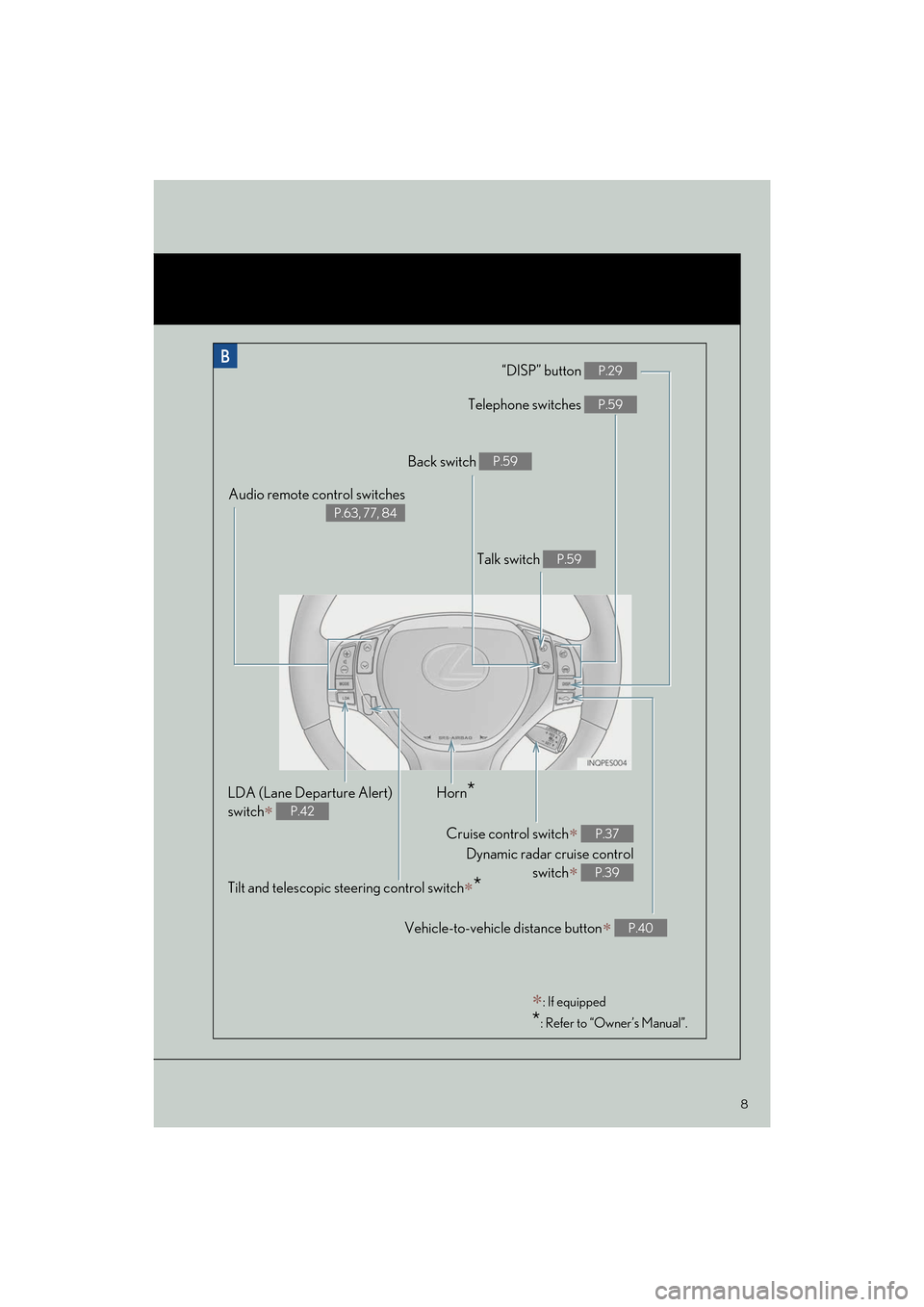
“DISP” button P.29
Telephone switches P.59
Vehicle-to-vehicle distance button∗ P.40
Back switch P.59
Talk switch P.59
Audio remote control switches
P.63, 77, 84
LDA (Lane Departure Alert)
switch
∗ P.42
Cruise control switch∗
Dynamic radar cruise control switch
∗
P.37
P.39
Horn*
Tilt and telescopic steering control switch∗*
∗: If equipped
*: Refer to “Owner’s Manual”.
Page 50 of 112
49
ES350_QG_OM33A11U_(U)
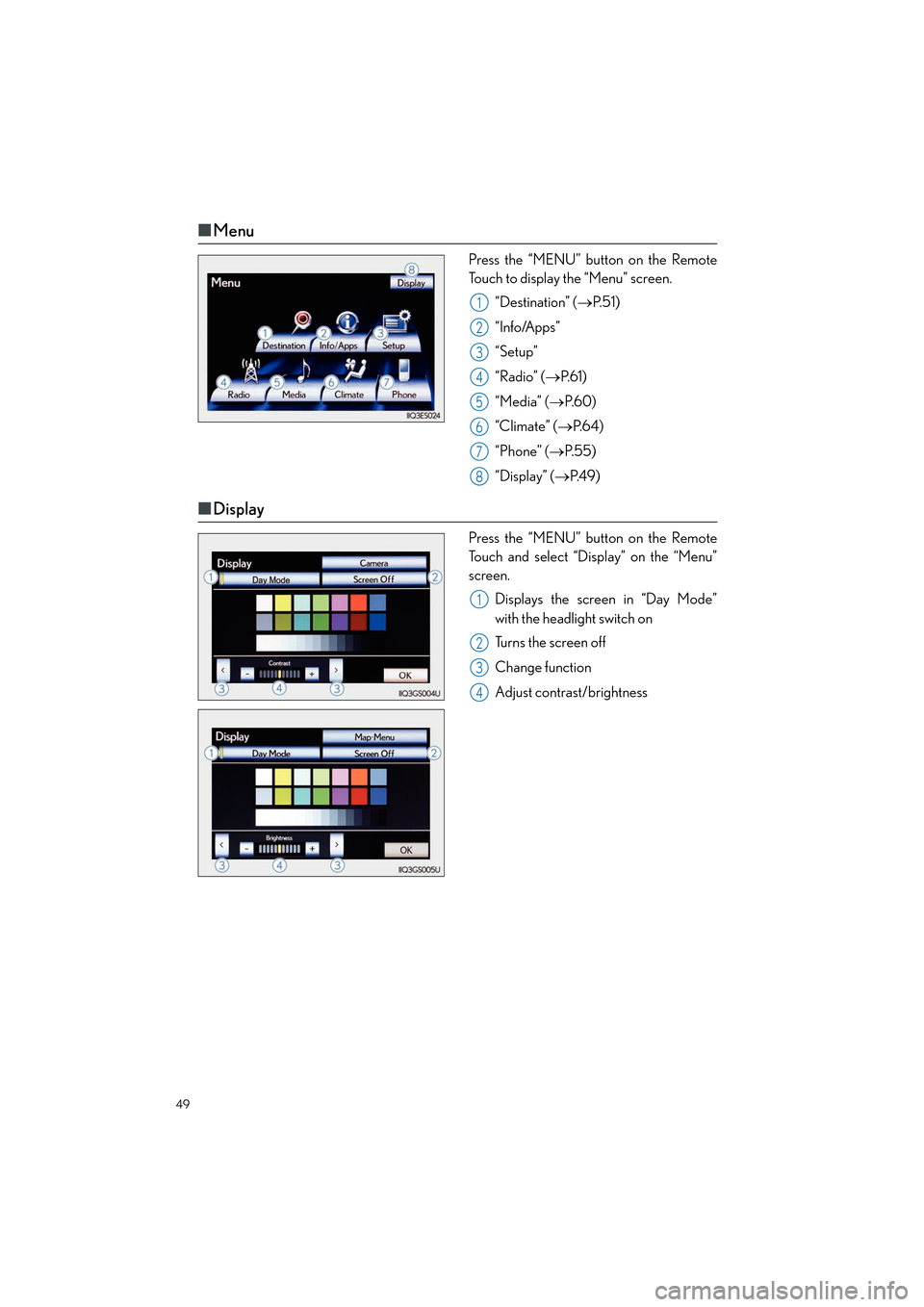
■Menu
Press the “MENU” button on the Remote
Touch to display the “Menu” screen.
“Destination” ( →P. 5 1 )
“Info/Apps”
“Setup”
“Radio” ( →P. 6 1 )
“Media” ( →P. 6 0 )
“Climate” ( →P. 6 4 )
“Phone” ( →P. 5 5 )
“Display” ( →P. 4 9 )
■Display
Press the “MENU” button on the Remote
Touch and select “Display” on the “Menu”
screen.
Displays the screen in “Day Mode”
with the headlight switch on
Turns the screen off
Change function
Adjust contrast/brightness
1
2
3
4
5
6
7
8
1
2
3
4
Page 55 of 112
54
ES350_QG_OM33A11U_(U)
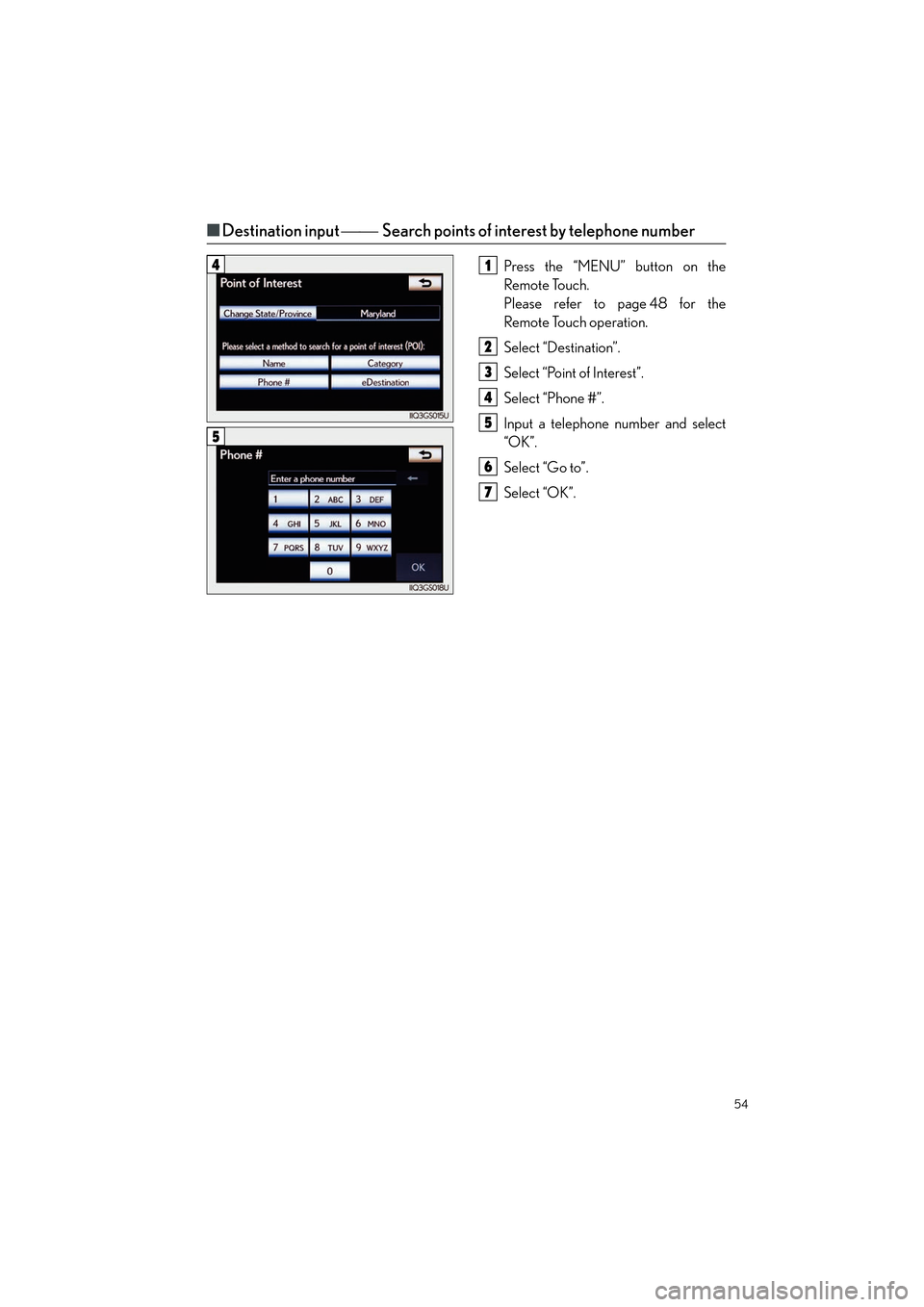
■Destination input Search points of interest by telephone number
Press the “MENU” button on the
Remote Touch.
Please refer to page 48 for the
Remote Touch operation.
Select “Destination”.
Select “Point of Interest”.
Select “Phone #”.
Input a telephone number and select
“OK”.
Select “Go to”.
Select “OK”.41
2
3
4
5
6
7
5
Page 56 of 112

55
ES350_QG_OM33A11U_(U)
Hands-free System For Cellular Phone
(with navigation system)
■Bluetooth® phone pairing
Compatible Bluetooth®-equipped phones can be connected to the vehicle, enabling
hands-free operation. Please re fer to the cellular phone manufacturer’s user guide for pair-
ing procedures, or go to “www.lexus.com/bluetooth
” for more phone information.
To use a Bluetooth
® phone, it is necessary
to first register it in the system.
Press the “MENU” button on the
Remote Touch.
Please refer to page 48 for the
Remote Touch operation.
Select “Phone”.
Select “Yes”.
Enter the passcode displayed on the
screen into the phone.
Refer to the cellular phone user’s man-
ual for cellular phone operation.
If a completion message is displayed,
registration is complete.3
1
2
3
4
5
4
Page 57 of 112

56
ES350_QG_OM33A11U_(U)
■Phonebook transfer
Press the “MENU” button on the
Remote Touch.
Please refer to page 48 for the
Remote Touch operation.
Select “Setup”.
Select “Phone”.
Select “Phonebook”.
Select “Manage Contacts”.
Select “Transfer Contacts”.
Select “Update Contacts”.
Transfer the phonebook data to the
system using the cellular phone.
Refer to the cellular phone user’s man-
ual for cellular phone operation.
■Registering a speed dial
Press the “MENU” button on the
Remote Touch.
Please refer to page 48 for the
Remote Touch operation.
Select “Setup”.
Select “Phone”.
Select “Phonebook”.
Select “Manage Speed Dials”.
Select “New”.
Select the data you want to register.
Select the desired phone number.
Select the button you want to register
in.
61
2
3
4
5
6
7
8
8
Phonebook transfer may not be possible depending on phone model.
61
2
3
4
5
6
7
8
9
7
Page 58 of 112

57
ES350_QG_OM33A11U_(U)
■Calling by name
You can call by saying a name registered in the phonebook. For setting the voice recogni-
tion, refer to the “Navigation System Owner’s Ma nual”. Only when English is selected as the
system language can you call by saying a name registered in the phonebook without regis-
tering any voice tags beforehand. (Names in the phonebook work as voice tags.)
Press .
Follow the voice guidance and say
“Call
Follow the voice guidance and say a
contact name.
Follow the voice guidance and say
“Dial”.
11
2
3
4
3
: Pressing this switch turns the voice command system on. Say a command after thebeep.
Page 59 of 112
58
ES350_QG_OM33A11U_(U)
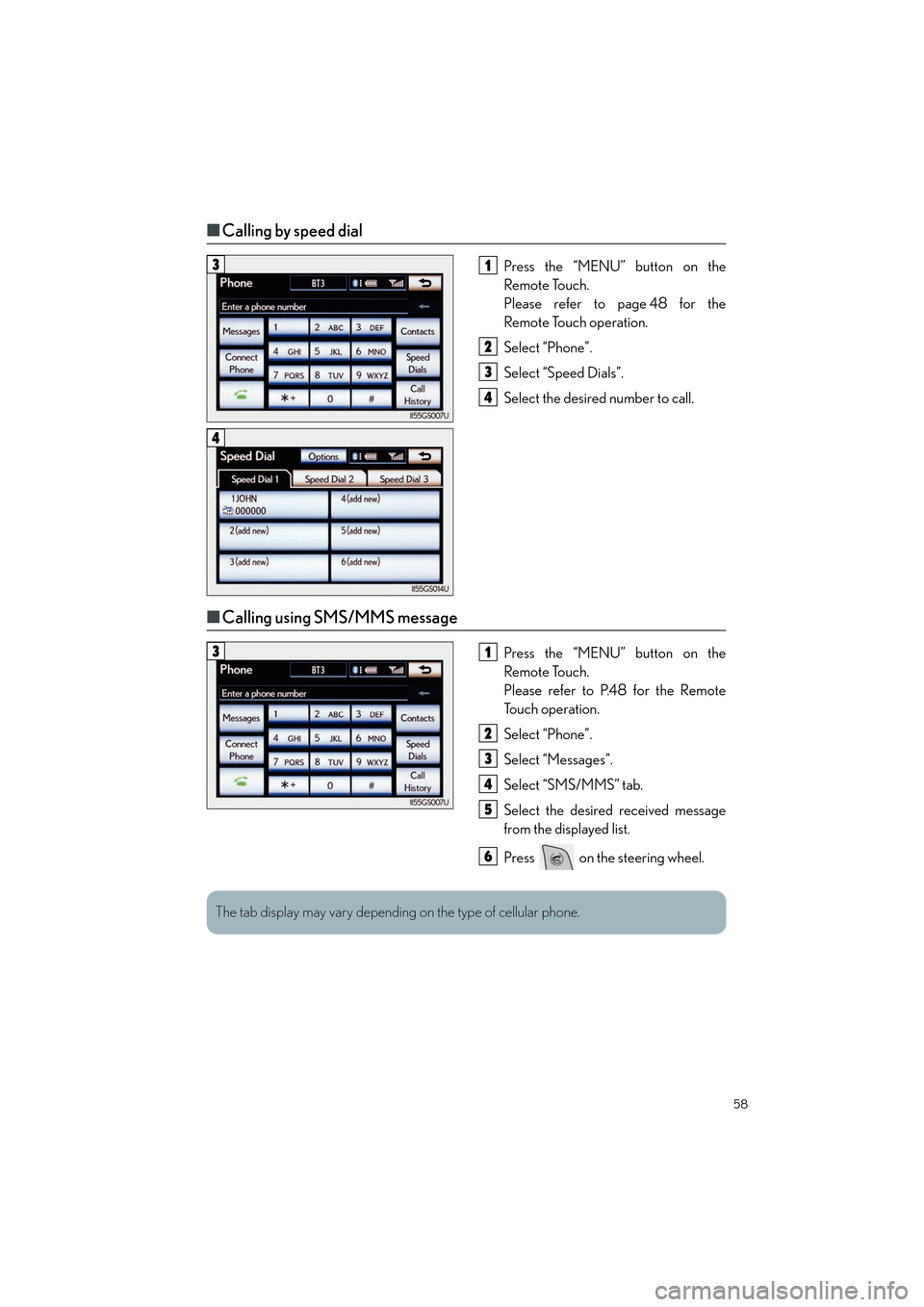
■Calling by speed dial
Press the “MENU” button on the
Remote Touch.
Please refer to page 48 for the
Remote Touch operation.
Select “Phone”.
Select “Speed Dials”.
Select the desired number to call.
■Calling using SMS/MMS message
Press the “MENU” button on the
Remote Touch.
Please refer to P.48 for the Remote
To u c h o p e r a t i o n .
Select “Phone”.
Select “Messages”.
Select “SMS/MMS” tab.
Select the desired received message
from the displayed list.
Press on the steering wheel.
31
2
3
4
4
31
2
3
4
5
6
The tab display may vary depending on the type of cellular phone.
Page 60 of 112
59
ES350_QG_OM33A11U_(U)
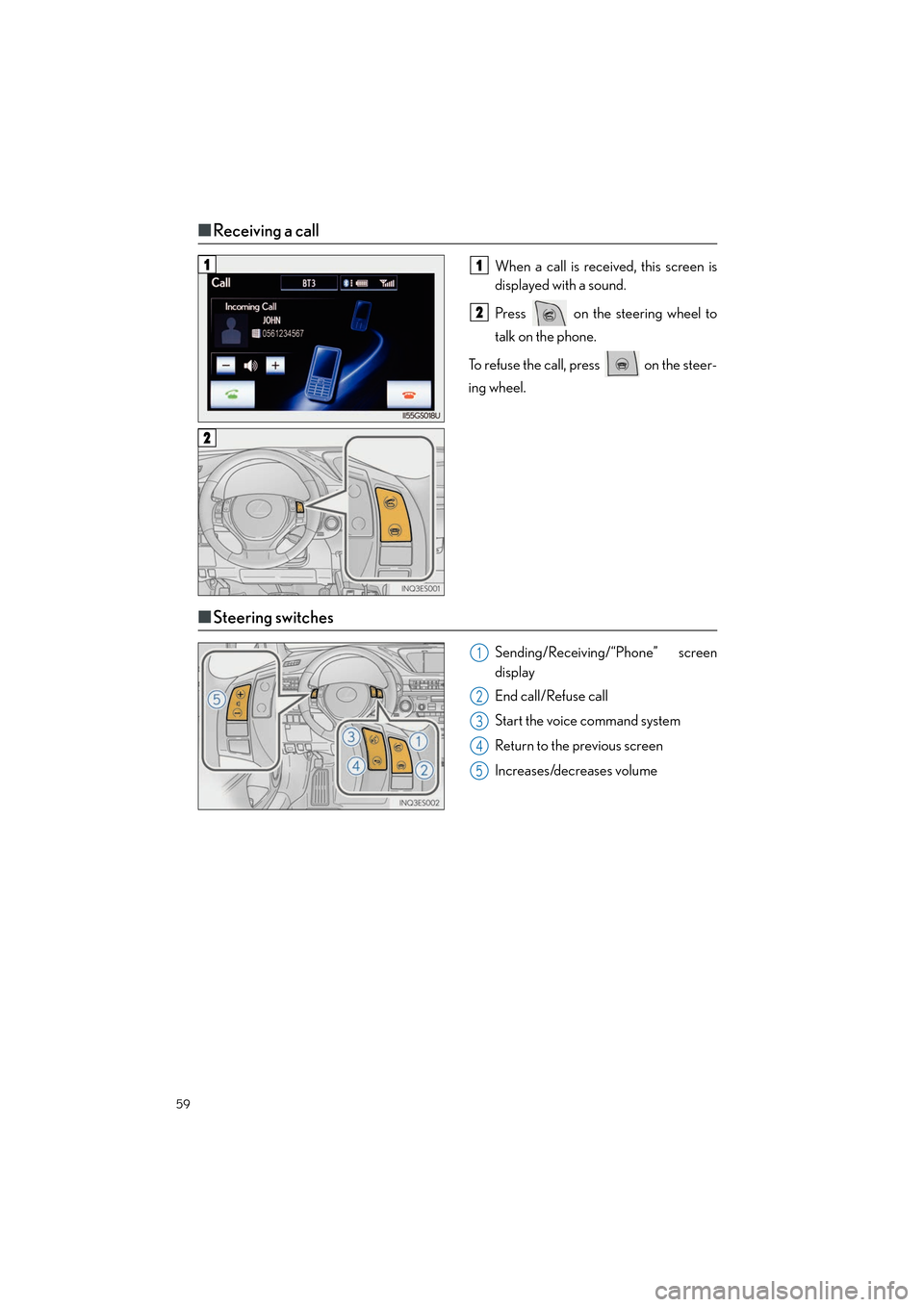
■Receiving a call
When a call is received, this screen is
displayed with a sound.
Press on the steering wheel to
talk on the phone.
To refuse the call, press on the steer-
ing wheel.
■ Steering switches
Sending/Receiving/“Phone” screen
display
End call/Refuse call
Start the voice command system
Return to the previous screen
Increases/decreases volume
11
2
2
1
2
3
4
5