phone Lexus ES350 2013 Quick Guide
[x] Cancel search | Manufacturer: LEXUS, Model Year: 2013, Model line: ES350, Model: Lexus ES350 2013Pages: 112, PDF Size: 4.51 MB
Page 66 of 112
65
ES350_QG_OM33A11U_(U)
Voice Command System (with navigation
system)
NOTE:When inputting voice commands you must wait until after the beep to speak.
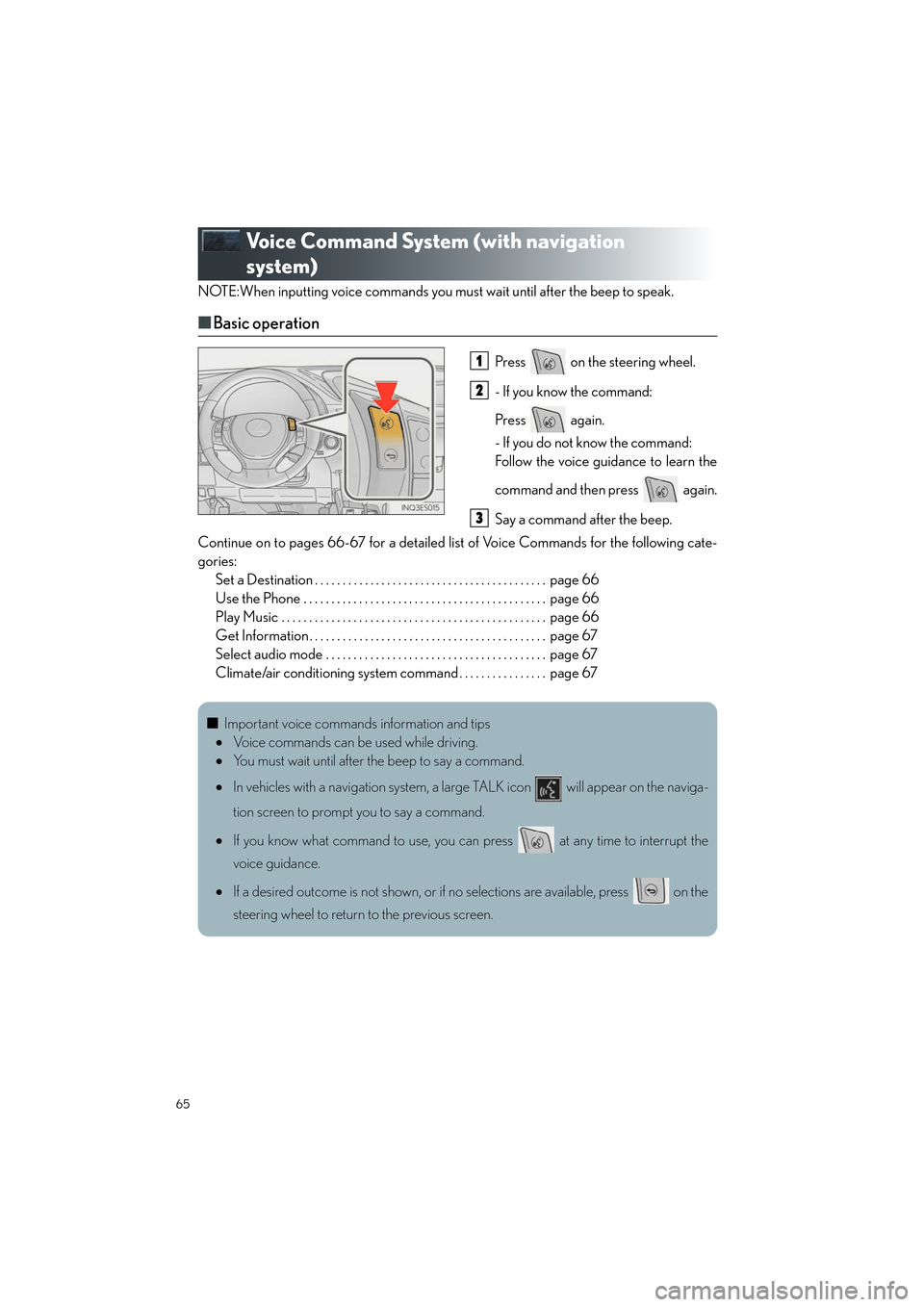
■Basic operation
Press on the steering wheel.
- If you know the command:
Press again.
- If you do not know the command:
Follow the voice guidance to learn the
command and then press again.
Say a command after the beep.
Continue on to pages 66-67 for a detailed list of Voice Commands for the following cate-
gories: Set a Destination . . . . . . . . . . . . . . . . . . . . . . . . . . . . . . . . . . . . . . . . . . page 66
Use the Phone . . . . . . . . . . . . . . . . . . . . . . . . . . . . . . . . . . . . . . . . . . . . page 66
Play Music . . . . . . . . . . . . . . . . . . . . . . . . . . . . . . . . . . . . . . . . . . . . . . . . page 66
Get Information . . . . . . . . . . . . . . . . . . . . . . . . . . . . . . . . . . . . . . . . . . . page 67
Select audio mode . . . . . . . . . . . . . . . . . . . . . . . . . . . . . . . . . . . . . . . . page 67
Climate/air conditioning system command . . . . . . . . . . . . . . . . page 671
2
3
■Important voice commands information and tips
• Voice commands can be used while driving.
• You must wait until after the beep to say a command.
• In vehicles with a navigation system, a large TALK icon will appear on the naviga-
tion screen to prompt you to say a command.
• If you know what command to use, you can press at any time to interrupt the
voice guidance.
• If a desired outcome is not shown, or if no selections are available, press on the
steering wheel to return to the previous screen.
Page 67 of 112

66
ES350_QG_OM33A11U_(U)
■Command list
Set a Destination
*: For example; Gas stations, Restaurants, etc.
Use the Phone
Play Music
*: Say the desired artist name or album name in the place of the “<>”.
CommandAction
“Find Nearby
position.
“Enter an Address”Enables setting a destination by saying the address.
“Go Home”Displays the route to home.
“Call Destination Assist”Connects Lexus Enform with Safety Connect
response center.
“Destination by Phone Num-
ber”Enables setting a destination by saying the phone
number.
CommandAction
“Call
Calls made by saying a name from the phonebook.
For example: Say “Call John Smith”, “Call John Smith,
mobile” etc.
“Dial
For example: Say “Dial 911”, “Dial 5556667777” etc.
“International Call”Calls international numbers by saying the phone
number.
CommandAction
“Play Artist
For example: Say “Play artist
*
“Play Album
For example: Say “Play album
*
“Play Song
Plays the selected track.
For example: Say “Play song Summertime”, “Play
song Concerto in A Major” etc.
“Play Playlist
Plays tracks from the selected playlist.
For example: Say “Play playlist My Favorite Songs”,
“Play Playlist Classic Hits” etc.
Page 70 of 112
69
ES350_QG_OM33A11U_(U)
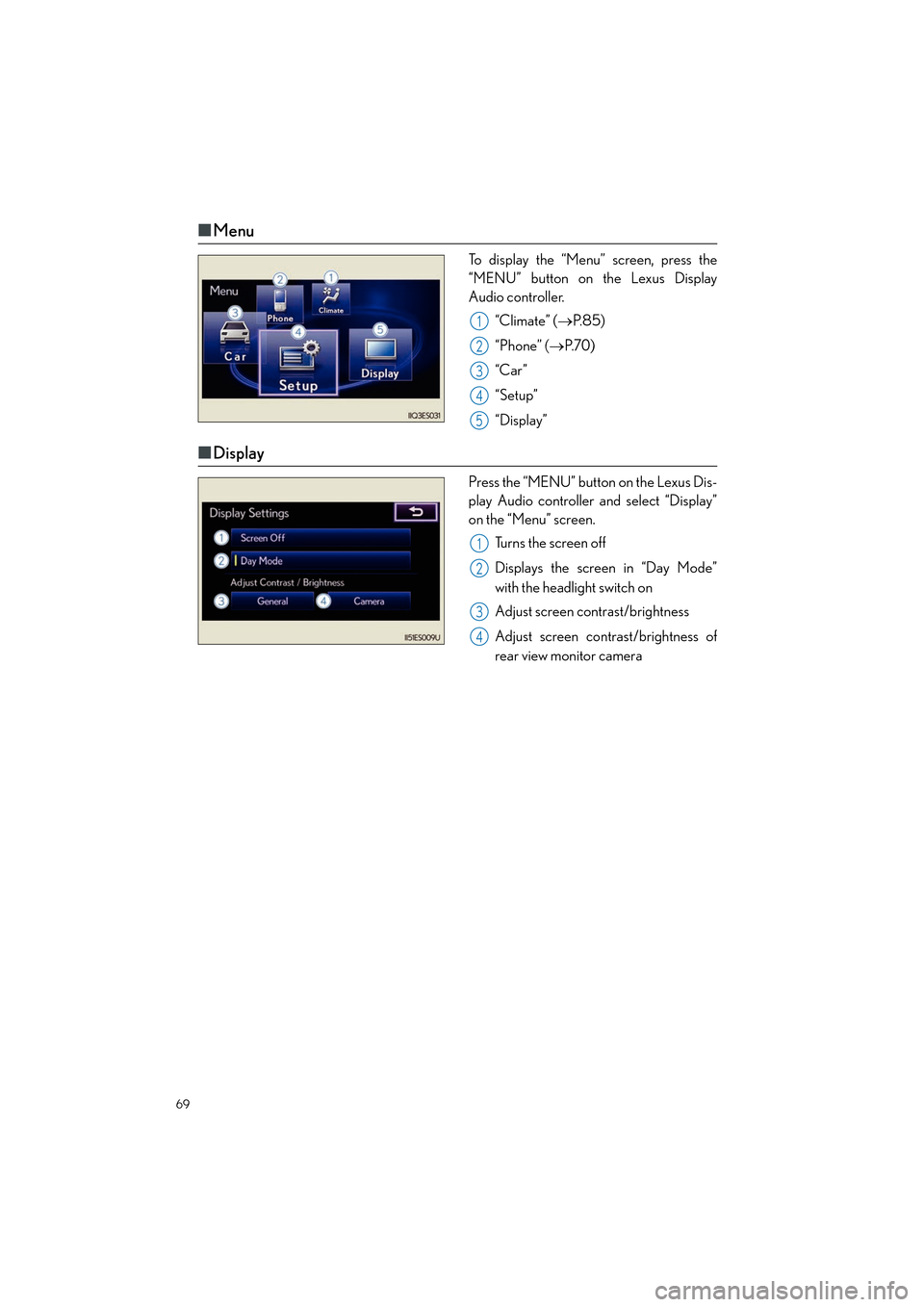
■Menu
To display the “Menu” screen, press the
“MENU” button on the Lexus Display
Audio controller.
“Climate” ( →P. 8 5 )
“Phone” ( →P. 7 0 )
“Car ”
“Setup”
“Display”
■ Display
Press the “MENU” button on the Lexus Dis-
play Audio controller and select “Display”
on the “Menu” screen.
Turns the screen off
Displays the screen in “Day Mode”
with the headlight switch on
Adjust screen contrast/brightness
Adjust screen contrast/brightness of
rear view monitor camera
1
2
3
4
5
1
2
3
4
Page 71 of 112

70
ES350_QG_OM33A11U_(U)
Hands-free System For Cellular Phone
(with Lexus Display Audio)
■Bluetooth® phone pairing
To use the hands-free system, you must register a Bluetooth® phone in the system.
Press the “MENU” button on the Lexus
Display Audio controller.
Select “Phone”.
Select “Yes”.
Enter the passcode displayed on the
screen into the phone.
Refer to the mobile phone user’s man-
ual for mobile phone operation.
If a completion message is displayed,
registration is complete.
■ Phonebook transfer
Press the “MENU” button on the Lexus Display Audio controller.
Select “Setup”.
Select “Phone”.
Select “Phonebook”.
Select “Manage Contacts”.
Select “Transfer Contacts”.
Transfer the phonebook data to the system using the mobile phone.
Refer to the mobile phone user’s manual for mobile phone operation.
31
2
3
44
5
1
2
3
4
5
6
7
Page 72 of 112
71
ES350_QG_OM33A11U_(U)
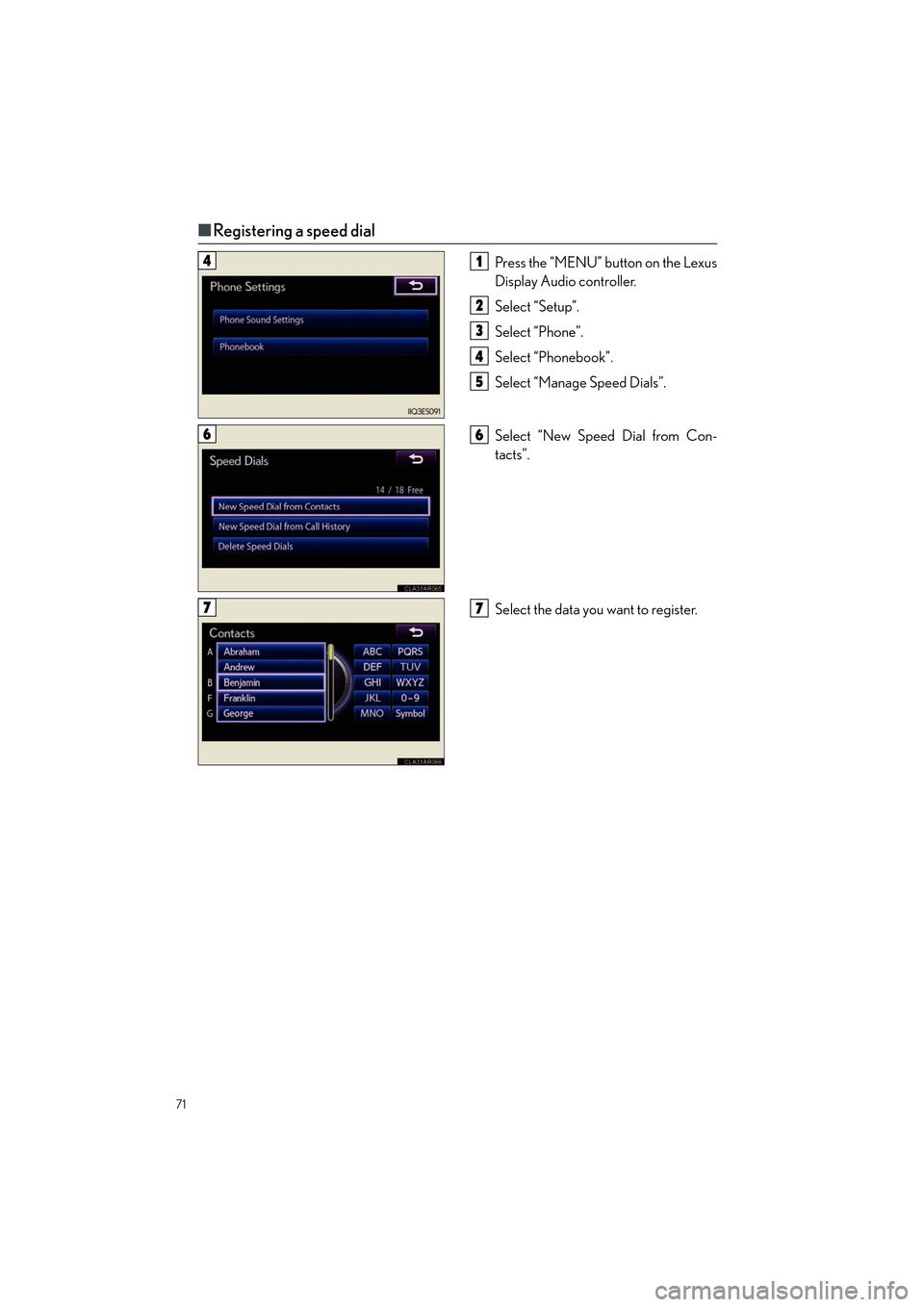
■Registering a speed dial
Press the “MENU” button on the Lexus
Display Audio controller.
Select “Setup”.
Select “Phone”.
Select “Phonebook”.
Select “Manage Speed Dials”.
Select “New Speed Dial from Con-
tacts”.
Select the data you want to register.41
2
3
4
5
66
77
Page 73 of 112
72
ES350_QG_OM33A11U_(U)
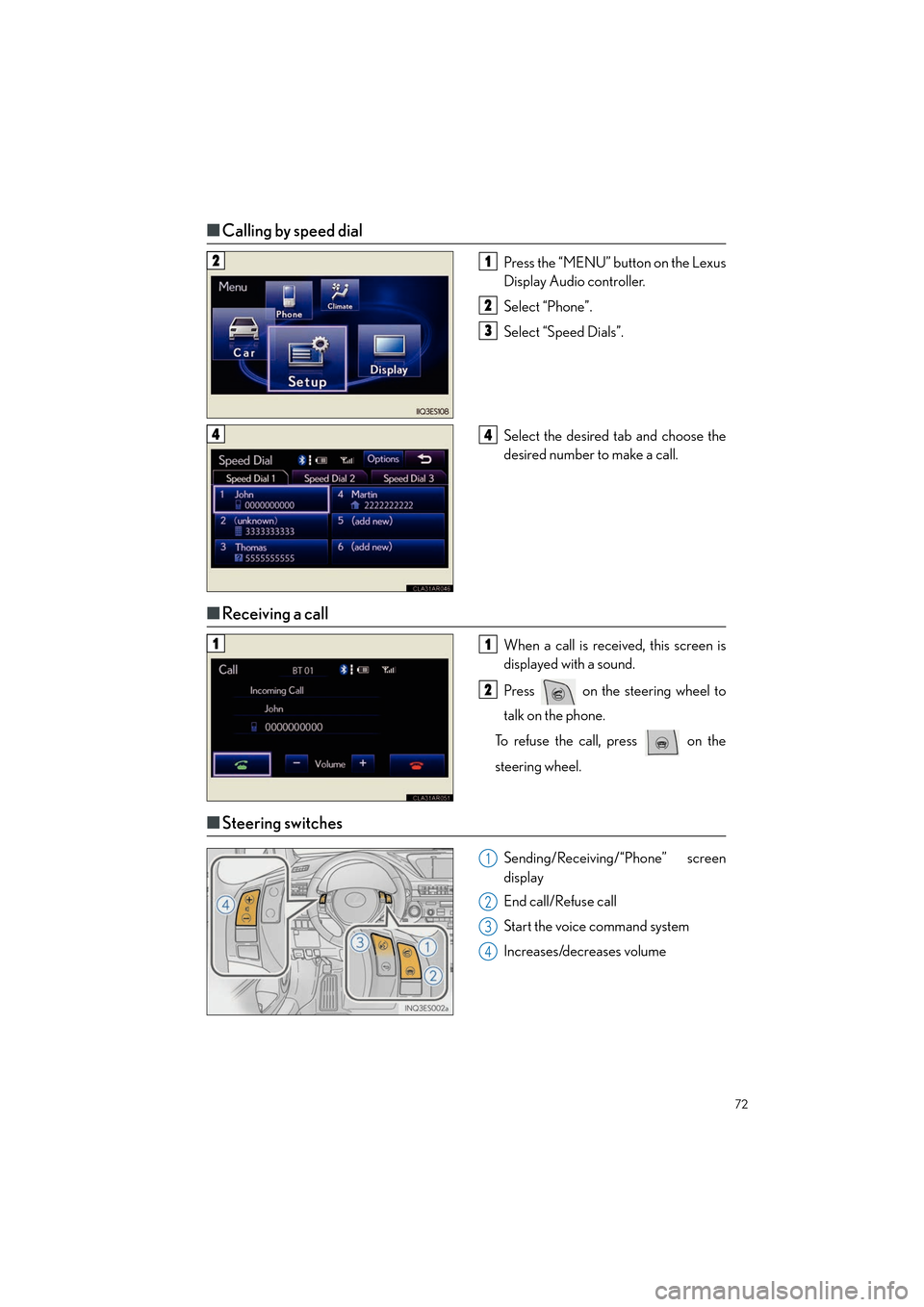
■Calling by speed dial
Press the “MENU” button on the Lexus
Display Audio controller.
Select “Phone”.
Select “Speed Dials”.
Select the desired tab and choose the
desired number to make a call.
■Receiving a call
When a call is received, this screen is
displayed with a sound.
Press on the steering wheel to
talk on the phone.
To refuse the call, press on the
steering wheel.
■ Steering switches
Sending/Receiving/“Phone” screen
display
End call/Refuse call
Start the voice command system
Increases/decreases volume
21
2
3
44
11
2
1
2
3
4
Page 80 of 112

79
ES350_QG_OM33A11U_(U)
Hands-free System For Cellular Phone (without
navigation system or Lexus Display Audio)
■Bluetooth® phone pairing
Compatible Bluetooth®-equipped phones can be connected to the vehicle, enabling
hands-free operation. Please re fer to the cellular phone manufacturer’s user guide for pair-
ing procedures, or go to “www.lexus.com/bluetooth
” for more phone information.
To use a Bluetooth® phone, it is necessary
to first register it in the system.
Press the off-hook switch or the talk
switch, and select “Pair Phone” using a
voice command or .
Select “Record Name” using
and say the name to be registered after
the beep or press the talk switch and
say the name to be registered.
Select “Confirm” using a voice com-
mand or .
Enter the passkey displayed on the
screen into the phone.
Refer to the cellular phone user’s man-
ual for cellular phone operation.
When “Pair Audio?” is displayed, select
“Yes” using a voice command or
.
1
2
3
4
5
Page 81 of 112
80
ES350_QG_OM33A11U_(U)
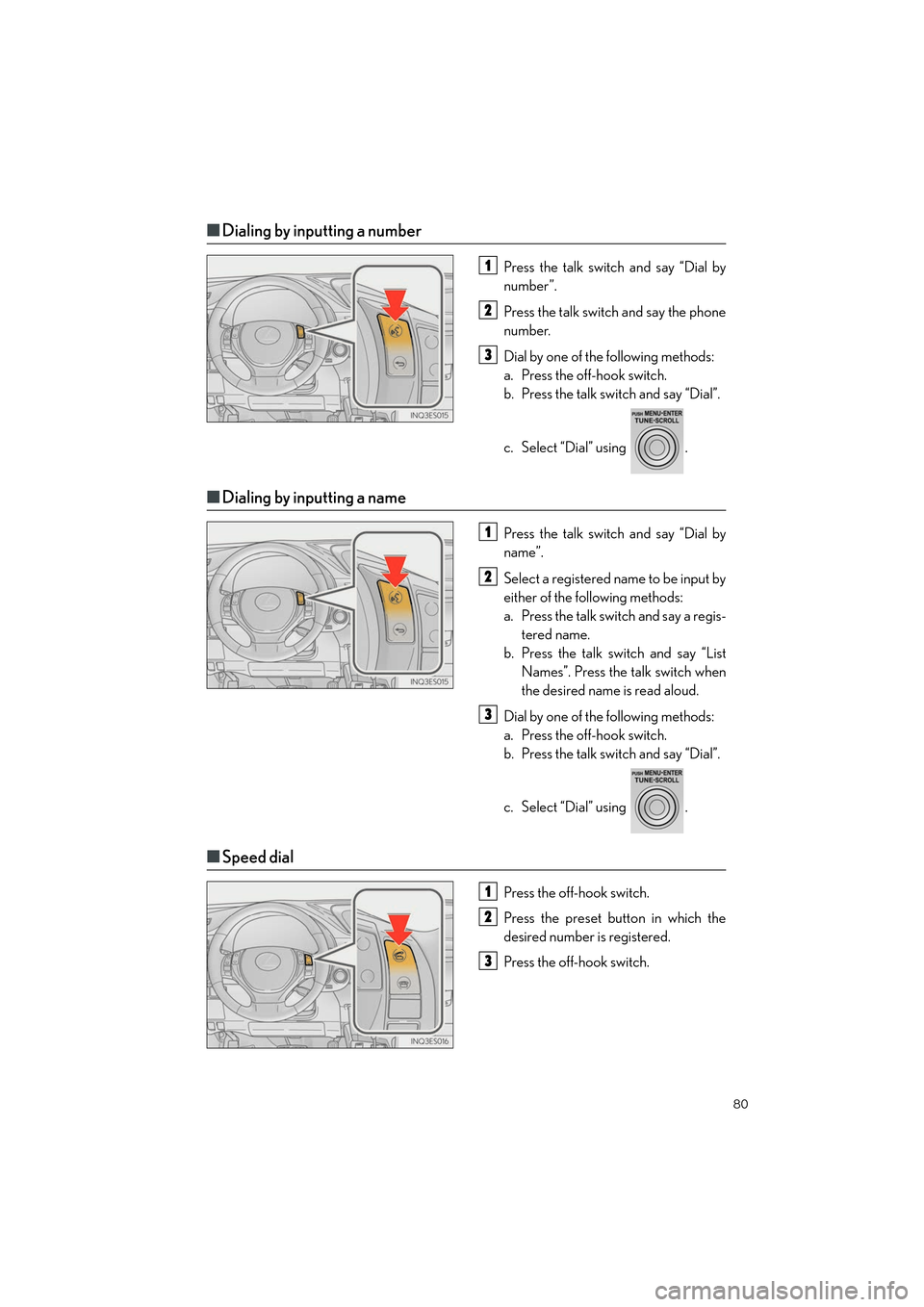
■Dialing by inputting a number
Press the talk switch and say “Dial by
number”.
Press the talk switch and say the phone
number.
Dial by one of the following methods:
a. Press the off-hook switch.
b. Press the talk switch and say “Dial”.
c. Select “Dial” using .
■Dialing by inputting a name
Press the talk switch and say “Dial by
name”.
Select a registered name to be input by
either of the following methods:
a. Press the talk switch and say a regis-
tered name.
b. Press the talk sw itch and say “List
Names”. Press the talk switch when
the desired name is read aloud.
Dial by one of the following methods:
a. Press the off-hook switch.
b. Press the talk switch and say “Dial”.
c. Select “Dial” using .
■ Speed dial
Press the off-hook switch.
Press the preset button in which the
desired number is registered.
Press the off-hook switch.
1
2
3
1
2
3
1
2
3
Page 82 of 112

81
ES350_QG_OM33A11U_(U)
■When receiving a phone call
■
Answering a phone call
Press the off-hook switch.
■Refusing a phone call
Press the on-hook switch.
Audio System (without navigation
system or Lexus Display Audio)
■ Basic operation
Ty p e A
Pow e r/ Vo l u m e
Audio sourcesAM: AM mode
FM: FM mode
SAT: SAT mode
CD: CD player
AUX: Auxiliary audio device/USB
memory/iPod/Bluetooth
® audio
Sound quality modes
Ty p e B
Pow e r/ Vo l u m e
Audio sourcesAM: AM mode
FM: FM mode
CD: CD player
AUX: Auxiliary audio device/USB
memory/iPod/Bluetooth
® audio
Sound quality modes
1
2
3
1
2
3
Page 92 of 112

91
ES350_QG_OM33A11U_(U)
■Programming other devices
For U.S.A. owners:
To program an entry gate, see the Owner’s Manual.
To program other devices, contact your Lexus dealer.
For Canadian owners: To program all other devices, follow the same procedure as for garage door programming.
■Operating HomeLink®
Press the appropriate HomeLink® button.
The indicator light should come on.
Safety Connect (if equipped)
■ System components
“SOS” button
LED light indicators
Microphone
Safety Connect is a subscription-based telematics service that uses Global Positioning
System (GPS) data and embedded cellular technology to provide safety and security
features to subscribers. Safety Connect is supported by Lexus’ designated response
center, which operates 24 hours per day, 7 days per week.
Safety Connect service is available by subscription on select, telematics hardware-
equipped vehicles.
1
2
3