audio Lexus ES350 2014 User Guide
[x] Cancel search | Manufacturer: LEXUS, Model Year: 2014, Model line: ES350, Model: Lexus ES350 2014Pages: 110, PDF Size: 11.86 MB
Page 46 of 110
46
ES350_QG_OM33A70U_(U)
Intuitive Parking Assist (if equipped)
■Turning the system on and off
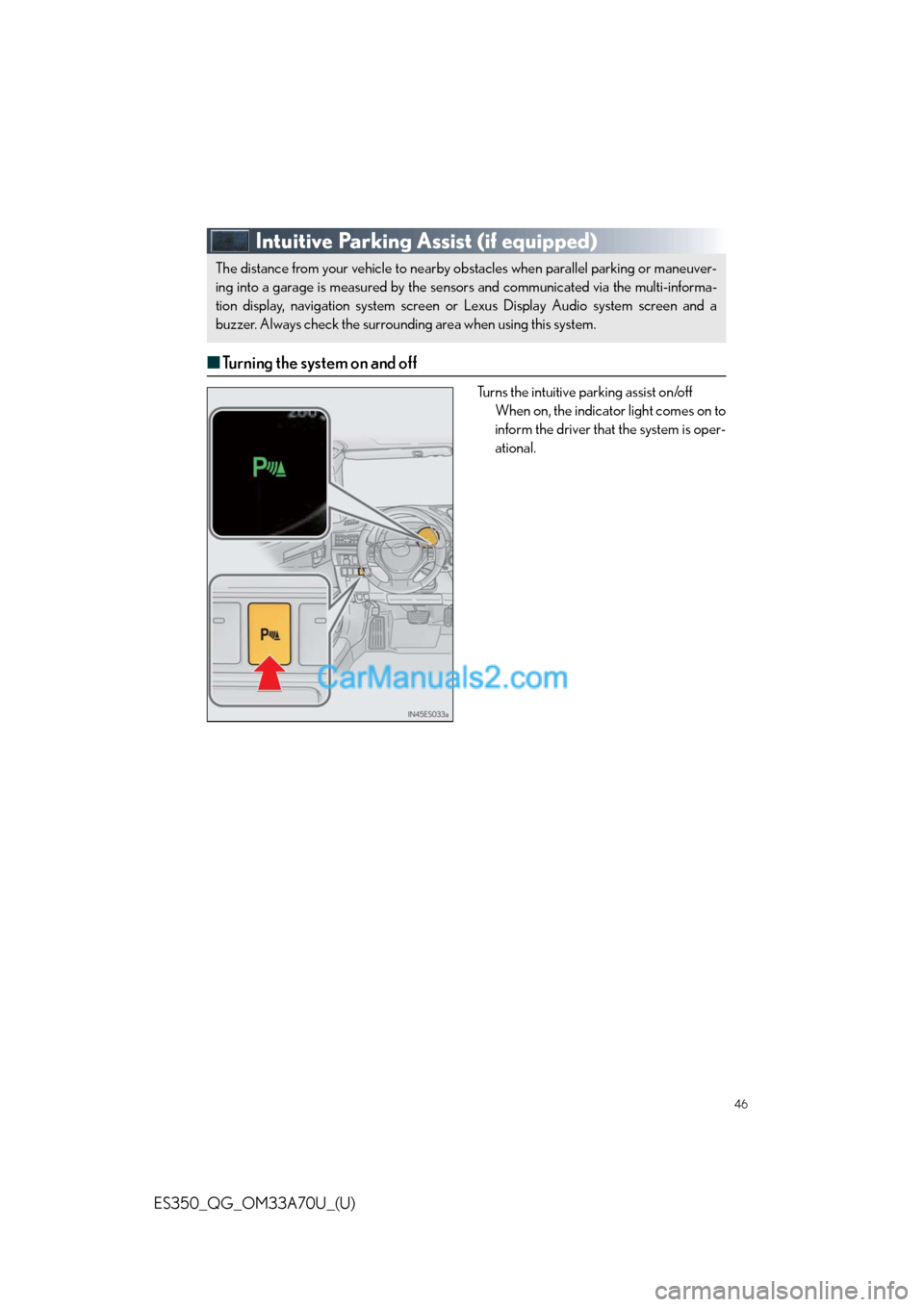
Turns the intuitive parking assist on/off
When on, the indicator light comes on to
inform the driver that the system is oper-
ational.
The distance from your vehicle to nearby obstacles when parallel parking or maneuver-
ing into a garage is measured by the sensors and communicated via the multi-informa-
tion display, navigation system screen or Lexus Display Audio system screen and a
buzzer. Always check the surrounding area when using this system.
Page 62 of 110
62
ES350_QG_OM33A70U_(U)
Audio System (with navigation system)
■Audio control screen
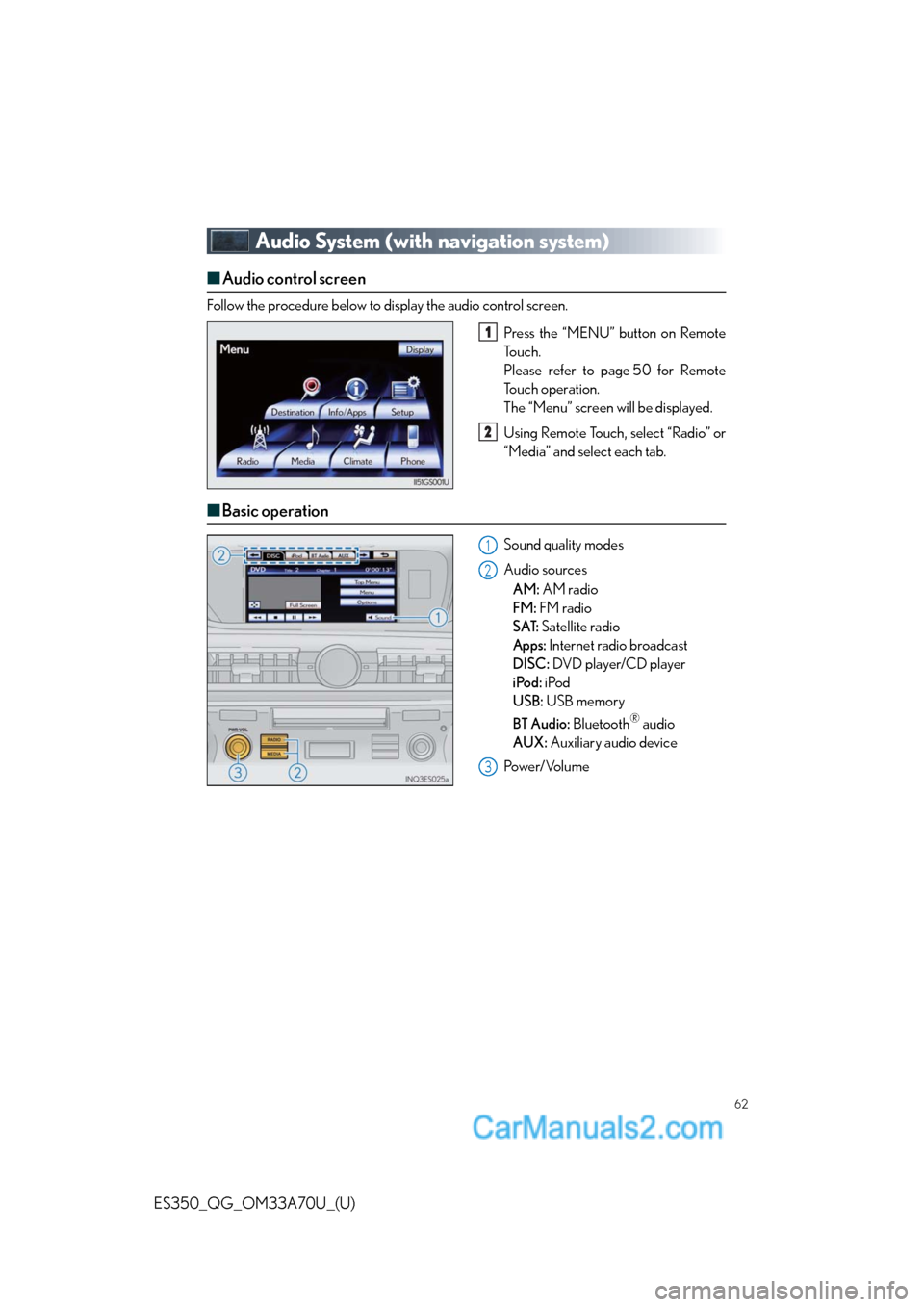
Follow the procedure below to display the audio control screen.
Press the “MENU” button on Remote
To u c h .
Please refer to page 50 for Remote
To u c h o p e r a t i o n .
The “Menu” screen will be displayed.
Using Remote Touch, select “Radio” or
“Media” and select each tab.
■Basic operation
Sound quality modes
Audio sources
AM: AM radio
FM: FM radio
SAT: Satellite radio
Apps: Internet radio broadcast
DISC: DVD player/CD player
iPod: iPod
USB: USB memory
BT Audio: Bluetooth
® audio
AUX: Auxiliary audio device
Po w e r/ Vo l u m e
1
2
1
2
3
Page 64 of 110
64
ES350_QG_OM33A70U_(U)
■DVD player/CD player
■
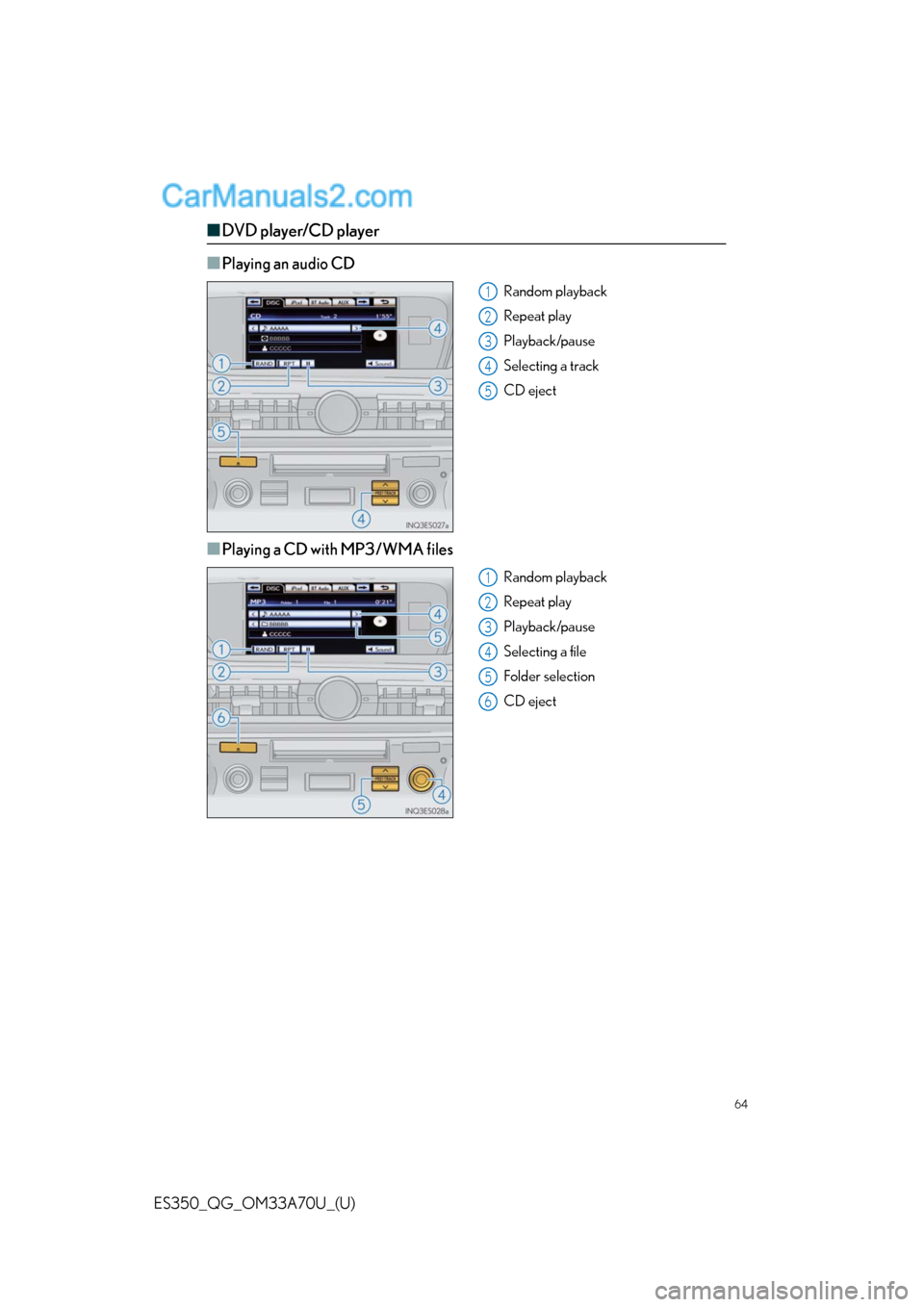
Playing an audio CD
Random playback
Repeat play
Playback/pause
Selecting a track
CD eject
■Playing a CD with MP3/WMA files
Random playback
Repeat play
Playback/pause
Selecting a file
Folder selection
CD eject
1
2
3
4
5
1
2
3
4
5
6
Page 65 of 110
65
ES350_QG_OM33A70U_(U)
■Playing a DVD
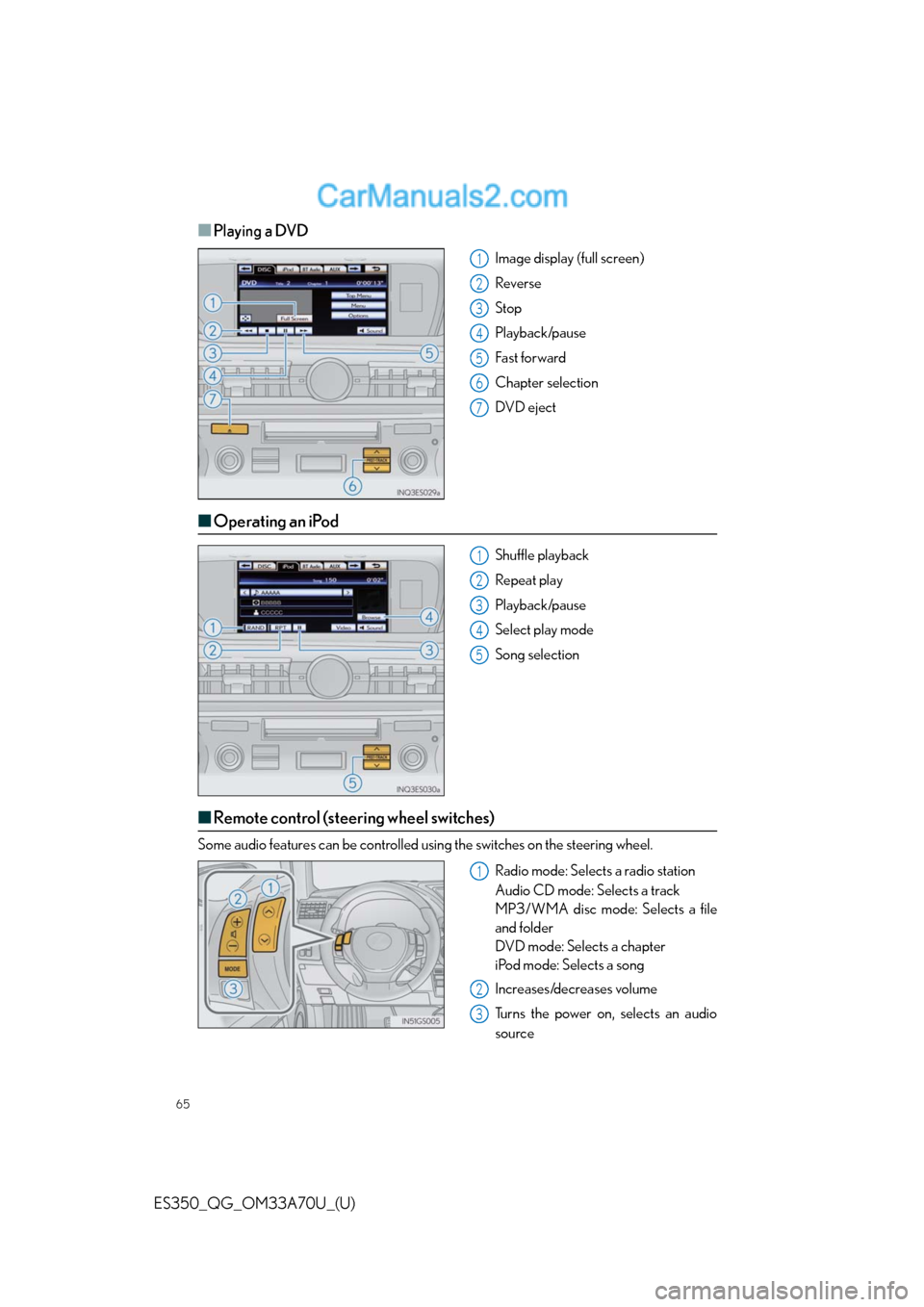
Image display (full screen)
Reverse
Stop
Playback/pause
Fast for ward
Chapter selection
DVD eject
■Operating an iPod
Shuffle playback
Repeat play
Playback/pause
Select play mode
Song selection
■Remote control (steering wheel switches)
Some audio features can be controlled using the switches on the steering wheel.
Radio mode: Selects a radio station
Audio CD mode: Selects a track
MP3/WMA disc mode: Selects a file
and folder
DVD mode: Selects a chapter
iPod mode: Selects a song
Increases/decreases volume
Turns the power on, selects an audio
source
1
2
3
4
5
6
7
1
2
3
4
5
1
2
3
Page 67 of 110
67
ES350_QG_OM33A70U_(U)
Voice Command System (with navigation
system)
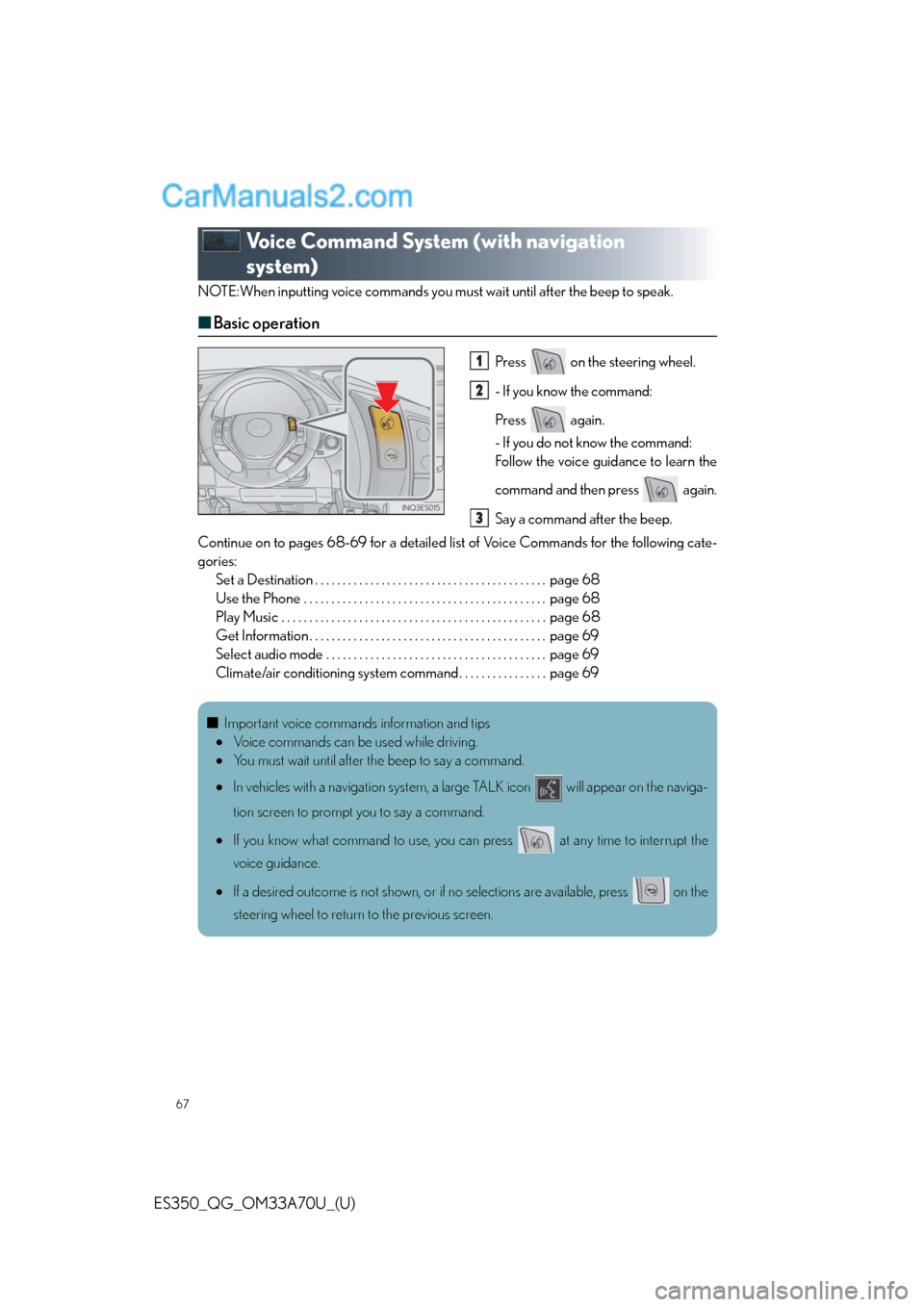
NOTE:When inputting voice commands you must wait until after the beep to speak.
■Basic operation
Press on the steering wheel.
- If you know the command:
Press again.
- If you do not know the command:
Follow the voice guidance to learn the
command and then press again.
Say a command after the beep.
Continue on to pages 68-69 for a detailed list of Voice Commands for the following cate-
gories:
Set a Destination . . . . . . . . . . . . . . . . . . . . . . . . . . . . . . . . . . . . . . . . . . page 68
Use the Phone . . . . . . . . . . . . . . . . . . . . . . . . . . . . . . . . . . . . . . . . . . . . page 68
Play Music . . . . . . . . . . . . . . . . . . . . . . . . . . . . . . . . . . . . . . . . . . . . . . . . page 68
Get Information . . . . . . . . . . . . . . . . . . . . . . . . . . . . . . . . . . . . . . . . . . . page 69
Select audio mode . . . . . . . . . . . . . . . . . . . . . . . . . . . . . . . . . . . . . . . . page 69
Climate/air conditioning system command . . . . . . . . . . . . . . . . page 691
2
3
■Important voice commands information and tips
Voice commands can be used while driving.
You must wait until after the beep to say a command.
In vehicles with a navigation system, a large TALK icon will appear on the naviga-
tion screen to prompt you to say a command.
If you know what command to use, you can press at any time to interrupt the
voice guidance.
If a desired outcome is not shown, or if no selections are available, press on the
steering wheel to return to the previous screen.
Page 69 of 110
69
ES350_QG_OM33A70U_(U)
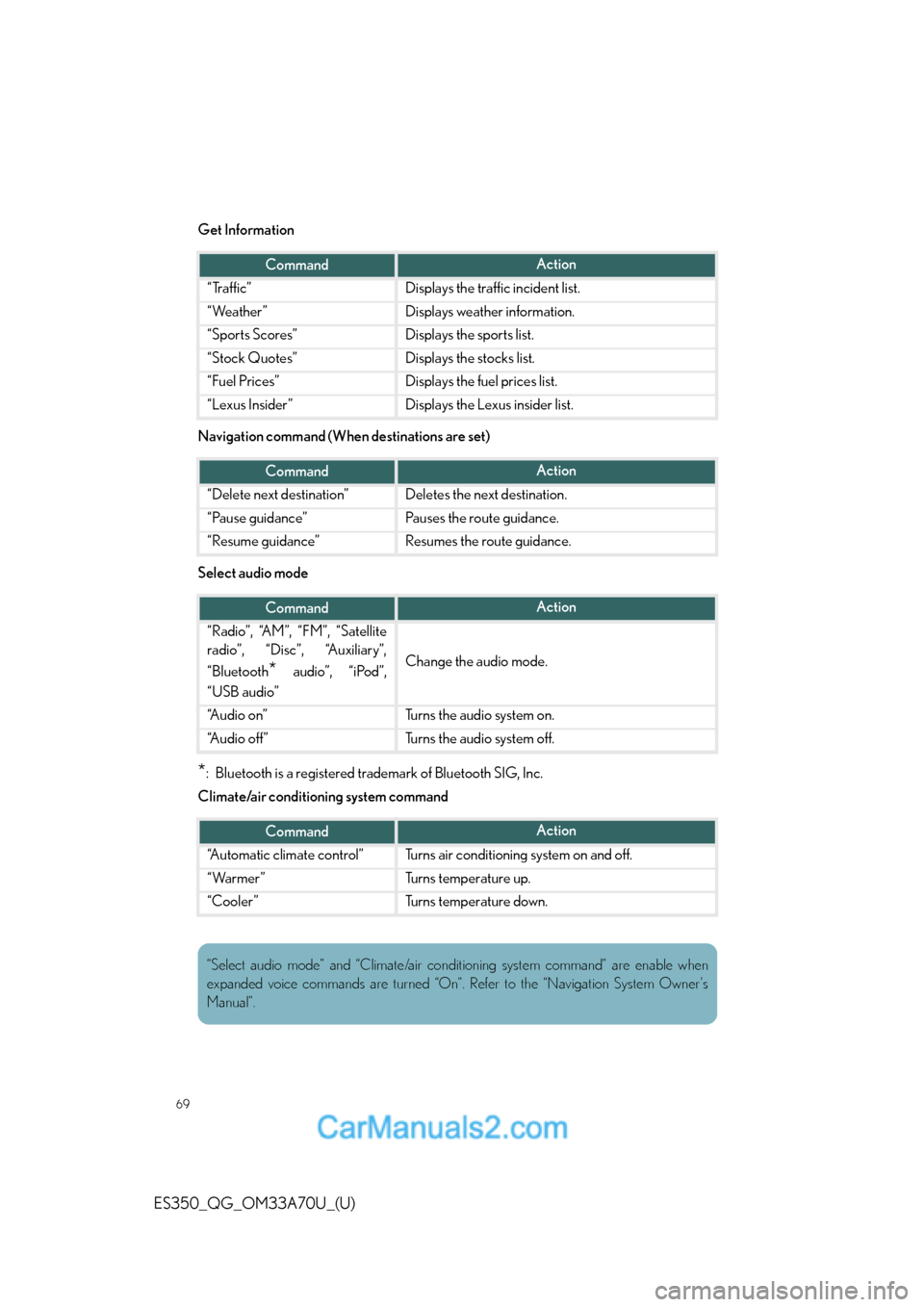
Get Information
Navigation command (When destinations are set)
Select audio mode
*: Bluetooth is a registered trademark of Bluetooth SIG, Inc.
Climate/air conditioning system command
CommandAction
“Traffic”Displays the traffic incident list.
“Weather”Displays weather information.
“Sports Scores”Displays the sports list.
“Stock Quotes”Displays the stocks list.
“Fuel Prices”Displays the fuel prices list.
“Lexus Insider”Displays the Lexus insider list.
CommandAction
“Delete next destination”Deletes the next destination.
“Pause guidance”Pauses the route guidance.
“Resume guidance”Resumes the route guidance.
CommandAction
“Radio”, “AM”, “FM”, “Satellite
radio”, “Disc”, “Auxiliary”,
“Bluetooth
* audio”, “iPod”,
“USB audio”Change the audio mode.
“A u d i o o n ”Turns the audio system on.
“A u d i o o f f ”Turns the audio system off.
CommandAction
“Automatic climate control”Turns air conditioning system on and off.
“Warmer”Turns temperature up.
“Cooler”Turns temperature down.
“Select audio mode” and “Climate/air conditioning system command” are enable when
expanded voice commands are turned “On”. Refer to the “Navigation System Owner’s
Manual”.
Page 70 of 110
70
ES350_QG_OM33A70U_(U)
Lexus Display Audio controller
(with Lexus Display Audio)
■Basic operation
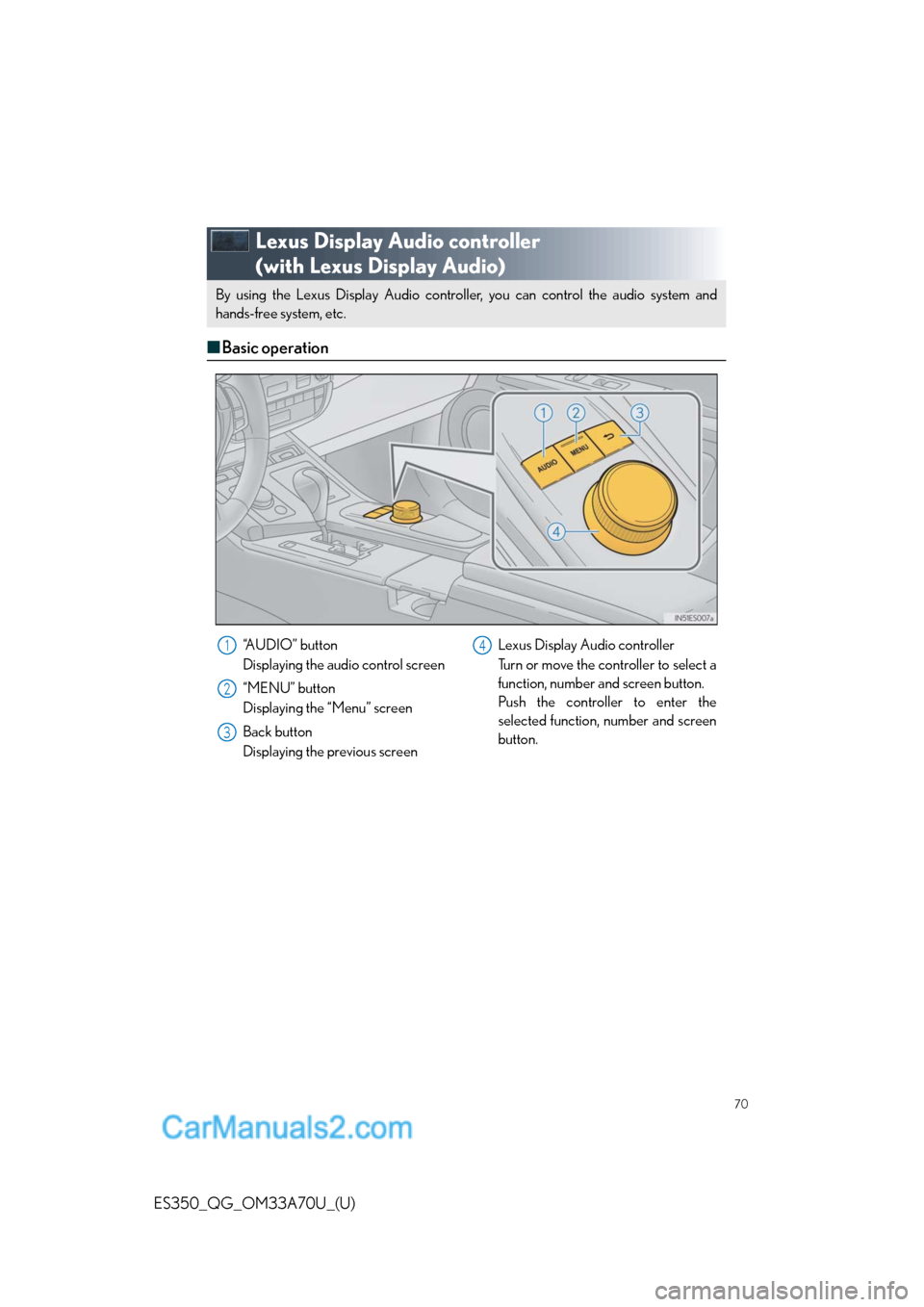
By using the Lexus Display Audio controller, you can control the audio system and
hands-free system, etc. By using the Lexus Display Audio controller, you can control the audio system and
hands-free system, etc.
“A U D I O ” b u t t o n
Displaying the audio control screen
“MENU” button
Displaying the “Menu” screen
Back button
Displaying the previous screenLexus Display Audio controller
Turn or move the controller to select a
function, number and screen button.
Push the controller to enter the
selected function, number and screen
button.1
2
3
4
Page 71 of 110
71
ES350_QG_OM33A70U_(U)
■Menu
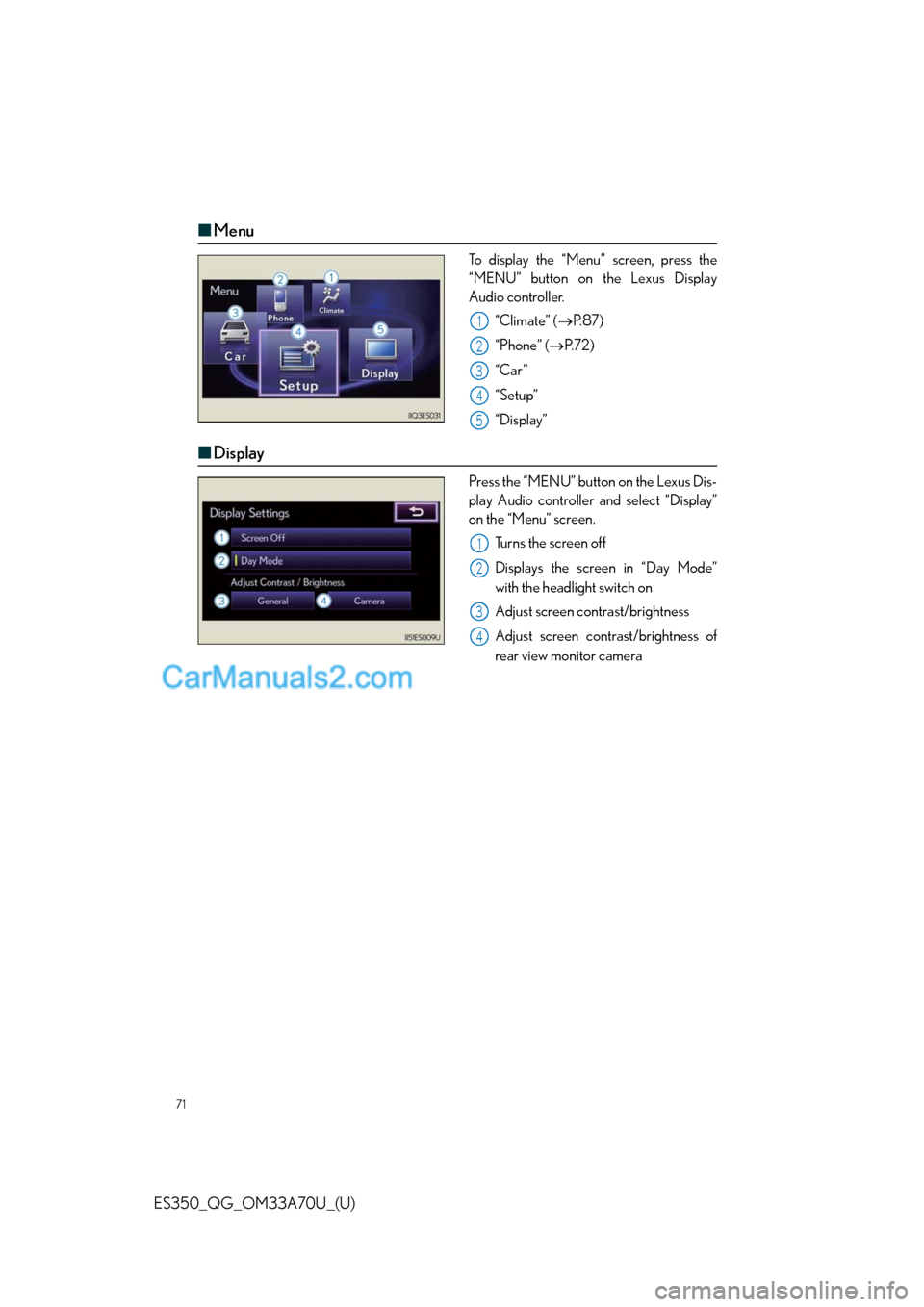
To display the “Menu” screen, press the
“MENU” button on the Lexus Display
Audio controller.
“Climate” (P. 8 7 )
“Phone” (P. 7 2 )
“Car ”
“Setup”
“Display”
■Display
Press the “MENU” button on the Lexus Dis-
play Audio controller and select “Display”
on the “Menu” screen.
Turns the screen off
Displays the screen in “Day Mode”
with the headlight switch on
Adjust screen contrast/brightness
Adjust screen contrast/brightness of
rear view monitor camera
1
2
3
4
5
1
2
3
4
Page 72 of 110
72
ES350_QG_OM33A70U_(U)
Hands-free System For Cellular Phone
(with Lexus Display Audio)
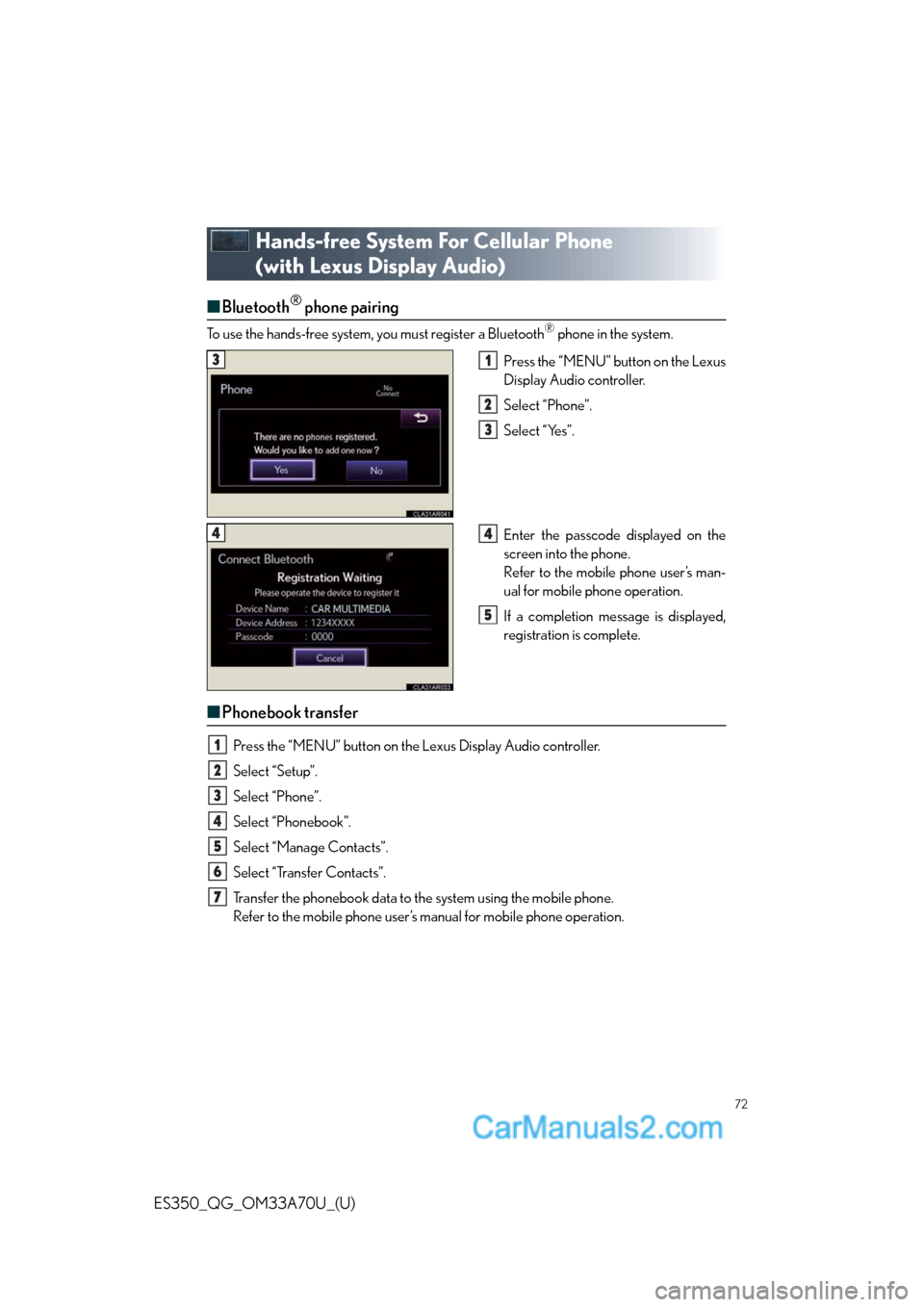
■Bluetooth® phone pairing
To use the hands-free system, you must register a Bluetooth® phone in the system.
Press the “MENU” button on the Lexus
Display Audio controller.
Select “Phone”.
Select “Yes”.
Enter the passcode displayed on the
screen into the phone.
Refer to the mobile phone user’s man-
ual for mobile phone operation.
If a completion message is displayed,
registration is complete.
■Phonebook transfer
Press the “MENU” button on the Lexus Display Audio controller.
Select “Setup”.
Select “Phone”.
Select “Phonebook”.
Select “Manage Contacts”.
Select “Transfer Contacts”.
Transfer the phonebook data to the system using the mobile phone.
Refer to the mobile phone user’s manual for mobile phone operation.
31
2
3
44
5
1
2
3
4
5
6
7
Page 73 of 110
73
ES350_QG_OM33A70U_(U)
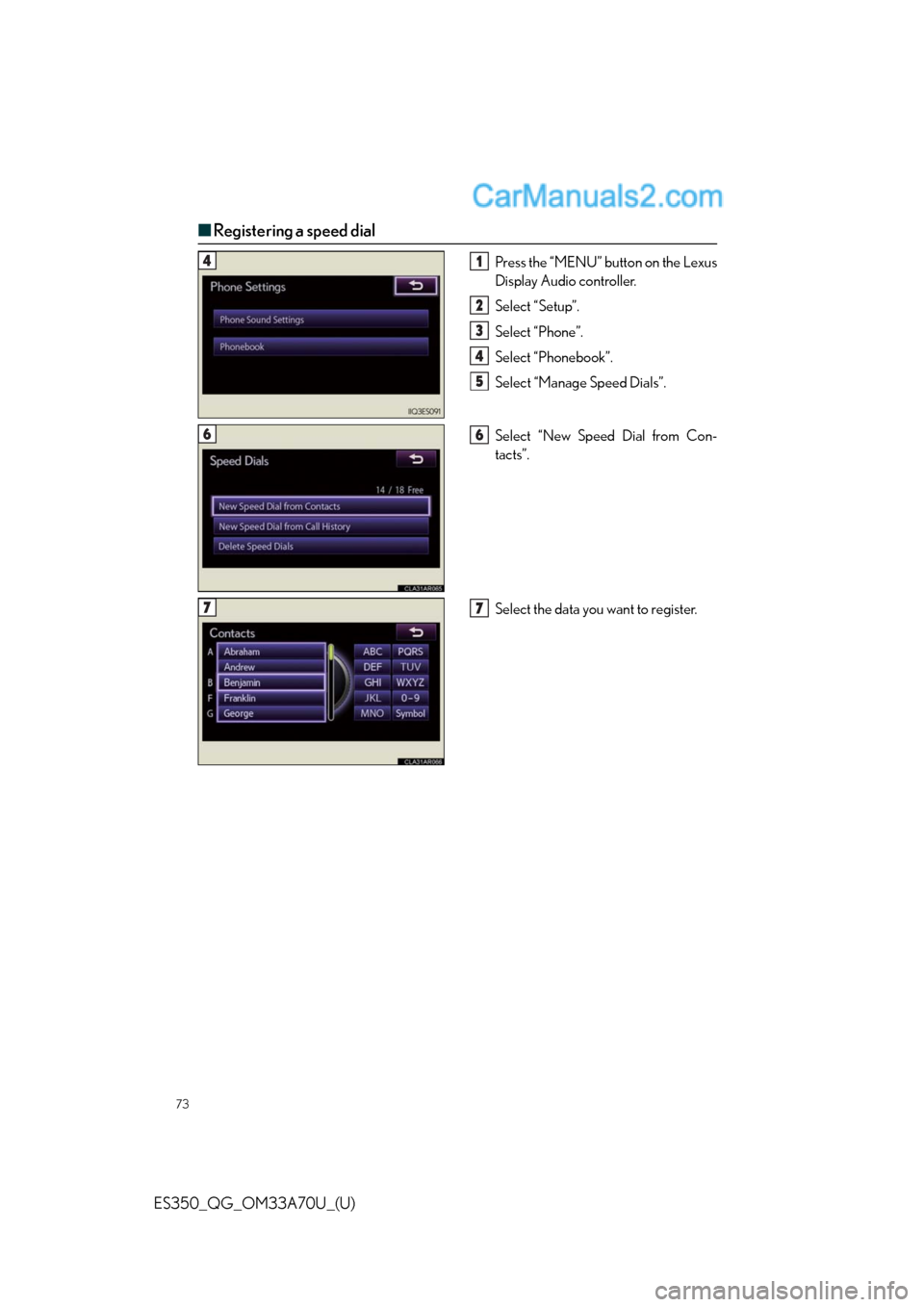
■Registering a speed dial
Press the “MENU” button on the Lexus
Display Audio controller.
Select “Setup”.
Select “Phone”.
Select “Phonebook”.
Select “Manage Speed Dials”.
Select “New Speed Dial from Con-
tacts”.
Select the data you want to register.41
2
3
4
5
66
77