audio Lexus ES350 2014 Quick Guide
[x] Cancel search | Manufacturer: LEXUS, Model Year: 2014, Model line: ES350, Model: Lexus ES350 2014Pages: 112, PDF Size: 2.53 MB
Page 75 of 112

74
ES350_QG_OM33A70U_(U)
■Calling by speed dial
Press the “MENU” button on the Lexus
Display Audio controller.
Select “Phone”.
Select “Speed Dials”.
Select the desired tab and choose the
desired number to make a call.
■Receiving a call
When a call is received, this screen is
displayed with a sound.
Press on the steering wheel to
talk on the phone.
To refuse the call, press on the
steering wheel.
■ Steering switches
Sending/Receiving/“Phone” screen
display
End call/Refuse call
Start the voice command system
Increases/decreases volume
21
2
3
44
11
2
1
2
3
4
Page 76 of 112
75
ES350_QG_OM33A70U_(U)
Audio System (with Lexus Display Audio )
■Audio control screen
Follow the procedure below to display the audio control screen.
Press the “AUDIO” button on the Lexus Display Audio controller.
Using the Lexus Display Audio controller, sele ct “Source” and select the desired audio
source.
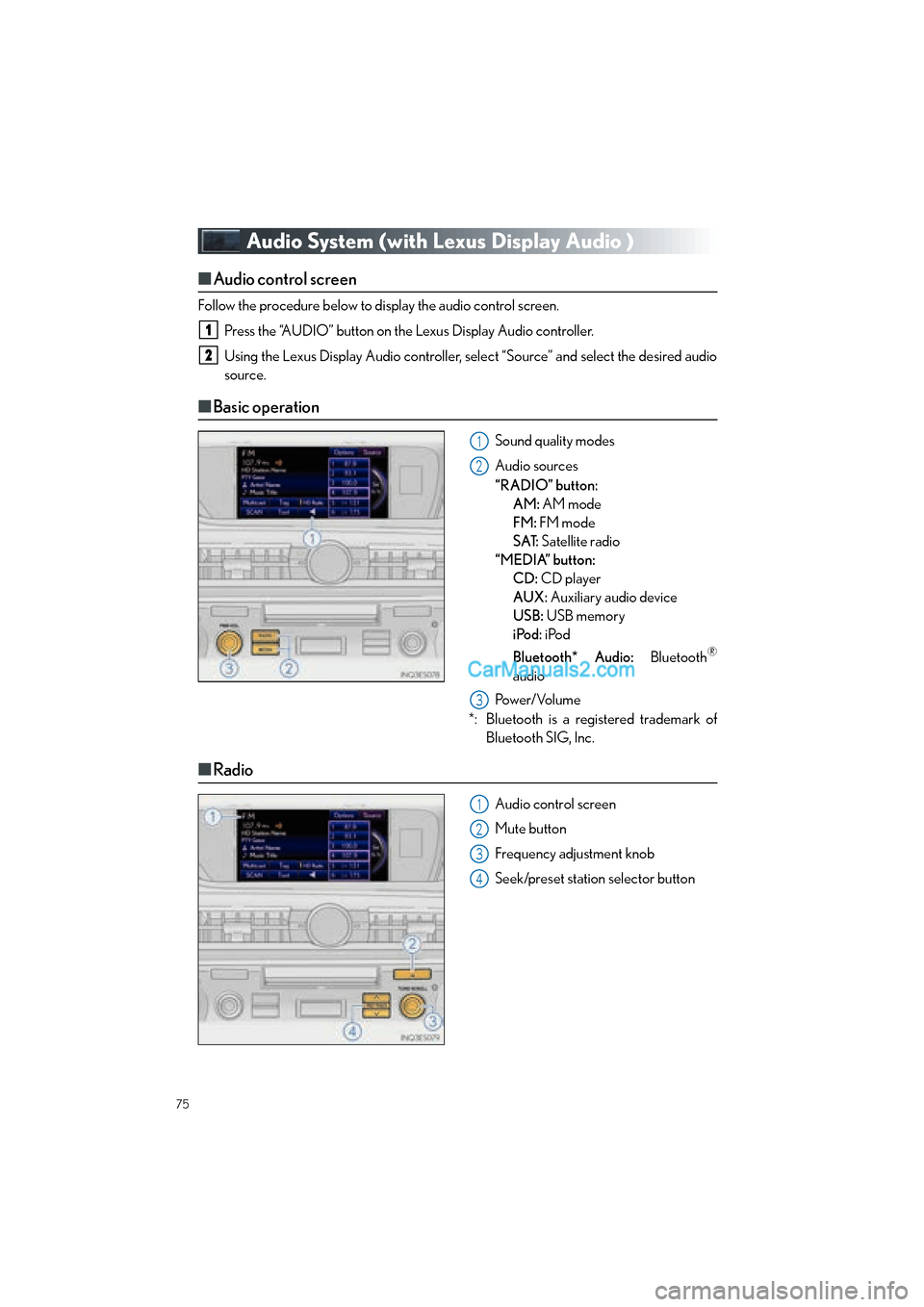
■ Basic operation
Sound quality modes
Audio sources
“RADIO” button:
AM: AM mode
FM: FM mode
SAT: Satellite radio
“MEDIA” button: CD: CD player
AUX: Auxiliary audio device
USB: USB memory
iPod: iPod
Bluetooth* Audio: Bluetooth
®
audio
Pow e r/ Vo l u m e
*: Bluetooth is a registered trademark of Bluetooth SIG, Inc.
■Radio
Audio control screen
Mute button
Frequency adjustment knob
Seek/preset station selector button
1
2
1
2
3
1
2
3
4
Page 77 of 112
76
ES350_QG_OM33A70U_(U)
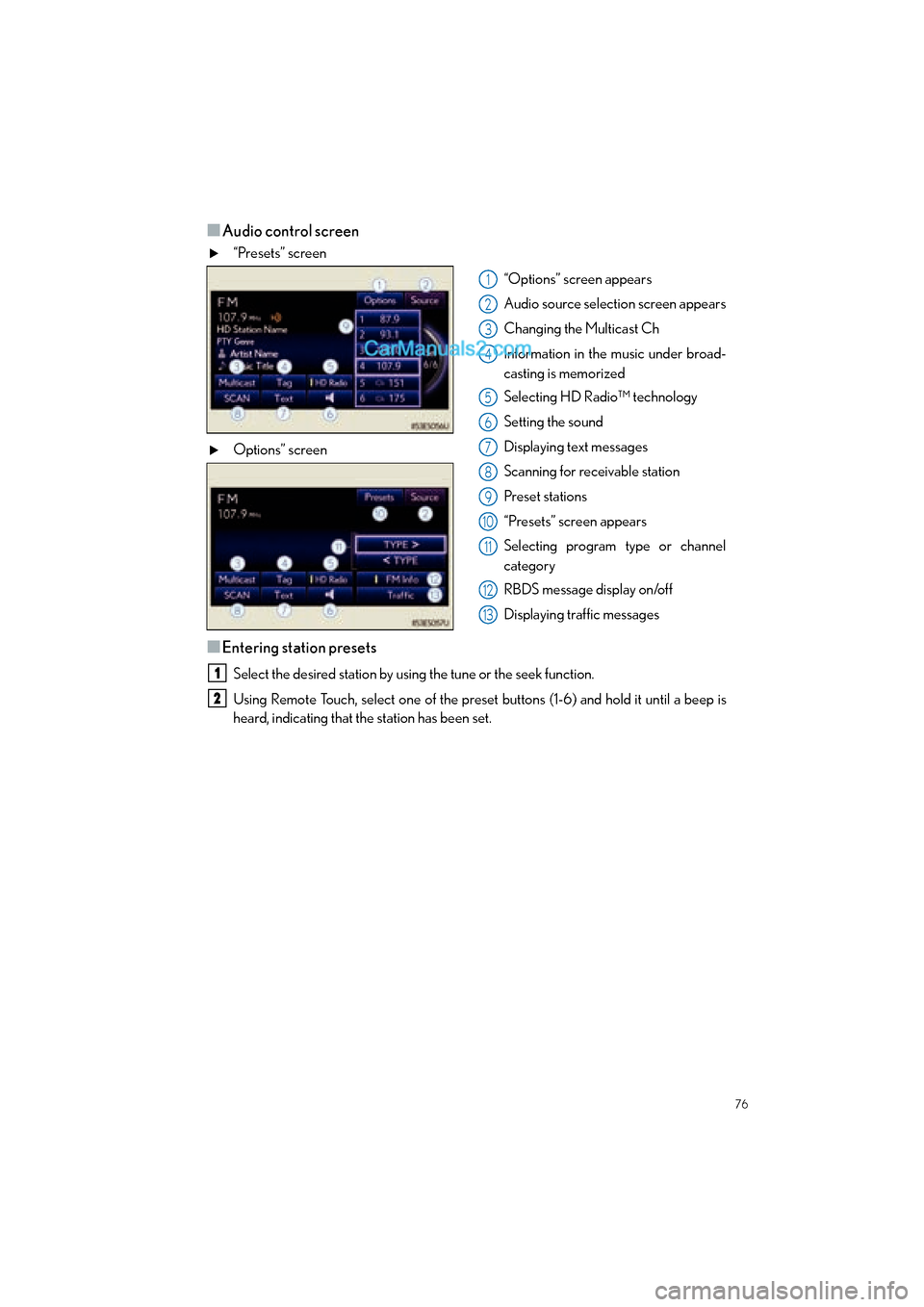
■Audio control screen
“Presets” screen“Options” screen appears
Audio source selection screen appears
Changing the Multicast Ch
Information in the music under broad-
casting is memorized
Selecting HD Radio™ technology
Setting the sound
Displaying text messages
Scanning for receivable station
Preset stations
“Presets” screen appears
Selecting program type or channel
category
RBDS message display on/off
Displaying traffic messages
Options” screen
■Entering station presets
Select the desired station by using the tune or the seek function.
Using Remote Touch, select one of the preset
buttons (1-6) and hold it until a beep is
heard, indicating that the station has been set.
1
2
3
4
5
6
7
8
9
10
11
12
13
1
2
Page 78 of 112
77
ES350_QG_OM33A70U_(U)
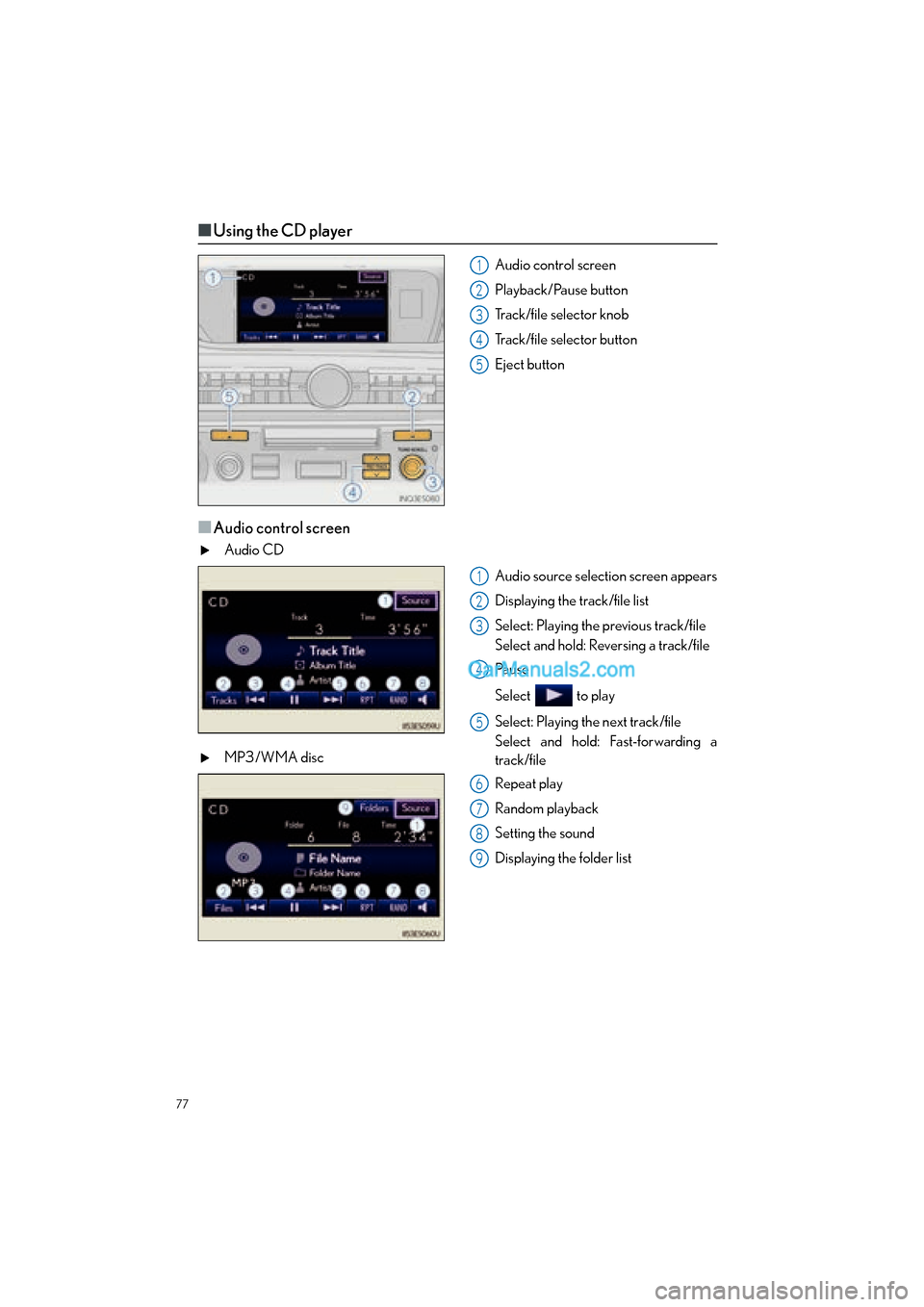
■Using the CD player
Audio control screen
Playback/Pause button
Track/file selector knob
Track/file selector button
Eject button
■Audio control screen
Audio CD
Audio source selection screen appears
Displaying the track/file list
Select: Playing the previous track/file
Select and hold: Reversing a track/file
Pa u s e
Select to play
Select: Playing the next track/file
Select and hold: Fast-forwarding a
track/file
MP3/WMA disc
Repeat play
Random playback
Setting the sound
Displaying the folder list
1
2
3
4
5
1
2
3
4
5
6
7
8
9
Page 79 of 112
78
ES350_QG_OM33A70U_(U)
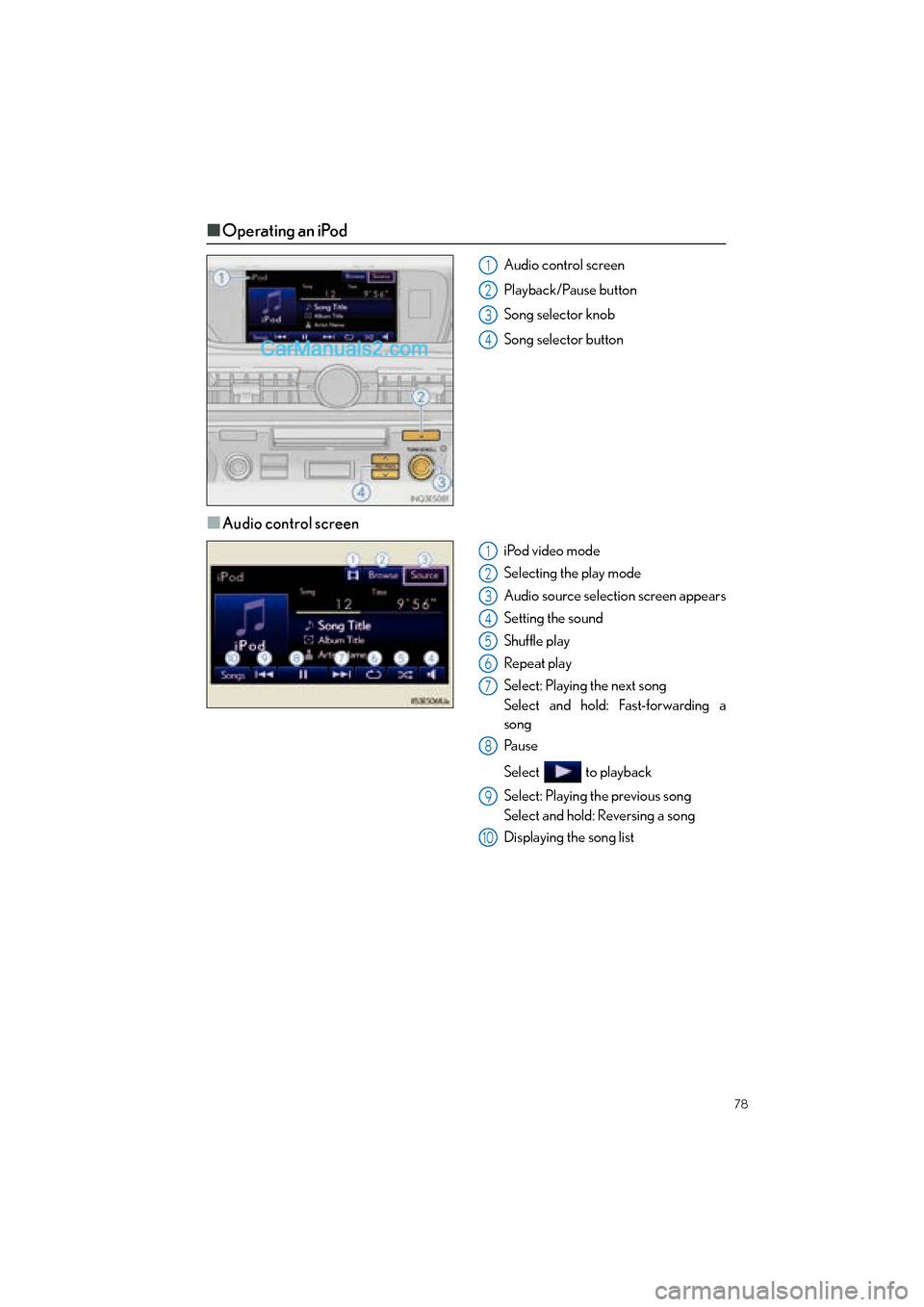
■Operating an iPod
Audio control screen
Playback/Pause button
Song selector knob
Song selector button
■Audio control screen
iPod video mode
Selecting the play mode
Audio source selection screen appears
Setting the sound
Shuffle play
Repeat play
Select: Playing the next song
Select and hold: Fast-forwarding a
song
Pau s e
Select to playback
Select: Playing the previous song
Select and hold: Reversing a song
Displaying the song list
1
2
3
4
1
2
3
4
5
6
7
8
9
10
Page 80 of 112

79
ES350_QG_OM33A70U_(U)
■Remote control (steering wheel switches)
Some audio features can be controlled using the switches on the steering wheel.
Radio mode: Selects a radio station
Audio CD mode: Selects a track
MP3/WMA disc mode: Selects a file
and folder
iPod mode: Selects a song
Increases/decreases volume
Turns the power on, selects an audio
source
1
2
3
Page 81 of 112
80
ES350_QG_OM33A70U_(U)
Air Conditioning System
(with Lexus Display Audio)
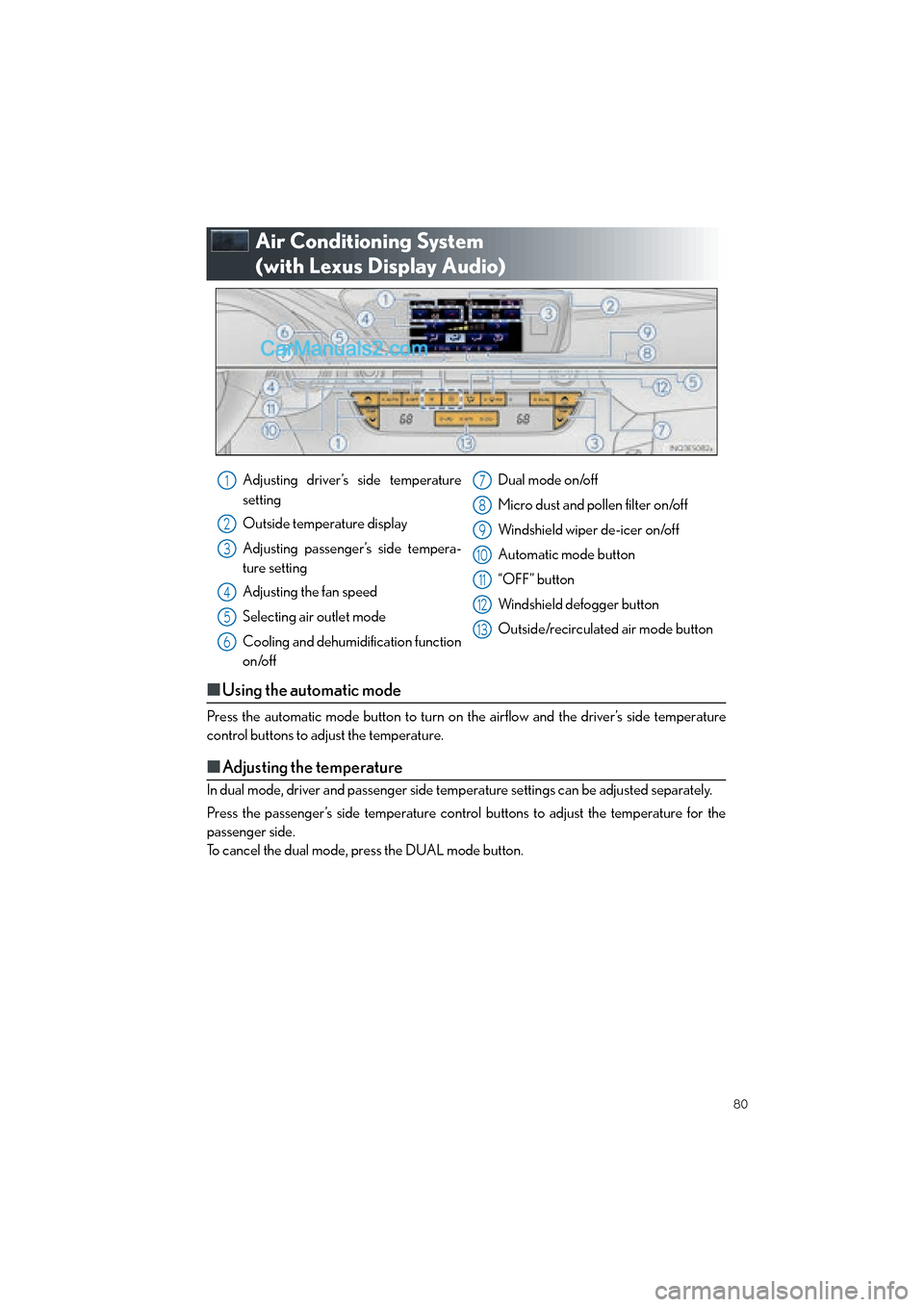
■Using the automatic mode
Press the automatic mode button to turn on the airflow and the driver’s side temperature
control buttons to adjust the temperature.
■Adjusting the temperature
In dual mode, driver and passenger side temp erature settings can be adjusted separately.
Press the passenger’s side temperature control buttons to adjust the temperature for the
passenger side.
To cancel the dual mode, press the DUAL mode button.
Adjusting driver’s side temperature
setting
Outside temperature display
Adjusting passenger’s side tempera-
ture setting
Adjusting the fan speed
Selecting air outlet mode
Cooling and dehumidification function
on/off Dual mode on/off
Micro dust and pollen filter on/off
Windshield wiper de-icer on/off
Automatic mode button
“OFF” button
Windshield defogger button
Outside/recirculated air mode button1
2
3
4
5
6
7
8
9
10
11
12
13
Page 82 of 112
81
ES350_QG_OM33A70U_(U)
Hands-free System For Cellular Phone (without
navigation system or Lexus Display Audio)
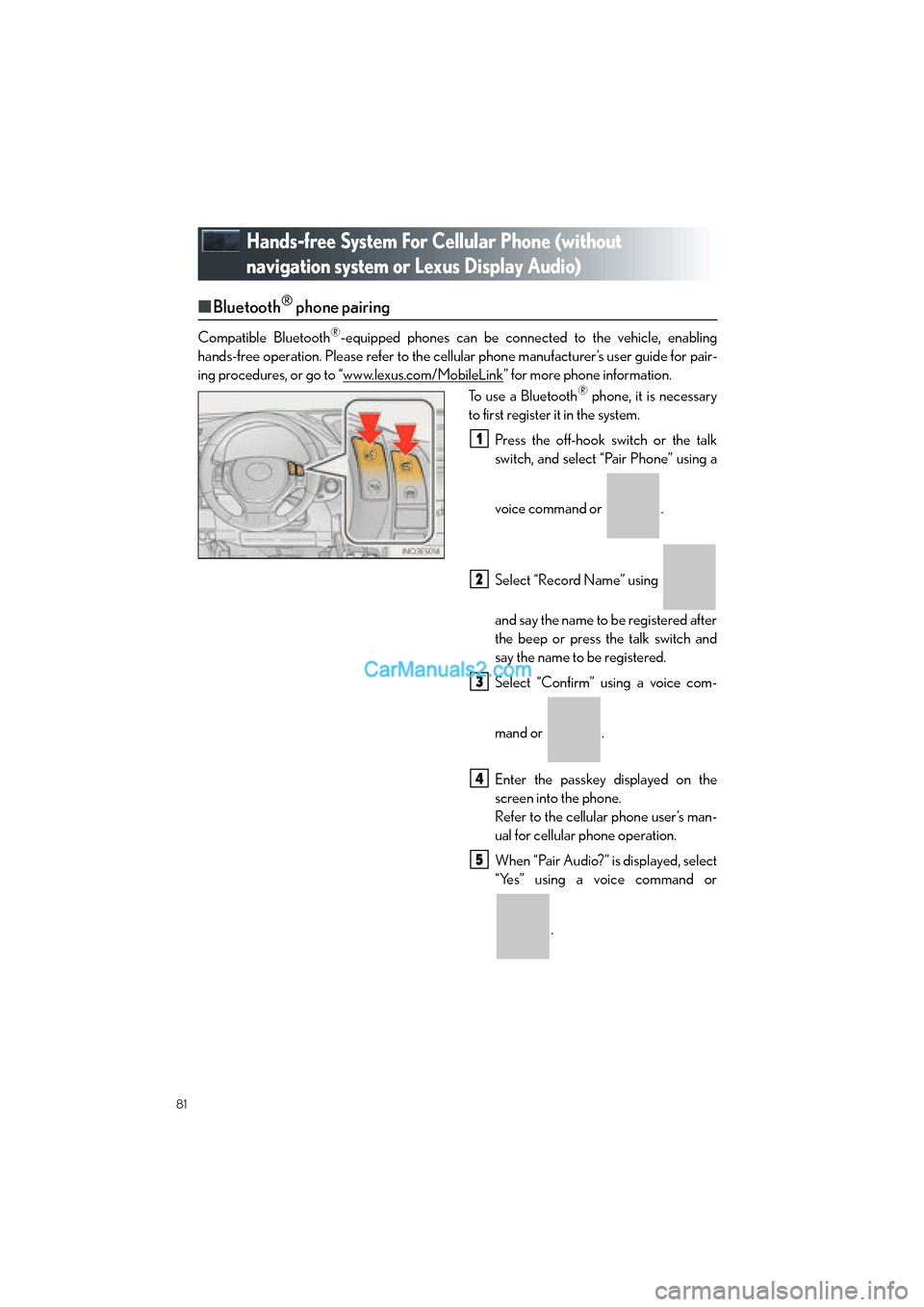
■Bluetooth® phone pairing
Compatible Bluetooth®-equipped phones can be connected to the vehicle, enabling
hands-free operation. Please re fer to the cellular phone manufacturer’s user guide for pair-
ing procedures, or go to “www.lexus.com/MobileLink
” for more phone information.
To use a Bluetooth® phone, it is necessary
to first register it in the system.
Press the off-hook switch or the talk
switch, and select “Pair Phone” using a
voice command or .
Select “Record Name” using
and say the name to be registered after
the beep or press the talk switch and
say the name to be registered.
Select “Confirm” using a voice com-
mand or .
Enter the passkey displayed on the
screen into the phone.
Refer to the cellular phone user’s man-
ual for cellular phone operation.
When “Pair Audio?” is displayed, select
“Yes” using a voice command or
.
1
2
3
4
5
Page 84 of 112
83
ES350_QG_OM33A70U_(U)
■When receiving a phone call
■
Answering a phone call
Press the off-hook switch.
■Refusing a phone call
Press the on-hook switch.
Audio System (without navigation
system or Lexus Display Audio)
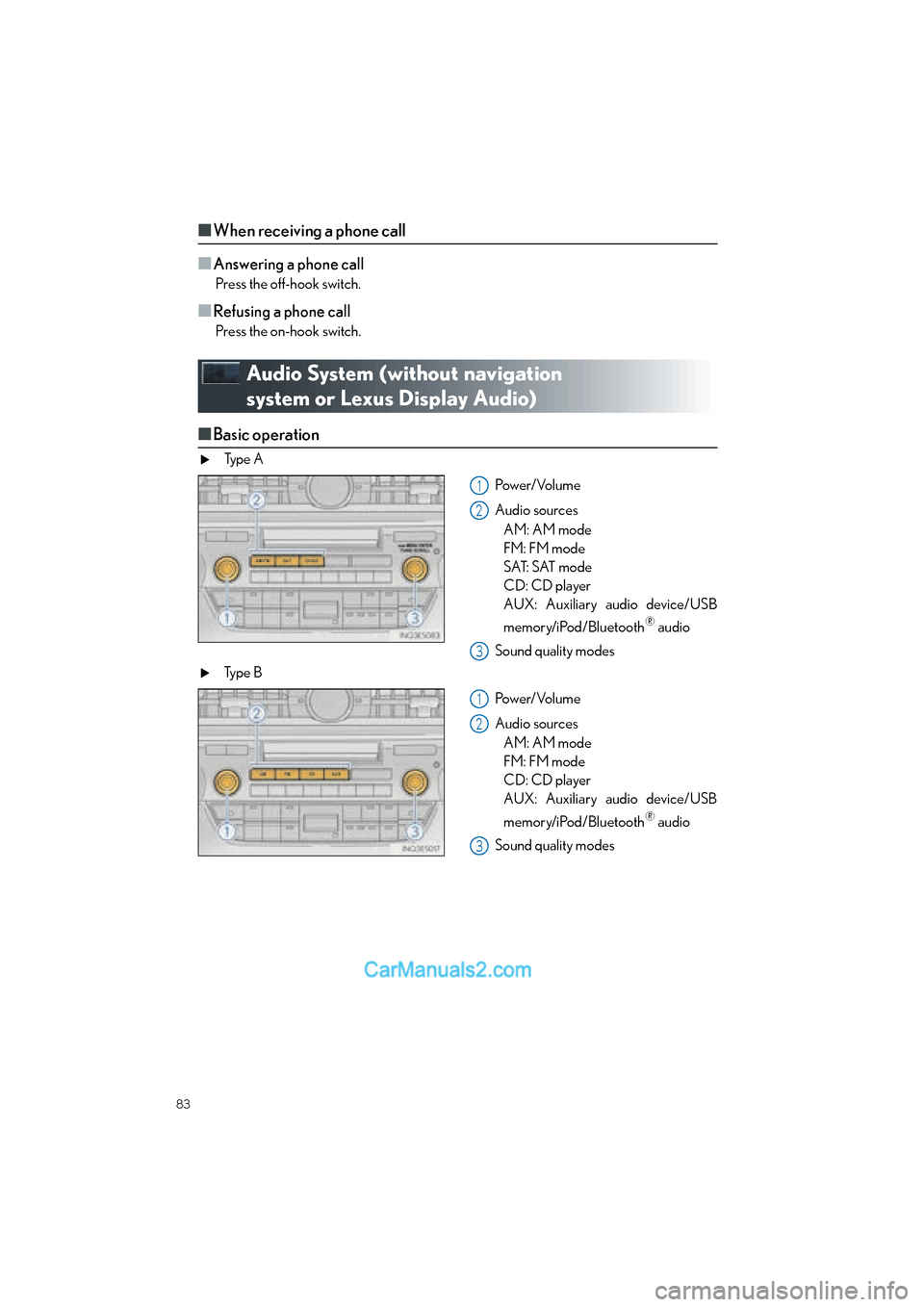
■ Basic operation
Ty p e A
Pow e r/ Vo l u m e
Audio sourcesAM: AM mode
FM: FM mode
SAT: SAT mode
CD: CD player
AUX: Auxiliary audio device/USB
memory/iPod/Bluetooth
® audio
Sound quality modes
Ty p e B
Pow e r/ Vo l u m e
Audio sourcesAM: AM mode
FM: FM mode
CD: CD player
AUX: Auxiliary audio device/USB
memory/iPod/Bluetooth
® audio
Sound quality modes
1
2
3
1
2
3
Page 85 of 112

84
ES350_QG_OM33A70U_(U)
■Radio
Ty p e A
Scan button
Seek button
Channel category button
Frequency adjustment (AM/FM
mode) and channel (SAT mode) knob
Traffic information button
Preset station buttons
Radio text message button
Ty p e B
Seek button
Channel category button
Frequency adjustment knob
Traffic information button
Preset station buttons
Radio text message button
■Entering station presets
Select the desired station by using the tune or the seek function.
Press and hold one of the preset buttons (1-6) until you hear a beep, indicating that the
station has been set.
■CD player
■
Playing an audio CD
Eject button
Load button
Search playback button (if equipped)
Track selector button
CD selector button
Playback/Pause button
Repeat play button
Random playback button
Text button
1
2
3
4
5
6
7
1
2
3
4
5
6
1
2
1
2
3
4
5
6
7
8
9