remote control Lexus ES350 2014 Quick Guide
[x] Cancel search | Manufacturer: LEXUS, Model Year: 2014, Model line: ES350, Model: Lexus ES350 2014Pages: 112, PDF Size: 2.53 MB
Page 2 of 112
1
ES350_QG_OM33A70U_(U)
The Quick Guide is not intended as a substitute for your Owner’s
Manual. We strongly encourage you to review the Owner’s
Manual and supplementary manuals so you will have a better
understanding of your vehicle’ s capabilities and limitations.
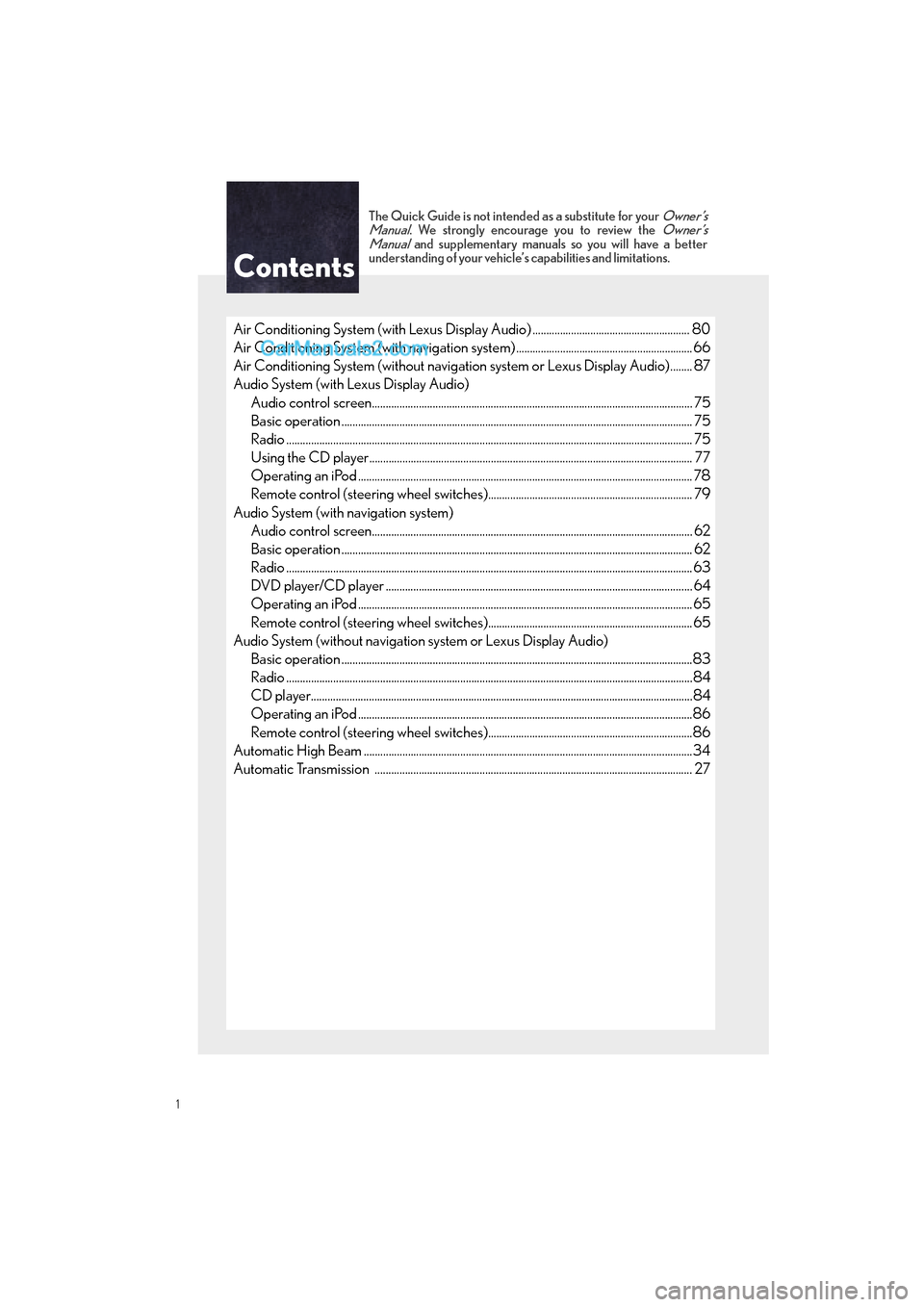
Air Conditioning System (with Lexus Display Audio) ......................................................... 80
Air Conditioning System (with navigation system) ................................................................ 66
Air Conditioning System (without navigation system or Lexus Display Audio)........ 87
Audio System (with Lexus Display Audio)
Audio control screen........................................................................................................... ......... 75
Basic operation ................................................................................................................ ............... 75
Radio ................................................................................................................................................... 75
Using the CD player............................................................................................................ ......... 77
Operating an iPod .............................................................................................................. ........... 78
Remote control (steering wheel switches).......................................................................... 79
Audio System (with navigation system) Audio control screen........................................................................................................... ......... 62
Basic operation ................................................................................................................ ............... 62
Radio ...................................................................................................................................................63
DVD player/CD player ........................................................................................................... .... 64
Operating an iPod .............................................................................................................. ...........65
Remote control (steering wheel switches)..........................................................................65
Audio System (without navigation system or Lexus Display Audio) Basic operation ................................................................................................................ ...............83
Radio .......................................................................................................................... .........................84
CD player...................................................................................................................... ....................84
Operating an iPod .............................................................................................................. ...........86
Remote control (steering wheel switches)..........................................................................86
Automatic High Beam ............................................................................................................ ...........34
Automatic Transmission ........................................................................................................ ........... 27
Contents
Page 9 of 112
8
ES350_QG_OM33A70U_(U)
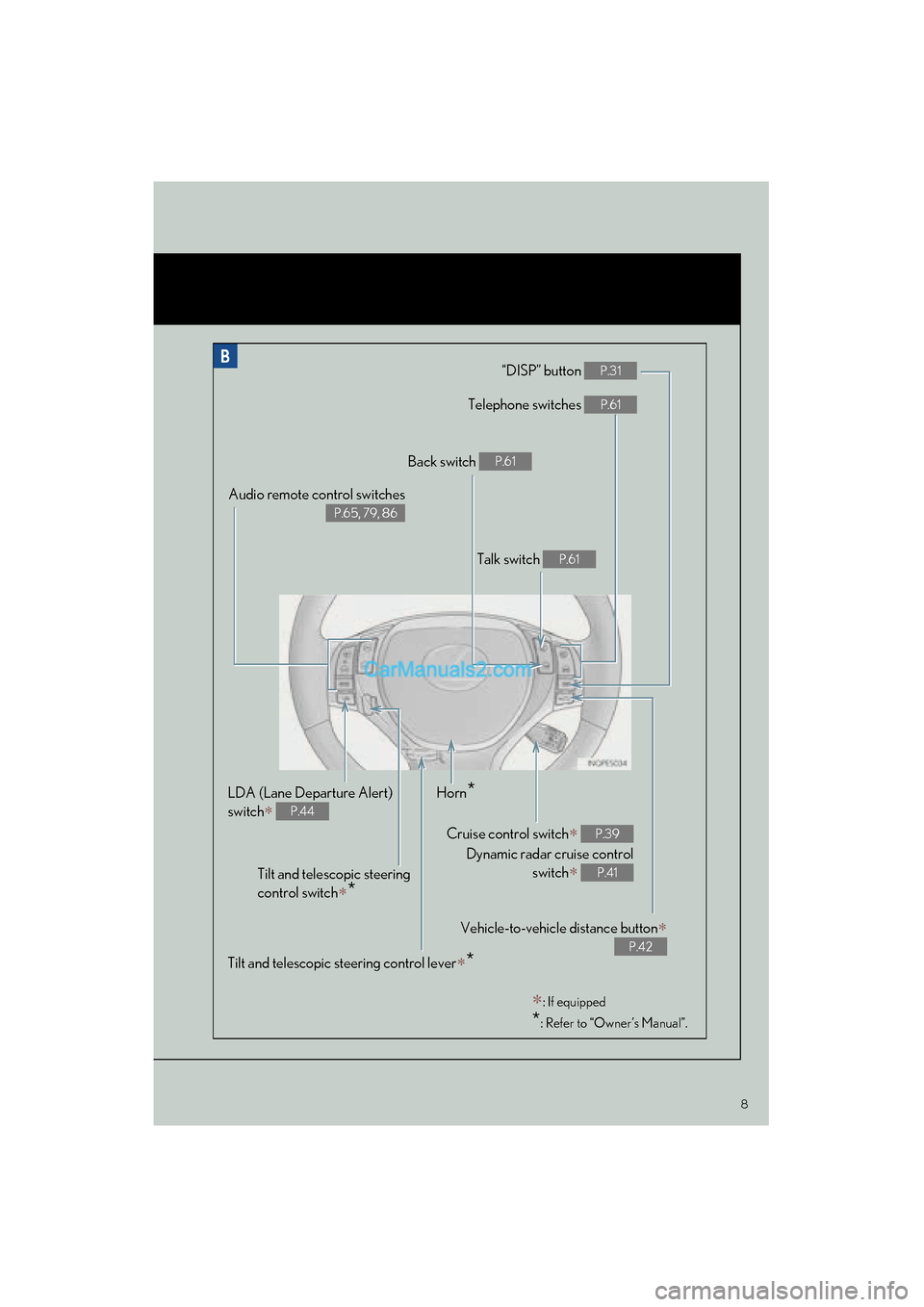
“DISP” button P.31
Telephone switches P.61
Vehicle-to-vehicle distance button∗
P.42
Back switch P.61
Talk switch P.61
Audio remote control switches
P.65, 79, 86
LDA (Lane Departure Alert)
switch
∗ P.44
Cruise control switch∗
Dynamic radar cruise control switch
∗
P.39
P.41
Horn*
Tilt and telescopic steering
control switch
∗*
∗: If equipped
*: Refer to “Owner’s Manual”.
Tilt and telescopic steering control lever∗*
Page 10 of 112
9
ES350_QG_OM33A70U_(U)
OverviewInstrument Panel
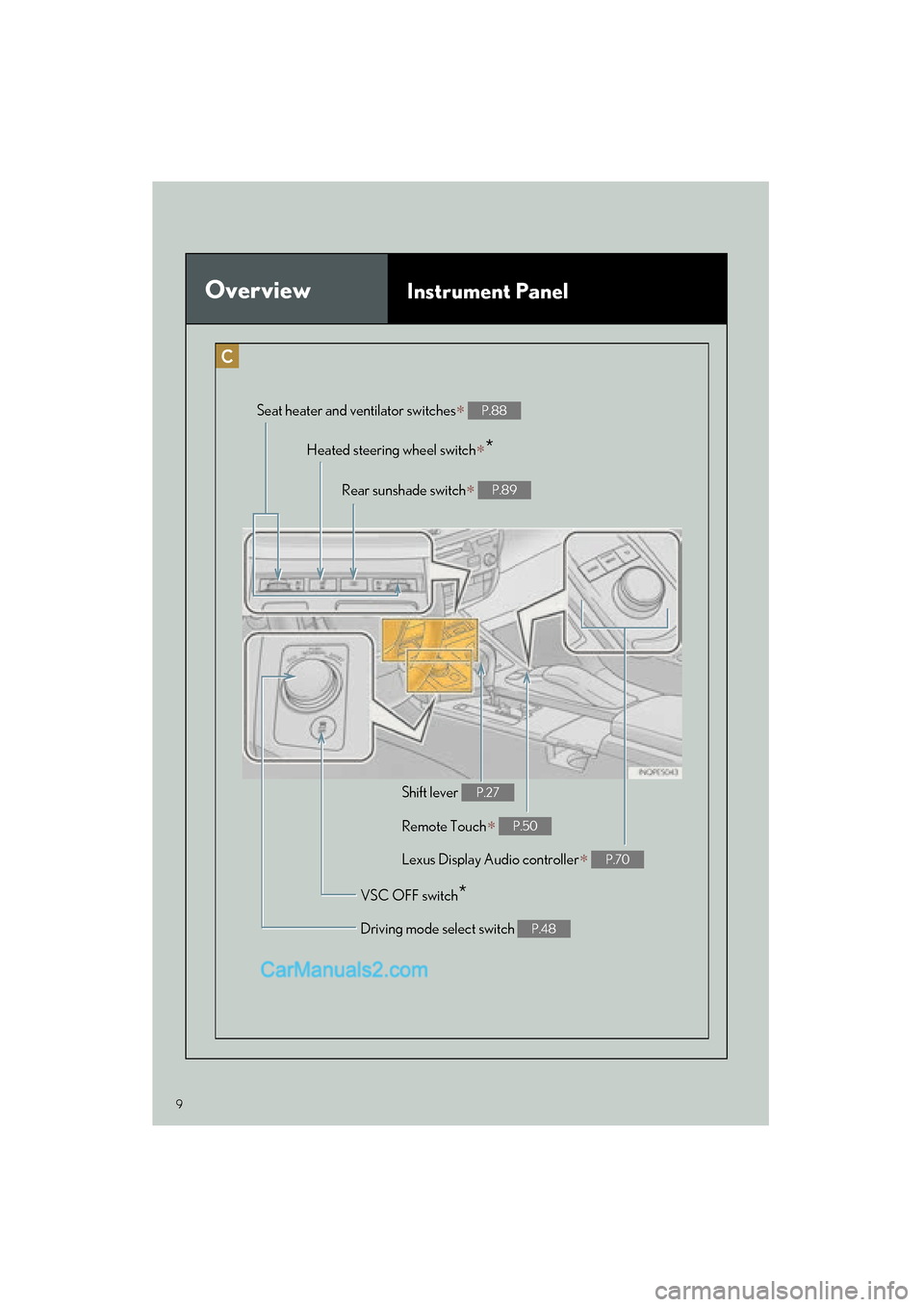
Remote Touch∗ P.50
Heated steering wheel switch∗*
VSC OFF switch*
Seat heater and ventilator switches∗ P.88
Driving mode select switch P.48
Shift lever P.27
Rear sunshade switch∗ P.89
Lexus Display Audio controller∗ P.70
Page 13 of 112

12
ES350_QG_OM33A70U_(U)
Consumption Screen (if equipped)
■Displaying the consumption screen
Vehicles with a navigation system
Press the “MENU” button on Remote Touch, then select “Info/Apps” on the “Menu”
screen.
Select “Fuel Consumption” on the “Information” screen.
Vehicles with Lexus Display Audio system
Press the “MENU” button on the Lexus Display Audio controller, then select “Car” on the
“Menu” screen.
● Trip information
If the “Trip Information” screen is not displayed, select “Trip Information”.
Vehicles with a navigation system
Current fuel consumption
Fuel consumption in the past 15 min-
utes
Regenerated energy in the past 15
minutes (if equipped)
Displays the average vehicle speed
since the engine was started.
Displays the elapsed time since the
engine was started.
Cruising range
Reset the consumption data
“Past Record” (Navigation system) or
“History” (Lexus Display Audio sys-
tem) screen appears
“Energy Monitor” screen appears (if
equipped)
Vehicles with Lexus Display Audio system
You can view the status of your vehicle on th
e navigation system screen or Lexus Display
Audio system screen.
1
2
1
2
3
4
5
6
7
8
9
Page 15 of 112

14
ES350_QG_OM33A70U_(U)
Keys
■Electronic key
Smart access system with push-button start
(→ P.1 5 , 2 4 )
Wireless remote control (→ P.1 5 )
■Mechanical key
To take out the mechanical key, push the
release button and take the key out.
After using the mechanical key, store it in
the electronic key. Carry the mechanical
key together with the electronic key. If
the electronic key battery is depleted or
the entry function does not operate
properly, you will need the mechanical
key.
Page 16 of 112

15
ES350_QG_OM33A70U_(U)
■Wireless remote control
Locks all the doors
Unlocks all the doors
Pressing the button unlocks the driver’s
door. Pressing the button again within
5 seconds unlocks the other doors.
Opens the windows and moon roof
(press and hold)
*
Opens the trunk (press and hold)
If the vehicle is equipped with a power
trunk opener and closer, the trunk lid
automatically opens fully.
Sounds the alarm (press and hold)
*: This setting must be customized at your
Lexus dealer.
Smart Access System wi th Push-button Start
■Entering the vehicle
Grip the driver’s door handle to unlock the
door. Grip the passenger’s door handle to
unlock all the doors.
Make sure to touch the sensor on the
back of the handle.
The doors cannot be unlocked for 3 sec-
onds after the doors are locked.
1
2
3
4
5
The following operations can be performed simply by carrying the electronic key on your
person, for example in your pocket. (The driver should always carry the electronic key.)
For details on starting the engine, see page 24.
Page 18 of 112

17
ES350_QG_OM33A70U_(U)
■Changing the door unlock function setting
It is possible to set which doors the entry function unlocks using the wireless remote con-
trol. Turn the “START STOP ENGINE” switch off.
When the indicator light on the key surface is not on, press and hold ,
or for approximately 5 seconds while pressing and holding .
The setting changes each time an operation is performed, as shown below. (When
changing the setting continuously, release th e buttons, wait for at least 5 seconds, and
repeat step .)
To prevent unintended triggering of the alarm, unlock the doors using the wireless
remote control and open and close a door once after the settings have been changed. (If
a door is not opened within 60 seconds af ter is pressed, the doors will be locked
again and the alarm will automatically be set.)
In case that the alarm is triggered, immediately stop the alarm. ( →P.1 8 )
1
2
2
Multi-information
displayUnlocking functionBeep
Holding the driver’s door han-
dle unlocks only the driver’s
door.
Exterior: Beeps 3 times
Interior: Pings once
Holding a passenger’s door
handle unlocks all the doors.
Holding a door handle unlocks
all the doors.Exterior: Beeps twice
Interior: Pings once
For details on what to do when the electronic key does not operate properly, see page 108.
Page 63 of 112

62
ES350_QG_OM33A70U_(U)
Audio System (with navigation system)
■Audio control screen
Follow the procedure below to display the audio control screen.
Press the “MENU” button on Remote
To u c h .
Please refer to page 50 for Remote
To u c h o p e r a t i o n .
The “Menu” screen will be displayed.
Using Remote Touch, select “Radio” or
“Media” and select each tab.
■Basic operation
Sound quality modes
Audio sources
AM: AM radio
FM: FM radio
SAT: Satellite radio
Apps: Internet radio broadcast
DISC: DVD player/CD player
iPod: iPod
USB: USB memory
BT Audio: Bluetooth
® audio
AUX: Auxiliary audio device
Po w e r/ Vo l u m e
1
2
1
2
3
Page 66 of 112

65
ES350_QG_OM33A70U_(U)
■Playing a DVD
Image display (full screen)
Reverse
Stop
Playback/pause
Fa s t f o r wa rd
Chapter selection
DVD eject
■Operating an iPod
Shuffle playback
Repeat play
Playback/pause
Select play mode
Song selection
■Remote control (steering wheel switches)
Some audio features can be controlled using the switches on the steering wheel.
Radio mode: Selects a radio station
Audio CD mode: Selects a track
MP3/WMA disc mode: Selects a file
and folder
DVD mode: Selects a chapter
iPod mode: Selects a song
Increases/decreases volume
Turns the power on, selects an audio
source
1
2
3
4
5
6
7
1
2
3
4
5
1
2
3
Page 77 of 112
76
ES350_QG_OM33A70U_(U)
■Audio control screen
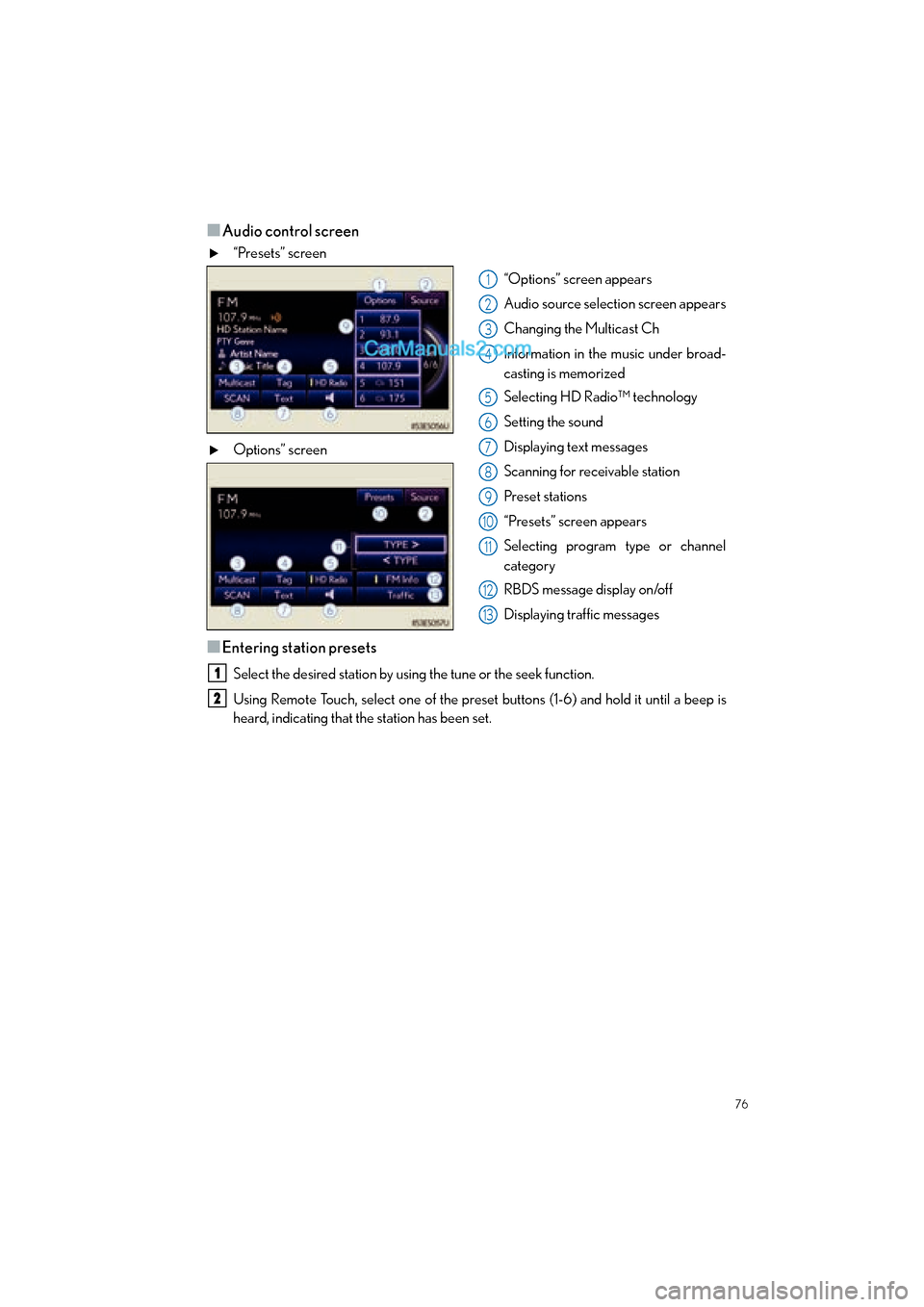
“Presets” screen“Options” screen appears
Audio source selection screen appears
Changing the Multicast Ch
Information in the music under broad-
casting is memorized
Selecting HD Radio™ technology
Setting the sound
Displaying text messages
Scanning for receivable station
Preset stations
“Presets” screen appears
Selecting program type or channel
category
RBDS message display on/off
Displaying traffic messages
Options” screen
■Entering station presets
Select the desired station by using the tune or the seek function.
Using Remote Touch, select one of the preset
buttons (1-6) and hold it until a beep is
heard, indicating that the station has been set.
1
2
3
4
5
6
7
8
9
10
11
12
13
1
2