steering wheel Lexus ES350 2014 Quick Guide
[x] Cancel search | Manufacturer: LEXUS, Model Year: 2014, Model line: ES350, Model: Lexus ES350 2014Pages: 112, PDF Size: 2.53 MB
Page 2 of 112
1
ES350_QG_OM33A70U_(U)
The Quick Guide is not intended as a substitute for your Owner’s
Manual. We strongly encourage you to review the Owner’s
Manual and supplementary manuals so you will have a better
understanding of your vehicle’ s capabilities and limitations.
Air Conditioning System (with Lexus Display Audio) ......................................................... 80
Air Conditioning System (with navigation system) ................................................................ 66
Air Conditioning System (without navigation system or Lexus Display Audio)........ 87
Audio System (with Lexus Display Audio)
Audio control screen........................................................................................................... ......... 75
Basic operation ................................................................................................................ ............... 75
Radio ................................................................................................................................................... 75
Using the CD player............................................................................................................ ......... 77
Operating an iPod .............................................................................................................. ........... 78
Remote control (steering wheel switches).......................................................................... 79
Audio System (with navigation system) Audio control screen........................................................................................................... ......... 62
Basic operation ................................................................................................................ ............... 62
Radio ...................................................................................................................................................63
DVD player/CD player ........................................................................................................... .... 64
Operating an iPod .............................................................................................................. ...........65
Remote control (steering wheel switches)..........................................................................65
Audio System (without navigation system or Lexus Display Audio) Basic operation ................................................................................................................ ...............83
Radio .......................................................................................................................... .........................84
CD player...................................................................................................................... ....................84
Operating an iPod .............................................................................................................. ...........86
Remote control (steering wheel switches)..........................................................................86
Automatic High Beam ............................................................................................................ ...........34
Automatic Transmission ........................................................................................................ ........... 27
Contents
Page 10 of 112
9
ES350_QG_OM33A70U_(U)
OverviewInstrument Panel
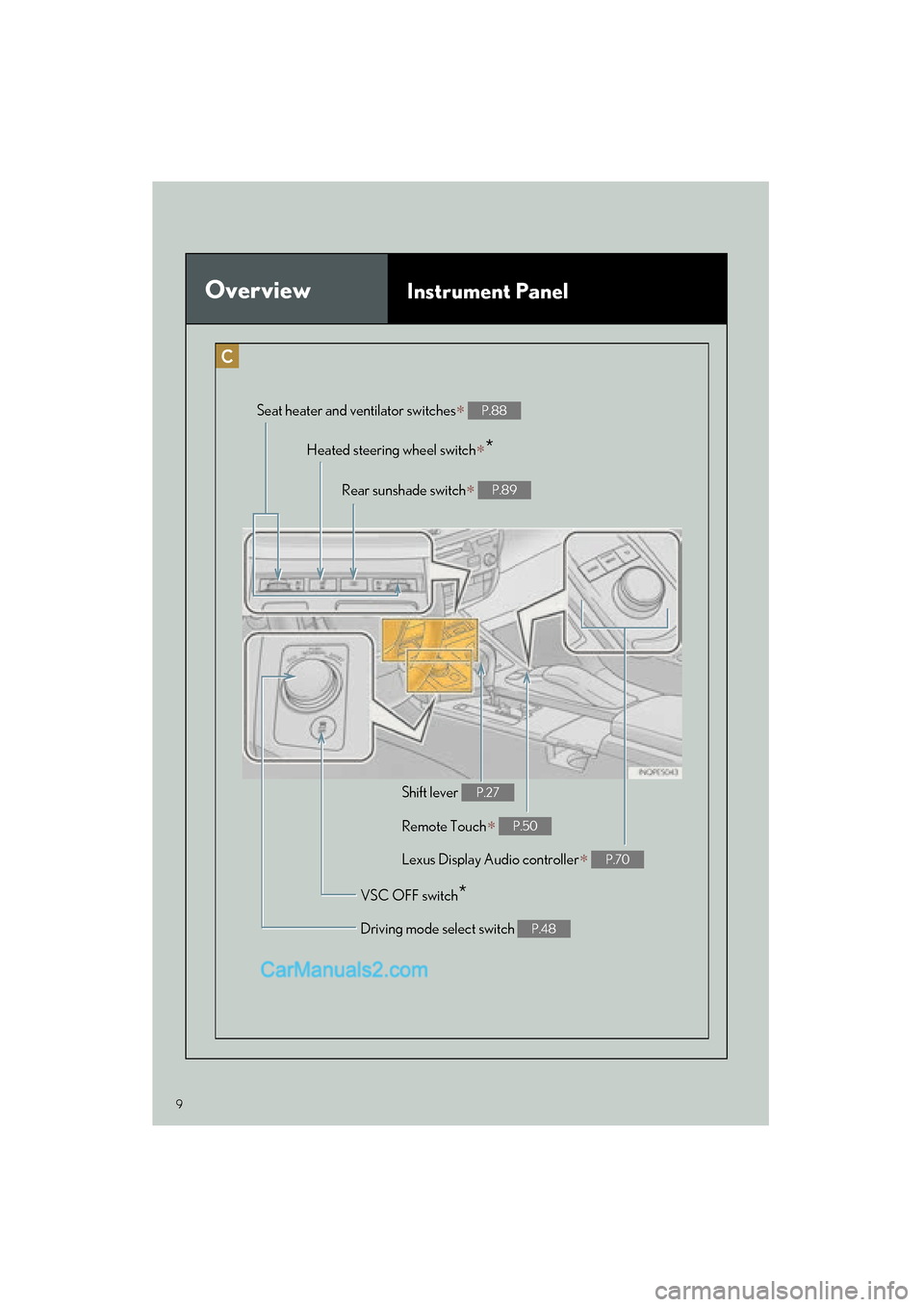
Remote Touch∗ P.50
Heated steering wheel switch∗*
VSC OFF switch*
Seat heater and ventilator switches∗ P.88
Driving mode select switch P.48
Shift lever P.27
Rear sunshade switch∗ P.89
Lexus Display Audio controller∗ P.70
Page 22 of 112
21
ES350_QG_OM33A70U_(U)
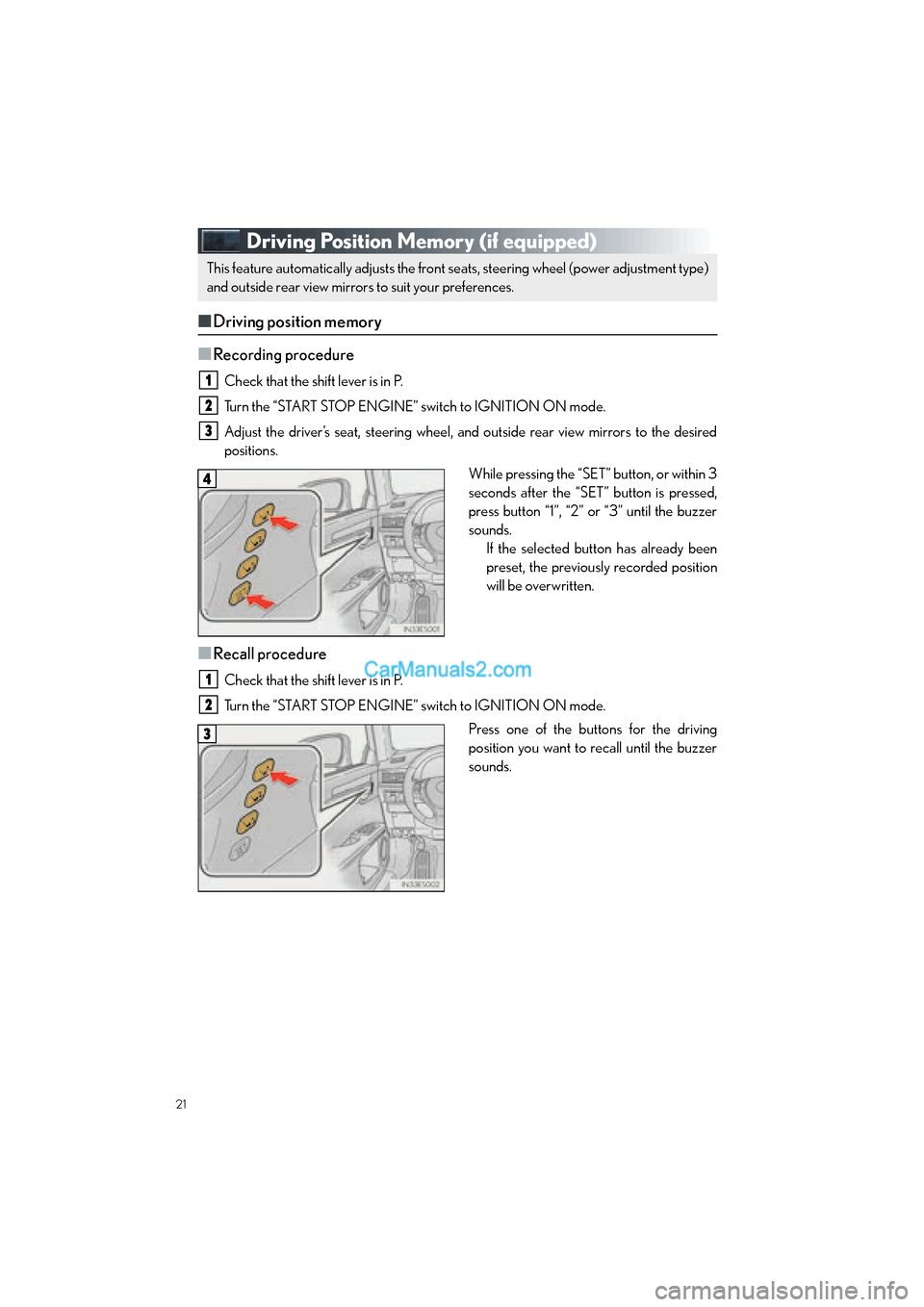
Driving Position Memory (if equipped)
■Driving position memory
■
Recording procedure
Check that the shift lever is in P.
Turn the “START STOP ENGINE” switch to IGNITION ON mode.
Adjust the driver’s seat, steering wheel, and outside rear view mirrors to the desired
positions. While pressing the “SET” button, or within 3
seconds after the “SET” button is pressed,
press button “1”, “2” or “3” until the buzzer
sounds.If the selected button has already been
preset, the previously recorded position
will be overwritten.
■Recall procedure
Check that the shift lever is in P.
Turn the “START STOP ENGINE” switch to IGNITION ON mode.
Press one of the buttons for the driving
position you want to recall until the buzzer
sounds.
This feature automatically adjusts the front se ats, steering wheel (power adjustment type)
and outside rear view mirrors to suit your preferences.
1
2
3
4
1
2
3
Page 61 of 112
60
ES350_QG_OM33A70U_(U)
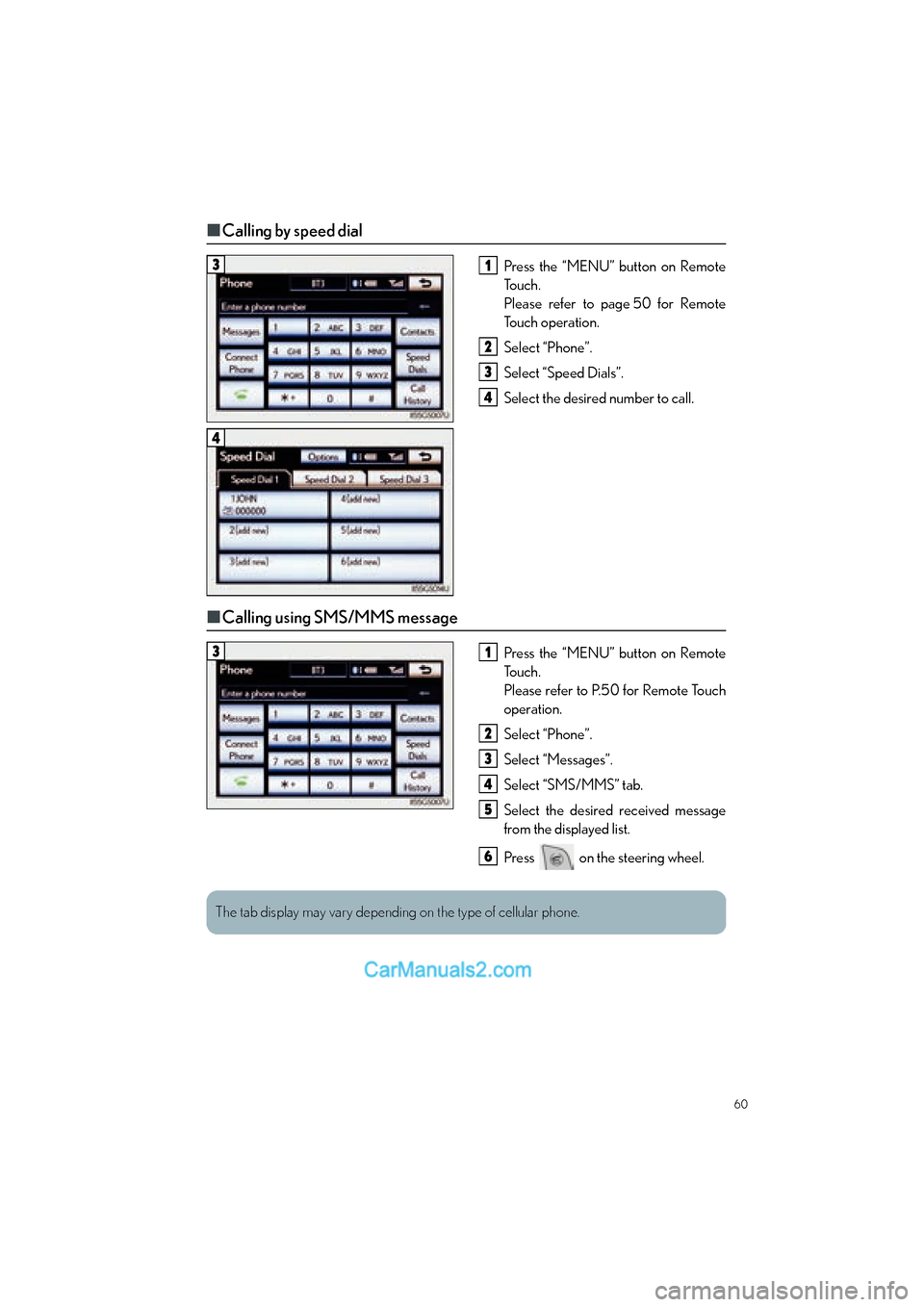
■Calling by speed dial
Press the “MENU” button on Remote
To u c h .
Please refer to page 50 for Remote
To u c h o p e r a t i o n .
Select “Phone”.
Select “Speed Dials”.
Select the desired number to call.
■Calling using SMS/MMS message
Press the “MENU” button on Remote
To u c h .
Please refer to P.50 for Remote Touch
operation.
Select “Phone”.
Select “Messages”.
Select “SMS/MMS” tab.
Select the desired received message
from the displayed list.
Press on the steering wheel.
31
2
3
4
4
31
2
3
4
5
6
The tab display may vary depending on the type of cellular phone.
Page 62 of 112
61
ES350_QG_OM33A70U_(U)
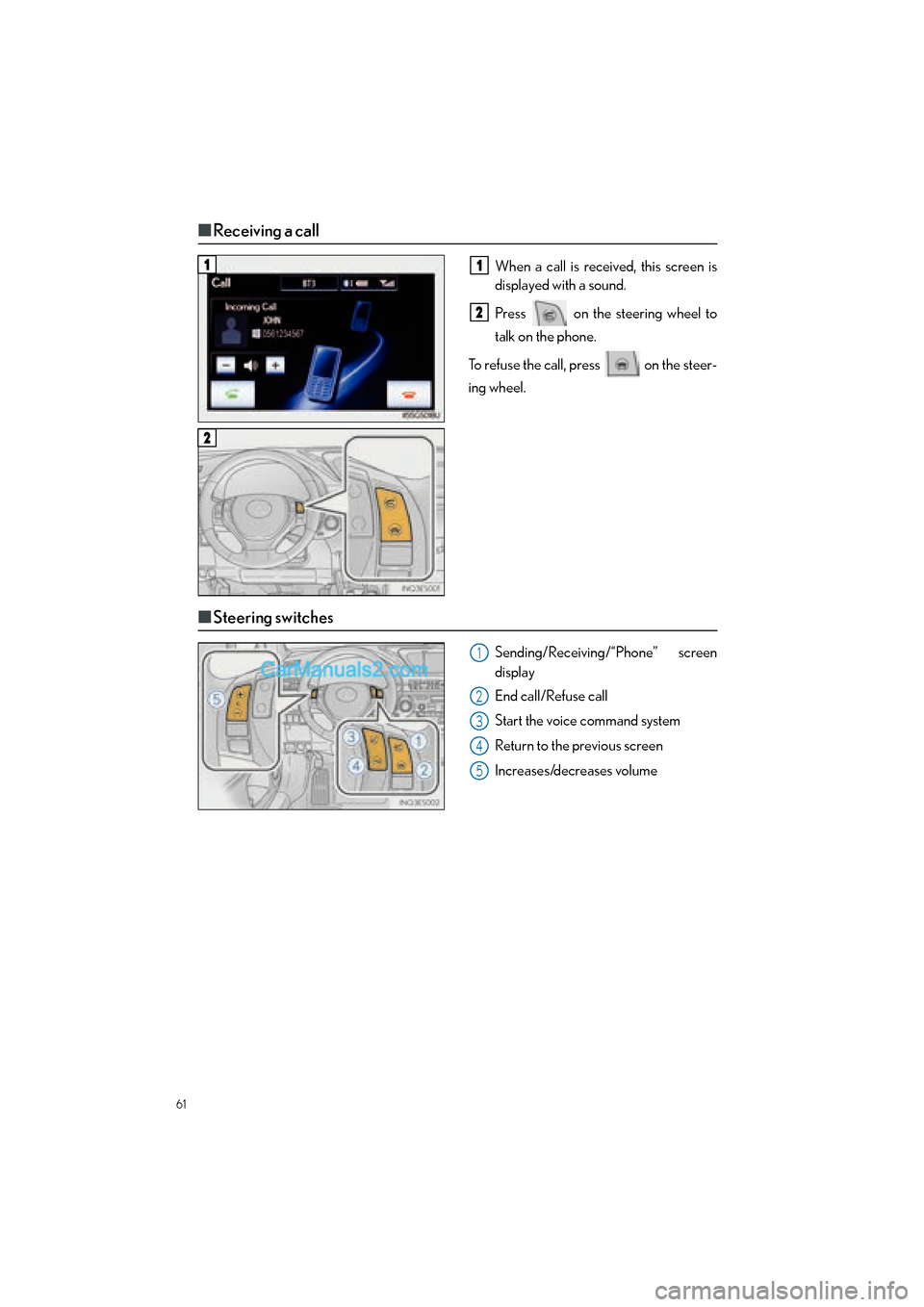
■Receiving a call
When a call is received, this screen is
displayed with a sound.
Press on the steering wheel to
talk on the phone.
To refuse the call, press on the steer-
ing wheel.
■ Steering switches
Sending/Receiving/“Phone” screen
display
End call/Refuse call
Start the voice command system
Return to the previous screen
Increases/decreases volume
11
2
2
1
2
3
4
5
Page 66 of 112

65
ES350_QG_OM33A70U_(U)
■Playing a DVD
Image display (full screen)
Reverse
Stop
Playback/pause
Fa s t f o r wa rd
Chapter selection
DVD eject
■Operating an iPod
Shuffle playback
Repeat play
Playback/pause
Select play mode
Song selection
■Remote control (steering wheel switches)
Some audio features can be controlled using the switches on the steering wheel.
Radio mode: Selects a radio station
Audio CD mode: Selects a track
MP3/WMA disc mode: Selects a file
and folder
DVD mode: Selects a chapter
iPod mode: Selects a song
Increases/decreases volume
Turns the power on, selects an audio
source
1
2
3
4
5
6
7
1
2
3
4
5
1
2
3
Page 68 of 112

67
ES350_QG_OM33A70U_(U)
Voice Command System (with navigation
system)
NOTE:When inputting voice commands you must wait until after the beep to speak.
■Basic operation
Press on the steering wheel.
- If you know the command:
Press again.
- If you do not know the command:
Follow the voice guidance to learn the
command and then press again.
Say a command after the beep.
Continue on to pages 68-69 for a detailed list of Voice Commands for the following cate-
gories: Set a Destination . . . . . . . . . . . . . . . . . . . . . . . . . . . . . . . . . . . . . . . . . . page 68
Use the Phone . . . . . . . . . . . . . . . . . . . . . . . . . . . . . . . . . . . . . . . . . . . . page 68
Play Music . . . . . . . . . . . . . . . . . . . . . . . . . . . . . . . . . . . . . . . . . . . . . . . . page 68
Get Information . . . . . . . . . . . . . . . . . . . . . . . . . . . . . . . . . . . . . . . . . . . page 69
Select audio mode . . . . . . . . . . . . . . . . . . . . . . . . . . . . . . . . . . . . . . . . page 69
Climate/air conditioning system command . . . . . . . . . . . . . . . . page 691
2
3
■Important voice commands information and tips
• Voice commands can be used while driving.
• You must wait until after the beep to say a command.
• In vehicles with a navigation system, a large TALK icon will appear on the naviga-
tion screen to prompt you to say a command.
• If you know what command to use, you can press at any time to interrupt the
voice guidance.
• If a desired outcome is not shown, or if no selections are available, press on the
steering wheel to return to the previous screen.
Page 75 of 112

74
ES350_QG_OM33A70U_(U)
■Calling by speed dial
Press the “MENU” button on the Lexus
Display Audio controller.
Select “Phone”.
Select “Speed Dials”.
Select the desired tab and choose the
desired number to make a call.
■Receiving a call
When a call is received, this screen is
displayed with a sound.
Press on the steering wheel to
talk on the phone.
To refuse the call, press on the
steering wheel.
■ Steering switches
Sending/Receiving/“Phone” screen
display
End call/Refuse call
Start the voice command system
Increases/decreases volume
21
2
3
44
11
2
1
2
3
4
Page 80 of 112

79
ES350_QG_OM33A70U_(U)
■Remote control (steering wheel switches)
Some audio features can be controlled using the switches on the steering wheel.
Radio mode: Selects a radio station
Audio CD mode: Selects a track
MP3/WMA disc mode: Selects a file
and folder
iPod mode: Selects a song
Increases/decreases volume
Turns the power on, selects an audio
source
1
2
3
Page 87 of 112

86
ES350_QG_OM33A70U_(U)
■Operating an iPod
Song selector button
iPod menu/Song selector knob
Go back button
Playback/Pause button
Repeat play button
Shuffle playback button
Text button
■Remote control (steering wheel switches)
Some audio features can be controlled using the switches on the steering wheel.
Radio mode: Selects a radio station
Audio CD mode: Selects a track and
disc (press and hold)
MP3/WMA disc mode: Selects a file
and disc (press and hold)
iPod mode: Selects a song
Increases/decreases volume
Turns the power on, selects an audio
source
1
2
3
4
5
6
7
1
2
3