ECO mode Lexus ES350 2016 s / User Guide
[x] Cancel search | Manufacturer: LEXUS, Model Year: 2016, Model line: ES350, Model: Lexus ES350 2016Pages: 576, PDF Size: 8.3 MB
Page 116 of 576
116
ES350_OM_OM33B64U_(U)3-3. Adjusting the seats
Your preferred driving position (the posi
tion of the driver’s seat, steering wheel
and outside rear view mirrors) can be recorded and recalled by pressing a but-
ton.
Three different driving positions can be recorded into memory.
■Recording procedure
Check that the shift lever is in P.
Turn the engine switch to IGNITION ON mode.
Adjust the driver’s seat, steering wheel, and outside rear view mirrors to the
desired positions.
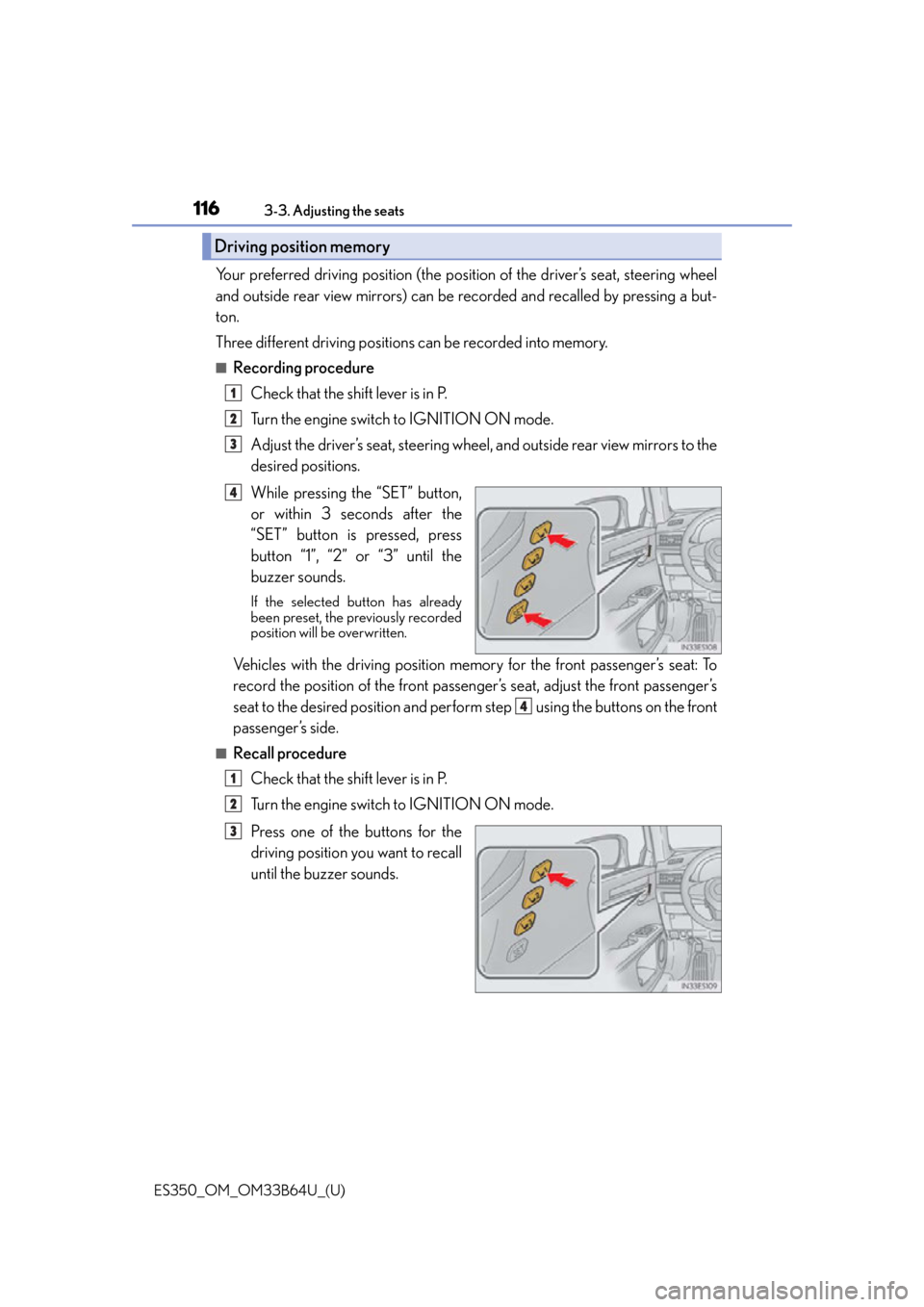
While pressing the “SET” button,
or within 3 seconds after the
“SET” button is pressed, press
button “1”, “2” or “3” until the
buzzer sounds.
If the selected button has already
been preset, the previously recorded
position will be overwritten.
Vehicles with the driving position memory for the front passenger’s seat: To
record the position of the front passenger’s seat, adjust the front passenger’s
seat to the desired position and perform step using the buttons on the front
passenger’s side.
■Recall procedure
Check that the shift lever is in P.
Turn the engine switch to IGNITION ON mode.
Press one of the buttons for the
driving position you want to recall
until the buzzer sounds.
Driving position memory
1
2
3
4
4
1
2
3
Page 117 of 576
ES350_OM_OM33B64U_(U)
1173-3. Adjusting the seats
3
Operation of each component
■To stop the position recall operation part-way through
Perform any of the following:
●Press the “SET” button.
●Press button “1”, “2” or “3”.
●Operate any of the seat adjustment switches (only cancels seat position recall).
●Operate the tilt and telescopic steering co ntrol switch (only cancels steering wheel
position recall).
■Seat positions that can be memorized ( P. 114)
The adjusted positions other than the position adjusted by lumbar support switch can be
recorded.
■Operating the driving position memory after turning the engine switch off
Driver’s seat:
Recorded seat positions can be activated up to 180 seconds after the driver’s door is
opened and another 60 seconds after it is closed again.
Front passenger’s seat:
Recorded seat positions can be activated up to 180 seconds after the front passenger’s
door is opened.
■In order to correctly use the dr iving position memory function
If a seat position is already in the furthest po ssible position and the seat is operated in the
same direction, the recorded position may be slightly different when it is recalled.
Each electronic key can be registered to recall your preferred driving position.
■Registering procedure
Record your driving position to button “1”, “2” or “3” before performing the
following:
Carry only the key you want to regist er, and then close the driver’s door.
If 2 or more keys are in the vehicle, the driving position cannot be recorded
properly.
Check that the shift lever is in P.
Turn the engine switch to IGNITION ON mode.
Recall the driving position that you want to record.
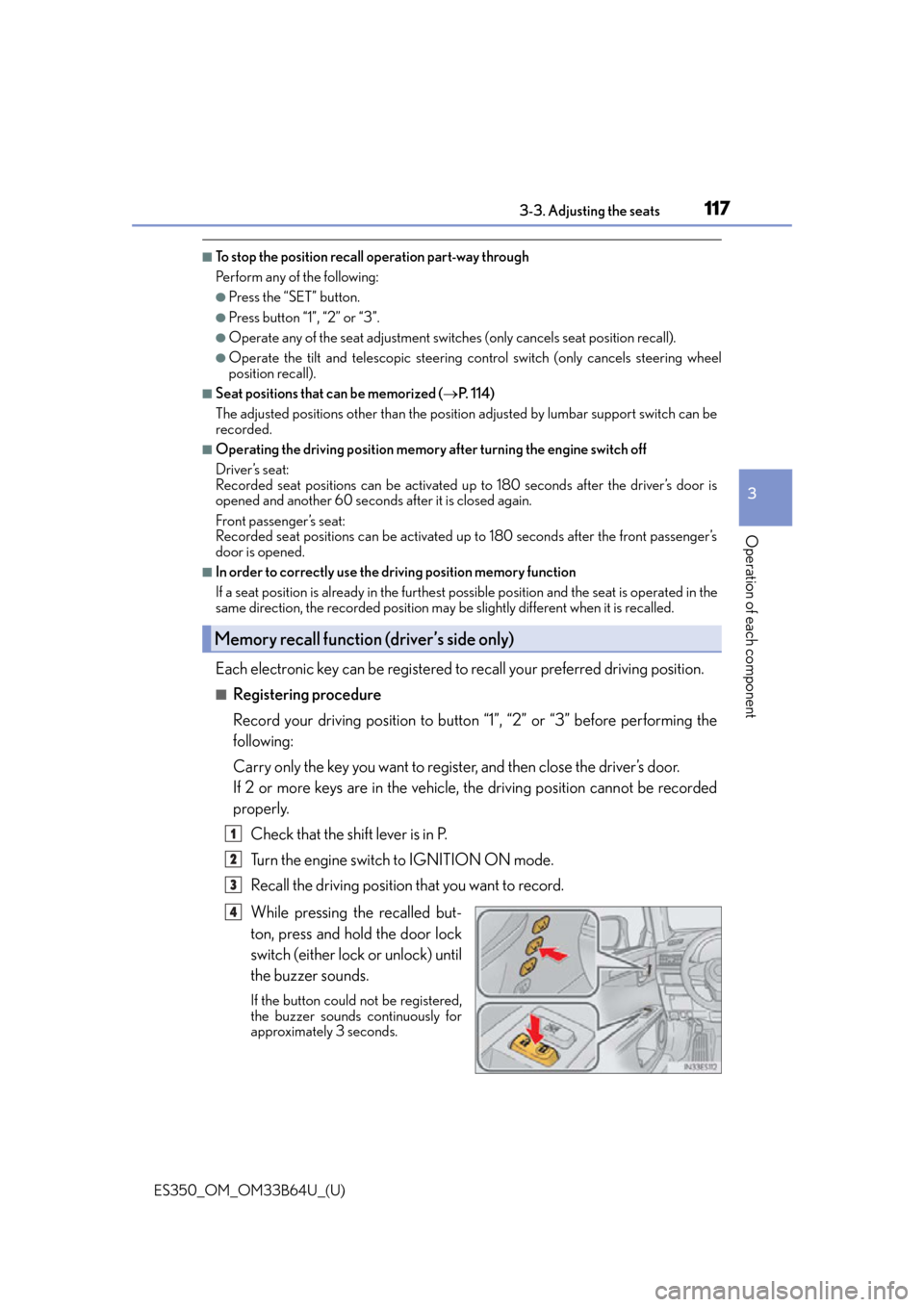
While pressing the recalled but-
ton, press and hold the door lock
switch (either lock or unlock) until
the buzzer sounds.
If the button could not be registered,
the buzzer sounds continuously for
approximately 3 seconds.
Memory recall function (driver’s side only)
1
2
3
4
Page 118 of 576
118
ES350_OM_OM33B64U_(U)3-3. Adjusting the seats
■Recall procedure
Carry the electronic key that has been registered to the driving position,
and then unlock and open the driver’s door using the smart access system
with push-button start or wireless remote control.
The driving position will move to the reco rded position (not including the steering
wheel). However, the seat will move to a po sition slightly behind the recorded posi-
tion in order to make entering the vehicle easier.
If the driving position is in a position th at has already been recorded, the seat and
outside rear view mirrors will not move.
Turn the engine switch to ACCESSORY mode or IGNITION ON mode,
or fasten a seat belt.
The seat and steering wheel will move to the recorded position.
■Cancelation procedure
Carry only the key you want to cancel and then close the driver’s door.
If 2 or more keys are in the vehicle, the driving position cannot be canceled
properly.
Turn the engine switch to IGNITION ON mode.
While pressing the “SET” button, press and hold the door lock switch
(either lock or unlock) unt il the buzzer sounds twice.
If the button could not be canceled, the buzzer sounds continuously for approxi-
mately 3 seconds.
■Recalling the driving position using the memory recall function
●Different driving positions can be registered for each electronic key. Therefore, the
driving position that is recalled may be different depending on the key being carried.
●If a door other than the driver’s door is unlocked with the smart access system with
push-button start, the driving position cannot be recalled. In this case, press the driving
position button which has been set.
■Customization
The unlock door settings of the memory re call function can be customized. (Customiz-
able features: P. 5 3 3 )
WA R N I N G
■Seat adjustment caution
Take care during seat adjustment so that th e seat does not strike the rear passenger or
squeeze your body against the steering wheel.
1
2
1
2
Page 129 of 576
129
ES350_OM_OM33B64U_(U)3-5. Opening, closing the windows and moon roof
3
Operation of each component
Power windows
The power windows can be opened and closed using the switches.
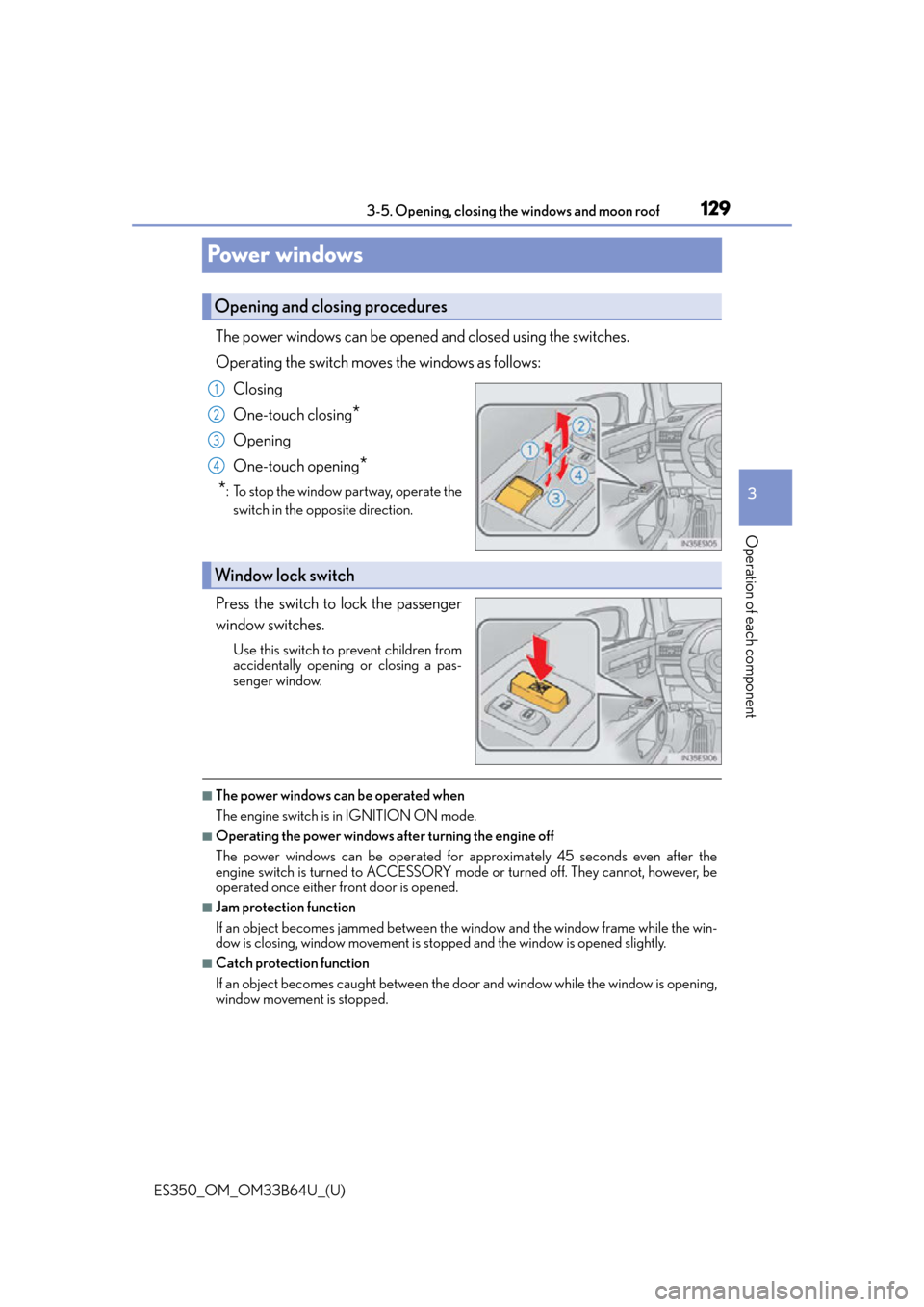
Operating the switch moves the windows as follows:
Closing
One-touch closing
*
Opening
One-touch opening
*
*
: To stop the window partway, operate the switch in the opposite direction.
Press the switch to lock the passenger
window switches.
Use this switch to prevent children from
accidentally opening or closing a pas-
senger window.
■The power windows can be operated when
The engine switch is in IGNITION ON mode.
■Operating the power windows after turning the engine off
The power windows can be operated for approximately 45 seconds even after the
engine switch is turned to ACCESSORY mode or turned off. They cannot, however, be
operated once either front door is opened.
■Jam protection function
If an object becomes jammed between the wi ndow and the window frame while the win-
dow is closing, window movement is stop ped and the window is opened slightly.
■Catch protection function
If an object becomes caught between the door and window while the window is opening,
window movement is stopped.
Opening and closing procedures
1
2
3
4
Window lock switch
Page 130 of 576

130
ES350_OM_OM33B64U_(U)3-5. Opening, closing the windows and moon roof
■When the window cannot be opened or closed
When the jam protection function or catch
protection function operates unusually and
the door window cannot be open ed or closed, perform the following operations with the
power window switch of that door.
●Stop the vehicle. With the engine switch in IGNITION ON mode, within 4 seconds of
the jam protection function or catch protecti on function activating, continuously oper-
ate the power window switch in the one-to uch closing direction or one-touch opening
direction so that the door wind ow can be opened and closed.
●If the door window cannot be opened and closed even when performing the above
operations, perform the following proc edure for function initialization.
Turn the engine switch to IGNITION ON mode.
Pull and hold the power window switch in the one-touch closing direction and com-
pletely close the door window.
Release the power window switch for a moment and then resume pulling and hold-
ing the switch in the one-touch closing direction for approximately 4 seconds.
Press and hold the power window switch in the one-touch opening direction. After
the door window is complete ly opened, continue holding the switch for an additional
1 second or more.
Pull and hold the power window switch in the one-touch closing direction again.
After the door window is completely clos ed, continue holding the switch for a fur-
ther 1 second or more.
If you release the switch while the window is moving, start again from the beginning.
If the window reverses and cannot be fully cl osed or opened, have the vehicle inspected
by your Lexus dealer.
■Door lock linked window operation
●The power windows can be opened an d closed using the mechanical key.* ( P. 4 9 9 )
●The power windows can be opened us ing the wireless remote control.* ( P. 9 3 )
*: These settings must be customized at your Lexus dealer.
■When the battery is disconnected
The window lock switch is disabled. If nece ssary, press the window lock switch after
reconnecting the battery.
■Power windows open warning buzzer
The buzzer sounds and a message is shown on the multi-information display in the instru-
ment cluster when the engine switch is turned off and the driver’s door is opened with the
power windows open.
■Customization
Settings (e.g. linked door lock operation) can be changed.
(Customizable features: P. 5 3 3 )
1
2
3
4
5
Page 133 of 576
ES350_OM_OM33B64U_(U)
1333-5. Opening, closing the windows and moon roof
3
Operation of each component
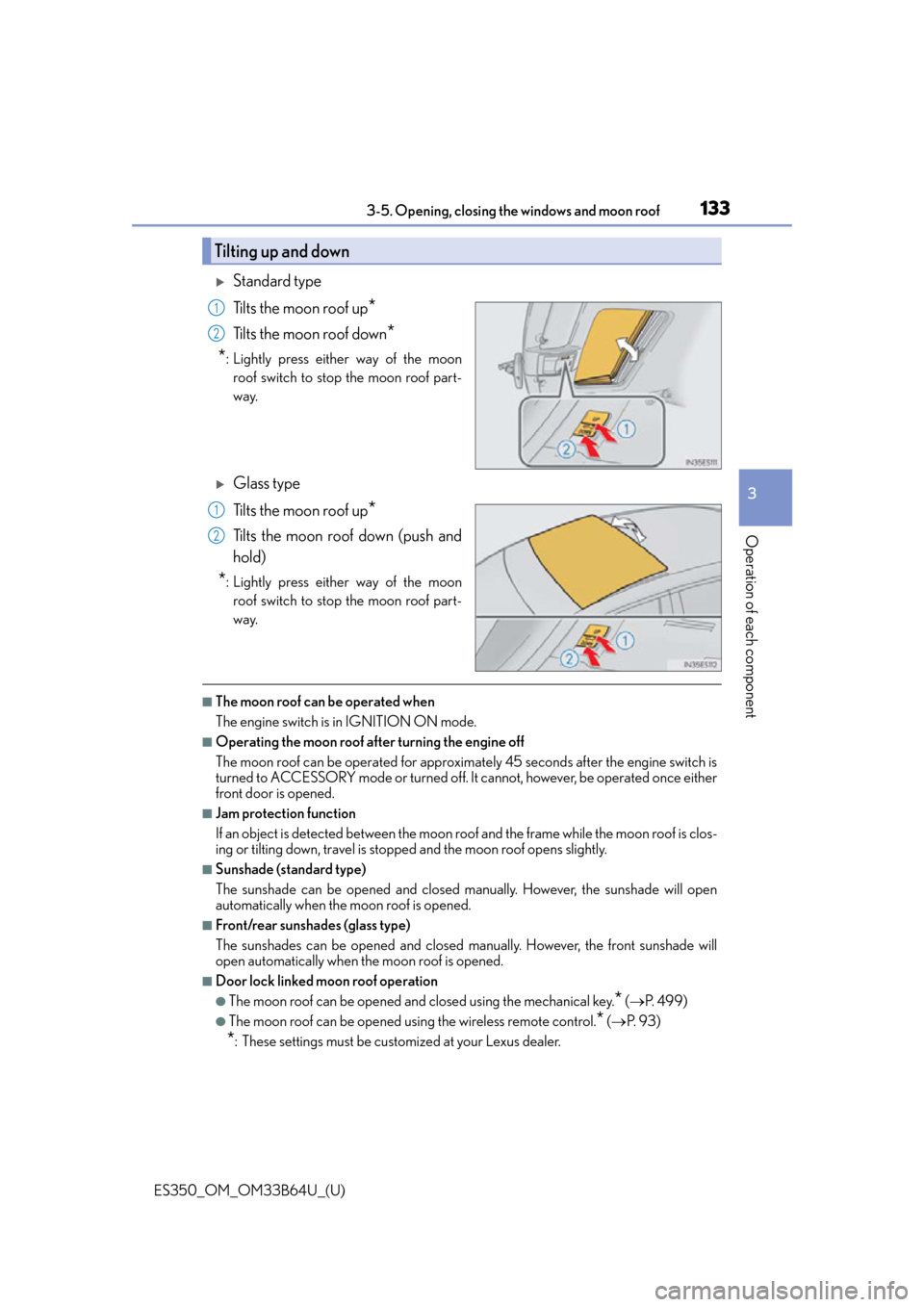
Standard type
Tilts the moon roof up
*
Tilts the moon roof down*
*
: Lightly press either way of the moon roof switch to stop the moon roof part-
way.
Glass type
Tilts the moon roof up
*
Tilts the moon roof down (push and
hold)
*: Lightly press either way of the moonroof switch to stop the moon roof part-
way.
■The moon roof can be operated when
The engine switch is in IGNITION ON mode.
■Operating the moon roof after turning the engine off
The moon roof can be operated for approximately 45 seconds after the engine switch is
turned to ACCESSORY mode or turned off. It cannot, however, be operated once either
front door is opened.
■Jam protection function
If an object is detected between the moon roof and the frame while the moon roof is clos-
ing or tilting down, travel is stoppe d and the moon roof opens slightly.
■Sunshade (standard type)
The sunshade can be opened and closed manually. However, the sunshade will open
automatically when the moon roof is opened.
■Front/rear sunshades (glass type)
The sunshades can be opened and closed manually. However, the front sunshade will
open automatically when the moon roof is opened.
■Door lock linked moon roof operation
●The moon roof can be opened and closed using the mechanical key.* ( P. 499)
●The moon roof can be opened us ing the wireless remote control.* ( P. 9 3 )
*: These settings must be customized at your Lexus dealer.
Tilting up and down
1
2
1
2
Page 151 of 576
151
ES350_OM_OM33B64U_(U)4-2. Driving procedures
4
Driving
Engine (ignition) switch
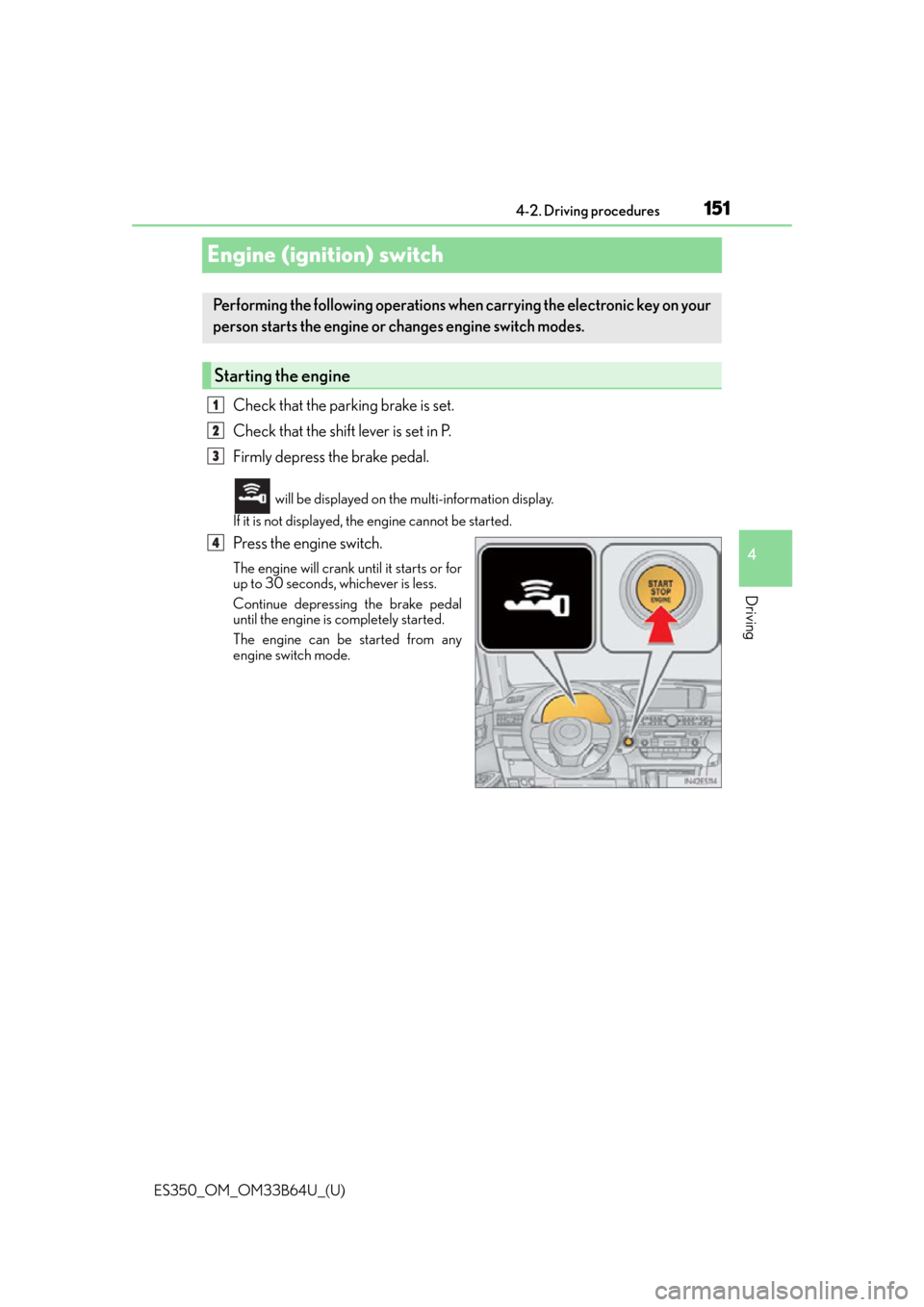
Check that the parking brake is set.
Check that the shift lever is set in P.
Firmly depress the brake pedal.
will be displayed on the
multi-information display.
If it is not displayed, the engine cannot be started.
Press the engine switch.
The engine will crank until it starts or for
up to 30 seconds, whichever is less.
Continue depressing the brake pedal
until the engine is completely started.
The engine can be started from any
engine switch mode.
Performing the following op erations when carrying the electronic key on your
person starts the engine or changes engine switch modes.
Starting the engine
1
2
3
4
Page 154 of 576
154
ES350_OM_OM33B64U_(U)4-2. Driving procedures
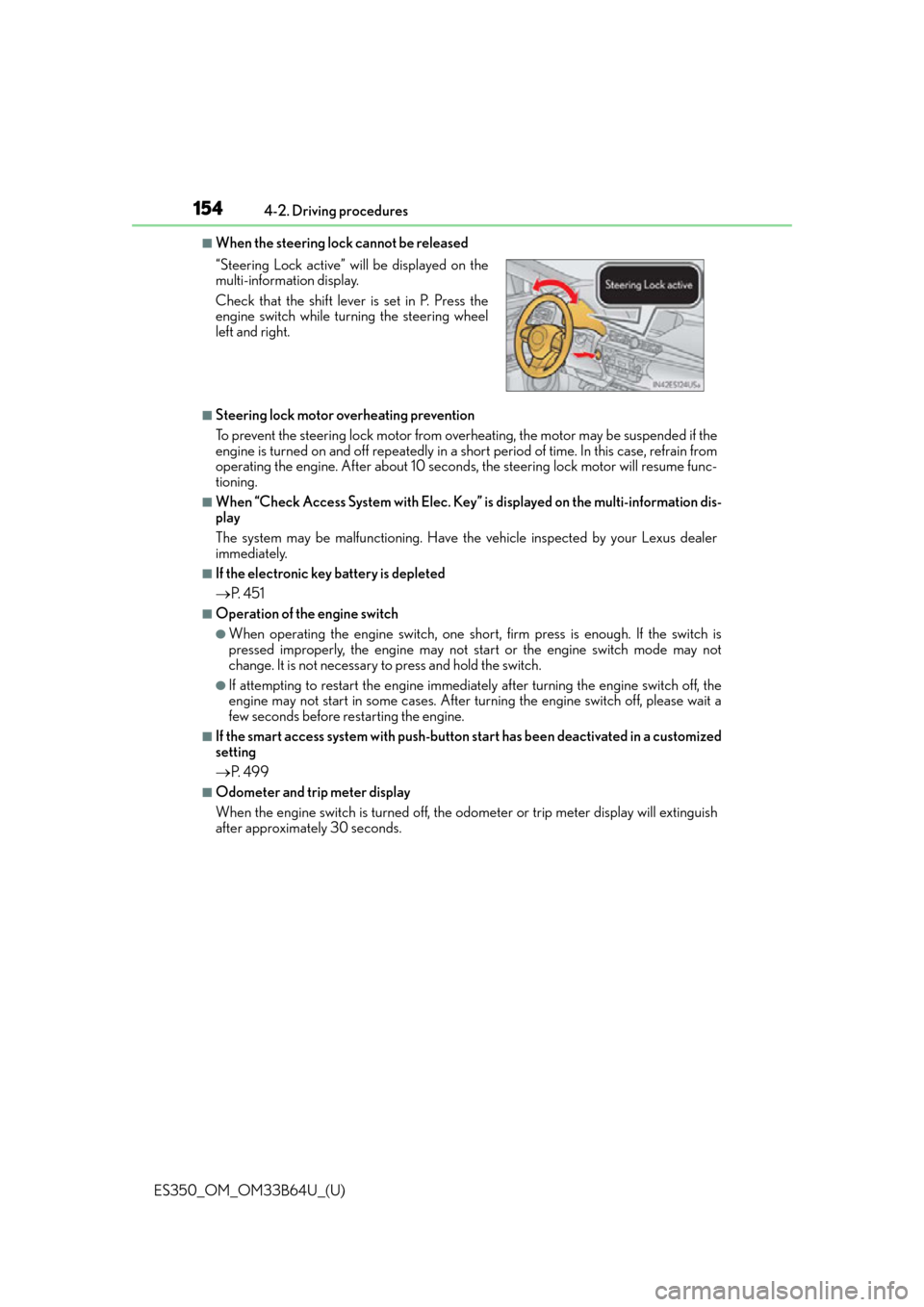
■When the steering lock cannot be released
■Steering lock motor overheating prevention
To prevent the steering lock motor from overheating, the motor may be suspended if the
engine is turned on and off repeatedly in a sh
ort period of time. In this case, refrain from
operating the engine. After about 10 seconds, the steering lock motor will resume func-
tioning.
■When “Check Access System with Elec. Key” is displayed on the multi-information dis-
play
The system may be malfunctioning. Have the vehicle inspected by your Lexus dealer
immediately.
■If the electronic key battery is depleted
P. 4 5 1
■Operation of the engine switch
●When operating the engine switch, one short, firm press is enough. If the switch is
pressed improperly, the engine may not start or the engine switch mode may not
change. It is not necessary to press and hold the switch.
●If attempting to restart the engine immediat ely after turning the engine switch off, the
engine may not start in some cases. After tu rning the engine switch off, please wait a
few seconds before re starting the engine.
■If the smart access system with push-butto n start has been deactivated in a customized
setting
P. 4 9 9
■Odometer and trip meter display
When the engine switch is tu rned off, the odometer or trip meter display will extinguish
after approximately 30 seconds. “Steering Lock active” will be displayed on the
multi-information display.
Check that the shift lever is set in P. Press the
engine switch while turning the steering wheel
left and right.
Page 155 of 576

ES350_OM_OM33B64U_(U)
1554-2. Driving procedures
4
Driving
WA R N I N G
■When starting the engine
Always start the engine while sitting in the driver’s seat. Do not depress the accelerator
pedal while starting the engine under any circumstances.
Doing so may cause an accident resu lting in death or serious injury.
■Caution while driving
If engine failure occurs while the vehicle is moving, do not lock or open the doors until
the vehicle reaches a safe and complete stop. Activation of the steering lock in this cir-
cumstance may lead to an accident, re sulting in death or serious injury.
■Stopping the engine in an emergency
If you want to stop the engine in an emergency while driving the vehicle, press and hold
the engine switch for more than 2 seconds, or press it briefly 3 times or more in succes-
sion. ( P. 4 6 9 )
However, do not touch the engine switch while driving except in an emergency. Turning
the engine off while driving will not cause lo ss of steering or braking control, but the
power assist to these systems will be lost. Th is will make it more difficult to steer and
brake, so you should pull over and stop the vehicle as soon as it is safe to do so.
NOTICE
■To prevent battery discharge
●Do not leave the engine switch in ACCESSORY or IGNITION ON mode for long
periods of time without the engine running.
●If “POWER ON” is displayed on the multi- information display, the engine switch is
not off. Exit the vehicle after turning the engine switch off.
●Do not stop the engine when the shift lever is in a position other than P. If the engine is
stopped in another shift lever position, the engine switch will not be turned off but
instead be turned to ACCESSORY mode. If the vehicle is left in ACCESSORY
mode, battery discharge may occur.
■When starting the engine
●Do not race a cold engine.
●If the engine becomes difficult to start or stalls frequently, have your vehicle checked
by your Lexus dealer immediately.
■Symptoms indicating a malfun ction with the engine switch
If the engine switch seems to be operating somewhat differently than usual, such as the
switch sticking slightly, there may be a malf unction. Contact your Lexus dealer immedi-
ately.
Page 156 of 576
156
ES350_OM_OM33B64U_(U)4-2. Driving procedures
Automatic transmission
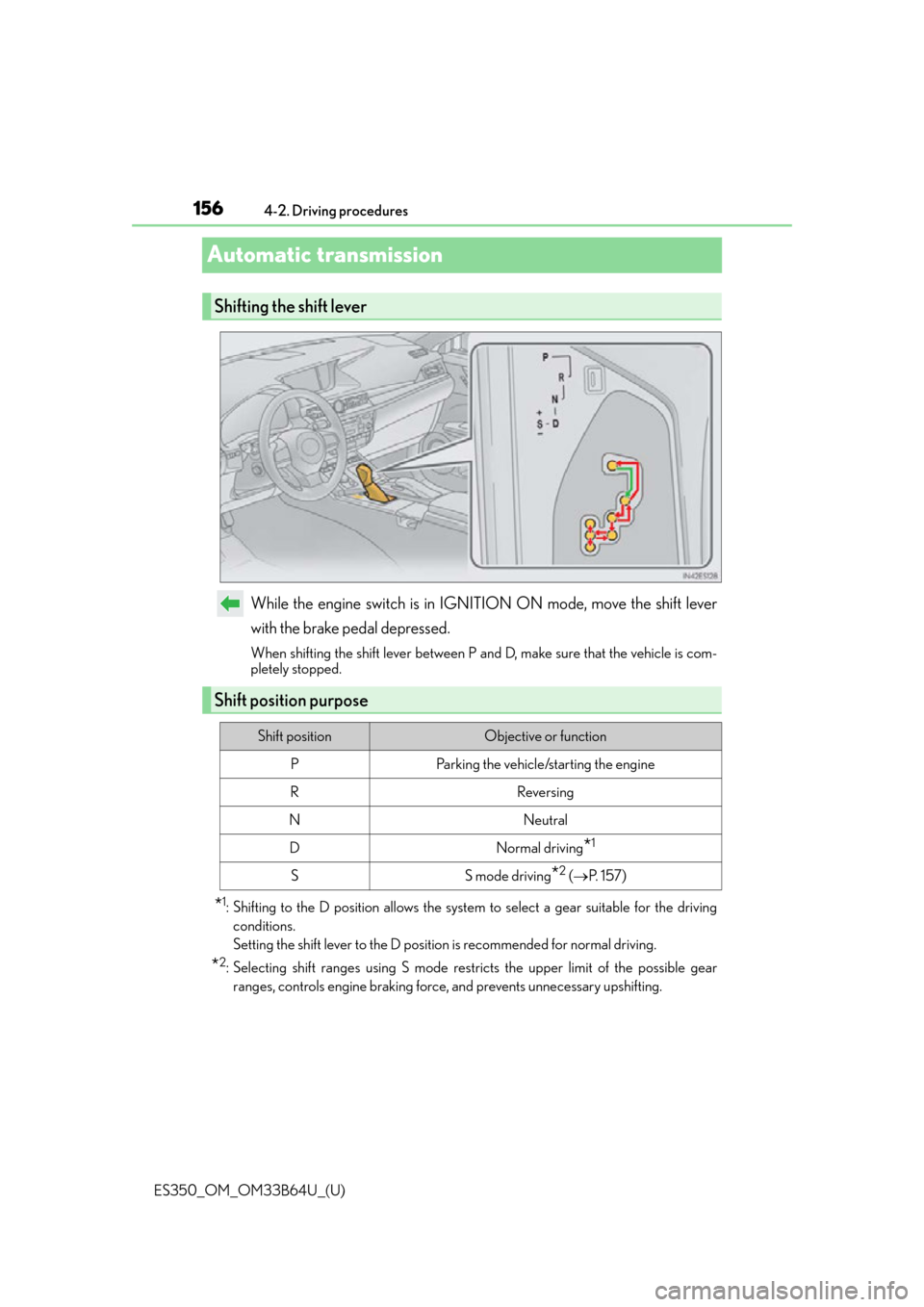
While the engine switch is in IGNITION ON mode, move the shift lever
with the brake pedal depressed.
When shifting the shift lever between P and D, make sure that the vehicle is com-
pletely stopped.
*1: Shifting to the D position allows the system
to select a gear suitable for the driving
conditions.
Setting the shift lever to the D positi on is recommended for normal driving.
*2: Selecting shift ranges using S mode rest ricts the upper limit of the possible gear
ranges, controls engine braking force, and prevents unnecessary upshifting.
Shifting the shift lever
Shift position purpose
Shift positionObjective or function
PParking the vehicle/starting the engine
RReversing
NNeutral
DNormal driving*1
SS mode driving*2 ( P. 1 5 7 )