ESP Lexus ES350 2016 s / User Guide
[x] Cancel search | Manufacturer: LEXUS, Model Year: 2016, Model line: ES350, Model: Lexus ES350 2016Pages: 576, PDF Size: 8.3 MB
Page 76 of 576

76
ES350_OM_OM33B64U_(U)2. Instrument cluster
■The meters and display illuminate when
The engine switch is in IGNITION ON mode.
■Instrument panel brightness adjustment
The instrument panel brig
htness levels when the tail ligh ts are on and off can be adjusted
individually. However, when the surroundings ar e bright (daytime, etc.), turning on the tail
lights will not change the instru ment panel brightness. At this time, any adjustments made
to the instrument panel bright ness levels will be applied to both settings at once.
■Limitation of brightness adjustment
The brightness of the instrume nt panel lights is automatically adjusted based on the light
sensor detecting how bright the surroundings are. However, if the instrument panel
brightness has been manually set to either th e brightest or darkest setting, the automatic
adjustment will not be performed.
■Outside temperature display
●In the following situations, the correct outside temperature may not be displayed, or the
display may take longer than normal to change.
• When stopped, or driving at low speeds (less than 12 mph [20 km/h])
• When the outside temperature has change d suddenly (at the entrance/exit of a
garage, tunnel, etc.)
• When the vehicle is parked in direct sunlight
●When “--” or “E” is displayed, the system may be malfunctioning.
Take your vehicle to your Lexus dealer.
■Pop-up display
In some situations, a pop-up display will be temporarily displayed on the multi-informa-
tion display or the odometer/trip meter/ maintenance required information screen.
The pop-up display function can be set on/off. ( P. 5 3 4 )
■Liquid crystal display
Small spots or light spots may appear on the display. This phenomenon is characteristic
of liquid crystal displays, and there is no problem continuing to use the display.
■Customization
The meter display can be customized on the multi-information display.
(Customizable features P. 5 3 3 )
WA R N I N G
■The information display at low temperatures
Allow the interior of the vehicle to warm up before using the liquid crystal information
display. At extremely low temperatures, th e information display monitor may respond
slowly, and display changes may be delayed.
For example, there is a lag between the driver’s shifting and the new gear number
appearing on the display. This lag could cau se the driver to downshift again, causing
rapid and excessive engine braking and po ssibly an accident resulting in personal
death or injury.
Page 79 of 576
ES350_OM_OM33B64U_(U)
792. Instrument cluster
2
Instrument cluster
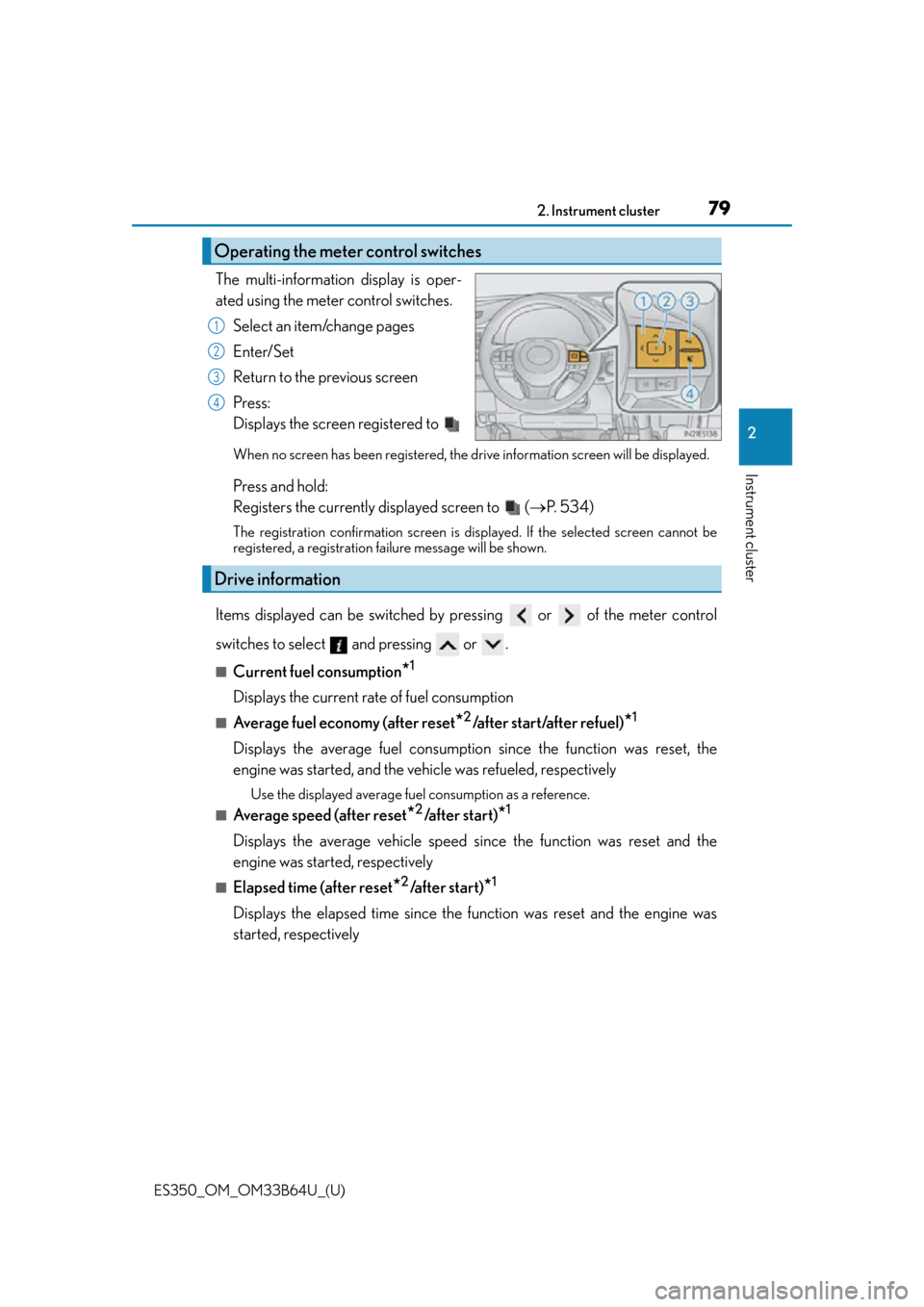
The multi-information display is oper-
ated using the meter control switches.Select an item/change pages
Enter/Set
Return to the previous screen
Press:
Displays the screen registered to
When no screen has been registered, the drive information screen will be displayed.
Press and hold:
Registers the currently displayed screen to ( P. 5 3 4 )
The registration confirmation screen is di splayed. If the selected screen cannot be
registered, a registration failure message will be shown.
Items displayed can be switched by pressing or of the meter control
switches to select and pressing or .
■Current fuel consumption*1
Displays the current rate of fuel consumption
■Average fuel economy (after reset*2/after start/after refuel)*1
Displays the average fuel consumptio n since the function was reset, the
engine was started, and the vehicle was refueled, respectively
Use the displayed average fuel consumption as a reference.
■Average speed (after reset*2/a f t e r s t a r t )*1
Displays the average vehicle speed since the function was reset and the
engine was started, respectively
■Elapsed time (after reset*2/after start)*1
Displays the elapsed time since the function was reset and the engine was
started, respectively
Operating the meter control switches
1
2
3
4
Drive information
Page 80 of 576

80
ES350_OM_OM33B64U_(U)2. Instrument cluster
■Distance (range/after start)*1
Displays the estimated maximum distance that can be driven with the quantity
of fuel remaining and the distance driv
en after the engine was started respec-
tively.
• This distance is computed based on your average fuel consumption. As a result,
the actual distance that can be driven may differ from that displayed.
• When only a small amount of fuel is added to the tank, the display may not be
updated.
When refueling, turn the engine switch off. If the vehicle is refueled without turning
the engine switch off, the display may not be updated.
■Eco Driving Indicator Zone Display
P. 8 2
■Tire inflation pressure
Displays inflation pressure of each tire.
The inflation pressure of the sp are tire will not be displayed.
■LDA (Lane Departure Alert with steering control) vehicle sway warning (if
equipped)
P. 1 9 6
■Display off
A blank screen is displayed
*1: Displayed when the item is set in “Drive In fo 1”, “Drive Info 2” or “Drive Info 3”.
( P. 5 3 4 )
*2: The function can be reset by pressing the of the meter control switches for
longer than 1 second when th e item to reset is displayed.
If there is more than one item that can be reset, the item selection screen will appear.
Page 98 of 576

98
ES350_OM_OM33B64U_(U)3-2. Opening, closing and
locking the doors and trunk
WA R N I N G
■To prevent an accident
Observe the following precautions while driving the vehicle.
Failure to do so may result in a door openin g and an occupant throwing out of the vehi-
cle, resulting in death or serious injury.
●Ensure that all doors are properly closed and locked.
●Do not pull the inside handle of the doors while driving.
Be especially careful for the front doors, as the doors may be opened even if the
inside lock buttons ar e in locked position.
●Set the rear door child-protector locks when children are seated in the rear seats.
Page 121 of 576
ES350_OM_OM33B64U_(U)
1213-3. Adjusting the seats
3
Operation of each component
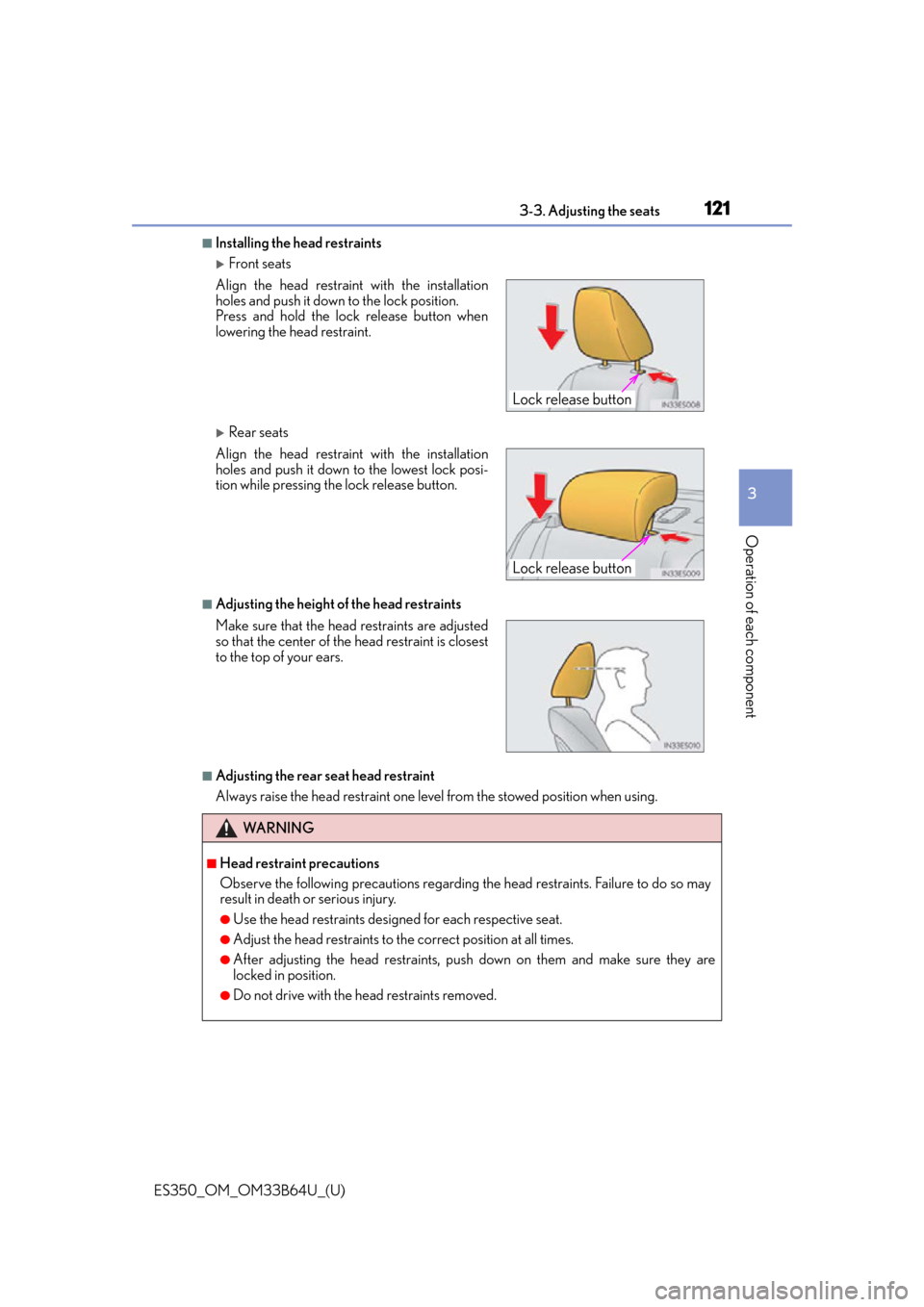
■Installing the head restraints
Front seats
Rear seats
■Adjusting the height of the head restraints
■Adjusting the rear seat head restraint
Always raise the head restraint one level from the stowed position when using. Align the head restrain t with the installation
holes and push it down to the lock position.
Press and hold the lock release button when
lowering the head restraint.
Align the head restrain t with the installation
holes and push it down to the lowest lock posi-
tion while pressing the lock release button.
Make sure that the head restraints are adjusted
so that the center of the head restraint is closest
to the top of your ears.
WA R N I N G
■Head restraint precautions
Observe the following precautions regarding the head restraints. Failure to do so may
result in death or serious injury.
●Use the head restraints designed for each respective seat.
●Adjust the head restraints to the correct position at all times.
●After adjusting the head restraints, push down on them and make sure they are
locked in position.
●Do not drive with the head restraints removed.
Lock release button
Lock release button
Page 124 of 576
1243-4. Adjusting the steering wheel and mirrors
ES350_OM_OM33B64U_(U)
Inside rear view mirror
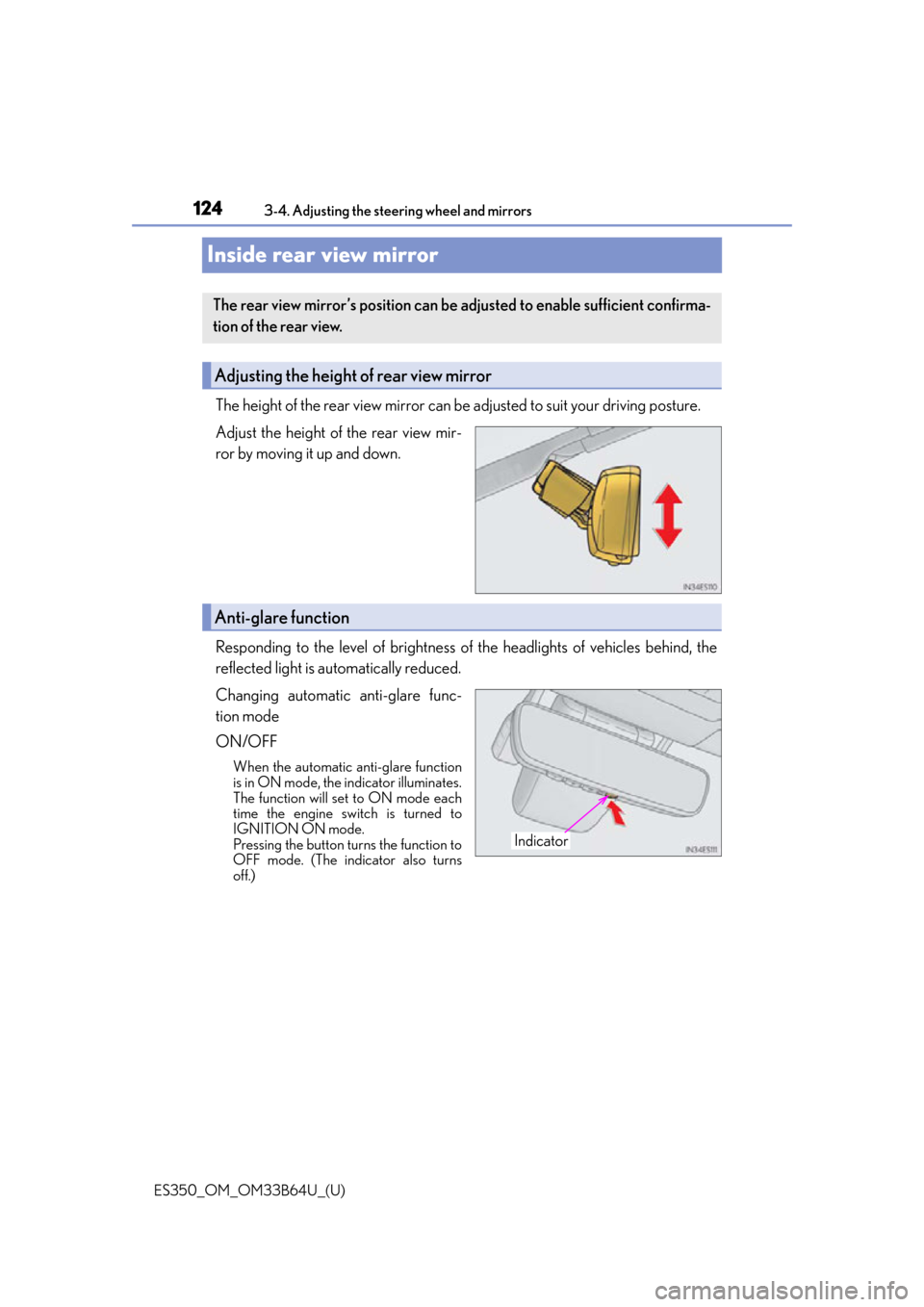
The height of the rear view mirror can be adjusted to suit your driving posture.
Adjust the height of the rear view mir-
ror by moving it up and down.
Responding to the level of brightness of the headlights of vehicles behind, the
reflected light is automatically reduced.
Changing automatic anti-glare func-
tion mode
ON/OFF
When the automatic anti-glare function
is in ON mode, the indicator illuminates.
The function will set to ON mode each
time the engine switch is turned to
IGNITION ON mode.
Pressing the button turns the function to
OFF mode. (The indicator also turns
off.)
The rear view mirror’s position can be adjusted to enable sufficient confirma-
tion of the rear view.
Adjusting the height of rear view mirror
Anti-glare function
Indicator
Page 131 of 576

ES350_OM_OM33B64U_(U)
1313-5. Opening, closing the windows and moon roof
3
Operation of each component
WA R N I N G
Observe the following precautions.
Failure to do so may result in death or serious injury.
■Closing the windows
●The driver is responsible for all the power window operations, including the operation
for the passengers. In order to prevent accidental operation, especially by a child, do
not let a child operate the power windows. It is possible for children and other passen-
gers to have body parts caught in the power window. Also, when riding with a child, it
is recommended to use the window lock switch. ( P. 1 2 9 )
●Check to make sure that all passengers do not have any part of their body in a posi-
tion where it could be caught when a window is being operated.
●When using the mechanical key and oper ating the power windows, operate the
power window after checking to make sure that there is no possibility of any passen-
ger having any of their body parts caught in the window. Also do not let a child oper-
ate window by the mechanical key. It is possible for children and other passengers to
get caught in the power window.
●When exiting the vehicle, turn the engine switch off, and take the key with you. Do not
leave children unattended in the vehicle. There may be accidental operation, due to
mischief, etc., that may possibly lead to an accident.
■Jam protection function
●Never use any part of your body to intentio nally activate the jam protection function.
●The jam protection function may not work if something gets jammed just before the
window is fully closed.
■Catch protection function
●Never use hands, arms, clothing, etc., to intentionally activate the catch protection
function.
●The catch protection function may not operate if something gets caught just before
the window is fully opened. Be careful not to get hands, arms, clothing, etc., caught in
the window.
Page 135 of 576

ES350_OM_OM33B64U_(U)
1353-5. Opening, closing the windows and moon roof
3
Operation of each component
WA R N I N G
Observe the following precautions.
Failure to do so may cause death or serious injury.
■Opening the moon roof
●Do not allow any passengers to put their hands or heads outside the vehicle while it is
moving.
●Do not sit on top of the moon roof.
■Closing the moon roof
●The driver is responsible for moon roof opening and closing operations. In order to
prevent accidental operation, especially by a child, do not let a child operate the
moon roof. It is possible for children and other passengers to have body parts caught
in the moon roof.
●Check to make sure that all passengers do not have any part of their body in a posi-
tion where it could be caught when the moon roof is being operated.
●When using the mechanical key and operat ing the moon roof, operate the moon roof
after checking to make sure that there is no possibility of any passenger having any of
their body parts caught in the moon roof. Al so do not let a child operate moon roof by
the mechanical key. It is possible for ch ildren and other passengers to get caught in
the moon roof.
●When exiting the vehicle, turn the engine sw itch off, carry the key and exit the vehicle
along with the child. There may be accidental operation, due to mischief, etc., that
may possibly lead to an accident.
■Jam protection function
●Never use any part of your body to intentio nally activate the jam protection function.
●The jam protection function may not work if something gets caught just before the
moon roof fully closes.
Page 139 of 576

ES350_OM_OM33B64U_(U)
1394-1. Before driving
4
Driving
■When starting off on a uphill
The hill-start assist control will activate. (P. 2 5 5 )
■Driving in the rain or adverse weather conditions
●Drive carefully, because visibility may be reduced, the windows may become fogged-
up, and the road will be slippery.
●Drive carefully when it gets we t or icy, because the road surface will be especially slip-
pery.
●Slow down when water is present on the roadway, because there may be a layer of
water between the tires and the road surface, preventing the steering and brakes from
operating properly.
■Engine speed while driving
In the following conditions, the engine speed may become high while driving. This is due
to automatic up-shifting control or down-shi fting implementation to meet driving condi-
tions. It does not indica te sudden acceleration.
●The vehicle is judged to be driving uphill or downhill
●When the accelerator pedal is released
■Restraining the engine output (Brake Override System)
●When the accelerator and brake pedals are depressed at the same time, the engine
output may be restrained.
●A warning message is displayed on the multi-information display while the system is
operating. If a warning message is shown on the multi-information display, read the
message and follow the instructions.
■Breaking in your new Lexus
To extend the life of the ve hicle, observing the followin g precautions is recommended:
●For the first 186 miles (300 km):
Avoid sudden stops.
●For the first 621 miles (1000 km):
• Do not drive at extremely high speeds.
• Avoid sudden acceleration.
• Do not drive continuously in low gears.
• Do not drive at a constant speed for extended periods.
■Drum-in-disc type parking brake system
Your vehicle has a drum-in-disc type parking brake system. This type of brake system
needs bedding-down of the brake shoes periodically or whenever the parking brake
shoes and/or drum are replaced. Have your Lexus dealer perform the bedding down
operation.
■Operating your vehicle in a foreign country
Comply with the relevant vehi cle registration laws and confirm the availability of the cor-
rect fuel. ( P. 5 2 1 )
■Eco-friendly driving
P. 8 2
■Customization
Setting of Eco Driving Indicator Light can be changed.
(Customizable features: P. 5 3 3 )
Page 140 of 576

140
ES350_OM_OM33B64U_(U)4-1. Before driving
WA R N I N G
Observe the following precautions.
Failure to do so may result in death or serious injury.
■When starting the vehicle
Always keep your foot on the brake pedal
while stopped with the engine running. This
prevents the vehicle from creeping.
■When driving the vehicle
●Do not drive if you are unfamiliar with the location of the brake and accelerator ped-
als to avoid depressing the wrong pedal.
• Accidentally depressing th e accelerator pedal instead of the brake pedal will
result in sudden acceleration that may lead to an accident.
• When backing up, you may twist your body around, leading to a difficulty in oper-
ating the pedals. Make sure to operate the pedals properly.
• Make sure to keep a correct driving posture even when moving the vehicle only slightly. This allows you to depress th e brake and accelerator pedals properly.
• Depress the brake pedal using your righ t foot. Depressing the brake pedal using
your left foot may delay response in an emergency, resulting in an accident.
●Do not drive the vehicle over or stop the vehicle near flammable materials.
The exhaust system and exhaust gases can be extremely hot. These hot parts may
cause a fire if there is any flammable material nearby.
●During normal driving, do not turn off the engine. Turning the engine off while driving
will not cause loss of steering or braking co ntrol, but the power assist to these systems
will be lost. This will make it more difficul t to steer and brake, so you should pull over
and stop the vehicle as soon as it is safe to do so.
However, in the event of an emergency, such as if it becomes impossible to stop the
vehicle in the normal way: P. 4 6 9
●Use engine braking (downshift) to maintain a safe speed when driving down a steep
hill.
Using the brakes continuously may cause th e brakes to overheat and lose effective-
ness. ( P. 1 5 7 )
●Do not adjust the positions of the steering wh eel, the seat, or the inside or outside rear
view mirrors while driving.
Doing so may result in a loss of vehicle control.
●Always check that all passengers’ arms, heads or other parts of their body are not
outside the vehicle.
●Do not drive in excess of the speed limit. Ev en if the legal speed limit permits it, do not
drive over 85 mph (140 km/h) unless your vehicle has high-speed capability tires.
Driving over 85 mph (140 km/h) may result in tire failure, loss of control and possible
injury. Be sure to consult a tire dealer to determine whether the tires on your vehicle
are high-speed capability tires or not before driving at such speeds.