battery Lexus ES350 2016 s / User Guide
[x] Cancel search | Manufacturer: LEXUS, Model Year: 2016, Model line: ES350, Model: Lexus ES350 2016Pages: 576, PDF Size: 8.3 MB
Page 108 of 576
108
ES350_OM_OM33B64U_(U)3-2. Opening, closing and
locking the doors and trunk
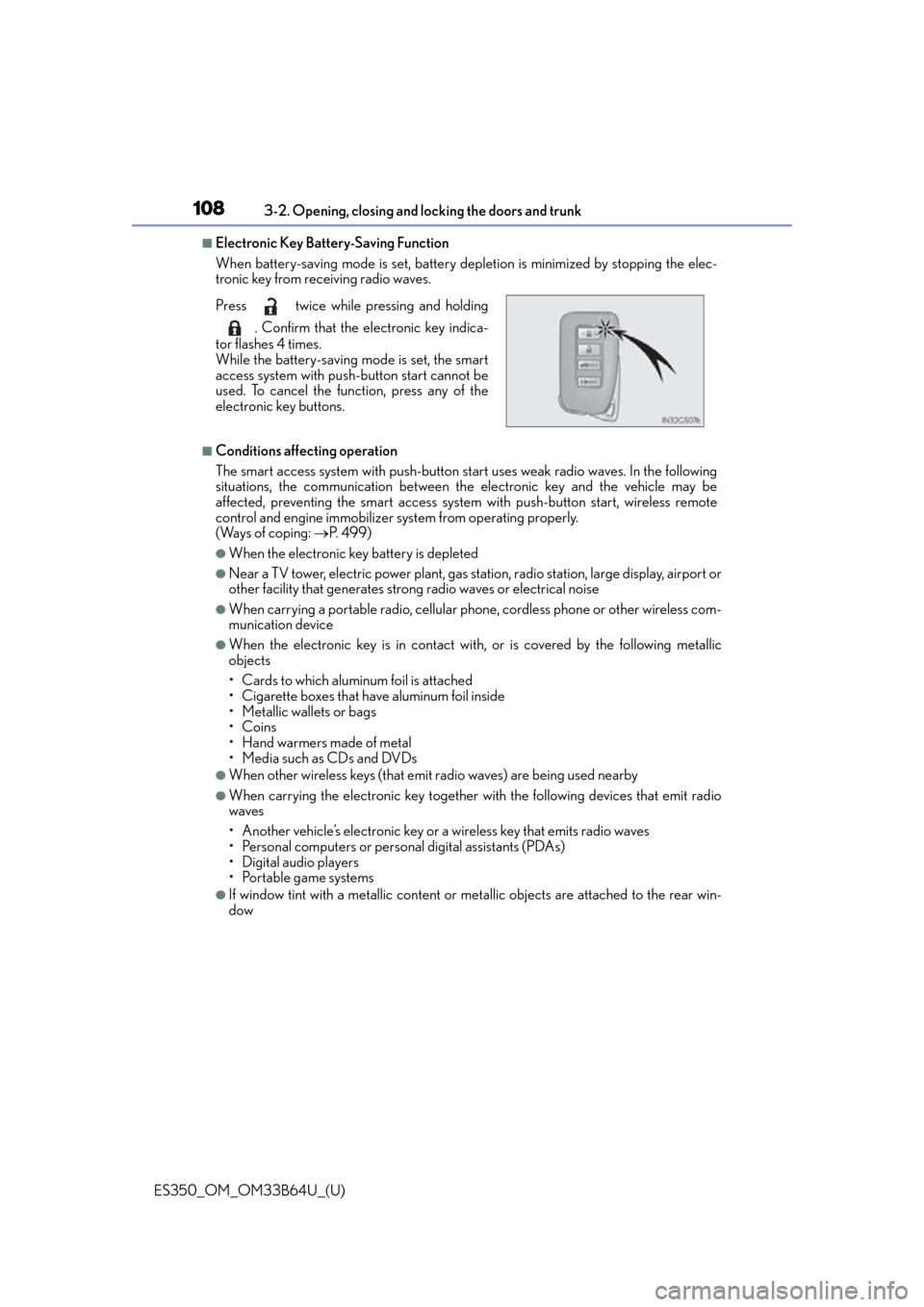
■Electronic Key Battery-Saving Function
When battery-saving mode is set, battery de pletion is minimized by stopping the elec-
tronic key from receiving radio waves.
■Conditions affe cting operation
The smart access system with push-button start uses weak radio waves. In the following
situations, the communication between th e electronic key and the vehicle may be
affected, preventing the smart access system with push-button start, wireless remote
control and engine immobilizer system from operating properly.
(Ways of coping: P. 499)
●When the electronic key battery is depleted
●Near a TV tower, electric powe r plant, gas station, radio station, large display, airport or
other facility that generates strong radio waves or electrical noise
●When carrying a portable radio, cellular ph one, cordless phone or other wireless com-
munication device
●When the electronic key is in contact wi th, or is covered by the following metallic
objects
• Cards to which aluminum foil is attached
• Cigarette boxes that have aluminum foil inside
• Metallic wallets or bags
•Coins
•Hand warmers made of metal
• Media such as CDs and DVDs
●When other wireless keys (that emit radio waves) are being used nearby
●When carrying the electronic key together with the following devices that emit radio
waves
• Another vehicle’s electronic key or a wireless key that emits radio waves
• Personal computers or personal digital assistants (PDAs)
• Digital audio players
• Portable game systems
●If window tint with a metallic content or me tallic objects are attached to the rear win-
dow
Press twice while pressing and holding
. Confirm that the electronic key indica-
tor flashes 4 times.
While the battery-saving mode is set, the smart
access system with push-button start cannot be
used. To cancel the function, press any of the
electronic key buttons.
Page 109 of 576

ES350_OM_OM33B64U_(U)
1093-2. Opening, closing and locking the doors and trunk
3
Operation of each component
■Note for the entry function
●Even when the electronic key is within the effective range (detection areas), the system
may not operate properly in the following cases:
• The electronic key is too close to the window or outside door handle, near the
ground, or in a high place when the doors are locked or unlocked.
• The electronic key is near the ground or in a high place, or too close to the rear
bumper center when the trunk is opened.
• The electronic key is on the instrument pa nel, rear package tray or floor, or in the
door pockets or glove box when the engine is started or engine switch modes are
changed.
●Do not leave the electronic key on top of th e instrument panel or near the door pockets
when exiting the vehicle. Depending on the radio wave reception conditions, it may be
detected by the antenna outside the cabin and the doors will become lockable from the
outside, possibly trapping the el ectronic key inside the vehicle.
●As long as the electronic key is within the effective range, the doors may be locked or
unlocked by anyone. However, only the door s detecting the electronic key can be used
to unlock the vehicle.
●Even if the electronic key is not inside the vehicle, it may be possible to start the engine
if the electronic key is near the window.
●The doors may unlock or lock if a large amou nt of water splashes on the door handle,
such as in the rain or in a car wash when th e electronic key is within the effective range.
(The doors will automatically be locked after approximately 60 seconds if the doors
are not opened and closed.)
●If the wireless remote control is used to lo ck the doors when the electronic key is near
the vehicle, there is a possibility that the door may not be unlocked by the entry func-
tion. (Use the wireless remote control to unlock the doors.)
●Touching the door lock or unlock sensor while wearing gloves may prevent lock or
unlock operation.
●If the door handle becomes wet while the el ectronic key is within the effective range,
the door may lock and unlock repeatedly. In that case, follow the following correction
procedures to wash the vehicle:
• Place the electronic key in a location 6 ft. (2 m) or more away from the vehicle. (Take
care to ensure that the key is not stolen.)
• Set the electronic key to battery-saving mode to disable the smart access system with push-button start. ( P. 1 0 8 )
●If the electronic key is insi de the vehicle and a door handle becomes wet during a car
wash, a message may be shown on the mult i-information display and a buzzer will
sound outside the vehicle. To turn off the alarm, lock all the doors.
●The lock sensor may not work properly if it comes into contact with ice, snow, mud, etc.
Clean the lock sensor and attempt to operate it again, or use the lock sensor on the
lower part of the door handle.
●A sudden approach to the effective range or door handle may prevent the doors from
being unlocked. In this case, return the door handle to the original position and check
that the doors unlock before pulling the door handle again.
●Gripping the door handle when wearing a glove may not unlock the door.
●If there is another electronic key in the detection area, it may take slightly longer to
unlock the doors after the door handle is gripped.
Page 130 of 576

130
ES350_OM_OM33B64U_(U)3-5. Opening, closing the windows and moon roof
■When the window cannot be opened or closed
When the jam protection function or catch
protection function operates unusually and
the door window cannot be open ed or closed, perform the following operations with the
power window switch of that door.
●Stop the vehicle. With the engine switch in IGNITION ON mode, within 4 seconds of
the jam protection function or catch protecti on function activating, continuously oper-
ate the power window switch in the one-to uch closing direction or one-touch opening
direction so that the door wind ow can be opened and closed.
●If the door window cannot be opened and closed even when performing the above
operations, perform the following proc edure for function initialization.
Turn the engine switch to IGNITION ON mode.
Pull and hold the power window switch in the one-touch closing direction and com-
pletely close the door window.
Release the power window switch for a moment and then resume pulling and hold-
ing the switch in the one-touch closing direction for approximately 4 seconds.
Press and hold the power window switch in the one-touch opening direction. After
the door window is complete ly opened, continue holding the switch for an additional
1 second or more.
Pull and hold the power window switch in the one-touch closing direction again.
After the door window is completely clos ed, continue holding the switch for a fur-
ther 1 second or more.
If you release the switch while the window is moving, start again from the beginning.
If the window reverses and cannot be fully cl osed or opened, have the vehicle inspected
by your Lexus dealer.
■Door lock linked window operation
●The power windows can be opened an d closed using the mechanical key.* ( P. 4 9 9 )
●The power windows can be opened us ing the wireless remote control.* ( P. 9 3 )
*: These settings must be customized at your Lexus dealer.
■When the battery is disconnected
The window lock switch is disabled. If nece ssary, press the window lock switch after
reconnecting the battery.
■Power windows open warning buzzer
The buzzer sounds and a message is shown on the multi-information display in the instru-
ment cluster when the engine switch is turned off and the driver’s door is opened with the
power windows open.
■Customization
Settings (e.g. linked door lock operation) can be changed.
(Customizable features: P. 5 3 3 )
1
2
3
4
5
Page 153 of 576

ES350_OM_OM33B64U_(U)
1534-2. Driving procedures
4
Driving
If the engine is stopped with the shift lever in a position other than P, the engine
switch will not be turned off but inst ead be turned to ACCESSORY mode. Per-
form the following procedure to turn the switch off:
Check that the parking brake is set.
Shift the shift lever to P.
Check that “Turn Off Vehicle” is displayed on the multi-information display
and then press the engine switch once.
Check that “Turn Off Vehicle” on the multi-information display is off.
■Auto power off function
If the vehicle is left in ACCESSORY mode for more than 20 minutes or IGNITION ON
mode (the engine is not running) for more than an hour with the shift lever in P, the engine
switch will automatically turn off. However, this function cannot entirely prevent battery
discharge. Do not leave the vehicle with the engine switch in ACCESSORY or IGNI-
TION ON mode for long periods of ti me when the engine is not running.
■Electronic key battery depletion
P. 9 1
■Conditions affe cting operation
P. 1 0 8
■Notes for the entry function
P. 1 0 9
■If the engine does not start
●The engine immobilizer system may not have been deactivated. ( P. 6 5 )
Contact your Lexus dealer.
●Check that the shift lever is securely set in P. The engine may not start if the shift lever is
displaced out of P. “Shift to P position to Start” will be displayed on the multi-information
display.
■Steering lock
After turning the engine switch off and opening and closing the doors, the steering wheel
will be locked due to the stee ring lock function. Operating the engine switch again auto-
matically cancels the steering lock.
When stopping the engine with the shift lever in a position other than P
1
2
3
4
Page 154 of 576

154
ES350_OM_OM33B64U_(U)4-2. Driving procedures
■When the steering lock cannot be released
■Steering lock motor overheating prevention
To prevent the steering lock motor from overheating, the motor may be suspended if the
engine is turned on and off repeatedly in a sh
ort period of time. In this case, refrain from
operating the engine. After about 10 seconds, the steering lock motor will resume func-
tioning.
■When “Check Access System with Elec. Key” is displayed on the multi-information dis-
play
The system may be malfunctioning. Have the vehicle inspected by your Lexus dealer
immediately.
■If the electronic key battery is depleted
P. 4 5 1
■Operation of the engine switch
●When operating the engine switch, one short, firm press is enough. If the switch is
pressed improperly, the engine may not start or the engine switch mode may not
change. It is not necessary to press and hold the switch.
●If attempting to restart the engine immediat ely after turning the engine switch off, the
engine may not start in some cases. After tu rning the engine switch off, please wait a
few seconds before re starting the engine.
■If the smart access system with push-butto n start has been deactivated in a customized
setting
P. 4 9 9
■Odometer and trip meter display
When the engine switch is tu rned off, the odometer or trip meter display will extinguish
after approximately 30 seconds. “Steering Lock active” will be displayed on the
multi-information display.
Check that the shift lever is set in P. Press the
engine switch while turning the steering wheel
left and right.
Page 155 of 576

ES350_OM_OM33B64U_(U)
1554-2. Driving procedures
4
Driving
WA R N I N G
■When starting the engine
Always start the engine while sitting in the driver’s seat. Do not depress the accelerator
pedal while starting the engine under any circumstances.
Doing so may cause an accident resu lting in death or serious injury.
■Caution while driving
If engine failure occurs while the vehicle is moving, do not lock or open the doors until
the vehicle reaches a safe and complete stop. Activation of the steering lock in this cir-
cumstance may lead to an accident, re sulting in death or serious injury.
■Stopping the engine in an emergency
If you want to stop the engine in an emergency while driving the vehicle, press and hold
the engine switch for more than 2 seconds, or press it briefly 3 times or more in succes-
sion. ( P. 4 6 9 )
However, do not touch the engine switch while driving except in an emergency. Turning
the engine off while driving will not cause lo ss of steering or braking control, but the
power assist to these systems will be lost. Th is will make it more difficult to steer and
brake, so you should pull over and stop the vehicle as soon as it is safe to do so.
NOTICE
■To prevent battery discharge
●Do not leave the engine switch in ACCESSORY or IGNITION ON mode for long
periods of time without the engine running.
●If “POWER ON” is displayed on the multi- information display, the engine switch is
not off. Exit the vehicle after turning the engine switch off.
●Do not stop the engine when the shift lever is in a position other than P. If the engine is
stopped in another shift lever position, the engine switch will not be turned off but
instead be turned to ACCESSORY mode. If the vehicle is left in ACCESSORY
mode, battery discharge may occur.
■When starting the engine
●Do not race a cold engine.
●If the engine becomes difficult to start or stalls frequently, have your vehicle checked
by your Lexus dealer immediately.
■Symptoms indicating a malfun ction with the engine switch
If the engine switch seems to be operating somewhat differently than usual, such as the
switch sticking slightly, there may be a malf unction. Contact your Lexus dealer immedi-
ately.
Page 163 of 576

ES350_OM_OM33B64U_(U)
1634-3. Operating the lights and wipers
4
Driving
■Automatic light off system
When the light switch is in , or : The headlights and tail lights turn off 30
seconds after the engine switch is turned to ACCESSORY mode or turned off and a
door is opened and all of the doors and trunk are closed. (The lights turn off immediately
if on the key is pressed twice after all the doors are closed.)
To turn the lights on again, turn the engine switch to IGNITION ON mode, or turn the
light switch off once and then back to or .
If any of the doors or trunk lid is kept open , the lights automatically turn off after 20 min-
utes.
■Light reminder buzzer
A buzzer sounds when the engine switch is turned off or turned to ACCESSORY mode
and the driver’s door is opened while the lights are turned on.
■Automatic headlight leveling system (if equipped)
The level of the headlights is automatically ad justed according to the number of passen-
gers and the loading condition of the vehicle to ensure that the headlights do not inter-
fere with other road users.
■If “Headlight System Malfunction Visit Your Dealer” is displayed on the multi-informa-
tion display
The system may be malfunctioning. Have the vehicle inspected by your Lexus dealer.
■Customization
Settings (e.g. light sensor se nsitivity) can be changed.
(Customizable features: P. 5 3 3 )
NOTICE
■To prevent battery discharge
Do not leave the lights on longer than ne cessary when the engine is not running.
Page 188 of 576

188
ES350_OM_OM33B64U_(U)4-5. Using the driving support systems
■Operational conditions
For vehicles sold in regions where the pede
strian detection function and pre-collision
braking function are available*4
The pre-collision system is enabled and the sy stem determines that the possibility of a
frontal collision with a vehicle or pedestrian is high.
Each function is operationa l at the following speeds:
●Pre-collision warning:
• Vehicle speed is approximately 7 mph (1 0 km/h) or more. (For detecting a pedes-
trian, vehicle speed is between approxim ately 7 and 50 mph (10 and 80 km/h).)
• The relative speed between your vehicl e and the vehicle or pedestrian ahead is
approximately 7 mph (10 km/h) or more.
●Pre-collision brake assist:
• Vehicle speed is approximately 19 mph (3 0 km/h) or more. (For detecting a pedes-
trian, vehicle speed is between approxim ately 19 and 50 mph (30 and 80 km/h).)
• The relative speed between your vehicl e and the vehicle or pedestrian ahead is
approximately 19 mph (30 km/h) or more.
●Pre-collision braking:
• Vehicle speed is approximately 7 mph (1 0 km/h) or more. (For detecting a pedes-
trian, vehicle speed is between approxim ately 7 and 50 mph (10 and 80 km/h).)
• The relative speed between your vehicl e and the vehicle or pedestrian ahead is
approximately 7 mph (10 km/h) or more.
The system may not operate in the following situations:
●If a battery terminal has be en disconnected and reconnected and then the vehicle has
not been driven for a certain amount of time
●If the shift lever is in R
●If VSC is disabled (only the pre-collision warning function will be operational)
●If the PCS warning light is flashing or illuminated
Page 189 of 576

ES350_OM_OM33B64U_(U)
1894-5. Using the driving support systems
4
Driving
For vehicles sold in regions where the pedestrian detection function is not available
and the pre-collision braking function is available
*4
The pre-collision system is enabled and the system determines that the possibility of a
frontal collision with a vehicle is high.
Each function is operationa l at the following speeds:
●Pre-collision warning:
• Vehicle speed is approximately 10 mph (15 km/h) or more.
• The relative speed between your vehicl e and the vehicle or pedestrian ahead is
approximately 7 mph (10 km/h) or more.
●Pre-collision brake assist:
• Vehicle speed is approximately 19 mph (30 km/h) or more.
• The relative speed between your vehicl e and the vehicle or pedestrian ahead is
approximately 19 mph (30 km/h) or more.
●Pre-collision braking:
• Vehicle speed is approximately 10 mph (15 km/h) or more.
• The relative speed between your vehicl e and the vehicle or pedestrian ahead is
approximately 7 mph (10 km/h) or more.
The system may not operate in the following situations:
●If a battery terminal has be en disconnected and reconnected and then the vehicle has
not been driven for a certain amount of time
●If the shift lever is in R
●If VSC is disabled (only the pre-collision warning function will be operational)
●If the PCS warning light is flashing or illuminated
For vehicles sold in regions where the pede strian detection function and pre-collision
braking function are not available*4
The pre-collision system is enabled and the sy stem determines that the possibility of a
frontal collision with a vehicle is high.
Each function is operationa l at the following speeds:
●Pre-collision warning:
• Vehicle speed is approximately 10 mph (15 km/h) or more.
• The relative speed between your vehicl e and the vehicle or pedestrian ahead is
approximately 7 mph (10 km/h) or more.
●Pre-collision brake assist:
• Vehicle speed is approximately 19 mph (30 km/h) or more.
• The relative speed between your vehicl e and the vehicle or pedestrian ahead is
approximately 19 mph (30 km/h) or more.
The system may not operate in the following situations:
●If a battery terminal has be en disconnected and reconnected and then the vehicle has
not been driven for a certain amount of time
●If the shift lever is in R
●If VSC is disabled (only the pre-collision warning function will be operational)
●If the PCS warning light is flashing or illuminated
*4: Depending on the region in which the vehicle was sold, the pedestrian detection func-
tion and pre-collision braking function may not be available.
Page 242 of 576
242
ES350_OM_OM33B64U_(U)4-5. Using the driving support systems
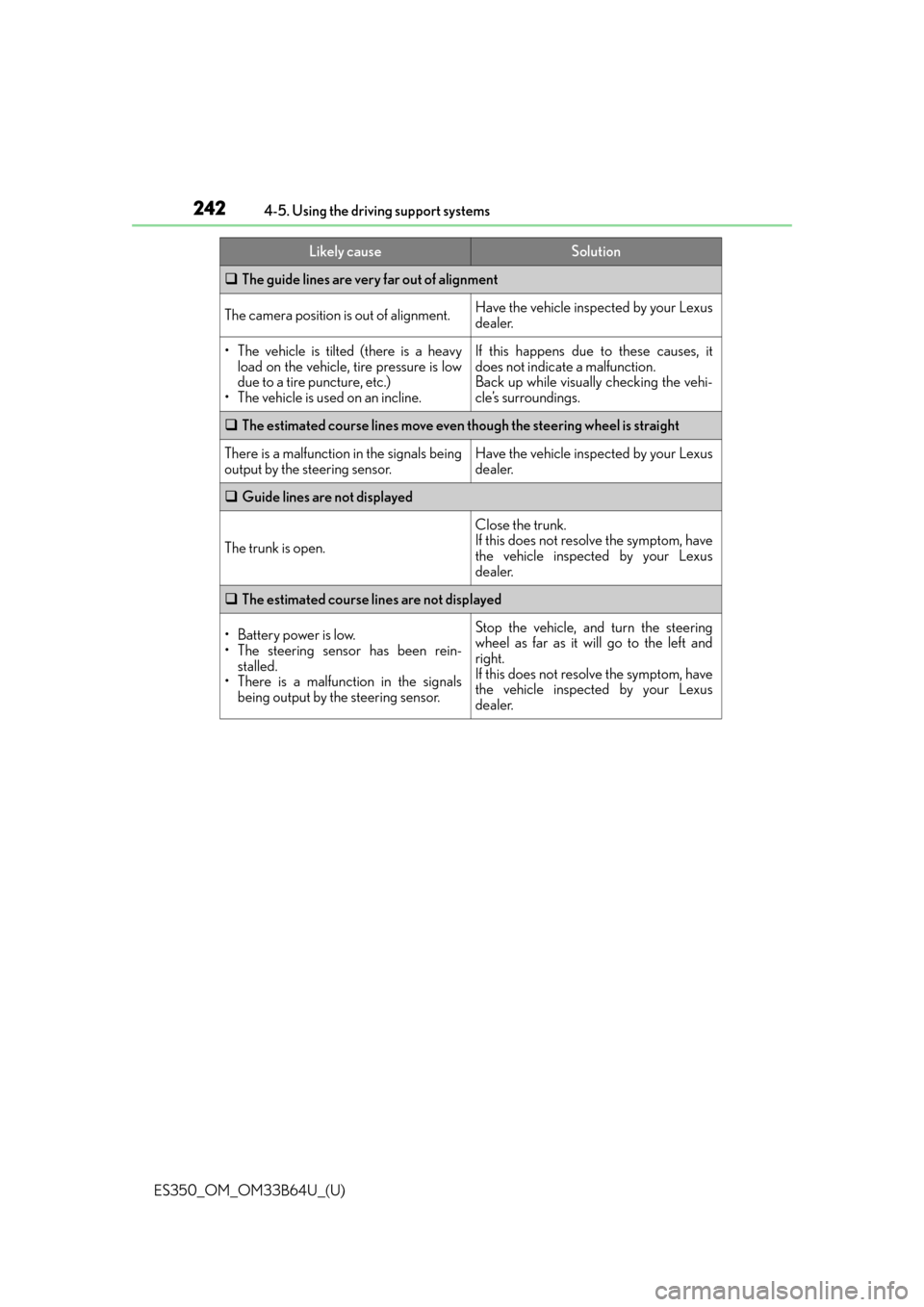
The guide lines are very far out of alignment
The camera position is out of alignment.Have the vehicle inspected by your Lexus
dealer.
• The vehicle is tilted (there is a heavy
load on the vehicle, tire pressure is low
due to a tire puncture, etc.)
• The vehicle is used on an incline.If this happens due to these causes, it
does not indicate a malfunction.
Back up while visually checking the vehi-
cle’s surroundings.
The estimated course lines move even though the steering wheel is straight
There is a malfunction in the signals being
output by the steering sensor.Have the vehicle inspected by your Lexus
dealer.
Guide lines are not displayed
The trunk is open.
Close the trunk.
If this does not resolve the symptom, have
the vehicle inspected by your Lexus
dealer.
The estimated course lines are not displayed
• Battery power is low.
• The steering sensor has been rein-
stalled.
• There is a malfunction in the signals
being output by the steering sensor.Stop the vehicle, and turn the steering
wheel as far as it will go to the left and
right.
If this does not resolve the symptom, have
the vehicle inspected by your Lexus
dealer.
Likely causeSolution