key Lexus ES350 2016 s / User Guide
[x] Cancel search | Manufacturer: LEXUS, Model Year: 2016, Model line: ES350, Model: Lexus ES350 2016Pages: 576, PDF Size: 8.3 MB
Page 92 of 576

92
ES350_OM_OM33B64U_(U)3-1. Key information
■Replacing the battery
P. 4 5 1
■Confirmation of the registered key number
The number of keys already registered to the vehicle can be confirmed. Ask your Lexus
dealer for details.
■If a wrong key is used
The key cylinder rotates freely to isolate inside mechanism.
NOTICE
■To prevent key damage
●Do not drop the keys, subject them to strong shocks or bend them.
●Do not expose the keys to high temp eratures for long periods of time.
●Do not get the keys wet or wash them in an ultrasonic washer etc.
●Do not attach metallic or magnetic materials to the keys or place the keys close to
such materials.
●Do not disassemble the keys.
●Do not attach a sticker or anything else to the surface of the electronic key.
●Do not place the keys near objects that pr oduce magnetic fields, such as TVs, audio
systems and induction cookers, or medical electrical equipment, such as low-fre-
quency therapy equipment.
■Carrying the electronic key on your person
Carry the electronic key 3.9 in. (10 cm) or mo re away from electric appliances that are
turned on. Radio waves emitted from electric appliances within 3. 9 in. (10 cm) of the
electronic key may interfere with the key, causing the key to not function properly.
■In case of a smart access system with push-button start malfunction or other key-
related problems
Take your vehicle with all the electronic keys provided with your vehicle to your Lexus
dealer.
■When an electronic key is lost
If the electronic key remains lost, the risk of vehicle theft increases significantly. Visit
your Lexus dealer immediately with all re maining electronic keys that was provided
with your vehicle.
Page 93 of 576
93
ES350_OM_OM33B64U_(U)3-2. Opening, closing and
locking the doors and trunk
3
Operation of each component
Doors
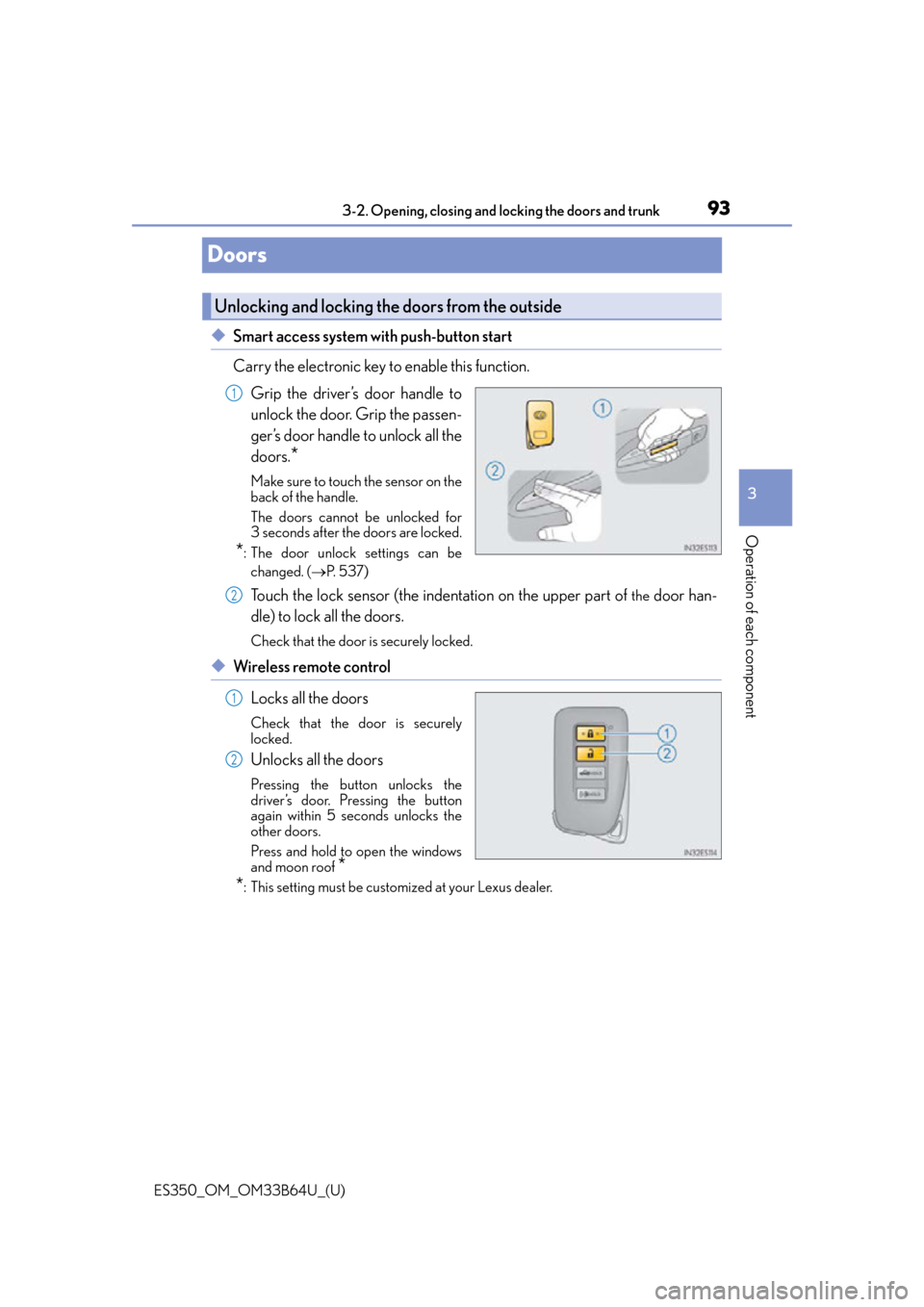
◆Smart access system with push-button start
Carry the electronic key to enable this function.
Grip the driver’s door handle to
unlock the door. Grip the passen-
ger’s door handle to unlock all the
doors.
*
Make sure to touch the sensor on the
back of the handle.
The doors cannot be unlocked for
3 seconds after the doors are locked.
*: The door unlock settings can bechanged. ( P. 5 3 7 )
Touch the lock sensor (the indentation on the upper part of the door han-
dle) to lock all the doors.
Check that the door is securely locked.
◆Wireless remote control
Locks all the doors
Check that the door is securely
locked.
Unlocks all the doors
Pressing the button unlocks the
driver’s door. Pressing the button
again within 5 seconds unlocks the
other doors.
Press and hold to open the windows
and moon roof
*
*
: This setting must be customized at your Lexus dealer.
Unlocking and locking the doors from the outside
1
2
1
2
Page 94 of 576
94
ES350_OM_OM33B64U_(U)3-2. Opening, closing and
locking the doors and trunk
■Operation signals
A buzzer sounds and the emergency flashers flash to indicate that the doors have been
locked/unlocked. (Locked: Once; Unlocked: Twice)
Windows and moon roof:
A buzzer sounds to indicate that th e windows and moon roof are opening.
■Security feature
If a door is not opened within approximately 60 seconds after the vehicle is unlocked, the
security feature automatically locks the vehicle again.
■Welcome light illumination control
The side marker, parking, tail and license plat e lights automatically turn on at night when
the doors are unlocked using the entry functi on or wireless remote control if the light
switch is in the “AUTO” position.
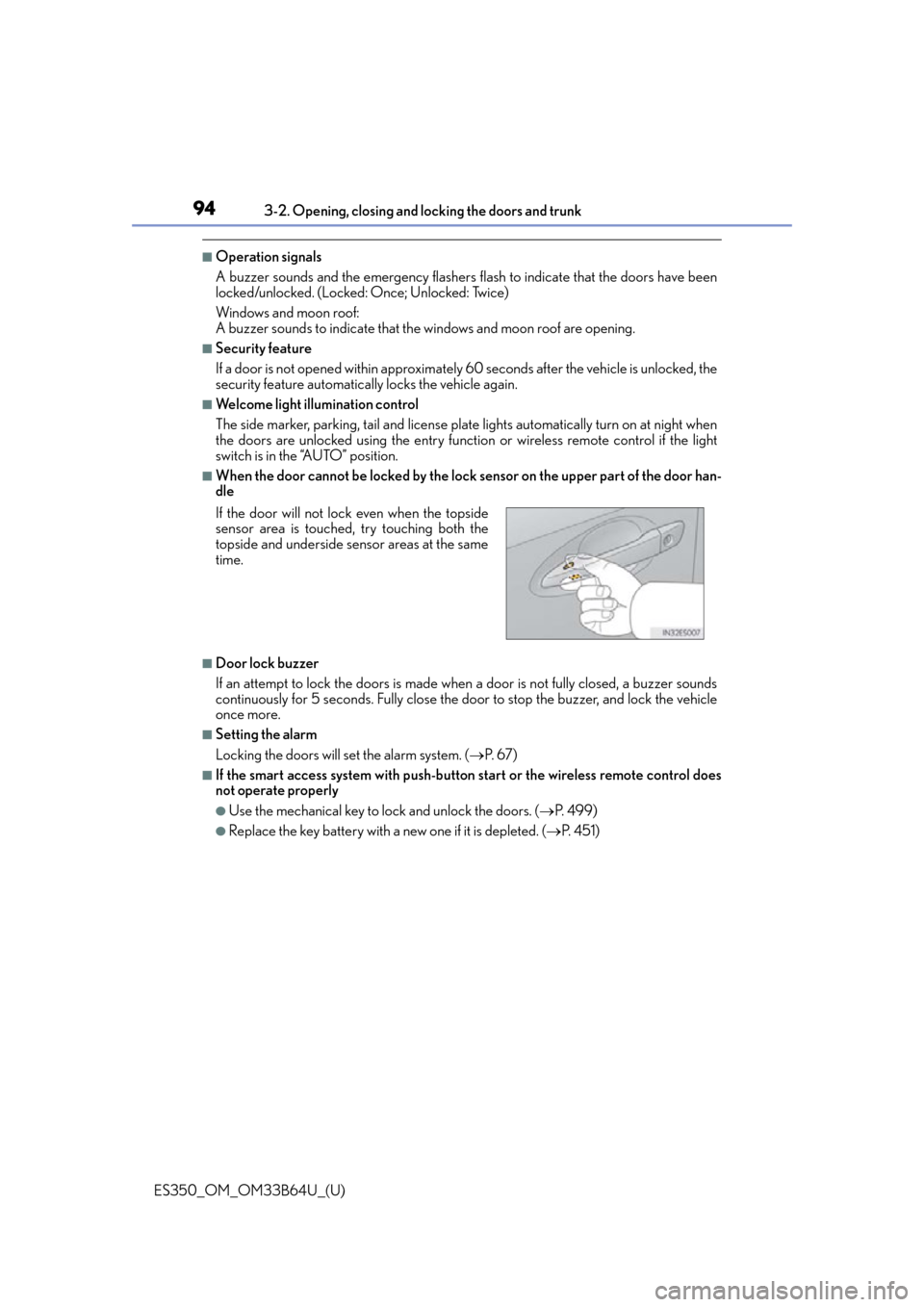
■When the door cannot be locked by the lock sensor on the upper part of the door han-
dle
■Door lock buzzer
If an attempt to lock the doors is made when a door is not fully closed, a buzzer sounds
continuously for 5 seconds. Fully close the door to stop the buzzer, and lock the vehicle
once more.
■Setting the alarm
Locking the doors will set the alarm system. ( P. 6 7 )
■If the smart access system with push-butto n start or the wireless remote control does
not operate properly
●Use the mechanical key to lock and unlock the doors. ( P. 4 9 9 )
●Replace the key battery with a new one if it is depleted. ( P. 4 5 1 )
If the door will not lock even when the topside
sensor area is touched, try touching both the
topside and underside sensor areas at the same
time.
Page 95 of 576
ES350_OM_OM33B64U_(U)
953-2. Opening, closing and locking the doors and trunk
3
Operation of each component
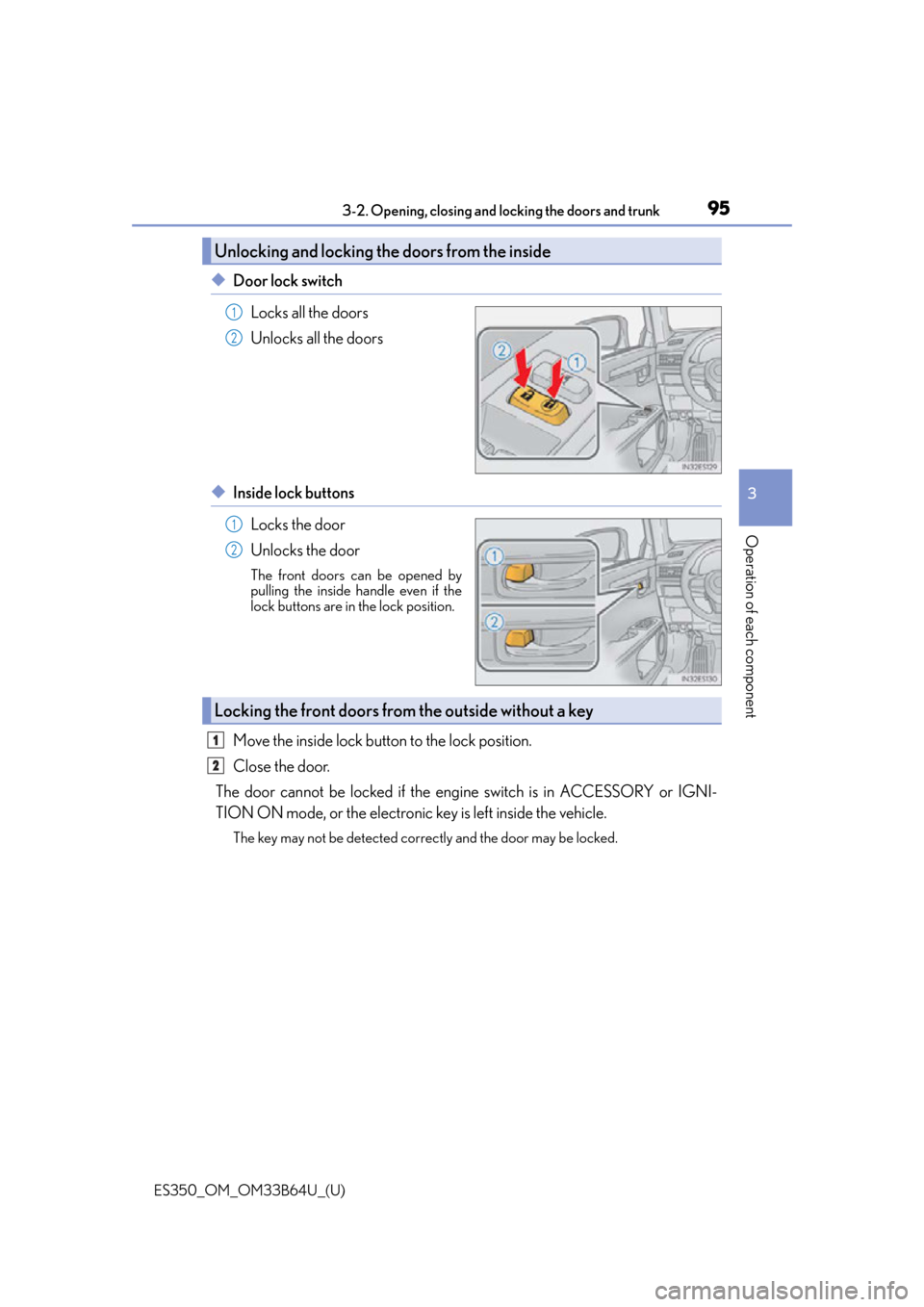
◆Door lock switch
Locks all the doors
Unlocks all the doors
◆Inside lock buttonsLocks the door
Unlocks the door
The front doors can be opened by
pulling the inside handle even if the
lock buttons are in the lock position.
Move the inside lock button to the lock position.
Close the door.
The door cannot be locked if the engi ne switch is in ACCESSORY or IGNI-
TION ON mode, or the electronic key is left inside the vehicle.
The key may not be detected correc tly and the door may be locked.
Unlocking and locking the doors from the inside
1
2
1
2
Locking the front doors from the outside without a key
1
2
Page 97 of 576
ES350_OM_OM33B64U_(U)
973-2. Opening, closing and locking the doors and trunk
3
Operation of each component
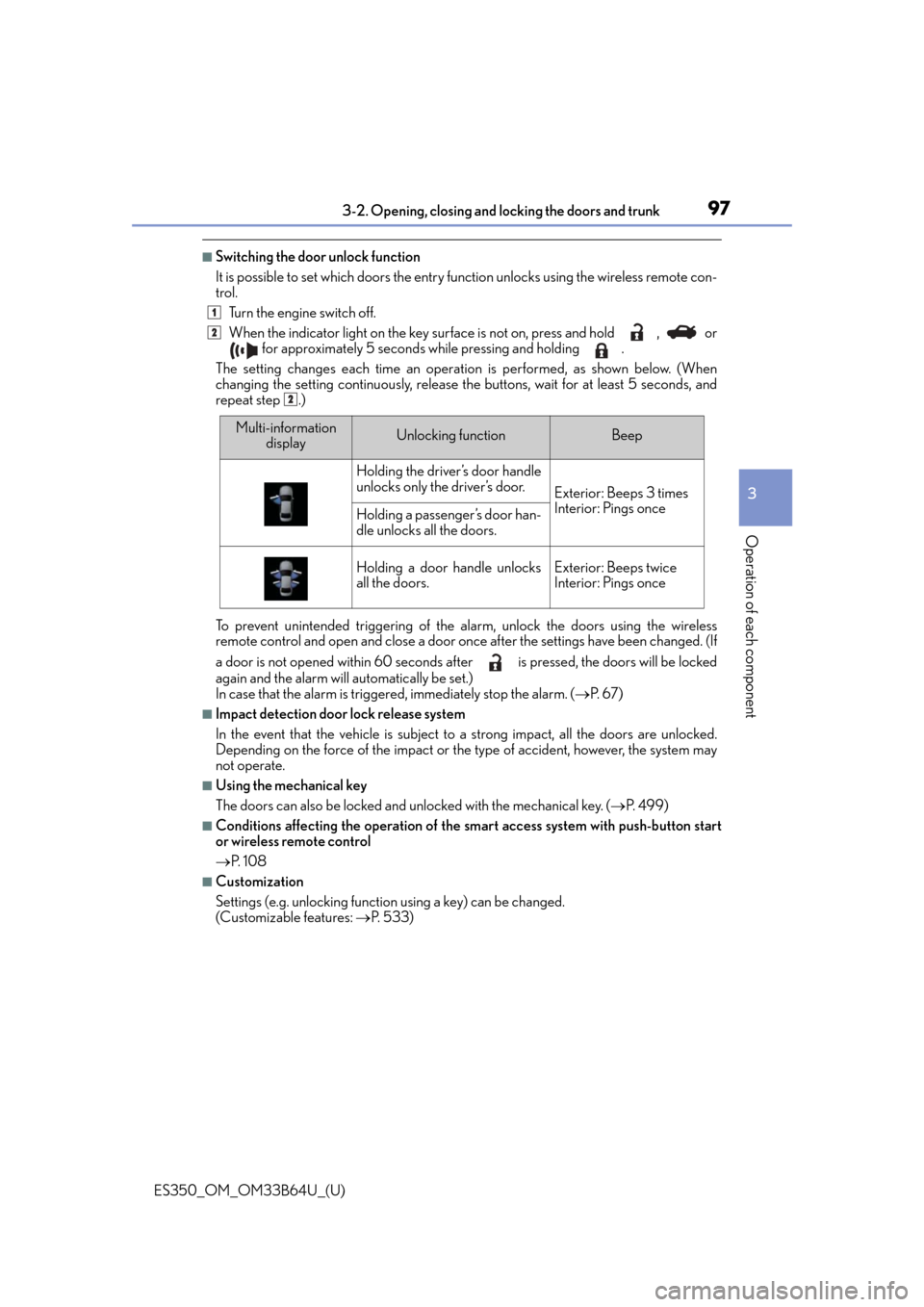
■Switching the door unlock function
It is possible to set which doors the entry fu nction unlocks using the wireless remote con-
trol.
Turn the engine switch off.
When the indicator light on the key su rface is not on, press and hold , or
for approximately 5 seconds while pressing and holding .
The setting changes each time an operatio n is performed, as shown below. (When
changing the setting continuously, release the buttons, wait for at least 5 seconds, and
repeat step .)
To prevent unintended triggering of the alarm, unlock the doors using the wireless
remote control and open and close a door once after the settings have been changed. (If
a door is not opened within 60 seconds af ter is pressed, the doors will be locked
again and the alarm will automatically be set.)
In case that the alarm is triggered, immediately stop the alarm. ( P. 6 7 )
■Impact detection door lock release system
In the event that the vehicle is subject to a strong impact, all the doors are unlocked.
Depending on the force of the impact or the type of accident, however, the system may
not operate.
■Using the mechanical key
The doors can also be locked and unlocked with the mechanical key. ( P. 499)
■Conditions affecting the operation of the sm art access system with push-button start
or wireless remote control
P. 1 0 8
■Customization
Settings (e.g. unlocking function using a key) can be changed.
(Customizable features: P. 5 3 3 )
1
2
2
Multi-information
displayUnlocking functionBeep
Holding the driver’s door handle
unlocks only the driver’s door.
Exterior: Beeps 3 times
Interior: Pings once
Holding a passenger’s door han-
dle unlocks all the doors.
Holding a door handle unlocks
all the doors.Exterior: Beeps twice
Interior: Pings once
Page 99 of 576
99
ES350_OM_OM33B64U_(U)3-2. Opening, closing and
locking the doors and trunk
3
Operation of each component
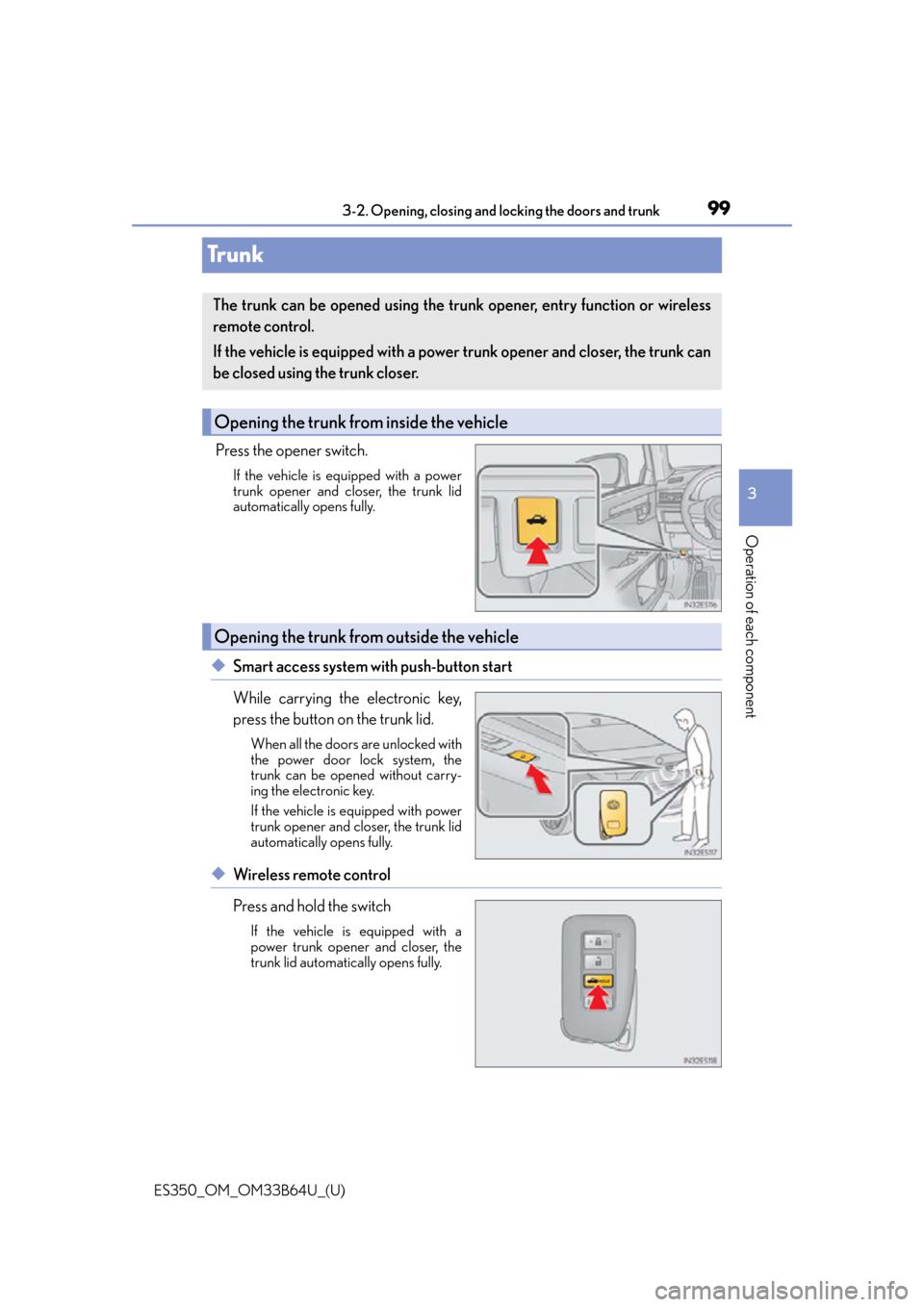
Tr u n k
Press the opener switch.
If the vehicle is equipped with a power
trunk opener and closer, the trunk lid
automatically opens fully.
◆Smart access system with push-button start
While carrying the electronic key,
press the button on the trunk lid.
When all the doors are unlocked with
the power door lock system, the
trunk can be opened without carry-
ing the electronic key.
If the vehicle is equipped with power
trunk opener and closer, the trunk lid
automatically opens fully.
◆Wireless remote control
Press and hold the switch
If the vehicle is equipped with a
power trunk opener and closer, the
trunk lid automatically opens fully.
The trunk can be opened using the trunk opener, entry function or wireless
remote control.
If the vehicle is equipped with a power trunk opener and closer, the trunk can
be closed using the trunk closer.
Opening the trunk from inside the vehicle
Opening the trunk from outside the vehicle
Page 101 of 576
ES350_OM_OM33B64U_(U)
1013-2. Opening, closing and locking the doors and trunk
3
Operation of each component
■Tr u n k l i g h t
The trunk light turns on when the trunk is opened.
■Trunk easy closer (vehicles with power trunk opener and closer)
In the event that the trunk lid is left slight ly open, the trunk easy closer will automatically
close it to the fully closed position.
■Function to prevent the trunk being lo cked with the electronic key inside
●When all doors are being locked, closing the tr unk lid with the electronic key left inside
the trunk will sound an alarm.
In this case, the trunk lid can be opened pressing the trunk release button on the trunk
lid.
●Even when the spare electronic key is put in the trunk with all the doors locked, the key
confinement prevention function can be activ ated so the trunk can be opened. In order
to prevent theft, take all electronic keys with you when leaving the vehicle.
●Even when the electronic key is put in the trunk with all the doors are locked, the key
may not be detected depending on the plac es and the surrounding radio wave condi-
tions. In this case, the key confinement prevention function cannot be activated, causing
the doors to lock when the trunk is closed. Make sure to check where the key is before
closing the trunk.
●The key confinement prevention function canno t be activated if any one of the doors is
unlocked. In this case, open the trunk using the trunk opener.
■Overload protection function (vehicles with power trunk opener and closer)
The trunk lid will not operate wh en excessive load is present on the top of the trunk lid.
■Fall-down protection function (vehicles with power trunk opener and closer)
While the trunk lid is opening automatically, ap plying excessive force to it will stop the
opening operation to prevent the tr unk lid from rapidly falling down.
■Jam protection function (vehicles with power trunk opener and closer)
While the trunk lid is closing automatically, the trunk lid will stop closing and open if
something gets caught.
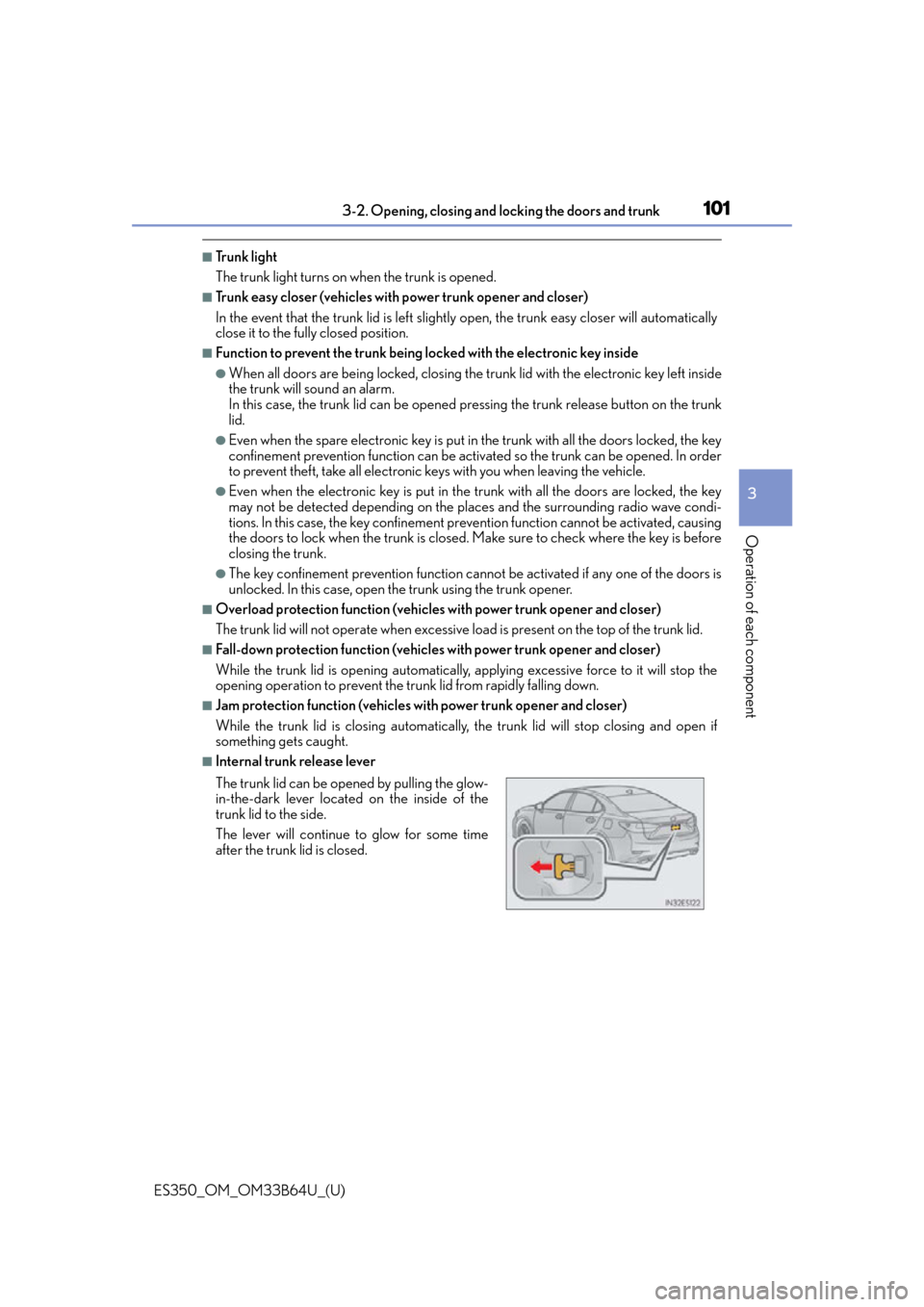
■Internal trunk release lever
The trunk lid can be open ed by pulling the glow-
in-the-dark lever located on the inside of the
trunk lid to the side.
The lever will continue to glow for some time
after the trunk lid is closed.
Page 102 of 576

102
ES350_OM_OM33B64U_(U)3-2. Opening, closing and
locking the doors and trunk
■Using the mechanical key
The trunk can be also opened using the mechanical key. ( P. 4 9 9 )
■When leaving a key to the vehi cle with a parking attendant
P. 9 1
■If the smart access system with push-butto n start or the wireless remote control does
not operate properly
●Use the mechanical key to unlock the trunk. ( P. 4 9 9 )
●Replace the key battery with a new one if it is depleted. ( P. 4 5 1 )
■Customization
The trunk unlocking operation can be changed. (Customizable features: P. 5 3 6 )
WA R N I N G
Observe the following precautions.
Failure to do so may result in death or serious injury.
■Before driving
●Make sure that the trun k lid is fully closed. If the trunk lid is not fully closed, it may
open unexpectedly while driving and hit ne ar-by objects or luggage in the trunk may
be thrown out, causing an accident.
●Do not allow children to play in the trunk.
If a child is accidentally locked in the trunk, they could suffer from heat exhaustion,
suffocation or other injuries.
●Do not allow a child to open or close the trunk lid.
Doing so may cause the trunk lid to open unexpectedly, or cause the child’s hands,
head, or neck to be caught by the closing trunk lid.
■Important points while driving
Never let anyone sit in the trunk. In the even t of sudden braking or a collision, they are
susceptible to death or serious injury.
Page 106 of 576
106
ES350_OM_OM33B64U_(U)3-2. Opening, closing and
locking the doors and trunk
Smart access system with push-button start
●Locks and unlocks the doors ( P. 9 3 )
●Opens the trunk (P. 99)
●Starts the engine ( P. 1 5 1 )
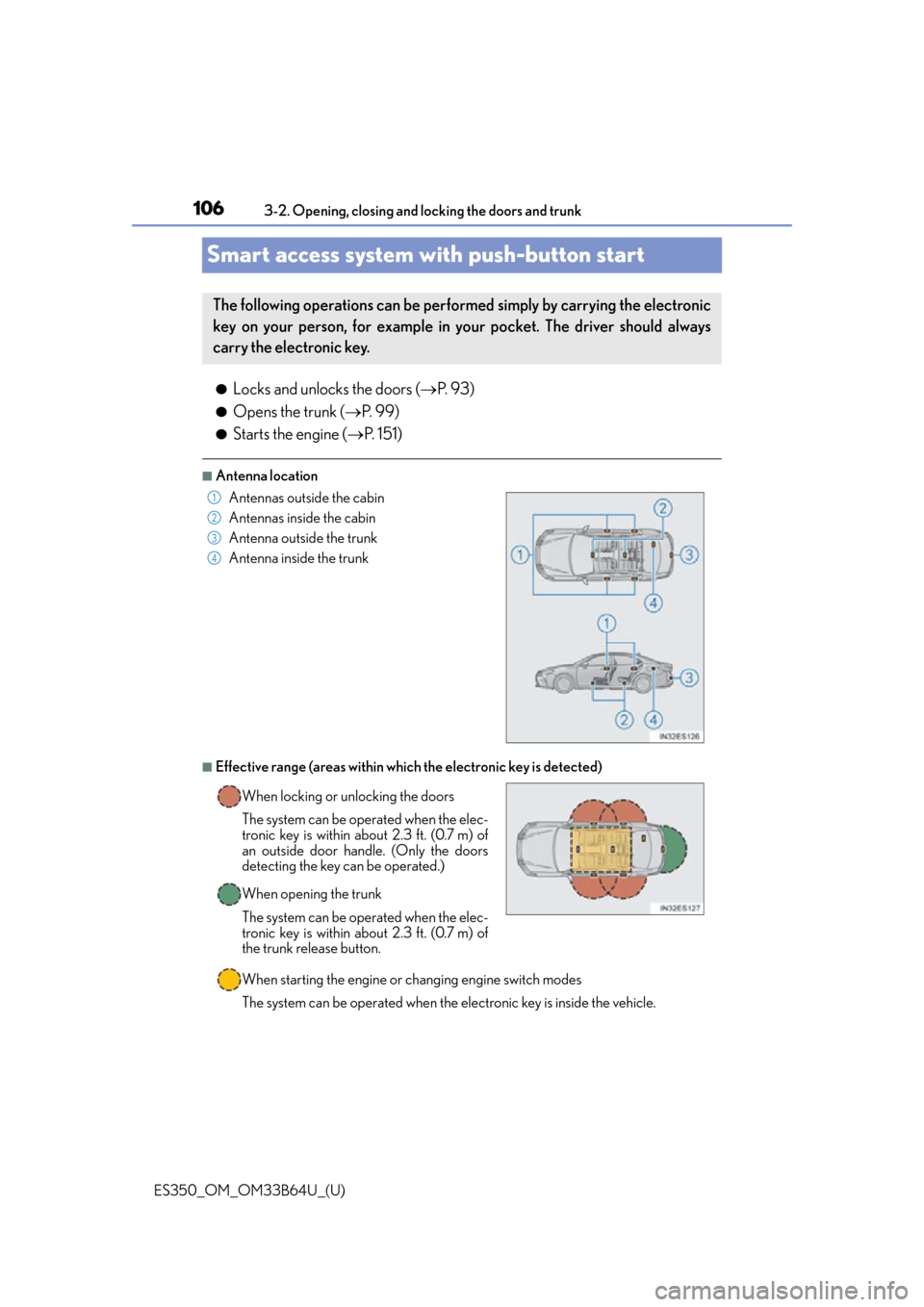
■Antenna location
■Effective range (areas within whic h the electronic key is detected)
When starting the engine or changing engine switch modes
The system can be operated when the electronic key is inside the vehicle.
The following operations can be performed simply by carrying the electronic
key on your person, for example in your pocket. The driver should always
carry the electronic key.
Antennas outside the cabin
Antennas inside the cabin
Antenna outside the trunk
Antenna inside the trunk
When locking or unlocking the doors
The system can be operated when the elec-
tronic key is within about 2.3 ft. (0.7 m) of
an outside door handle. (Only the doors
detecting the key can be operated.)
When opening the trunk
The system can be operated when the elec-
tronic key is within about 2.3 ft. (0.7 m) of
the trunk release button.1
2
3
4
Page 107 of 576
ES350_OM_OM33B64U_(U)
1073-2. Opening, closing and locking the doors and trunk
3
Operation of each component
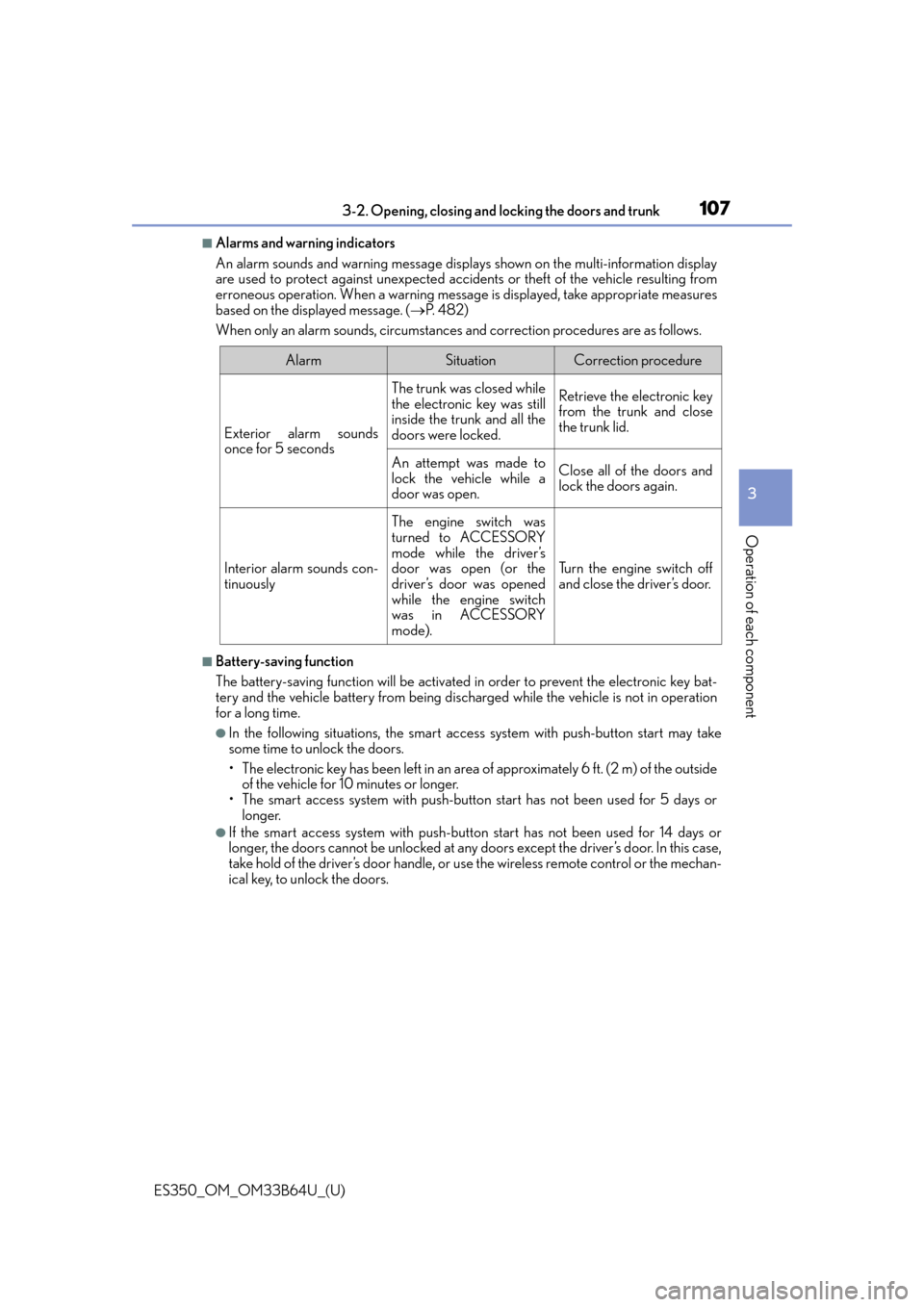
■Alarms and warning indicators
An alarm sounds and warning message displa ys shown on the multi-information display
are used to protect against unexpected acci dents or theft of the vehicle resulting from
erroneous operation. When a warning messag e is displayed, take appropriate measures
based on the displayed message. ( P. 4 8 2 )
When only an alarm sounds, circumstances and correction procedures are as follows.
■Battery-saving function
The battery-saving function will be activated in order to prevent the electronic key bat-
tery and the vehicle battery from being discharged while the vehicle is not in operation
for a long time.
●In the following situations, the smart access system with push-button start may take
some time to unlock the doors.
• The electronic key has been left in an area of approximately 6 ft. (2 m) of the outside
of the vehicle for 10 minutes or longer.
• The smart access system with push-butto n start has not been used for 5 days or
longer.
●If the smart access system with push-butto n start has not been used for 14 days or
longer, the doors cannot be unlocked at any doors except the driver’s door. In this case,
take hold of the driver’s door handle, or us e the wireless remote control or the mechan-
ical key, to unlock the doors.
AlarmSituationCorrection procedure
Exterior alarm sounds
once for 5 seconds
The trunk was closed while
the electronic key was still
inside the trunk and all the
doors were locked.Retrieve the electronic key
from the trunk and close
the trunk lid.
An attempt was made to
lock the vehicle while a
door was open.Close all of the doors and
lock the doors again.
Interior alarm sounds con-
tinuously
The engine switch was
turned to ACCESSORY
mode while the driver’s
door was open (or the
driver’s door was opened
while the engine switch
was in ACCESSORY
mode).
Turn the engine switch off
and close the driver’s door.