navigation Lexus ES350 2016 s / User Guide
[x] Cancel search | Manufacturer: LEXUS, Model Year: 2016, Model line: ES350, Model: Lexus ES350 2016Pages: 576, PDF Size: 8.3 MB
Page 221 of 576
ES350_OM_OM33B64U_(U)
2214-5. Using the driving support systems
4
Driving
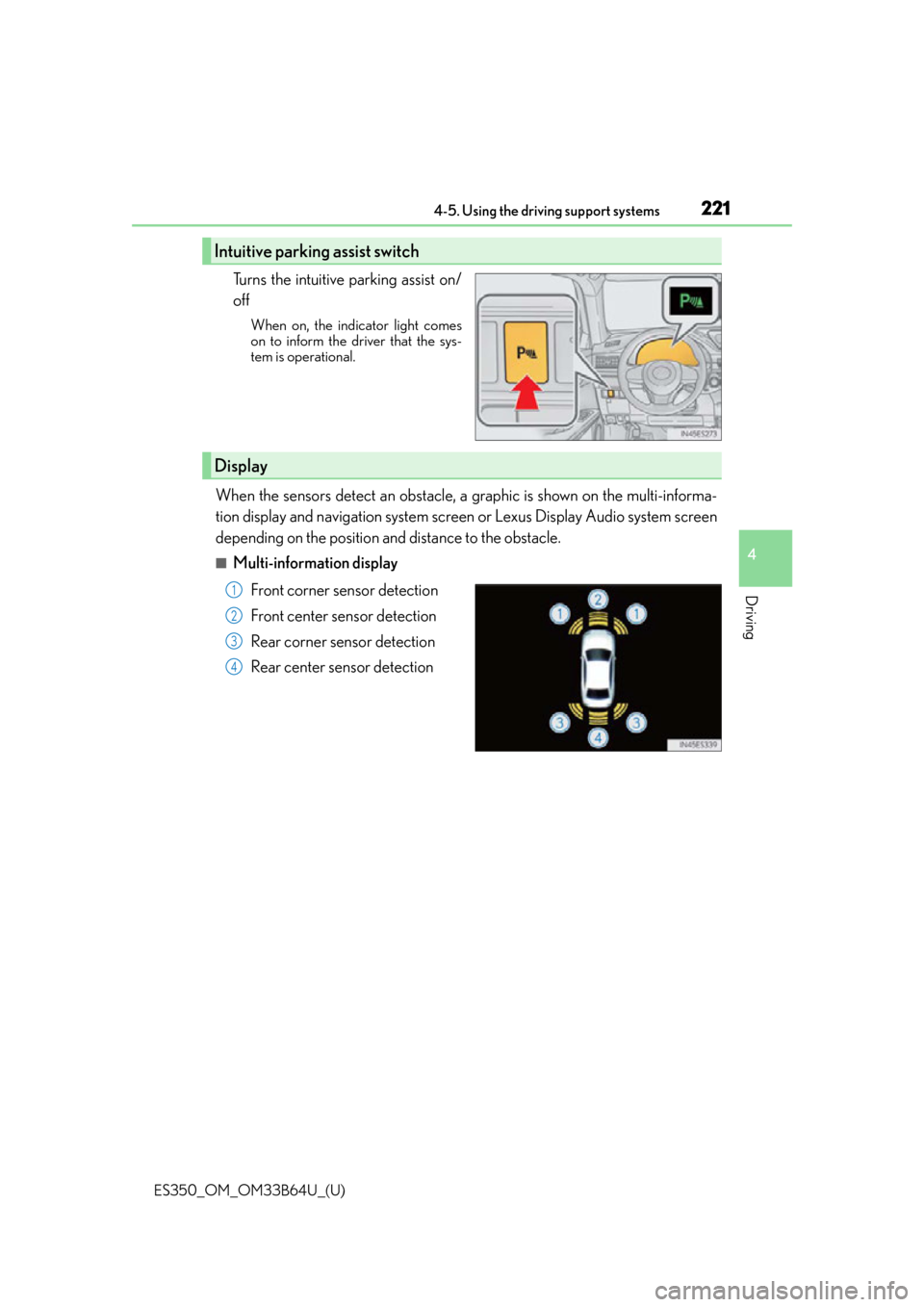
Turns the intuitive parking assist on/
off
When on, the indicator light comes
on to inform the driver that the sys-
tem is operational.
When the sensors detect an obstacle, a graphic is shown on the multi-informa-
tion display and navigation system scr een or Lexus Display Audio system screen
depending on the position and distance to the obstacle.
■Multi-information display
Front corner sensor detection
Front center sensor detection
Rear corner sensor detection
Rear center sensor detection
Intuitive parking assist switch
Display
1
2
3
4
Page 222 of 576
222
ES350_OM_OM33B64U_(U)4-5. Using the driving support systems
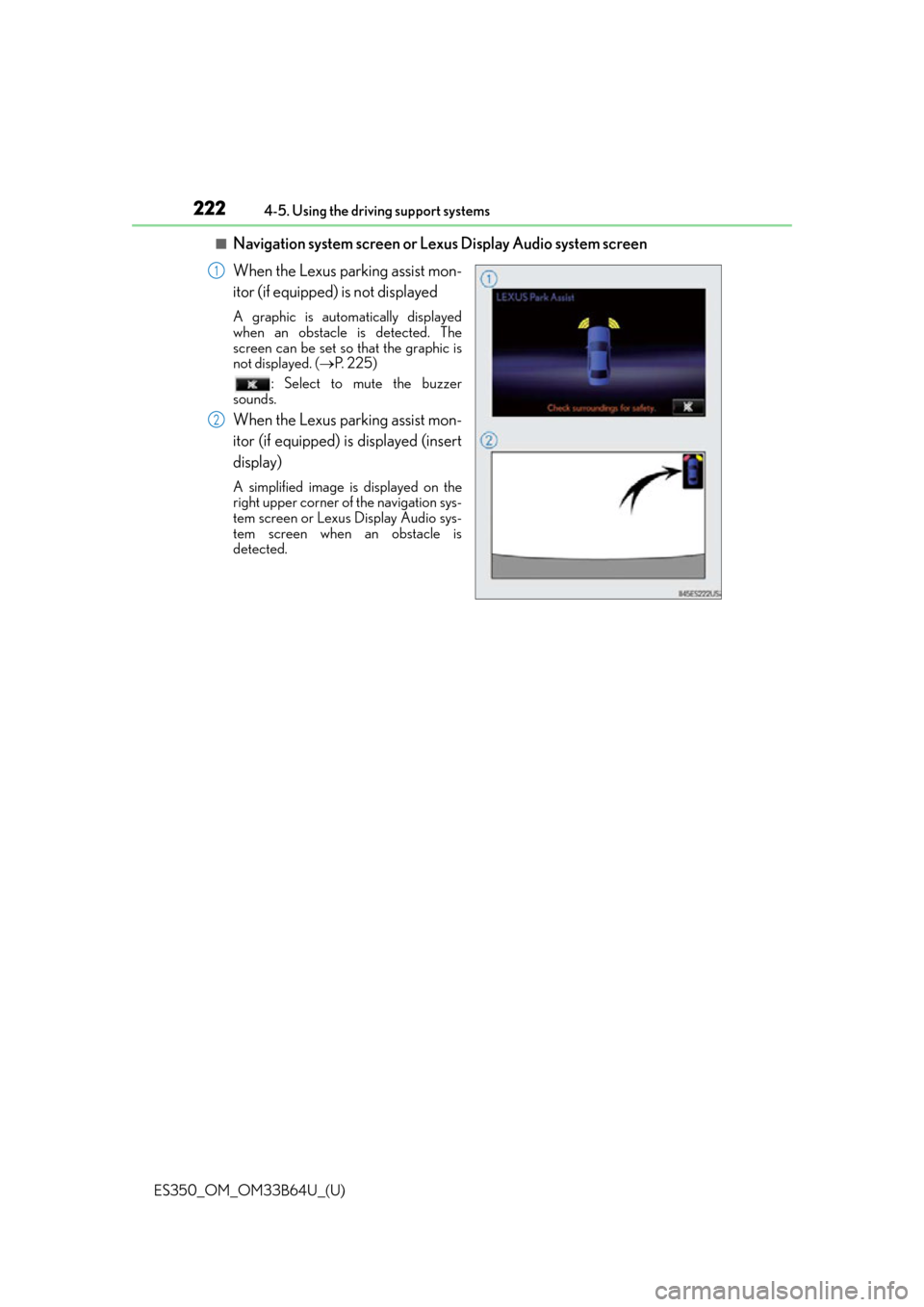
■Navigation system screen or Lexus Display Audio system screen
When the Lexus parking assist mon-
itor (if equipped) is not displayed
A graphic is automatically displayed
when an obstacle is detected. The
screen can be set so that the graphic is
not displayed. (
P. 225)
: Select to mute the buzzer
sounds.
When the Lexus parking assist mon-
itor (if equipped) is displayed (insert
display)
A simplified image is displayed on the
right upper corner of the navigation sys-
tem screen or Lexus Display Audio sys-
tem screen when an obstacle is
detected.
1
2
Page 223 of 576
ES350_OM_OM33B64U_(U)
2234-5. Using the driving support systems
4
Driving
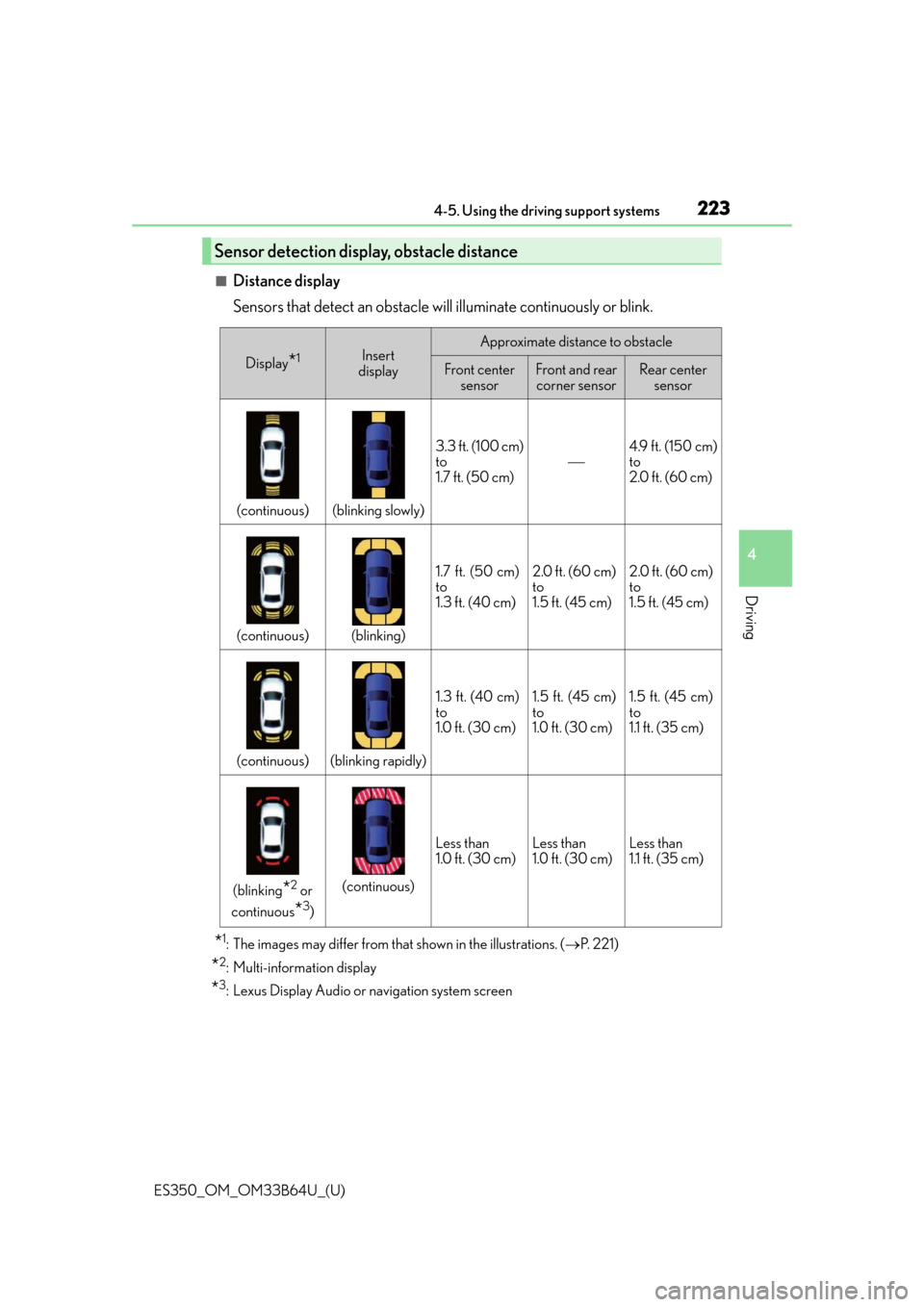
■Distance display
Sensors that detect an obstacle will illuminate continuously or blink.
*1: The images may differ from that shown in the illustrations. (P. 221)
*2: Multi-information display
*3: Lexus Display Audio or navigation system screen
Sensor detection display, obstacle distance
Display*1Insert
displayApproximate distance to obstacle
Front center sensorFront and rear corner sensorRear center sensor
(continuous)(blinking slowly)
3.3 ft. (100 cm)
to
1.7 ft. (50 cm)4.9 ft. (150 cm)
to
2.0 ft. (60 cm)
(continuous)(blinking)
1.7 ft. (50 cm)
to
1.3 ft. (40 cm)2.0 ft. (60 cm)
to
1.5 ft. (45 cm)2.0 ft. (60 cm)
to
1.5 ft. (45 cm)
(continuous)(blinking rapidly)
1.3 ft. (40 cm)
to
1.0 ft. (30 cm)1.5 ft. (45 cm)
to
1.0 ft. (30 cm)1.5 ft. (45 cm)
to
1.1 ft. (35 cm)
(blinking*2 or
continuous
*3)
(continuous)
Less than
1.0 ft. (30 cm)Less than
1.0 ft. (30 cm)Less than
1.1 ft. (35 cm)
Page 225 of 576
ES350_OM_OM33B64U_(U)
2254-5. Using the driving support systems
4
Driving
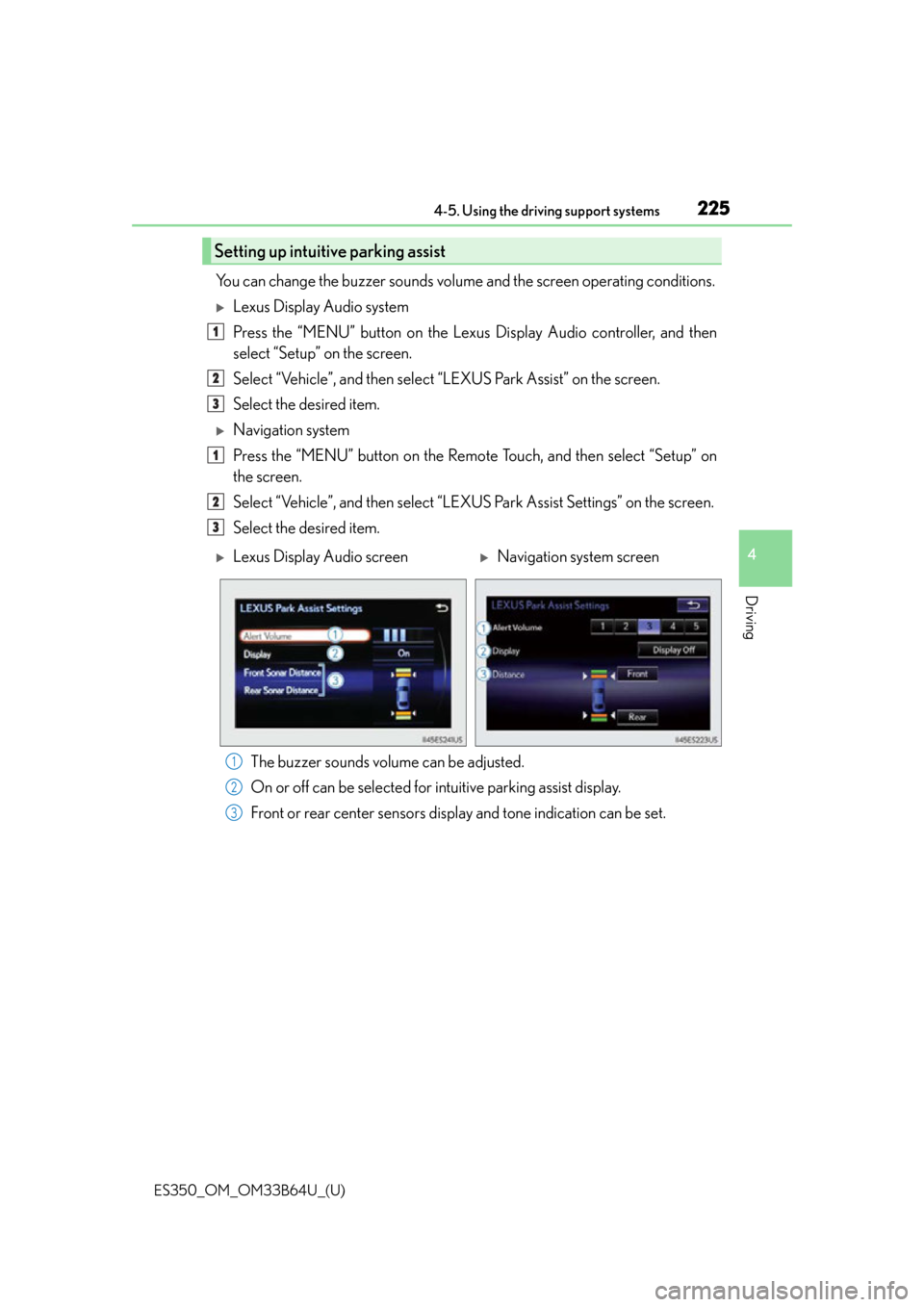
You can change the buzzer sounds volume and the screen operating conditions.
Lexus Display Audio system
Press the “MENU” button on the Lexus Display Audio controller, and then
select “Setup” on the screen.
Select “Vehicle”, and then select “LEXUS Park Assist” on the screen.
Select the desired item.
Navigation system
Press the “MENU” button on the Remote Touch, and then select “Setup” on
the screen.
Select “Vehicle”, and then select “LEXUS Park Assist Settings” on the screen.
Select the desired item.
The buzzer sounds volume can be adjusted.
On or off can be selected for intuitive parking assist display.
Front or rear center sensors disp lay and tone indication can be set.
Setting up intuitive parking assist
1
2
3
1
2
3
Lexus Display Audio screenNavigation system screen
1
2
3
Page 229 of 576
229
ES350_OM_OM33B64U_(U)4-5. Using the driving support systems
4
Driving
Lexus parking assist monitor
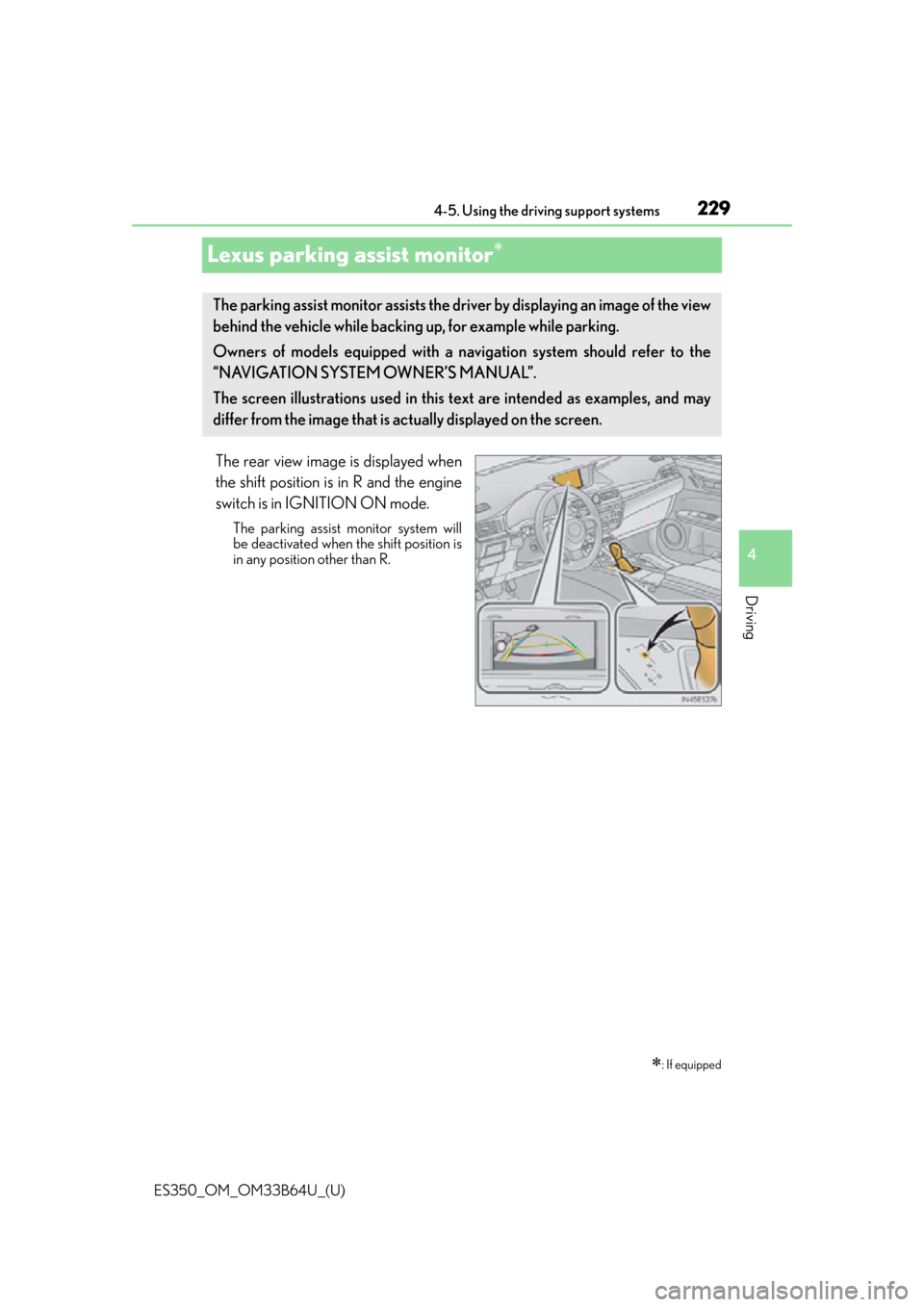
The rear view image is displayed when
the shift position is in R and the engine
switch is in IGNITION ON mode.
The parking assist monitor system will
be deactivated when the shift position is
in any position other than R.
: If equipped
The parking assist monitor assists the driv
er by displaying an image of the view
behind the vehicle while backing up, for example while parking.
Owners of models equipped with a navi gation system should refer to the
“NAVIGATION SYSTEM OWNER’S MANUAL”.
The screen illustrations used in this text are intended as examples, and may
differ from the image that is ac tually displayed on the screen.
Page 273 of 576
273
ES350_OM_OM33B64U_(U)5-1. Basic Operations
5
Lexus Display Audio system
Steering wheel audio switches
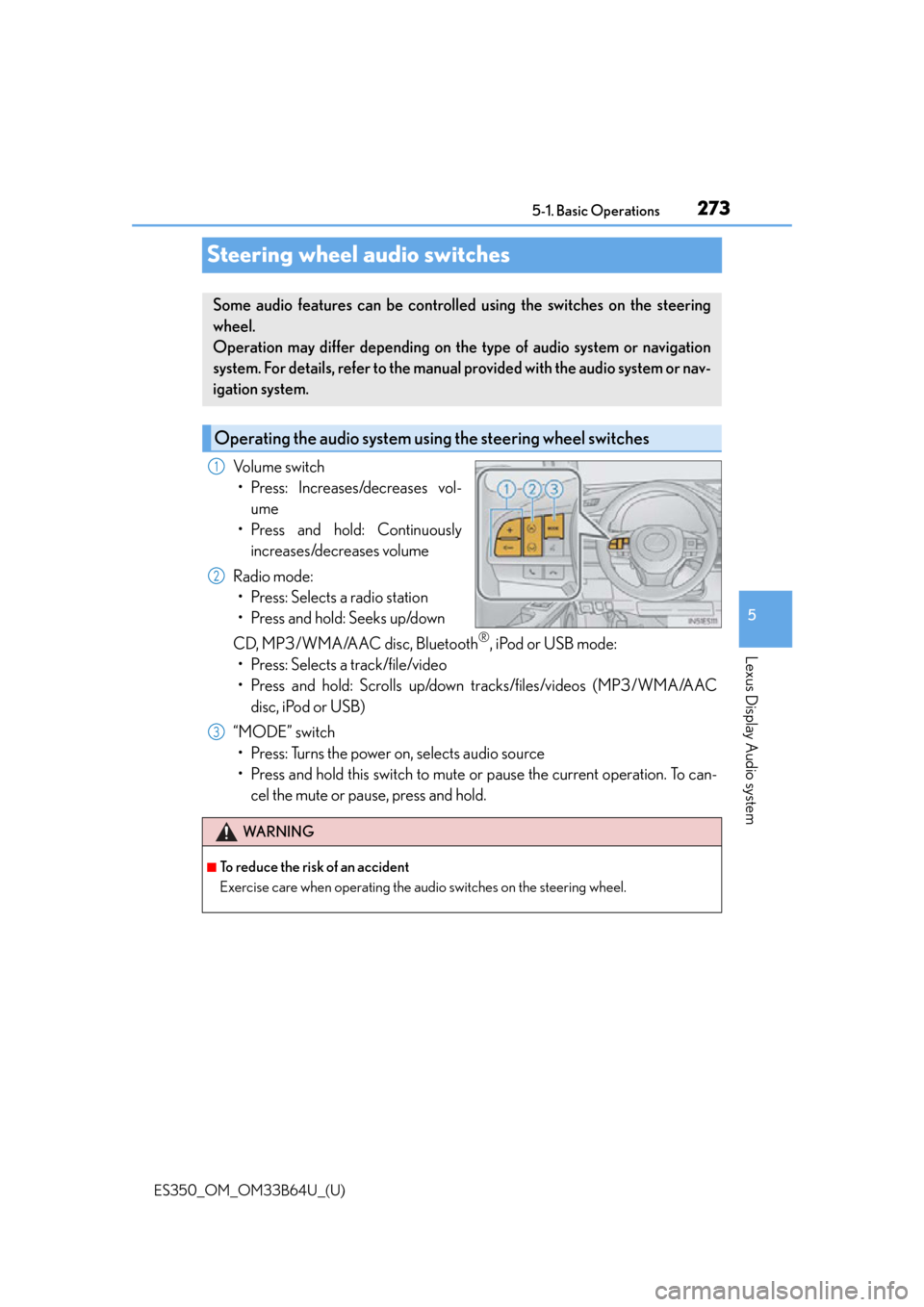
Volume switch
• Press: Increases/decreases vol- ume
• Press and hold: Continuously increases/decreases volume
Radio mode: • Press: Selects a radio station
• Press and hold: Seeks up/down
CD, MP3/WMA/AAC disc, Bluetooth
®, iPod or USB mode:
• Press: Selects a track/file/video
• Press and hold: Scrolls up/down tracks/files/videos (MP3/WMA/AAC disc, iPod or USB)
“MODE” switch • Press: Turns the power on, selects audio source
• Press and hold this switch to mute or pause the current operation. To can- cel the mute or pause, press and hold.
Some audio features can be controlled using the switches on the steering
wheel.
Operation may differ depending on th e type of audio system or navigation
system. For details, refer to the manual provided with the audio system or nav-
igation system.
Operating the audio system us ing the steering wheel switches
1
2
WA R N I N G
■To reduce the risk of an accident
Exercise care when operating the audio switches on the steering wheel.
3
Page 361 of 576
ES350_OM_OM33B64U_(U)
3615-12. Other function
5
Lexus Display Audio system
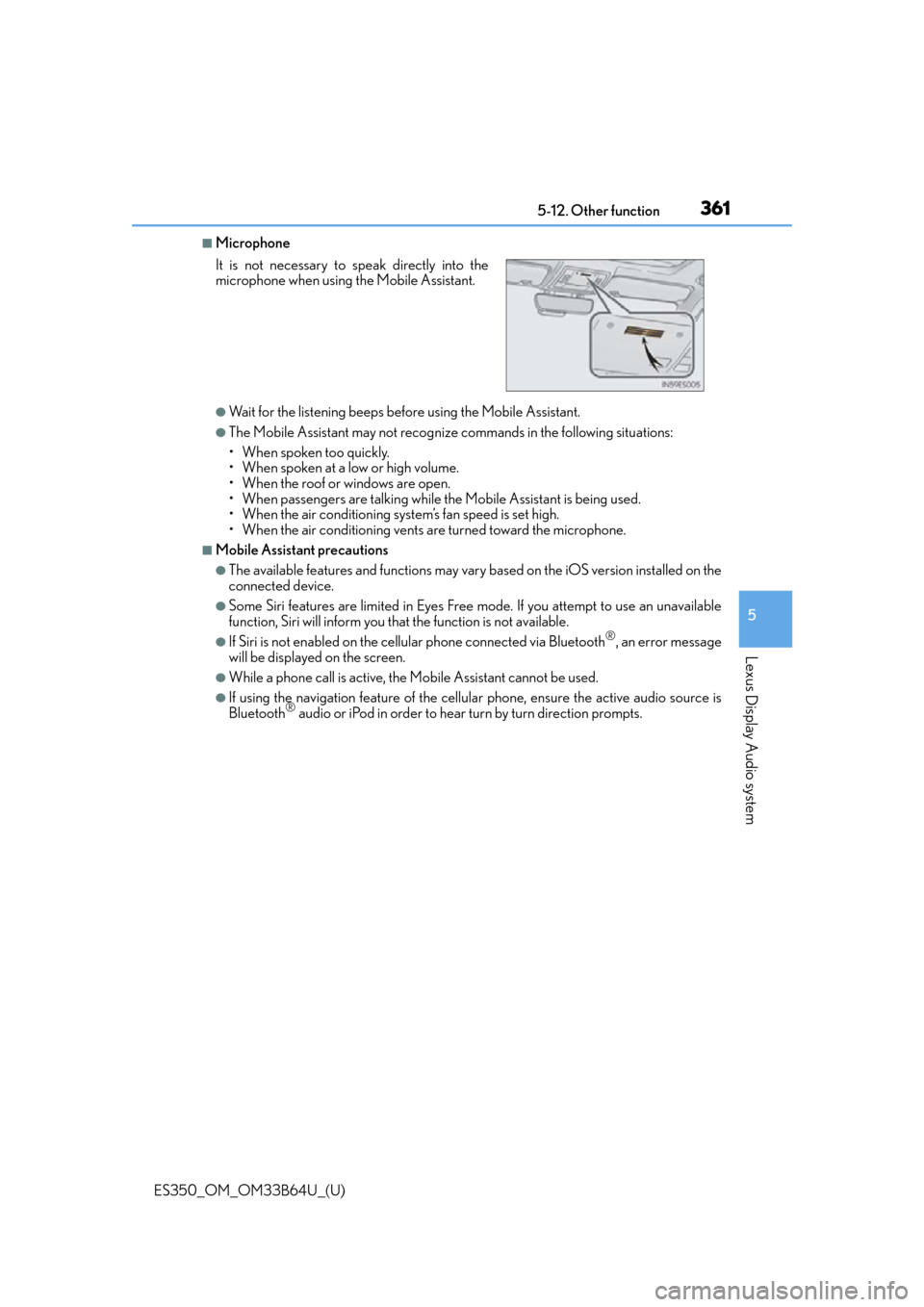
■Microphone
●Wait for the listening beeps before using the Mobile Assistant.
●The Mobile Assistant may not recognize commands in the following situations:
• When spoken too quickly.
• When spoken at a low or high volume.
• When the roof or windows are open.
• When passengers are talking while th e Mobile Assistant is being used.
• When the air conditioning syst em’s fan speed is set high.
• When the air conditioning vents ar e turned toward the microphone.
■Mobile Assistant precautions
●The available features and functions may vary based on the iOS version installed on the
connected device.
●Some Siri features are limited in Eyes Free mode. If you attempt to use an unavailable
function, Siri will inform you that the function is not available.
●If Siri is not enabled on the cellular phone connected via Bluetooth®, an error message
will be displayed on the screen.
●While a phone call is active, the Mobile Assistant cannot be used.
●If using the navigation feature of the cellular phone, ensure the active audio source is
Bluetooth® audio or iPod in order to hear turn by turn direction prompts.
It is not necessary to speak directly into the
microphone when using
the Mobile Assistant.
Page 364 of 576
364
ES350_OM_OM33B64U_(U)6-1. Using the air conditioning system and defogger
Automatic air conditioning system
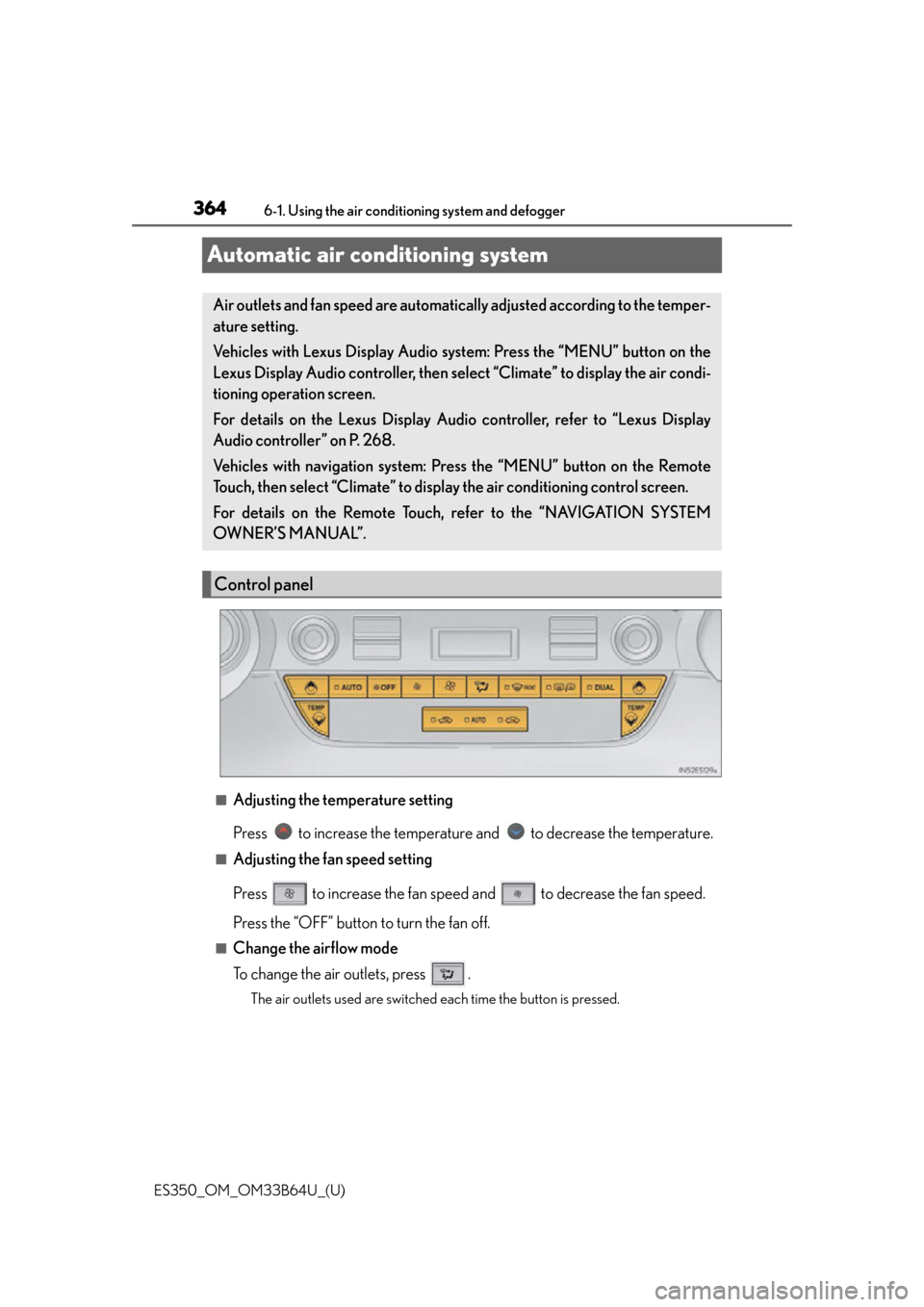
■Adjusting the temperature setting
Press to increase the temperature and to decrease the temperature.
■Adjusting the fan speed setting
Press to increase the fan speed and to decrease the fan speed.
Press the “OFF” button to turn the fan off.
■Change the airflow mode
To change the air outlets, press .
The air outlets used are switched each time the button is pressed.
Air outlets and fan speed are automatica
lly adjusted according to the temper-
ature setting.
Vehicles with Lexus Display Audio sy stem: Press the “MENU” button on the
Lexus Display Audio controller, then select “Climate” to display the air condi-
tioning operation screen.
For details on the Lexus Display Audio controller, refer to “Lexus Display
Audio controller” on P. 268.
Vehicles with navigation system: Press the “MENU” button on the Remote
Touch, then select “Climate” to display the air conditioning control screen.
For details on the Remote Touch, refer to the “NAVIGATION SYSTEM
OWNER’S MANUAL”.
Control panel
Page 366 of 576
3666-1. Using the air conditioning system and defogger
ES350_OM_OM33B64U_(U)
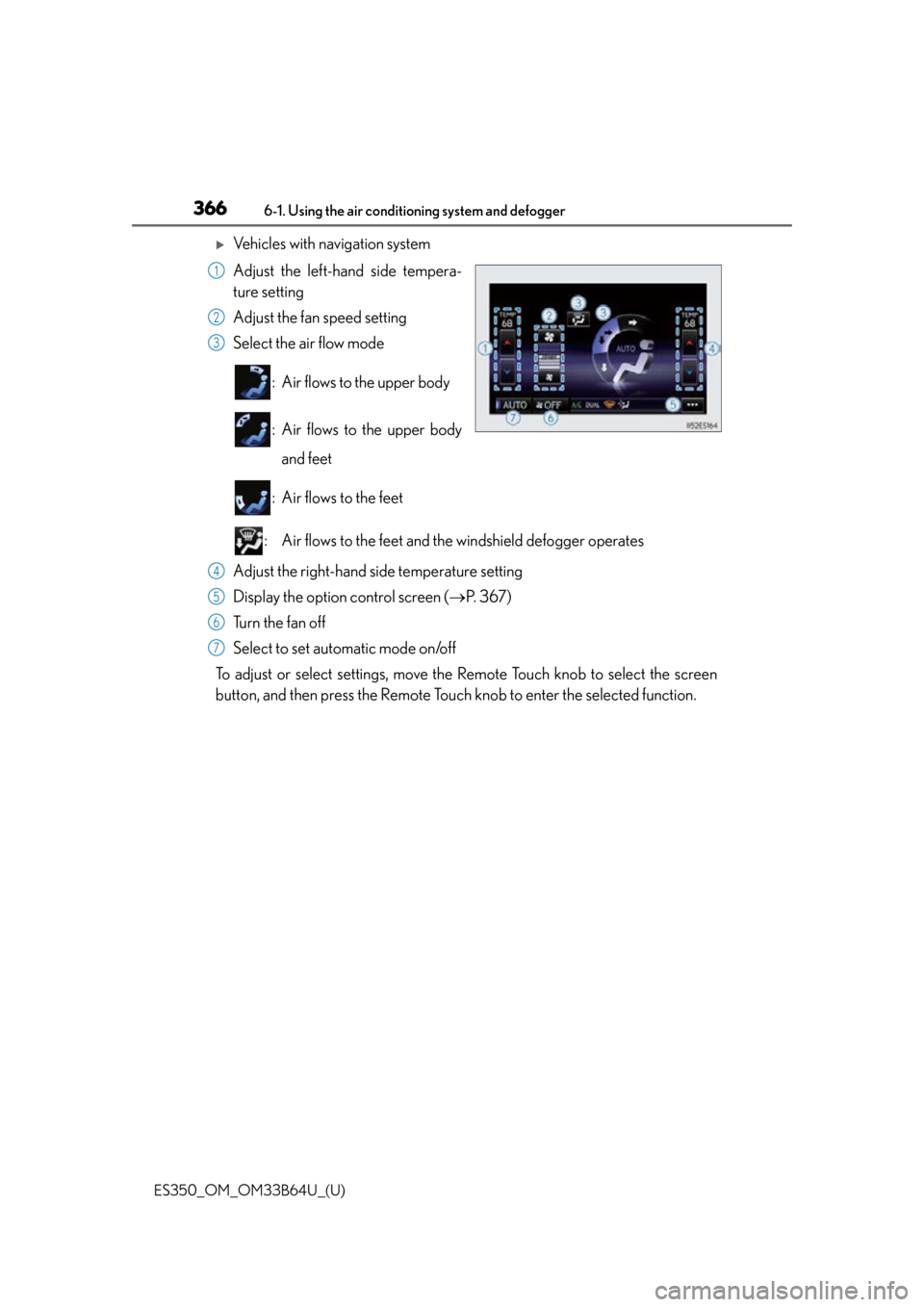
Vehicles with navigation system
Adjust the left-hand side tempera-
ture setting
Adjust the fan speed setting
Select the air flow mode : Air flows to the upper body
: Air flows to the upper bodyand feet
: Air flows to the feet
: Air flows to the feet and the windshield defogger operates
Adjust the right-hand side temperature setting
Display the option control screen ( P. 3 6 7 )
Tu r n t h e f a n o f f
Select to set automatic mode on/off
To adjust or select settings, move the Remote Touch knob to select the screen
button, and then press the Remote Touch knob to enter the selected function.
1
2
3
4
5
6
7
Page 367 of 576
ES350_OM_OM33B64U_(U)
3676-1. Using the air conditioning system and defogger
6
Interior features
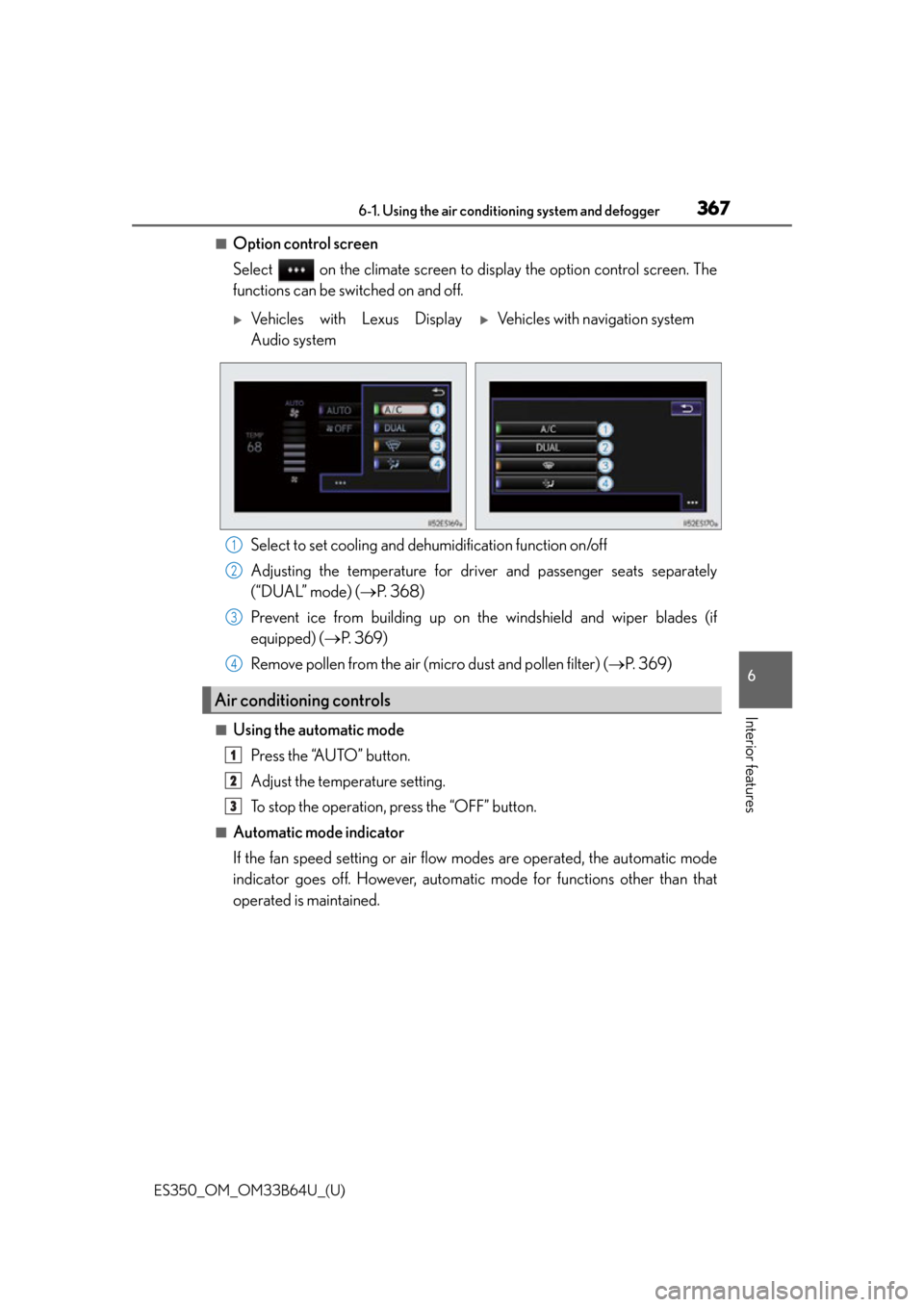
■Option control screen
Select on the climate screen to display the option control screen. The
functions can be switched on and off.
Select to set cooling and dehumidification function on/off
Adjusting the temperature for driver and passenger seats separately
(“DUAL” mode) ( P. 3 6 8 )
Prevent ice from building up on th e windshield and wiper blades (if
equipped) ( P. 3 6 9 )
Remove pollen from the air (micro dust and pollen filter) ( P. 3 6 9 )
■Using the automatic mode
Press the “AUTO” button.
Adjust the temperature setting.
To stop the operation, press the “OFF” button.
■Automatic mode indicator
If the fan speed setting or air flow modes are operated, the automatic mode
indicator goes off. However, automati c mode for functions other than that
operated is maintained.
Vehicles with Lexus Display
Audio systemVehicles with navigation system
Air conditioning controls
1
2
3
4
1
2
3