reset Lexus ES350 2016 s / User Guide
[x] Cancel search | Manufacturer: LEXUS, Model Year: 2016, Model line: ES350, Model: Lexus ES350 2016Pages: 576, PDF Size: 8.3 MB
Page 266 of 576
266
ES350_OM_OM33B64U_(U)5-1. Basic Operations
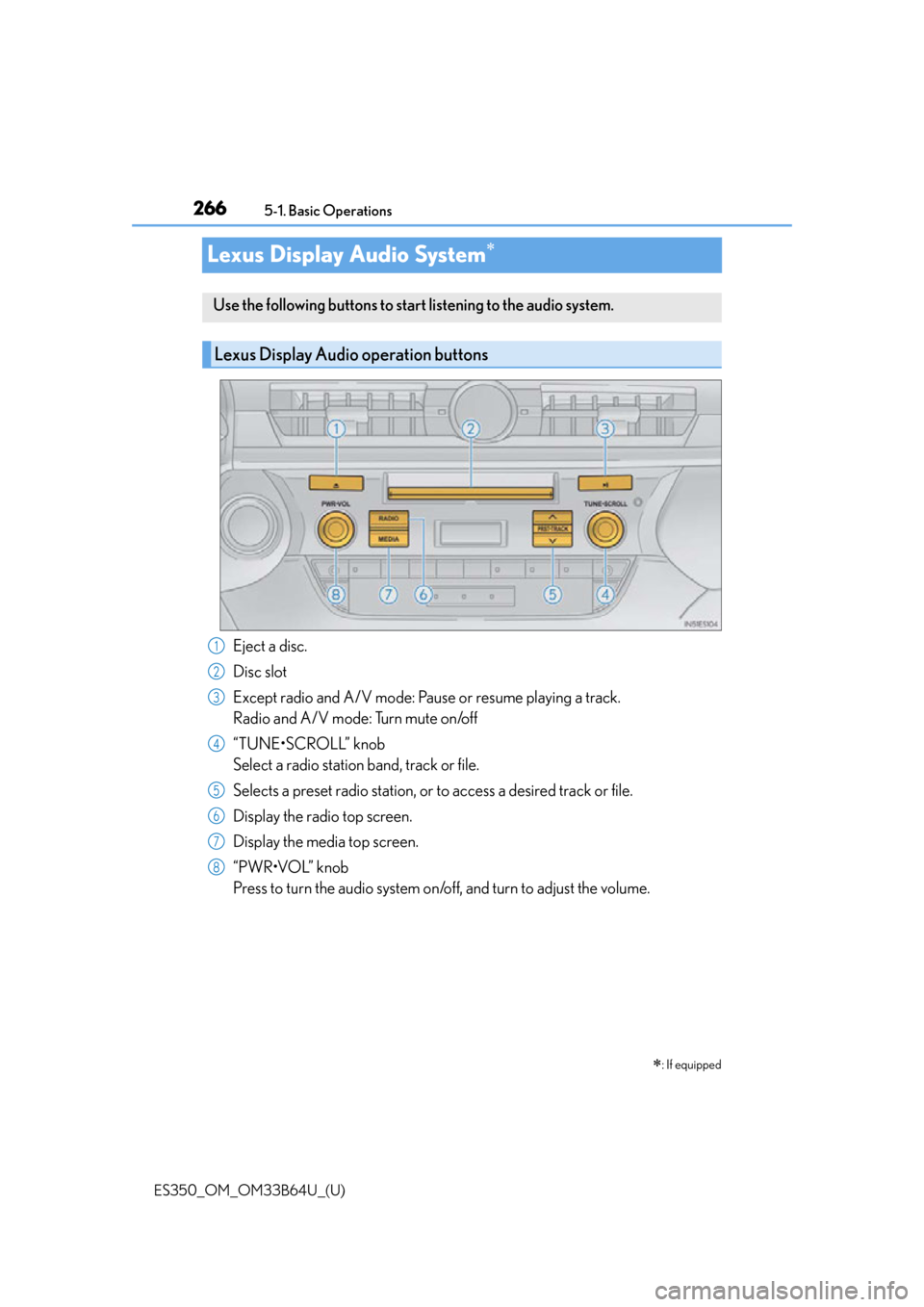
Lexus Display Audio System
Eject a disc.
Disc slot
Except radio and A/V mode: Pause or resume playing a track.
Radio and A/V mode: Turn mute on/off
“TUNE•SCROLL” knob
Select a radio station band, track or file.
Selects a preset radio st
ation, or to access a desired track or file.
Display the radio top screen.
Display the media top screen.
“PWR•VOL” knob
Press to turn the audio system on/o ff, and turn to adjust the volume.
: If equipped
Use the following buttons to start listening to the audio system.
Lexus Display Audio operation buttons
1
2
3
4
5
6
7
8
Page 280 of 576

2805-2. Setup
ES350_OM_OM33B64U_(U)
“MENU” button “Setup” “General” “Delete Personal Data”
Select “Delete”.
Check carefully beforehand, as data cannot be retrieved once deleted.
The following personal data will be deleted or changed to its default settings.
• Phonebook data
• Call history data
•Favorite data
•Bluetooth
® devices data
•Phone sound settings
• Detailed Bluetooth
® settings
• Audio/video setting
• Preset switch data
•Last used radio station
• Customized image data
•FM info setting
• iPod tagging information
• Software update history
• Software update detail information
•Phone disp lay setting
• Contact/call history setting
• Messaging setting
• Traffic information map
• Weather information
• Phonebook data for voice recognition
• Music data for voice recognition
Deleting personal data
1
2
Page 286 of 576
286
ES350_OM_OM33B64U_(U)5-3. Using the audio system
Audio settings
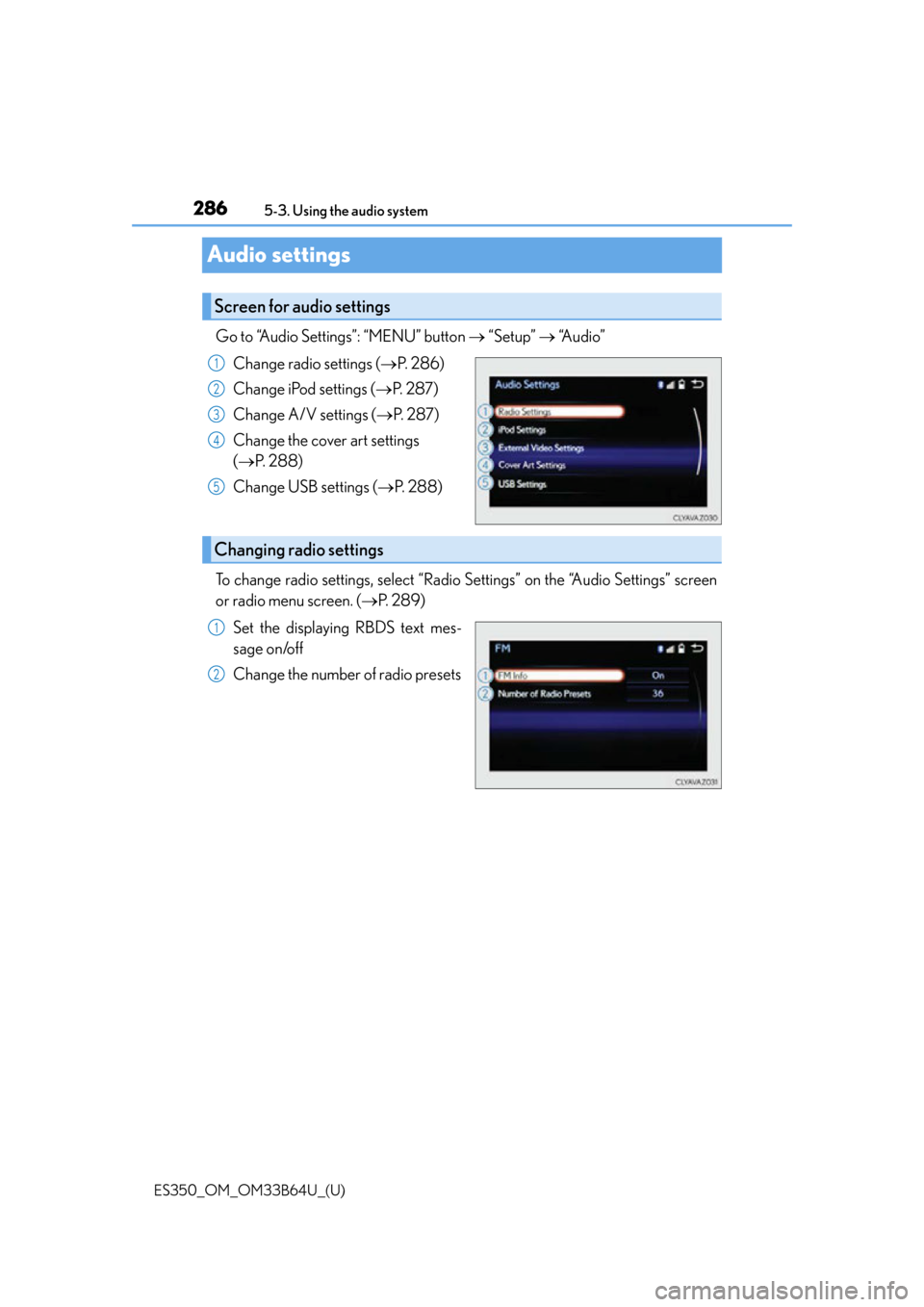
Go to “Audio Settings”: “MENU” button
“Setup” “Audio”
Change radio settings ( P. 2 8 6 )
Change iPod settings ( P. 2 8 7 )
Change A/V settings ( P. 2 8 7 )
Change the cover art settings
( P. 288)
Change USB settings ( P. 288)
To change radio settings, select “Radio Settings” on the “Audio Settings” screen
or radio menu screen. ( P. 2 8 9 )
Set the displaying RBDS text mes-
sage on/off
Change the number of radio presets
Screen for audio settings
1
2
3
4
5
Changing radio settings
1
2
Page 292 of 576
292
ES350_OM_OM33B64U_(U)5-4. Using the radio
Radio operation
Pressing the “RADIO” button displays the radio top screen from any screen of
the selected source.
■Menu screen
P. 2 8 9
Tune in to the desired station us ing one of the following methods.
■Seek tuning
Press and hold then release “” or “ ”.
Seek turning can also be oper ated on the menu screen. (P. 2 8 9 )
The radio will begin seeking up or down for a station of the nearest frequency
and will stop when a station is found.
■Manual tuning
Turn the “TUNE•SCROLL” knob.
■Preset stations
Select the desired preset station by pressing “ ” or “ ” or controller.
■Station list
Move the controller to the right and selecting “Station List”.
AM radio: Selecting a desired station.
FM radio: Selecting a desired type of station and selecting a desired sta-
tion.
To refreshing the station list, select “R efresh”. Select “Source” on the refresh
screen, can be change to the other audio source while refreshing.
Select “AM”, “FM” or “SAT” on the audio source selection screen to begin lis-
tening to the radio.
Radio top screen
Selecting a station (AM or FM radio)
1
2
Page 293 of 576
ES350_OM_OM33B64U_(U)
2935-4. Using the radio
5
Lexus Display Audio system
When “HD Radio” is set to “On”, available stations with HD Radio channels are
marked with “HD)”.In AM or FM mode, select a station marked with “HD)”.
Turn the “TUNE•SCROLL” knob to select an HD Radio channel.
HD Radio channels can also be selected by selecting “Multicast” on the menu screen.
( P. 2 8 9 )
Select in to the desired channel using one of the following methods.
■Tu r n i n g u p /d o w n t h e c h a n n e l
Press and hold “” or “ ” or turn the “TUNE•SCROLL” knob.
■Preset channels
Select the desired preset channel by pressing “ ” or “ ” or controller.
■Channel list
Move the controller to the right and selecting “Select a SAT Category”.
Selecting a desired category of chan nel and selecting a desired channel.
Search for desired stations or channel.
Select and hold one of the preset until you hear a beep.
■Display the song information
Move the controller to the right and selecting “Text”.
■Display the Additional information (AM, FM radio)
Move the controller to the right and selecting “Additional Information”.
Selecting an HD Radio channel
Selecting a channel (XM Satellite Radio)
Setting presets
Display the text message
1
2
1
2
1
2
Page 295 of 576
ES350_OM_OM33B64U_(U)
2955-4. Using the radio
5
Lexus Display Audio system
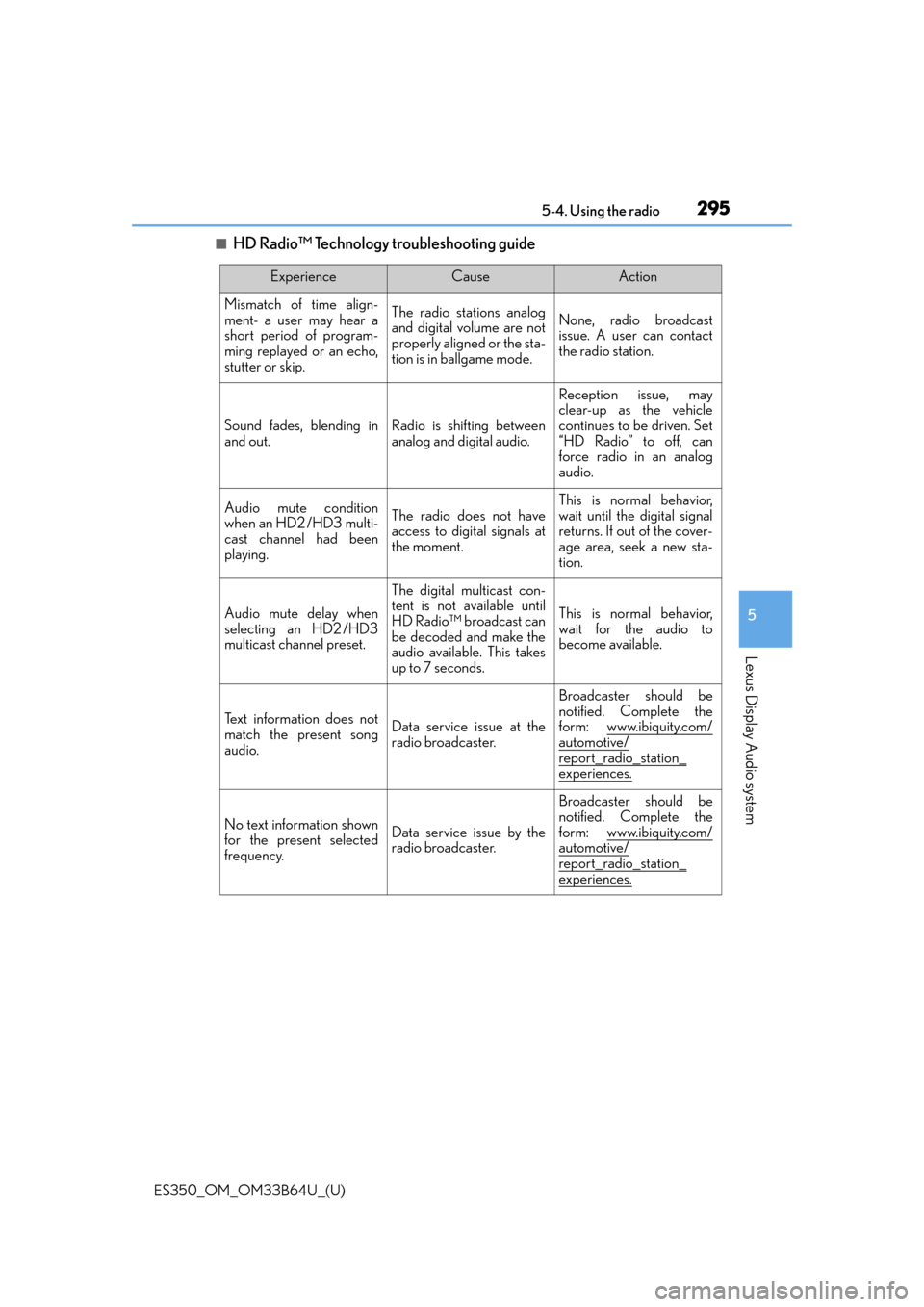
■HD Radio™ Technology troubleshooting guide
ExperienceCauseAction
Mismatch of time align-
ment- a user may hear a
short period of program-
ming replayed or an echo,
stutter or skip.The radio stations analog
and digital volume are not
properly aligned or the sta-
tion is in ballgame mode.None, radio broadcast
issue. A user can contact
the radio station.
Sound fades, blending in
and out.Radio is shifting between
analog and digital audio.
Reception issue, may
clear-up as the vehicle
continues to be driven. Set
“HD Radio” to off, can
force radio in an analog
audio.
Audio mute condition
when an HD2 /HD3 multi-
cast channel had been
playing.The radio does not have
access to digital signals at
the moment.
This is normal behavior,
wait until the digital signal
returns. If out of the cover-
age area, seek a new sta-
tion.
Audio mute delay when
selecting an HD2 /HD3
multicast channel preset.
The digital multicast con-
tent is not available until
HD Radio™ broadcast can
be decoded and make the
audio available. This takes
up to 7 seconds.
This is normal behavior,
wait for the audio to
become available.
Te x t i n f o r m a t i o n d o e s n o t
match the present song
audio.Data service issue at the
radio broadcaster.
Broadcaster should be
notified. Complete the
form: www.ibiquity.com/
automotive/
report_radio_station_
experiences.
No text information shown
for the present selected
frequency.Data service issue by the
radio broadcaster.
Broadcaster should be
notified. Complete the
form: www.ibiquity.com/
automotive/report_radio_station_
experiences.
Page 308 of 576
3085-6. Using an external device
ES350_OM_OM33B64U_(U)
■iPod problems
To resolve most problems encountered when using your iPod, disconnect your iPod from
the vehicle iPod connection and reset it. For in structions on how to reset your iPod, refer
to your iPod Owner’s Manual.
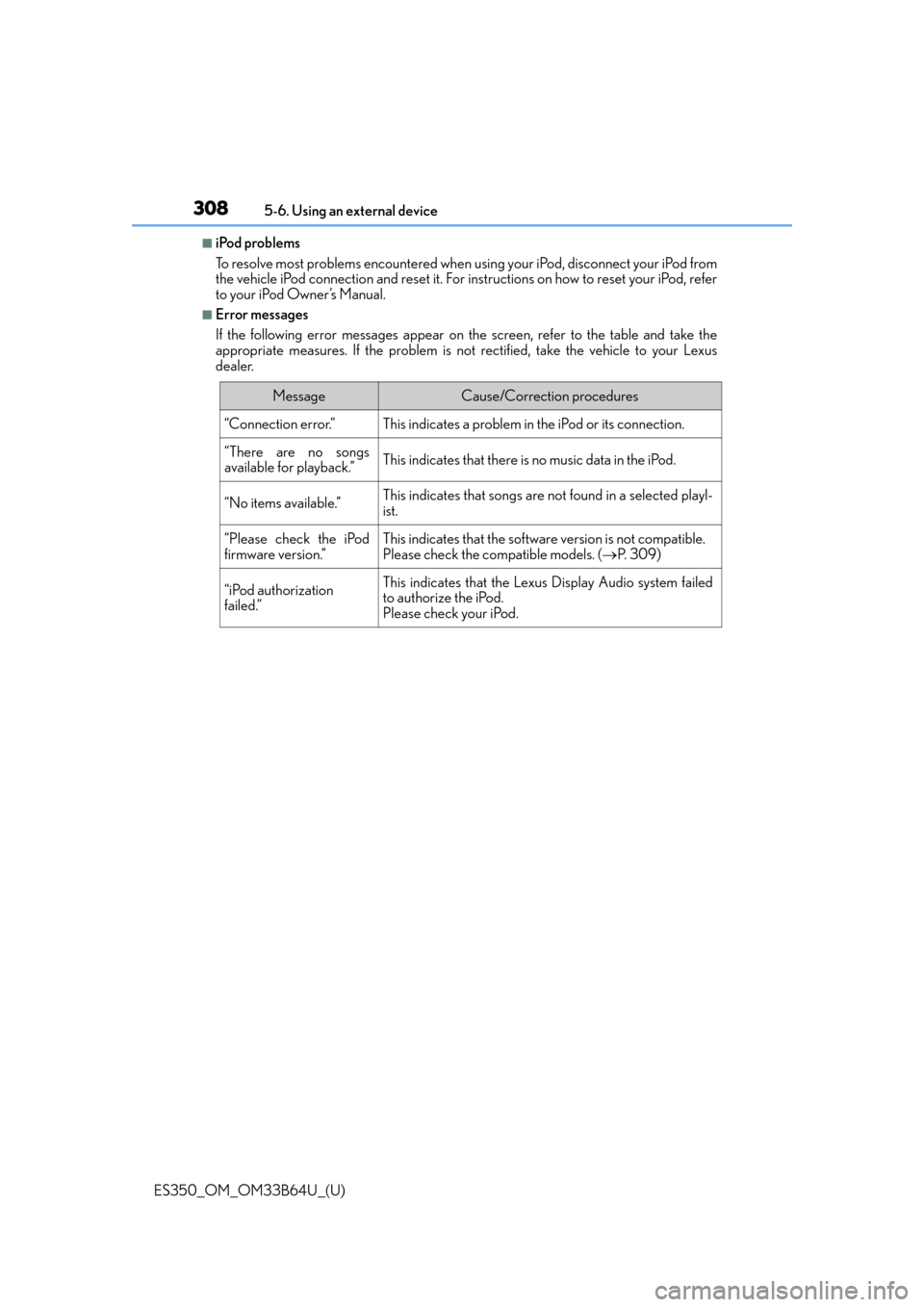
■Error messages
If the following error messages appear on the screen, refer to the table and take the
appropriate measures. If the pr oblem is not rectified, take the vehicle to your Lexus
dealer.
MessageCause/Correction procedures
“Connection error.”This indicates a problem in the iPod or its connection.
“There are no songs
available for playback.”This indicates that there is no music data in the iPod.
“No items available.”This indicates that songs are not found in a selected playl-
ist.
“Please check the iPod
firmware version.”This indicates that the software version is not compatible.
Please check the co mpatible models. (P. 3 0 9 )
“iPod authorization
failed.”This indicates that the Lexus Display Audio system failed
to authorize the iPod.
Please check your iPod.
Page 415 of 576
ES350_OM_OM33B64U_(U)
4157-2. Maintenance
7
Maintenance and care
■Repair and replacement
It is recommended that genuine Lexus parts be used for repairs to ensure performance
of each system. If non-Lexus parts are used in replacement or if a repair shop other than
a Lexus dealer performs repairs, confirm the warranty coverage.
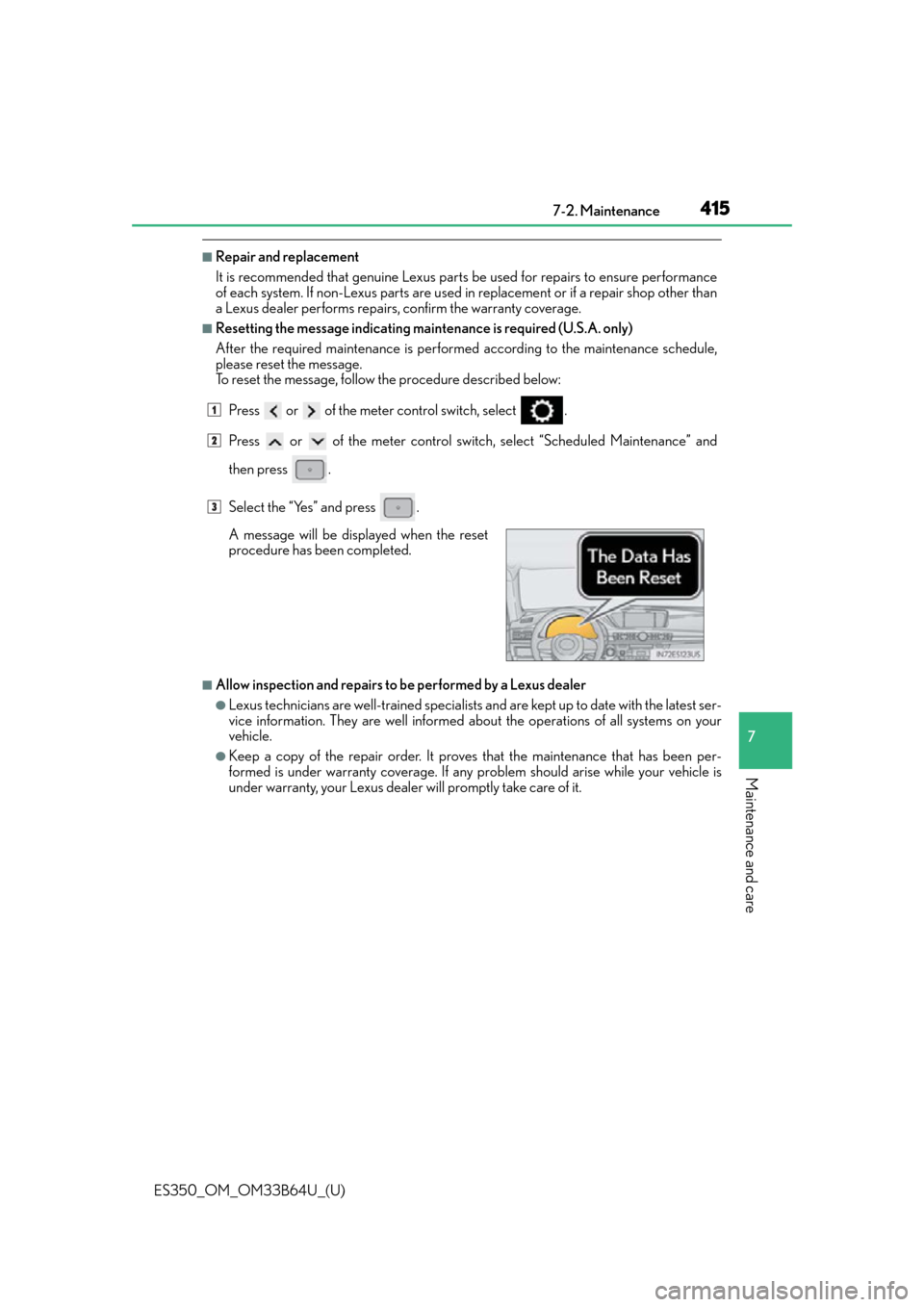
■Resetting the message indicating maintenance is required (U.S.A. only)
After the required maintenance is performed according to the maintenance schedule,
please reset the message.
To reset the message, follow the procedure described below:Press or of the meter control switch, select .
Press or of the meter control switch , select “Scheduled Maintenance” and
then press .
Select the “Yes” and press .
■Allow inspection and repairs to be performed by a Lexus dealer
●Lexus technicians are well-trained specialists an d are kept up to date with the latest ser-
vice information. They are well informed ab out the operations of all systems on your
vehicle.
●Keep a copy of the repair order. It proves that the maintenance that has been per-
formed is under warranty coverage. If any problem should arise while your vehicle is
under warranty, your Lexus dealer will promptly take care of it.
A message will be displayed when the reset
procedure has been completed.
1
2
3
Page 429 of 576
ES350_OM_OM33B64U_(U)
4297-3. Do-it-yourself maintenance
7
Maintenance and care
■Engine oil consumption
A certain amount of engine oil will be consumed while driving. In the following situations,
oil consumption may increase, and engine o il may need to be refilled in between oil
maintenance intervals.
●When the engine is new, for example directly after purchasing the vehicle or after
replacing the engine
●If low quality oil or oil of an inappropriate viscosity is used
●When driving at high engine speeds or with a heavy load, or when driving while accel-
erating or decelerating frequently
●When leaving the engi ne idling for a long time, or when driving frequently through
heavy traffic
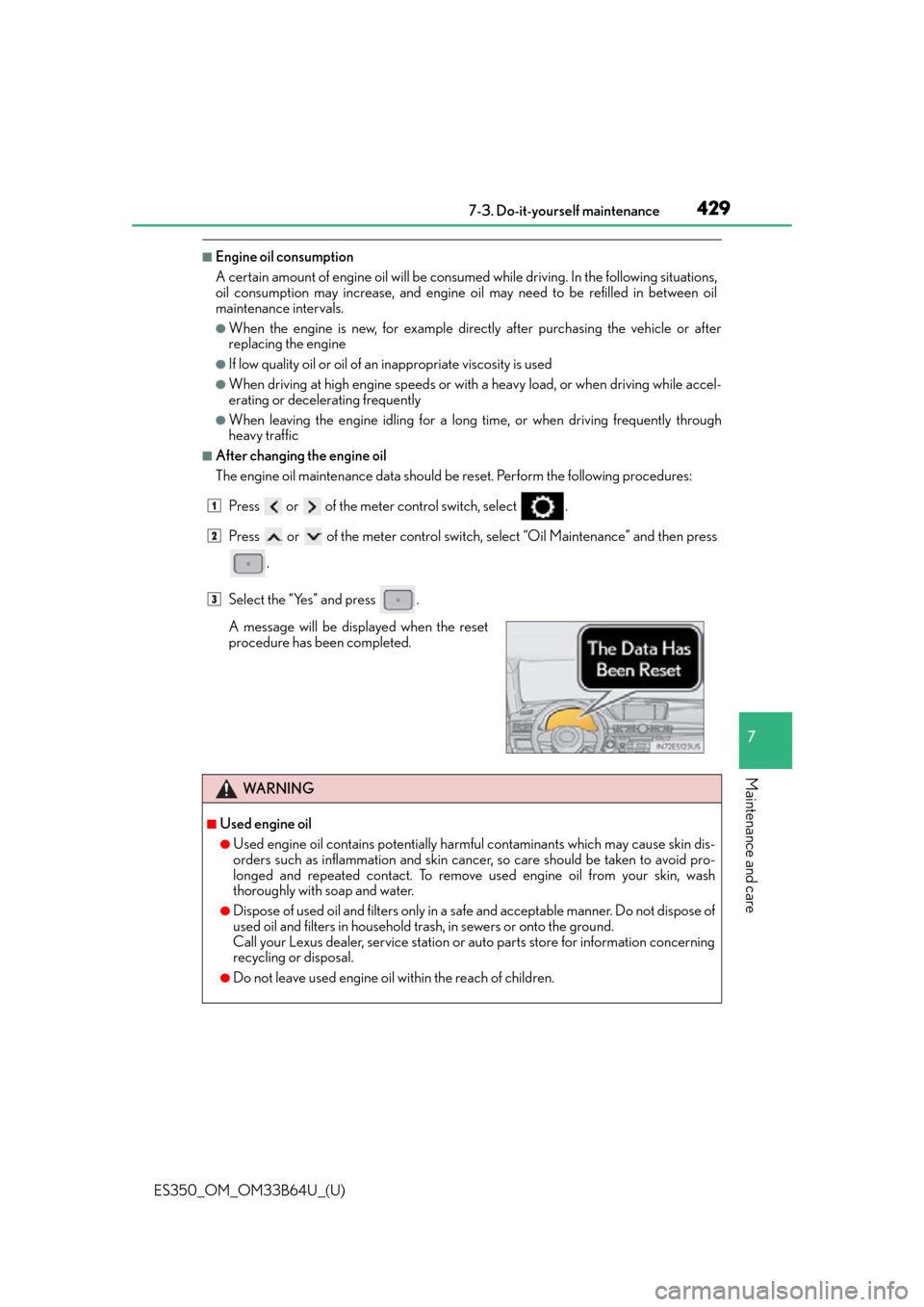
■After changing the engine oil
The engine oil maintenance da ta should be reset. Perform the following procedures:
Press or of the meter control switch, select .
Press or of the meter control switch, select “Oil Maintenance” and then press
.
Select the “Yes” and press .
A message will be displayed when the reset
procedure has been completed.
WA R N I N G
■Used engine oil
●Used engine oil contains potentially harm ful contaminants which may cause skin dis-
orders such as inflammation and skin canc er, so care should be taken to avoid pro-
longed and repeated contact. To remove used engine oil from your skin, wash
thoroughly with soap and water.
●Dispose of used oil and filters only in a safe and acceptable manner. Do not dispose of
used oil and filters in household tras h, in sewers or onto the ground.
Call your Lexus dealer, service station or auto parts store for information concerning
recycling or disposal.
●Do not leave used engine oil within the reach of children.
1
2
3
Page 438 of 576
438
ES350_OM_OM33B64U_(U)7-3. Do-it-yourself maintenance
■How to initialize the tire pressure warning system
Park the vehicle in a safe place and turn the engine switch off.
Initialization cannot be performe d while the vehicle is moving.
Adjust the tire inflation pressure to the specified cold tire inflation pressure
level. (P. 5 1 8 )
Make sure to adjust the tire pressure to the specified cold tire inflation pressure
level. The tire pressure warning system w ill operate based on this pressure level.
Turn the engine switch to IGNITION ON mode.
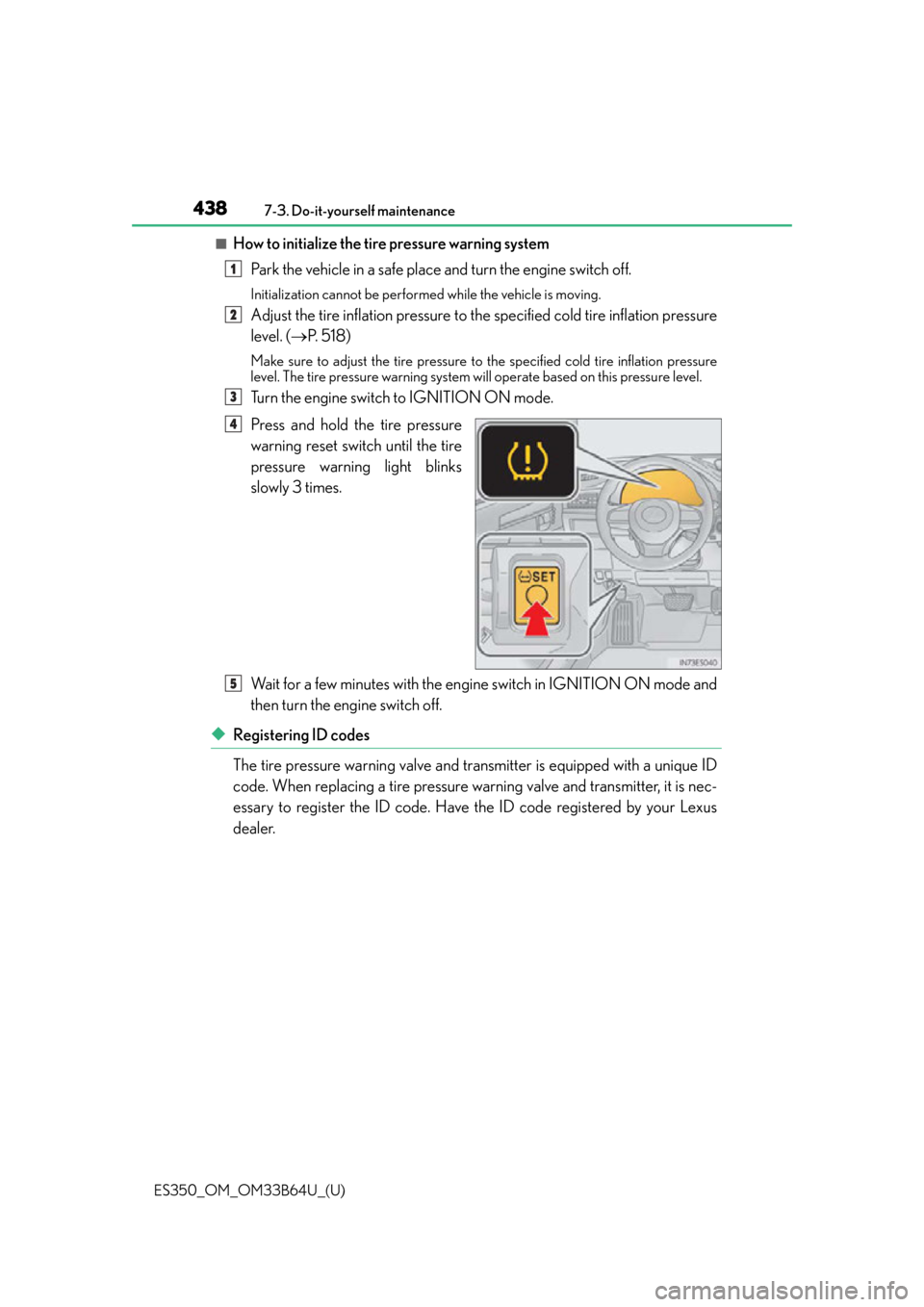
Press and hold the tire pressure
warning reset switch until the tire
pressure warning light blinks
slowly 3 times.
Wait for a few minutes with the engine switch in IGNITION ON mode and
then turn the engine switch off.
◆Registering ID codes
The tire pressure warning valve and transmitter is equipped with a unique ID
code. When replacing a tire pressure warning valve and transmitter, it is nec-
essary to register the ID code. Have the ID code registered by your Lexus
dealer.
1
2
3
4
5