headlight Lexus ES350 2016 s / Owner's Guide
[x] Cancel search | Manufacturer: LEXUS, Model Year: 2016, Model line: ES350, Model: Lexus ES350 2016Pages: 576, PDF Size: 8.3 MB
Page 282 of 576
282
ES350_OM_OM33B64U_(U)5-2. Setup
Display settings
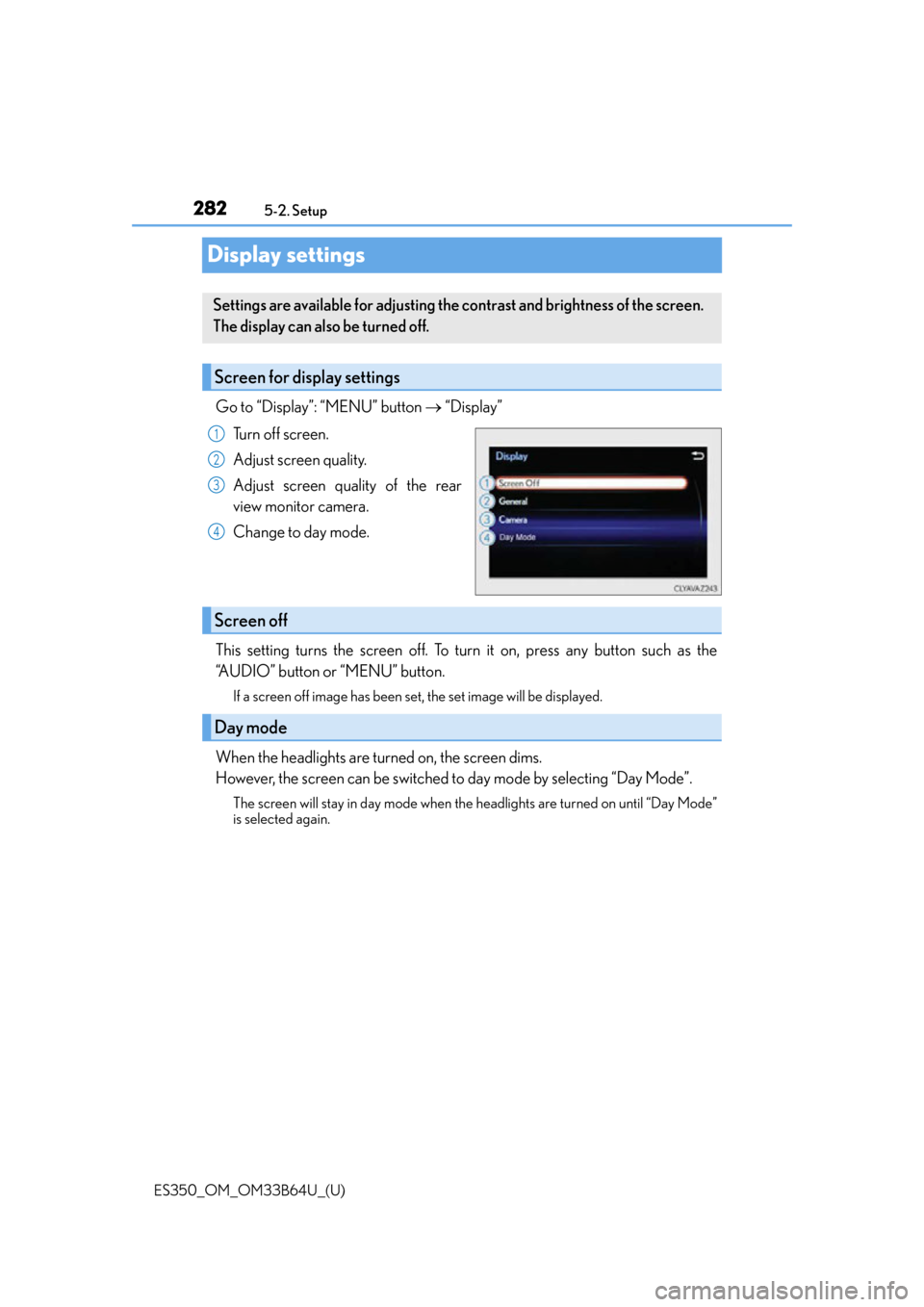
Go to “Display”: “MENU” button
“Display”
Turn off screen.
Adjust screen quality.
Adjust screen quality of the rear
view monitor camera.
Change to day mode.
This setting turns the screen off. To turn it on, press any button such as the
“AUDIO” button or “MENU” button.
If a screen off image has been set, the set image will be displayed.
When the headlights are turned on, the screen dims.
However, the screen can be switched to day mode by selecting “Day Mode”.
The screen will stay in day mode when the headlights are turned on until “Day Mode”
is selected again.
Settings are available for adjusting the contrast and brightness of the screen.
The display can also be turned off.
Screen for display settings
1
2
3
4
Screen off
Day mode
Page 418 of 576
418
ES350_OM_OM33B64U_(U)7-2. Maintenance
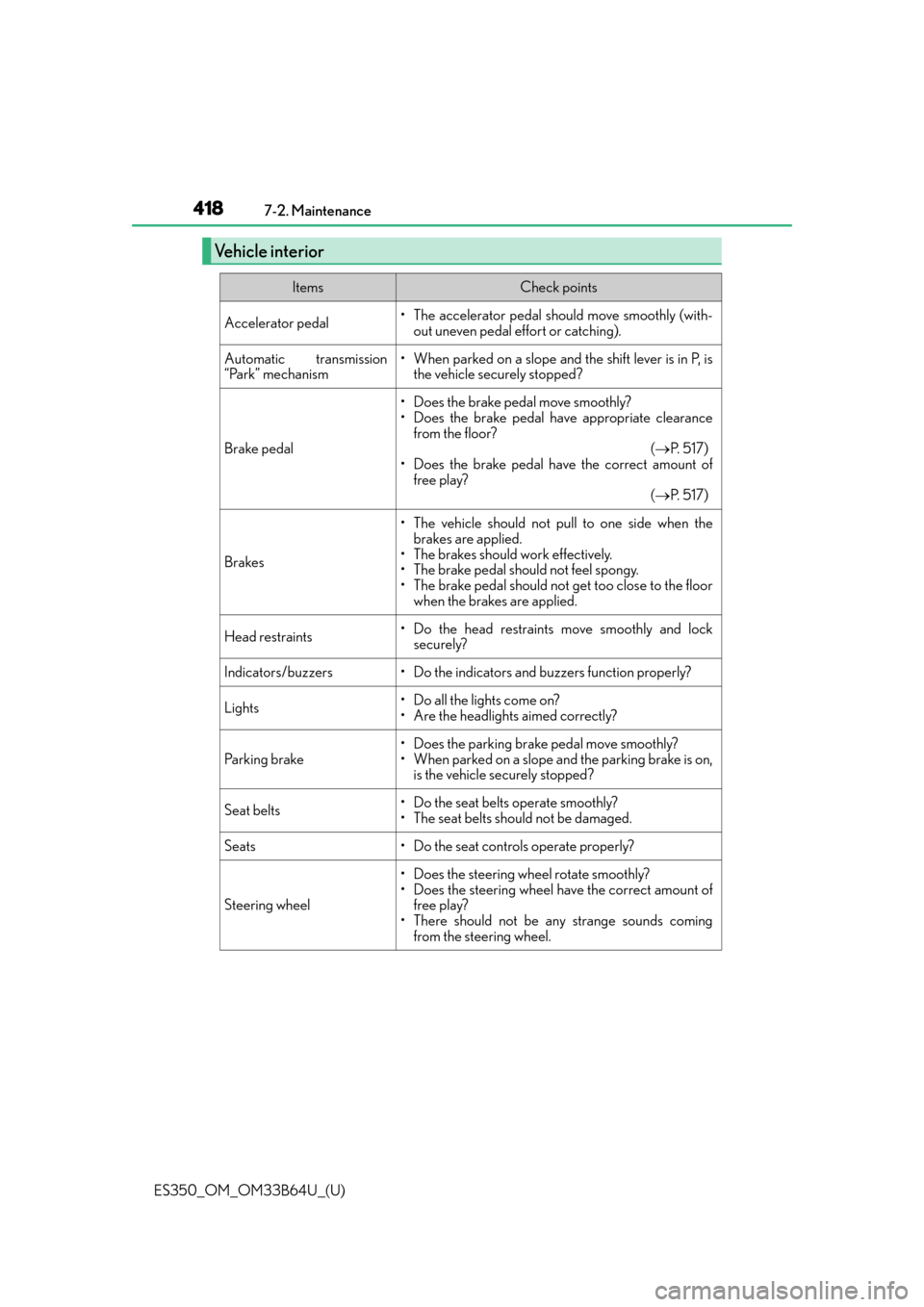
Vehicle interior
ItemsCheck points
Accelerator pedal• The accelerator pedal should move smoothly (with-
out uneven pedal effort or catching).
Automatic transmission
“Park” mechanism• When parked on a slope and the shift lever is in P, isthe vehicle securely stopped?
Brake pedal
• Does the brake pedal move smoothly?
• Does the brake pedal have appropriate clearance
from the floor? ( P. 5 1 7 )
• Does the brake pedal have the correct amount of free play? ( P. 5 1 7 )
Brakes
• The vehicle should not pull to one side when the
brakes are applied.
• The brakes should work effectively.
• The brake pedal should not feel spongy.
• The brake pedal should not get too close to the floor when the brakes are applied.
Head restraints• Do the head restraints move smoothly and locksecurely?
Indicators/buzzers• Do the indicators and buzzers function properly?
Lights• Do all the lights come on?
• Are the headlights aimed correctly?
Parking brake
• Does the parking brake pedal move smoothly?
• When parked on a slope and the parking brake is on,is the vehicle securely stopped?
Seat belts•Do the seat belt s operate smoothly?
• The seat belts should not be damaged.
Seats• Do the seat controls operate properly?
Steering wheel
• Does the steering wheel rotate smoothly?
• Does the steering wheel have the correct amount of free play?
• There should not be an y strange sounds coming
from the steering wheel.
Page 456 of 576
456
ES350_OM_OM33B64U_(U)7-3. Do-it-yourself maintenance
Light bulbs
Check the wattage of the light bulb to be replaced. (
P. 5 2 0 )
P. 4 2 6
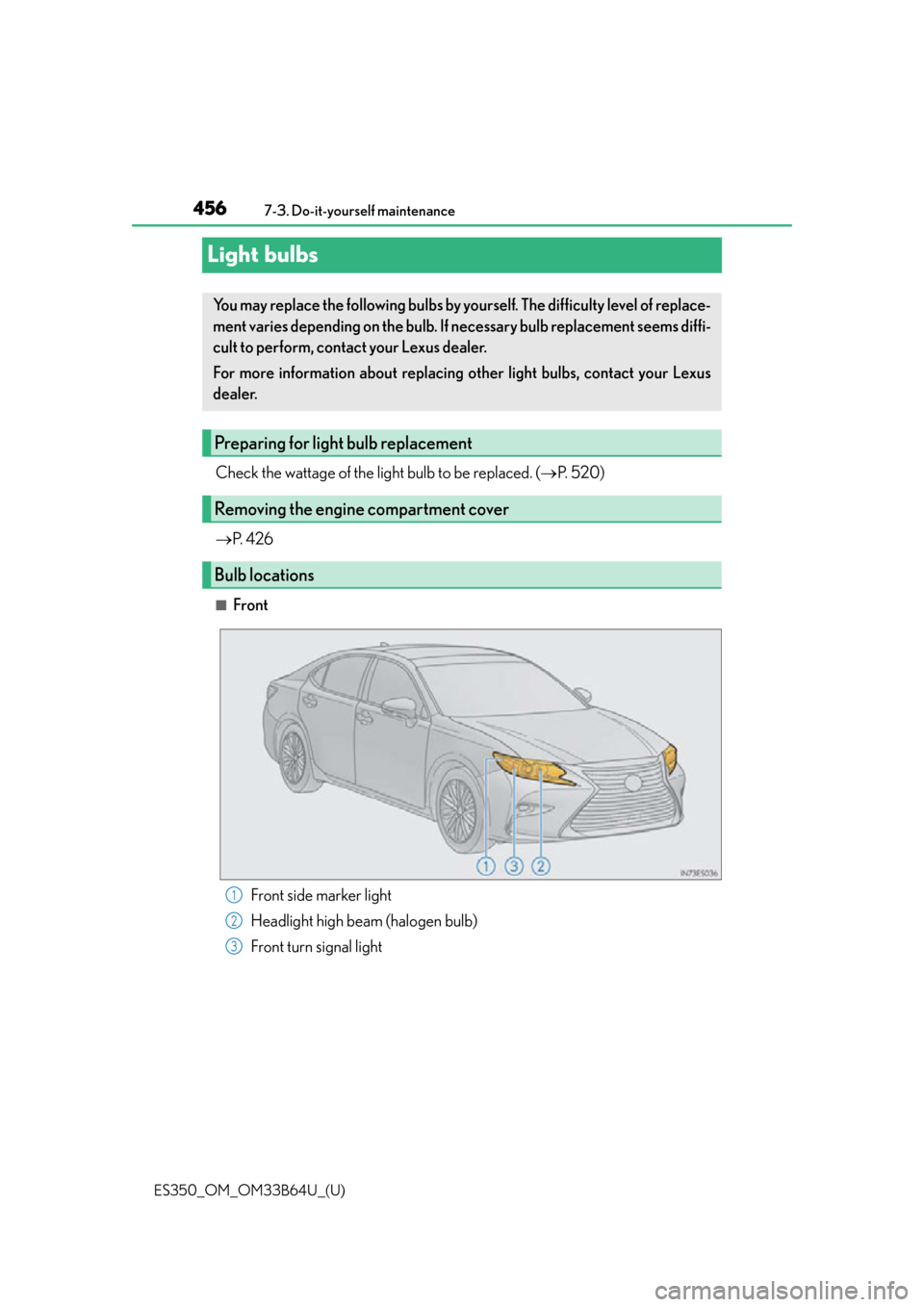
■Front
Front side marker light
Headlight high beam (halogen bulb)
Front turn signal light
You may replace the following bulbs by yourself. The difficulty level of replace-
ment varies depending on the bulb. If necessary bulb replacement seems diffi-
cult to perform, contact your Lexus dealer.
For more information about replacing other light bulbs, contact your Lexus
dealer.
Preparing for light bulb replacement
Removing the engine compartment cover
Bulb locations
1
2
3
Page 458 of 576
458
ES350_OM_OM33B64U_(U)7-3. Do-it-yourself maintenance
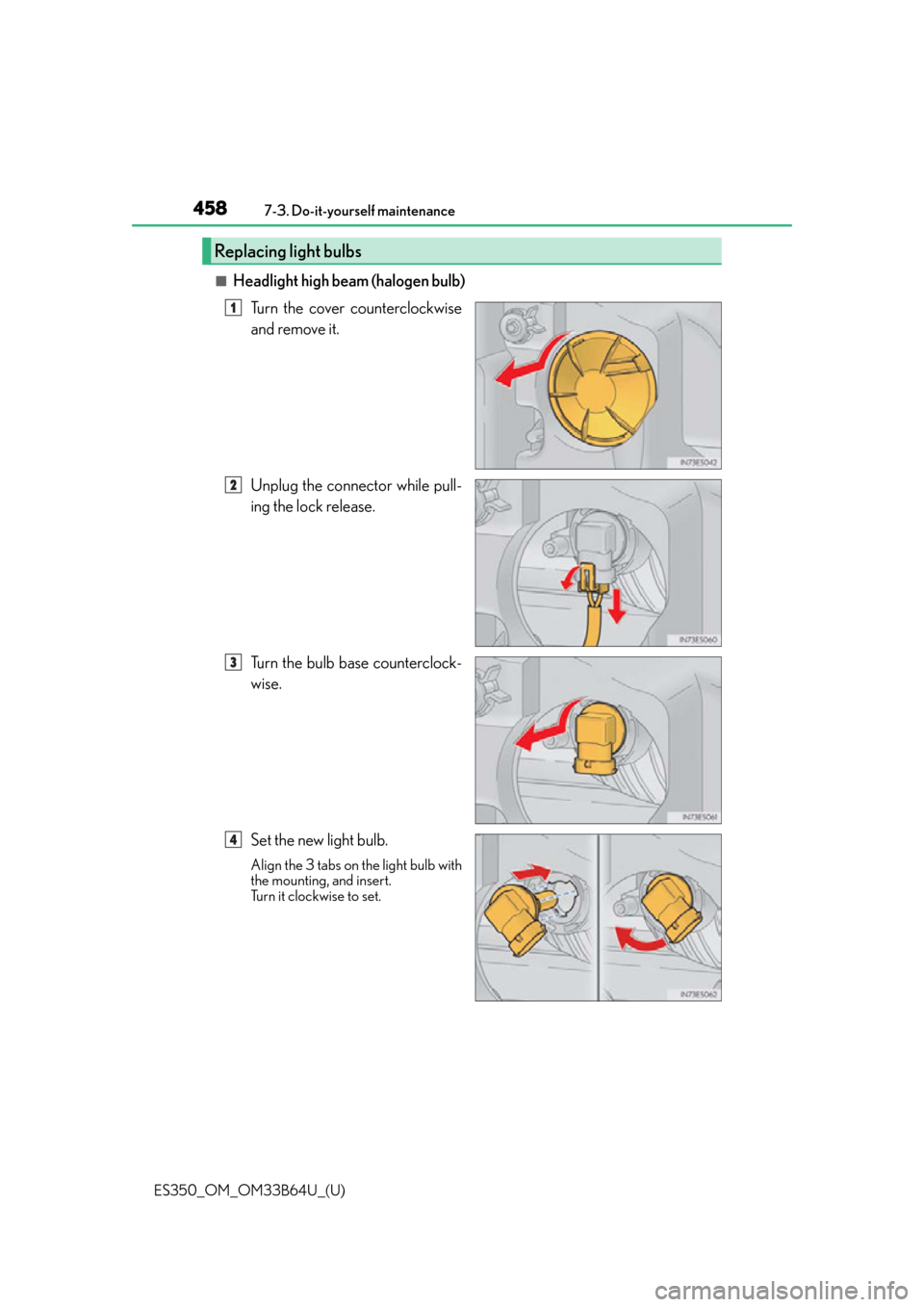
■Headlight high beam (halogen bulb)
Turn the cover counterclockwise
and remove it.
Unplug the connector while pull-
ing the lock release.
Turn the bulb base counterclock-
wise.
Set the new light bulb.
Align the 3 tabs on the light bulb with
the mounting, and insert.
Turn it clockwise to set.
Replacing light bulbs
1
2
3
4
Page 459 of 576
ES350_OM_OM33B64U_(U)
4597-3. Do-it-yourself maintenance
7
Maintenance and care
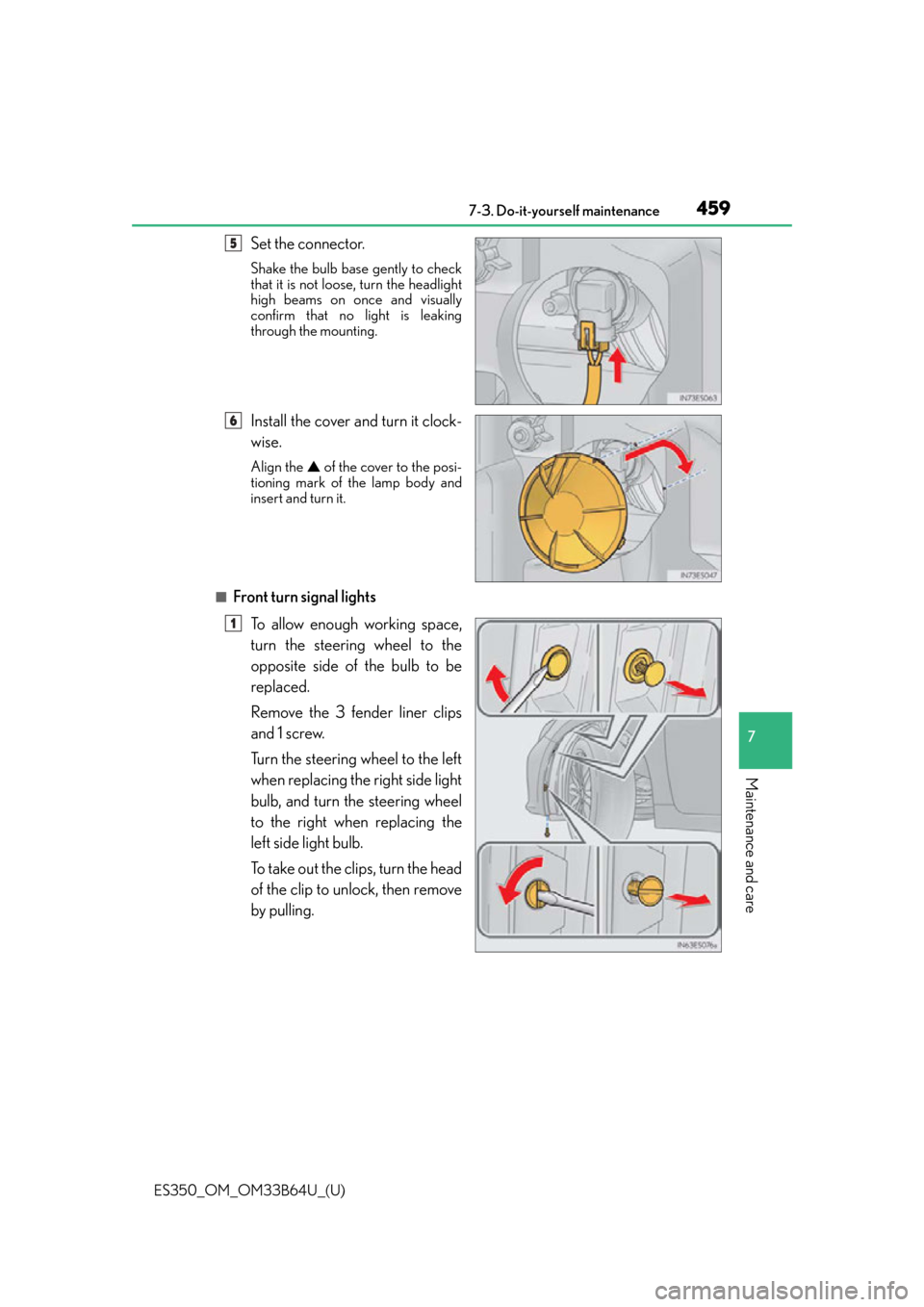
Set the connector.
Shake the bulb base gently to check
that it is not loose, turn the headlight
high beams on once and visually
confirm that no light is leaking
through the mounting.
Install the cover and turn it clock-
wise.
Align the ▲ of the cover to the posi-
tioning mark of the lamp body and
insert and turn it.
■Front turn signal lights
To allow enough working space,
turn the steering wheel to the
opposite side of the bulb to be
replaced.
Remove the 3 fender liner clips
and 1 screw.
Turn the steering wheel to the left
when replacing the right side light
bulb, and turn the steering wheel
to the right when replacing the
left side light bulb.
To take out the clips, turn the head
of the clip to unlock, then remove
by pulling.
5
6
1
Page 464 of 576
464
ES350_OM_OM33B64U_(U)7-3. Do-it-yourself maintenance
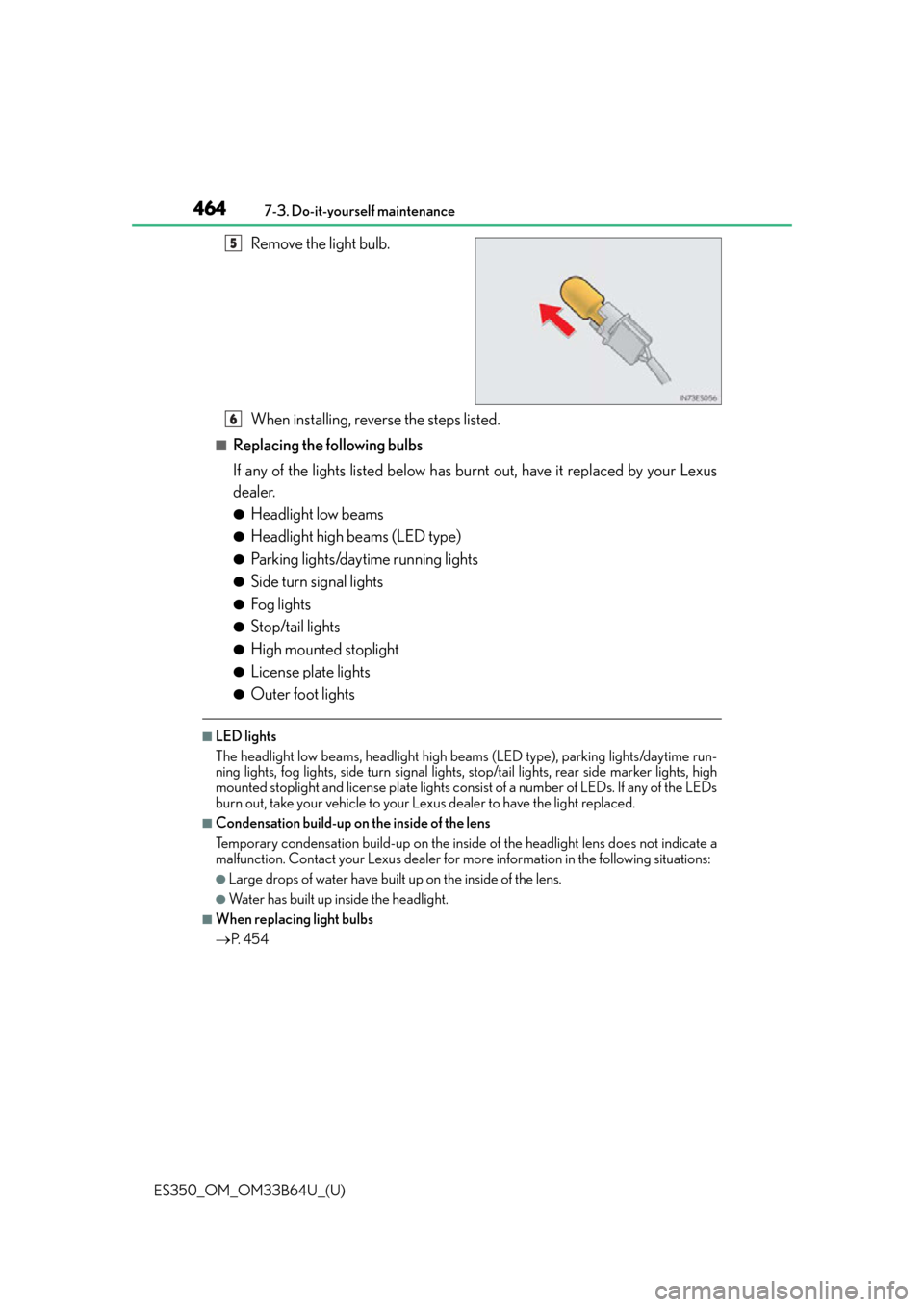
Remove the light bulb.
When installing, reverse the steps listed.
■Replacing the following bulbs
If any of the lights listed below has burnt out, have it replaced by your Lexus
dealer.
●Headlight low beams
●Headlight high beams (LED type)
●Parking lights/daytime running lights
●Side turn signal lights
●Fog lights
●Stop/tail lights
●High mounted stoplight
●License plate lights
●Outer foot lights
■LED lights
The headlight low beams, headlight high be
ams (LED type), parking lights/daytime run-
ning lights, fog lights, side turn signal lights, stop/tail lights, rear side marker lights, high
mounted stoplight and license plate lights cons ist of a number of LEDs. If any of the LEDs
burn out, take your vehicle to your Le xus dealer to have the light replaced.
■Condensation build-up on the inside of the lens
Temporary condensation build-up on the inside of the headlight lens does not indicate a
malfunction. Contact your Lexus dealer for mo re information in the following situations:
●Large drops of water have built up on the inside of the lens.
●Wa t e r h a s b u i l t u p i nside the headlight.
■When replacing light bulbs
P. 4 5 4
5
6
Page 465 of 576

ES350_OM_OM33B64U_(U)
4657-3. Do-it-yourself maintenance
7
Maintenance and care
WA R N I N G
■Replacing light bulbs
●Turn off the lights. Do not attempt to replace the bulb immediately after turning off the
lights.
The bulbs become very hot and may cause burns.
●Do not touch the glass portion of the light bulb with bare hands. When it is unavoid-
able to hold the glass portion, use and hold with a clean dry cloth to avoid getting
moisture and oils on the bulb.
Also, if the bulb is scratched or dropped, it may blow out or crack.
●Fully install light bulbs and any parts used to secure them. Failure to do so may result
in heat damage, fire, or water entering the headlight unit. This may damage the head-
lights or cause condensation to build up on the lens.
■To prevent damage or fire
●Make sure bulbs are fully seated and locked.
●Check the wattage of the bulb before installin g to prevent heat damage.
Page 496 of 576
496
ES350_OM_OM33B64U_(U)8-2. Steps to take in an emergency
If the engine will not start
One of the following may be the cause of the problem:
●There may not be sufficient fuel in the vehicle’s tank.
Refuel the vehicle.
●The engine may be flooded.
Try to restart the engine again following correct starting procedures.
(
P. 1 5 1 )
●There may be a malfunction in the engine immobilizer system. ( P. 6 5 )
One of the following may be the cause of the problem:
●The battery may be discharged. ( P. 5 0 1 )
●The battery terminal connections may be loose or corroded.
The engine starting system may be malfun ctioning due to an electrical problem
such as electronic key battery depletion or a blown fuse. However, an interim
measure is available to start the engine. ( P. 4 9 7 )
One of the following may be the cause of the problem:
●One or both of the battery terminals may be disconnected.
●The battery may be discharged. ( P. 5 0 1 )
●There may be a malfunction in the steering lock system.
Contact your Lexus dealer if the problem cannot be repaired, or if repair procedures
are unknown.
If the engine will not start even though correct starting procedures are being
followed ( P. 151), consider each of the following points:
The engine will not start even thoug h the starter motor operates nor-
mally.
The starter motor turns over slowly , the interior lights and headlights
are dim, or the horn does not sound or sounds at a low volume.
The starter motor does not turn over
The starter motor does not turn over, the interior lights and headlights
do not turn on, or the horn does not sound.
Page 503 of 576
5038-2. Steps to take in an emergency
ES350_OM_OM33B64U_(U)
8
When trouble arises
■Starting the engine when the battery is discharged
The engine cannot be started by push-starting.
■To prevent battery discharge
●Turn off the headlights and the audio system while the engine is stopped.
●Turn off any unnecessary electrical components when the vehicle is running at a low
speed for an extended period, such as in heavy traffic.
■Charging the battery
The electricity stored in the battery will discharge gradually even when the vehicle is not
in use, due to natural discharg e and the draining effects of certain electrical appliances. If
the vehicle is left for a long time, the battery may discharge, and the engine may be
unable to start. (The battery recharges automatically during driving.)
■When recharging or replacing the battery
●In some cases, it may not be possible to unlock the doors using the smart access system
with push-button start when the battery is discharged. Use the wireless remote control
or the mechanical key to lock or unlock the doors.
●The engine may not start on the first attempt after the battery has recharged but will
start normally after the second attempt. This is not a malfunction.
●The engine switch mode is memorized by the vehicle. When the battery is recon-
nected, the system will return to the mode it was in before the battery was discharged.
Before disconnecting the battery, turn the engine switch off.
If you are unsure what mode the engine switch was in before the battery discharged, be
especially careful when reconnecting the battery.
Page 520 of 576
520
ES350_OM_OM33B64U_(U)9-1. Specifications
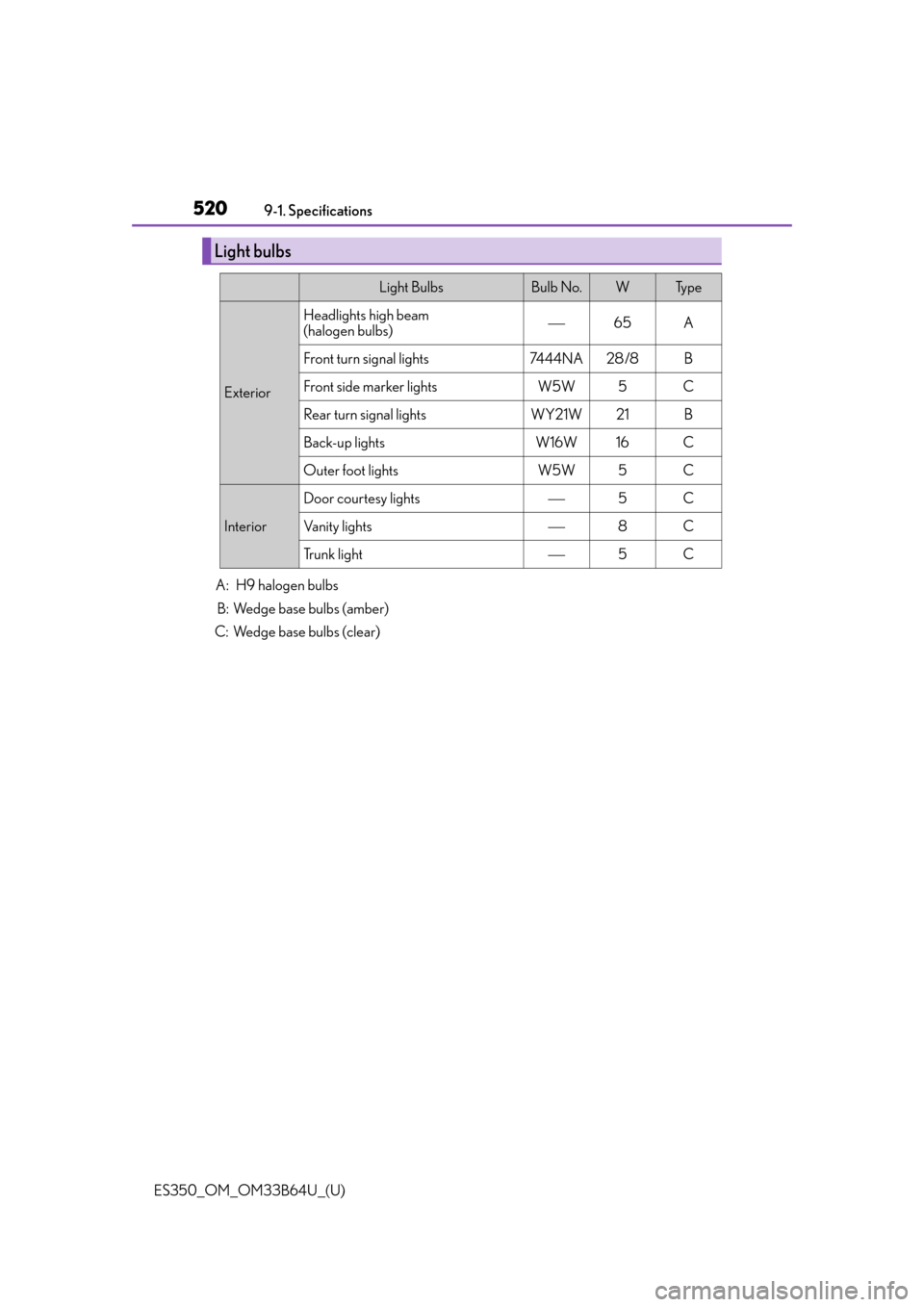
A: H9 halogen bulbs B: Wedge base bulbs (amber)
C: Wedge base bulbs (clear)
Light bulbs
Light BulbsBulb No.WTy p e
Exterior
Headlights high beam
(halogen bulbs)65A
Front turn signal lights7444NA28 /8B
Front side marker lightsW5W5C
Rear turn signal lightsWY21W21B
Back-up lightsW16W16C
Outer foot lightsW5W5C
Interior
Door courtesy lights5C
Vanity lights8C
Trunk light5C